

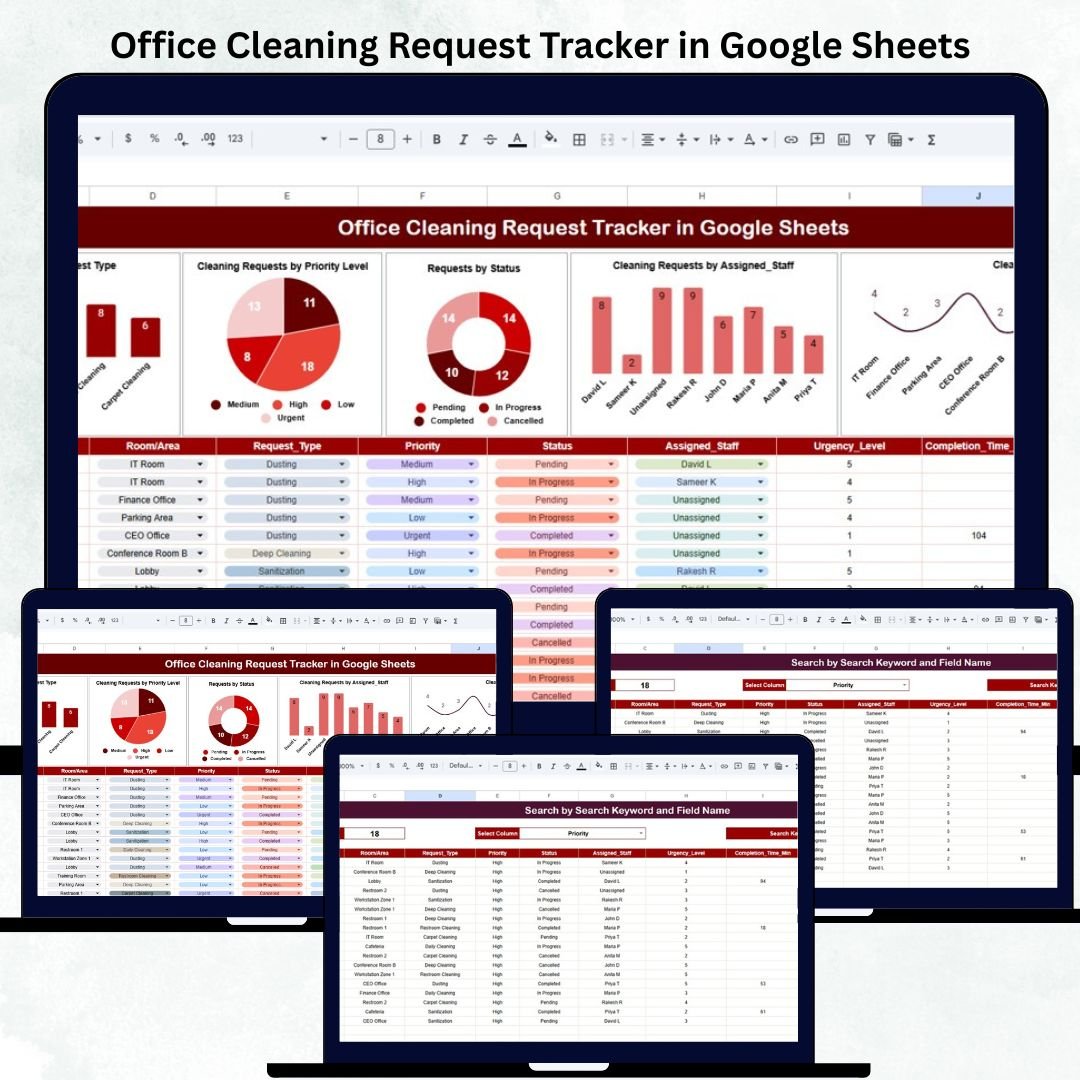
Every office needs a clean, healthy, and organized environment to function smoothly. But managing cleaning tasks manually becomes exhausting—especially when multiple rooms, requests, priority levels, and staff members are involved. That’s why the Office Cleaning Request Tracker in Google Sheets is the perfect tool to streamline your cleaning operations. This ready-to-use tracker helps you log cleaning requests, assign staff instantly, track progress, and analyze overall performance through automated charts and insights.Office Cleaning Request Tracker in Google Sheets
Whether you manage a corporate office, small business workspace, co-working building, or multi-floor facility, this tracker centralizes everything into one simple system. With an easy interface and structured data flow, you never miss a cleaning task again. The tracker updates automatically, allowing your team to stay organized, proactive, and fully aligned.
✨ Key Features of Office Cleaning Request Tracker in Google Sheets
This tracker includes powerful tools that make cleaning management fast and efficient.
🧼 Smart Tracker Sheet – Record cleaning requests with details like room, priority, assigned staff, and status.
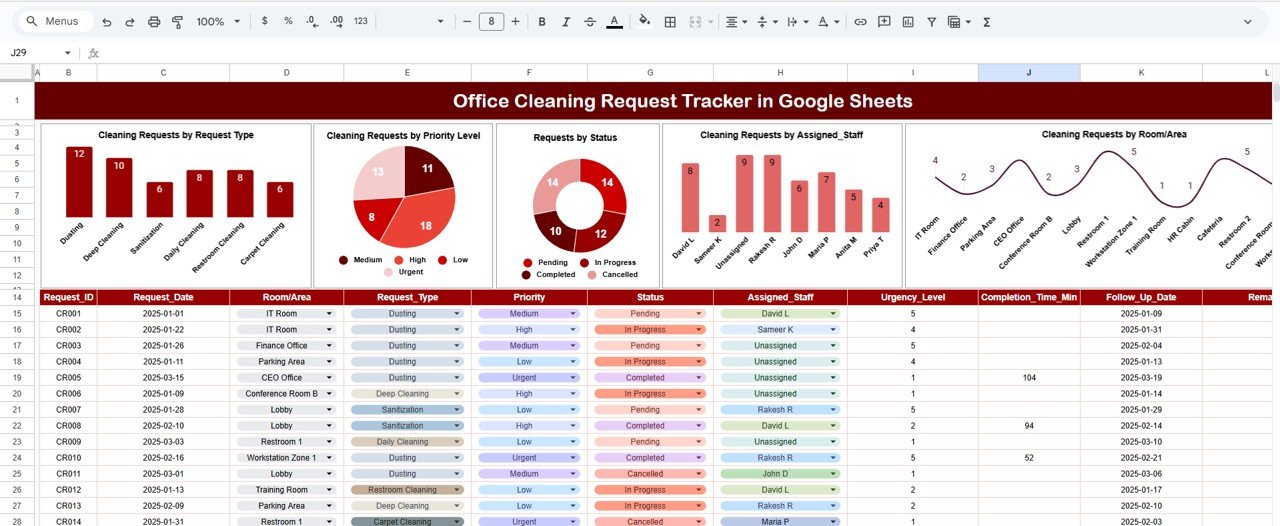
📊 Automated Charts – Visualize cleaning trends across staff members, rooms, priority levels, and request types.
📍 Room/Area Insights – Identify the most frequently cleaned areas for better planning.
⚡ Priority-Level Dashboard – Track urgent, high, medium, and low-priority requests.
👤 Staff Workload Analysis – See how many tasks each cleaning staff member handles.
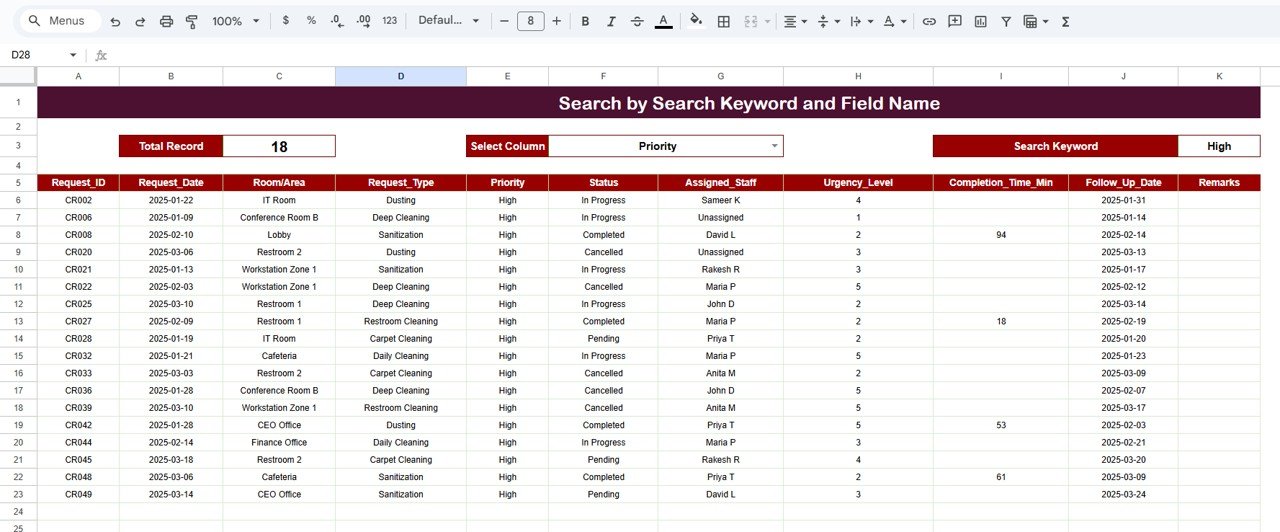
🔍 Search Function – Find any cleaning request instantly using keywords or filters.
💻 Accessible on Any Device – Works online via Google Sheets with real-time updates.
📥 Ready to Use – Just enter your data and the dashboard updates automatically.
This tracker replaces manual logs, improves task visibility, and ensures every cleaning activity is completed on time.
📦 What’s Inside the Office Cleaning Request Tracker in Google Sheets
When you download this template, you get a complete cleaning management system:Office Cleaning Request Tracker in Google Sheets
📄 Tracker Sheet (Main Database) –
The heart of the system where all cleaning requests are entered. Includes fields like:
-
Request ID
-
Request Type
-
Priority Level
-
Assigned Staff
-
Room/Area
-
Request Date
-
Status
-
Completion Date
-
Comments
📊 Data-Driven Charts –
-
Cleaning Requests by Request Type
-
Cleaning Requests by Priority
-
Requests by Status
-
Tasks by Assigned Staff
-
Cleaning Requests by Room/Area
🔎 Search Function Panel –
Search instantly by staff name, request type, room, priority, or status.
Everything is neatly organized and fully editable.
🛠️ How to Use the Office Cleaning Request Tracker in Google Sheets
Using this tracker is extremely simple—even for beginners.
1️⃣ Enter cleaning requests in the Tracker Sheet.
2️⃣ Update statuses as the cleaning team completes tasks.
3️⃣ Assign staff based on priority levels and workload.
4️⃣ Use the charts to review cleaning trends and performance.
5️⃣ Use filters to analyze specific rooms, staff members, or request types.
6️⃣ Search requests instantly when preparing reports or audits.
7️⃣ Review workload distribution to plan resources better.
No technical skills required—just basic data entry.
👥 Who Can Benefit from This Office Cleaning Request Tracker in Google Sheets
This tracker is useful for everyone involved in maintaining office cleanliness:
🏢 Office Administrators – Keep track of all requests in one system.
🧹 Cleaning Supervisors – Assign staff and review performance easily.
👥 Facility Management Teams – Analyze cleaning load across floors and rooms.
💼 HR & Operations – Monitor workplace hygiene standards.
🌐 Co-working Spaces – Track requests from multiple teams and offices.
🏬 Corporate Offices – Ensure quick response to urgent cleaning tasks.
📌 Small Offices & Startups – Improve cleanliness without extra tools or software.
If workplace cleanliness matters to your organization, this tracker is a must-have.
Click here to read the Detailed blog post
Visit our YouTube channel to learn step-by-step video tutorials
Watch the step-by-step video Demo:
Visit our YouTube channel to learn step-by-step video tutorials
Youtube.com/@NeotechNavigators















Reviews
There are no reviews yet.