


The metaverse is no longer a future concept—it is a real, fast-growing digital ecosystem where organizations build virtual worlds, immersive experiences, NFTs, digital twins, and decentralized platforms. Metaverse Development KPI Dashboard in Excel However, as metaverse projects grow in size and complexity, tracking development performance becomes extremely challenging.
Metaverse Development KPI Dashboard in Excel Teams must monitor productivity, delivery timelines, development costs, quality metrics, and innovation velocity—all at once. When this information stays scattered across spreadsheets and manual status reports, decision-making slows down and risks increase.
That is exactly why the Metaverse Development KPI Dashboard in Excel becomes a powerful performance management solution 🚀.
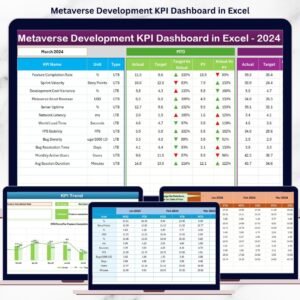
This ready-to-use Excel dashboard transforms raw development data into clear KPIs, visual indicators, trends, and comparisons. Instead of guessing project health, teams can instantly track actual vs target performance, MTD and YTD progress, and year-over-year improvements—all in one structured dashboard.
Whether you manage metaverse development teams, virtual product roadmaps, innovation labs, or Web3 initiatives, this dashboard gives you clarity, control, and confidence.
🔑 Key Features of Metaverse Development KPI Dashboard in Excel
📊 Centralized KPI Monitoring
Track all metaverse development KPIs in one Excel dashboard.
🎯 Target vs Actual Tracking
Instantly identify performance gaps and achievements.
📅 MTD & YTD Performance Analysis
Monitor short-term delivery and long-term progress.
📈 Trend-Based Insights
Analyze development performance over time.
🚦 Visual Performance Indicators
Green ▲ and Red ▼ arrows highlight status instantly.
🧠 KPI Definition & Formula Clarity
Understand each KPI without confusion.
⚙️ Excel-Based & Easy to Maintain
No advanced tools or coding required.
📦 What’s Inside the Metaverse Development KPI Dashboard in Excel
🏠 Home Sheet – Easy Navigation Hub

The Home Sheet acts as the index page of the dashboard.
🔹 Six navigation buttons
🔹 One-click access to all major sheets
🔹 Clean and user-friendly layout
As a result, users move across the dashboard effortlessly—without searching tabs.
📊 Dashboard Sheet – Complete KPI Overview
The Dashboard Sheet is the main performance monitoring page.
🎛 Month Selection
On cell D3, users select the reporting month from a drop-down. Once selected, the entire dashboard updates automatically.
📋 KPI Performance Table
The dashboard displays detailed MTD and YTD metrics for each KPI.
MTD Metrics
-
Actual MTD
-
Target MTD
-
Previous Year MTD
-
Target vs Actual (%)
-
Previous Year vs Actual (%)
-
▲ / ▼ performance indicator
YTD Metrics
-
Actual YTD
-
Target YTD
-
Previous Year YTD
-
Target vs Actual (%)
-
Previous Year vs Actual (%)
-
▲ / ▼ performance indicator
Because of visual indicators, teams instantly see which KPIs need attention.
📈 KPI Trend Sheet – Deep Performance Analysis
The KPI Trend Sheet supports KPI-level trend evaluation.
🎯 KPI Selection
On cell C3, users select a KPI name from a drop-down list.
📌 KPI Details Displayed
-
KPI Group
-
Unit of Measurement
-
KPI Type (UTB / LTB)
-
KPI Formula
-
KPI Definition
📊 Trend Charts
-
MTD Trend Chart – Actual vs Target vs PY
-
YTD Trend Chart – Actual vs Target vs PY
These charts help identify:
✔ Performance fluctuations
✔ Delivery consistency
✔ Long-term improvement patterns
🧾 Input Sheets – Simple & Structured
📥 Actual Numbers Input Sheet
Users enter:
-
KPI Name
-
MTD Actual Value
-
YTD Actual Value
Cell E1 controls the reporting year.
🎯 Target Sheet
Users define:
-
KPI-wise MTD targets
-
KPI-wise YTD targets
📆 Previous Year Number Sheet
Stores last year’s MTD and YTD values for YoY comparison.
📘 KPI Definition Sheet
Contains:
-
KPI Name
-
KPI Group
-
Unit
-
Formula
-
KPI Definition
This ensures standardization and governance.
👥 Who Can Benefit from This Dashboard
🧑💻 Metaverse developers
📦 Virtual product managers
🚀 Web3 & blockchain teams
🎮 XR / AR / VR development teams
📊 Innovation & R&D managers
💼 Startup founders & tech leaders
🔍 Click here to read the Detailed blog post
📺 Visit our YouTube channel to learn step-by-step video tutorials
👉 Youtube.com/@PKAnExcelExpert



























Reviews
There are no reviews yet.