

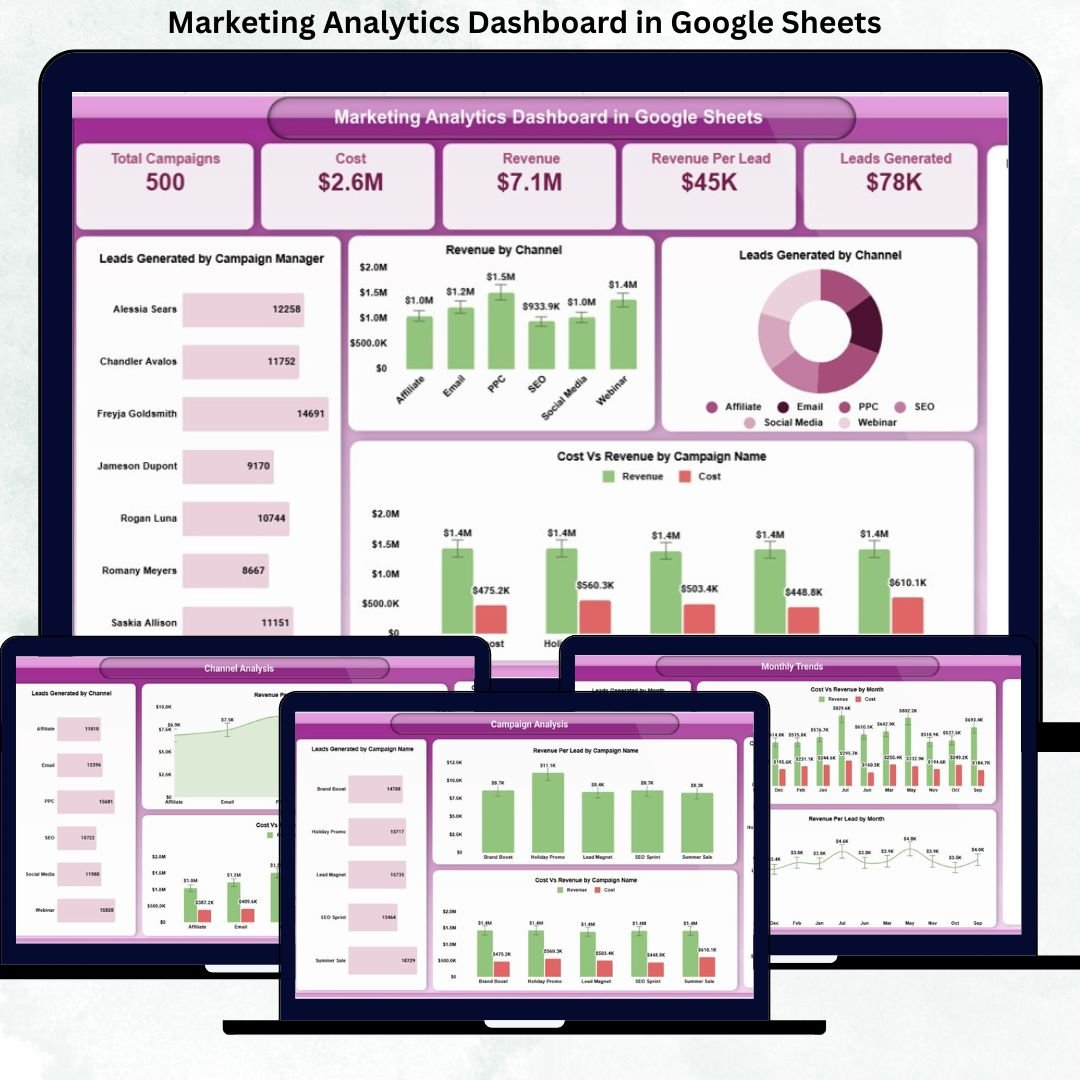



Modern marketing teams deal with constantly changing data. Campaign budgets, leads, channels, managers, and revenue figures evolve every day. However, when this information stays scattered across multiple tools, reports, and spreadsheets, teams lose clarity. As a result, marketers struggle to understand campaign ROI, channel effectiveness, and budget efficiency. That is exactly why the Marketing Analytics Dashboard in Google Sheets becomes an essential solution.
This ready-to-use dashboard transforms raw marketing data into clear KPIs, interactive charts, and actionable insights—all within a single Google Sheets file. Instead of switching between tools or building reports manually, marketing teams can monitor performance, optimize spending, and improve ROI using one centralized dashboard.
Because this dashboard is built entirely in Google Sheets, it remains cloud-based, collaborative, and cost-effective. There is no need for expensive BI software or complex integrations. You simply update your marketing data, and the dashboard automatically recalculates metrics and refreshes visuals in real time.

🚀 Key Features of the Marketing Analytics Dashboard
-
📊 All-in-One Marketing Performance View – Track campaigns, channels, leads, cost, and revenue in one place
-
💰 Cost vs Revenue Analysis – Measure ROI clearly at campaign, channel, and manager level
-
🎯 Lead Quality Metrics – Monitor Revenue per Lead and Cost per Lead
-
📈 Trend Analysis – Identify monthly performance patterns and seasonality
-
🧑💼 Campaign Manager Accountability – Compare performance across managers
-
🔍 Advanced Search Functionality – Find specific records instantly
-
☁️ 100% Google Sheets Based – No technical skills or BI tools required
These features help marketing teams move from guesswork to data-driven decision-making.
📦 What’s Inside the Marketing Analytics Dashboard
📌 Overview Sheet Tab
The Overview sheet acts as the executive summary of your entire marketing performance.
KPI Cards Display:
-
Total Campaigns – Number of active and completed campaigns
-
Cost – Total marketing spend
-
Revenue – Revenue generated from marketing efforts
-
Revenue per Lead – Lead quality indicator
-
Leads Generated – Total leads acquired
Charts Included:
-
Leads Generated by Campaign Manager
-
Revenue by Channel
-
Leads Generated by Channel
-
Cost vs Revenue by Campaign Name
-
Revenue by Campaign Manager
These visuals allow leadership to understand marketing efficiency in seconds.
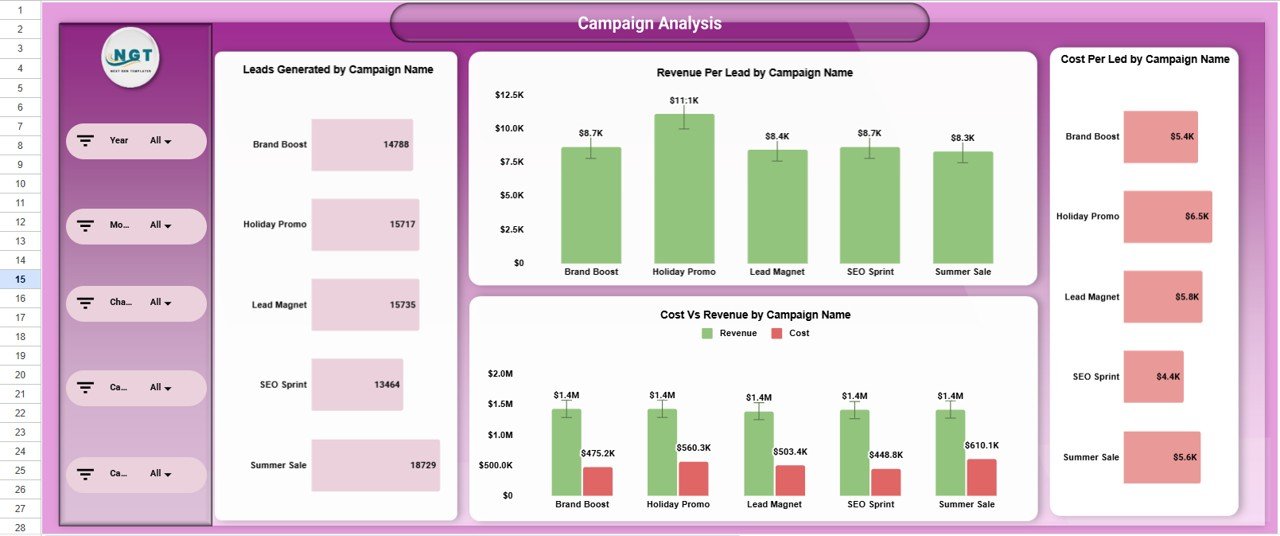
📊 Campaign Analysis Section
This section helps marketers evaluate individual campaign performance.
Charts include:
-
Leads Generated by Campaign Name
-
Revenue per Lead by Campaign Name
-
Cost per Lead by Campaign Name
-
Cost vs Revenue by Campaign Name
This analysis clearly shows which campaigns to scale, optimize, or stop.
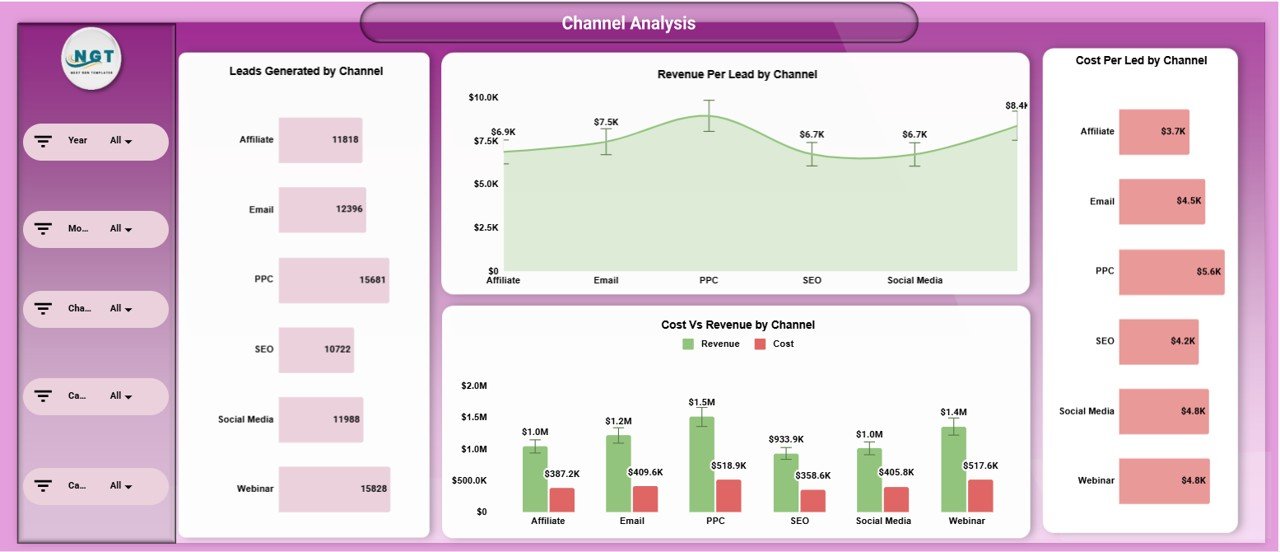
📡 Channel Analysis Section
Understand how each marketing channel performs.
Charts include:
-
Leads Generated by Channel
-
Revenue per Lead by Channel
-
Cost per Lead by Channel
-
Cost vs Revenue by Channel
With these insights, teams can shift budgets toward high-performing channels.
🧑💼 Campaign Manager Analysis
Track performance by campaign owner.
Charts include:
-
Leads Generated by Campaign Manager
-
Cost vs Revenue by Campaign Manager
-
Cost per Lead by Campaign Manager
-
Revenue per Lead by Campaign Manager
This improves accountability, performance reviews, and workload planning.
📅 Monthly Trends Analysis
Identify growth patterns and seasonality.
Charts include:
-
Leads Generated by Month
-
Cost vs Revenue by Month
-
Cost per Lead by Month
-
Revenue per Lead by Month
Trend analysis helps teams plan future campaigns more effectively.
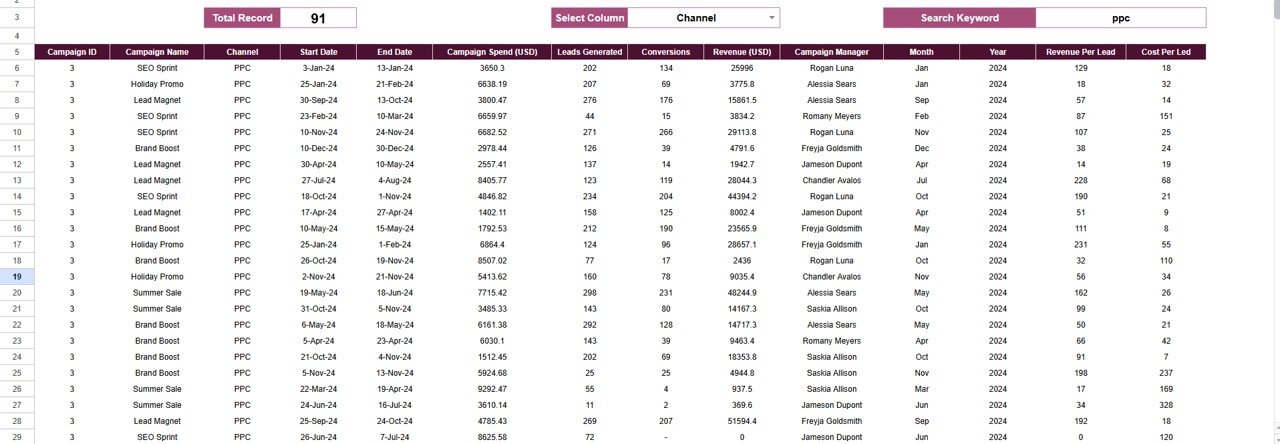
🔍 Search Functionality
The dashboard includes a smart search panel where you can:
-
Enter a Search Keyword (Campaign, Channel, Manager, Month, etc.)
-
Select a Field Name
Matching records appear instantly, saving hours of manual filtering during reviews, audits, or meetings.
🎯 Who Can Use This Dashboard
-
Marketing Managers
-
Digital Marketing Teams
-
Performance Marketers
-
Marketing Analysts
-
Business Owners & Founders
-
Marketing Agencies
### Click here to read the Detailed blog post
Watch the step-by-step video tutorial:





















Reviews
There are no reviews yet.