



In today’s fast-paced and highly regulated business environment, legal and compliance management is mission-critical. Organizations must adhere to regulatory requirements, manage risks, and ensure transparency to avoid costly penalties or reputational damage. However, tracking compliance metrics manually across multiple spreadsheets often leads to confusion, missed deadlines, and lack of accountability.
The Legal and Compliance KPI Dashboard in Excel provides the perfect solution. This ready-to-use template consolidates all compliance-related KPIs into one structured, visual, and interactive dashboard. With automated variance tracking, trend analysis, and centralized data management, compliance officers, auditors, and managers can make better decisions, reduce risks, and strengthen accountability.
✨ Key Features of Legal and Compliance KPI Dashboard
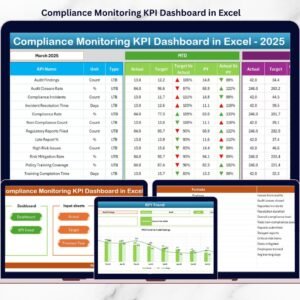
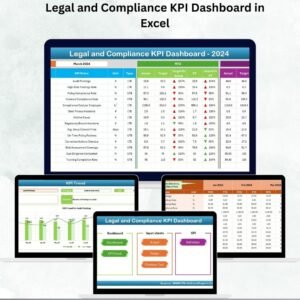
✅ 7 Pre-Built Worksheets – Home, Dashboard, KPI Trend, Actual Numbers Input, Target, Previous Year Numbers, and KPI Definition.
✅ Dynamic Dashboard Sheet – MTD (Month-to-Date) and YTD (Year-to-Date) values with variance arrows for performance insights.
✅ Trend Analysis – Choose a KPI and track its progress across time with charts and benchmarks.
✅ Target Tracking – Compare actual values against monthly and yearly compliance goals.
✅ Previous Year Data – Store historical numbers for benchmarking and year-over-year improvement.
✅ KPI Definition Sheet – Provides name, group, formula, unit, and definition of each KPI for transparency.
✅ Centralized Data Entry – Update Actuals and Targets easily in structured sheets.
✅ User-Friendly Navigation – Buttons on the Home sheet simplify moving across pages.
✅ Customizable – Add or edit KPIs, targets, and visuals to align with organizational policies.
📦 What’s Inside the Legal and Compliance KPI Dashboard
When you download this Excel template, you get:
Home Sheet: Simple index page with navigation buttons.

Dashboard Sheet: Central hub for compliance KPIs with automatic updates when you select a month.
KPI Trend Sheet: Analyze selected KPIs over time with definitions, formulas, and performance charts.
Actual Numbers Input Sheet: Enter monthly data for MTD/YTD tracking.
Target Sheet: Define compliance and legal performance goals.
Previous Year Numbers Sheet: Historical reference for accurate benchmarking.
KPI Definition Sheet: A complete library of compliance KPIs with definitions and formulas.
This structure ensures real-time monitoring, transparency, and accountability in compliance management.
🛠️ How to Use the Dashboard
Enter Data – Add monthly compliance metrics in the Actual Numbers Input Sheet.
Set Targets – Define MTD and YTD goals in the Target Sheet.
Review Dashboard – View KPIs with conditional formatting and variance indicators.
Analyze Trends – Use the KPI Trend Sheet to study performance over time.
Benchmark Performance – Compare results against previous year’s numbers.
Customize KPIs – Edit or add new KPIs in the KPI Definition Sheet.
No advanced Excel knowledge is required—the template is designed for plug-and-play usability.
👩💼 Who Can Benefit from This Dashboard?
Compliance Officers – Monitor KPIs, risks, and regulatory deadlines.
HR Managers – Track policy adherence and compliance training effectiveness.
Auditors – Ensure audit readiness with structured compliance performance data.
Executives & Boards – Get transparency on compliance health and risk areas.
Financial Services, Healthcare, Manufacturing, and Education Institutions – Tailor KPIs for industry-specific compliance requirements.
With this tool, organizations create a culture of compliance while avoiding penalties and fostering accountability.
👉 Click here to read the Detailed blog post
Visit our YouTube channel to learn step-by-step video tutorials
Watch the step-by-step video tutorial:
Compatibility and Requirements
- Works in Microsoft Excel desktop (Excel 2016 or later, or Microsoft 365).
- The Dashboard sheet updates when you select a month. New to Excel? Microsoft has a full set of lessons in Excel for Windows training.
Frequently Asked Questions
Which sheets are included?
Seven sheets: Home, Dashboard, KPI Trend, Actual Numbers Input, Target, Previous Year Numbers and KPI Definition.
How do I update the dashboard?
Enter your monthly figures in the Actual Numbers Input sheet and your goals in the Target sheet. Then select a month on the Dashboard sheet and the MTD and YTD values update.
Can I compare results with last year?
Yes. Store last year’s figures in the Previous Year Numbers sheet to benchmark your current results against them.
How do I follow one KPI over time?
Choose the KPI on the KPI Trend sheet. It shows the KPI’s definition and formula next to a performance chart.
Can I add my own KPIs?
Yes. You can edit or add KPIs, targets and visuals. The KPI Definition sheet lists the name, group, formula, unit and definition of each KPI.
Is there a Google Sheets or Power BI version?
There is a Legal Compliance KPI Dashboard in Google Sheets and a Legal Compliance KPI Dashboard in Power BI.
Related Legal and Compliance Templates
- Legal Compliance KPI Dashboard in Excel: a similar compliance KPI dashboard in Excel
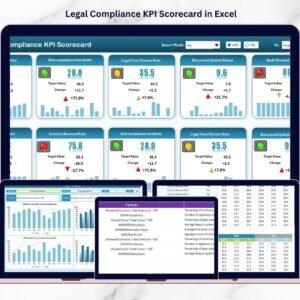
- Legal Compliance KPI Scorecard in Excel: a scorecard view of compliance metrics
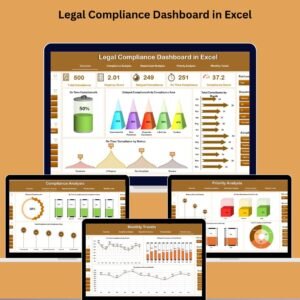
- Legal Compliance Dashboard in Excel: a broader compliance dashboard
- Legal and Compliance Training and Development KPI Dashboard in Excel: KPIs for compliance training
- Compliance Audit Tracker in Excel: a tracker for audit items
Browse all Excel KPI dashboards.



Reviews
There are no reviews yet.