



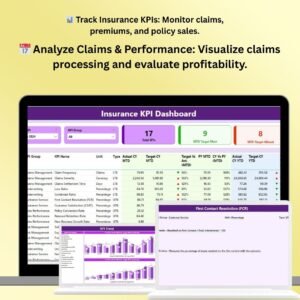
The Insurance KPI Dashboard in Power BI is a powerful tool designed to help insurance companies, brokers, and financial managers track and analyze key performance indicators (KPIs) related to their business operations. This intuitive Power BI dashboard allows you to monitor crucial metrics such as policy sales, claims performance, customer retention, and profitability, all in one place.
With real-time data integration, this dashboard provides comprehensive insights into the health of your insurance business. Visualize trends, compare performance across various segments, and make data-driven decisions to optimize your operations and enhance customer satisfaction. Whether you’re managing life insurance, health insurance, or property insurance, this dashboard is customizable to meet the unique needs of your business.
Key Features of the Insurance KPI Dashboard in Power BI
📊 Track Key Insurance Metrics
Monitor essential KPIs such as policy sales, premium income, claims ratio, customer retention, and profitability. Track your business performance and gain insights into each critical area of your operations.
📅 Real-Time Data Tracking
Get up-to-date data on your KPIs with real-time updates. Track claims, policy renewals, and premium collections instantly, allowing you to respond quickly to any challenges.
📈 Claims & Policy Analysis
Visualize claims performance and analyze the ratio of claims to premiums, helping you identify trends and areas for improvement in underwriting or claims processing.
🔄 Segmented Reporting
Break down your performance by different segments, such as product lines, geographic locations, customer demographics, and more. Track how each segment is contributing to overall performance.
📉 Profitability & Loss Tracking
Evaluate the profitability of your insurance products by tracking income, expenses, and loss ratios. This helps you make informed decisions about pricing, underwriting, and business expansion.
💡 Customizable & Scalable
Tailor the dashboard to your specific business needs. Modify KPIs, data fields, and reports to match your business model, whether you’re a small insurance agency or a large global insurer.
Why You’ll Love the Insurance KPI Dashboard in Power BI

✅ Make Data-Driven Decisions
With detailed performance insights and easy-to-read visualizations, you can make informed decisions to improve your operations, optimize profitability, and enhance customer satisfaction.
✅ Monitor Claims Performance
Track claims processing and claims ratios in real-time. Identify bottlenecks or inefficiencies in your claims department and take corrective action to improve turnaround times.
✅ Evaluate Profitability & Risk
Monitor the profitability of each insurance product and identify potential risk areas. Make data-driven adjustments to your pricing or underwriting strategies based on these insights.
✅ Enhance Customer Retention
By tracking customer satisfaction, renewal rates, and churn, you can identify ways to improve customer retention, offering better service and maintaining a loyal customer base.
✅ Customizable to Your Business
Easily customize the dashboard to meet the specific needs of your insurance business. Adapt KPIs, data fields, and reports to align with your operations and goals.
What’s Inside the Insurance KPI Dashboard in Power BI?
- Claims Performance Tracker: Visualize claims processing, claims ratio, and the impact on your business profitability.
- Policy Sales & Premium Tracker: Monitor policy sales, premiums collected, and revenue trends across different products and segments.
- Customer Retention Metrics: Track customer renewal rates, churn, and satisfaction scores to improve retention strategies.
- Profitability & Risk Analysis: Evaluate your loss ratio, underwriting performance, and profitability metrics.
- Customizable Reports & Visualizations: Tailor your KPIs and reporting structure to suit your business needs.
- Real-Time Data: Get real-time data updates on policy sales, claims, and other key metrics for immediate decision-making.
How to Use the Insurance KPI Dashboard in Power BI
1️⃣ Download & Setup: Easily download and set up the Insurance KPI Dashboard in Power BI.
2️⃣ Integrate Your Data: Connect your insurance data sources, including policy sales, claims records, and customer data, to the dashboard.
3️⃣ Track KPIs & Metrics: Use the dashboard to monitor key insurance KPIs such as claims, premiums, and customer retention.
4️⃣ Analyze Performance: Dive deep into the data and use visualizations to analyze performance trends, identify areas for improvement, and make informed decisions.
5️⃣ Generate Reports & Insights: Share data insights with stakeholders and leadership teams through customizable reports and dashboards.
Who Can Benefit from the Insurance KPI Dashboard in Power BI?
🔹 Insurance Companies & Brokers
🔹 Claims Managers & Underwriters
🔹 Financial Managers & Analysts
🔹 Customer Retention Teams
🔹 Business Owners & Executives
🔹 Risk Management & Compliance Teams
Optimize your insurance operations and make data-driven decisions with the Insurance KPI Dashboard in Power BI. Track key metrics, analyze performance, and improve profitability while enhancing customer satisfaction.
Click here to read the Detailed blog post
Visit our YouTube channel to learn step-by-step video tutorials
Youtube.com/@PKAnExcelExpert
Compatibility and Requirements
- Opens in Power BI Desktop, which is free from Microsoft. See Get Power BI Desktop.
- Connect your own policy sales, claims and customer data in Power BI Desktop and refresh the report.
Frequently Asked Questions
Which insurance KPIs does the dashboard track?
It covers policy sales, premium income, claims ratio, customer retention, loss ratio and profitability.
Can I break results down by segment?
Yes. You can view performance by product line, geographic location and customer demographics.
Does it work for life, health and property insurance?
Yes. The KPIs, data fields and reports can be adjusted for life, health or property insurance.
Do I need a paid Power BI license?
No. The file opens in Power BI Desktop, which is free. Sharing reports online through the Power BI service needs a Microsoft license.
Related Insurance Templates
- Insurance Dashboard in Power BI: a full insurance dashboard on the same platform
- Insurance Claim Dashboard in Power BI: goes deeper into claims
- Healthcare Insurance KPI Dashboard in Power BI: KPIs for health insurers
- Insurance KPI Dashboard in Excel: the same topic in Excel
- Power BI Dashboard Mega Collection: 15 Power BI templates in one bundle
Browse all Power BI KPI dashboards or the Power BI templates.












Reviews
There are no reviews yet.