

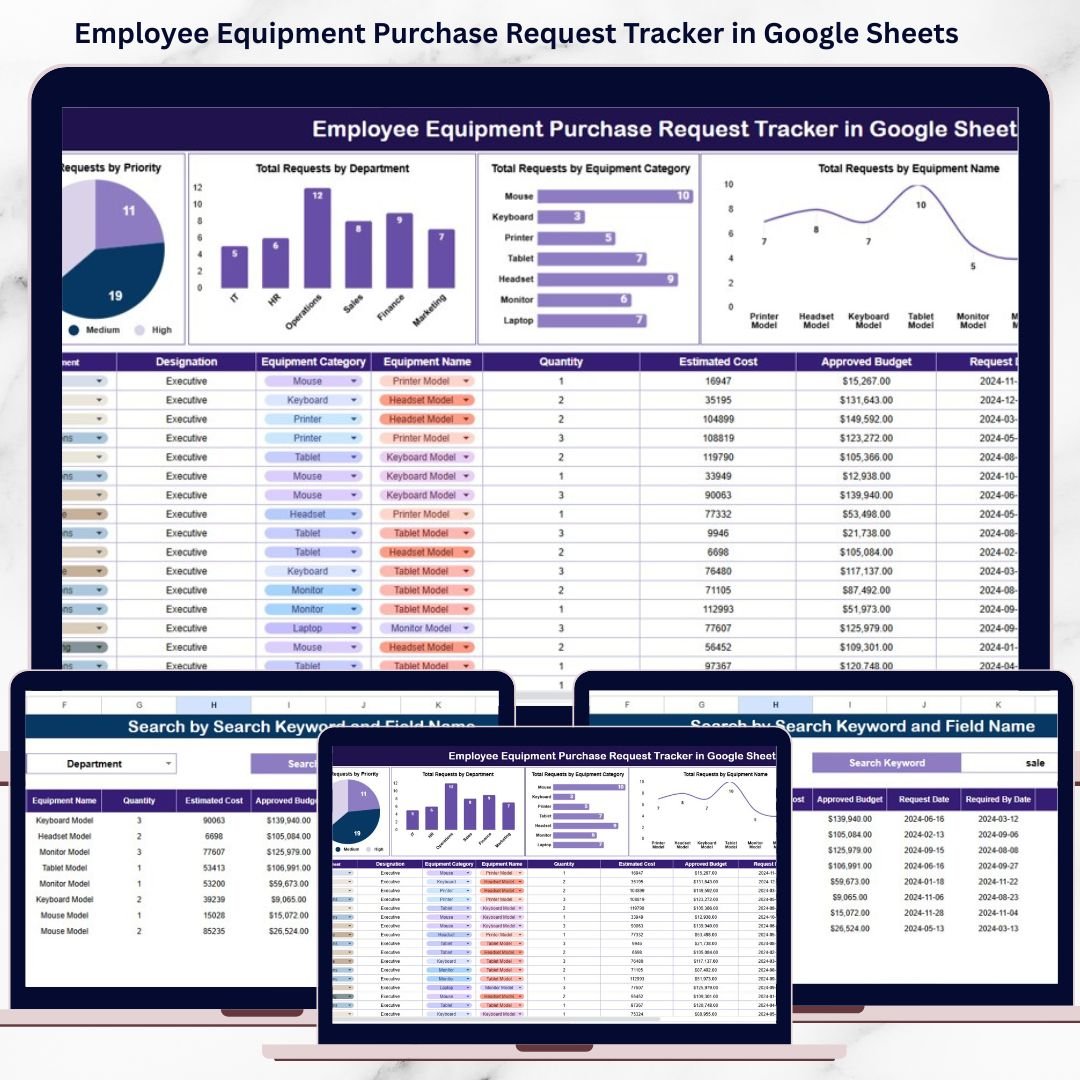
Managing employee equipment purchase requests can quickly become complex. Employees request laptops, monitors, accessories, software tools, office equipment, and specialized devices. However, when these requests arrive through emails, chats, or unstructured spreadsheets, procurement and HR teams struggle to track approvals, budgets, vendors, and priorities. As a result, delays increase, visibility drops, and costs become harder to control.
That is exactly why an Employee Equipment Purchase Request Tracker in Google Sheets becomes an essential operational and procurement management tool.
This ready-to-use tracker provides a structured and centralized system to manage all employee equipment purchase requests in one place. It records request details, tracks approval status, analyzes department-wise demand, monitors vendors, and delivers instant insights through visual charts and a powerful search feature.
Because the tracker is built in Google Sheets, it stays easy to use, collaborative, and accessible from anywhere—without the need for expensive procurement software.
🚀 Key Features of the Employee Equipment Purchase Request Tracker
📌 Centralized Request Management
Track all employee equipment requests in a single, well-structured tracker.
⏱️ Faster Approval Visibility
Monitor pending, approved, and rejected requests without manual follow-ups.
🎯 Priority-Based Tracking
Focus on urgent and high-priority equipment requests first.
🏢 Department-Wise Analysis
Understand which departments generate the most equipment demand.
📊 Visual Insights with Charts
Identify trends, bottlenecks, and spending patterns instantly.
🔍 Smart Search Function
Find any request in seconds using keyword-based filtering.
📦 What’s Inside the Employee Equipment Purchase Request Tracker
🗂️ Tracker Sheet Tab – Central Request Register
The Tracker Sheet Tab is the core of the system. All equipment purchase requests are logged and maintained here in a clean, structured format.
Typical fields include:
-
Request ID
-
Request Date
-
Employee Name
-
Department
-
Equipment Category
-
Equipment Name
-
Vendor Name
-
Quantity
-
Priority (Low, Medium, High)
-
Approval Status (Pending, Approved, Rejected)
-
Estimated Cost
-
Remarks / Notes
Whenever data is added or updated, all charts refresh automatically. This ensures real-time visibility and accurate reporting.
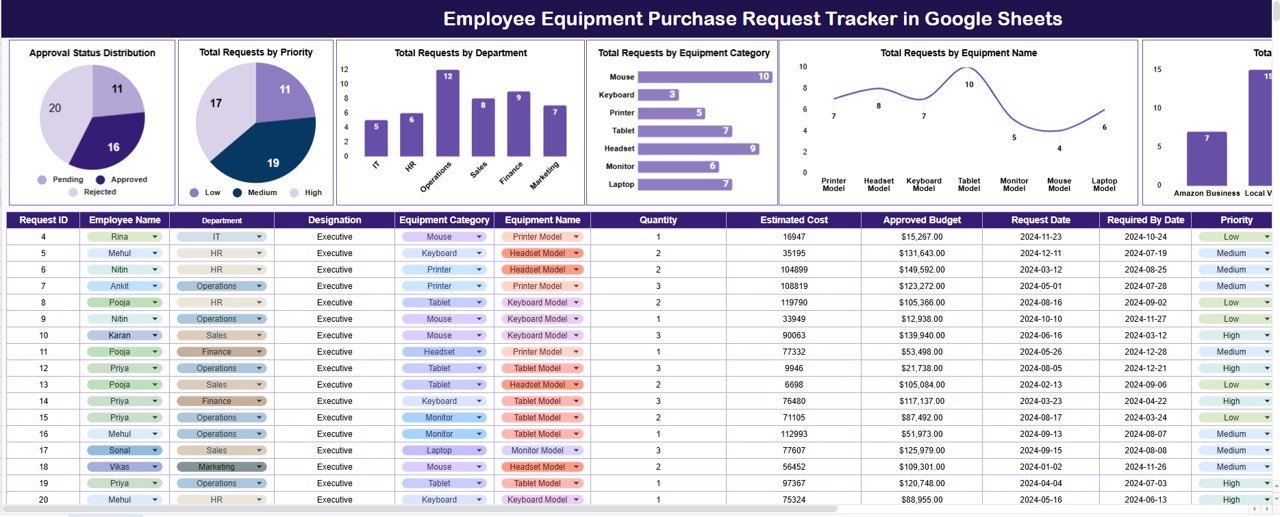
📊 Dashboard Charts – Instant Equipment Request Insights
✔️ Approval Status Distribution
This chart shows how requests are distributed across:
-
Pending
-
Approved
-
Rejected
It helps managers identify approval backlogs and speed up decision-making.
🚦 Total Requests by Priority
This chart categorizes requests by priority level:
-
High
-
Medium
-
Low
As a result, procurement teams can address critical requests first and avoid operational delays.
🏢 Total Requests by Department
This view highlights which departments raise the most equipment requests.
It supports:
-
Budget planning
-
Resource allocation
-
Demand forecasting
🧰 Total Requests by Equipment Category
This chart groups requests by category such as:
-
Laptops
-
Monitors
-
Accessories
-
Office Equipment
-
Specialized Devices
It helps organizations understand purchasing patterns and standardize equipment.
💻 Total Requests by Equipment Name
This chart shows demand for specific equipment items.
It helps:
-
Identify frequently requested devices
-
Optimize bulk purchasing decisions
-
Reduce procurement costs
🏪 Total Requests by Vendor Name
This chart analyzes requests by vendor.
It supports:
-
Vendor performance evaluation
-
Negotiation and contract planning
-
Supplier consolidation
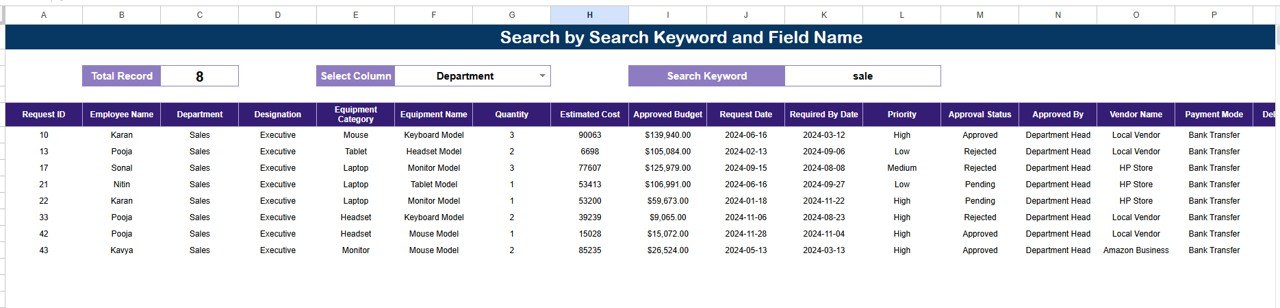
🔍 Search Functionality – Find Requests Instantly
The tracker includes a powerful Search section that allows filtering by:
-
Search Keyword
-
Field Name (Department, Equipment Name, Vendor, Status, Priority, etc.)
This feature helps teams:
-
Find specific requests in seconds
-
Respond faster to employee queries
-
Prepare audit or management reports
-
Track historical purchase activity easily
🎯 Who Can Benefit from This Equipment Purchase Request Tracker
-
🧑💼 HR Teams
-
🛒 Procurement & Purchase Teams
-
🏢 IT & Operations Departments
-
📋 Finance & Budget Controllers
-
🚀 Growing Organizations & Startups
🛠️ How to Use the Employee Equipment Purchase Request Tracker
-
Log all equipment requests in the Tracker Sheet
-
Assign priority and approval status
-
Review charts weekly for trends
-
Use search for quick follow-ups
-
Analyze department and vendor demand
Consistent use ensures better cost control, faster approvals, and improved transparency.
🔗 ### Click here to read the Detailed blog post
Watch the step-by-step video tutorial:
▶️ Visit our YouTube channel to learn step-by-step video tutorials
👉 Youtube.com/@NeotechNavigators
































Reviews
There are no reviews yet.