Managing employee performance effectively is essential for every organization. Companies continuously evaluate employee productivity, communication skills, teamwork, problem-solving abilities, and technical expertise to ensure that teams perform efficiently. However, many HR departments still rely on scattered spreadsheets or manual reports to track employee appraisal data.
As a result, HR managers often struggle to identify high-performing employees, evaluate departmental productivity, and track performance trends over time.Employee Appraisal & Performance Dashboard in Google Sheets
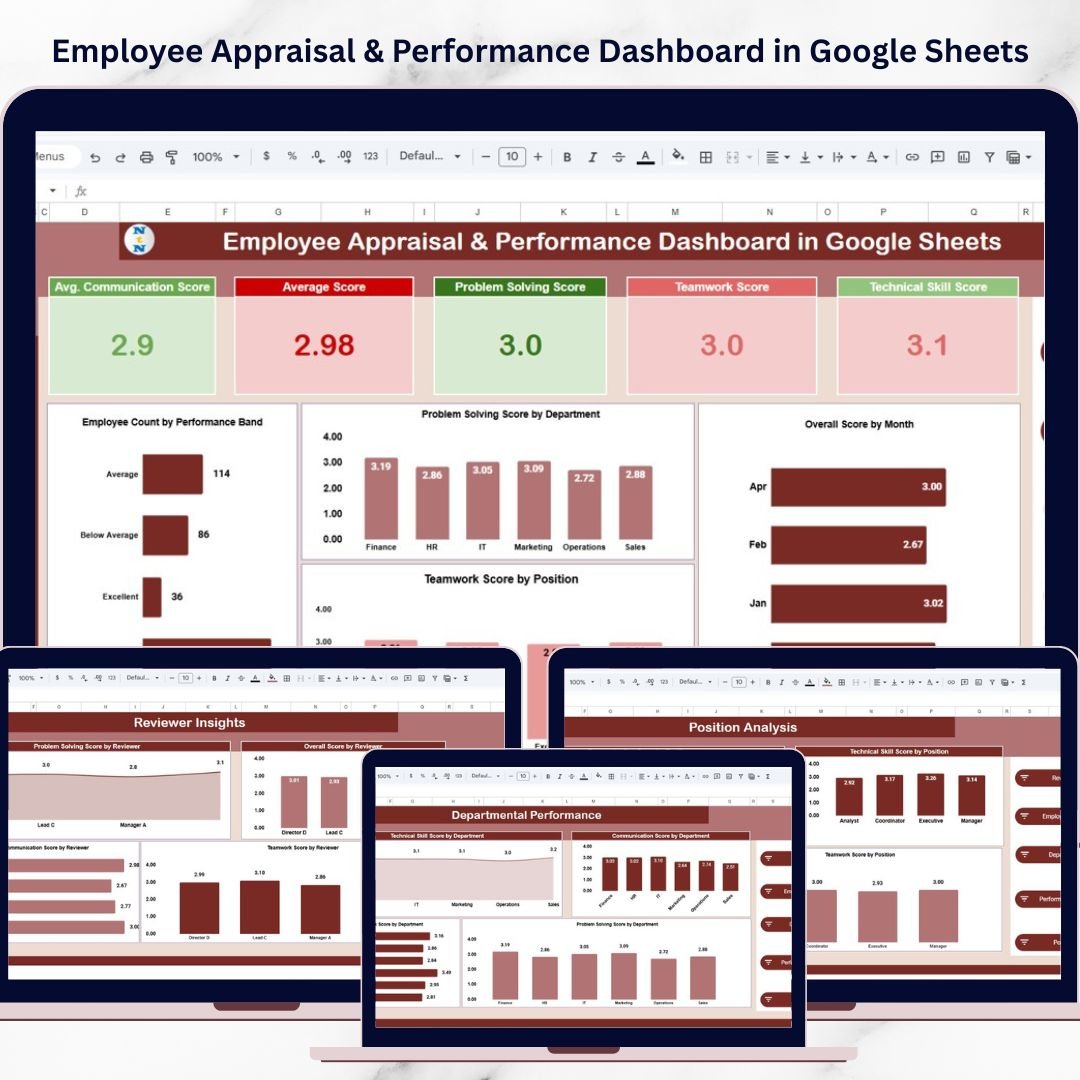
To solve this challenge, we created the Employee Appraisal & Performance Dashboard in Google Sheets — a powerful and ready-to-use analytics solution designed to help organizations monitor employee performance using interactive charts, KPI indicators, and dynamic filters.
This dashboard transforms raw employee evaluation data into clear visual insights that HR managers can analyze instantly. With Google Sheets’ collaborative capabilities, teams can easily update performance data, share insights with managers, and track performance trends in real time.
Instead of reviewing lengthy performance reports, organizations can quickly monitor employee appraisal metrics, departmental performance, reviewer assessments, and monthly performance changes using a centralized and interactive dashboard.
This makes employee performance analysis faster, more accurate, and more transparent.
🚀 Key Feature of Employee Appraisal & Performance Dashboard in Google Sheets
This dashboard is designed to simplify employee performance analysis and provide actionable HR insights.
📊 Interactive Performance Dashboard
Visual charts and KPI indicators allow HR teams to instantly understand employee performance trends.
⚙️ Multiple Analytical Pages
The dashboard contains several analysis pages that provide insights into employee performance from different perspectives.
👥 Department Performance Insights
Analyze employee performance across departments such as HR, IT, Finance, Sales, and Marketing.
💼 Position-Based Performance Analysis
Evaluate how different job roles perform in communication, technical skills, teamwork, and problem-solving.
📈 Reviewer Performance Insights
Understand how different reviewers evaluate employee performance and ensure fair assessment standards.
📅 Monthly Performance Trend Tracking
Track employee performance changes across months to identify improvement patterns.
🎯 KPI Performance Cards
Quickly monitor important performance metrics such as communication score, technical skills score, teamwork score, and problem-solving score.
🔎 Dynamic Filters & Slicers
Instantly filter performance data by reviewer, department, employee name, position, and performance band.
⚡ Real-Time Collaboration
Because the dashboard is built in Google Sheets, multiple HR managers can work together and update data in real time.
📊 What’s Inside the Employee Appraisal & Performance Dashboard in Google Sheets
This dashboard contains several powerful analytical pages designed to provide complete employee performance insights.
1️⃣ Overview Dashboard
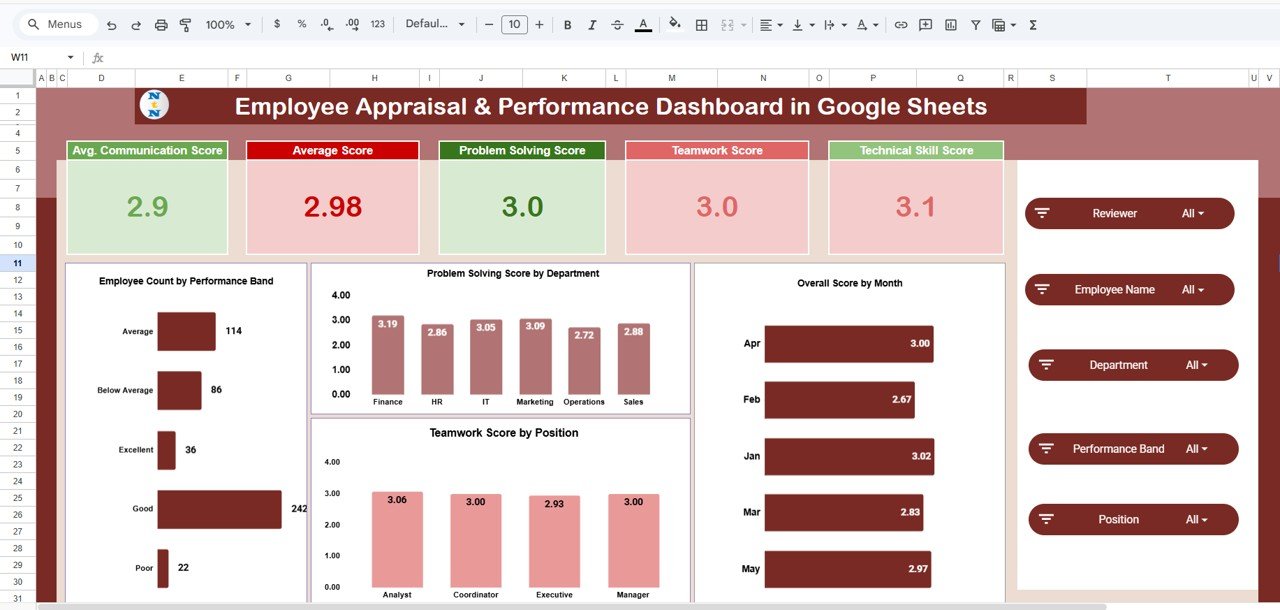
The Overview Page provides a quick snapshot of overall employee performance.
Key KPI Metrics:
-
Average Communication Score
-
Overall Average Score
-
Problem Solving Score
-
Teamwork Score
-
Technical Skill Score
Charts Included:
-
Employee Count by Performance Band
-
Problem Solving Score by Department
-
Teamwork Score by Position
-
Overall Score by Month
This page helps HR managers quickly understand the overall performance status of employees.
2️⃣ Departmental Performance Analysis
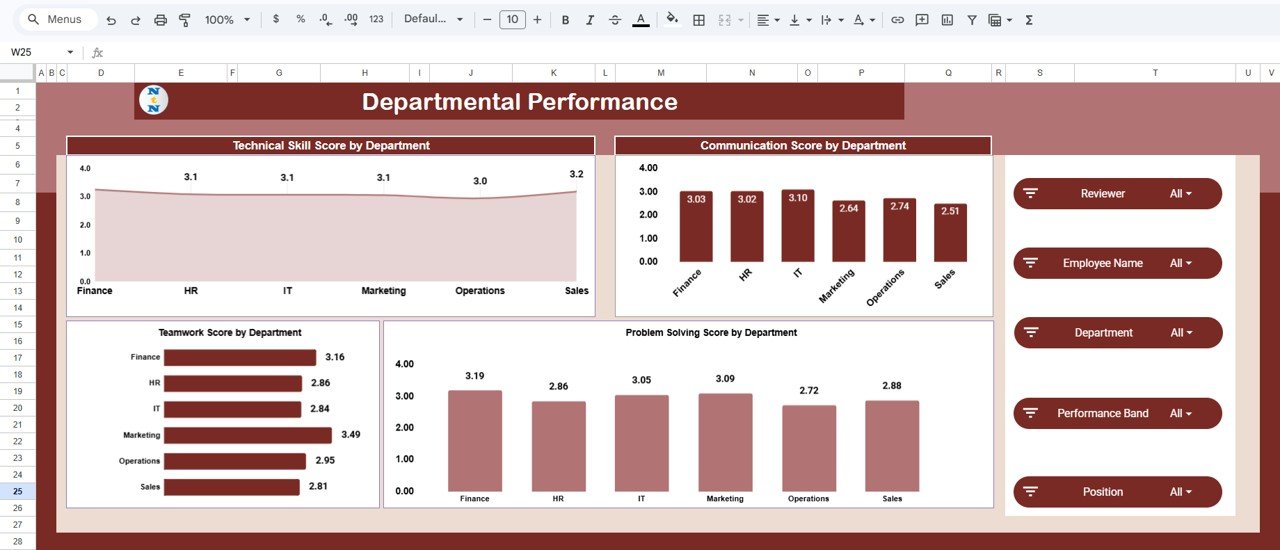
This page analyzes employee performance across different departments.
Charts Included:
-
Technical Skill Score by Department
-
Communication Score by Department
-
Teamwork Score by Department
-
Problem Solving Score by Department
This analysis helps HR teams identify high-performing departments and skill gaps.
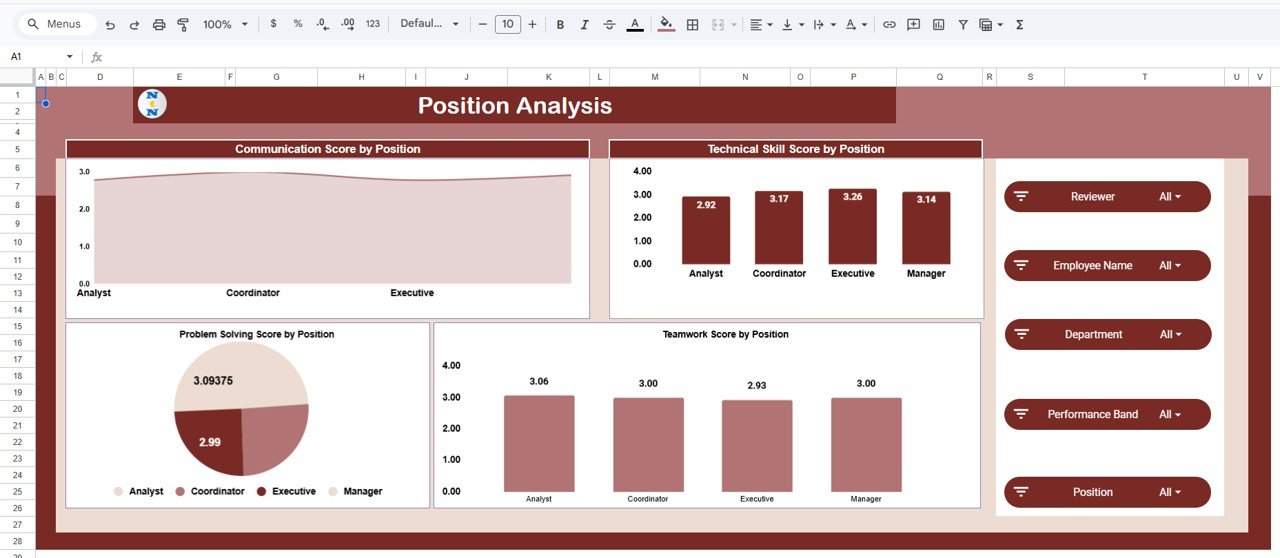
3️⃣ Position Analysis
Employees perform different roles within organizations. This page helps compare performance across job roles.
Charts Included:
-
Communication Score by Position
-
Technical Skill Score by Position
-
Problem Solving Score by Position
-
Teamwork Score by Position
HR teams can use these insights to design role-based training programs.
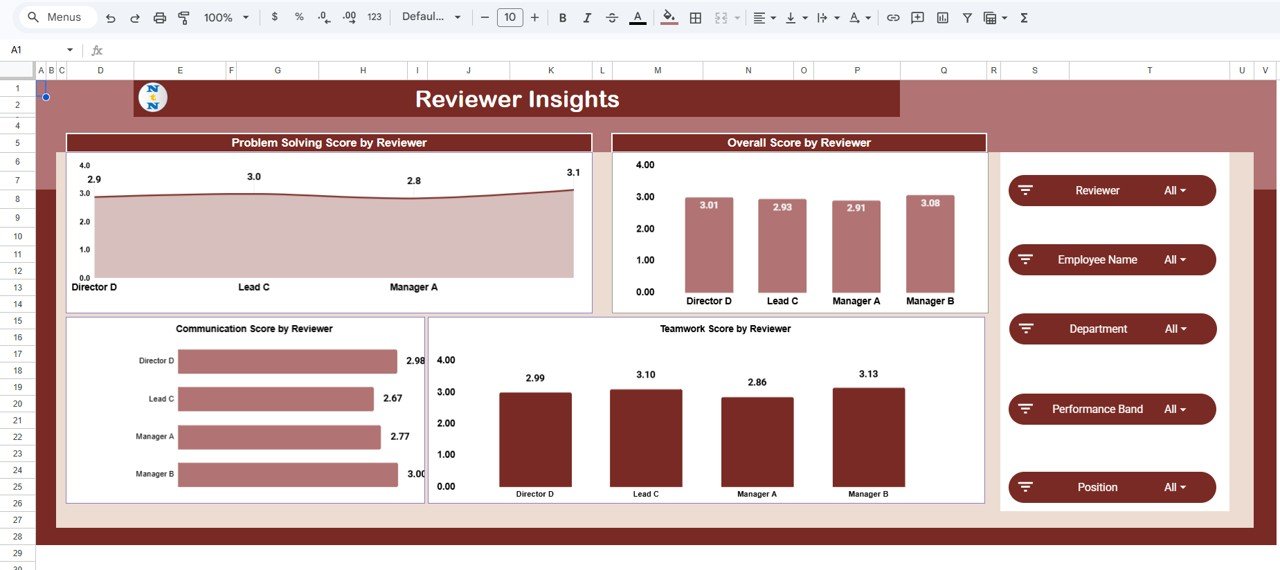
4️⃣ Reviewer Insights
Performance reviews are conducted by managers and team leaders. This page evaluates reviewer assessment patterns.
Charts Included:
-
Problem Solving Score by Reviewer
-
Overall Score by Reviewer
-
Communication Score by Reviewer
-
Teamwork Score by Reviewer
This helps ensure consistent and fair employee evaluations.
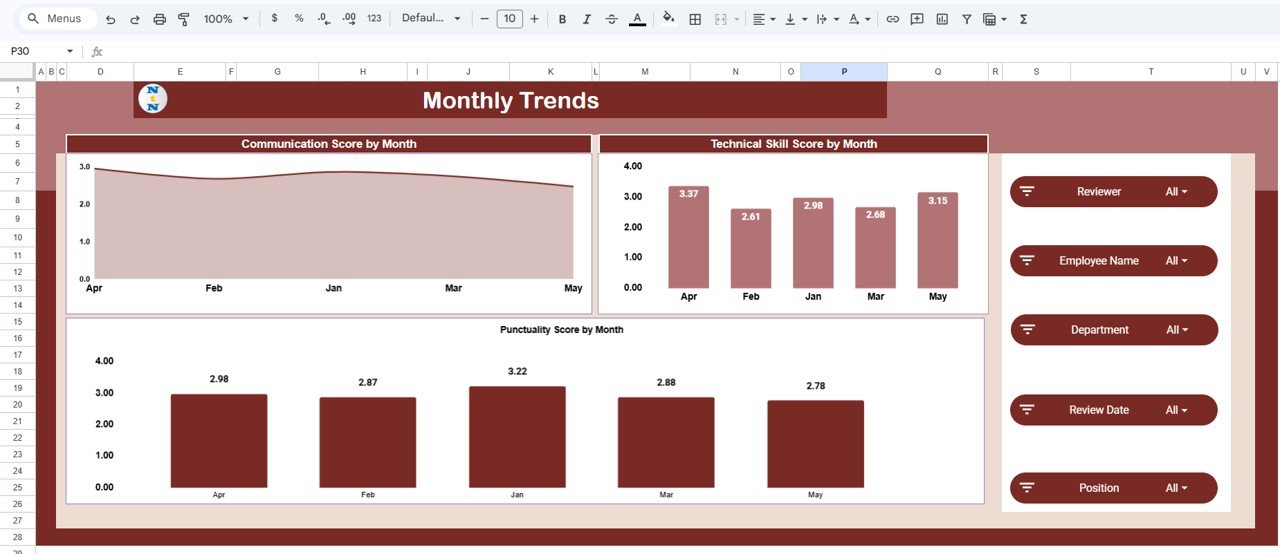
5️⃣ Monthly Trends
Employee performance evolves over time. This page tracks performance changes across months.
Charts Included:
-
Communication Score by Month
-
Technical Skill Score by Month
-
Punctuality Score by Month
HR teams can easily identify performance improvements and development trends.
⚙️ How to Use the Employee Appraisal & Performance Dashboard in Google Sheets
Using this dashboard is simple and efficient.
1️⃣ Enter employee appraisal data into the Data Sheet.
2️⃣ Update performance scores such as communication, teamwork, technical skills, and problem-solving.
3️⃣ Use filters to analyze performance by employee, department, reviewer, or position.
4️⃣ Review KPI cards and charts to identify performance trends.
5️⃣ Use insights to improve training programs and workforce planning.
Even users with basic Google Sheets knowledge can easily manage and analyze employee performance using this dashboard.
👥 Who Can Benefit from This Employee Appraisal & Performance Dashboard
This dashboard is extremely useful for organizations that want to improve performance management.
👨💼 HR Managers – Monitor employee appraisal scores and performance trends.
🏢 Department Managers – Evaluate team productivity and employee development.
📊 Business Analysts – Analyze workforce performance data.
👔 Executives & Leadership Teams – Make strategic HR decisions using performance insights.
📈 Talent Development Teams – Identify skill gaps and plan training programs.
Click here to read the Detailed blog post
Watch the step-by-step video tutorial:
Visit our YouTube channel to learn step-by-step video tutorials