

Customer account information changes constantly. Contact details, billing data, service preferences, subscription plans, and compliance records often need updates. When these requests are managed through emails, phone calls, or scattered spreadsheets, teams face delays, data inconsistencies, missed follow-ups, and poor visibility. As customer volumes grow, these issues directly affect customer satisfaction and operational efficiency.
That is exactly why the Customer Account Update Tracker in Google Sheets becomes an essential operational and customer management solution.
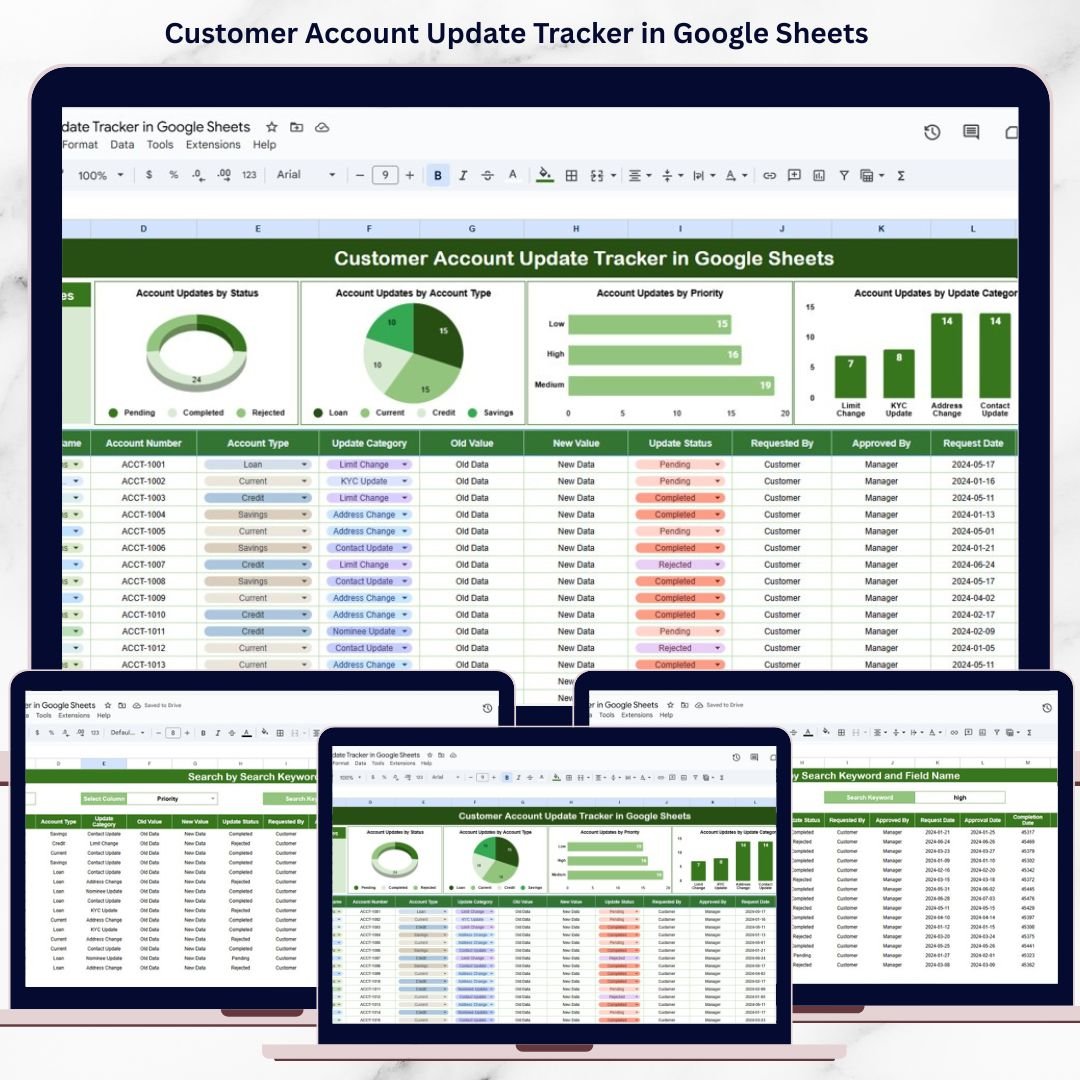
This ready-to-use tracker provides a centralized, structured, and transparent way to record, monitor, and analyze all customer account update requests. Instead of chasing updates across multiple systems, customer support, operations, and account management teams gain real-time visibility into request status, priorities, channels, and completion timelines—all within Google Sheets. With visual dashboards and a powerful search feature, teams can act faster, reduce errors, and maintain a clear audit trail.
Because the tracker is cloud-based, it supports collaboration, instant updates, and secure access without any additional software cost.
✨ Key Features of the Customer Account Update Tracker in Google Sheets
📂 1. Centralized Account Update Management
All customer account update requests are logged in one structured tracker, eliminating scattered records and manual follow-ups.
📊 2. Visual Dashboard Charts
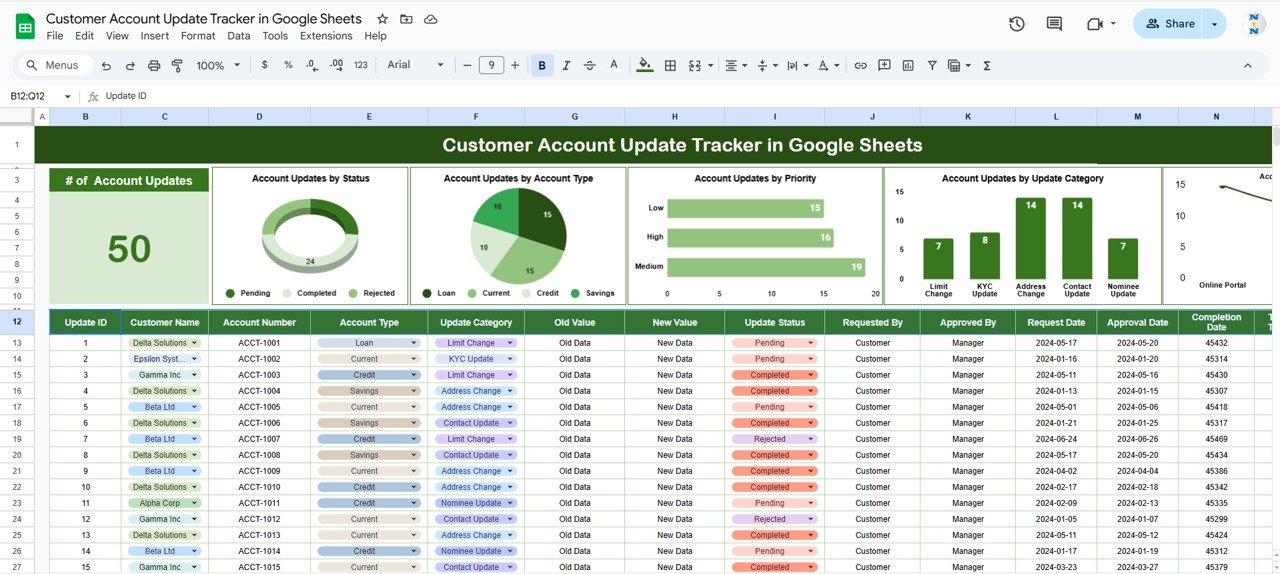
Pre-built charts provide instant insights into request status, priority, account type, update category, and submission channel.
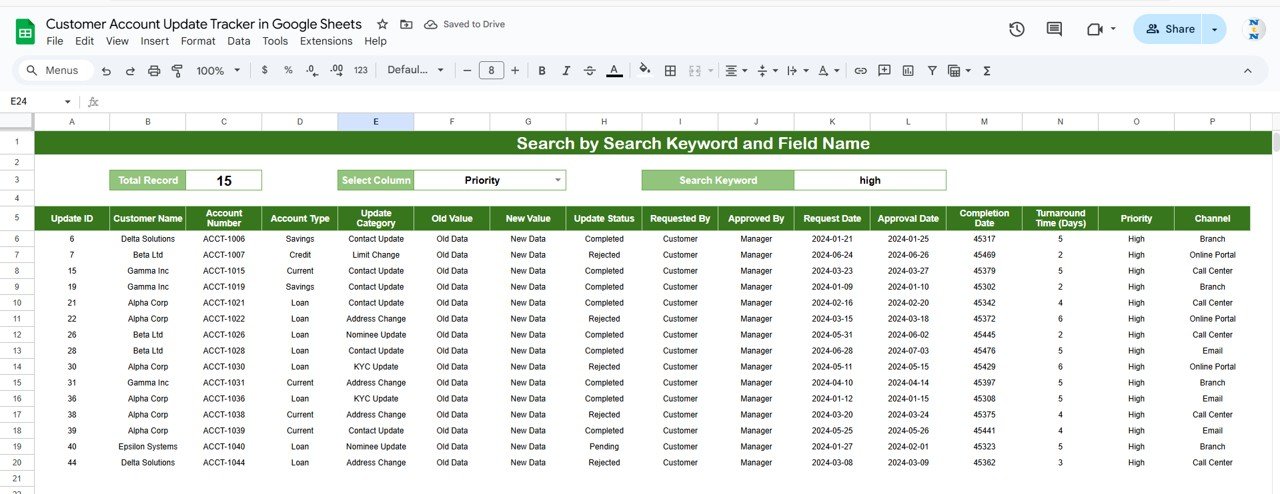
🔍 3. Smart Search Functionality
Quickly locate any customer update request using keywords and field-based filtering.
⚡ 4. Real-Time Updates
As soon as a request is updated, all charts refresh automatically, ensuring accurate reporting.
🤝 5. Google Sheets-Based Collaboration
Customer support, operations, and compliance teams can work together in real time using one shared file.
📦 What’s Inside the Customer Account Update Tracker in Google Sheets
🗂️ Tracker Sheet Tab (Core Data Sheet)
This is the backbone of the tracker where all account update requests are recorded in a clean and consistent format.
Typical fields include:
-
Request ID
-
Request Date
-
Customer Name / Account ID
-
Account Type
-
Update Category
-
Request Priority
-
Update Channel (Email, Phone, Portal, Support Ticket, etc.)
-
Request Status (Pending, In Progress, Completed, Rejected)
-
Assigned To
-
Completion Date
-
Remarks / Notes
Any change in this sheet automatically updates all dashboard visuals.
📈 Dashboard Charts Included
📌 Account Updates by Status
Shows how many requests are Pending, In Progress, Completed, or Rejected. This helps managers identify backlogs and ensure timely resolution.
📌 Account Updates by Account Type
Breaks down update requests by customer segment such as Individual, Business, Enterprise, or Premium—helping teams understand demand patterns.
📌 Account Updates by Priority
Categorizes requests into Low, Medium, High, and Urgent, ensuring critical updates receive immediate attention.
📌 Account Updates by Update Category
Highlights the most common update types, such as billing changes, contact updates, service modifications, or compliance requests.
📌 Account Updates by Channel
Analyzes how customers submit requests—email, phone, portal, or support ticket—supporting channel optimization decisions.
🔍 Smart Search Feature – Find Requests Instantly
The tracker includes a powerful search section that allows users to filter requests by:
-
Keyword (customer name, account ID, category)
-
Field Name (Status, Priority, Account Type, Channel, Update Category)
This feature helps teams:
-
Respond quickly to customer inquiries
-
Track historical account changes
-
Prepare audit and compliance reports
-
Avoid manual scrolling through large datasets
🎯 Who Can Benefit from This Customer Account Update Tracker
📞 Customer Support Teams
Resolve account updates faster with full visibility.
👥 Account Managers
Track customer changes and maintain accurate records.
⚙️ Operations Teams
Improve turnaround time and process efficiency.
📊 Compliance & Audit Teams
Maintain a clear and review-ready update history.
🏢 Organizations of Any Size
Manage customer data changes without complex tools.
🛠️ How to Use the Tracker Effectively
-
Log every customer account update request
-
Assign ownership for each request
-
Review pending and high-priority updates daily
-
Update status and completion dates promptly
-
Analyze dashboard charts weekly to identify trends
Consistent use ensures accuracy, transparency, and customer satisfaction.
### Click here to read the Detailed blog post
Watch the step-by-step video tutorial:

































Reviews
There are no reviews yet.