

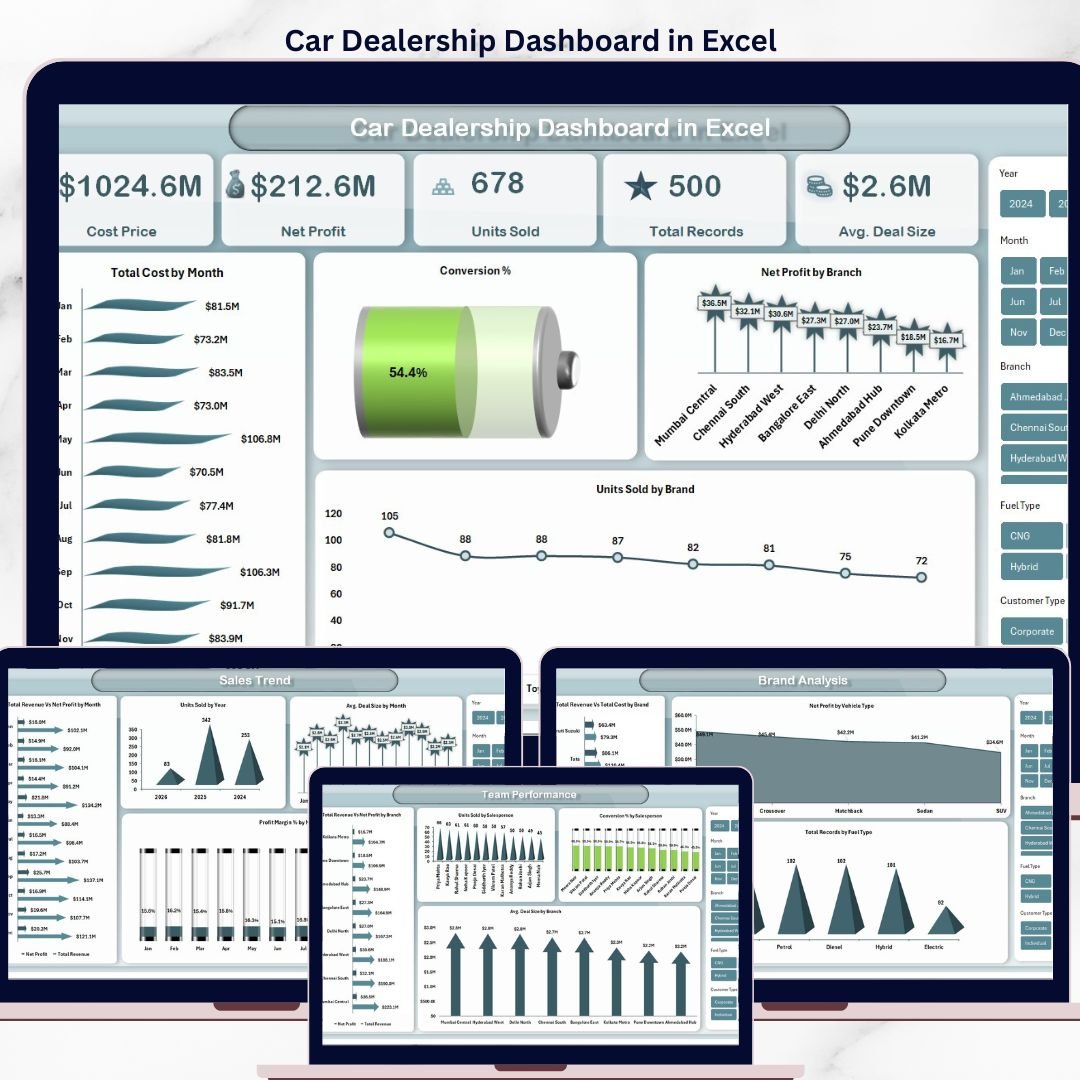

The Car Dealership Dashboard in Excel tracks 5 core KPIs across 5 interactive pages and 2 data-engine sheets, with 15+ pre-built charts, 4 slicers, and auto-refreshing pivot tables. Setup takes under 10 minutes — just paste your dealership sales records into the Data sheet and every page updates automatically.
🌍 Join 8,400+ teams in 40+ countries using NextGenTemplates to replace paid SaaS tools with one-time-purchase Excel, Google Sheets, Power BI, and HTML templates.
✅ Instant download · One-time payment · No subscription · No per-user fees · Lifetime access
🔑 Key Features of the Car Dealership Dashboard in Excel
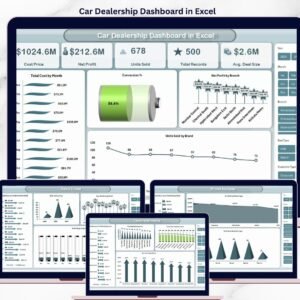
📊 Five interactive pages — Overview, Sales Trend, Brand Analysis, Team Performance, and Customer Insights — each engineered for a specific decision your dealership makes every week. The Overview page surfaces Cost Price, Net Profit, Units Sold, Total Records, and Avg. Deal Size as header cards so your GM sees dealership health in 5 seconds.
🎯 Four slicers on every page for Brand, Branch, Fuel Type, and Vehicle Type so a sales manager at a multi-brand dealership can isolate Toyota SUV performance in one click. All slicers are connected to every pivot, so a single filter updates all charts on the page simultaneously.
🔄 Pivot-driven architecture — every chart is powered by a pivot table on the Support sheet. Click Data → Refresh All after pasting new records and the entire dashboard reprocesses. No formulas break, no chart ranges need adjusting.
💰 Margin-first metrics — Profit Margin %, Conversion %, and Avg. Deal Size are calculated automatically alongside raw units and revenue, so finance and sales see the same numbers without a second report.
🎨 Clean automotive color palette with high-contrast KPI cards, gray-scale tables, and accent reds for negative-margin alerts — print-ready for dealer meetings and board packs.
📦 What’s Inside the Car Dealership Dashboard in Excel
Page 1 — Overview
The Overview page is the homepage of the dashboard. KPI cards at the top show Cost Price, Net Profit, Units Sold, Total Records, and Avg. Deal Size. Below the cards, four charts tell the financial story: Total Cost by Month reveals seasonal inventory swings; Conversion % highlights lead-to-close efficiency; Net Profit by Branch ranks outlet profitability; Units Sold by Brand shows which manufacturers move fastest. Slicers for Brand, Branch, Fuel Type, and Vehicle Type let you re-segment every chart in one click.
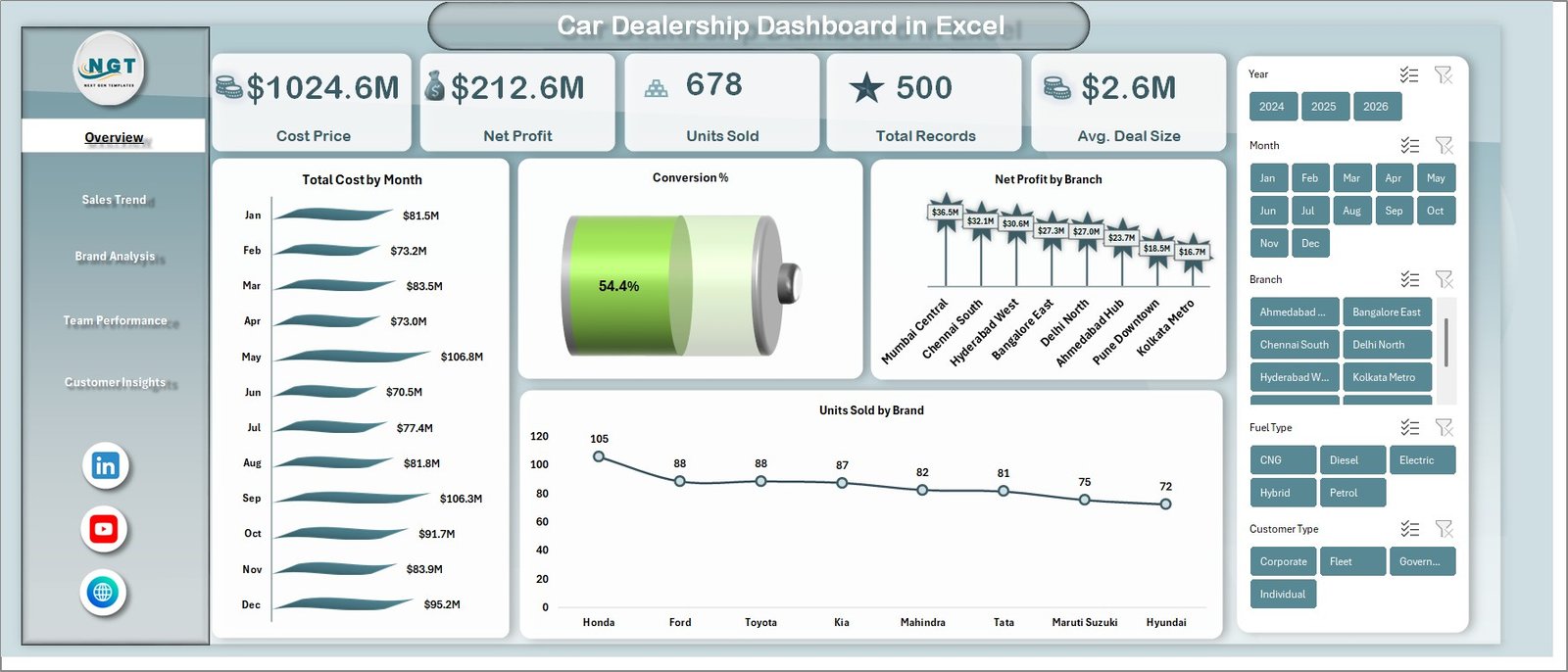
Car Dealership Dashboard in Excel
Page 2 — Sales Trend
The Sales Trend page analyses performance over time so you can see whether the dealership is growing or slipping. It shows Total Revenue vs. Net Profit by Month (revenue-margin gap visualized), Units Sold by Year (multi-year volume trend), Avg. Deal Size by Month (pricing and mix), and Profit Margin % by Month (financial health trend).
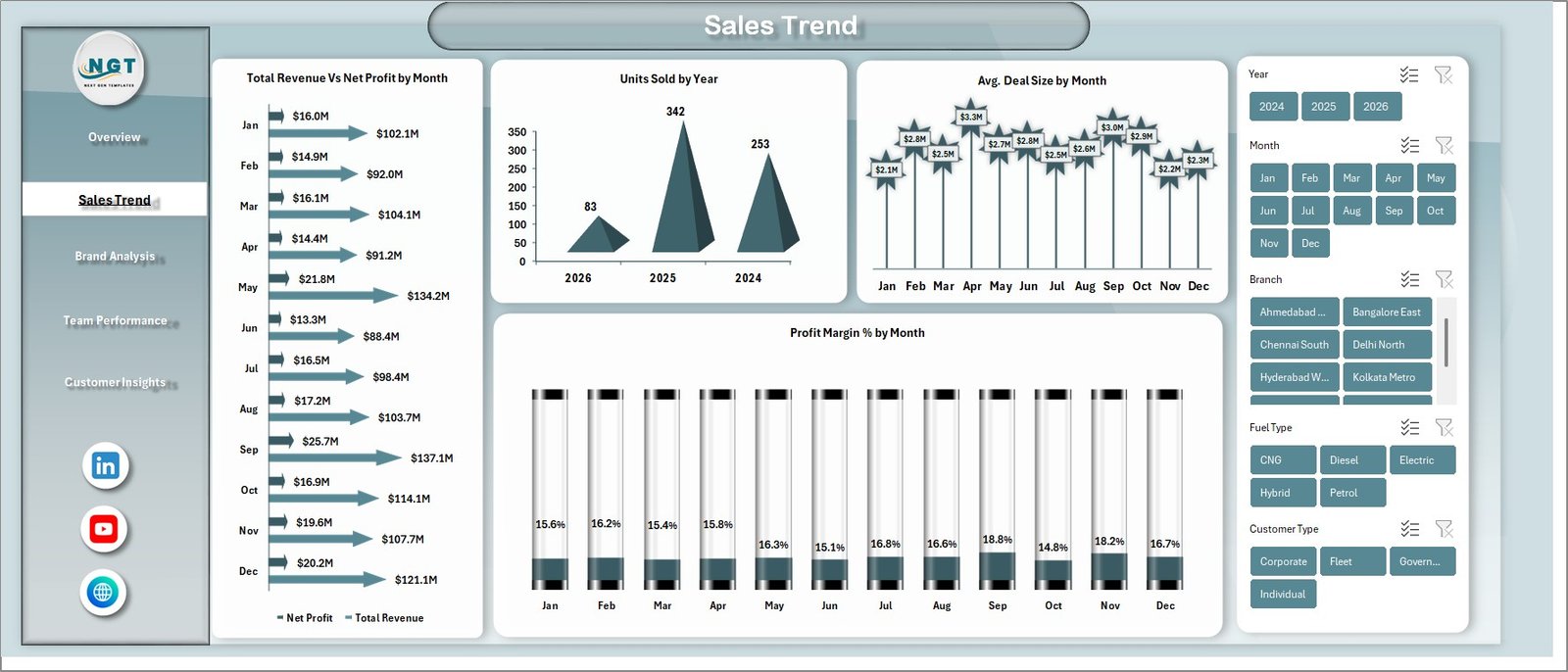
Sales Trend
Page 3 — Brand Analysis
The Brand Analysis page ranks your inventory by manufacturer and segment. Total Revenue vs. Total Cost by Brand reveals which brands actually make money; Net Profit by Vehicle Type compares SUV vs. Sedan vs. Hatchback margins; Total Records by Fuel Type breaks your book by Petrol, Diesel, Electric, and Hybrid — essential as EV demand shifts.
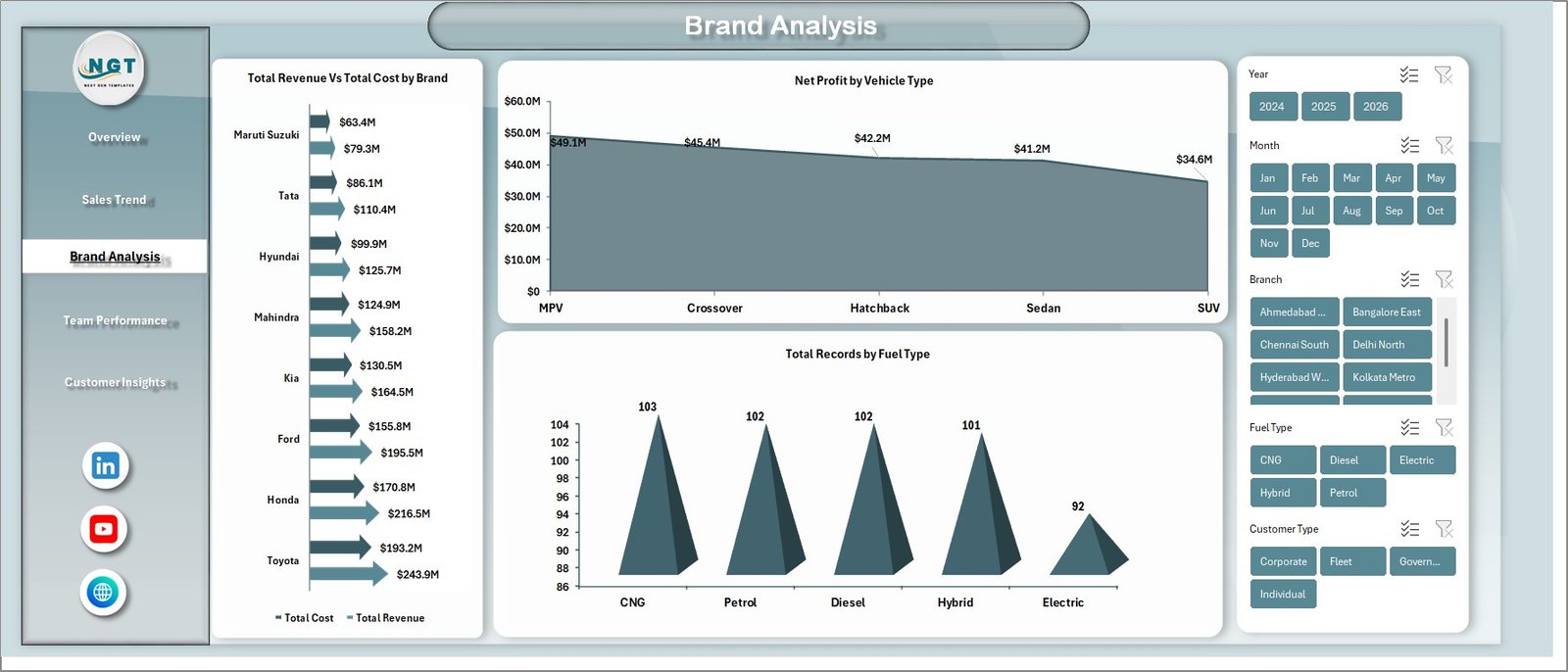
Brand Analysis
Page 4 — Team Performance
The Team Performance page puts your sales floor under a microscope. Total Revenue vs. Net Profit by Branch shows which outlet manager is beating targets; Units Sold by Salesperson and Conversion % by Salesperson expose who is closing vs. who is churning leads; Avg. Deal Size by Branch uncovers branches that are under-pricing.
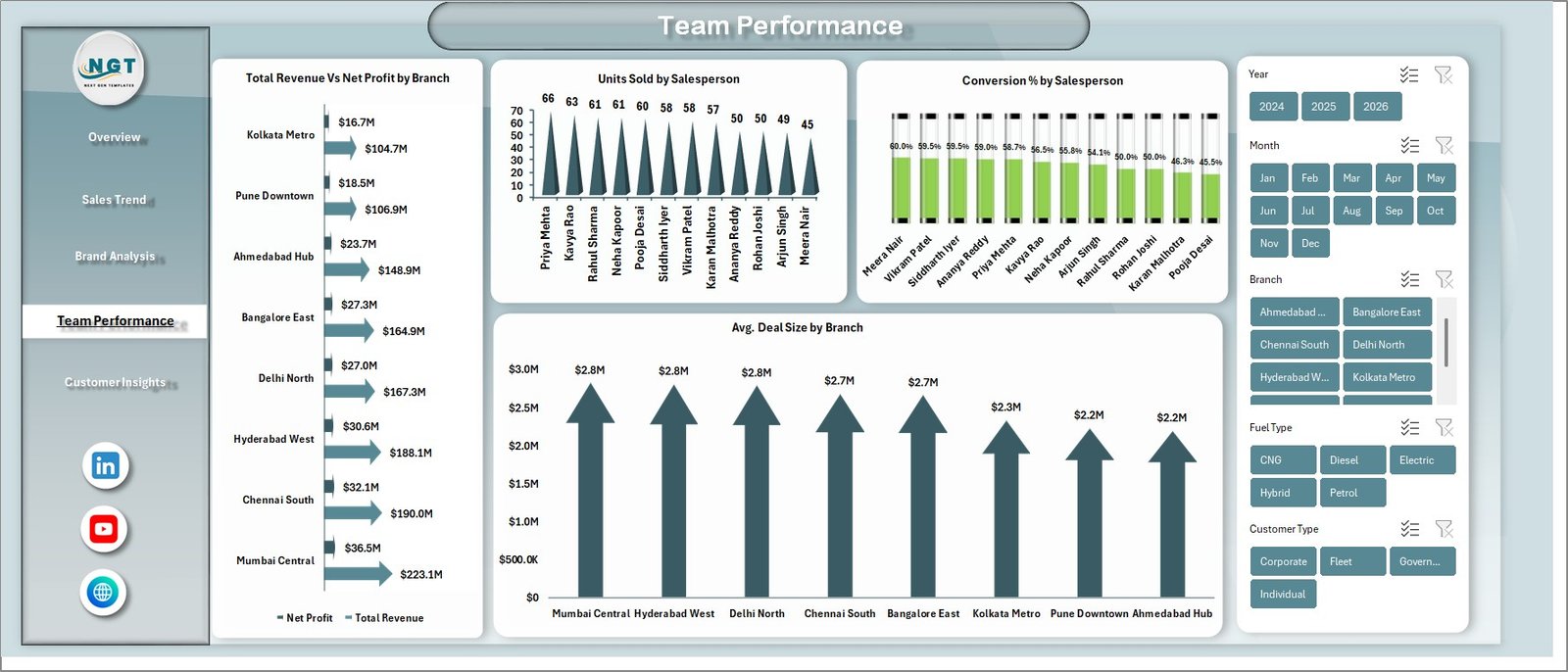
Team Performance
Page 5 — Customer Insights
The Customer Insights page uncovers who is buying from you and how. Total Revenue by Customer Type splits Individual vs. Corporate buyers; Total Records by Payment Method shows the cash / card / loan mix; Net Profit by Financing Type compares dealership-financed deals vs. bank loans vs. cash — critical because financing margin often beats vehicle margin.
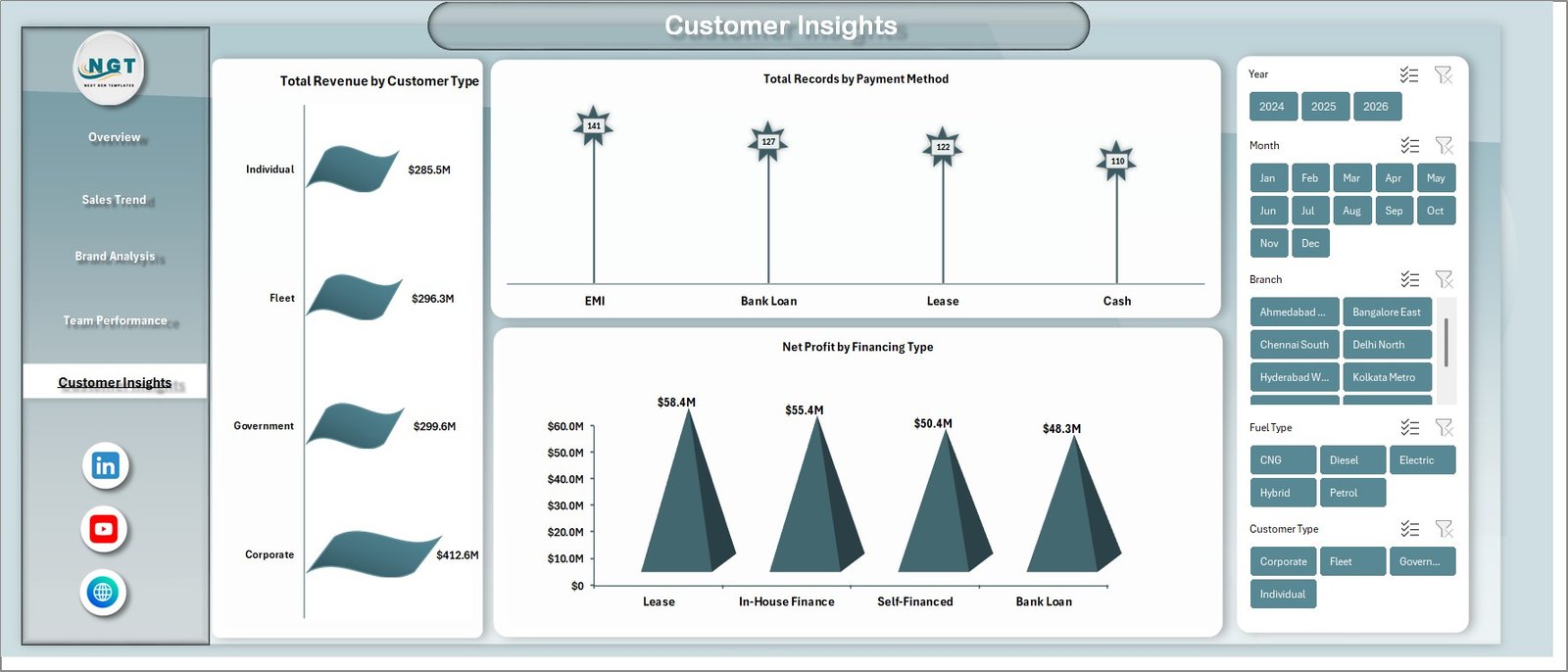
Customer Insights
Data Sheet
The Data sheet is your single source of truth. Every sale record goes here in the same column layout — Date, Brand, Model, Vehicle Type, Fuel Type, Branch, Salesperson, Customer Type, Payment Method, Financing Type, Units, Cost Price, Sale Price, Net Profit. Keep the column order intact and the entire dashboard auto-refreshes.

Data Sheet tab
Support Sheet
The Support sheet holds every pivot table that feeds the dashboard. After pasting new records into the Data sheet, go to the Excel Ribbon → Data → Refresh All and every pivot recalculates — every chart and KPI card refreshes automatically. You can hide this sheet from end-users (Right-click tab → Hide) without breaking the dashboard.

Support sheet tab
📊 Car Dealership Dashboard in Excel vs. Google Sheets Equivalent vs. DealerSocket / VinSolutions — Where This Fits
| Feature | Car Dealership Dashboard in Excel | Google Sheets equivalent | DealerSocket / VinSolutions |
|---|---|---|---|
| Cost | $17.99 one-time | $12–15 one-time | $600–1,500 / month / rooftop |
| Platform | Microsoft Excel (offline-capable) | Google Sheets (browser only) | Cloud CRM + DMS |
| Setup time | Under 10 minutes | Under 15 minutes | 4–8 weeks implementation |
| Real-time team collaboration | File-share / OneDrive | ✅ Native multi-user | ✅ Multi-user with roles |
| Mobile access | Excel mobile app | ✅ Any browser | ✅ Native iOS/Android app |
| Customizable fields | ✅ Fully editable | ✅ Fully editable | ⚠ Locked to vendor schema |
| Year-1 cost at 5 users | $17.99 total | $12–15 total | $36,000–$90,000 |
| Requires DMS integration | ❌ No — standalone | ❌ No — standalone | ✅ Required |
| Profit Margin % & Conversion % pre-built | ✅ Yes | ✅ Yes | ⚠ Requires custom report |
For independent dealerships and small multi-brand groups that want margin, conversion, and branch-level visibility without paying $600+ per month per rooftop, the Car Dealership Dashboard in Excel sits in the sweet spot.
👥 Who This Template Is For — and Who It’s Not For
✅ This template is built for:
- Independent used-car dealers tracking 50–500 sales per month across 1–3 branches
- Multi-brand dealership GMs who want one view of Toyota, Hyundai, Honda performance side-by-side
- Finance managers comparing dealership-financed deals vs. bank-loan deals vs. cash deals
- Dealership owners who refuse to pay $600+/month per rooftop for DealerSocket when a spreadsheet will do
❌ This template is NOT for:
- Large franchised auto groups that need integrated DMS (CDK / Reynolds) + CRM + F&I menu selling
- Teams requiring real-time VIN decoding, OEM incentive feeds, or automated credit bureau pulls
- Dealerships with 20+ concurrent users needing role-based permissions and audit trails
⚙️ How to Use the Car Dealership Dashboard in Excel
- Download and unzip the template file, then open Car-Dealership-Dashboard.xlsx in Microsoft Excel 2016 or later.
- Open the Data sheet and replace the sample rows with your own dealership records — keep the column order intact (Date, Brand, Model, Vehicle Type, Fuel Type, Branch, Salesperson, Customer Type, Payment Method, Financing Type, Units, Cost Price, Sale Price, Net Profit).
- Go to Data → Refresh All in the Excel ribbon. Every pivot on the Support sheet reprocesses and every chart updates.
- Open any dashboard page (Overview, Sales Trend, Brand, Team, Customer) and use the four slicers to filter by Brand, Branch, Fuel Type, or Vehicle Type.
- Right-click the Support tab → Hide before sharing the file with branch managers or salespeople to keep the pivot engine out of sight.
💼 Real-World Use Cases
Ramesh runs an independent used-car dealership in Pune with two showrooms and 180 sales a month. He uses the Car Dealership Dashboard in Excel to compare branch-level profit margin each week, spots that his Wakad branch is under-pricing SUVs by 4%, and coaches his team — without paying ₹50,000/month for a dealer CRM.
Priya is the F&I manager at a Toyota-Honda multi-brand dealership in Bangalore. She uses the Customer Insights page to see that dealership-financed deals are producing 18% margin vs. 11% on cash deals, and reallocates her call-back team to push financing on every walk-in.
David owns a 3-rooftop dealership group in Texas. He was quoted $840/month/rooftop for DealerSocket Advanced Reporting — $30,240/year. He replaced the reporting module with the Car Dealership Dashboard in Excel, kept his DMS, and saved $29,000 in year one.
❓ Frequently Asked Questions
What KPIs does the Car Dealership Dashboard in Excel track?
The Car Dealership Dashboard in Excel tracks 5 header KPIs — Cost Price, Net Profit, Units Sold, Total Records, and Avg. Deal Size — plus derived metrics including Profit Margin %, Conversion %, Total Revenue, and Net Profit by Brand, Branch, Salesperson, Vehicle Type, Fuel Type, Customer Type, Payment Method, and Financing Type.
How long does setup take?
Setup takes under 10 minutes for the Car Dealership Dashboard in Excel. Open the file, replace sample rows in the Data sheet with your own records in the same column order, and click Data → Refresh All. Every pivot and chart across all 5 dashboard pages updates automatically.
How does this compare to DealerSocket or VinSolutions?
The Car Dealership Dashboard in Excel is a one-time $17.99 offline tool, while DealerSocket and VinSolutions are $600–1,500/month/rooftop cloud CRMs with DMS integration, VIN decoding, and F&I workflows. This dashboard replaces the reporting layer, not the full CRM — ideal for independents that already track leads elsewhere.
Can I add my own custom KPIs to the dashboard?
Yes. The Car Dealership Dashboard in Excel is fully editable. Add new columns to the Data sheet, create a new pivot on the Support sheet, and build a chart on any page. Because the dashboard is pivot-driven rather than formula-driven, new KPIs slot in without breaking existing ones.
Will this work for used-car dealerships and new-car dealerships?
Yes. The Car Dealership Dashboard in Excel works for used-car, new-car, and mixed inventory dealerships. The Brand, Vehicle Type, Fuel Type, and Financing Type dimensions handle both segments — add a “Stock Type” column to the Data sheet if you want to split new vs. used analysis explicitly.
Does it refresh automatically when I add new sales?
The Car Dealership Dashboard in Excel refreshes with one click. After pasting new records into the Data sheet, go to Data → Refresh All in the Excel ribbon and every pivot on the Support sheet reprocesses, updating every chart and KPI card on all 5 pages.
What version of Excel do I need?
The Car Dealership Dashboard in Excel runs on Microsoft Excel 2016, 2019, 2021, and Microsoft 365 on both Windows and Mac. It does not require Power Pivot, Power Query, or any add-ins — only native pivot tables, charts, and slicers.
👤 About the Author
Built by PK — Microsoft Certified Professional with 15+ years of Excel, Google Sheets, and Power BI experience. Founder of NextGenTemplates, reaching 300K+ subscribers across YouTube channels (@PK-AnExcelExpert, @NextGenTemplates, @NeoTechNavigators). Every template is hand-built and tested before release.
🔗 Explore Related Templates
Looking for more automotive analytics? Browse our full Excel Dashboard Templates collection.
- Automotive Parts Manufacturing Dashboard in Excel — supplier-side view with production, defects, and OEE
- Automotive KPI Scorecard in Excel — monthly MTD/YTD scorecard format for dealership leadership reviews
- Fleet Management Dashboard in Power BI — for dealership-owned rental or lease fleets
Also available as: Automotive KPI Dashboard in Google Sheets · Used Car Sales KPI Dashboard in Google Sheets
📖 Click here to read the Detailed Blog Post
🎥 Visit our YouTube channel for step-by-step video tutorials
👉 YouTube.com/@NextGenTemplates
Watch the step-by-step video tutorial:
Compatibility and Requirements
- Works in Microsoft Excel 2016, 2019, 2021 and Microsoft 365 on Windows and Mac.
- It uses native pivot tables, charts and slicers, with no add-ins. Microsoft explains slicers in Use slicers to filter data.




























Reviews
There are no reviews yet.