



The Attendance Sheet Template in Google Sheets records daily attendance for a class, team or staff group. It combines attendance totals, absence counts, percentages and color-coded status indicators with editable fields, so users can review attendance patterns for the period they record.
With built-in features such as automated calculations, color-coding for absences, and customizable fields, this attendance sheet is the perfect tool for any organization, school, or business looking to stay on top of attendance records. The Google Sheets template also supports easy collaboration, so multiple users can access and update the sheet simultaneously, ensuring real-time tracking.

Key Features of the Attendance Sheet Template in Google Sheets
📅 Easy-to-Use Layout: A clean and simple layout for easy tracking of attendance over time.
⚙️ Automated Calculations: Automatically calculate the number of days attended, absences, and percentages.
📝 Customizable Fields: Add or remove fields based on your specific attendance tracking needs (e.g., notes, shift times).
🔴 Color-Coded Indicators: Use color-coding to quickly identify absences and attendance patterns.
📈 Attendance Analysis: Automatically track trends and view summaries of attendance patterns over a specified period.
🧑💼 Real-Time Collaboration: Share the template with team members or staff to collaborate and update in real-time.
💾 Cloud-Based Storage: Store and access your attendance sheet from anywhere with Google Sheets.
Why You’ll Love the Attendance Sheet Template in Google Sheets
✅ Effortless Attendance Tracking: Easily track attendance for any group with an intuitive and simple-to-use template.
✅ Time-Saving Automation: Let the template handle calculations and formatting so you can focus on managing your team.
✅ Customizable for Any Purpose: Tailor the sheet to fit the needs of your business, school, or team by adding or modifying fields.
✅ Real-Time Data Sharing: Share the sheet with multiple users and update it in real-time for accurate tracking.
✅ Comprehensive Analysis: Gain valuable insights from the built-in attendance analysis and summary functions.
What’s Inside the Attendance Sheet Template in Google Sheets?
📅 Daily Attendance Tracking: Easily record attendance for each day, along with leave or absence details.
⚙️ Calculations and Formulas: Automatic calculations for attendance percentages, total absences, and other essential metrics.
🔴 Color-Coded Attendance Status: Color-coded cells to represent different attendance statuses, such as present, absent, or late.
📈 Reports and Analysis: Summarized data and trends for evaluating attendance over a set period.
🧑💼 Real-Time Updates: Share the template with others for collaborative data entry and real-time updates.
How to Use the Attendance Sheet Template in Google Sheets
1️⃣ Download the Template – Get immediate access to the ready-to-use Google Sheets attendance sheet.
2️⃣ Customize Fields: Modify the template to suit your group’s specific needs (e.g., adding shift timings or specific leave types).
3️⃣ Track Attendance: Input daily attendance for each member, noting absences, tardiness, and other relevant details.
4️⃣ Monitor Trends: Use the built-in analysis and summary functions to keep track of attendance patterns over time.
5️⃣ Collaborate and Update: Share the template with your team or colleagues for collaborative, real-time updates.
Who Can Benefit from the Attendance Sheet Template in Google Sheets?
🔹 Business Owners
🔹 HR Managers
🔹 School Administrators
🔹 Teachers
🔹 Project Managers
🔹 Team Leaders
🔹 Small Business Owners
Easily track and manage attendance for your team or organization with the Attendance Sheet Template in Google Sheets. Stay organized, save time, and improve the accuracy of your attendance records.
Click here to read the detailed blog post
Visit our YouTube channel to learn step-by-step video tutorials
Watch the step-by-step video tutorial:
Also check our Small Business KPI Dashboard
Questions about this template
Can multiple people update the attendance sheet?
Yes. The template uses Google Sheets sharing for collaborative updates. Create your own copy using File > Make a copy, then choose who can view or edit your attendance records.
For help comparing reporting tools for this area, see our HR and payroll template guide.
What does the attendance sheet calculate automatically?
It calculates days attended, total absences and attendance percentages.
How are absences shown?
Cells are color coded by status, such as present, absent or late, so patterns stand out.
Can I add my own fields?
Yes. You can add or remove fields such as notes, shift times or specific leave types.
Can teachers use it for a class?
Yes. It records attendance for a class, a team or a staff group.
Compatibility and Requirements
- Works in Google Sheets with a free Google account and a web browser. No Excel installation is needed.
- New to Google Sheets? Google covers the basics in How to use Google Sheets.
Related Attendance Templates
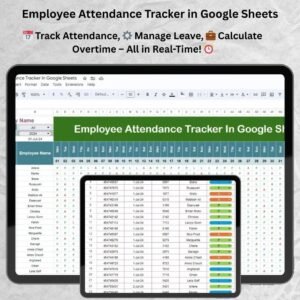
- Employee Attendance Tracker in Google Sheets: employee attendance tracking in Google Sheets
- Weekly Attendance Sheet in Google Sheets: a weekly attendance layout in Google Sheets
- Attendance and Overtime Dashboard in Excel: an Excel dashboard for attendance and overtime
- HR Google Sheets Pack: ten HR templates for Google Sheets in one pack
Browse all Google Sheets HR and payroll templates or the Google Sheets trackers.















Reviews
There are no reviews yet.