

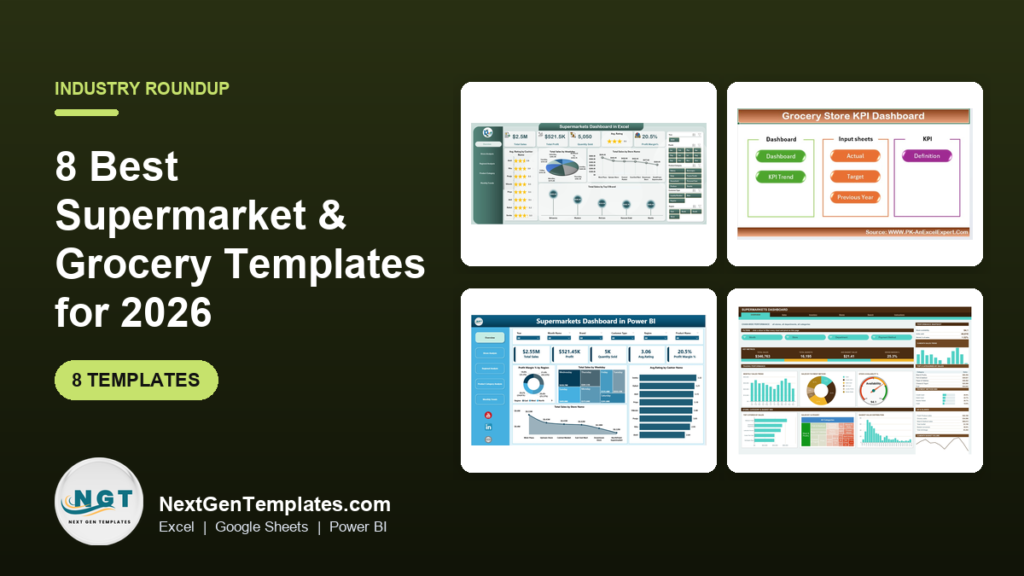
The best grocery store dashboard template for most stores is the Supermarkets Dashboard in Excel ($17.99), which covers sales, profit margin, ratings, stores, regions and categories on five pages. On a tight budget, the Supermarkets Dashboard in Google Sheets ($9.99) gives you six pages, 18 charts and 15 slicers.
Last updated: October 2026
Key takeaways
- The Supermarkets Dashboard in Excel ($17.99) is the best overall pick: five analytical pages covering overview, store, region, category and monthly trends.
- The Supermarkets Dashboard in Google Sheets ($9.99) is the best value: 6 pages, 18 charts, 15 slicers and 500 sample records.
- Prices across the eight templates run from $9.99 to $39.99, all one-time purchases with no per-user fee.
- Pick a KPI dashboard (Excel $12.99, Power BI $11.99, Sheets $9.99) if you track targets, MTD and YTD. Pick a Supermarkets dashboard if you analyse transaction-level sales by store, region and category.
- None of these replaces a till system. The General Store POS Web App ($39.99) is the only template here that actually rings up sales.
 Launch offer
From your first Pivot Table to the Data Model, DAX, Power Query and a one-page KPI dashboard. 11h 51m of video by PK, with practice files, quizzes and a capstone.
Grocery store dashboard templates compared
| Template | Format | Best For | Price |
|---|---|---|---|
| Supermarkets Dashboard in Excel (Best overall) | Excel | Chains and multi-store owners comparing stores, regions and categories | $17.99 |
| Supermarkets Dashboard in Google Sheets (Best value) | Google Sheets | Managers who want sales, stock, shrinkage and footfall in one cloud file | $9.99 |
| Grocery Store KPI Dashboard in Excel | Excel | Single-store owners tracking sales, stock turnover, NPS and margins | $12.99 |
| Grocery Store KPI Dashboard in Power BI | Power BI | Teams that want MTD, YTD and target-versus-actual in Power BI | $11.99 |
| Supermarkets Dashboard in Power BI | Power BI | Analysts and executives who want slicers and drill-through by store and region | $17.99 |
| Grocery Store KPI Dashboard in Google Sheets | Google Sheets | Owners who want KPI targets, stock-outs and employee insights in Sheets | $9.99 |
| Convenience Store KPI Dashboard in Google Sheets | Google Sheets | Small convenience shops and mini-marts | $9.99 |
| General Store POS Web App | Google Sheets web app | Grocery shops that need billing, picking and inventory, not just reports | $39.99 |
How we picked these grocery and supermarket templates
We searched the Next Gen Templates catalog of roughly 6,900 products for anything built for grocery stores, supermarkets, convenience stores and general stores. We kept paid templates that track sales, stock, margin or store performance, and that exist in a format a store team already uses.
Where the same tool exists in Excel, Google Sheets and Power BI, we included more than one format so you can choose the one your team opens daily. We excluded generic retail dashboards with no grocery angle. For those, see our guide to retail and e-commerce dashboard templates.
All prices and feature descriptions come from the product pages. We have not run your store’s data through them, so test with a month of your own figures before you roll out.
What are the 8 best grocery store dashboard templates for 2026?
The ranking weighs three things: how much of a grocery operation the file covers, how easily a non-analyst can update it, and price. Each template below says who it suits and what you get.
1. Supermarkets Dashboard in Excel: best overall
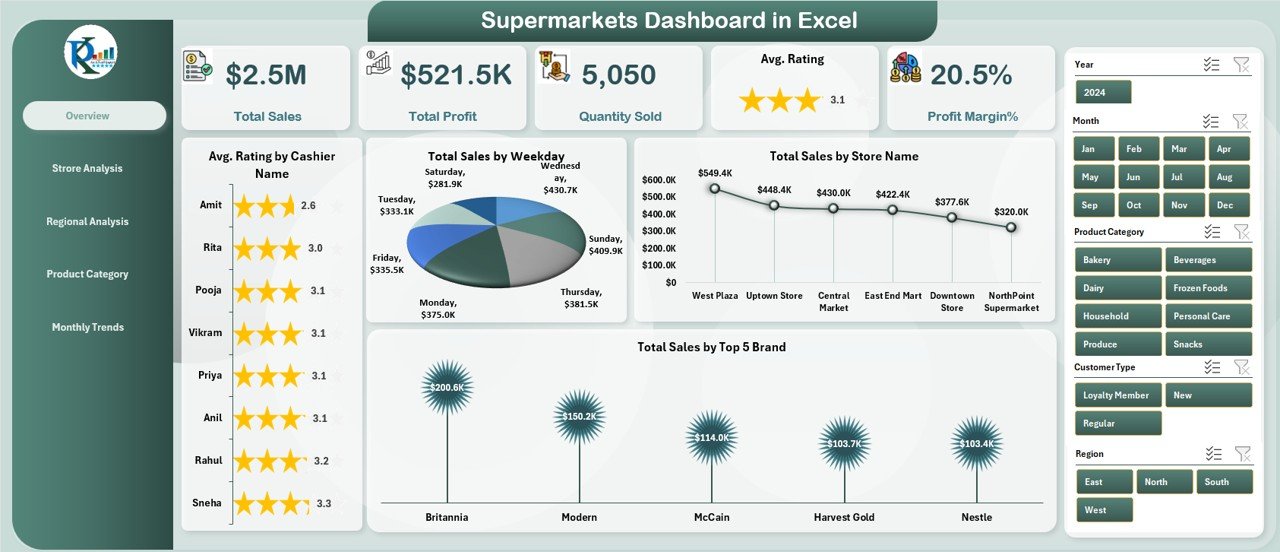
This is a ready-made Excel workbook that turns supermarket sales data into five analytical pages. It ranks first because it answers the questions a multi-store owner asks most: which store, which region and which category makes the money.
Who it is for: supermarket owners, managers and analysts, from one store to a chain.
- Five pages: Overview, Store Analysis, Regional Analysis, Product Category Analysis and Monthly Trends, plus a support sheet for backend data.
- KPI cards for total sales, profit margin, number of stores, top brands and average customer rating.
- Store view of total profit, quantity sold and customer satisfaction.
- Auto data refresh with one click.
Use cases:
- Rank your stores by profit and customer rating to find the one that needs a visit.
- Compare regions on sales, profit and rating before you decide where to add stock.
- Check which product categories carry the most revenue and profit before renegotiating shelf space.
- Read the monthly trend page to spot seasonal peaks ahead of ordering.
Price: $17.99. Get the Supermarkets Dashboard in Excel.
Best for: owners who run more than one store and live in Excel.
2. Supermarkets Dashboard in Google Sheets: best value
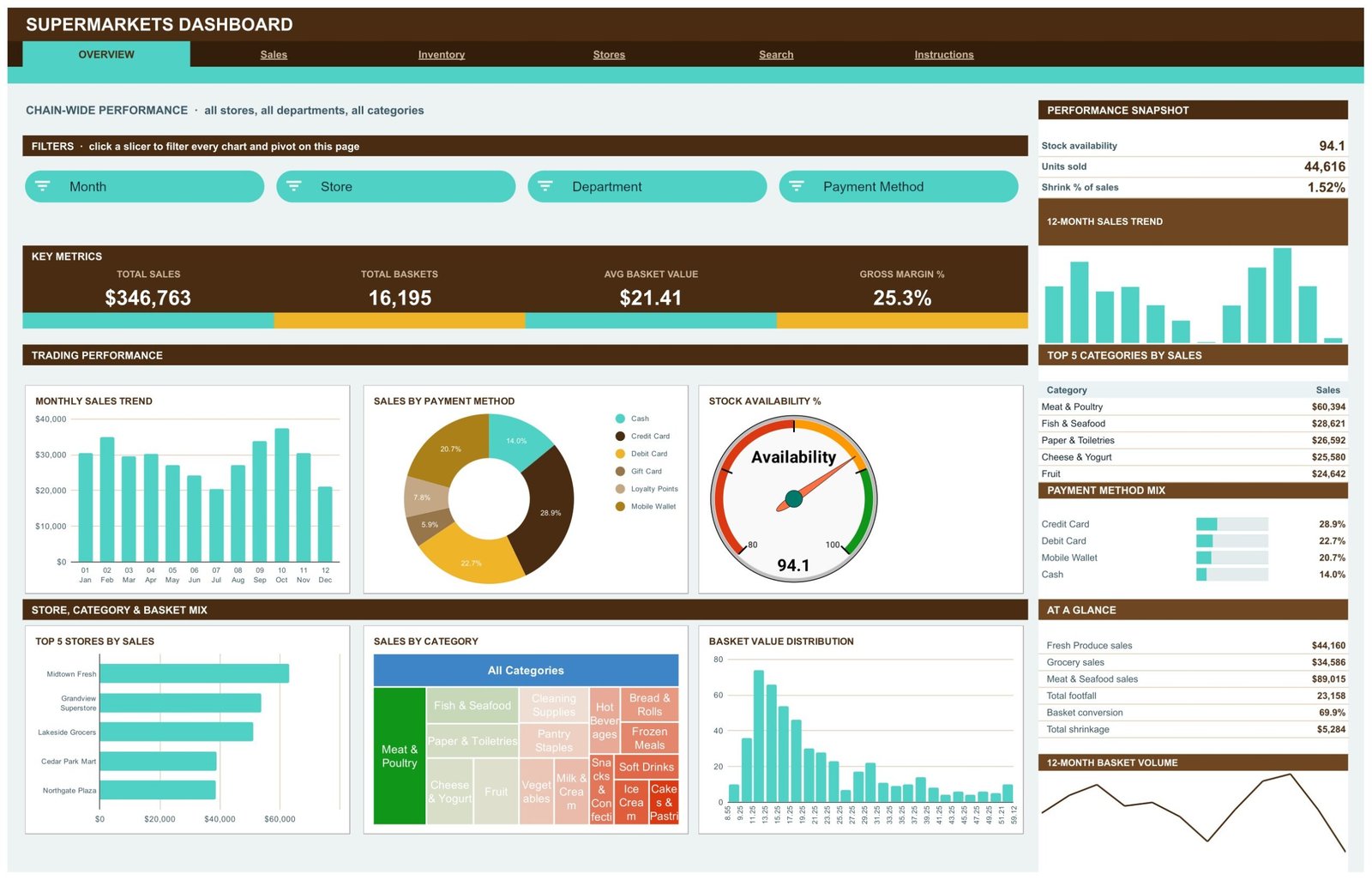
At $9.99 this is the cheapest template in the list and one of the deepest. It is a six-page Google Sheets report driven by native pivot tables, with 500 sample records you replace with your own.
Who it is for: store managers and chain analysts who want cloud access and shared editing.
- Six pages: Overview, Sales, Inventory, Stores, Search and an Instructions guide.
- 4 KPI cards per page, 18 charts and 15 slicers.
- Sales across 8 departments, 16 categories and 10 suppliers, with a sales-by-category treemap.
- An availability gauge, availability by department and shrinkage by region and category.
Use cases with the sample numbers:
- The sample chain reads Total Sales $346,763 over 16,195 baskets, an average basket value of $21.41.
- Gross margin on the sample data is 25.3%.
- Shrinkage is $5,284, which is 1.52% of sales, so you can see how your own loss rate compares.
- Footfall of 23,158 against 16,195 baskets gives you a conversion view by store.
Price: $9.99. Get the Supermarkets Dashboard in Google Sheets.
Best for: the lowest price with the widest set of grocery metrics, including shrinkage and footfall.
3. Grocery Store KPI Dashboard in Excel
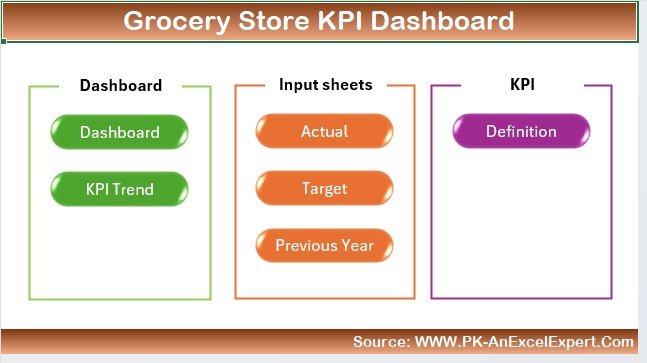
This Excel workbook is built around KPIs rather than transaction records. It is the one to pick if you want a single sheet that tells you how the store is doing against its numbers.
Who it is for: grocery owners, managers and analysts running a small local store or a larger supermarket.
- Daily, weekly, monthly and yearly sales tracking.
- Stock levels and turnover rates.
- Customer satisfaction through Net Promoter Score and feedback.
- Profit margin tracking by product category and sales channel.
Use cases:
- Find peak shopping times from the sales trends and adjust staffing around them.
- Spot slow-moving products with the turnover figures before you reorder.
- Track NPS month by month after a layout change.
- Check margin by category to decide where to adjust pricing.
Price: $12.99. Get the Grocery Store KPI Dashboard in Excel.
Best for: a single-store owner who wants KPIs in a familiar Excel file.
4. Grocery Store KPI Dashboard in Power BI
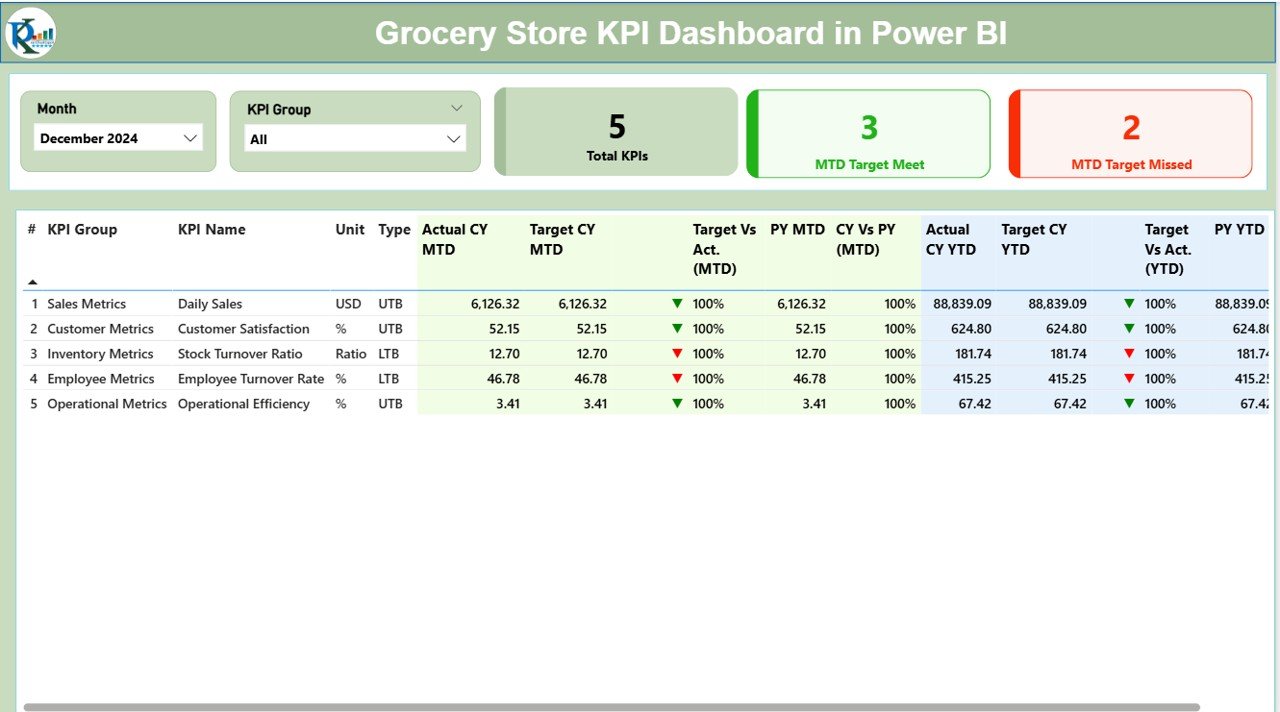
The Power BI version of the grocery KPI dashboard has three interactive pages and takes its data from structured Excel input sheets, so updating it does not need Power BI skills.
Who it is for: grocery managers and teams already licensed for Power BI, or chains that want to scale from one store to many.
- Summary page with slicers for month and KPI group, KPI count and MTD and YTD status.
- KPI Trend page with combo charts of Actual, Target and Previous Year.
- A hidden drill-through KPI Definition page showing formula, unit and type (UTB or LTB).
- Green up and red down icons for target versus actual.
Use cases:
- Review month-to-date against target in a weekly management meeting.
- Compare this year to last year on one KPI at a time using the trend slicer.
- Check a KPI’s exact formula by drilling through, which settles disputes about how a figure is calculated.
- Track inventory turnover and shrinkage alongside sales.
Price: $11.99. Get the Grocery Store KPI Dashboard in Power BI.
Best for: KPI-driven teams who prefer Power BI visuals and drill-through.
5. Supermarkets Dashboard in Power BI
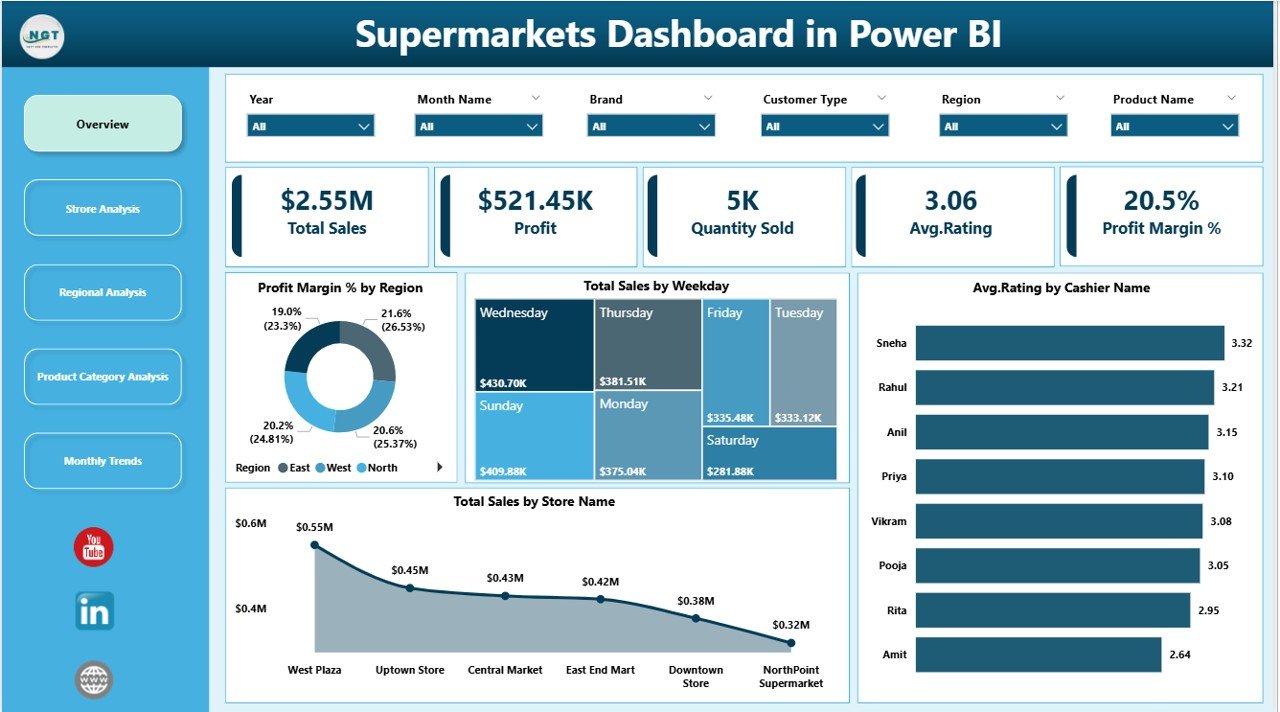
This is the Power BI counterpart to our best overall pick. It connects to your data sources and aggregates sales, store, regional and product category metrics into interactive pages.
Who it is for: supermarket managers, analysts and executives who want slicers, filters and drill-through.
- Overview page with total sales, profit, average ratings and profit margins.
- Store Analysis, Regional Analysis and Product Category Analysis pages.
- Monthly Trends for sales, profit and profit margin over time.
- Views you can tailor for managers, regional leaders and executives.
Use cases:
- Let a regional leader filter to their own stores without touching anyone else’s data.
- Compare high- and low-performing locations on customer feedback.
- Use category views to understand customer preferences.
- Use monthly trends to forecast future performance.
Price: $17.99. Get the Supermarkets Dashboard in Power BI.
Best for: head-office analysts who report across stores and regions in Power BI.
6. Grocery Store KPI Dashboard in Google Sheets
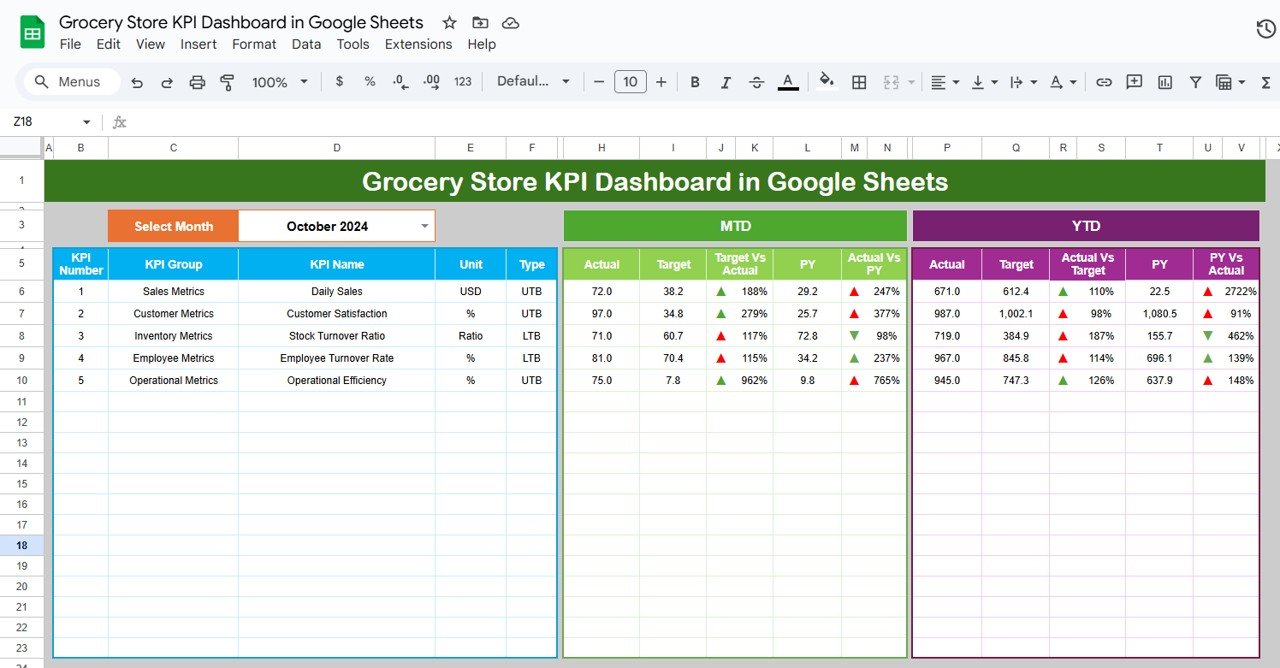
A KPI dashboard built entirely in Google Sheets, with a month selector, MTD, YTD and year-on-year comparisons, and separate tabs for actual numbers and targets.
Who it is for: store managers, owners and analysts who want a shared, browser-based KPI file.
- Dashboard tab with a month selection cell (D3) that updates every KPI.
- KPI Trend tab with a dropdown (C3) showing group, unit, type and formula.
- Actual Numbers tab where you enter MTD and YTD data.
- Inventory metrics for stock-outs and turnover, sales by category and department, and employee insights.
Use cases:
- Pick the month in D3 and print the page for the monthly owners’ meeting.
- Track stock-outs against a target you set on the Target tab.
- Check department sales to see which aisle is pulling its weight.
- Share the file with a deputy manager so both of you see the same figures.
Price: $9.99. Get the Grocery Store KPI Dashboard in Google Sheets.
Best for: Google Sheets teams who want target-based KPI tracking at the lowest price.
7. Convenience Store KPI Dashboard in Google Sheets
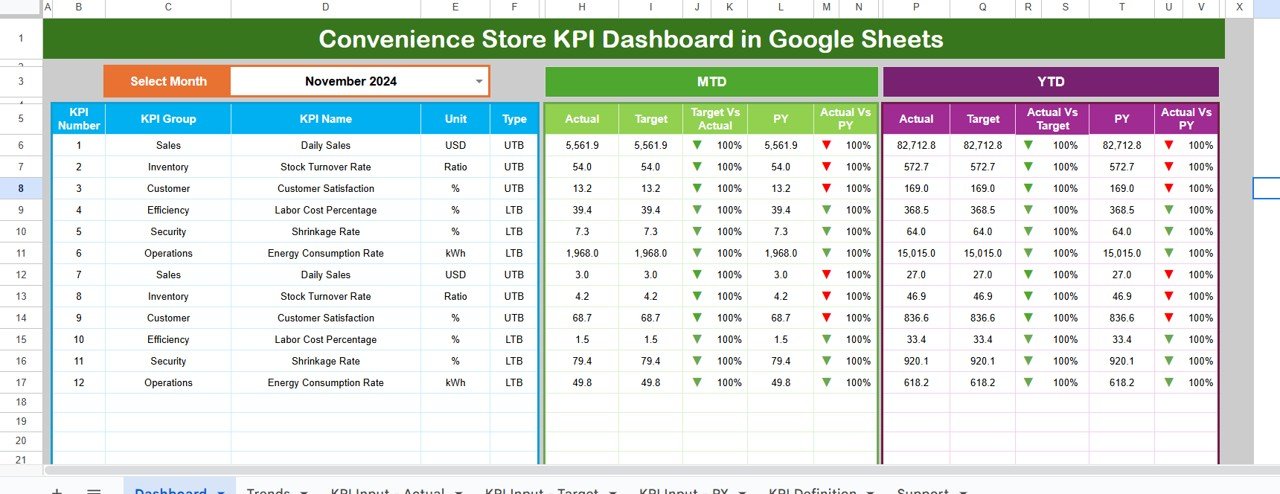
This one is aimed at small convenience shops and mini-marts. It is a six-worksheet Google Sheets file with MTD and YTD comparisons, target versus actual and trend charts.
Who it is for: convenience store owners and retail managers who juggle sales, stock and customer satisfaction by hand.
- Dashboard view with MTD and YTD for every KPI.
- Target versus actual indicators.
- Month dropdown in cell D3 that refreshes all data.
- Enter data once and the dashboard refreshes KPIs, targets and charts.
Use cases:
- Share live performance with a partner or shift lead.
- Replace a paper tally of daily sales with one monthly input sheet.
- See which KPIs are under target without opening a report pack.
- Avoid BI software licences by staying in Google Sheets.
Price: $9.99. Get the Convenience Store KPI Dashboard in Google Sheets.
Best for: small shops that want a simple KPI view and nothing more.
8. General Store POS Web App
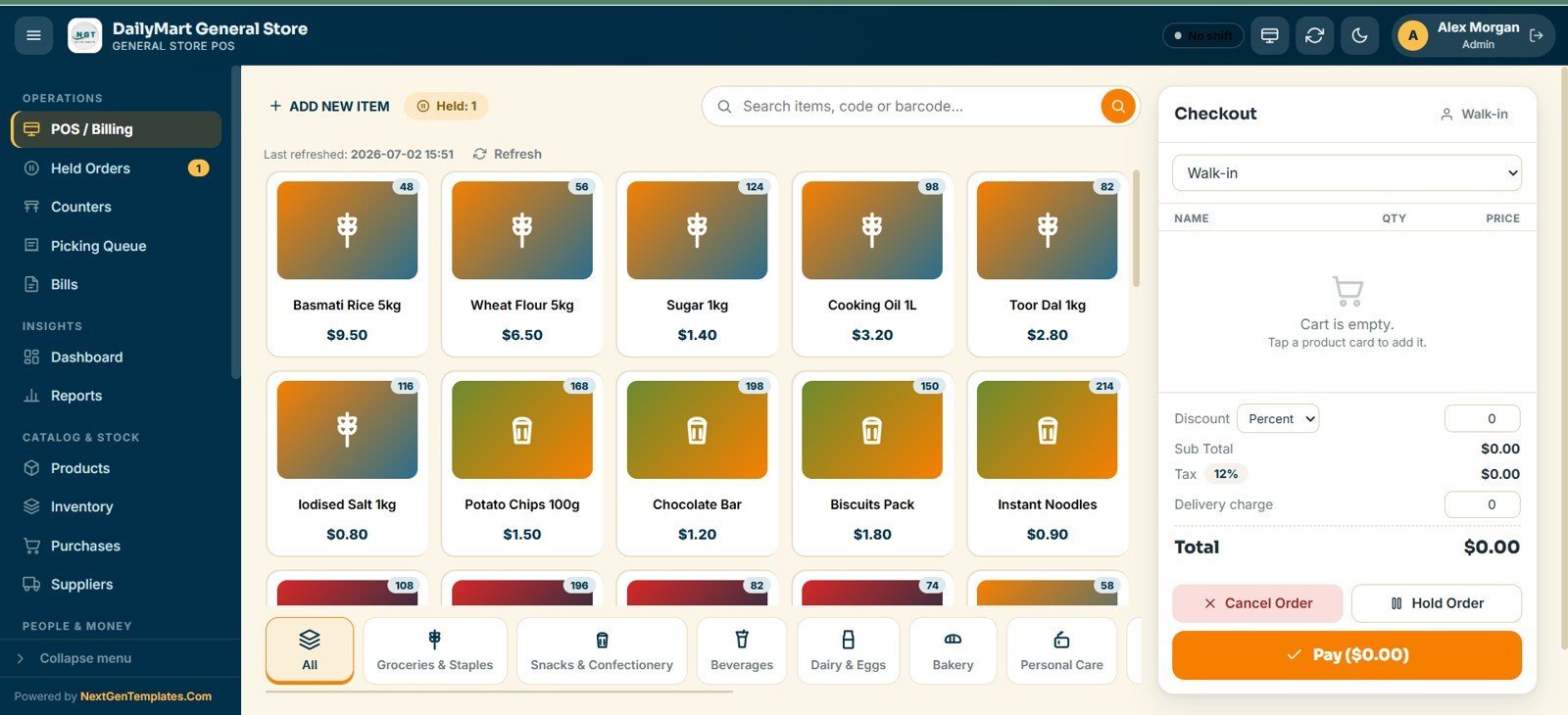
This is not a dashboard. It is a Google Sheets web app that runs a general store, grocery shop or mini-mart from one browser tab, and it includes an 8-KPI sales dashboard and 19 built-in reports. We list it because many readers searching for a dashboard actually need the till as well.
Who it is for: grocery shop owners who want billing, inventory and reporting in one place without a monthly POS subscription.
- 20 connected screens covering billing, counters, picking queue, inventory, purchases, suppliers, customers, shifts and expenses.
- Touch-friendly POS with SKU and barcode search and product cards by category.
- Walk-in counters, delivery lanes and pickup slots, with a picking queue that moves Pending, Preparing, Ready, Served.
- Role-based login for Admin, Manager, Cashier, Storekeeper, Inventory User and Viewer.
Use cases:
- Ring up groceries with discount, 12% tax and delivery charge on one checkout screen.
- Print pick lists for delivery and pickup orders and flag refrigerated lines.
- Give a cashier access to billing only, while the manager sees reports.
- Go live in under 15 minutes by deploying the script, setting the business profile and loading products.
Price: $39.99. Get the General Store POS Web App.
Best for: a single grocery shop that needs a till and reports together.
How do I choose between these grocery dashboard templates?
Start with the question you ask most often, then pick the format your team already opens. This table maps one to the other.
| If your main question is… | Choose | Price |
|---|---|---|
| Which store, region or category earns the most? | Supermarkets Dashboard (Excel, Sheets or Power BI) | $17.99, $9.99, $17.99 |
| Are we hitting our KPI targets this month? | Grocery Store KPI Dashboard (Excel, Power BI or Sheets) | $12.99, $11.99, $9.99 |
| How is a small convenience shop doing? | Convenience Store KPI Dashboard in Google Sheets | $9.99 |
| Do I need a till as well as reports? | General Store POS Web App | $39.99 |
Then apply the format rule: Excel if one person maintains it, Google Sheets if several people update it, Power BI if head office reports to executives and already has licences.
Which grocery metrics should the dashboard show?
Whatever template you choose, check that it shows these figures, and that you can calculate them from your own data. The sample numbers come from the Google Sheets Supermarkets Dashboard.
| Metric | Formula | Sample reading |
|---|---|---|
| Average basket value | Total sales / number of baskets | $346,763 / 16,195 = $21.41 |
| Gross margin | (Sales – cost of goods) / sales | 25.3% |
| Shrinkage rate | Shrinkage value / total sales | $5,284 / $346,763 = 1.52% |
| Conversion rate | Baskets / footfall | 16,195 / 23,158 = about 70% |
| Sales per visitor | Total sales / footfall | $346,763 / 23,158 = about $14.97 |
Grocery net margins are commonly cited as very thin, often 1% to 3% of sales, according to industry bodies such as the Food Industry Association (FMI). That is why a shrinkage rate of 1.52% matters: on thin margins, a point of loss is a large share of your profit. Check the current figures for your own market before you set targets.
A worked example: finding the weak store
Say a three-store owner loads the last quarter into a Supermarkets dashboard. The overview shows a healthy average basket, so nothing looks wrong. On the store page, one outlet has the same sales as the others but a lower customer rating and lower profit.
On the category page, the margin gap traces to one department with heavy shrinkage. You now have a specific conversation to have with that store manager, rather than a vague one about performance. That is the practical gain from a dashboard: it narrows a general worry to a store, a department and a figure.
If you want to go further on the stock side, our guide to inventory KPIs to track covers turnover and stock-out formulas. For margin definitions, see the profitability KPIs guide, and for the wider list of store metrics, read 12 retail KPIs to track in 2026.
Refrigeration is a major cost in grocery. If your energy bill is a concern, the energy management KPIs post shows what to measure. For customer acquisition and promotions, see the marketing KPIs guide.
Ready to buy a grocery store dashboard template?
The cheapest route to a working dashboard is the Supermarkets Dashboard in Google Sheets at $9.99. If you prefer Excel and want store, region and category analysis, the Supermarkets Dashboard in Excel costs $17.99.
Watch walkthroughs of our dashboards on the Next Gen Templates YouTube channel.
When is a dashboard template NOT the right answer for a grocery store?
A template is the wrong tool in several situations, and it is better to know them before you buy.
- You need live till data. The KPI dashboards and Supermarkets dashboards read data you enter or paste. If you want sales to flow in from the register automatically, you need POS software such as Square, Lightspeed or Shopify POS, or the General Store POS Web App for a single shop.
- You need barcode-level stock control. A dashboard reports on stock. It does not receive deliveries, count shelves or generate purchase orders. For that, use inventory software or the POS app.
- You run a large chain with an existing data warehouse. If IT already feeds a BI platform, building a custom model there may be better than adapting a template.
- Nobody will update the data. A dashboard with last quarter’s numbers is worse than none. If no one owns the monthly input, fix that first.
- You are an online grocer. Delivery windows, basket abandonment and ad spend need e-commerce metrics. Start with the retail and e-commerce templates instead.
Also note that the Power BI templates need Power BI Desktop to open. Check Microsoft’s current Power BI pricing if you plan to share reports with colleagues, as sharing can need paid licences.
Frequently asked questions
What is a grocery store dashboard template?
A grocery store dashboard template is a pre-built Excel, Google Sheets or Power BI file that turns your sales, stock and customer data into charts and KPI cards. You paste in your numbers and the visuals update. Prices here run from $9.99 to $17.99 for the dashboards.
Which grocery store dashboard template is best overall?
The Supermarkets Dashboard in Excel ($17.99) is our best overall pick. It has five analytical pages covering overview, store, region, product category and monthly trends, with KPI cards for sales, profit margin, top brands and average customer rating. It suits owners with more than one outlet.
What is the cheapest supermarket dashboard template?
The Supermarkets Dashboard in Google Sheets is $9.99. It has six pages, 18 charts, 15 slicers and 500 sample records, and covers sales, basket value, gross margin, shrinkage, availability and footfall. The Grocery Store and Convenience Store KPI dashboards in Google Sheets are also $9.99.
Can I build a grocery dashboard in Google Sheets?
Yes. The Supermarkets Dashboard in Google Sheets uses native pivot tables, so you make a copy, paste your records over the sample rows and every chart redraws. The Grocery Store KPI Dashboard in Google Sheets uses a month selector and a separate Actual Numbers tab instead.
Should I use Excel, Google Sheets or Power BI for a grocery dashboard?
Use Excel if one person maintains the file, Google Sheets if several staff update it from different places, and Power BI if head office reports to executives and already has licences. All three formats exist for both the Supermarkets and the Grocery Store KPI dashboards.
What KPIs should a grocery store track?
Track sales by day and month, average basket value, gross margin, shrinkage, stock availability, stock turnover, footfall, conversion and customer satisfaction such as NPS. The Grocery Store KPI Dashboard in Excel ($12.99) covers sales, turnover, NPS and profit margins in one file.
How do I calculate average basket value?
Divide total sales by the number of baskets (transactions) in the same period. In the sample data of the Supermarkets Dashboard in Google Sheets, $346,763 in sales across 16,195 baskets gives an average basket value of $21.41. Track it monthly to see the effect of promotions.
What is a normal shrinkage rate for a supermarket?
It varies by store type and category, so use your own history as the baseline rather than a single industry number. The sample chain in the Google Sheets Supermarkets Dashboard shows $5,284 of shrinkage, which is 1.52% of sales. The template breaks it down by region and category.
Do I need a POS system as well as a dashboard?
Usually yes. A dashboard reports on data, and a POS records the sales. The General Store POS Web App ($39.99) combines billing, inventory and reports for a single grocery shop. Larger stores typically export from an existing POS into a dashboard template.
Get more grocery and retail dashboard templates
Start with the Supermarkets Dashboard in Excel ($17.99) or the Supermarkets Dashboard in Google Sheets ($9.99). For a wider view of store performance, browse our retail dashboard templates.
See the dashboards in action on the Next Gen Templates YouTube channel.