

The best free stock register template is a blank Excel or Google Sheets register with six columns: item code, opening stock, receipts, issues, closing stock and reorder level. Microsoft Create, Vertex42 and the Google Sheets gallery all offer free starting points. Once you track several locations or batches, a paid system such as the Warehouse Inventory Management System Web App ($39.99) is safer.
Last updated: November 2026
Key takeaways
- A free stock register template works well for one location and roughly a few hundred items, using the formula closing = opening + receipts – issues.
- Free sources worth checking are Microsoft Create, Vertex42 and the Google Sheets template gallery, plus a plain blank register you build yourself in 15 minutes.
- Free registers stop working when you need batch or expiry tracking, several warehouses, barcode labels or user permissions.
- The Inventory & Warehouse Master Kit costs $69.99 for 8 templates, against $109.92 if bought one by one.
- The cheapest paid step up is the Inventory Management Dashboard in HTML at $12.99, which reads your stock data as charts and KPIs.
 Launch offer
SUMIFS, XLOOKUP, FILTER, LAMBDA and checking AI-written formulas, with real business projects. 11h 47m of video by PK, with practice files, quizzes and a capstone.
Free stock register templates compared
Free routes come first, then the paid NGT upgrades. Every price is in USD.
| Template | Format | Best For | Price |
|---|---|---|---|
| Microsoft Create stock templates | Excel | Quick start with Office formatting | Free |
| Vertex42 inventory spreadsheets | Excel, Google Sheets | Small shops wanting a printable layout | Free |
| Google Sheets template gallery | Google Sheets | Shared registers for small teams | Free |
| Blank Excel register (DIY) | Excel | Full control of columns | Free |
| Blank Google Sheets register (DIY) | Google Sheets | Two or three people editing live | Free |
| Excel Table register with dropdowns (DIY) | Excel | Fewer typing errors | Free |
| Warehouse Inventory Management System Web App (Best overall) | Web app on Google Sheets | Multi-warehouse, batch and expiry stock | $39.99 |
| Inventory & Warehouse Master Kit (Best value) | Excel, Google Sheets, VBA, Power BI | Teams that want every format | $69.99 |
| Web-based Advanced Inventory Management System | Web app on Google Sheets | Bilingual EN/FR teams with transfers | $24.99 |
| Product Inventory Dashboard in Power BI | Power BI | Reporting on existing Excel stock data | $17.99 |
| Retail Inventory KPI Scorecard in Excel | Excel | Retailers tracking actual vs target | $14.99 |
| Inventory Management Dashboard in HTML | HTML (browser) | Visual stock analysis with no software | $12.99 |
How we picked these
For the free half we looked at the three most established places to get a spreadsheet at no cost, then added three do-it-yourself builds. We do not list specific free file names, because those change and we cannot vouch for them. Check the file you download against the column list below.
For the paid half we searched the NextGenTemplates catalog of roughly 6,900 products for inventory and warehouse tools. We kept only paid, full systems and dashboards with a real price, and excluded free items and loosely related products such as generic finance sheets.
What should a stock register template include?
A stock register records what you hold, what came in and what went out. Whatever template you pick, it needs these columns at a minimum:
- Item code (SKU): a unique identifier, never reused.
- Item description and unit of measure: pieces, boxes, kilograms.
- Opening stock: the quantity at the start of the period.
- Receipts (stock in): purchases, returns from customers, transfers in.
- Issues (stock out): sales, usage, damage, transfers out.
- Closing stock: the calculated balance.
- Reorder level: the quantity that triggers a purchase.
- Unit cost and stock value: needed once you report to finance.
The core formula is closing stock = opening stock + receipts – issues. In Excel, with opening in column C, receipts in D and issues in E, closing in F is =C2+D2-E2. If a closing balance ever goes negative, someone recorded an issue before the receipt, or a count is wrong.
The 6 free stock register template options
1. Microsoft Create
Microsoft Create (create.microsoft.com, formerly templates.office.com) hosts Excel templates you can open in desktop Excel or Excel for the web. Search for inventory or stock and you will find registers in several layouts.
Who it is for: one-person shops and offices that already use Microsoft 365 or Excel.
Watch for: layouts vary a lot, so confirm the file has receipts and issues columns rather than a single quantity field. A single quantity field gives you a list, not a register.
Best for: getting a formatted starting sheet in two minutes.
2. Vertex42
Vertex42 (vertex42.com) has long published free spreadsheet templates, including inventory sheets. Many are designed to print cleanly, which suits a paper stock book beside a shelf.
Who it is for: small retailers, workshops and clubs that want a clear layout and are happy to edit formulas themselves.
Watch for: read the site’s terms for each file before using it commercially or redistributing it.
Best for: a printable register with sensible default formatting.
3. Google Sheets template gallery
The Google Sheets template gallery appears when you create a new sheet from sheets.google.com. It is the quickest route if two or three people need to update the same register from different devices.
Who it is for: small teams and volunteer groups.
Watch for: the gallery changes over time and its inventory offering is limited, so you may end up adapting a general-purpose sheet.
Best for: shared editing without installing anything.
4. Blank Excel register (DIY)
Open a blank workbook and type the eight columns listed above in row 1. Put the formula =C2+D2-E2 in the closing column and fill it down. Add conditional formatting so rows turn red when closing stock is at or below the reorder level.
Who it is for: anyone who wants exactly their own columns and nothing else.
Best for: under 200 items and one storeroom.
5. Blank Google Sheets register (DIY)
The same build in Google Sheets, with one improvement: use a second tab as a transaction log (date, item code, in or out, quantity) and a summary tab that uses SUMIF to total receipts and issues per item code. The summary tab never needs typing, which removes most errors.
Who it is for: teams that edit at the same time.
Best for: a live register where several people log movements.
6. Excel Table register with dropdowns (DIY)
Convert your range to an Excel Table (Ctrl+T) so formulas fill automatically for new rows. Add data validation on the item code column so people pick from a list instead of typing. Add a transactions sheet and use SUMIFS for receipts and issues by item code and month.
Who it is for: a stock controller who is comfortable with a few formulas.
Best for: a register that stays accurate over 12 months of entries.
Want more free-template roundups by email? Join the NextGenTemplates email list through the sign-up on this site and we will send new roundups as they publish. You can also subscribe on the NextGenTemplates YouTube channel for spreadsheet walkthroughs.
How do you calculate stock value: FIFO or weighted average?
A register that tracks quantity only is easy. Once finance asks what the closing stock is worth, you must pick a costing method. The two most common are FIFO (first in, first out) and weighted average. See the Investopedia explanation of FIFO for the accounting background.
Worked example. You open with 100 units at $5.00 (value $500). You then receive 50 units at $6.00 (value $300). You issue 120 units. Closing quantity is 100 + 50 – 120 = 30.
| Method | Formula | Cost of 120 issued | Closing value (30 units) |
|---|---|---|---|
| FIFO | Oldest layers used first | 100 x $5 + 20 x $6 = $620 | 30 x $6 = $180 |
| Weighted average | (existing value + received value) / (existing qty + received qty) | 120 x $5.33 = $640 | 30 x $5.33 = $160 |
Total value is $800 either way: $620 + $180 for FIFO, $640 + $160 for weighted average. The split between cost of goods sold and closing stock is what changes. When prices rise, FIFO shows a lower cost of sales and higher profit.
Weighted average is simple in a spreadsheet because you recalculate one number per receipt. FIFO needs cost layers, which is where a basic free register starts to strain. Check which method your country and accountant require before you choose.
How do you set a reorder level?
A usable rule is reorder level = average daily usage x supplier lead time in days + safety stock. If you issue 8 units a day, the supplier takes 7 days, and you want 20 units spare, the reorder level is 8 x 7 + 20 = 76 units.
In the register, add a status column with =IF(F2<=H2,"Reorder","OK"), where H is the reorder level. Review it weekly. Fast movers need the level recalculated every quarter because usage drifts.
When do free stock register templates stop working?
Free is the right answer until one of these things happens. Each is a point where errors cost real money.
- More than one location. A single sheet cannot say how much is in warehouse A versus B, or record a transfer as one move.
- Batch or expiry dates. Food, cosmetics and medical supplies need stock by lot, and a simple register cannot pick the earliest-expiring lot.
- More than two or three editors. Shared sheets get overwritten, and nobody can say who changed a quantity.
- Purchase orders and receiving. Once receipts must match orders line by line, a flat register becomes a reconciliation job.
- Barcodes. Typing item codes at a scanner-speed volume guarantees typos.
- Reporting. Managers want turnover, stockout rate and supplier performance, which a register does not calculate on its own.
If two or more of these apply, the six paid options below are cheaper than the hours spent fixing a spreadsheet. Related free-template roundups on this site cover the paperwork around stock, such as a free purchase order template and a free invoice template in Excel.
The 6 best paid stock register upgrades for 2026
These are ranked by how directly they replace a stock register. The first is a full system, the later ones add analysis on top of a register you already keep. All are one-time purchases.
1. Warehouse Inventory Management System Web App: best overall
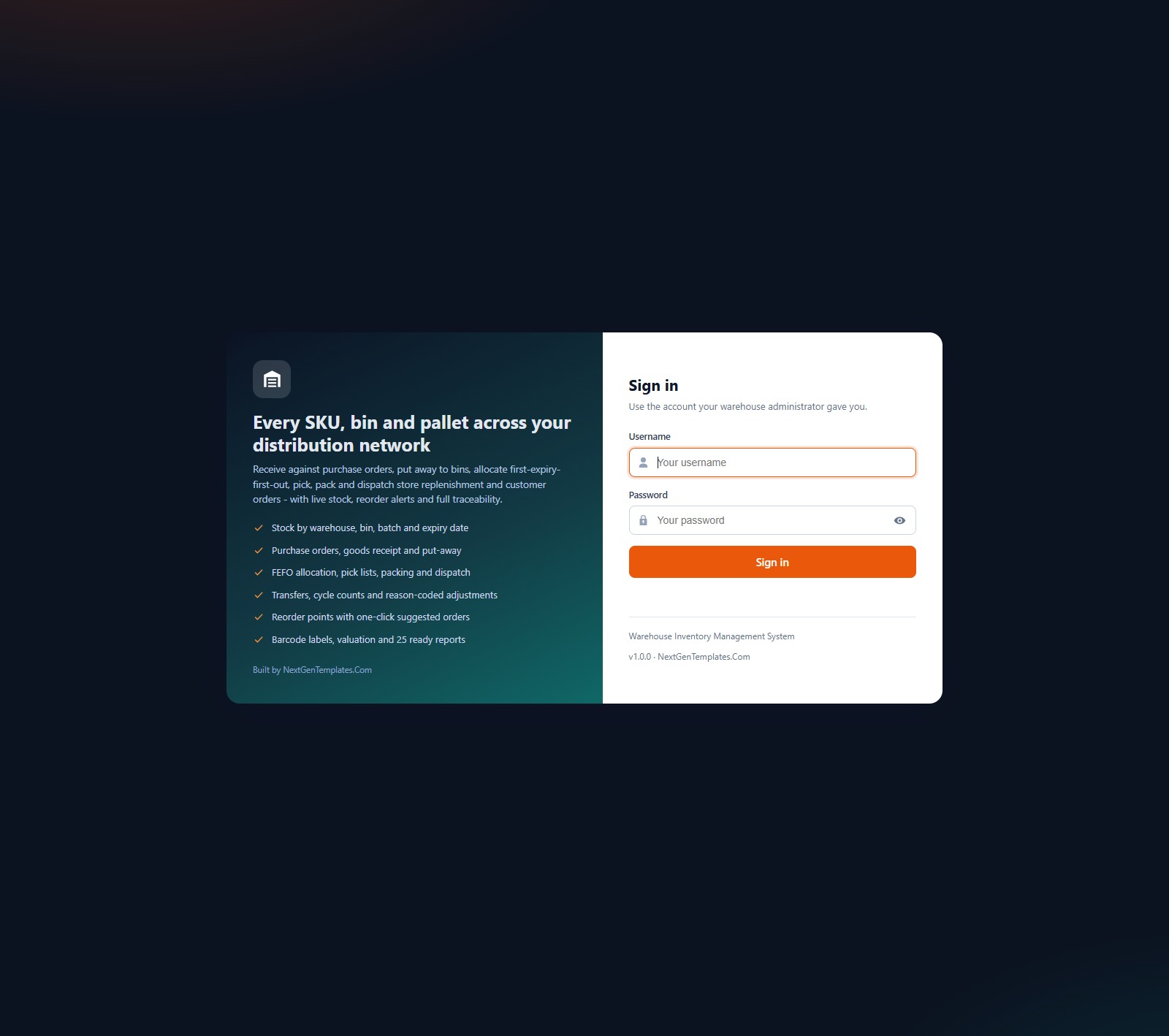
It ranks first because it replaces the register itself, with the ledger, stock by location and purchasing in one place. It runs on Google Apps Script and stores data in a Google Sheet in your own Drive.
Who it is for: wholesalers, distributors and stores running more than one warehouse.
- Stock by bin, batch and expiry, with on hand, allocated and available per lot.
- Purchase orders, goods receipt and put-away.
- FEFO pick, pack and dispatch.
- Transfers, cycle counts and reason-coded adjustments.
- Reorder points with suggested purchase orders, Code 128 barcode labels, and 25 reports with print and CSV export.
- 7 roles and 41 permissions, with a live demo you can try before buying.
Use cases: replace per-warehouse spreadsheets with one ledger; run cycle counts and log every variance with a reason code; print barcode labels at 3 inch, 4 inch or A4; stop short-dated lots being left at the back of the shelf.
Price: $39.99. See the warehouse inventory management system web app.
Best for: outgrowing a free register with batch, expiry or several warehouses.
2. Inventory & Warehouse Master Kit: best value
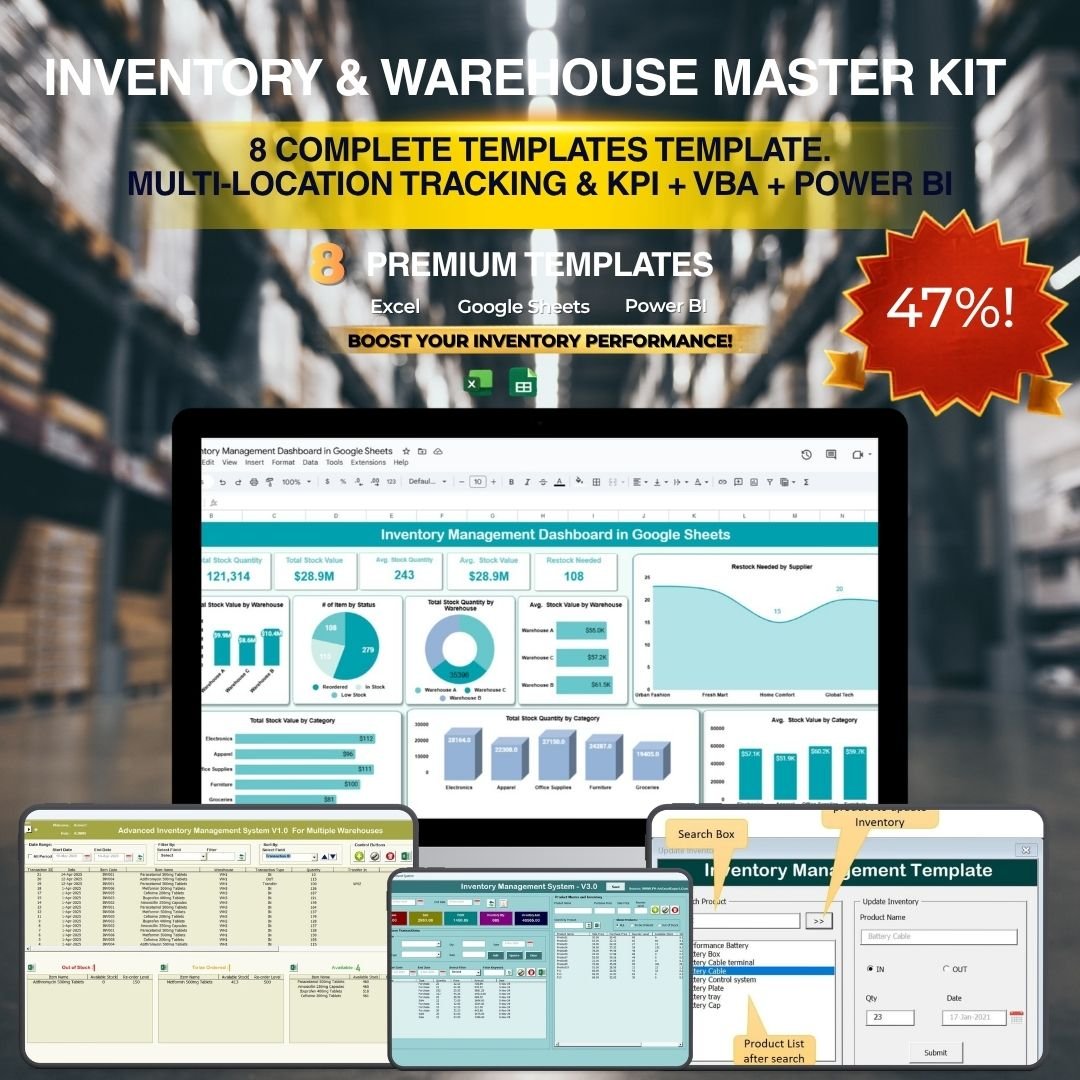
This bundle holds 8 templates across Excel, Google Sheets, VBA and Power BI. The individual total is $109.92 and the bundle is $69.99, a saving of $39.93 (36%).
Who it is for: inventory managers and supply chain leads who want a stock system, dashboards and a KPI scorecard without buying each separately.
- Two VBA management systems (V1.0 and V3.0).
- Multi-location inventory tracking across warehouses.
- KPI scorecard dashboard with MTD, YTD and previous year comparison.
- Power BI dashboard with 5 report pages and supplier analysis.
- Order management with purchases, sales, returns and alerts.
Use cases: run daily stock in VBA, report monthly in Power BI; compare locations in one workbook; show the board a scorecard against target.
Price: $69.99. Get the inventory management Excel and Google Sheets bundle.
Best for: the lowest cost per template and the widest format coverage.
3. Web-based Advanced Inventory Management System
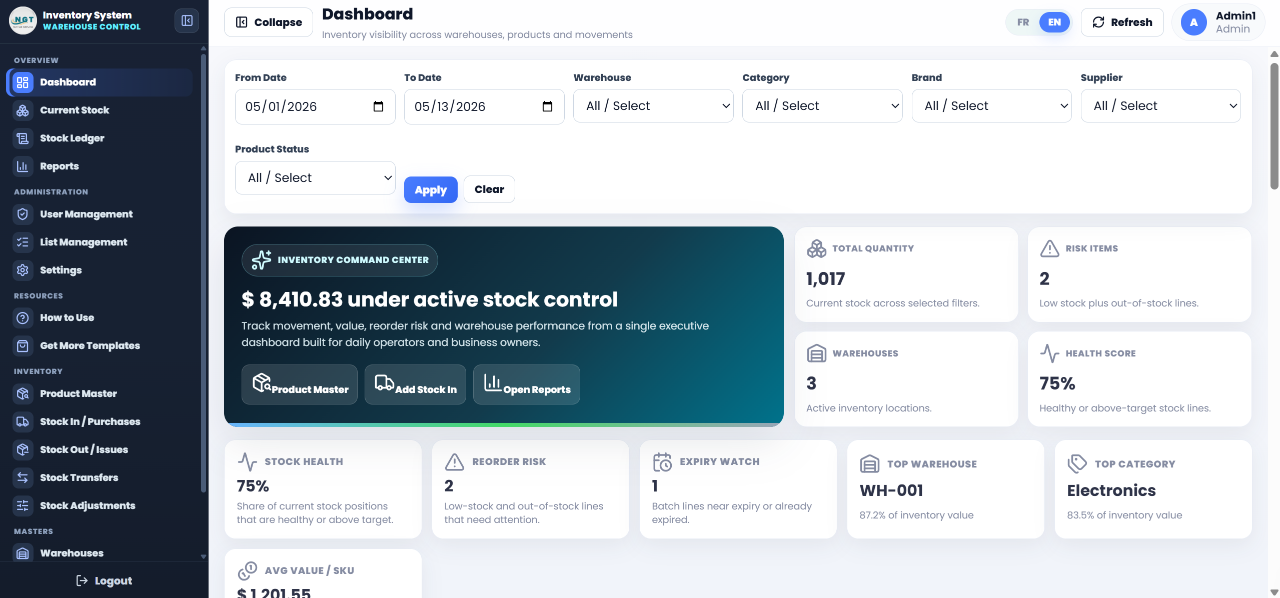
A Google Apps Script web app with Google Sheets as the database. It runs in any browser and the interface switches between English and French with one toggle.
Who it is for: small and mid-sized teams who want a real ledger at a lower price than the full warehouse system.
- 11 operational pages including Dashboard, Current Stock, Stock Ledger, Stock In, Stock Out, Transfers and Adjustments.
- Admin and User roles with login.
- Executive dashboard with KPI tiles and an inward, outward and net-flow chart.
- Multi-warehouse transfers.
- Source code included, with a setup video.
Use cases: log stock in and out the same day as it moves; move stock between warehouses; give staff a limited User view while admins manage masters.
Price: $24.99. Open the web-based inventory management system.
Best for: a bilingual stock ledger at the lowest web-app price.
4. Product Inventory Dashboard in Power BI
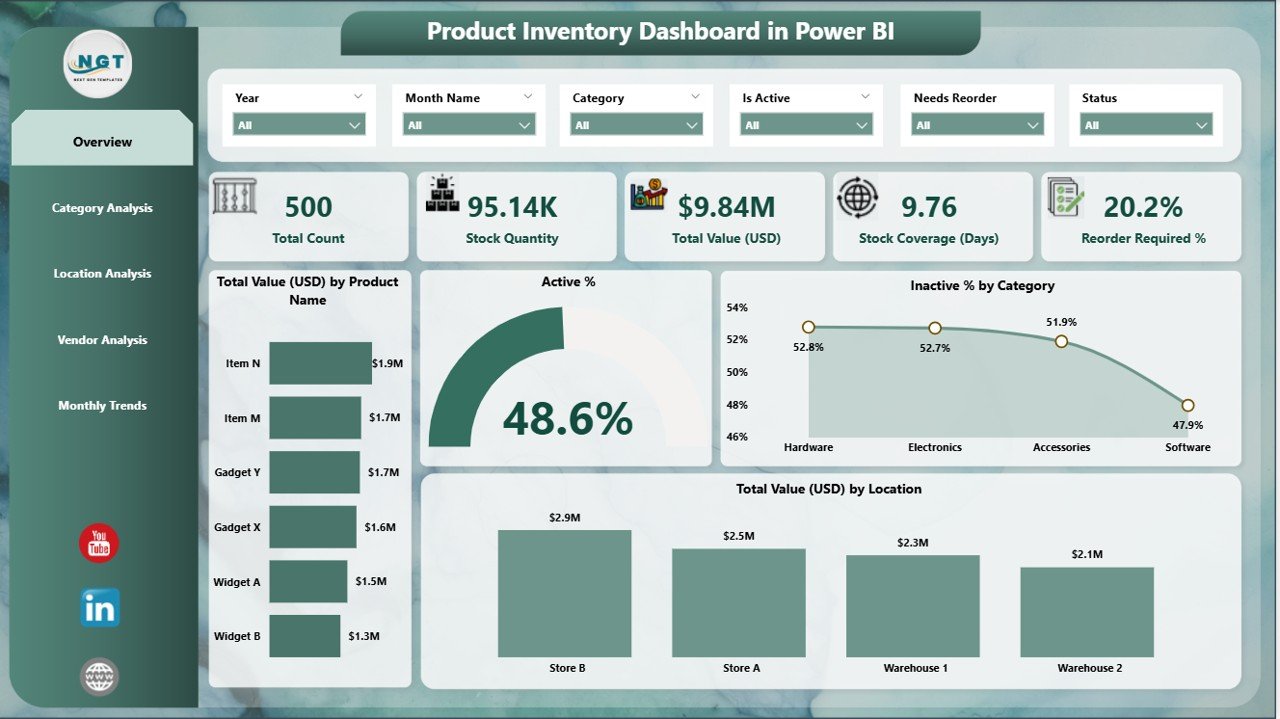
A .pbix file that reads your existing Excel inventory data. Your register stays in Excel, and this turns it into five report pages.
Who it is for: inventory managers, finance teams and procurement leads who already keep stock in a spreadsheet.
- Overview, Category Analysis, Location Analysis, Vendor Analysis and Monthly Trends pages.
- KPIs for total value and active versus inactive percentage.
- Drill-down filters by category and location.
- Works in free Power BI Desktop.
Use cases: spot slow categories; check vendor reliability before the next order; compare stock coverage by warehouse.
Price: $17.99. View the product inventory dashboard in Power BI.
Best for: reporting on a register you want to keep in Excel.
5. Retail Inventory KPI Scorecard in Excel
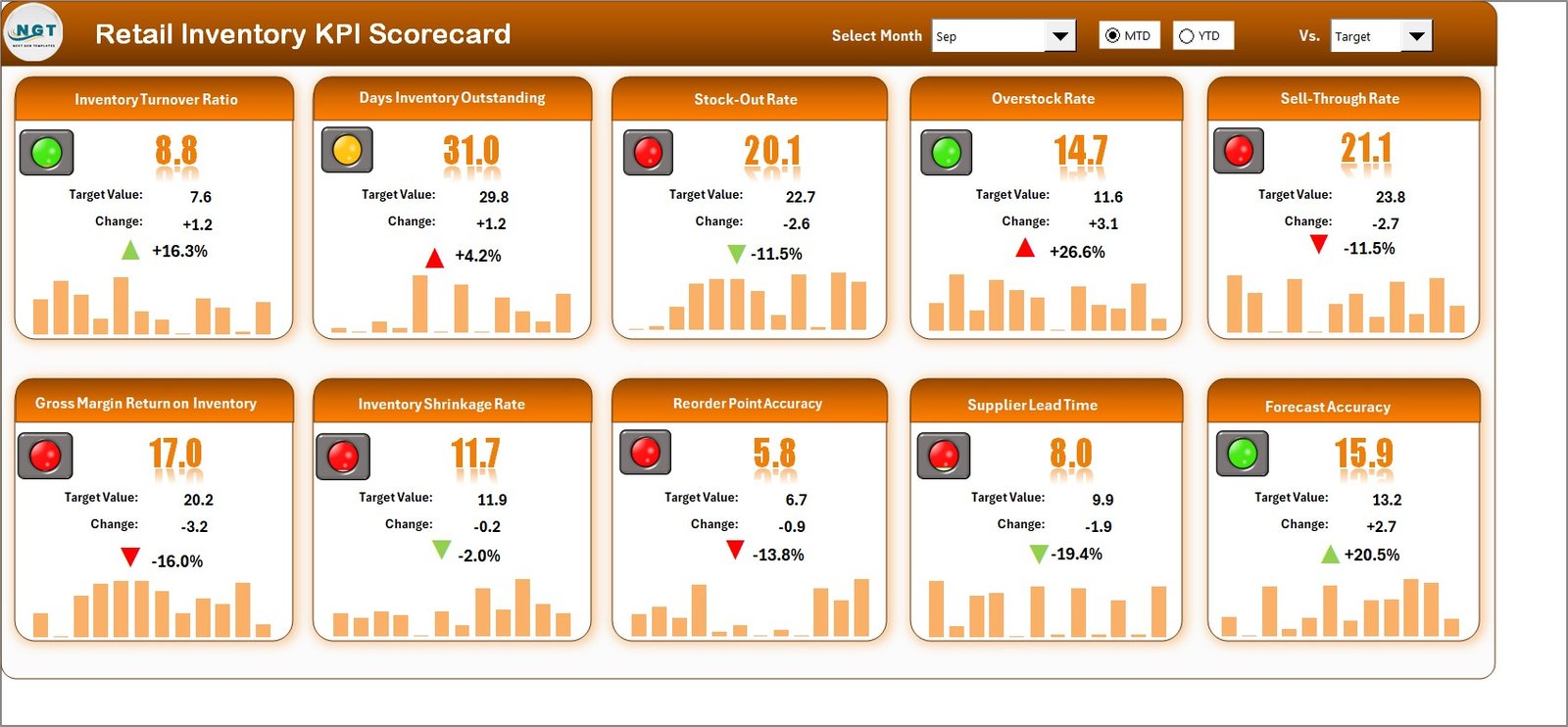
An Excel scorecard with 4 worksheets that compares actual with target, month to date and year to date, plus previous year benchmarks.
Who it is for: retail owners and buyers watching turnover, aging and shrinkage.
- Dynamic month selection and MTD/YTD toggle.
- Actual vs target comparison with green and red indicators.
- KPI trend charts.
- Customizable KPI structure.
Use cases: see whether turnover is above target this month; compare year-over-year growth; give store managers one sheet to review.
Price: $14.99. Try the retail inventory KPI scorecard in Excel.
Best for: retailers who need KPIs, not another register.
6. Inventory Management Dashboard in HTML
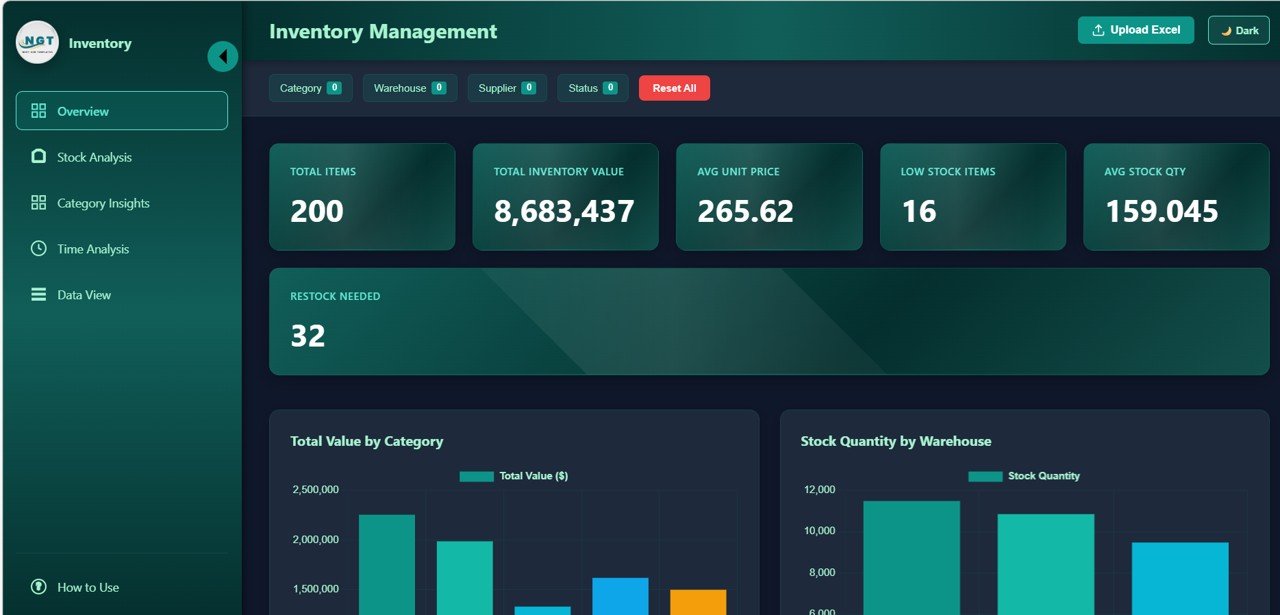
A browser-based dashboard that needs no Excel or Power BI installed. Open the file and use the filters.
Who it is for: warehouse managers and inventory controllers who want visuals fast.
- KPIs: Total SKUs, Stock Value, Turnover Rate, Total Orders, Stockout Rate and Reorder Alerts.
- Stock value by product line, warehouse and category.
- Supplier performance and warehouse analytics.
- Filters by warehouse, category, supplier, stock status and date range.
Use cases: a quick stockout-rate review; compare suppliers by lead time and fulfillment rate; present stock value by category.
Price: $12.99. Get the inventory management dashboard in HTML.
Best for: the cheapest way to see your stock visually.
How do you choose between them?
| If you need | Choose | Price |
|---|---|---|
| One location, under 200 items, no budget | A free register (options 1 to 6) | Free |
| Batch, expiry, bins and several warehouses | Warehouse Inventory Management System Web App | $39.99 |
| A ledger with transfers, bilingual EN/FR | Web-based Advanced Inventory Management System | $24.99 |
| Every format and dashboards in one purchase | Inventory & Warehouse Master Kit | $69.99 |
| Reports on an Excel register you keep | Product Inventory Dashboard in Power BI | $17.99 |
| Retail KPIs against target | Retail Inventory KPI Scorecard in Excel | $14.99 |
| Visuals with no software installed | Inventory Management Dashboard in HTML | $12.99 |
Bundle maths: buying separately costs $109.92 for the 8 templates in the kit. The bundle is $69.99. If you need three or more of its formats, the bundle wins. If you need one web app, buy that app alone.
For other reporting needs, see the free Excel dashboard templates and free Google Sheets dashboard templates roundups.
When is a template NOT the right answer?
Be honest about limits. Buy or subscribe to dedicated software instead if:
- You need live integration with an online store, accounting package or courier system. Spreadsheets and Apps Script apps do not replace a full ERP with automatic sync.
- You hold tens of thousands of SKUs with high daily volumes. Google Sheets has cell limits and gets slow, so a database-backed system is safer.
- Regulation requires an audited trail, such as controlled pharmaceuticals, where you need validated software and vendor support.
- You never count stock. Any register, free or paid, is only as accurate as your last count. Fix the process first.
- You are a one-off seller with 30 items. A free register does the job and a paid system is wasted money.
If the stock is small, a free register plus the other free guides on this site (for example the free timesheet template in Excel, the free payslip template in Excel and the free cash flow statement template) covers most small-business admin.
Frequently asked questions
What is a stock register?
A stock register is a record of every item you hold, showing opening stock, receipts, issues and closing stock for a period. It lets you reconcile physical counts against the book balance and spot shortages, theft or recording mistakes early.
What columns does a stock register need?
At minimum: item code, description, unit of measure, opening stock, receipts, issues, closing stock and reorder level. Add unit cost and stock value if finance uses the register for reporting. A date column or separate transaction sheet helps you trace every movement.
What is the stock register formula in Excel?
Closing stock equals opening stock plus receipts minus issues. With opening in C2, receipts in D2 and issues in E2, enter =C2+D2-E2 in F2 and fill down. For several movements per item, use SUMIFS on a transactions sheet instead.
Where can I download a free stock register template?
Microsoft Create, Vertex42 and the Google Sheets template gallery all offer free inventory spreadsheets. You can also build a blank register in 15 minutes. Whichever you pick, confirm it has separate receipts and issues columns and check the site’s usage terms.
Is a stock register the same as a stock ledger?
Not exactly. A register summarises each item by period, while a ledger records every individual movement with a date. Small businesses often use one sheet for both. Larger operations keep the ledger as the source and the register as a summary of it.
Should I use FIFO or weighted average for stock valuation?
Use whichever your accountant and local rules allow. FIFO costs the oldest stock first and suits perishable goods. Weighted average smooths price changes and is simpler in a spreadsheet. In a rising price market, FIFO shows higher profit than weighted average.
How do I calculate a reorder level?
Multiply average daily usage by supplier lead time in days, then add safety stock. For 8 units a day, a 7 day lead time and 20 units of safety stock, the reorder level is 76 units. Recalculate it each quarter.
When should I move from a free register to paid software?
Move when you manage more than one location, need batch or expiry tracking, have several people editing, or spend more time fixing errors than selling. The Warehouse Inventory Management System Web App costs $39.99 and covers those cases.
Can I use Google Sheets as a stock register?
Yes. Google Sheets works well for small teams because several people can edit at once. Keep a transactions tab and a summary tab using SUMIF so nobody types over formulas. It slows down with very large item lists, so plan an upgrade as you grow.
Get more stock and inventory templates
Best value: Inventory & Warehouse Master Kit, $69.99. 8 templates across Excel, Google Sheets, VBA and Power BI, against $109.92 bought separately.
Get the Inventory & Warehouse Master Kit
Only need one system? The Warehouse Inventory Management System Web App is $39.99. Watch spreadsheet walkthroughs on the NextGenTemplates YouTube channel. Need to document costs too? See our free expense report templates.