



The Internal Communications KPI Dashboard in Excel is an invaluable tool for HR, communication, and marketing teams looking to monitor and optimize internal communication efforts. This Excel-based dashboard allows you to track the effectiveness of your internal communication strategies by monitoring key performance indicators (KPIs), engagement levels, and team collaboration metrics.
With this tool, you can easily track how messages, updates, and company-wide communications are being received by employees. It helps you assess which communication channels are most effective, identify areas where communication can be improved, and make data-driven decisions to ensure that internal communications are clear, efficient, and impactful.
Key Features of the Internal Communications KPI Dashboard in Excel
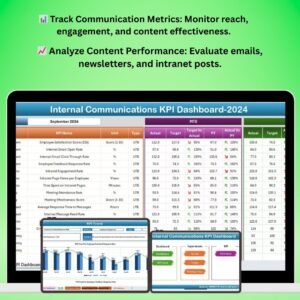
📊 Track Key Communication Metrics
Monitor KPIs such as message reach, employee engagement, content effectiveness, and response times. Assess how well your communications are reaching employees and whether they are engaging with the content.
📈 Content Performance Analysis
Evaluate how internal content, such as newsletters, emails, and intranet posts, is performing. Track views, clicks, and employee interactions to determine the most effective content and formats.
🔄 Channel Effectiveness Tracking
Assess the performance of various communication channels, including email, company intranet, meetings, and social platforms. Identify which channels are most effective in reaching different employee groups.
📅 Engagement Monitoring & Trends
Monitor employee engagement levels over time. Track response rates, participation in internal surveys, and overall interaction with communication initiatives to identify trends and areas for improvement.
📊 Real-Time Data & Visual Reports
Access live tracking and visual reports of communication metrics. Use dynamic charts and graphs to visualize the performance of your communication efforts and make data-driven decisions.
⚙️ Customizable & Scalable Dashboard
This dashboard is fully customizable to meet your organization’s unique communication goals. Add or modify KPIs, change the layout, and adjust tracking criteria to align with your internal communication strategies.
Why You’ll Love the Internal Communications KPI Dashboard in Excel

✅ Optimize Communication Effectiveness
Track and evaluate the effectiveness of your internal communication strategies. Identify which content resonates with employees and which channels are most effective.
✅ Improve Employee Engagement
Monitor engagement with internal communication materials to ensure your messages are reaching employees and prompting the desired actions. Make improvements based on data insights.
✅ Identify Communication Gaps
Use data-driven insights to identify gaps in communication, such as underused channels or low engagement with specific content, and address them to improve overall communication.
✅ Make Informed Decisions
Make data-driven decisions to optimize your internal communication efforts. Use real-time tracking and performance metrics to adjust strategies and improve employee communication.
✅ Fully Customizable to Your Needs
This dashboard is adaptable to any organization’s communication strategy. Customize KPIs, metrics, and layout to reflect your unique internal communication goals.
What’s Inside the Internal Communications KPI Dashboard in Excel?
- Key Communication Metrics: Track KPIs such as message reach, engagement levels, and content effectiveness.
- Channel Performance Tracker: Evaluate the effectiveness of various communication channels like email, intranet, and meetings.
- Engagement Monitoring: Track employee interaction with internal content, including clicks, views, and responses.
- Content Performance Analysis: Monitor the performance of newsletters, intranet posts, emails, and other communication formats.
- Customizable Dashboard & KPIs: Modify the dashboard to track the communication metrics most relevant to your organization.
- Real-Time Reports & Charts: Visualize communication performance using charts and graphs for easy data analysis.
How to Use the Internal Communications KPI Dashboard in Excel
1️⃣ Download the Template: Get immediate access to the Internal Communications KPI Dashboard in Excel.
2️⃣ Set Communication KPIs & Metrics: Customize the dashboard to align with your internal communication goals, such as engagement, reach, and channel performance.
3️⃣ Track Communication Effectiveness: Monitor the success of your communication campaigns and content. Track employee interaction and engagement in real-time.
4️⃣ Analyze Content Performance: Evaluate the effectiveness of different content formats, including emails, intranet posts, and newsletters.
5️⃣ Generate Reports & Insights: Use dynamic charts and visual reports to track trends, analyze data, and optimize future communication strategies.
Who Can Benefit from the Internal Communications KPI Dashboard in Excel?
🔹 HR Teams & Internal Communications Managers
🔹 Marketing & Communications Teams
🔹 Team Leaders & Managers
🔹 Employee Engagement Teams
🔹 Small & Medium Enterprises (SMEs) & Large Corporations
🔹 Nonprofit Organizations and Government Bodies
Improve your internal communication strategies and track engagement metrics with the Internal Communications KPI Dashboard in Excel. Optimize your communication channels, track employee engagement, and use data-driven insights to enhance the effectiveness of your internal communication efforts.
Click here to read the Detailed blog post
Visit our YouTube channel to learn step-by-step video tutorials
Youtube.com/@PKAnExcelExpert
Compatibility and Requirements
- Works in Microsoft Excel desktop (Excel 2016 or later, or Microsoft 365).
- Microsoft’s guide Create a chart from start to finish explains the Excel feature this file is built on.
Frequently Asked Questions
Which KPIs does the Internal Communications KPI Dashboard track?
Message reach, employee engagement, content effectiveness and response times.
Which communication channels can I compare?
Email, the company intranet, meetings and social platforms.
Can I measure newsletters and intranet posts?
Yes. Track views, clicks and employee interactions for newsletters, emails, intranet posts and other formats.
Can I change the KPIs?
Yes. You can add or modify KPIs, change the layout and adjust tracking criteria to fit your goals.
Related Communication and Engagement Templates
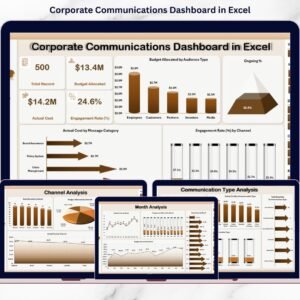
- Corporate Communications Dashboard in Excel: a full communications dashboard
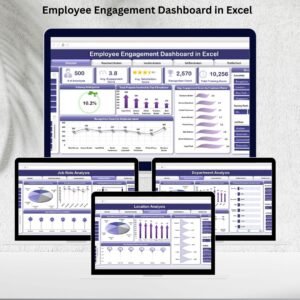
- Employee Engagement Dashboard in Excel: analyze engagement survey results
- Employee Engagement Survey KPI Dashboard in Excel: survey KPIs in Excel
- Office Communication Dashboard In Google Sheets: a browser-based option
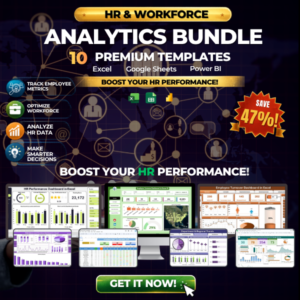
- HR & Workforce Analytics Bundle: 10 HR templates in one bundle
Browse all Excel KPI dashboards or the Excel HR and payroll templates.



Reviews
There are no reviews yet.