

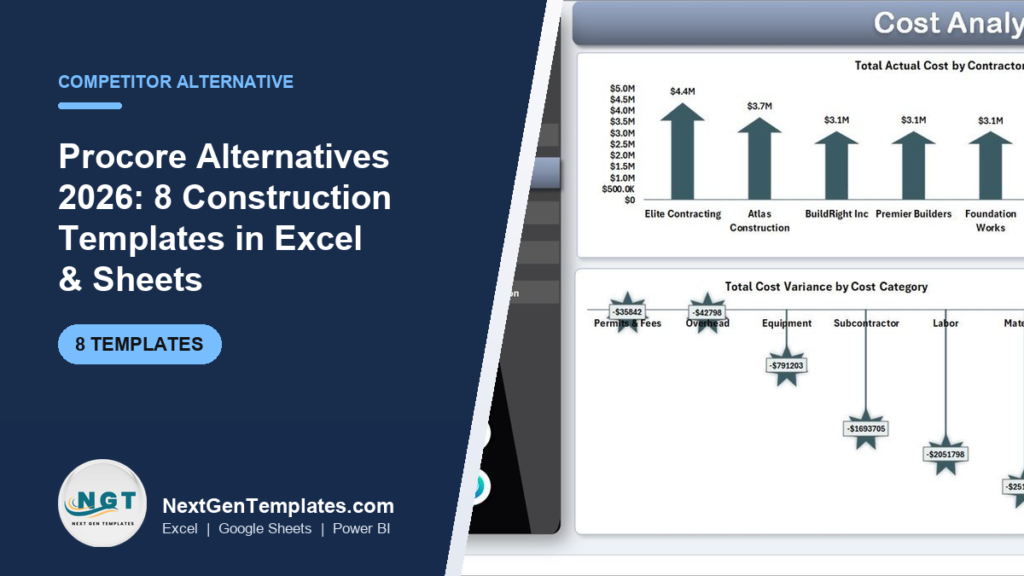
The best Procore alternatives in 2026 are spreadsheet and web-app construction templates that replace its core cost, schedule and reporting modules for a one-time $6.99–$49.99 instead of Procore’s $15,000–$80,000-a-year contract. For small GCs and subcontractors, a $49.99 template kit covers project cost tracking, budgets and dashboards without the annual commitment or implementation fee.
Last updated: September 2026
Key takeaways
- Procore is priced on Annual Construction Volume (ACV), not seats — most contractors pay $15,000–$80,000 per year, plus $50,000+ first-year implementation, per Procore’s official pricing page.
- The Construction Project Intelligence Kit bundles 6 premium templates (Excel + Power BI + Google Sheets) for a one-time $49.99 — the best-value Procore alternative here.
- Need a multi-user, browser-based hub? The Construction Project Management System Web App ($39.99) is the closest single-tool replacement.
- Templates fit small GCs, subcontractors and owners who use one or two Procore modules but pay for the whole platform.
- Procore still wins for 100+ user enterprises needing RFIs, submittals, drawings and field workflows in one audited system — we say exactly when below.
 Launch offer
SUMIFS, XLOOKUP, FILTER, LAMBDA and checking AI-written formulas, with real business projects. 11h 47m of video by PK, with practice files, quizzes and a capstone.
Procore alternatives compared
| Template | Format | Best for | Price |
|---|---|---|---|
| Construction Project Management System Web App | Web App | Best overall — multi-user Procore replacement | $39.99 |
| Construction Project Intelligence Kit (6 templates) | Excel + Power BI + Sheets | Best value — full toolkit in one buy | $49.99 |
| Construction Project Cost Dashboard in Excel | Excel | Budget vs actual cost control | $17.99 |
| Construction Project Cost Dashboard in Google Sheets | Google Sheets | Real-time team collaboration | $9.99 |
| Construction Project Cost Dashboard in HTML | HTML | Web/portal cost display | $12.99 |
| Construction Project Management Dashboard in Google Sheets | Google Sheets | Lowest-cost schedule + task tracking | $6.99 |
| Solar Project Construction Dashboard in Excel | Excel | Solar / renewables contractors | $17.99 |
| Solar Project Construction Dashboard in Power BI | Power BI | Executive BI reporting | $17.99 |
Why small teams leave Procore
Procore is an excellent platform — the issue is its shape, not its quality. It is sold on an annual ACV licence, so a small general contractor doing $10–50M of work typically pays $15,000–$30,000 a year, and mid-size firms $30,000–$80,000, according to independent pricing analyses. Three patterns push smaller teams toward alternatives:
- The annual floor is fixed. Even if you only run 3–4 active jobs, the licence and effective ~0.1–0.2% of ACV do not shrink to match. A quiet quarter still costs the same.
- You pay for modules you never open. Firms that live in cost, budget and schedule still fund RFIs, submittals, drawings, BIM and field productivity — Procore is priced as a bundle, not a menu.
- Admin and onboarding overhead. First-year implementation commonly adds $50,000+, plus the internal time to configure workflows and train crews before value appears.
If your real need is “track budget vs actual, keep a schedule, and show a clean dashboard to the owner,” a one-time template does that job for the price of a lunch. Below is a head-to-head on the modules that matter most.
Procore feature vs template equivalent
| Procore module | NGT template that covers it | One-time price |
|---|---|---|
| Project financials / budgets | Construction Project Cost Dashboard in Excel | $17.99 |
| Portfolio & project management | Construction Project Management System Web App | $39.99 |
| Executive analytics / reporting | Solar Project Construction Dashboard in Power BI | $17.99 |
| Team collaboration / shared access | Construction Project Cost Dashboard in Google Sheets | $9.99 |
| Schedule & task tracking | Construction Project Management Dashboard in Google Sheets | $6.99 |
| Owner/client web portal view | Construction Project Cost Dashboard in HTML | $12.99 |
| Everything above, discounted | Construction Project Intelligence Kit (6 templates) | $49.99 |
How we picked these
We searched NextGenTemplates’ construction and project catalog and shortlisted paid templates that map directly onto the Procore modules small teams actually use — cost, budget, schedule, portfolio and executive reporting. We prioritised tools available in more than one format (Excel, Google Sheets, Power BI, HTML and web app) so you can match your existing stack, ruled out free or single-metric files that could not stand in for a platform module, and ranked the multi-user web app and the 6-template kit highest because they replace the most Procore functionality per dollar.
The 8 best Procore alternatives for 2026
1. Construction Project Management System Web App — best overall
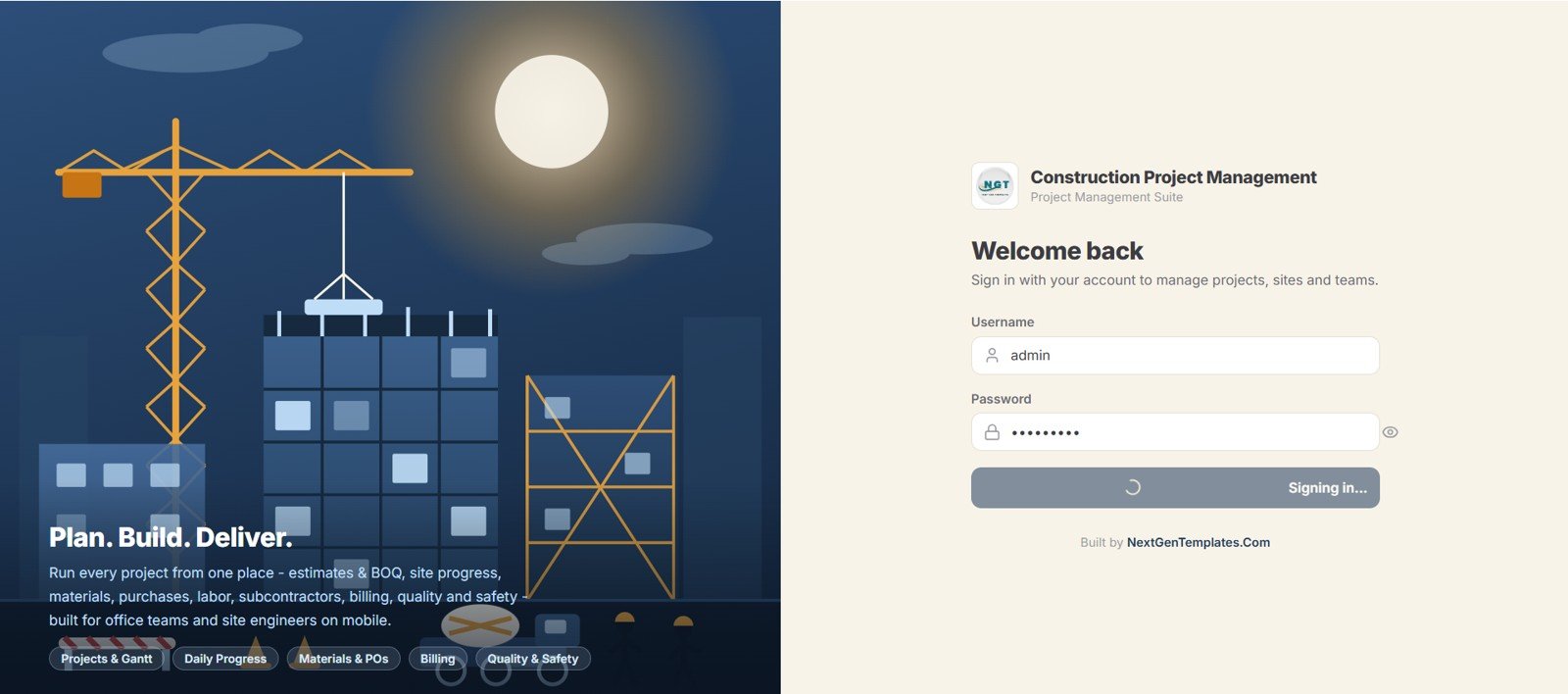
This browser-based system is the closest single-tool stand-in for Procore’s centralised hub. It runs multiple projects, tasks, resources and budgets from one interface your whole team logs into.
- Who it is for: small-to-mid GCs and subcontractors who want a shared, always-on project hub, not a spreadsheet emailed around.
- What is inside: project register, task and milestone tracking, resource allocation, budget vs actual, and status dashboards in a clean web UI.
- No monthly seat fees — one payment, unlimited internal use.
A 12-crew remodeler can run 8 concurrent jobs, flag the two that are over budget, and reassign labour the same afternoon. An owner-builder can hand a subcontractor a login instead of chasing PDF updates. Where Procore would bill five figures a year for this, the web app is a single purchase.
Price: $39.99 — get the Construction Project Management Web App.
Best for: teams that need multi-user access without a platform subscription.
2. Construction Project Intelligence Kit — best value

Six premium construction templates spanning Excel, Power BI and Google Sheets in one bundle — the widest Procore coverage for the lowest per-template cost on this list.
- Who it is for: firms that want the whole cost-and-reporting toolkit at once rather than buying files one at a time.
- What is inside: multiple construction dashboards, KPI and cost views across three formats, so office and field staff each get the tool they prefer.
- Roughly $8.33 per template versus $9.99–$17.99 bought separately.
A growing contractor can put the Excel cost model on the estimator’s desk, publish the Power BI dashboard to the owner, and share the Google Sheet with site supervisors — all from one purchase. It is the natural upgrade from a single dashboard once you are running several jobs.
Price: $49.99 — get the Construction Project Intelligence Kit.
Best for: maximum module coverage in a single, discounted buy.
3. Construction Project Cost Dashboard in Excel — best for cost control
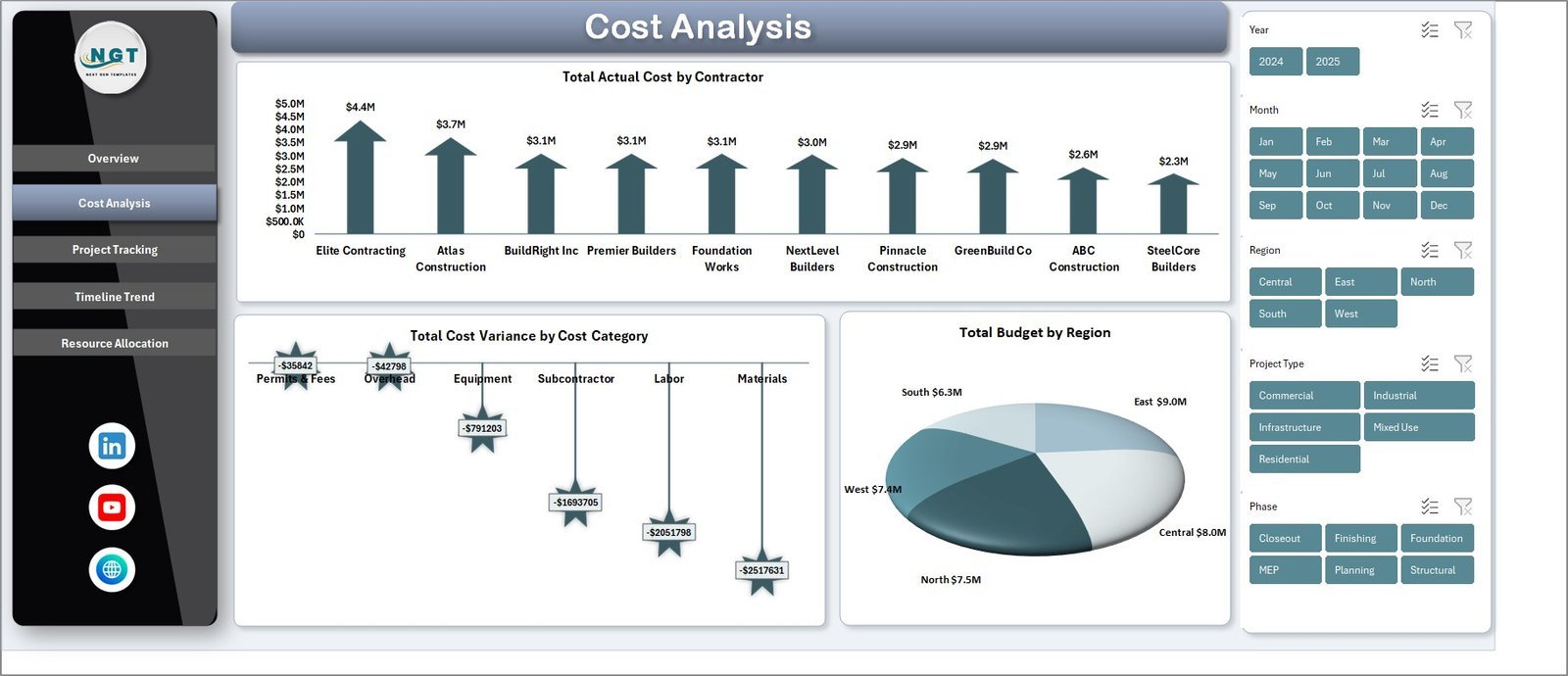
This is the direct replacement for Procore’s project-financials module. It tracks budget vs actual cost by contractor and category, then visualises variance so overruns are obvious at a glance.
- Who it is for: project managers and QS who live in cost codes and need a fast budget-vs-actual read.
- What is inside: cost-by-contractor and cost-variance-by-category charts, KPI cards, and a structured data sheet you update as invoices land.
- Pure Excel — no add-ins, macros or subscriptions.
Enter a $4.4M contractor commitment against a $3.7M budget and the variance chart shows the $700K gap immediately. Roll five subcontractors into one view to see which trade is bleeding margin. It is the single most useful file for teams whose only real Procore need is money.
Price: $17.99 — get the Excel cost dashboard.
Best for: budget vs actual cost control in Excel.
4. Construction Project Cost Dashboard in Google Sheets — best for collaboration

The same cost-tracking logic as the Excel version, rebuilt for Google Sheets so several people can edit the same live file. This is where Procore’s collaboration value gets replaced for $9.99.
- Who it is for: distributed crews and PMs who need one shared source of truth, not versioned attachments.
- What is inside: live budget-vs-actual dashboard, cost-category breakdowns and KPIs that recalculate as the field updates numbers.
- Works on any device with a browser — no licences to assign.
A site engineer can log a change order from a phone and the office sees the revised forecast instantly. Share view-only with the client so they track spend without touching formulas. For teams already on Google Workspace, this is the frictionless swap.
Price: $9.99 — get the Google Sheets cost dashboard.
Best for: real-time, multi-editor cost tracking.
5. Construction Project Cost Dashboard in HTML — best for portal display
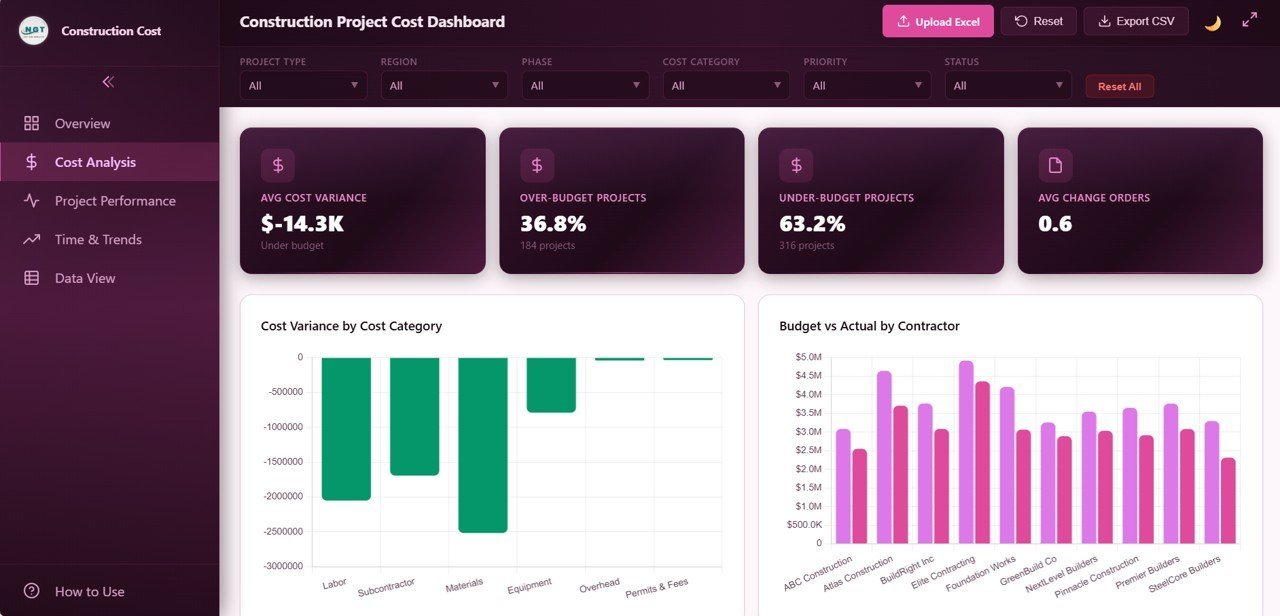
A standalone web dashboard you can host or embed — ideal when you want an owner or client to see cost status in a browser without opening a spreadsheet.
- Who it is for: firms that present to clients and want a polished, read-only web view.
- What is inside: responsive HTML cost dashboard with charts and KPIs, editable through its underlying data.
- Drops into a client portal, intranet or shared link.
Publish it to a project subdomain so the developer-client checks spend without a Procore seat. Because it is plain HTML, your web team can restyle it to match brand colours. It fills the “external stakeholder view” gap that otherwise justifies a platform login.
Price: $12.99 — get the HTML cost dashboard.
Best for: client-facing web cost displays.
6. Construction Project Management Dashboard in Google Sheets — best budget option
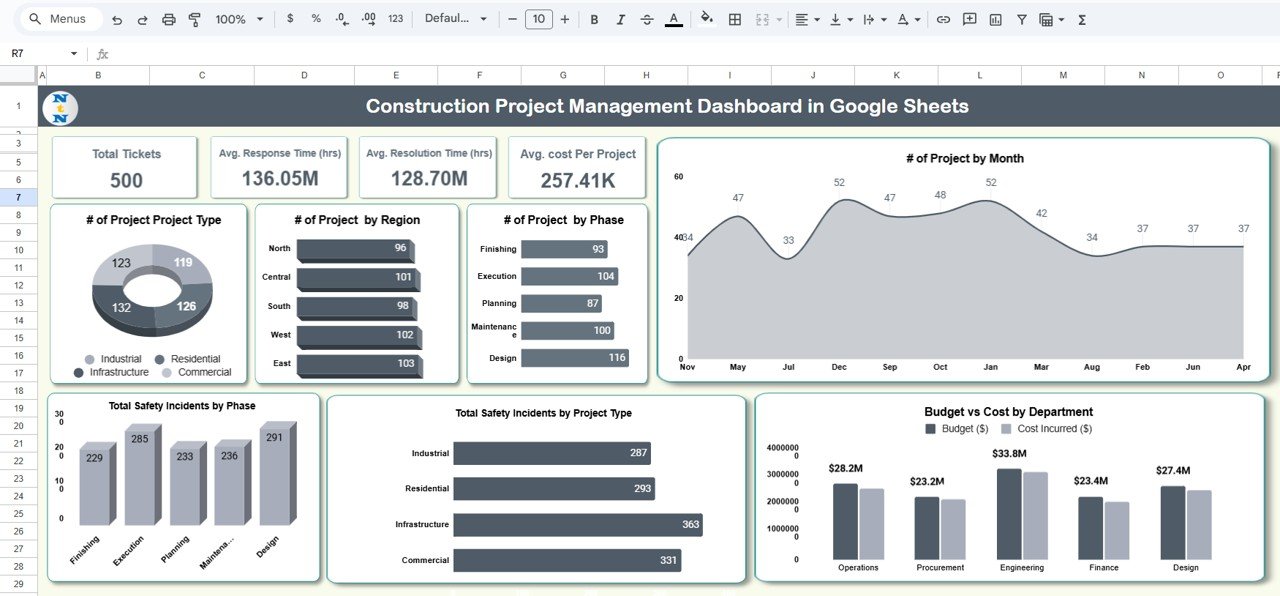
At $6.99 this is the cheapest way to replace Procore’s schedule and task-tracking basics. It covers project status, tasks and milestones in a shared Google Sheet.
- Who it is for: solo builders and micro-teams testing whether they need software at all.
- What is inside: project and task tracker, milestone and status views, and a summary dashboard tab.
- The lowest-risk starting point on this list.
Track 15 tasks across two jobs, mark blockers, and see percent-complete without touching a Gantt licence. When you outgrow it, step up to the web app or the kit. For a one-person operation deciding if Procore is overkill, $6.99 answers the question cheaply.
Price: $6.99 — get the budget PM dashboard.
Best for: the cheapest schedule-and-task replacement.
7. Solar Project Construction Dashboard in Excel — best for renewables
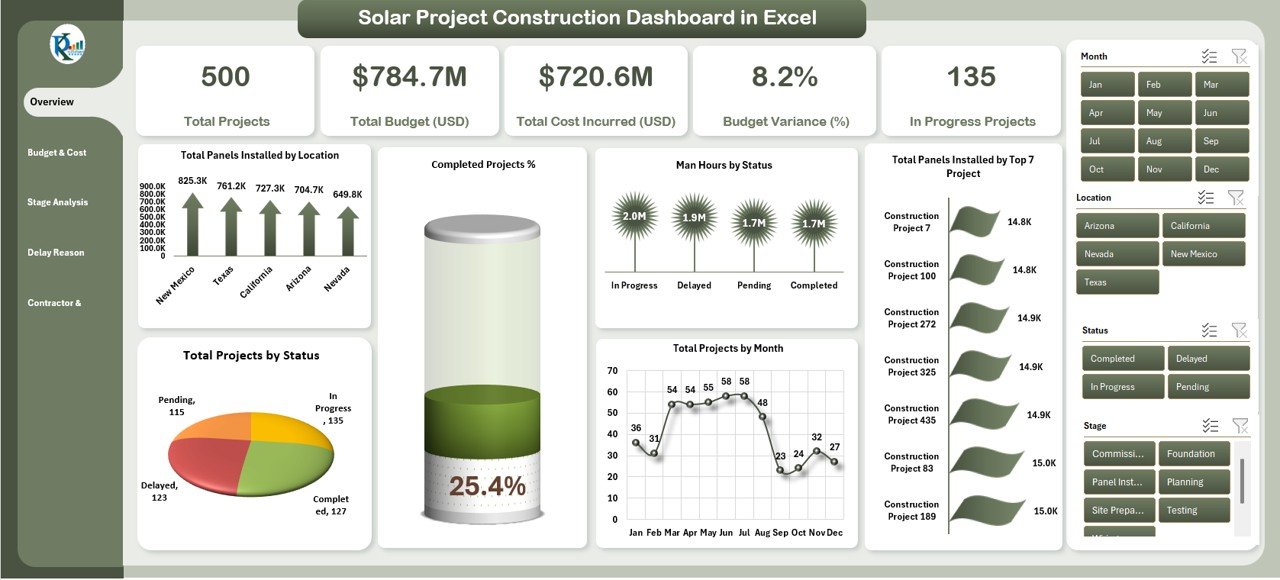
A construction dashboard tuned for solar and renewable-energy builds, tracking installation progress, cost and milestones for panel and infrastructure projects.
- Who it is for: solar EPCs and renewable contractors who find generic PM software a poor fit.
- What is inside: project progress, cost tracking and capacity/milestone views built around solar workflows.
- Excel-native, so estimators can adapt cost codes freely.
Track MW installed against plan across three sites, watch cost per watt, and flag the array that is behind schedule. It gives renewables teams a purpose-built view Procore’s general modules do not, at a one-time price.
Price: $17.99 — get the solar Excel dashboard.
Best for: solar and renewable construction tracking.
8. Solar Project Construction Dashboard in Power BI — best for BI reporting
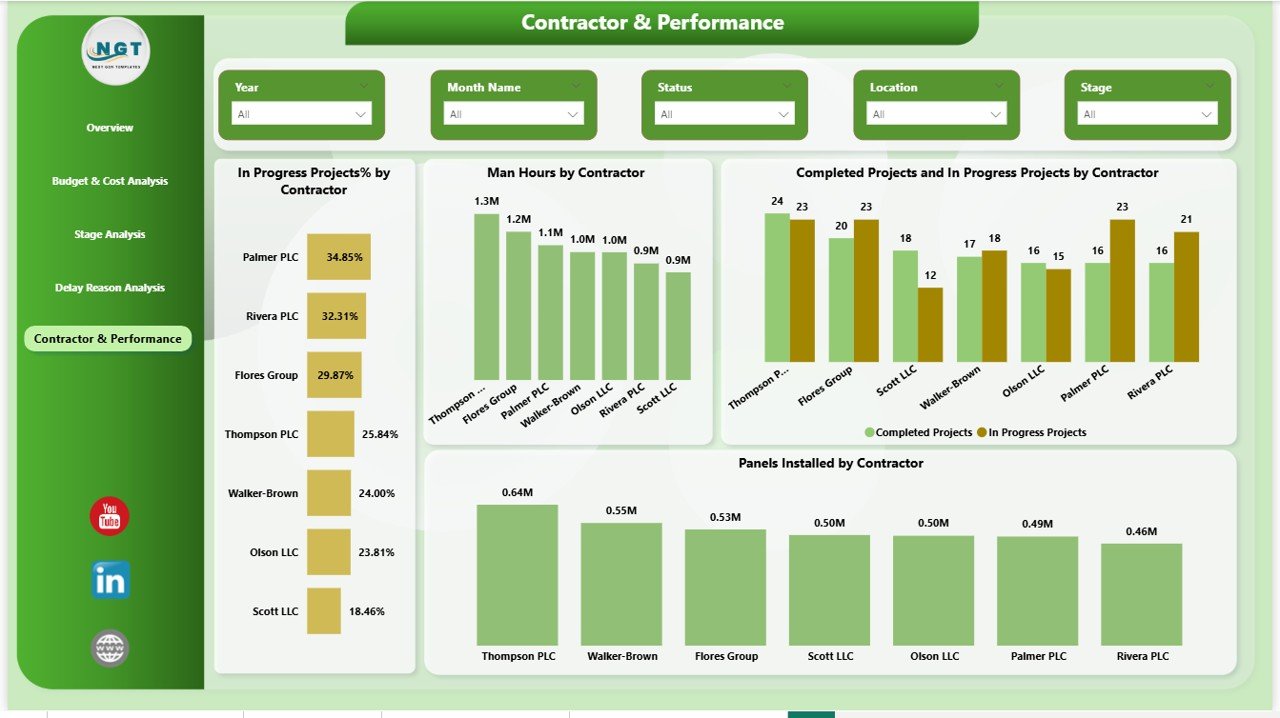
The Power BI edition turns the same solar-construction data into an interactive executive dashboard — the answer when leadership wants slicers and drill-downs, not a static sheet.
- Who it is for: portfolio owners and executives who report across multiple projects.
- What is inside: interactive Power BI report with filters, KPI visuals and project-level drill-through.
- Refreshes from your data so board decks build themselves.
Filter a 20-site portfolio to one region, compare cost variance across projects, and export a clean visual for the monthly review. It replaces the analytics layer that makes Procore’s higher tiers expensive, for a single payment.
Price: $17.99 — get the solar Power BI dashboard.
Best for: interactive executive construction reporting.
How to choose between them
- Want the closest all-in-one Procore swap? Start with the Construction Project Management Web App ($39.99).
- Want the most coverage per dollar? Buy the Intelligence Kit ($49.99).
- Only need cost control? Excel for solo work, Google Sheets for a shared team, HTML for client-facing views.
- On the tightest budget? The $6.99 Google Sheets PM dashboard.
- In solar/renewables? Excel for the field, Power BI for the boardroom.
When Procore is still the right call
Templates are not a like-for-like platform, and pretending otherwise would cost you money. Choose Procore (or a comparable construction platform) when:
- You run 100+ users across office and field and need role-based permissions, a full audit trail and a single system of record.
- RFIs, submittals, drawings and change-order approvals must live in one connected, timestamped workflow for compliance or litigation protection.
- Mobile field capture — daily logs, photos, punch lists, inspections from the jobsite — is core to how you work.
- Integrations with accounting (Sage, QuickBooks) and ERP need to be native and supported, not manual exports.
- You are scaling fast and the cost of a missed submittal or unmanaged RFI dwarfs the licence fee.
Templates shine for small teams, single-module needs, and firms that want cost and reporting without a subscription. If your risk and headcount are enterprise-scale, the platform earns its price — and the honest answer is to buy it. Many firms also run both: templates for fast estimating and owner reporting, the platform for field compliance.
How to migrate off Procore in a weekend
Switching does not have to be disruptive. Most small teams move their live cost and schedule data across in a day or two:
- Export your Procore financials. Pull budget, committed cost and actuals to CSV from the reports module while your contract is still active.
- Pick your spine. Choose the cost dashboard (Excel, Sheets or HTML) that matches how your team already works, and paste the exported figures into its data tab.
- Rebuild the schedule. Move active tasks and milestones into the Google Sheets PM dashboard or the web app, then share access with the crew.
- Run parallel for one cycle. Keep Procore for a single billing period while you confirm the templates capture everything you rely on, then cancel before the annual renewal — the point where the savings actually land.
Because the templates are one-time purchases, there is no rush to decide: you own the files whether you migrate this month or next.
Frequently asked questions
How much does Procore cost in 2026?
Procore does not publish public pricing. It charges an annual fee based on your Annual Construction Volume, not per user. Independent analyses put small GCs at roughly $15,000–$30,000 a year and mid-size firms at $30,000–$80,000, with first-year implementation often adding $50,000 or more.
What is the cheapest Procore alternative?
The Construction Project Management Dashboard in Google Sheets at $6.99 is the cheapest option here. It covers project, task and milestone tracking — the schedule basics — in a shared sheet, making it the lowest-risk way to test whether you need construction software at all.
Can a spreadsheet really replace Procore?
For cost tracking, budgets, schedules and reporting — yes, especially for small teams using only one or two Procore modules. Spreadsheets cannot replace RFIs, submittals, drawing management, mobile field capture or role-based audit trails, which is why enterprises still need the platform.
Does Procore charge per user?
No. Procore’s model gives unlimited users and is priced on Annual Construction Volume instead. That is good for large teams but means a small firm with only a few active jobs still pays a fixed five-figure annual fee, which is why many switch to one-time templates.
Which Procore alternative is best for solar contractors?
The Solar Project Construction Dashboard in Excel ($17.99) for field and estimating teams, or the Power BI edition ($17.99) for executive reporting. Both are purpose-built for solar and renewable installs, tracking capacity, cost and milestones better than Procore’s general-purpose modules.
Are these templates one-time purchases or subscriptions?
Every template on this list is a one-time purchase with no recurring fee. You buy the file once, own it, and keep using it across unlimited projects — the opposite of Procore’s annual ACV contract that renews every year whether your volume grows or shrinks.
What is the best value Procore alternative?
The Construction Project Intelligence Kit at $49.99 bundles six premium templates across Excel, Power BI and Google Sheets — about $8.33 each. It gives the widest module coverage for the lowest per-template cost, making it the best value for firms that want a complete toolkit.
Do I need Excel or Power BI experience to use these?
Basic spreadsheet skills are enough for the Excel and Google Sheets dashboards — you update the data table and charts recalculate. The Power BI version needs the free Power BI Desktop app. The web app requires no technical skill; it runs in a browser like any website.
Can multiple people use these templates at once?
Yes. The Google Sheets dashboards and the Construction Project Management Web App support multiple simultaneous users. Excel and Power BI files can be shared via OneDrive or SharePoint for co-editing. Unlike Procore, there are no per-seat charges for adding people.
Will a template scale as my construction business grows?
To a point. Templates handle small and mid-size operations well. As you approach 100+ users, heavy RFI/submittal volume or strict compliance needs, a platform like Procore becomes worth it. Many firms run templates alongside a platform, using each for what it does best.
Get more construction templates
The fastest way to leave Procore’s annual bill behind is the Construction Project Intelligence Kit — 6 premium Excel, Power BI and Google Sheets templates for a one-time $49.99. Prefer a single tool? The Construction Project Management Web App ($39.99) is the closest all-in-one swap, and the Construction Project Cost Dashboard in Excel ($17.99) is the quickest win for cost control.
Comparing other tools too? See our guides to Power BI Premium alternatives, Trello alternatives for project management, Domo alternatives, Salesforce alternatives, QuickBooks alternatives, Xero alternatives and Gusto payroll alternatives.
Watch template walkthroughs on the NextGenTemplates YouTube channel.