

The best Deputy alternative in Excel or Google Sheets is a one-time shift scheduling template that builds the rota, records attendance and exports hours without a per-user subscription. Our top pick is the Employee Shift Schedule in Google Sheets ($6.99, paid once), which replaces Deputy’s core rota screen for less than a quarter of one month’s minimum invoice.
Last updated: August 2026
Related guide: If payroll rather than rostering is what you are trying to get off, see Gusto alternatives: 6 payroll templates in Excel & Sheets.
Key takeaways
- Deputy publishes three plans – Lite at $5, Core at $6.50 and Pro at $9 per user per month – plus a minimum monthly spend of USD $30 per invoice, so a four-person team pays $360 a year no matter how little it uses.
- All 6 templates in this guide are one-time purchases between $6.99 and $14.99, with no per-user fee, no minimum invoice and no annual renewal.
- Best overall is the Employee Shift Schedule in Google Sheets ($6.99); best value is the Smart Attendance Manager in Excel VBA ($6.99), a full clock-in app for the price of a plain sheet.
- The whole six-template stack costs $55.94 once – less than two months of Deputy’s minimum invoice, and under four weeks of a ten-person Core plan.
- Spreadsheets win on cost and control but lose on award interpretation, GPS clock-in and staff-initiated shift swaps – we say exactly when to stay on Deputy.
 Launch offer
SUMIFS, XLOOKUP, FILTER, LAMBDA and checking AI-written formulas, with real business projects. 11h 47m of video by PK, with practice files, quizzes and a capstone.
Why small teams leave Deputy – and what it actually costs
Deputy is a strong rostering product, and for a multi-site hospitality group it is worth every cent. Small teams still churn off it, and the reasons cluster into three.
1. The minimum invoice, not the seat price, is what stings. As published on the official Deputy pricing page (checked August 2026), Deputy runs Lite at $5, Core at $6.50 and Pro at $9 per user per month, billed monthly or upfront. Those are reasonable headline numbers. What catches small teams out is the minimum monthly spend of USD $30 per invoice, in force since 1 September 2025. A four-person cafe on Lite does the sum as 4 x $5 = $20 a month. The bill arrives at $30. Their effective rate is $7.50 per user – more than Core, on the cheapest plan. Below six users on Lite, or below five on Core, you are paying for people you do not employ.
2. You pay for modules you never open. Deputy’s cheaper plans get thinner as the add-ons multiply: HR at $2 per user per month, Messaging+ at $1.95, Analytics+ at $1.50, and Deputy Payroll enabled by Paycor at $8 per user per month plus a $49 monthly base fee. Stack Core with the three small add-ons and a ten-person team is on $11.95 per user – $119.50 a month, or $1,434 a year. Most of that team uses one screen: this week’s rota.
3. Admin overhead. Someone has to own the system – invite and deactivate users, keep locations and areas tidy, fix a timesheet that clocked out at 3am, and re-onboard every seasonal hire. In a business with high casual turnover, the account admin work can outrun the scheduling work it supports.
A template flips all three. You pay once, you own the file, every formula is visible, and there is nothing to administer beyond the sheet itself. Here is the arithmetic most switchers run:
| Team size & plan | Deputy per month | Deputy per year | Six NGT templates |
|---|---|---|---|
| 4 staff, Lite ($5) | $30 (minimum applies) | $360 | $55.94 once |
| 5 staff, Core ($6.50) | $32.50 | $390 | $55.94 once |
| 10 staff, Core ($6.50) | $65 | $780 | $55.94 once |
| 10 staff, Core + HR + Messaging+ + Analytics+ | $119.50 | $1,434 | $55.94 once |
| 25 staff, Pro ($9) | $225 | $2,700 | $55.94 once |
Every figure in the Deputy columns repeats next year. The $55.94 does not. On the smallest plan the entire template stack pays for itself in under two months; on a ten-person Core plan, in under four weeks.
Deputy vs the NGT template that covers it
Feature by feature. On the left, the job you are paying Deputy to do; on the right, the template that does the same job once.
| What Deputy charges for | NGT template that covers it | One-time price |
|---|---|---|
| Weekly rota building & shift publishing | Employee Shift Schedule in Google Sheets | $6.99 |
| Time & attendance records | Automated Attendance Sheet in Excel | $6.99 |
| Clock-in / clock-out capture & timesheet database | Smart Attendance Manager in Excel VBA | $6.99 |
| Headcount & labour demand forecasting (Pro + Analytics+) | Workforce Planning KPI Dashboard in Excel | $12.99 |
| Shift reminders & team notifications (Messaging+ add-on) | Hourly Auto Email with Scheduler | $6.99 |
| Recurring tasks & compliance checks (Deputy Tasks) | KPI Tracking Schedule in Excel | $14.99 |
Deputy alternative templates compared
Every template in this guide, side by side. Two rows are flagged: one best overall and one best value.
| Template | Format | Best for | Price |
|---|---|---|---|
| Employee Shift Schedule (Best overall) | Google Sheets | The weekly rota itself, shared by link | $6.99 |
| Automated Attendance Sheet | Excel | Daily attendance marking and monthly summaries | $6.99 |
| Smart Attendance Manager (Best value) | Excel VBA | Clock-in app with a real timesheet database | $6.99 |
| Workforce Planning KPI Dashboard | Excel | Headcount, labour cost and demand forecasting | $12.99 |
| Hourly Auto Email with Scheduler | Excel VBA | Automatic rota and reminder emails | $6.99 |
| KPI Tracking Schedule | Excel | Recurring shift tasks and compliance checks | $14.99 |
How we picked these
We searched the NextGenTemplates catalogue of roughly 6,900 published products for scheduling, rostering, attendance, timesheet and workforce templates in Excel, Google Sheets and Excel VBA, then filtered to the ones that reproduce the jobs a small team actually opens Deputy to do: build next week’s rota, record who turned up, total the hours, forecast the headcount, and nudge people about their shift. We excluded generic calendars with no staff dimension, single-industry dashboards that would fit one niche only, and anything without editable formulas – a rostering tool you cannot bend to your own shift pattern is not a replacement. Every template below is paid, one-time, and ships with the logic exposed so you can rename shifts, add locations or change the week start without asking anyone’s support desk.
The 6 best Deputy alternative templates for 2026
1. Employee Shift Schedule in Google Sheets – best overall
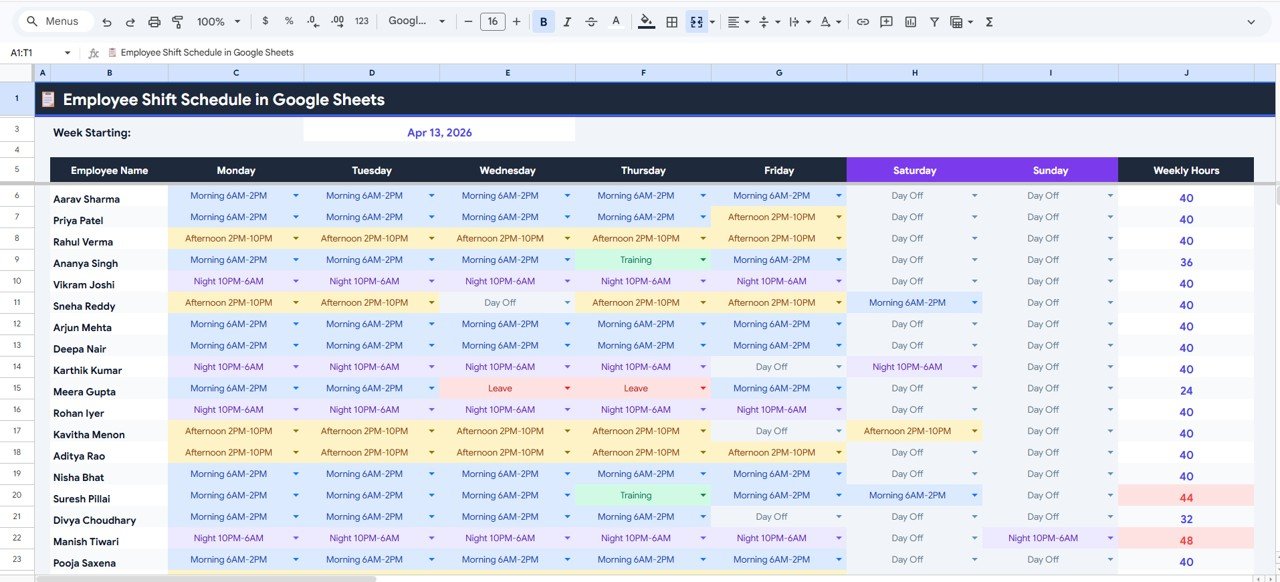
This is the one screen Deputy users actually live in, rebuilt as a spreadsheet: a week-by-week grid of employees down the side, days across the top, and a shift in every cell. It is our number one pick for a simple reason – it is the only template here that replaces Deputy’s core product rather than one of its satellites, and because it lives in Google Sheets it keeps the thing people value most about Deputy: staff open a link on their phone and see the roster, with no app to install and no seat to license.
Who it is for: cafes, clinics, salons, retail floors and small warehouses running 3 to 25 staff on repeating weekly shift patterns.
What is inside:
- Weekly shift grid with dropdown shift codes and colour-coded cells
- Automatic weekly hours per employee, so you see overtime forming before it happens
- An employee master list that feeds every dropdown – add a hire once, it appears everywhere
- Week-start control, so the rota follows your pay week rather than the calendar
In practice: build the pattern once, then copy the tab each week and change the exceptions – most managers report the second week takes under ten minutes. Share it view-only with staff and edit-only with supervisors, which is the same permission model Deputy charges per user for. A five-person team leaving Core recovers the $6.99 in under a week of avoided subscription. If you also need the people records behind the roster, pair it with the templates in our BambooHR alternatives guide.
Best for: the single closest Deputy-to-spreadsheet swap. $6.99 – view the template.
2. Automated Attendance Sheet in Excel
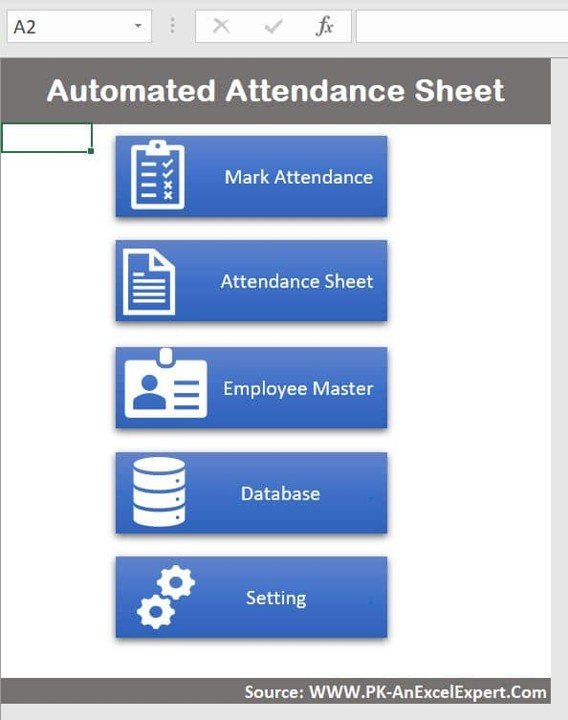
A rota tells you who was supposed to work. Attendance tells you who did. This Excel workbook is the second screen Deputy customers open: a menu-driven attendance system with a Mark Attendance button, an attendance sheet, an employee master and a database behind it.
Who it is for: managers who need a defensible record of present, absent, half-day and leave – for payroll, for disputes, and for the end-of-month total.
What is inside:
- Button-driven navigation – Mark Attendance, Attendance Sheet, Employee Master, Database, Setting
- Present / absent / half-day / leave statuses with monthly totals per employee
- A settings sheet for company name, month and employee list
- A flat database sheet you can pivot or hand straight to a bookkeeper
The payoff is the month-end: instead of reading back through a rota to reconstruct who actually turned up, you export one sheet with days present and leave taken per person. That is the number payroll needs, and it is exactly what Deputy’s timesheet export is doing for $6.50 a user a month. Feed the totals into the payroll templates in our Gusto alternatives roundup and the whole hours-to-pay chain runs on files you own. If you only need hours per person, a free timesheet template may be enough to start.
Best for: a clean, auditable monthly attendance record. $6.99 – view the template.
3. Smart Attendance Manager in Excel VBA – best value
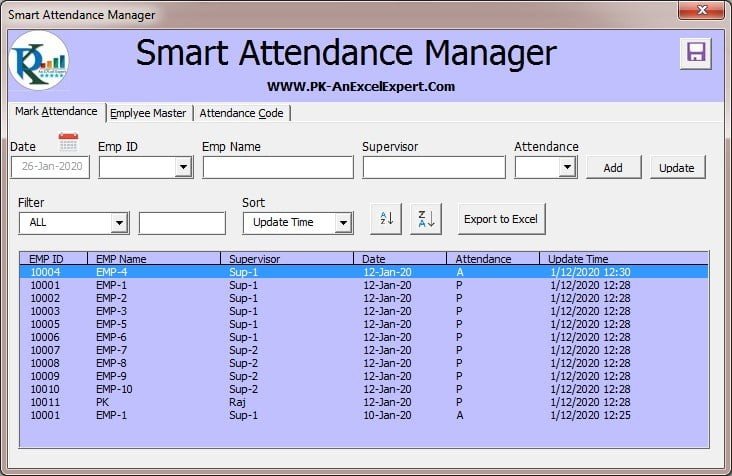
This is the best value on the list because $6.99 buys a working application, not a worksheet. It is a VBA tool with forms, validation and a stored database – the closest thing on this page to Deputy’s kiosk clock-in, running on a shared PC or tablet at the back of house.
Who it is for: a site with one shared device where staff record in and out times, and a manager who wants the entry controlled rather than typed anywhere in a grid.
What is inside:
- Userform-driven in/out entry so staff cannot overwrite each other’s rows
- An employee master with codes, so entry is a selection rather than free text
- A growing timesheet database with date, employee and hours
- Report and summary views built from that database
The reason this matters: the single biggest source of payroll disputes in a small business is hand-written or free-typed hours. A form with a dropdown and a validated time field removes most of that class of error for a one-off $6.99, where Deputy solves it with a per-user licence forever. It needs desktop Excel with macros enabled – see the honest-limits section if your team is Mac-and-phone only. Teams that like this pattern usually also run something from our Workday alternatives guide for the wider HR record.
Best for: controlled clock-in on a shared back-office device. $6.99 – view the template.
Switching this week? The three templates above are the working core of a Deputy replacement – rota, attendance and clock-in – for $20.97 once. That is less than one month of Deputy’s $30 minimum invoice, and there is no second bill. Start with the Employee Shift Schedule in Google Sheets at $6.99.
4. Workforce Planning KPI Dashboard in Excel

Deputy answers “who is on tonight”. This answers “how many people should we be rostering at all”. It is an Actual-vs-Target KPI dashboard for the workforce numbers a manager is judged on – headcount, cost, turnover, utilisation – and it is the template that replaces what Deputy sells as Pro reporting plus the Analytics+ add-on.
Who it is for: owners and operations managers planning next quarter’s staffing, not next Tuesday’s shift.
What is inside:
- Dashboard, KPI Trend and Definition tabs with a clean Actual / Target / Previous Year input area
- Pre-built workforce KPIs with month-on-month and year-on-year variance
- Charts that redraw the moment a number changes – no pivot rebuild
- A definitions tab so everyone agrees what each metric means before the argument starts
Use it monthly: drop in actual hours from template #2, set the target, and the variance tells you whether the roster is over- or under-staffed against plan. At $12.99 once it costs less than two months of the $9 Pro seat it stands in for, and it keeps the history after you cancel – which an expired SaaS account does not. If you would rather have this in a BI tool, our Power BI dashboard templates ranked by industry covers the same ground interactively.
Best for: labour cost and headcount forecasting. $12.99 – view the template.
5. Hourly Auto Email with Scheduler
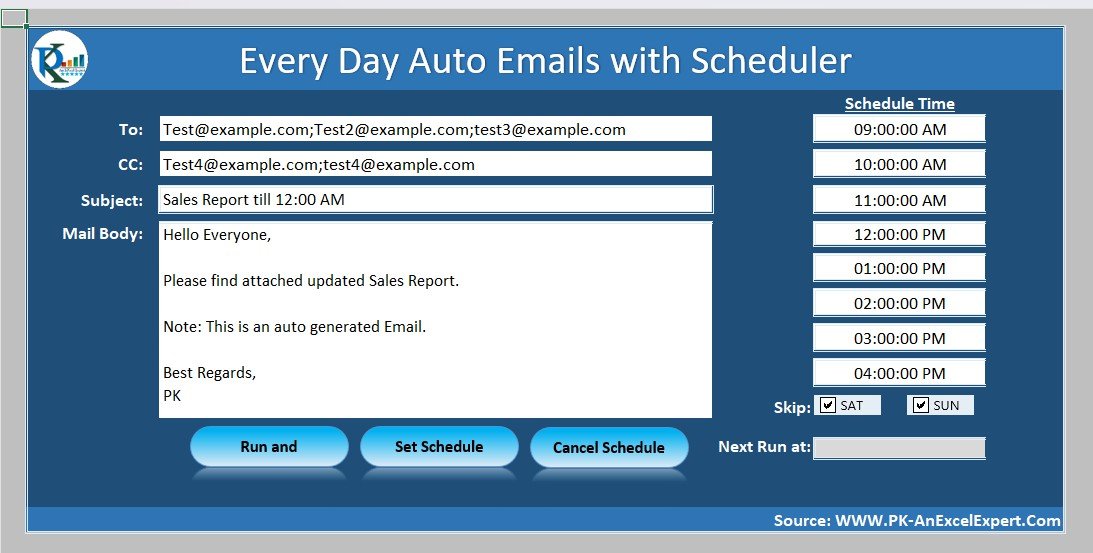
The honest weakness of a spreadsheet rota is that it does not tell anyone the rota changed. This VBA tool closes that gap: it sends scheduled emails on a timer from Excel, so the published roster, the reminder or the daily attendance summary goes out without anyone remembering to send it.
Who it is for: the manager who currently pays for Messaging+ at $1.95 per user per month purely so staff get told about their shifts.
What is inside:
- A scheduler that fires on an hourly or timed interval while the workbook is open
- Configurable recipient list, subject and body
- Attachment support – send the current rota or attendance sheet as a file
- On/off control so you can pause it during a quiet week
Paired with template #1, this is the missing notification layer: publish the sheet, let the scheduler mail the link or the PDF every Friday afternoon. For a fifteen-person team, Messaging+ alone is $29.25 a month – $351 a year – against $6.99 once here. It does need a machine with Outlook and the workbook left open, which is a real constraint and one we cover below. The same automate-the-boring-part logic applies to task chasing in our Trello alternatives guide.
Best for: automatic rota and reminder emails without a messaging add-on. $6.99 – view the template.
6. KPI Tracking Schedule in Excel
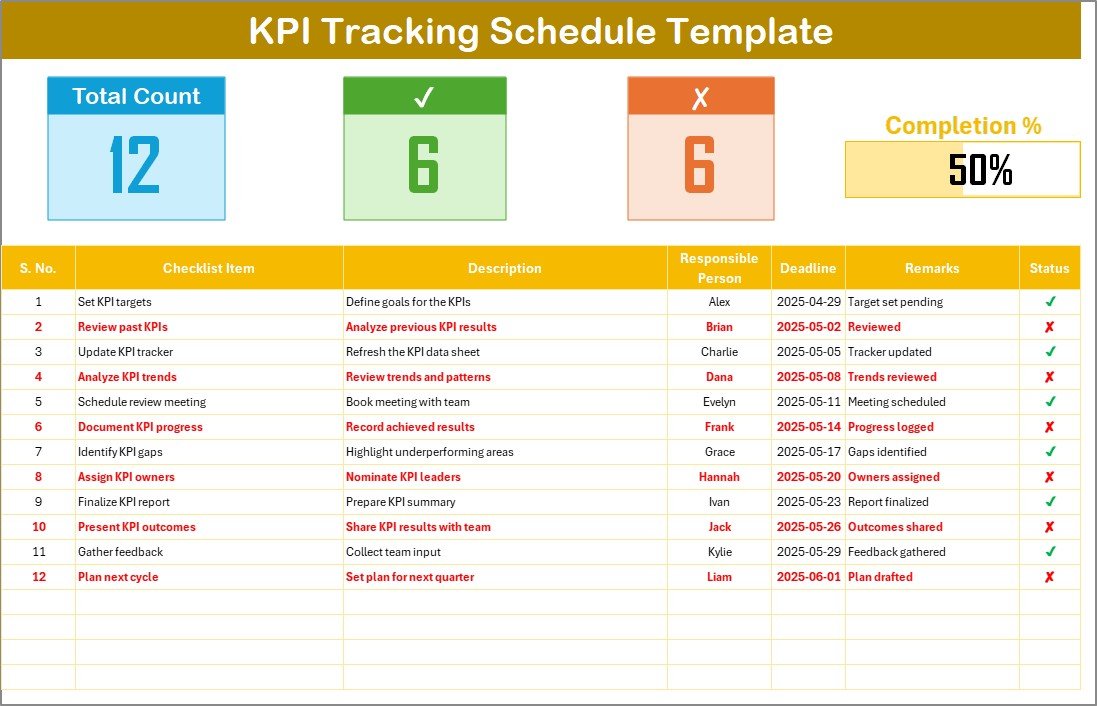
Deputy’s Tasks feature exists because a shift is not only hours – it is the opening checks, the temperature log, the closing count and the weekly deep clean. This template is the scheduled-and-tracked version of that: a recurring schedule of what has to be done, by when, by whom, and whether it was.
Who it is for: operations leads in food, care, retail or facilities who need proof that recurring checks happened on each shift.
What is inside:
- A scheduled item list with owner, frequency and due date
- Status tracking with completion percentage against the schedule
- Period-by-period view so a missed week is visible rather than buried
- Summary tracking you can print for an audit or a franchise review
This is the most expensive template here at $14.99, and it is the one to skip if your shifts carry no recurring compliance load. If they do, it is the cheapest audit trail you will find: an inspector wants to see a dated record of the check, and a completed schedule is exactly that. It is also the piece Deputy bundles into higher tiers, which is how a “we only need scheduling” business ends up on Pro. For heavier task pipelines, compare it against our Jira alternatives guide.
Best for: recurring shift tasks and compliance evidence. $14.99 – view the template.
How to choose between them
Buy for the job you open Deputy to do, not for the whole product:
| If you… | Buy this | Price |
|---|---|---|
| Just need next week’s rota, shared to phones | Employee Shift Schedule (Google Sheets) | $6.99 |
| Need a monthly attendance record for payroll | Automated Attendance Sheet (Excel) | $6.99 |
| Have a shared device for clock in / out | Smart Attendance Manager (Excel VBA) | $6.99 |
| Are planning headcount and labour cost | Workforce Planning KPI Dashboard (Excel) | $12.99 |
| Only pay for Deputy so staff get told about shifts | Hourly Auto Email with Scheduler | $6.99 |
| Must prove recurring checks were done | KPI Tracking Schedule (Excel) | $14.99 |
Still unsure? Run the three-question switch test. One: do you operate more than two locations? Two: do staff need to clock in from their own phones with location proof, rather than on a shared device? Three: does an award, union agreement or overtime rule have to be interpreted automatically to keep you compliant? Two or more yeses and you should stay on Deputy. Zero or one, and a $6.99 file does the job you are paying $30 a month minimum for.
When a template is NOT the right answer
We would rather keep a customer than sell them the wrong file, so here is the honest version. Deputy – or another dedicated workforce management platform – is still the right call when any of these is true:
- You need award or labour-law interpretation. Deputy’s rule engine applies pay rates, penalties, breaks and overtime automatically. A spreadsheet will calculate whatever formula you write, and it will not defend you in a wage audit. If you operate under a modern award or a union agreement, this alone justifies the subscription.
- Staff clock in from their own phones, across sites. GPS-verified and photo-verified clock-in is a genuine anti-buddy-punching control. No spreadsheet replicates it. Multi-site field, care and security teams should keep it.
- You want staff-initiated swaps and open-shift claiming. Deputy lets an employee drop a shift and a colleague claim it, with manager approval, from a phone. Reproducing that in a shared sheet creates more messages, not fewer.
- You need live labour cost against sales during the shift. Hospitality and retail operators who cut or extend staff mid-service against a real-time wage percentage are using the exact feature Deputy is built around.
- You are past roughly 25-30 staff, or running several locations. Above that, concurrent editing, version control and permissions stop being a spreadsheet problem you can win. The templates here are built for 3-25 people at one or two sites.
- Approved timesheets must flow straight into payroll. If a manual export and import each pay run is unacceptable, buy the integration.
The sweet spot for these templates is a single-site or two-site business of roughly three to twenty-five people who need a rota, an attendance record and a monthly hours total – not automated award interpretation. If that is you, both the maths and the control point to a one-time file. If it is not, Deputy is fairly priced for what it does. For heavier internal tooling that sits between a template and real software, look at our Workday alternatives for HR and workforce reporting.
Running a salon or spa rather than a shift-based team? Our guide to the best salon and spa management templates covers appointments, packages and stylist performance from $9.99.
Frequently asked questions
What is the best Deputy alternative in Excel or Google Sheets?
The Employee Shift Schedule in Google Sheets ($6.99) is the best Deputy alternative for most small teams. It rebuilds Deputy’s core weekly rota grid with dropdown shift codes and automatic weekly hours, shares to staff phones by link, and costs less once than a single day of Deputy’s minimum monthly invoice.
How much does Deputy cost in 2026?
Deputy publishes three plans: Lite at $5, Core at $6.50 and Pro at $9 per user per month, billed monthly or upfront, excluding tax. A minimum monthly spend of USD $30 per invoice applies. Add-ons are extra – HR $2, Messaging+ $1.95 and Analytics+ $1.50 per user per month. Confirm current figures on Deputy’s pricing page.
Does Deputy have a free plan?
No permanent free tier is listed on Deputy’s Lite, Core or Pro plans – the free access on offer is a time-limited trial, and the add-ons carry their own 30-day trials. Because the $30 minimum invoice applies from the first paid month, very small teams often find a one-time template cheaper within weeks.
Why does a four-person team pay $30 a month on a $5 plan?
Deputy applies a minimum monthly spend of USD $30 per invoice, effective 1 September 2025. Four users on Lite bill at $20 by seat count, so the minimum tops it up to $30. The effective rate becomes $7.50 per user – higher than the Core plan’s headline $6.50 price.
Can a spreadsheet really replace shift scheduling software?
For roughly three to twenty-five staff at one or two sites, yes. A template covers rota building, attendance, hours totals and forecasting. What it cannot replace is automated award interpretation, GPS clock-in, staff-initiated shift swaps and live labour cost against sales. If those matter, keep the software.
How do I move my Deputy data into a template?
Export your employee list and timesheets from Deputy to CSV, then paste the columns – name, role, location, date, start, finish – into the template’s employee master and database tabs. The dashboards and totals recalculate automatically. Budget about an hour for the first import and one rota cycle to settle the shift codes.
Will staff still see the roster on their phones?
Yes, with the Google Sheets template. Share the sheet view-only and every employee opens the current rota in a browser on any phone, with no app and no licence. Supervisors get edit access. What you lose is push notification, which the Hourly Auto Email with Scheduler ($6.99) covers by email instead.
Do these templates handle overtime and break rules?
They calculate what you tell them to. The shift schedule totals weekly hours per employee so overtime is visible before it is incurred, and you can add your own rate formulas. They do not interpret awards, penalty rates or statutory breaks automatically – that is the one feature worth paying Deputy for if it applies to you.
Are one-time templates cheaper than Deputy over a year?
Almost always for small teams. A ten-person Core plan is $780 a year, and $1,434 with the HR, Messaging+ and Analytics+ add-ons. All six templates here total $55.94 once. Even the smallest possible Deputy account costs $360 a year because of the $30 minimum invoice.
Can I customise these scheduling templates?
Yes. Every formula, dropdown and chart is visible and editable – rename shift codes, add locations, change the week start, extend the employee master or restyle the dashboard. That was a selection criterion: a rostering tool you cannot bend to your own shift pattern is not a replacement for one you can configure.
Get more shift scheduling templates
Leaving Deputy does not mean losing the roster – it means owning it. For less than two months of the minimum invoice you can run the rota, the attendance record, the hours total and the workforce forecast on files you paid for once. Start with the Employee Shift Schedule in Google Sheets ($6.99) if you want the fastest switch, add the Automated Attendance Sheet in Excel ($6.99) for the payroll record, and take the Workforce Planning KPI Dashboard in Excel ($12.99) when you start planning headcount rather than shifts. All six together come to $55.94, once.
Prefer to see a template working before you buy? Watch build walk-throughs and set-up tutorials on our YouTube channel: youtube.com/@NextGenTemplates.
Related: Replacing more of the HR stack? See our BambooHR alternatives — 8 HR templates in Excel & Sheets and the Gusto payroll alternatives.