


The best Jira alternatives for small teams are spreadsheet-based issue tracking templates that replace Jira’s core sprint, bug, and backlog tracking without the per-seat cost. Our top pick is the Agile Sprint KPI Dashboard in Excel ($12.99), a one-time buy that covers velocity, burndown, and backlog health for an unlimited number of users.
Last updated: August 2026
Key takeaways
- Jira’s paid plans are billed per user, per month, forever, while every template here is a one-time purchase from $4.99 to $14.99 for unlimited users.
- The Agile Sprint KPI Dashboard in Excel ($12.99) is the best overall Jira alternative for teams tracking velocity, burndown, and sprint completion.
- For bug and defect tracking specifically, the Bug Resolution KPI Dashboard in Power BI ($11.99) mirrors Jira’s issue lifecycle reporting.
- The Agile Sprint KPI Dashboard in Google Sheets ($9.99) is the best value for remote teams that need free, browser-based collaboration.
- Small teams typically churn off Jira for three reasons: escalating seat cost, paying for unused modules, and heavy admin overhead — none of which a spreadsheet template carries.
 Launch offer
SUMIFS, XLOOKUP, FILTER, LAMBDA and checking AI-written formulas, with real business projects. 11h 47m of video by PK, with practice files, quizzes and a capstone.
Why small teams leave Jira
Jira remains the market leader for large agile organisations, and for good reason. But its pricing model is built for scale, not for a five-person startup or a side project. According to Atlassian’s official Jira pricing page, the Standard plan runs roughly $7–8 per user per month and the Premium plan roughly $14–16 per user per month, both billed continuously. A free tier exists for up to 10 users, but it strips out the reporting, automation, and admin controls that most teams actually adopt Jira for.
Three recurring frustrations push small teams to look for a Jira alternative:
- Seat cost that never stops. Ten users on Premium is well over $1,500 a year, every year. A one-time template purchase ends the metering entirely.
- Paying for modules you never open. Roadmaps, dependency mapping, sandbox environments, and release hubs are bundled into paid tiers whether or not a two-team shop touches them.
- Administration overhead. Someone has to own workflow schemes, permission sets, and board configuration. For a team of six, that admin tax often outweighs the tool’s benefit.
What switching actually saves a small team
The saving is not a one-off discount — it compounds every month you would otherwise pay per seat. Here is the three-year cost of a 10-person team on Jira Standard and Premium against a one-time template purchase, using the representative rates from Atlassian’s pricing page.
| Option | Monthly cost (10 users) | Year 1 | 3-year total |
|---|---|---|---|
| Jira Standard (~$7.75/user) | ~$77.50 | ~$930 | ~$2,790 |
| Jira Premium (~$15.25/user) | ~$152.50 | ~$1,830 | ~$5,490 |
| Agile Sprint KPI Dashboard (Excel) | $0 ongoing | $12.99 | $12.99 |
| Project Management Pro Bundle | $0 ongoing | $49.99 | $49.99 |
Even the full 9-template bundle costs less than one month of a Premium team. For a team that mainly needs sprint, bug, and portfolio reporting, that gap is the entire argument for switching. Figures are illustrative; confirm live rates on the Jira pricing page.
Jira features vs the templates that replace them
Here is a head-to-head of the Jira capability small teams use most, the NextGenTemplates template that covers it, and the one-time price.
| Jira feature | Template that replaces it | Format | Best for | Price |
|---|---|---|---|---|
| Sprint velocity & burndown | Agile Sprint KPI Dashboard (Best overall) | Excel | Sprint delivery tracking | $12.99 |
| Scrum board & team capacity | Scrum Team KPI Dashboard | Excel | Scrum masters & leads | $14.99 |
| Bug & issue lifecycle reporting | Bug Resolution KPI Dashboard | Power BI | QA & defect tracking | $11.99 |
| Shared, real-time boards | Agile Sprint KPI Dashboard (Best value) | Google Sheets | Remote collaboration | $9.99 |
| Portfolio & program reporting | PMO KPI Dashboard | Excel | Multi-project oversight | $14.99 |
| Sprint planning & scheduling | Agile Sprint Planning Calendar | Excel | Budget-conscious teams | $4.99 |
How we picked these
We searched the NextGenTemplates catalog of more than 2,000 paid templates for tools that map directly onto the jobs small teams actually do in Jira: sprint tracking, scrum management, bug resolution, and portfolio reporting. We excluded generic project trackers that carry no agile metrics, and deliberately kept every pick under $15 so the total cost stays a fraction of one month of a Jira Premium team. Each template was assessed on metric depth, format flexibility (Excel, Google Sheets, Power BI), and how closely its reporting mirrors a Jira workflow.
The 6 best Jira alternative templates for 2026
1. Agile Sprint KPI Dashboard in Excel — best overall

What it is: A ready-to-use Excel dashboard that tracks the exact sprint metrics Jira surfaces on its reports tab — velocity, work completed, work remaining, and backlog health — in a single file you own outright.
Who it is for: Scrum and Kanban teams of any size that run sprints and want burndown visibility without a per-seat subscription.
What is inside:
- Sprint velocity tracking across completed and planned work
- Burndown chart that visualises remaining effort day by day
- Sprint completion rate and backlog prioritisation views
- Team performance monitoring to predict future sprint capacity
A five-person team that would pay roughly $40 a month on Jira Standard covers the same sprint reporting here for a single $12.99 payment. Update the sprint log each stand-up, and the burndown and velocity charts refresh automatically. Product owners get a forecast of how much scope the next sprint can realistically absorb, and leads spot a stalling backlog before it derails a release.
Best for: The default Jira replacement for any team that lives and dies by the sprint.
Price: $12.99 — view the Agile Sprint KPI Dashboard in Excel.
2. Scrum Team KPI Dashboard in Excel

What it is: A scrum-focused dashboard that goes deeper than a single sprint, tracking team capacity, utilisation, and backlog health the way a scrum master would inside Jira.
Who it is for: Scrum masters and delivery leads who manage workload balance across a standing team.
What is inside:
- Sprint velocity and completion-rate tracking
- Backlog health analysis to keep the queue prioritised
- Team capacity and utilisation to balance workload
- Burndown chart for remaining-work visibility
Where Jira spreads this across boards, reports, and a paid capacity add-on, this template consolidates it into one Excel file. A scrum master running two-week sprints can see at a glance whether the team is over-committed, spot an underutilised member, and rebalance before velocity drops. That capacity view alone is a Premium-tier feature in Jira.
Best for: Scrum masters who need capacity planning, not just a task list.
Price: $14.99 — view the Scrum Team KPI Dashboard in Excel.
3. Bug Resolution KPI Dashboard in Power BI
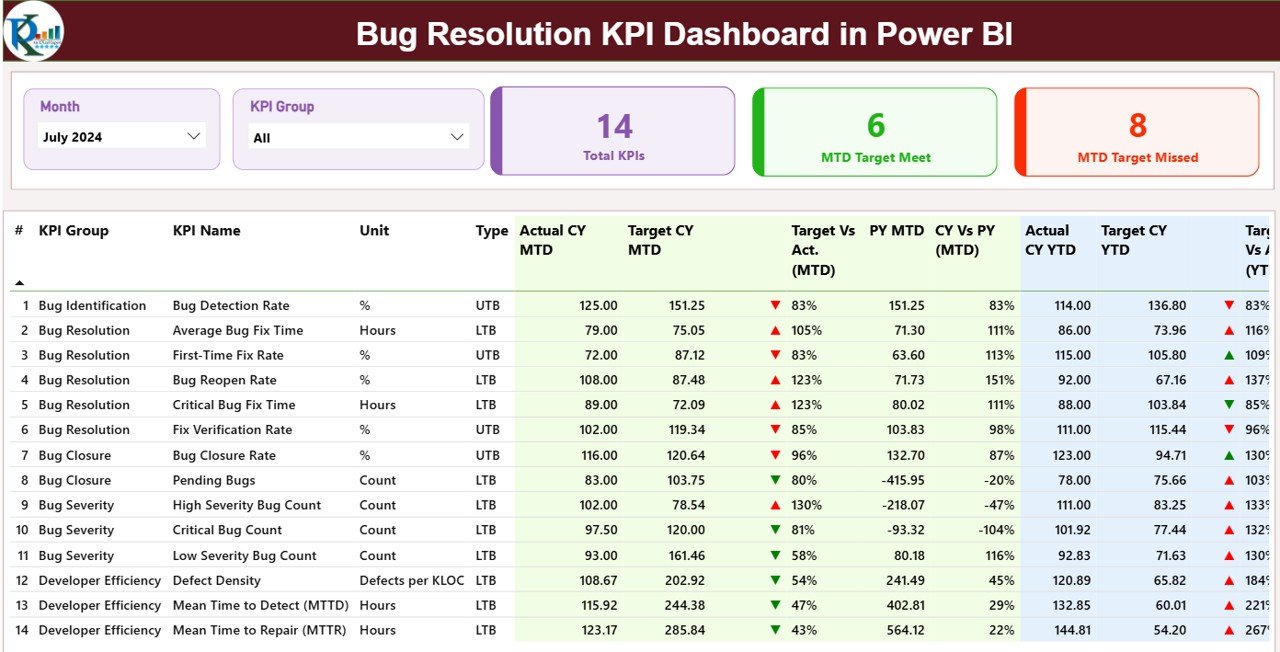
What it is: A Power BI dashboard built around the bug lifecycle — detection rate, resolution time, reopened bugs, and severity analysis — which is exactly what most teams open Jira for in the first place.
Who it is for: QA engineers and dev leads who need defect-tracking metrics with interactive filtering.
What is inside:
- Bug detection rate and resolution-time KPIs
- Reopened-bug analysis to cut recurring defects
- Severity-wise breakdown of critical vs non-critical issues
- Interactive slicers for team, sprint, and time period
If your team’s Jira usage is really an issue tracker with sprints bolted on, this is the closest match. A QA lead can measure whether mean time to resolution is trending up, identify which module reopens the most bugs, and report severity mix to stakeholders — all in a self-refreshing Power BI file with no seat licences to renew.
Best for: QA-heavy teams that track defects more than stories.
Price: $11.99 — view the Bug Resolution KPI Dashboard in Power BI.
4. Agile Sprint KPI Dashboard in Google Sheets — best value
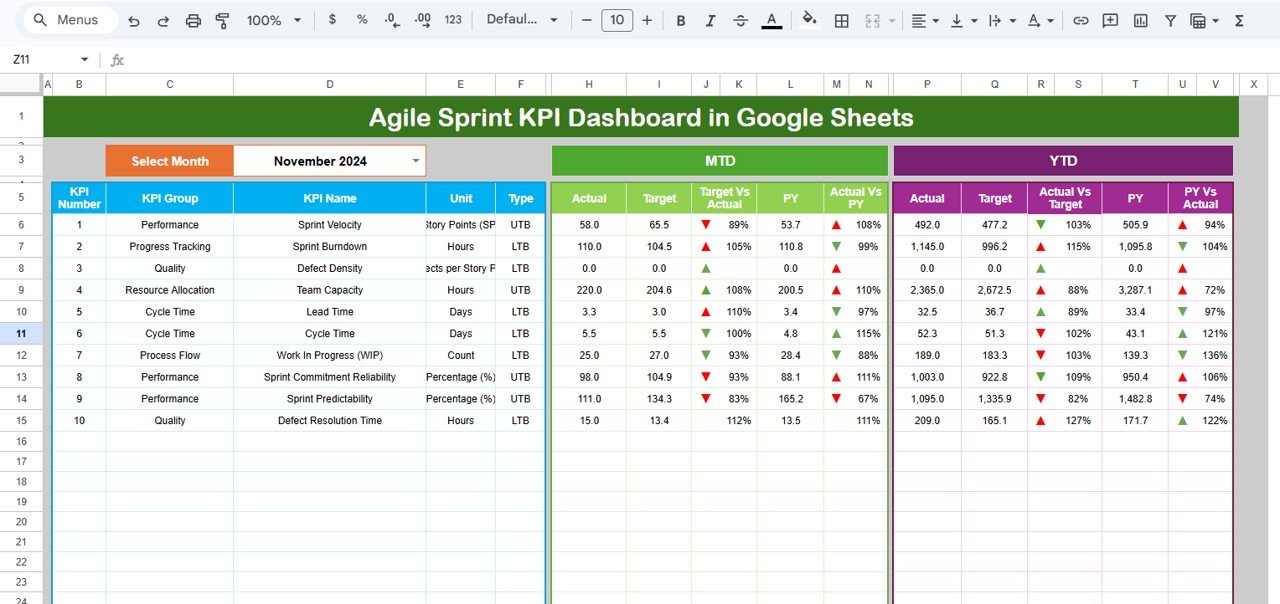
What it is: The Google Sheets edition of our top pick, giving distributed teams the same sprint KPIs in a shareable, browser-based file with live multi-user editing.
Who it is for: Remote and hybrid teams that need real-time collaboration without desktop software.
What is inside:
- Month selector in a single cell for instant KPI refresh
- MTD and YTD performance comparison of actual vs target
- Sprint velocity, completion, and backlog views
- Cloud-native sharing with view or edit permissions
At $9.99 this is the lowest-friction way off Jira for a remote team: no installs, no licences, and anyone with the link can be added in seconds. Because it lives in Google Drive, it replicates the one thing teams miss most when leaving Jira — a single shared board everyone sees update in real time.
Best for: Remote-first teams that want a shared cloud board on a budget.
Price: $9.99 — view the Agile Sprint KPI Dashboard in Google Sheets.
5. Project Management Office (PMO) KPI Dashboard in Excel
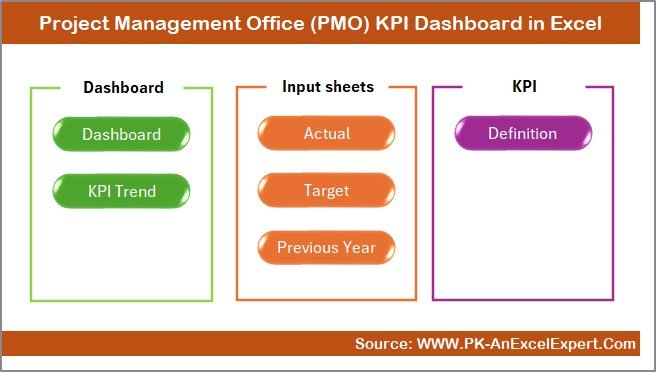
What it is: A portfolio-level dashboard that monitors schedule, cost, risk, and resources across multiple projects — the reporting layer Jira reserves for its Premium and Enterprise tiers.
Who it is for: Team leads and PMOs juggling several projects who need executive-ready reporting.
What is inside:
- Real-time KPI tracking for schedule, cost, risk, and resources
- MTD and YTD analytics with target vs actual comparison
- Automatic traffic-light status flags
- Trend charts showing performance movement month over month
When a small shop grows past a single team, Jira pushes you toward Advanced Roadmaps on a pricier plan. This template gives you cross-project oversight for a flat $14.99. A lead can roll up three or four projects, flag the one slipping on cost, and hand stakeholders a clean status view without touching a Jira admin console.
Best for: Multi-project oversight and stakeholder reporting.
Price: $14.99 — view the PMO KPI Dashboard in Excel.
6. Agile Sprint Planning Calendar in Excel — best budget pick
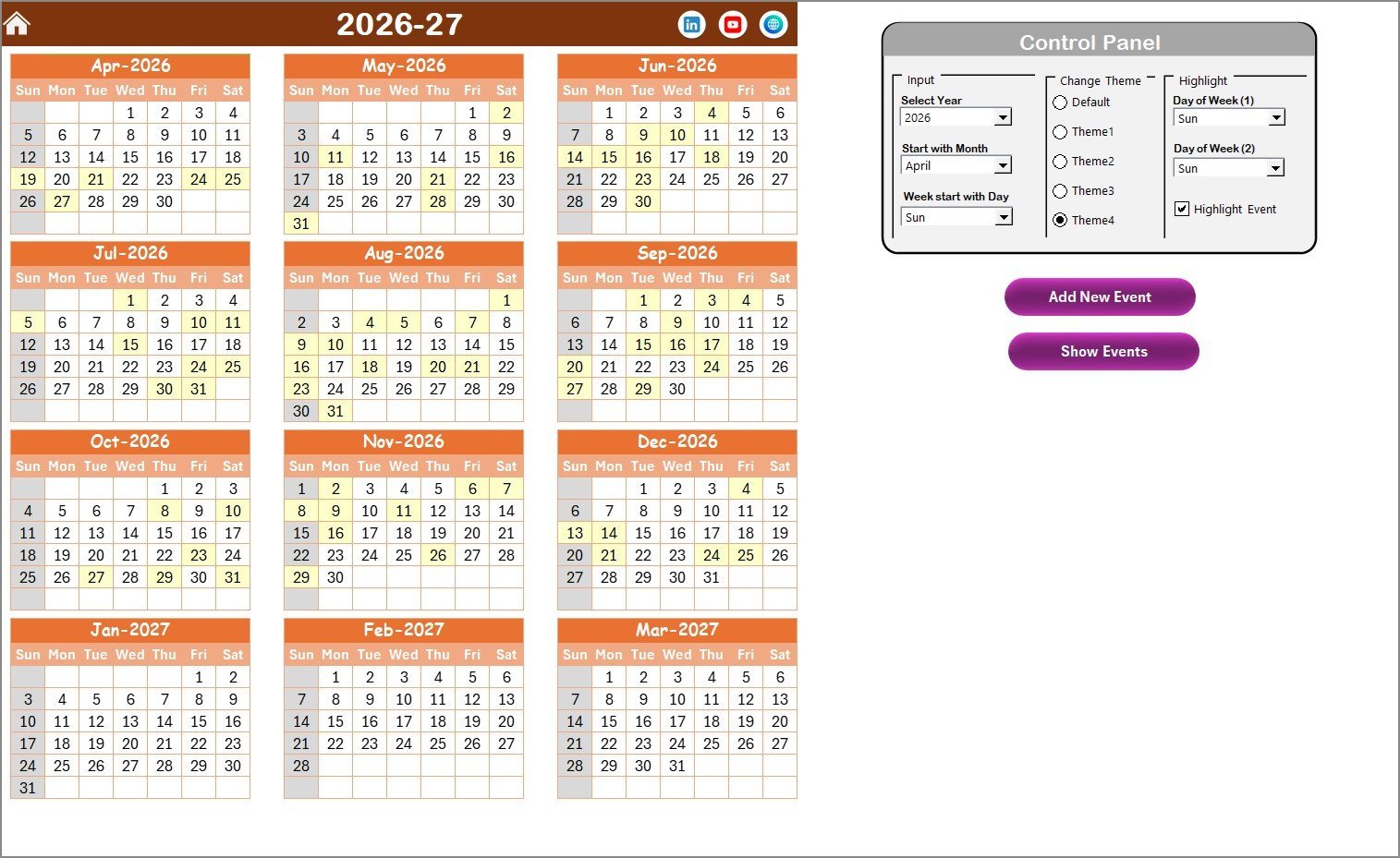
What it is: A five-sheet Excel calendar for planning and scheduling sprints, ceremonies, and releases — the planning half of Jira, without the tracking overhead.
Who it is for: Teams that mainly need to schedule sprints and events and want the cheapest possible entry point.
What is inside:
- Annual, monthly, daily, and events views with home navigation
- Flexible year, starting month, and week-start configuration
- Five colour themes to match team branding
- Simple add, view, update, and delete event management
At $4.99 this is the lightest way to replace Jira’s calendar and timeline planning. A team can lay out a quarter of sprints, mark demo and retro dates, and share the file — no subscription, no learning curve. Pair it with the Agile Sprint KPI Dashboard and you have planning plus tracking for under $18 total.
Best for: Teams that need sprint scheduling on the smallest budget.
Price: $4.99 — view the Agile Sprint Planning Calendar in Excel.
How to choose between them
Match the template to the job you actually do in Jira:
- You run sprints and want one file: start with the Agile Sprint KPI Dashboard in Excel.
- Your team is remote: pick the Google Sheets edition for live collaboration.
- You mostly track bugs: the Bug Resolution KPI Dashboard is the closest fit.
- You manage a scrum team’s capacity: the Scrum Team KPI Dashboard adds utilisation.
- You oversee several projects: the PMO KPI Dashboard rolls them up.
When Jira is still the right call
A spreadsheet template is not always the better answer, and being honest about that saves you a wasted purchase. Stay on Jira — or move to it — when:
- You need automated workflows and permissions. Jira enforces who can move an issue to “Done” and can trigger actions automatically. A spreadsheet relies on team discipline.
- You have deep tool integrations. If Bitbucket, Confluence, CI/CD pipelines, or a dozen marketplace apps are wired into your issues, replacing that plumbing costs more than the licences.
- You are scaling past ~25 people. Real-time concurrent editing, audit history, and role-based access matter more at that size, and dedicated software earns its seat cost.
- Compliance requires an audit trail. Regulated teams need immutable change history that a shared file cannot guarantee.
For a small team tracking sprints, bugs, and a handful of projects, though, these templates deliver the reporting that matters at a fraction of the lifetime cost.
How to move from Jira to a spreadsheet in 4 steps
A migration does not have to be painful. Because these templates use the same agile vocabulary as Jira, most of the work is a straight export-and-map.
- Export your open issues. In Jira, filter to active and backlog issues and export the board to CSV or Excel. You now have every issue key, summary, status, assignee, and story-point value in a flat file.
- Map the columns. Line up Jira’s fields with the template’s input sheet — summary to task name, story points to effort, status to sprint stage. Most fields have a one-to-one match, so this is a copy-paste, not a rebuild.
- Set your current sprint baseline. Enter the active sprint’s committed and completed points so the velocity and burndown charts have a starting reference. From there the dashboard updates as you log daily progress.
- Share and retire the licences. Put the file in OneDrive, SharePoint, Teams, or Google Drive so the team edits one source of truth, then cancel the Jira seats you no longer need. Keep a read-only Jira archive if compliance requires the history.
Budget an afternoon for a single team. The payback is immediate: the next monthly invoice does not arrive.
Frequently asked questions
What is the best free Jira alternative?
Jira’s own free tier (up to 10 users) is the best fully free option, but it omits most reporting and automation. If you want ownership without recurring cost, a one-time template like the $9.99 Agile Sprint KPI Dashboard in Google Sheets is cheaper over any period longer than a couple of months and adds no seat limit.
How much does Jira actually cost per user?
Per Atlassian’s published pricing, Jira Standard is roughly $7–8 per user per month and Premium roughly $14–16 per user per month, billed continuously. A 10-person Premium team therefore spends well over $1,500 a year. Check the official Jira pricing page for the current figures, as they change periodically.
Can Excel really replace Jira for issue tracking?
For small teams, yes. Excel and Google Sheets templates handle sprint tracking, bug logging, velocity, and burndown reporting — the core of what most teams use Jira for. What they do not replace is automated workflow enforcement, permissions, and deep integrations, which matter mainly at larger scale.
Which template is closest to Jira’s bug tracking?
The Bug Resolution KPI Dashboard in Power BI ($11.99) is the closest match. It tracks detection rate, resolution time, reopened bugs, and severity mix with interactive filtering, mirroring the issue-lifecycle reporting teams rely on in Jira for defect management.
Do these templates work for Scrum and Kanban?
Yes. The Agile Sprint and Scrum Team dashboards are built around sprint velocity, burndown, and backlog health, which apply to both Scrum and Kanban. Kanban teams can ignore the sprint-boundary fields and use the flow and backlog metrics on their own.
Are these one-time payments or subscriptions?
Every template listed is a one-time purchase between $4.99 and $14.99. There are no per-user fees and no recurring charges. Once downloaded, the file is yours for unlimited users and unlimited projects, which is the core saving over Jira’s per-seat model.
Can my whole team use one template at once?
The Google Sheets edition supports real-time multi-user editing natively — share the link and everyone works live. The Excel and Power BI files can be shared through OneDrive, SharePoint, or Teams for co-authoring, or kept as a single source of truth that one owner updates each stand-up.
Will I lose Jira’s automation if I switch?
Yes, automated transitions, notifications, and marketplace integrations do not carry over to a spreadsheet. If those are central to your process, keep Jira. If your automation amounts to status updates and reminders, a template plus a shared calendar covers most of it at no ongoing cost.
What if I outgrow the templates later?
That is a good outcome. The templates cost under $15, so starting with them and moving to Jira or a bundle later loses nothing. Many teams run the dashboards alongside dedicated software for executive reporting even after they scale, because the KPI views are cleaner for stakeholders.
Get more issue tracking templates
If you want the full agile and project toolkit in one purchase, the Project Management Pro Bundle packs 9 premium Excel and Google Sheets templates for $49.99 — less than the templates cost individually and a fraction of one month of a Jira team. It is the best-value way to cover sprint tracking, scrum reporting, and portfolio oversight in a single download.
Prefer to compare other tools first? See our guides to Asana alternatives in Excel and Sheets, Monday.com work management alternatives, and everyday task and to-do management templates. Teams evaluating their wider software stack also read our Zoho CRM alternatives, Pipedrive alternatives, and Salesforce alternatives roundups.
Watch template walkthroughs and setup tutorials on our YouTube channel: @NextGenTemplates.
Related: Reviewing the ERP reporting layer too? Our SAP alternatives: 8 ERP reporting templates in Excel & Sheets covers FI/CO, MM, inventory and warehouse dashboards as one-time purchases.