

The best BambooHR alternative for a small team is a spreadsheet-based HR stack you own outright. BambooHR charges roughly $6–$12 per employee per month plus paid add-ons; a one-time Excel or Google Sheets template like the Employee Attendance & Payroll Management System ($39.99) covers the same core HRIS work with no per-seat billing.
Last updated: August 2026
Related reading: moving off enterprise software to cut per-seat reporting costs? Compare our Oracle Fusion alternatives: 8 enterprise reporting templates in Excel & Sheets.
Key takeaways
- BambooHR uses per-employee-per-month (PEPM) pricing across two tiers, so a 25-person team pays every month, forever — a template is a one-time purchase you keep.
- The most complete BambooHR alternative here is the Employee Attendance & Payroll Management System ($39.99), which replaces the core HRIS, attendance and payroll modules in a single Excel/VBA app.
- The best value pick is the HR Employee Performance Analytics Dashboard in Google Sheets at just $6.99 — less than a single month of one BambooHR seat.
- Small teams churn off BambooHR for three reasons: rising seat cost, modules they never use, and admin overhead the platform forces on them.
- All eight templates below are one-time purchases priced from $6.99 to $39.99, available in Excel, Google Sheets and Power BI.
 Launch offer
SUMIFS, XLOOKUP, FILTER, LAMBDA and checking AI-written formulas, with real business projects. 11h 47m of video by PK, with practice files, quizzes and a capstone.
Why small teams look for a BambooHR alternative
BambooHR is a genuinely good HRIS. It is also priced for companies that have an HR department, not a founder doing HR on a Friday afternoon. BambooHR does not publish a flat price list; it quotes per employee per month across two plans (Core and Pro), and stacks paid add-ons — Payroll, Benefits Administration and Time Tracking — on top. Commonly reported figures put the Core tier around $6–$8 per employee per month and Pro around $9–$12, with Payroll adding roughly another $6 per employee per month. You can confirm the current numbers on the official BambooHR pricing page.
Run that maths for a 25-person company. On the Pro tier with payroll, you are looking at somewhere around $375–$450 every month — $4,500 to $5,400 a year — and the bill grows with every hire. That is where the three classic churn triggers come from:
- Seat cost that scales the wrong way. You pay more precisely as you grow, and the per-seat model punishes seasonal or part-time headcount.
- Modules you never open. Most small teams use the employee directory, time off and a bit of performance tracking. They still pay for applicant tracking, onboarding workflows and reporting suites they never touch.
- Admin overhead. A full HRIS assumes someone owns it. For a 10–30 person team, configuring approval chains and workflows is more system than the problem needs.
A spreadsheet HR stack flips all three. You pay once, you keep only the modules you actually need, and the tools work the way you already work — in Excel and Google Sheets. If you are cutting other SaaS bills too, the same logic drives our Monday.com alternatives in Excel & Sheets and Asana alternatives for project management.
BambooHR feature vs the NGT template that covers it
| BambooHR feature | NGT template that covers it | Format | Price |
|---|---|---|---|
| Core HRIS + payroll + attendance | Employee Attendance & Payroll Management System (Best overall) | Excel / VBA | $39.99 |
| Performance management module | Employee Performance Management System V1.0 | Excel / VBA | $19.99 |
| HR analytics & reporting | HR Performance Dashboard in Excel | Excel | $17.99 |
| People analytics (live) | HR Employee Performance Analytics Dashboard (Best value) | Google Sheets | $6.99 |
| Executive HR reporting | HR Performance Dashboard in Power BI | Power BI | $17.99 |
| Performance reviews | Employee Performance Review Dashboard in Excel | Excel | $17.99 |
| Employee scorecards | Employee Performance Rating Card & Dashboard | Excel | $17.99 |
| Review analytics for leadership | Employee Performance Review Dashboard in Power BI | Power BI | $17.99 |
Every one of these is a one-time purchase. Buy the two or three that map to what you actually do in BambooHR and you have replaced the parts you use for less than one month of the SaaS bill.
How we picked these
We searched the full NextGenTemplates catalogue of 1,000+ paid templates and filtered to HR and people-management tools that map directly onto a BambooHR module — core HR records, attendance, payroll, performance and reporting. We prioritised complete systems over single sheets, kept a spread across Excel, Google Sheets and Power BI so you can pick your own environment, and excluded free downloads and loosely related productivity templates. Each pick had to do real work a BambooHR subscriber would recognise, not just look the part.
The 8 best BambooHR alternatives for 2026
1. Employee Attendance & Payroll Management System — best overall
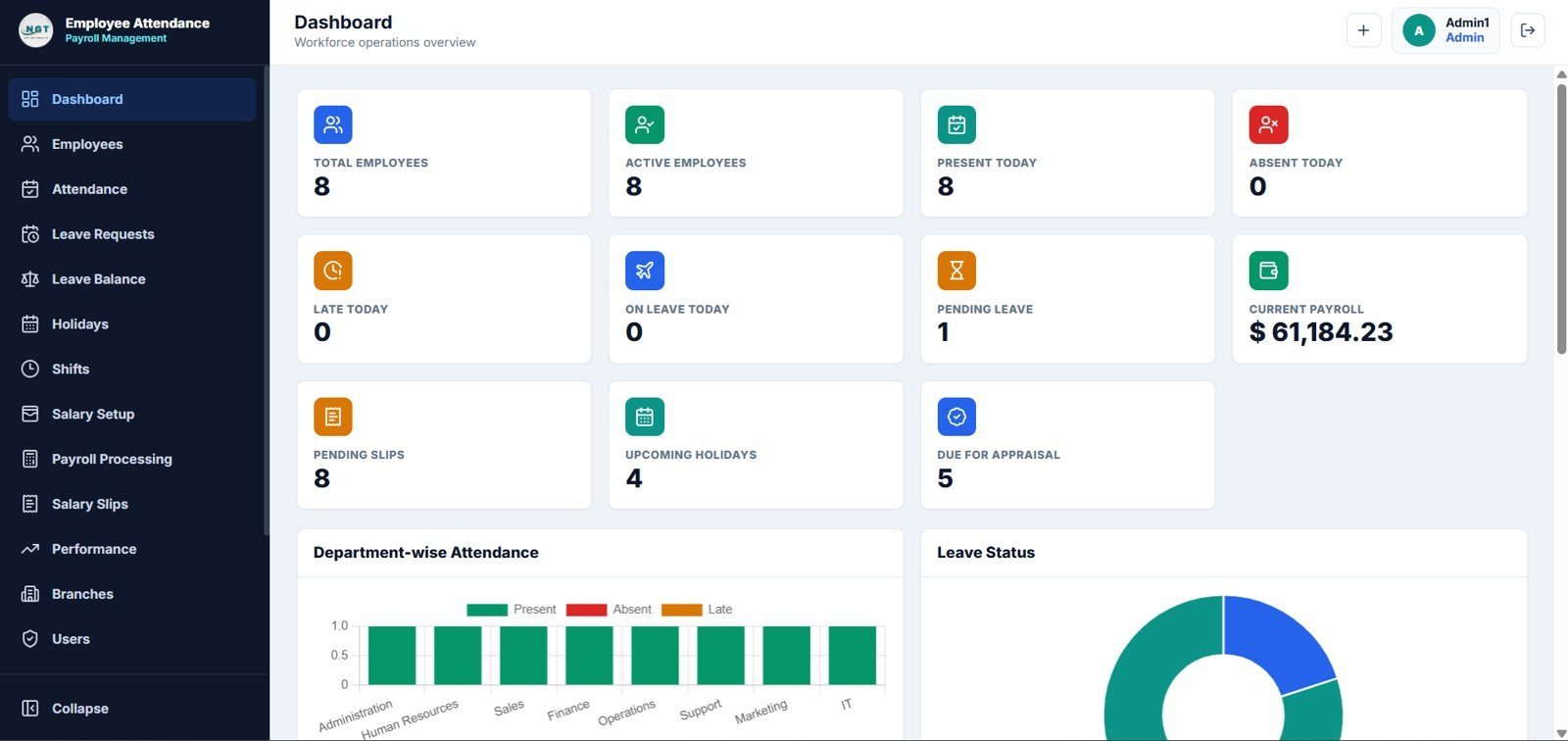
What it is: A complete Excel/VBA HR web-app template that handles employee records, daily attendance and payroll in one workbook — the three modules that make up the core of any BambooHR subscription.
Who it is for: Founders and office managers at 5–50 person companies who need a real HRIS but refuse to pay per seat.
What is inside:
- Employee master database with a searchable directory
- Daily attendance capture with present/absent/leave status
- Automated payroll calculation from attendance data
- VBA-driven add, update and delete forms — no manual row editing
- Summary dashboard with headcount, attendance and payroll KPIs
For a 25-person team, this single $39.99 file replaces the roughly $375+/month you would pay for BambooHR Pro with the payroll add-on — it pays for itself in under four days. It runs offline, so employee salary data never leaves your machine, which many small businesses prefer for payroll.
Best for: Teams that want to replace the whole BambooHR core in one purchase. Get it for $39.99.
2. Employee Performance Management System V1.0 — best performance module
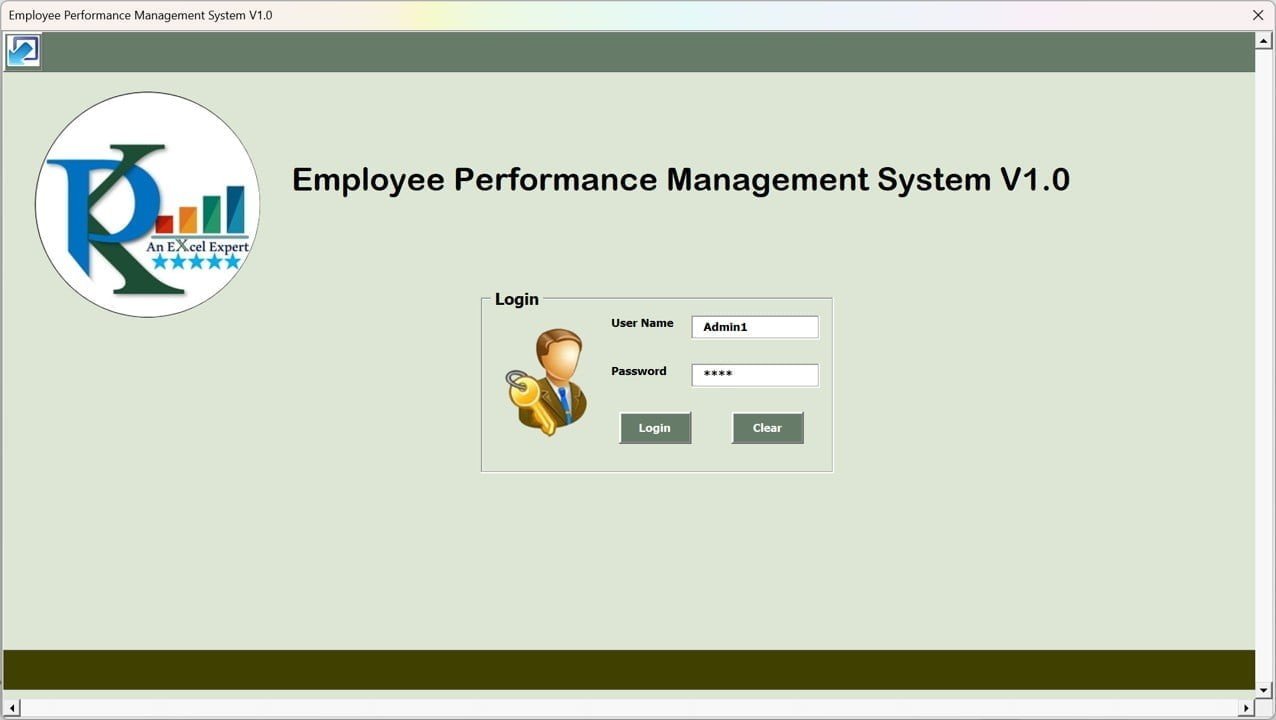
What it is: A macro-driven Excel system that runs the full performance cycle — goals, ratings, review records and analytics — the module BambooHR sells inside its Pro tier.
Who it is for: Managers who want structured reviews and rating history without buying a performance add-on.
What is inside:
- Employee and goal setup sheets
- Rating capture with VBA forms
- Review history log per employee
- Analytics view for top and bottom performers
If your team is on BambooHR mainly for reviews, this $19.99 tool covers that job on its own. It gives you a defensible rating record for promotion and raise decisions, and because it is offline VBA, the data stays with you.
Best for: Replacing BambooHR’s performance module specifically. Get it for $19.99.
3. HR Performance Dashboard in Excel — best HR reporting

What it is: A ready-made HR analytics dashboard that turns your headcount, turnover, attendance and performance data into the charts BambooHR puts behind its reporting tier.
Who it is for: HR leads who need board-ready HR metrics without building pivot tables from scratch.
What is inside:
- Headcount, attrition and tenure KPIs
- Department and location breakdowns
- Interactive slicers and filters
- Print-ready one-page summary
At $17.99, it delivers the reporting that BambooHR gates behind higher tiers. Drop your own data in and the visuals update automatically — useful when a founder wants a monthly people snapshot in five minutes.
Best for: Monthly HR reporting to leadership. Get it for $17.99.
4. HR Employee Performance Analytics Dashboard (Google Sheets) — best value
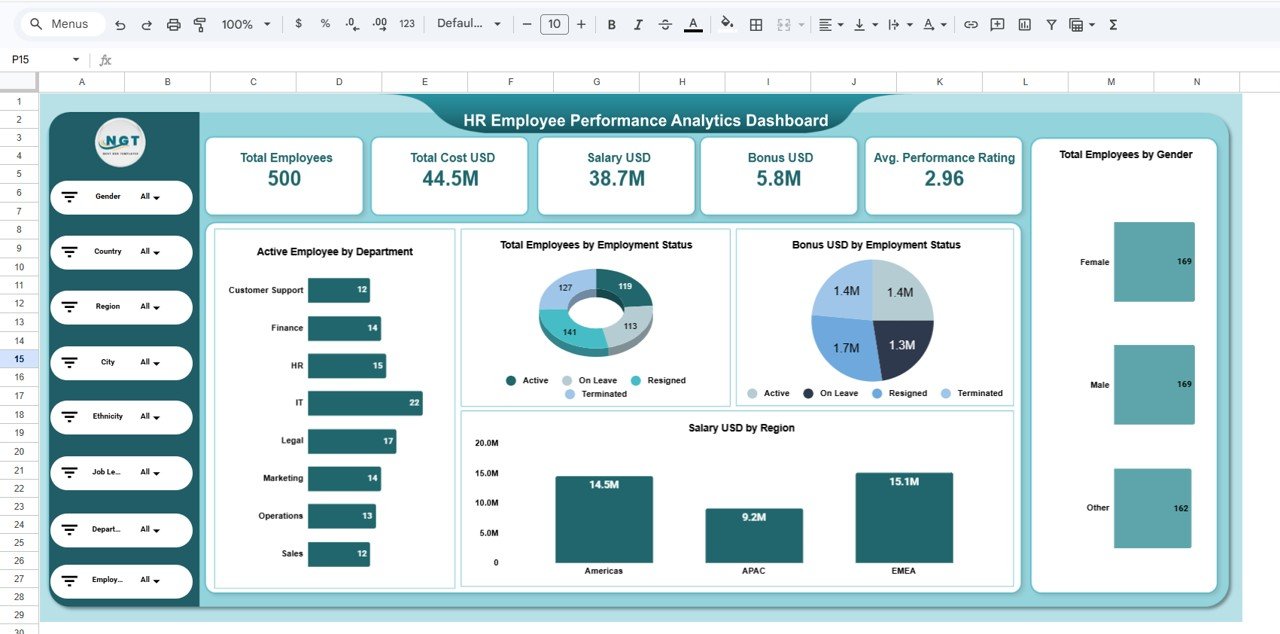
What it is: A live, cloud-based people-analytics dashboard in Google Sheets — the closest match to BambooHR’s shareable online reports, minus the subscription.
Who it is for: Distributed teams that live in Google Workspace and want HR analytics they can share by link.
What is inside:
- Performance scoring by employee and team
- Auto-updating charts and KPI tiles
- Shareable, permission-controlled access
- Works on any device with a browser
At $6.99, this is less than a single month of one BambooHR seat and the strongest value on this list. Because it is Google Sheets, multiple managers can view the same live dashboard the way they would a BambooHR report — without anyone holding a paid login.
Best for: Google Workspace teams wanting shareable HR analytics on the cheap. Get it for $6.99.
5. HR Performance Dashboard in Power BI — best for scale
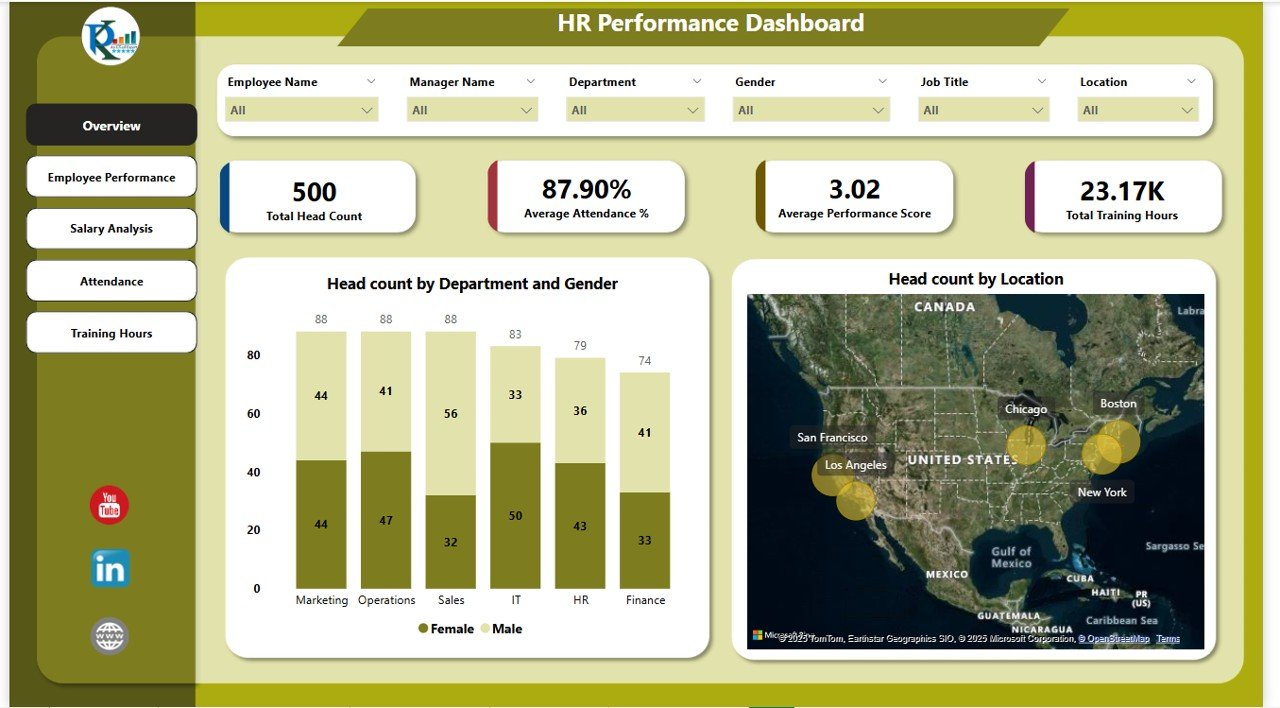
What it is: A Power BI version of the HR performance dashboard, built for larger data volumes and richer drill-down than a spreadsheet can offer.
Who it is for: Companies with 50+ employees or a data team already using Power BI.
What is inside:
- Interactive HR KPIs with drill-through
- Department, role and time-based analysis
- Refreshable data model
- Publish-to-web sharing for stakeholders
At $17.99 it is the pick for teams outgrowing BambooHR’s canned reports but not ready to pay enterprise HRIS prices. It scales to thousands of records without slowing down.
Best for: Larger teams that want enterprise-grade HR analytics. Get it for $17.99.
6. Employee Performance Review Dashboard in Excel
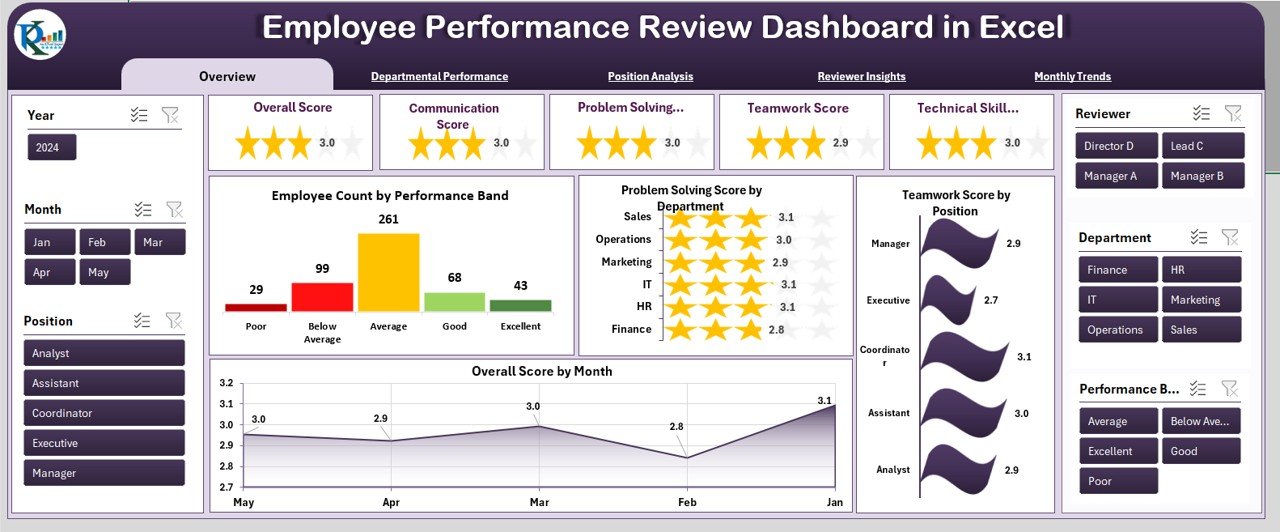
What it is: A focused review dashboard that captures appraisal scores and turns them into ranked, visual output — the review-cycle view BambooHR charges for.
Who it is for: Managers running quarterly or annual reviews who want clean visuals, not spreadsheets full of raw scores.
What is inside:
- Review score capture by competency
- Employee ranking and comparison charts
- Cycle-over-cycle tracking
- Summary cards for each reviewee
At $17.99 it pairs well with the performance management system at #2 — that tool runs the process, this one presents the results to leadership.
Best for: Presenting review outcomes to decision-makers. Get it for $17.99.
7. Employee Performance Rating Card & Dashboard in Excel

What it is: A scorecard-style template that produces a per-employee rating card plus an aggregate dashboard — the individual scorecard BambooHR surfaces per person.
Who it is for: Small teams that want a single printable rating card to hand each employee.
What is inside:
- Weighted rating card per employee
- Competency and KPI scoring
- Roll-up dashboard across the team
- Print-ready card layout
At $17.99 it is the most employee-facing tool on the list — give each person a clear, one-page card at review time.
Best for: Handing employees a clean individual scorecard. Get it for $17.99.
8. Employee Performance Review Dashboard in Power BI
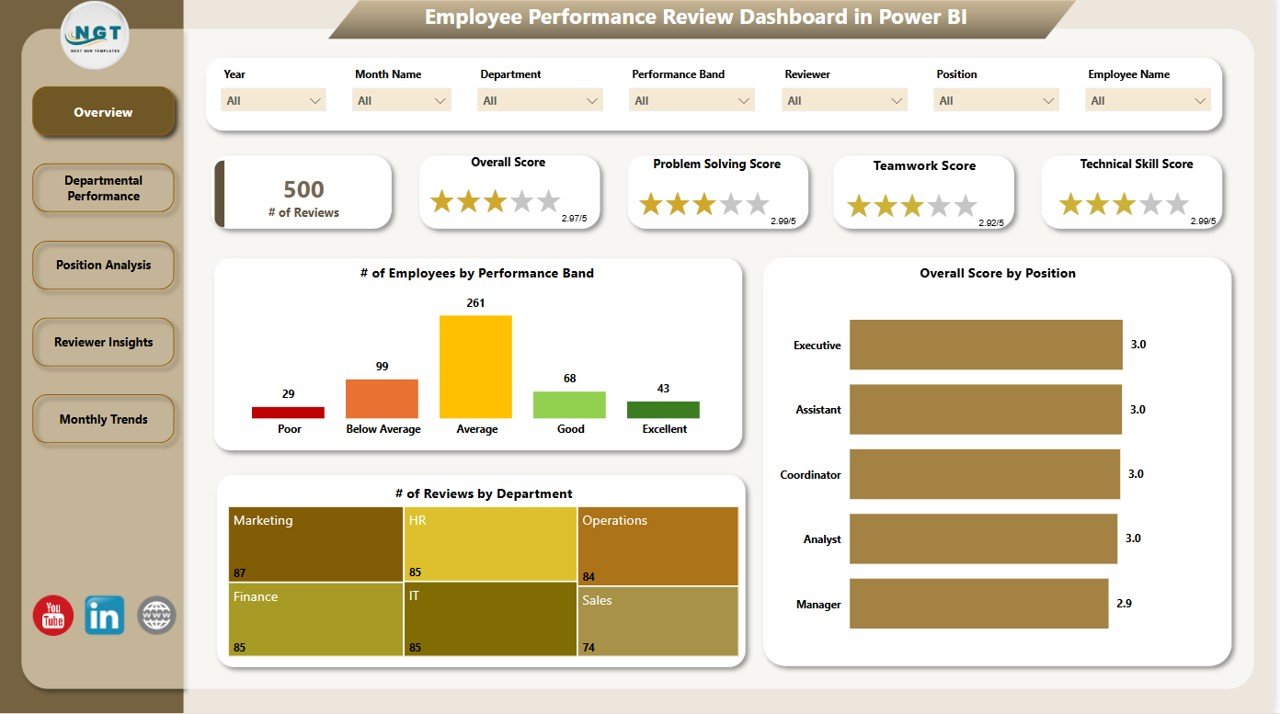
What it is: The Power BI edition of the review dashboard, for leadership teams that want review analytics inside their existing BI environment.
Who it is for: HR and leadership at data-mature companies standardised on Power BI.
What is inside:
- Review analytics with interactive filters
- Department and manager comparisons
- Trend analysis across review cycles
- Refreshable, shareable model
At $17.99 it closes the set: if your organisation already reports in Power BI, this keeps HR reviews in the same tool as everything else.
Best for: Power BI shops that want reviews in their BI stack. Get it for $17.99.
BambooHR vs a template stack: the 3-year cost
The single number that decides most switches is total cost of ownership. Here is a like-for-like comparison for a 25-person company, using a mid-range BambooHR Pro estimate of about $11 per employee per month plus a $6 per-employee payroll add-on, against a three-template stack (attendance/payroll + performance + a dashboard) bought once.
| Time frame | BambooHR Pro + payroll (25 staff) | NGT template stack (one-time) | You keep |
|---|---|---|---|
| Year 1 | ~$5,100 | ~$75 | ~$5,025 |
| Year 2 | ~$10,200 cumulative | ~$75 | ~$10,125 |
| Year 3 | ~$15,300 cumulative | ~$75 | ~$15,225 |
Those SaaS figures are estimates — BambooHR quotes per company, so confirm your own on their pricing page — but the shape does not change. The subscription is a line item that recurs and grows; the template stack is a rounding error you pay once. Even if you later re-buy or upgrade templates every year, you are comparing tens of dollars to thousands.
How to migrate off BambooHR in an afternoon
Switching is less work than it sounds because BambooHR lets you export your own data. A realistic path:
- Export your data. In BambooHR, run a custom report or use the data export to pull employee records, time-off balances and any historical performance data to CSV.
- Pick your one or two core templates. Most teams start with the Employee Attendance & Payroll Management System and one dashboard.
- Paste the employee master in. Map name, role, department, start date and salary into the template’s employee sheet — the columns line up with a standard BambooHR export.
- Rebuild live data going forward. Start logging attendance and reviews in the template from the current month; keep the CSV export as your historical archive.
- Cancel at renewal. Run both in parallel for one cycle if you are nervous, then let the subscription lapse.
For a 25-person team this is a half-day job, and it is the same playbook we recommend when teams leave other subscriptions, such as in our Pipedrive alternatives for sales pipelines.
How to choose between them
Match the template to the BambooHR module you actually use:
- You use BambooHR for core HR, attendance and payroll → start with the Employee Attendance & Payroll Management System ($39.99). It is the one file that replaces the most.
- You mostly use it for reviews and ratings → the Employee Performance Management System ($19.99) plus one review dashboard.
- You mostly use it for reports → pick the HR dashboard in your tool: Excel or Google Sheets ($6.99–$17.99) for small teams, Power BI ($17.99) at scale.
- Your whole team is in Google Workspace → the Google Sheets analytics dashboard at $6.99 is the fastest, cheapest start.
Two or three of these together, bought once, still cost less than a single month on BambooHR Pro for a mid-size team.
When BambooHR is still the right call
These templates are not a straight replacement for every BambooHR customer, and pretending otherwise would waste your money. Stay on BambooHR — or another full HRIS — when:
- You have 100+ employees. At that scale a self-serve employee portal, audit trails and role-based access are worth the subscription. Spreadsheets get fragile.
- You need employee self-service. BambooHR lets staff update their own details, request time off and e-sign documents. A template has no login for each employee.
- Compliance and audit are non-negotiable. Regulated industries need the access logs, e-signatures and data-retention controls a hosted HRIS provides out of the box.
- You need integrated ATS and onboarding. If hiring pipelines and structured onboarding are central to your HR, BambooHR’s connected modules save real time.
- Nobody on the team is comfortable in spreadsheets. A template you cannot maintain is worse than a subscription you can.
The honest rule: templates win on cost and ownership for small teams; a full HRIS wins on self-service, compliance and scale. If you are somewhere in between, start with a template and upgrade only when you feel a specific wall — not because a sales rep told you to.
If your team also tracks inventory and orders, compare our Fishbowl alternatives with Excel inventory templates — the same swap-the-subscription approach, applied to stock control.
Frequently asked questions
How much does BambooHR cost per month?
BambooHR uses per-employee-per-month pricing across its Core and Pro plans and does not publish flat rates. Commonly reported figures are roughly $6–$8 per employee for Core and $9–$12 for Pro, with add-ons like Payroll costing extra. Check the official pricing page for a current quote.
What is the best free BambooHR alternative?
There is no fully free HRIS that matches BambooHR, but a low-cost template comes closest. The HR Employee Performance Analytics Dashboard in Google Sheets is $6.99 — effectively a one-time cost that undercuts even a single month of one BambooHR seat, with no ongoing fees.
Can Excel really replace BambooHR?
For a small team, yes — for the modules you actually use. The Employee Attendance & Payroll Management System handles core HR records, attendance and payroll in one Excel/VBA file. What Excel cannot replace is employee self-service and audit-grade compliance, which matter more as you grow past 100 staff.
Is a template cheaper than BambooHR over time?
Dramatically. BambooHR bills every month and the total grows with headcount; a template is a one-time purchase from $6.99 to $39.99 that you keep forever. A 25-person team can save several thousand dollars a year by replacing the modules it uses with two or three templates.
Which BambooHR alternative works with Google Sheets?
The HR Employee Performance Analytics Dashboard in Google Sheets ($6.99) is built natively for Google Workspace. It updates live, works on any device, and can be shared by link with permission control — the closest spreadsheet match to BambooHR’s shareable online reports.
Do these templates handle payroll like BambooHR?
The Employee Attendance & Payroll Management System ($39.99) calculates payroll directly from attendance data inside Excel. It does not file taxes or issue direct deposits the way BambooHR’s payroll add-on can, so pair it with your accountant or a payment provider for the final disbursement step.
Can I run employee performance reviews without BambooHR?
Yes. The Employee Performance Management System V1.0 ($19.99) runs the full review cycle — goals, ratings and history — and the Employee Performance Review Dashboard ($17.99) presents the results. Together they replace BambooHR’s performance module for a fraction of a year’s subscription.
Are these templates one-time purchases?
Every template on this list is a one-time purchase with no recurring fee. You download the file, own it outright, and use it for as many employees as you like — there is no per-seat billing and no renewal, which is the core advantage over BambooHR’s PEPM model.
What is the most complete BambooHR alternative?
The Employee Attendance & Payroll Management System ($39.99) is the most complete single file here, combining an employee database, attendance tracking and payroll in one Excel/VBA app. For performance on top, add the Employee Performance Management System ($19.99).
Get more HR templates
Replacing BambooHR does not have to be all-or-nothing. Start with the one or two modules you use most — the Employee Attendance & Payroll Management System at $39.99 for the core, or the HR analytics dashboard in Google Sheets at $6.99 for the fastest, cheapest start — and add more as you go. Every file is a one-time purchase you own forever.
Cutting other SaaS costs too? See our Salesforce alternatives in Excel & Sheets, HubSpot alternatives and Zoho CRM alternatives. For walkthroughs of these HR templates in action, subscribe to the NextGenTemplates YouTube channel.
Related: Scheduling the shift is the other half of the HR stack. For one-time rota and attendance files that feed these HR templates, read Deputy alternatives: 6 shift scheduling templates in Excel & Sheets, starting at $6.99.
Related: Rippling bundles HR with IT device management, which BambooHR leaves to a separate tool. If company laptops, app access and joiner-leaver hardware are part of the same problem for you, read our Rippling alternatives — 6 HR & IT asset templates in Excel & Sheets — one-time onboarding trackers and IT asset registers from $1.99.