

The best Asana alternative for most small teams is a spreadsheet-based project management template you buy once and own forever. Instead of paying $10.99–$24.99 per user every month, an Excel or Google Sheets template gives you task boards, timelines and KPI dashboards for a flat $4.99–$14.99, with no seat limits and no vendor lock-in.
Last updated: August 2026
Related guide: If your team runs boards more than pipelines, see our Trello alternatives: 8 kanban board templates in Excel & Sheets.
Key takeaways
- Asana’s paid plans start at $10.99/user/month (Starter, billed annually) and climb to $24.99/user/month (Advanced) — a five-person team on Advanced pays roughly $1,500 a year, forever.
- A one-time Asana alternative Excel template costs $4.99–$14.99 total, covers unlimited users, and never expires.
- Our top overall pick is the Project Task Management Dashboard in Google Sheets ($6.99) — it mirrors Asana’s list-and-board workflow in a cloud file your whole team can edit.
- Small teams churn off Asana for three reasons: per-seat cost, unused modules they never touch, and admin overhead maintaining the workspace.
- Asana is still the right call for 50+ person portfolios, cross-team automation and API integrations — we say exactly when to stay on it below.
 Launch offer
SUMIFS, XLOOKUP, FILTER, LAMBDA and checking AI-written formulas, with real business projects. 11h 47m of video by PK, with practice files, quizzes and a capstone.
Why small teams leave Asana
Asana is a genuinely good product. But it is priced and built for scaling organisations, and a lot of small teams outgrow the bill long before they outgrow the spreadsheet. Here is Asana’s published pricing at the time of writing (always confirm the current figure on the official Asana pricing page):
| Asana plan | Price (billed annually) | Who it targets |
|---|---|---|
| Personal | Free (up to 10 users) | Individuals, tiny teams |
| Starter | $10.99 / user / month | Growing teams |
| Advanced | $24.99 / user / month | Teams managing portfolios |
| Enterprise / Enterprise+ | Custom quote | Large organisations |
Three reasons small teams switch away:
- Seat cost compounds. The free plan caps at 10 users, and the moment you need timelines, custom fields or reporting you are on a paid seat for every collaborator — including the part-time contractor who logs in twice a month.
- Unused modules. Most five-to-fifteen person teams use task lists, a board and a due-date calendar. They pay for goals, portfolios, workload balancing and automations they never open.
- Admin overhead. Someone has to own the workspace — provisioning seats, cleaning up projects, managing permissions. A spreadsheet has none of that; it lives in your existing Google Drive or OneDrive.
Asana feature vs the NGT template that covers it
The honest head-to-head. Every core Asana job maps to a template you own outright:
| Asana feature | NGT template that covers it | Format | Price |
|---|---|---|---|
| List & board task views | Project Task Management Dashboard | Google Sheets | $6.99 |
| Timeline / Gantt & milestones | Project Milestone Tracking Dashboard | Excel | $13.99 |
| Agile boards & sprints | Scrum Team KPI Dashboard | Excel | $14.99 |
| Workflow & status reporting | Project Workflow Performance Dashboard | Google Sheets | $6.99 |
| Workload & team reporting | Team Management KPI Dashboard | Power BI | $11.99 |
| Calendar / due-date view | Team Performance Task Calendar | Excel | $4.99 |
Asana alternative templates compared
| Template | Format | Best for | Price |
|---|---|---|---|
| Project Task Management Dashboard (Best overall) | Google Sheets | Everyday task & assignee tracking | $6.99 |
| Scrum Team KPI Dashboard | Excel | Agile / sprint teams | $14.99 |
| Project Milestone Tracking Dashboard | Excel | Milestone & timeline tracking | $13.99 |
| Project Workflow Performance Dashboard | Google Sheets | Workflow & status analytics | $6.99 |
| Team Management KPI Dashboard | Power BI | Portfolio & workload reporting | $11.99 |
| Team Collaboration KPI Dashboard | Power BI | Collaboration & engagement metrics | $11.99 |
| Team Performance Task Calendar (Best value) | Excel | Calendar / due-date view | $4.99 |
| Team Performance Project Calendar | Excel | Project scheduling calendar | $4.99 |
How we picked these
We searched the NextGenTemplates catalogue of roughly 6,900 published products and shortlisted every project-, task- and team-management template across Excel, Google Sheets and Power BI. From that pool we kept the eight that map cleanly onto a job Asana users actually do — task boards, timelines, sprints, calendars and team reporting. We excluded single-chart trackers, industry-specific dashboards and anything without an editable data table, because a real Asana replacement has to let a team enter and update work, not just read a static report. Prices shown are the current published USD prices and every link goes to the live product page.
The 8 best Asana alternative templates for 2026
1. Project Task Management Dashboard in Google Sheets — best overall
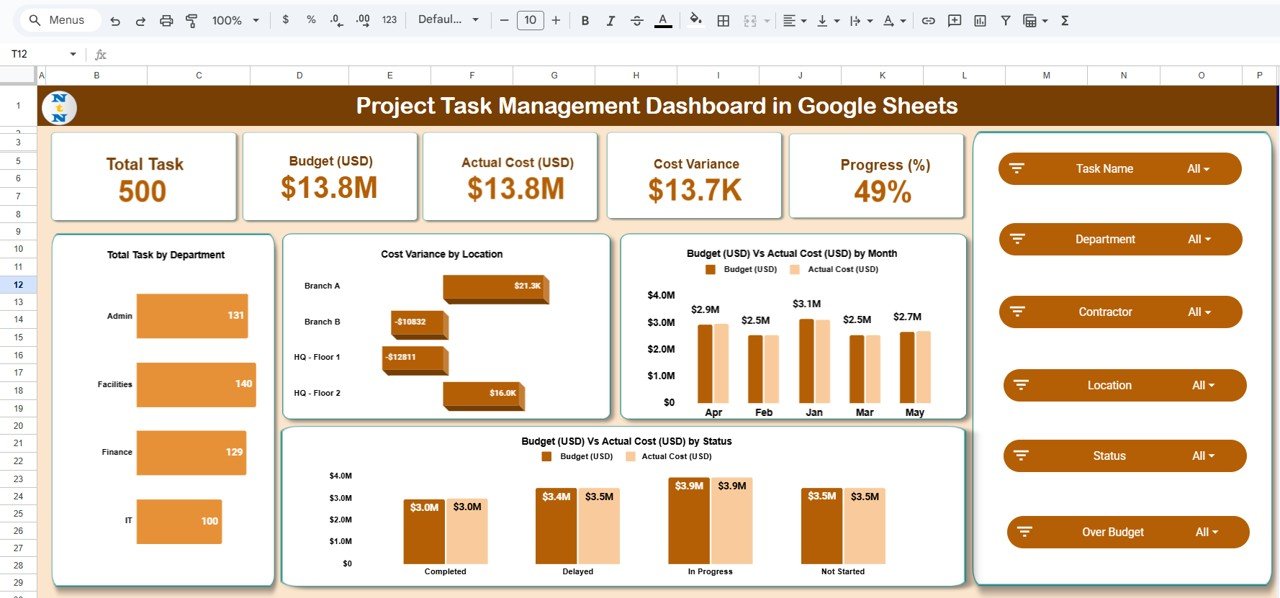
What it is: a cloud-based task tracker that reproduces Asana’s core list-and-board workflow inside a single Google Sheet your whole team can open and edit at once.
Who it is for: five-to-twenty person teams who mainly need to assign tasks, set due dates and see status at a glance — the 80% of Asana usage that never touches portfolios.
What is inside:
- Task table with owner, priority, status, start and due dates
- Auto-updating dashboard with completion %, overdue count and workload by person
- Colour-coded status board and filter views
- Progress and cost-variance charts that refresh as you type
Because it lives in Google Sheets, it is genuinely multiplayer like Asana — concurrent editing, comment threads, version history and mobile access are all built in through Drive, at no per-seat cost. A 12-person team that would pay Asana Starter about $1,580 a year owns this for a one-time $6.99. It is the closest 1:1 swap for day-to-day Asana use, which is why it tops the list.
Price: $6.99. Get the Project Task Management Dashboard.
Best for: teams that want Asana’s task board without the monthly seat bill.
2. Scrum Team KPI Dashboard in Excel — best for agile teams

What it is: a sprint-focused dashboard that tracks velocity, burndown, story points and team capacity the way Asana’s boards do for agile squads.
Who it is for: development and product teams running two-week sprints who need agile metrics, not just a task list.
What is inside:
- Sprint backlog with story points, status and assignee
- Velocity and burndown charts across sprints
- Team capacity vs committed-work view
- Cycle-time and completion-rate KPIs
Asana’s Advanced plan ($24.99/user/month) is what most agile teams pay for burndown-style reporting and rules. This dashboard delivers the same sprint visibility for a one-time $14.99 — less than a single seat’s monthly cost on Advanced. A six-person scrum team saves roughly $1,800 in year one. It is the most Asana-like tool here for teams that live in sprints rather than plain checklists.
Price: $14.99. Get the Scrum Team KPI Dashboard.
Best for: agile and product teams that need velocity and burndown.
3. Project Milestone Tracking Dashboard in Excel — best for timelines
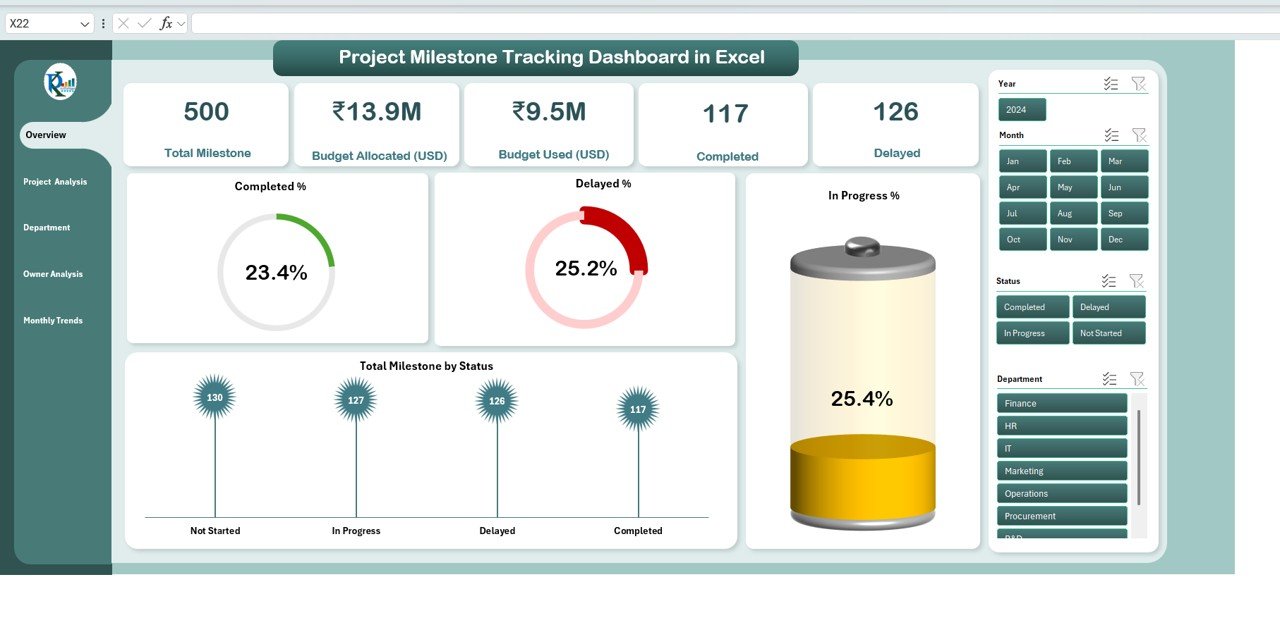
What it is: a milestone and timeline planner that covers the job Asana’s Timeline (Gantt) view does — phases, dependencies and deadline slippage.
Who it is for: project managers running date-driven work like launches, construction or client deliverables where the schedule matters more than the daily task feed.
What is inside:
- Milestone table with planned vs actual dates
- Gantt-style timeline bars that redraw automatically
- Slippage and on-time-delivery indicators
- Phase-level completion tracking
Asana gates Timeline behind its paid tiers, so a small team pays per seat just to see a Gantt chart. This template gives you the same planned-versus-actual timeline for a flat $13.99 and works offline in Excel. Use it when your reporting question is “are we on schedule?” rather than “who is doing what today?”.
Price: $13.99. Get the Project Milestone Tracking Dashboard.
Best for: deadline-driven projects that need a Gantt timeline.
4. Project Workflow Performance Dashboard in Google Sheets
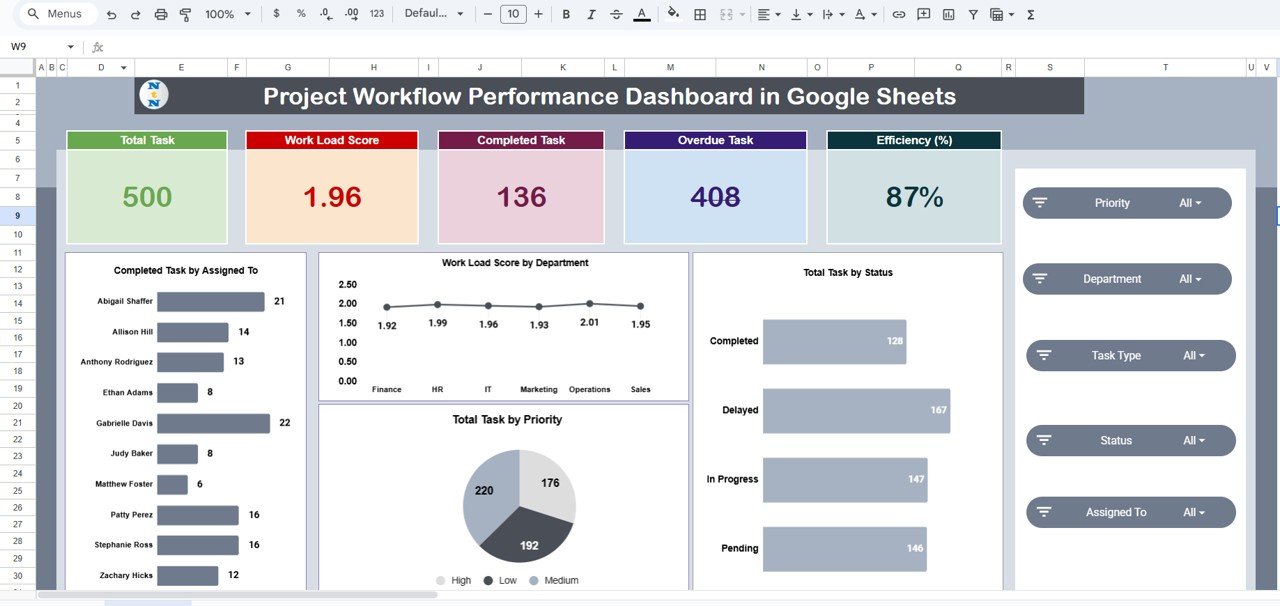
What it is: a status-and-throughput dashboard that answers the reporting questions Asana’s dashboards do — how much work is in each stage and where it is stuck.
Who it is for: team leads and ops managers who need workflow visibility across multiple projects in one cloud file.
What is inside:
- Workflow stage tracker with aging and bottleneck flags
- Throughput and completion-rate charts
- Owner and status breakdowns
- Live KPIs that update as the team edits
Where the #1 pick handles individual tasks, this one rolls the data up into a management view — the reporting layer Asana charges Advanced prices for. At $6.99 in Google Sheets, it pairs perfectly with the Project Task Management Dashboard: enter work in one, report on it in the other. Together they cost under $14 and cover the everyday-plus-reporting workflow most teams buy Asana for.
Price: $6.99. Get the Project Workflow Performance Dashboard.
Best for: lightweight cross-project status reporting.
5. Team Management KPI Dashboard in Power BI
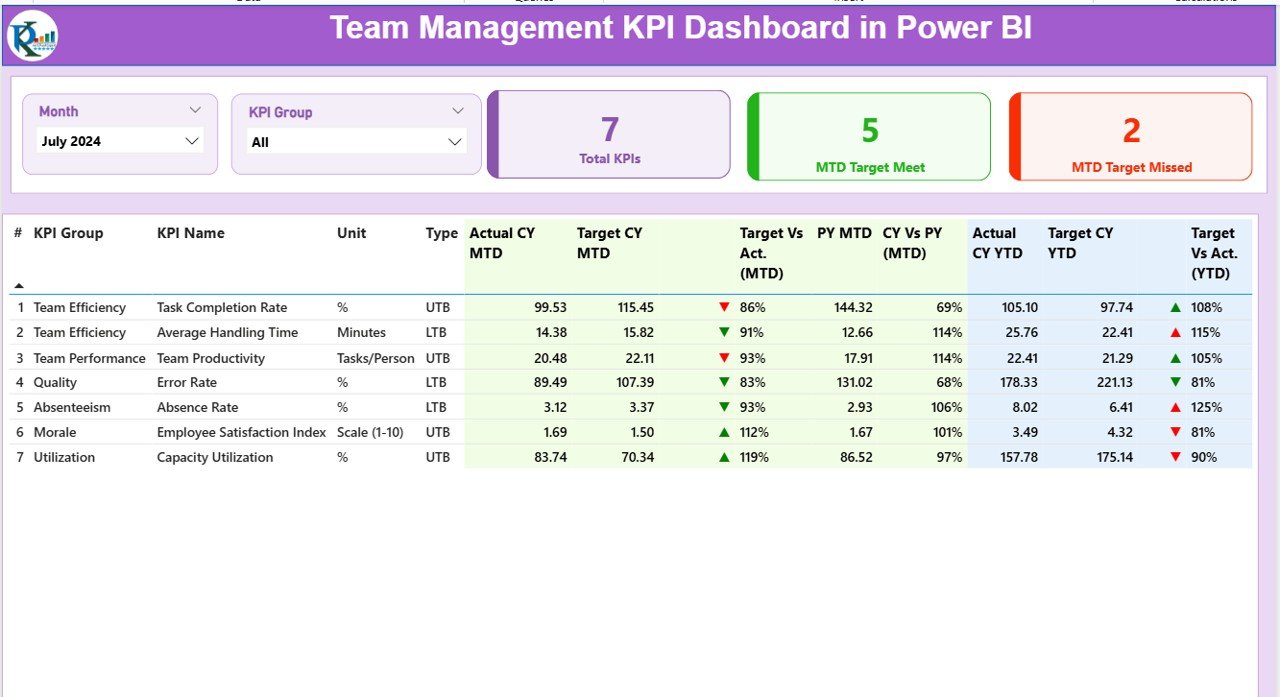
What it is: an interactive Power BI report that covers Asana’s workload and portfolio reporting — capacity, utilisation and performance across the whole team.
Who it is for: managers who already work in Microsoft Power BI and want filterable, drill-down team analytics rather than a spreadsheet.
What is inside:
- Team workload and utilisation visuals
- Task-completion and productivity KPIs by member
- Slicers for date, team and project
- Drill-through detail pages
Asana’s workload balancing sits on its most expensive standard tier. This Power BI dashboard reproduces the capacity-and-utilisation picture for a one-time $11.99, and because it is Power BI you can point it at your own data source and refresh it automatically. It is the right pick when leadership wants portfolio-level analytics, not a task board.
Price: $11.99. Get the Team Management KPI Dashboard.
Best for: Power BI users who need workload and portfolio reporting.
6. Team Collaboration KPI Dashboard in Power BI
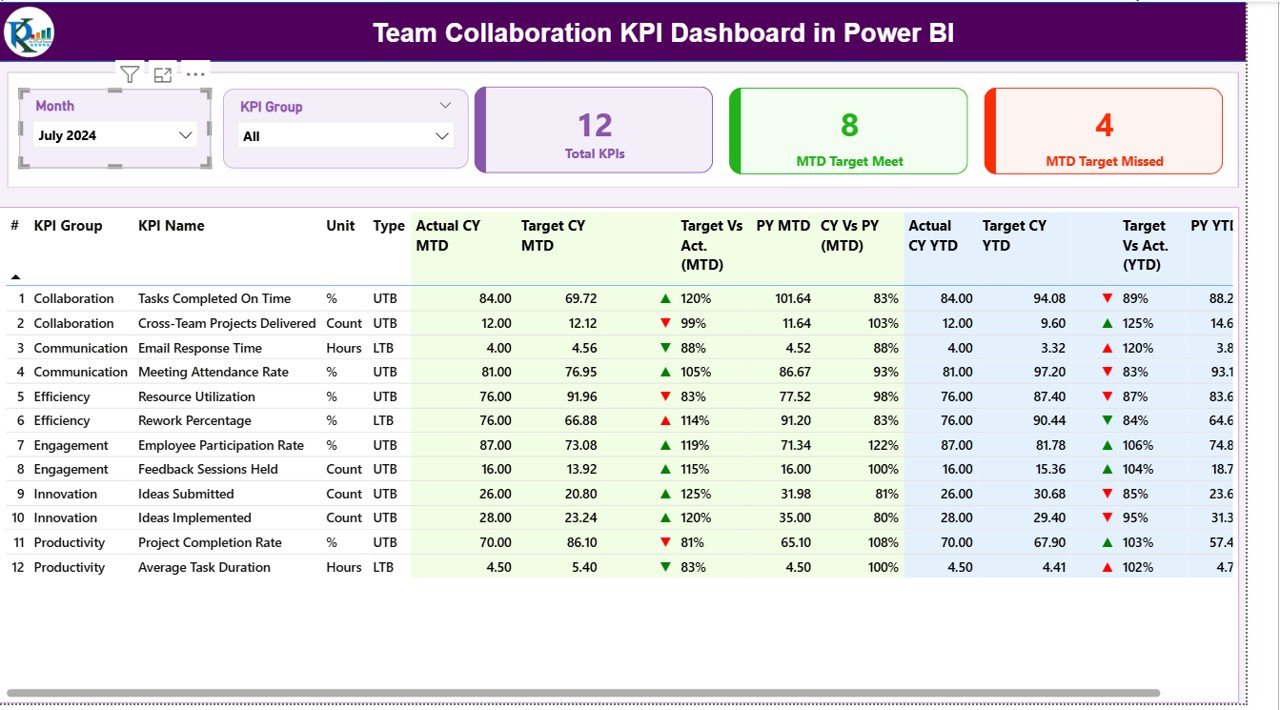
What it is: a Power BI report focused on collaboration and engagement metrics — response times, hand-offs and participation across the team.
Who it is for: managers of distributed or hybrid teams who want to measure how well people are actually working together, a layer Asana only hints at.
What is inside:
- Collaboration and communication KPIs
- Task hand-off and response-time tracking
- Engagement and participation visuals
- Interactive slicers and trend charts
This is the analytics companion to the task templates above: use the trackers to run the work, then use this to see whether collaboration is healthy. At $11.99 one-time it costs less than one Asana Advanced seat for a single month, and it never expires. Best deployed alongside a task template rather than on its own.
Price: $11.99. Get the Team Collaboration KPI Dashboard.
Best for: hybrid teams measuring collaboration health.
7. Team Performance Task Calendar in Excel — best value

What it is: a calendar-view task planner that covers Asana’s Calendar view — tasks laid out by due date with owner and status.
Who it is for: small teams and solo managers who mostly need to see what is due this week and who owns it, at the lowest possible price.
What is inside:
- Monthly and weekly calendar layout of tasks
- Owner, priority and status per task
- Overdue and upcoming highlighting
- Simple performance summary
At $4.99 this is the cheapest way to replace Asana’s calendar for a team that does not need boards or Gantt charts. It is the classic “we just want to see the week” use case, and it downloads and opens in seconds. That combination of near-zero price and instant usefulness makes it our best-value pick.
Price: $4.99. Get the Team Performance Task Calendar.
Best for: the lowest-cost Asana calendar replacement.
8. Team Performance Project Calendar in Excel
What it is: a project-level scheduling calendar — the same idea as the task calendar but organised around projects and phases rather than individual to-dos.
Who it is for: managers juggling several projects who want them laid out on one calendar to spot clashes and gaps.
What is inside:
- Project schedule across a monthly calendar grid
- Phase and deadline markers
- Resource and owner assignment
- Performance and progress summary
Pair this $4.99 calendar with the task or milestone dashboards and you have a two-file system that covers scheduling and execution for under $12 total — roughly what one Asana seat costs for a single month. It is the pick for anyone whose main pain is seeing multiple projects on one timeline.
Price: $4.99. Get the Team Performance Project Calendar.
Best for: scheduling several projects on one calendar.
Replace Asana this week for the price of one lunch.
Start with the Project Task Management Dashboard in Google Sheets at $6.99 — a one-time buy, unlimited users, yours forever. No monthly seats, no lock-in.
How to choose between them
Match the template to the job you actually do in Asana most days:
| Your main need | Buy this | Price |
|---|---|---|
| Everyday tasks & assignees (cloud) | Project Task Management Dashboard (Google Sheets) | $6.99 |
| Agile sprints, velocity, burndown | Scrum Team KPI Dashboard (Excel) | $14.99 |
| Timelines, milestones, deadlines | Project Milestone Tracking Dashboard (Excel) | $13.99 |
| Cross-project status reporting | Project Workflow Performance Dashboard (Google Sheets) | $6.99 |
| Portfolio / workload analytics | Team Management KPI Dashboard (Power BI) | $11.99 |
| Just a calendar of what is due | Team Performance Task Calendar (Excel) | $4.99 |
Prefer cloud, multiplayer editing? Choose the Google Sheets templates. Already standardised on Microsoft? The Excel and Power BI options fit your stack. Most teams end up buying two — a task tracker plus a calendar or reporting dashboard — and still spend under $15 total. For more options across formats, browse our project management dashboard templates and task and to-do management templates.
When Asana is still the right call
Templates are not a universal replacement, and pretending otherwise just leads to refunds. Stay on Asana — or another dedicated SaaS tool — when:
- You are 50+ people across multiple teams. Real-time permissions, audit trails and role-based access at that scale are exactly what SaaS is built for, and a spreadsheet starts to strain.
- You need automation and integrations. If your workflow depends on rules, triggers, and native connections to Slack, Jira, Salesforce or a CI pipeline, Asana’s automation earns its price.
- You require live mobile apps with notifications. Push notifications, @mentions that ping phones and a polished mobile app are things a template cannot match.
- Compliance demands it. SOC 2, SSO/SAML, granular data-residency and admin controls are SaaS territory.
The honest rule of thumb: under ~20 users doing task, timeline and calendar work, a template wins on cost and ownership. Above that, or when automation and integrations are core, keep paying for the software. Many teams run both — Asana for the automated pipeline, a KPI dashboard for the reporting Asana does not do well.
Frequently asked questions
What is the best Asana alternative for small teams?
For most small teams the best Asana alternative is the Project Task Management Dashboard in Google Sheets ($6.99). It reproduces Asana’s list-and-board task workflow in a cloud file with unlimited multiplayer editing, so you avoid the $10.99–$24.99 per-user monthly seat cost entirely while keeping the day-to-day features you actually use.
How much does Asana cost in 2026?
Asana offers a free Personal plan for up to 10 users. Paid plans start at $10.99 per user per month for Starter and $24.99 per user per month for Advanced, both billed annually, with custom pricing for Enterprise. Always confirm the current figures on Asana’s official pricing page, as SaaS prices change.
Can an Excel or Google Sheets template really replace Asana?
For teams under roughly 20 people doing task, timeline and calendar work, yes. Templates cover boards, Gantt timelines, sprints and reporting. What they do not replace is heavy automation, native integrations and mobile push notifications, so match the tool to how you actually work rather than to feature lists.
Is a one-time template cheaper than Asana over time?
Dramatically. A five-person team on Asana Starter pays about $660 a year, every year; on Advanced it is about $1,500 a year. A template is a single $4.99–$14.99 purchase you own forever. Even a two-template setup costs under $15 once, versus hundreds or thousands annually.
Do these templates support multiple users at once?
The Google Sheets templates do — Google Drive gives you concurrent editing, comments and version history at no per-seat cost, just like Asana’s collaboration. The Excel and Power BI templates support multi-user work through OneDrive/SharePoint or a shared drive, though real-time co-editing is smoothest in the Google Sheets versions.
Which template is best for agile or scrum teams?
The Scrum Team KPI Dashboard in Excel ($14.99) is built for agile teams. It tracks velocity, burndown, story points and team capacity across sprints — the reporting Asana reserves for its Advanced tier — for a one-time price lower than a single Advanced seat costs in a month.
Do I need a subscription or does the template expire?
Neither. Every template is a one-time purchase with no subscription and no expiry. You download the file, keep it forever, and use it on unlimited projects and with unlimited team members. There are no seat limits, renewal fees or feature paywalls once you own it.
Can I customise the templates to match my workflow?
Yes. Because they are standard Excel, Google Sheets and Power BI files, you can add columns, change statuses, rename fields, adjust charts and recolour everything to your branding. Unlike SaaS, where you work within the vendor’s structure, you fully control the layout and logic of a template you own.
What is the difference between the task calendar and the project calendar?
The Team Performance Task Calendar organises individual to-dos by due date — ideal for “what is due this week?”. The Team Performance Project Calendar organises whole projects and phases across the month, so you can spot scheduling clashes between projects. Both are $4.99; many teams buy both.
Where can I see these templates in action?
Each product page includes full screenshots and details, and our NextGenTemplates YouTube channel walks through dashboards and trackers step by step. Video is where you can see the filters, charts and data entry working before you buy, which is the fastest way to judge fit.
Get more project management templates
Own your project management stack for under $15 — once.
Pair the Project Task Management Dashboard ($6.99) with the Team Performance Task Calendar ($4.99) and you have Asana’s core covered for a one-time $11.98 — no seats, no subscription.
Explore more project management templates, Power BI dashboards ranked by industry, and performance review templates. Subscribe on YouTube for walkthroughs.
Tracking software engineering work instead of general tasks? Compare our Jira alternatives in Excel and Google Sheets for sprint, bug, and backlog tracking without per-seat fees.
Leaving ClickUp specifically? Compare our ClickUp alternative spreadsheet templates for 2026 for the same task, sprint and timeline coverage without per-seat fees.
Related: Moving off another platform? See our Smartsheet alternatives — 8 work management templates in Excel & Google Sheets.
Replacing Notion for planning and docs? Read our Notion alternatives in Excel & Sheets for workspace and planner templates that replace Notion for a one-time fee.
Before you commit to a template, make sure you know which numbers to watch. Our guide to the 12 project management KPIs (CPI, SPI, EVM) to track in 2026 explains the formulas and benchmarks every project dashboard should calculate.