



The Analog Clock in Excel Using Pie and Doughnut Charts is a unique and visually engaging Excel tool designed to create a dynamic, interactive analog clock using the built-in pie and doughnut chart functionalities. This tool allows you to display the current time in a sleek, customizable clock format right within your Excel spreadsheet. It is an ideal solution for those looking to enhance their Excel dashboards or reports with a visually appealing and informative clock.
The clock uses a combination of pie and doughnut charts to represent the hour, minute, and second hands, and the time is updated dynamically based on your system’s current time. This tool is highly customizable, allowing you to adjust the clock’s design, colors, and size to fit your reporting needs or dashboard style. Whether you’re presenting real-time data, creating an interactive dashboard, or adding a fun and informative element to your reports, this analog clock tool offers both functionality and aesthetic appeal.

Key Features of the Analog Clock in Excel Using Pie and Doughnut Charts:
⏰ Real-Time Analog Clock
Display an interactive analog clock that updates in real-time, showing the current time using pie and doughnut charts.
🎨 Customizable Design
Customize the clock’s appearance, including colors, sizes, and chart types, to match your reporting or dashboard theme.
📊 Dynamic Time Updates
The clock automatically updates every second, ensuring that you always see the current time as you work in Excel.
⚙️ Uses Pie and Doughnut Charts
Leverages Excel’s pie and doughnut chart functionalities to create a visually compelling clock with hands representing hours, minutes, and seconds.
🔄 Easy to Use and Integrate
Simple setup and integration into your existing Excel spreadsheets or dashboards, with no complex formulas or VBA required.
Why You’ll Love the Analog Clock in Excel Using Pie and Doughnut Charts:
✅ Real-Time Functionality – The clock updates in real time, ensuring accurate time representation without manual adjustments. ✅ Visually Appealing – The combination of pie and doughnut charts creates a professional-looking analog clock that adds a dynamic element to your reports or dashboards. ✅ Highly Customizable – Tailor the clock’s design, colors, and sizes to fit your needs, making it perfect for any Excel project or dashboard. ✅ Easy Setup – The clock is easy to set up with minimal effort, no VBA required, and can be integrated into your reports or dashboards seamlessly. ✅ Perfect for Dashboards and Presentations – Enhance your reports with an interactive, visual representation of time that adds both functionality and style.
What’s Inside the Analog Clock in Excel Using Pie and Doughnut Charts:
- Real-Time Analog Clock – A functional clock that updates in real-time to reflect the current time using pie and doughnut charts.
- Customizable Features – Adjust the colors, size, and other elements to match your dashboard or reporting needs.
- Simple Integration – Integrates easily into existing Excel reports or dashboards without requiring complex formulas.
- Interactive and Dynamic – The clock updates every second, making it a live, engaging element in your reports or dashboards.
How to Use the Analog Clock in Excel Using Pie and Doughnut Charts:
1️⃣ Download the Template – Access the Excel file immediately after purchase. 2️⃣ Insert into Your Report – Copy the clock into your existing Excel report, dashboard, or presentation. 3️⃣ Customize the Design – Adjust the colors, sizes, and other settings to match your needs. 4️⃣ Monitor Real-Time Time Updates – Watch the clock update every second, reflecting the current time as you work.
Who Can Benefit from the Analog Clock in Excel Using Pie and Doughnut Charts:
- Data Analysts
- Business Analysts
- Dashboard Creators
- Project Managers
- Anyone looking to add dynamic visual elements to Excel reports or dashboards
The Analog Clock in Excel Using Pie and Doughnut Charts is a fun, interactive tool that adds a dynamic time element to your Excel projects, reports, or dashboards. Whether for professional use or as an enhancement to your spreadsheets, this tool brings both functionality and visual appeal to your work.
Click here to read the Detailed blog post
https://www.pk-anexcelexpert.com/analog-clock-in-excel-pie-chart-doughnut-chart/
Visit our YouTube channel to learn step-by-step video tutorials
Watch the step-by-step video tutorial:
Compatibility and Requirements
- Works in Microsoft Excel desktop (Excel 2016 or later, or Microsoft 365).
- You can change colors, sizes and labels with standard Excel chart tools. Microsoft explains them in Create a chart from start to finish.
Frequently Asked Questions
How does the clock work?
It combines pie and doughnut charts to draw the hour, minute and second hands and shows the current time from your computer’s clock.
Can I add the clock to my own dashboard?
Yes. Copy the clock into your existing Excel report, dashboard or presentation.
Can I change the clock’s design?
Yes. You can adjust the colors, size and chart styles to match your report or dashboard theme.
Who uses it?
Data analysts, business analysts, dashboard creators and project managers who want a live time element in their reports.
Related Excel Chart Templates
- Stylish Doughnut Charts in Excel: more doughnut chart designs
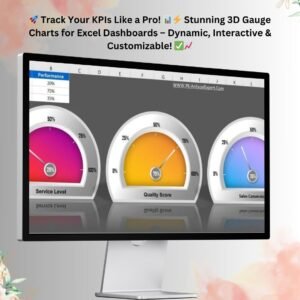
- 3D Gauge Chart in Excel: a dial-style gauge for KPIs
- RYG Dial Gauge Meter in Excel: a red, yellow and green dial
- Stylish Progress Bar Chart in Excel: show progress toward a goal
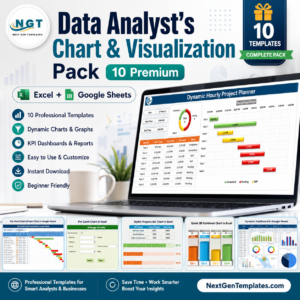
- Data Analyst’s Chart & Visualization Pack: 10 chart templates in one download
Browse all Excel charts and visualizations or the Excel dashboards.














Reviews
There are no reviews yet.