Employee satisfaction is influenced by more than just salary, work culture, or benefits. One often-overlooked factor is food quality and variety. When employees enjoy cafeteria meals, morale improves, engagement increases, and productivity stays high. However, many organizations struggle to manage cafeteria feedback effectively. Suggestions usually arrive through emails, chats, or casual conversations, which leads to missed ideas, poor tracking, and no clear follow-up.Office Cafeteria Menu Suggestion Tracker in Google Sheets
That is exactly why the Office Cafeteria Menu Suggestion Tracker in Google Sheets is a smart and practical solution.
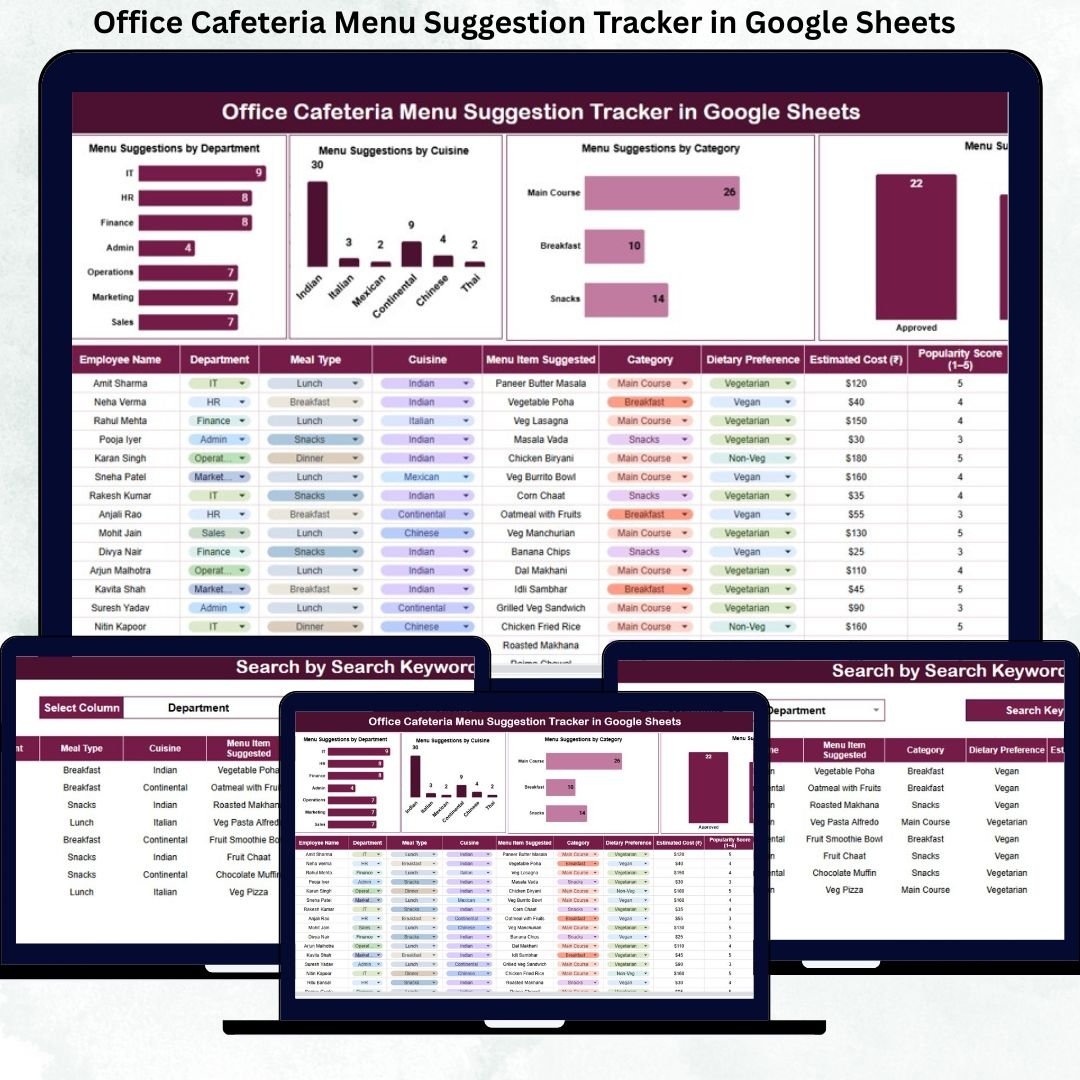
This ready-to-use Google Sheets tracker helps organizations collect, organize, and analyze cafeteria menu suggestions in a structured way. Instead of guessing employee preferences, HR teams and cafeteria managers can rely on real data, charts, and trends to improve menu planning. Moreover, the tracker includes a powerful search feature that allows teams to find any suggestion instantly.Office Cafeteria Menu Suggestion Tracker in Google Sheets
Because it runs entirely in Google Sheets, this tracker is cloud-based, collaborative, cost-effective, and extremely easy to use—no additional software or technical skills required.Office Cafeteria Menu Suggestion Tracker in Google Sheets
⭐ Key Features of the Office Cafeteria Menu Suggestion Tracker
🍽️ Centralized cafeteria suggestion tracking
📊 Automatic charts for food trend analysis
🔍 Smart search by keyword and field
🏢 Department-wise feedback visibility
🌍 Cuisine & category-based insights
⚡ Real-time updates and collaboration
☁️ 100% Google Sheets based
🚀 Ready to use with no setup
This tracker transforms cafeteria feedback into actionable insights.
📂 What’s Inside the Office Cafeteria Menu Suggestion Tracker
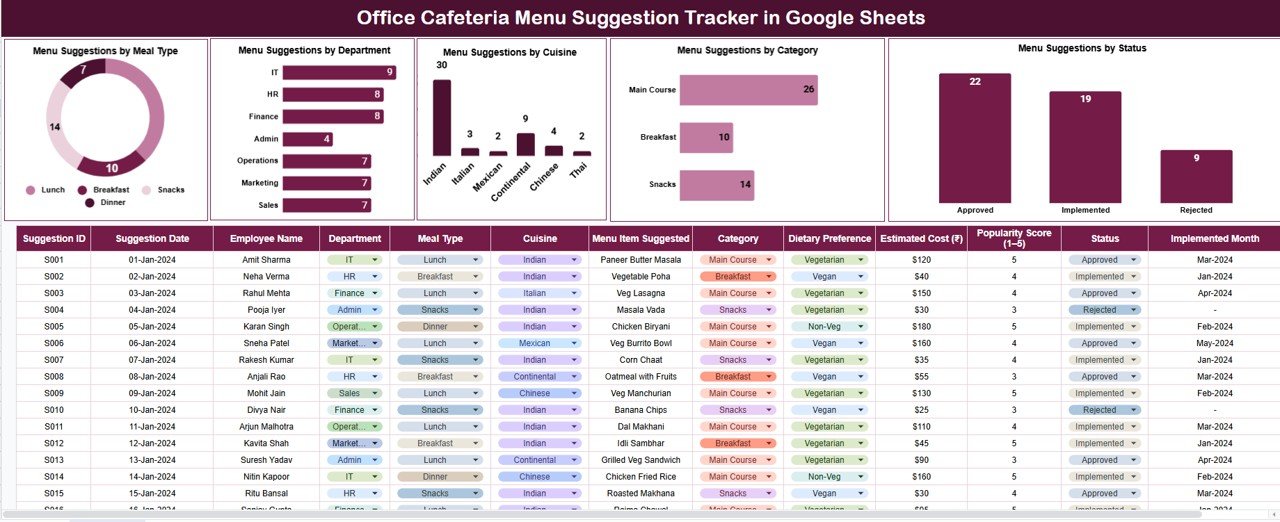
🗂️ Tracker Sheet Tab (Main Data Sheet)
This is the core of the entire system where all menu suggestions are recorded.
Typical fields include:
Suggestion ID
Employee Name
Department
Meal Type (Breakfast, Lunch, Snacks, Dinner)
Cuisine (Indian, Continental, Chinese, Italian, etc.)
Category (Vegetarian, Non-Vegetarian, Vegan, Healthy)
Suggested Dish
Suggestion Status (New, Under Review, Approved, Rejected)
Comments
Once data is entered, all charts update automatically, ensuring transparency and consistency.
📊 Built-in Charts for Cafeteria Insights
The tracker includes five powerful charts that help cafeteria teams and HR take informed decisions.
🍳 Menu Suggestions by Meal Type
Understand whether employees need better breakfast, lunch, snacks, or dinner options.
🏢 Menu Suggestions by Department
Identify which departments submit more suggestions and track engagement levels.
🌍 Menu Suggestions by Cuisine
Analyze cuisine preferences and plan menus that match employee taste trends.
🥗 Menu Suggestions by Category
Track vegetarian, vegan, healthy, and special-diet preferences to support wellness initiatives.
📌 Menu Suggestions by Status
Ensure suggestions are reviewed and approved instead of being ignored.
These charts eliminate manual analysis and improve cafeteria planning.
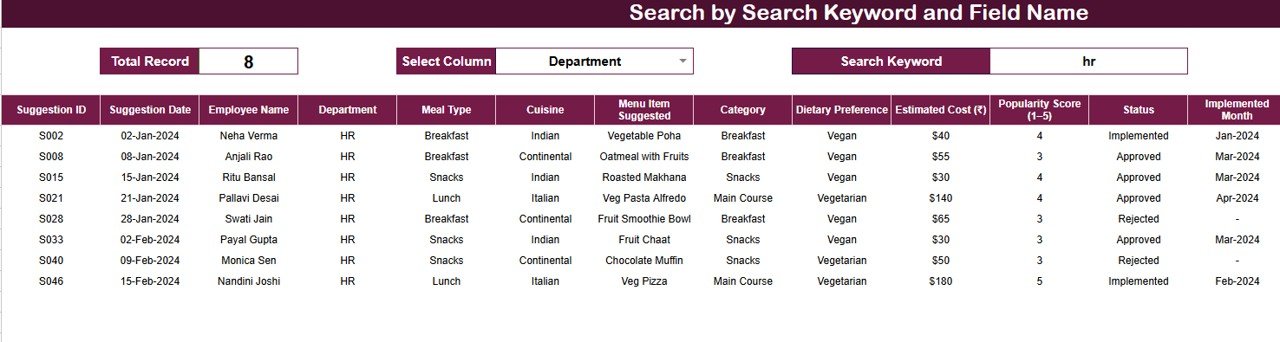
🔍 Smart Search Functionality
The tracker includes a Smart Search Panel for instant record lookup.
You simply enter:
🔎 Search Keyword (Employee Name, Dish, Cuisine, etc.)
🏷️ Field Name (Department, Meal Type, Category, Status)
The tracker instantly filters matching results.
✅ Why This Matters
Faster review of pending suggestions
Easy preparation for cafeteria meetings
Quick response to employee queries
No manual scrolling through rows
🧭 How to Use the Cafeteria Menu Suggestion Tracker
1️⃣ Record every menu suggestion in the Tracker Sheet
2️⃣ Categorize by meal type, cuisine, and category
3️⃣ Update suggestion status regularly
4️⃣ Use charts to analyze trends
5️⃣ Search suggestions instantly when needed
6️⃣ Improve cafeteria menus based on data
No technical knowledge required.
👥 Who Can Benefit from This Tracker
HR Teams
Admin & Facility Teams
Cafeteria Management Teams
Office Operations Teams
Corporate Offices & Campuses
### 📖 Click here to read the detailed blog post
Watch the step-by-step video tutorial: