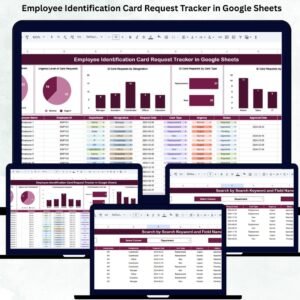
Every organization needs a smooth and reliable system to manage employee ID card requests. When requests are handled through emails, handwritten notes, or messaging apps, the chances of delays and miscommunication increase dramatically. Cards get issued late, admin teams struggle with follow-ups, and employees stay frustrated waiting for updates. That’s why a Employee Identification Card Request Tracker in Google Sheets becomes an essential tool for modern HR and admin teams.Employee Identification Card Request Tracker in Google Sheets
This ready-to-use tracker centralizes all ID card requests—new cards, replacements, temporary cards, or upgrades—into one structured system. It simplifies request tracking, improves processing speed, and gives clear visibility into every stage of the ID card issuance process. Whether you manage a small team or a large multi-office workforce, this Google Sheets tracker helps you streamline ID operations without needing complicated or expensive software.Employee Identification Card Request Tracker in Google Sheets
With automated charts, a built-in search function, and cloud-based access, the Employee Identification Card Request Tracker empowers HR, admin, and facility teams to work smarter, faster, and with complete accuracy.Employee Identification Card Request Tracker in Google Sheets
✨ Key Features of the Employee Identification Card Request Tracker in Google Sheets
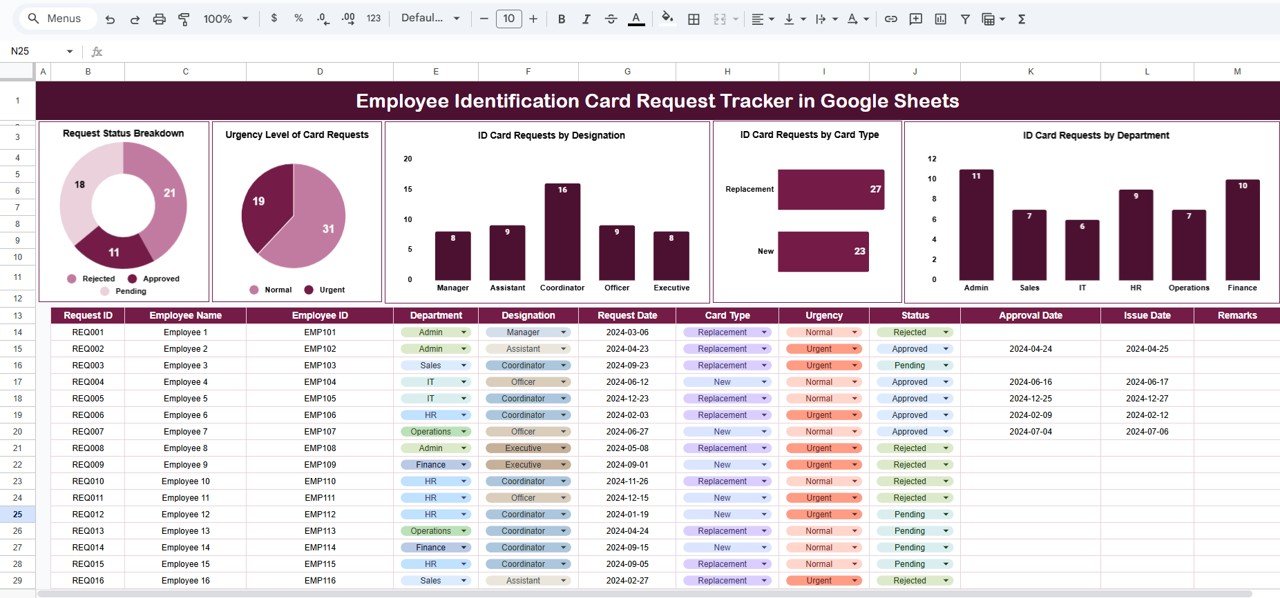
📊 1. Visual Breakdown of Request Status
The tracker highlights how many requests are:
Pending
In Progress
Completed
Delayed
This helps teams manage workload effectively and identify bottlenecks instantly.
🔥 2. Urgency-Based Priority Analysis
Requests may come in different urgency levels. This dashboard shows the distribution of:
Urgent
High
Medium
Low
This ensures the most time-sensitive requests get processed immediately.
🏢 3. Department-Wise Request Insights
See which department generates the highest number of ID card requests. This helps HR plan workload, improve communication, and manage expectations.
🪪 4. ID Card Type Breakdown
Analyze how many requests are for:
New ID cards
Replacement cards
Temporary cards
Upgraded design cards
This gives clarity on common issues and supports better resource planning.
📦 What’s Inside the Employee Identification Card Request Tracker in Google Sheets
📍 1. Tracker Sheet – Main Request Dashboard
This is the heart of the system. It includes:
Status charts
Priority charts
Designation-wise charts
Department-wise charts
Card type charts
All visuals update automatically when new data is entered in the Data Sheet.
This gives a complete picture of ID card activities across the organization.
🔍 2. Search Sheet – Fast Request Finder
No more scrolling through hundreds of rows. With the Search Sheet, you can:
Search by keyword
Search by designation
Search by department
Search by card type
Search by status
Search by priority
This saves time and helps HR/admin teams retrieve records in seconds—especially helpful during follow-ups or audits.
🎯 Who Can Benefit from the Employee Identification Card Request Tracker in Google Sheets
👥 HR Teams
Manage ID issuance, replacements, and updates efficiently.
🏛️ Admin Departments
Track request volume, prioritize tasks, and manage workflows.
👨💼 Facility Managers
Coordinate printing, approvals, and delivery timelines.
🌍 Large & Multi-Location Organizations
Standardize ID card operations across branches.
🌟 Advantages of Using This Tracker
Streamlined Request Handling – Everything stays in one organized location.
Faster Processing – Prioritized charts improve speed and clarity.
Better Transparency – Shareable with employees for status visibility.
Real-Time Collaboration – Multiple team members can update at once.
Easy Data Analysis – Charts help identify trends and workload peaks.
No Technical Skills Needed – Simple and beginner-friendly.
Cloud-Based & Secure – No installation or maintenance required.
🚀 Opportunities for Improvement
Enhance the tracker further with:
Google Form submission for automated request entries
Email notifications when requests are completed
QR code generation for ID cards
SLA tracking for processing delays
A request history log
📝 Best Practices for Using the Tracker
Use standardized status labels like Pending, Processing, Completed
Update the tracker daily for accuracy
Keep priorities simple and structured
Review the dashboard weekly
Share the tracker with admin and HR teams
Use filters to manage large datasets effectively
Conclusion
The Employee Identification Card Request Tracker in Google Sheets is a simple yet powerful solution for managing ID card requests efficiently. With its structured layout, automated charts, and easy search function, the tracker ensures faster processing, improved transparency, and better coordination across teams. Whether you are issuing ID cards to new hires, replacing lost cards, or managing multiple card types, this tracker helps you streamline operations and deliver a smoother employee experience.
Click here to read the Detailed blog post
Watch the step-by-step video Demo: