

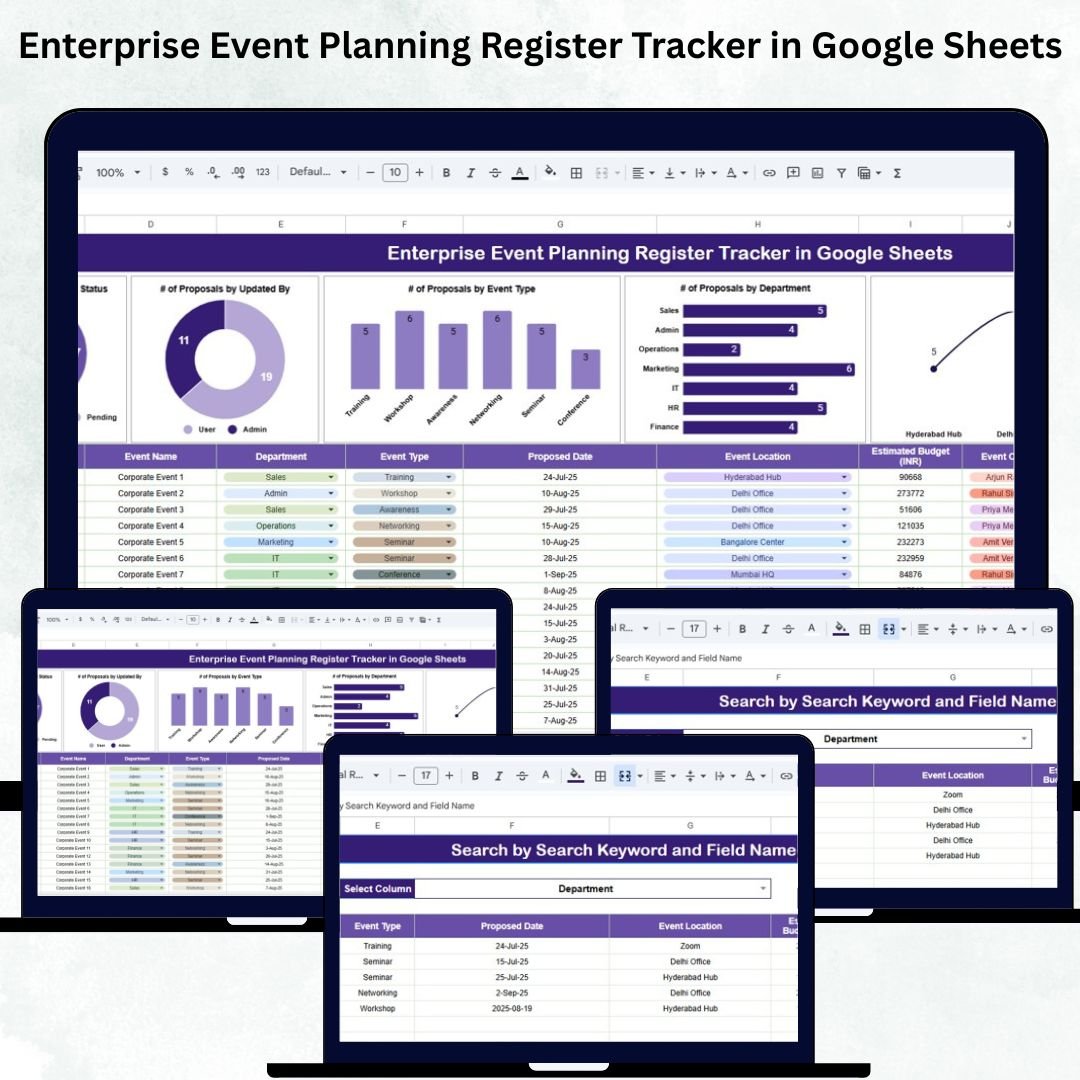

Managing events across an organization becomes challenging when several departments, event types, approval levels, and team members are involved. Without a centralized tracking system, proposals get lost, approvals are delayed, and communication breaks down — leading to inefficiencies and confusion.
The Enterprise Event Planning Register Tracker in Google Sheets solves this problem with a ready-to-use, structured, and visually powerful event monitoring system. It centralizes all event proposal details, tracks approval progress, and provides real-time insights through automated charts and an intuitive Search Tab.
Whether your organization plans internal training sessions, corporate activities, marketing events, town halls, or team-building programs, this tracker ensures every proposal is documented, monitored, and managed efficiently — all inside Google Sheets.
Key Features of the Enterprise Event Planning Register Tracker in Google Sheets
This tracker includes smart features that simplify planning workflows and improve visibility across departments.
✨ Centralized Event Proposal Tracking – Maintain all proposals in one place for easy monitoring and reporting.
📊 Automated Visual Dashboards – Instantly view proposal trends by status, department, event type, location, and updated-by activity.
👥 Collaboration-Friendly – Real-time updates make it ideal for cross-department teams.
🔍 Built-In Search Function – Quickly locate proposals using keywords or specific fields.
📅 Approval Workflow Monitoring – Identify pending, rejected, or approved proposals instantly.
🏷️ Department & Event-Type Breakdown – Analyze trends and understand departmental activity.
🛠️ Fully Customizable – Add fields, workflow levels, calendars, or budget sections anytime.
☁️ Cloud-Based & Cost-Free – No software required — works fully on Google Sheets.
These features ensure simplified coordination, faster approvals, and better event planning outcomes.
What’s Inside the Enterprise Event Planning Register Tracker in Google Sheets
🟦 Tracker Sheet Tab
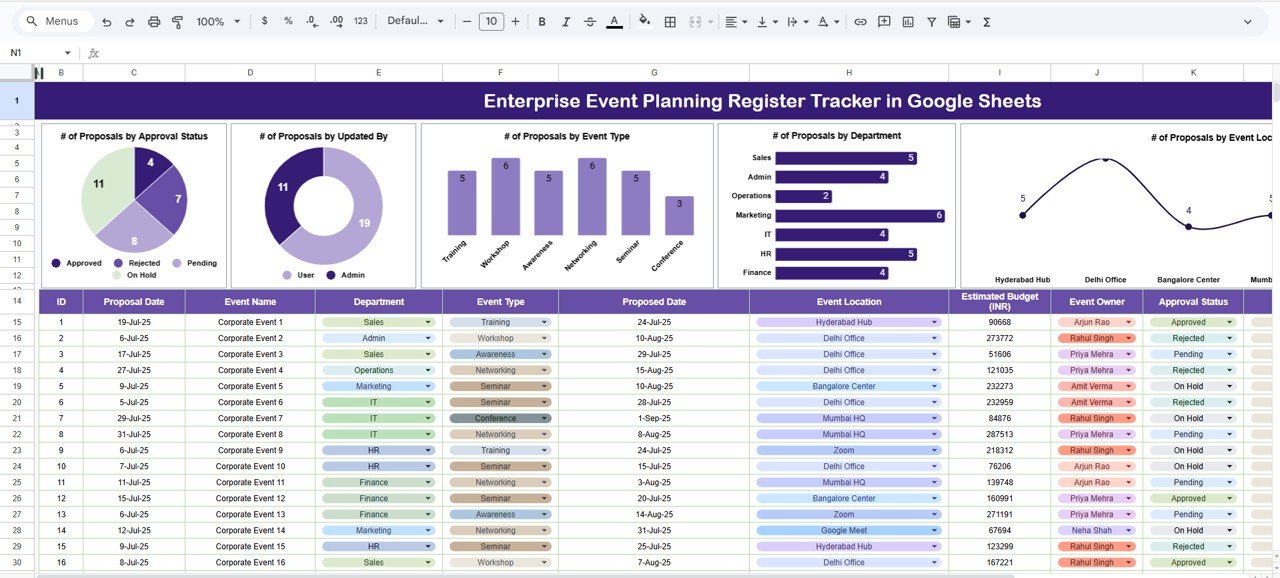
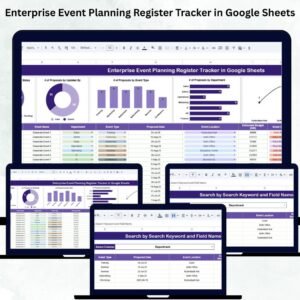
This is the main dashboard where all visual analytics are displayed.
It includes multiple charts that help teams analyze event proposal patterns:
📌 # of Proposals by Approval Status
Displays how many event proposals are Approved, Pending, Rejected, or Under Review.
This helps you identify bottlenecks and track workflow speed.
📌 # of Proposals by Updated By
Shows which team members have updated proposals recently — useful for accountability and collaboration tracking.
📌 # of Proposals by Event Type
Highlights the types of events being planned, such as Training, Workshops, Seminars, Celebrations, CSR events, and more.
📌 # of Proposals by Department
Shows event activity across HR, Marketing, IT, Sales, Finance, Operations, and more.
📌 # of Proposals by Event Location
Analyze where most events are being planned — onsite, offsite, regional branches, conference halls, etc.
These charts give decision-makers a quick overview of event planning activity across the organization.
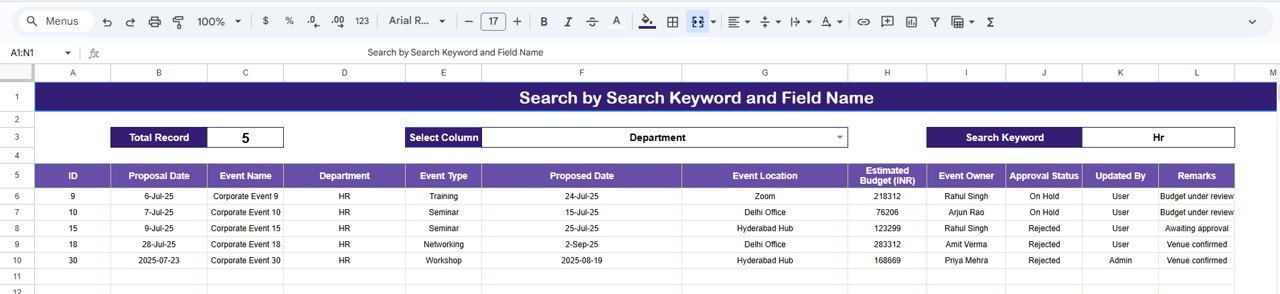
🟩 Search Sheet Tab
This tab allows users to locate proposals instantly.
You can search by:
Proposal ID
Event Type
Department
Location
Updated By
Approval Status
Keywords
Perfect for audits, follow-ups, or meetings.
🟫 Data Sheet Tab
This sheet contains all event proposal records.
It includes fields such as:
Proposal ID
Event Name
Event Type
Department
Location
Requested By
Updated By
Approval Status
Date Submitted
Notes
Follow-up Information
Updating this sheet automatically refreshes all charts.
How to Use the Enterprise Event Planning Register Tracker in Google Sheets
🔹 Step 1: Enter Proposal Data – Add all event requests into the Data Sheet.
🔹 Step 2: Update Approval Status – Mark proposals as Pending, Approved, or Rejected.
🔹 Step 3: Monitor Trends on the Tracker Sheet – Use charts to identify active departments, frequent event types, and approval delays.
🔹 Step 4: Use Search Tab for Quick Retrieval – Ideal for audits, meetings, or follow-ups.
🔹 Step 5: Customize Fields as Needed – Add budget sections, approval levels, or workflow steps.
🔹 Step 6: Share with Teams – Use Google’s collaboration features for cross-department access.
All visuals refresh instantly as data changes.
Who Can Benefit from This Enterprise Event Planning Register Tracker in Google Sheets
👥 HR Teams – Track employee engagement events and training proposals.
📣 Corporate Communications – Manage announcements, celebrations, and corporate events.
📊 Marketing Departments – Track campaign events, launches, and promotional activities.
🏢 Admin & Operations Teams – Manage logistics, facilities, and event requests.
🎓 Learning & Development Teams – Track training sessions and workshops.
🎤 Event Planning Teams – Centralize all proposals and approval workflows.
Any organization planning multiple events throughout the year can benefit from this powerful tracker.
Click here to read the Detailed blog post
Watch the step-by-step video Demo:
Visit our YouTube channel for step-by-step tutorials – Neotech Navigators
Compatibility and Requirements
- Works in Google Sheets. You need a free Google account and a web browser.
- The Tracker sheet shows charts of proposals by approval status, updated by, event type, department and event location. Google explains how charts work in Add and edit a chart or graph.
Frequently Asked Questions
Which sheets are included?
Three sheets: Tracker, Search and Data. The Tracker sheet holds the charts, the Search sheet finds proposals, and the Data sheet holds every event proposal record.
How do I update the charts?
Enter or edit proposals in the Data sheet. All charts on the Tracker sheet refresh automatically.
Can I find one proposal quickly?
Yes. The Search sheet lets you look up proposals by Proposal ID, event type, department, location, updated by, approval status or keyword.
Can I add my own fields?
Yes. The template is fully customizable, so you can add fields, workflow levels, calendars or budget sections.
Is there an Excel or Power BI version?
There is no Excel or Power BI version of this exact register. For event planning in other formats, see the Event Planning KPI Dashboard in Excel and the Event Planning KPI Dashboard in Power BI.
Related Event Planning Templates
- Event Planning & Approval Tracker in Google Sheets: another approval tracker for event proposals
- Corporate Event Planning Dashboard in Google Sheets: a dashboard view of corporate events
- Event Planning KPI Dashboard in Google Sheets: KPIs for event planning
- Event Planning Calendar in Google Sheets: a calendar for scheduled events
- Tracker Toolkit: 12 tracker templates for Excel and Google Sheets in one download
Browse all Google Sheets trackers.




























Reviews
There are no reviews yet.