

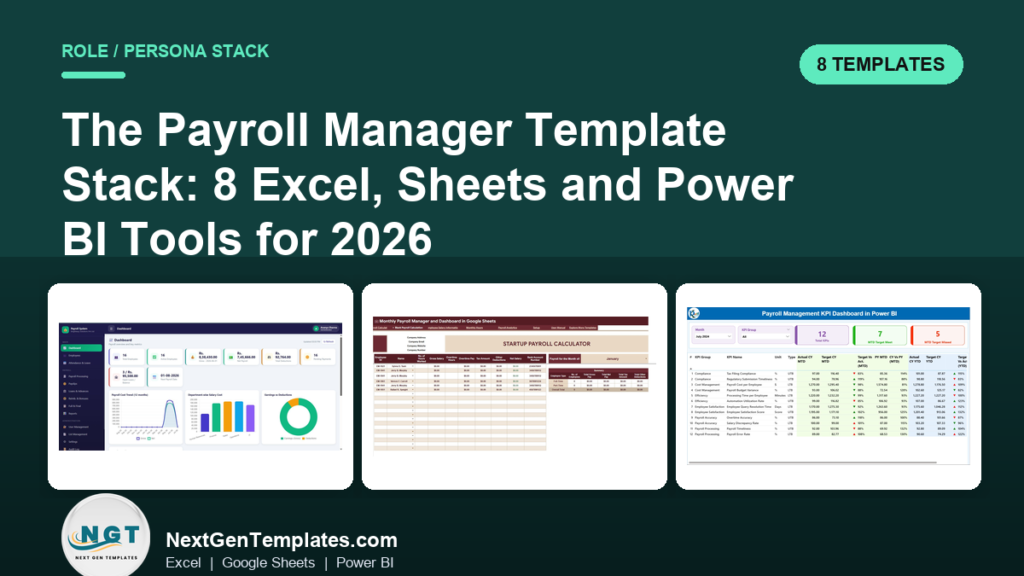
The best payroll manager Excel templates are the Payroll and Salary Management System Web App ($39.99) for full payroll runs, the Payroll Calculator and Payslip Generator in Excel ($14.99) for payslips, and the Monthly Payroll Manager and Dashboard in Google Sheets ($9.99) for shared monthly review. Add accuracy dashboards for reporting.
Last updated: October 2026
Key takeaways
- The Payroll and Salary Management System Web App costs $39.99 once and covers 14 pages, from employees and attendance to payslips, loans and an audit log.
- The Payroll Calculator and Payslip Generator in Excel costs $14.99 and produces PDF payslips for individual employees or in bulk.
- The Monthly Payroll Manager and Dashboard in Google Sheets costs $9.99 and is the lowest-priced way to get gross pay, overtime, tax and net pay by employee in a shared file.
- Three Payroll Accuracy KPI dashboards (Excel $14.99, Power BI $11.99, Google Sheets $9.99) let you pick the format your team already uses.
- The whole 8-template stack costs $136.92 if bought individually, and a 30-day rollout plan below shows the order to set it up.
 Launch offer
From your first Pivot Table to the Data Model, DAX, Power Query and a one-page KPI dashboard. 11h 51m of video by PK, with practice files, quizzes and a capstone.
Payroll manager Excel templates compared
| Template | Format | Best For | What it can replace | Price |
|---|---|---|---|---|
| Payroll and Salary Management System Web App (Best overall) | Web app | Full payroll runs with audit log | Part of a Gusto or ADP subscription used for record keeping | $39.99 |
| Payroll Calculator and Payslip Generator in Excel | Excel (VBA) | Salary calculation and PDF payslips | Payslip modules in Zoho Payroll, RazorpayX, greytHR | $14.99 |
| Monthly Payroll Manager and Dashboard in Google Sheets (Best value) | Google Sheets | Shared monthly payroll review | Manual payroll files, and hours review you might do in Deputy | $9.99 |
| Payroll Accuracy KPI Dashboard in Excel | Excel | Error and compliance monitoring | Manual error-check spreadsheets | $14.99 |
| Payroll Accuracy KPI Dashboard in Power BI | Power BI | MTD and YTD accuracy reporting | Custom-built report requests to analysts | $11.99 |
| Payroll Accuracy KPI Dashboard in Google Sheets | Google Sheets | Collaborative accuracy tracking | Scattered monthly reports | $9.99 |
| Payroll Management KPI Dashboard in Power BI | Power BI | Presenting payroll KPIs to finance | Slide decks built by hand each month | $11.99 |
| Employee Benefits Utilization KPI Dashboard in Excel | Excel | Benefits usage next to payroll | Separate benefits tracking sheets | $12.99 |
How we picked these payroll templates
We searched the Next Gen Templates catalog of HR and payroll products and kept only paid templates that map to a step in a payroll manager’s month: set up pay, track hours, process payslips, report accuracy and present results. We favored templates with a clear named job over general HR files.
We excluded free files and anything about hiring or training, because those belong to a different role. The “what it can replace” column is our judgement based on the listed features, not a claim that the template matches every feature of the paid software.
What are the best payroll manager Excel templates for 2026?
The eight templates below are grouped by the job a payroll manager does each cycle: plan, track, process payslips, report and present. They are ranked by how much of the monthly workload each one removes. For a generic single-file view, our payroll Excel template toolkit covers the small-business angle.
1. Payroll and Salary Management System Web App: best overall
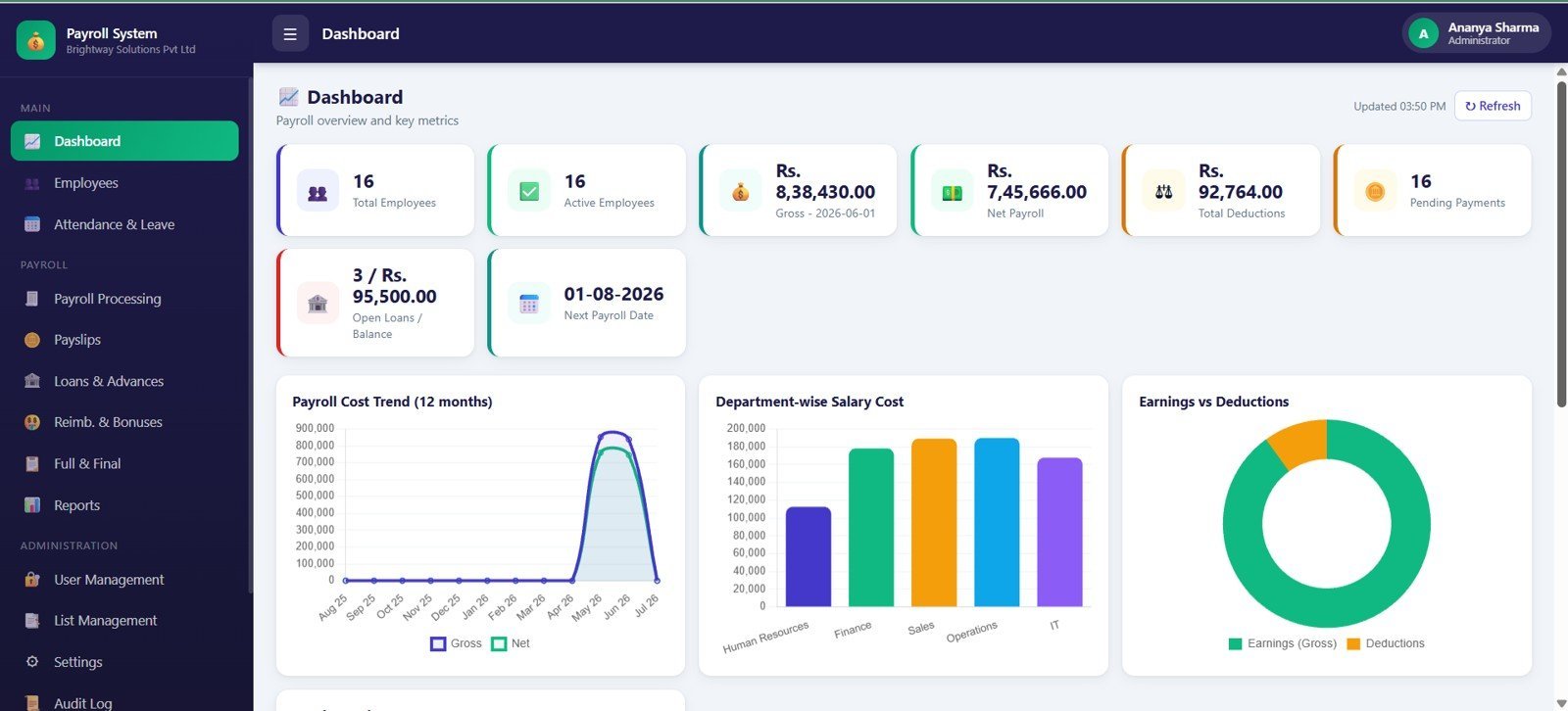
Job: plan and process. This is a 14-page browser workspace with login, dashboard, employees, attendance, payroll, payslips, loans, reports, settings and an audit log. It ranks first because it is the only template here that covers the whole cycle in one place.
Who it is for: HR and finance teams who have outgrown a single workbook and want a record of who changed what.
- Dashboard with total employees, active employees, gross payroll, net payroll, deductions, pending payments, loans and next payroll date
- Employee records with ID, department, designation, branch, joined date and status
- Attendance and leave inputs: working days, present days, paid leave, unpaid LOP, overtime hours
- Payroll runs, payslip review with bulk email workflow, and adjustments for loans, advances, reimbursements and settlements
Use cases: a monthly run where you check pending payments on the dashboard before approving; a loan balance review before deductions; a final settlement for a leaver; an audit log check when a figure looks wrong.
Price: $39.99, one-time. It replaces the record-keeping side of a subscription such as Gusto or ADP, not statutory filing. Get the Payroll and Salary Management System Web App.
Best for: payroll managers who want one system for the whole month.
2. Payroll Calculator and Payslip Generator in Excel
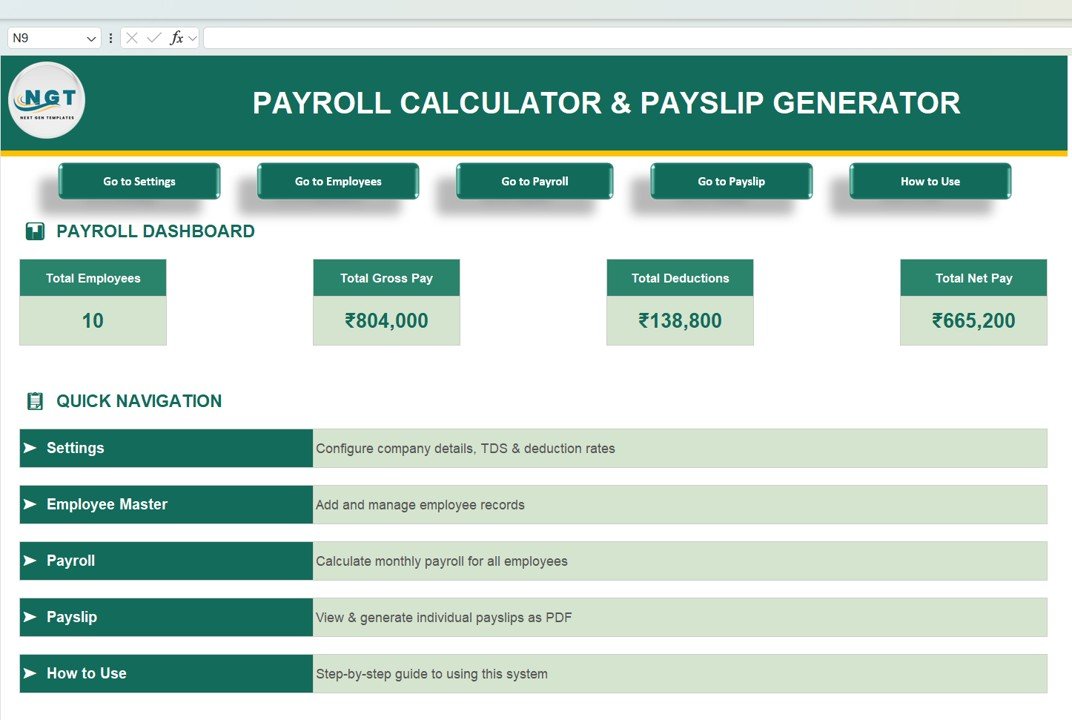
Job: payslip processing. This Excel VBA tool holds employee master records, calculates salary with allowances and statutory deductions (PF, ESI, TDS, Professional Tax), and generates PDF payslips in one click, individually or in bulk.
Who it is for: payroll managers in small and mid-size teams who currently copy and paste into a payslip template. The fields (PAN, Aadhaar, Basic, HRA, DA) point to Indian payroll, so check fit before buying for other countries.
- Dashboard KPI cards for total employees, gross pay, deductions and net pay
- Settings for company details, working days, salary components and deduction rates
- Earnings such as Basic, HRA, DA, Conveyance, Medical and Special Allowance
Use cases: the listing’s own estimate is that automated payslips save 5 to 10 minutes per employee per month, so a 30-person team saves 2.5 to 5 hours per cycle. The listing also compares Indian payroll software at roughly ₹50 to ₹250 per employee per month with a one-time $14.99.
Price: $14.99. It can replace the payslip step of Zoho Payroll, RazorpayX or greytHR for small teams. See the payroll calculator and payslip generator in Excel.
Best for: teams that need accurate PDF payslips from one file.
3. Monthly Payroll Manager and Dashboard in Google Sheets: best value
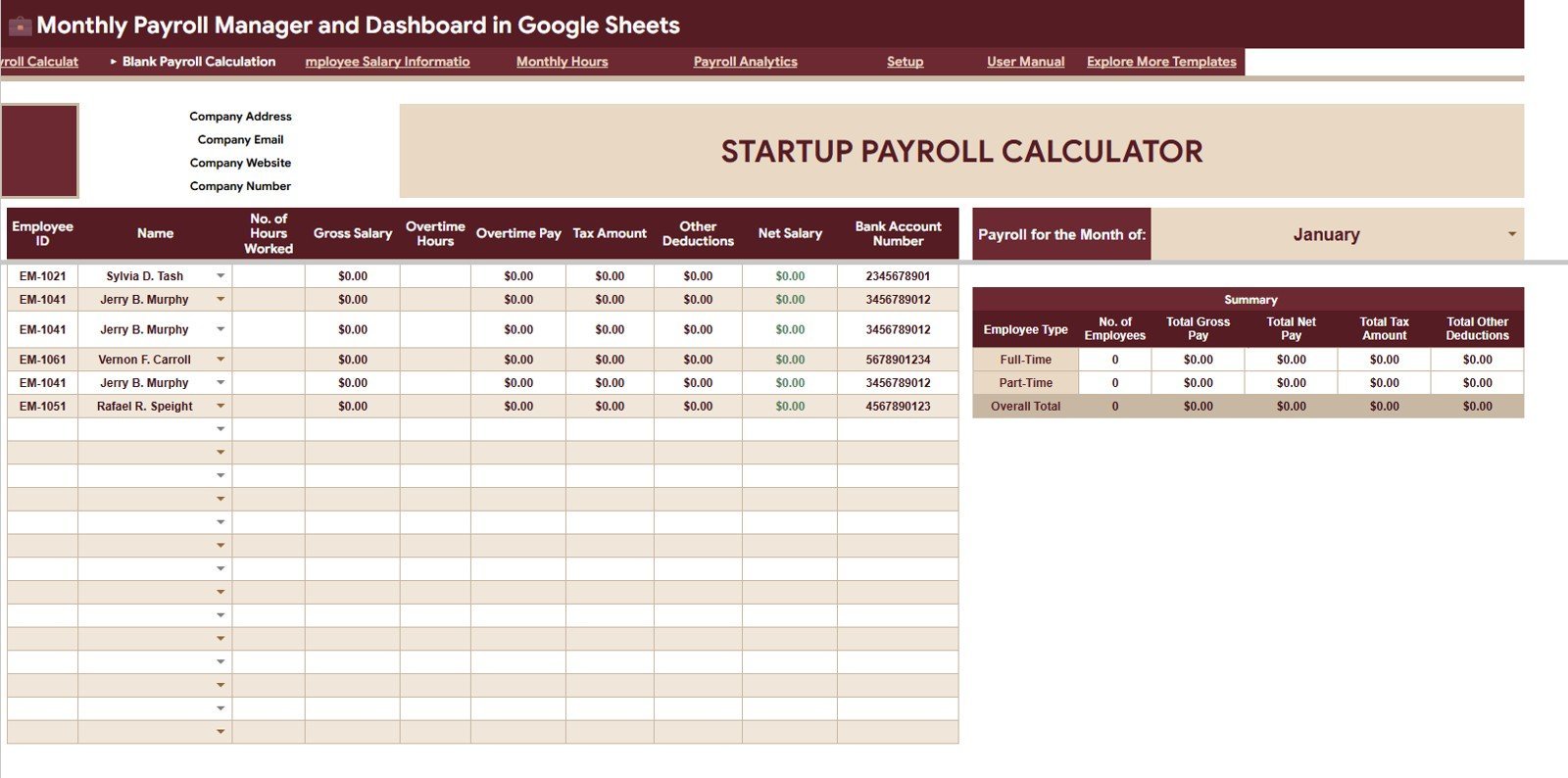
Job: plan and track. This workbook calculates gross pay, overtime, tax, other deductions and net pay for every employee, with a top summary of payroll month, employee count and totals. At $9.99 it is the cheapest route to a working monthly payroll file.
Who it is for: HR teams and founders who want finance and HR in the same shared workbook, with access controlled in Google Drive.
- Employee salary setup: type, position, hourly rate, overtime rate, monthly salary, deductions
- Monthly hours tracking for regular and overtime hours
- Payroll analytics tab: net pay by employee, headcount by type, payroll by component, average net pay
- Interactive slicers and a setup sheet for dropdown lists
Use cases: a payroll review meeting where you filter by employee type with slicers; an overtime check by month; a side-by-side of gross and net salary per person before sign-off.
Price: $9.99. It can take over a hand-built payroll sheet and some of the hours review you may run in Deputy. Open the Monthly Payroll Manager in Google Sheets.
Best for: small teams that collaborate in Google Drive.
4. Payroll Accuracy KPI Dashboard in Excel

Job: report. This dashboard monitors gross pay, deductions, net pay, overtime hours and tax calculations, and flags discrepancies in deductions, overtime or tax against thresholds you set.
Who it is for: payroll teams that want an error check after each run and a compliance view of tax withholdings and overtime.
- Payroll data accuracy tracking across periods
- Error detection against KPIs and thresholds
- Compliance monitoring for tax, wage laws and benefits
- Customizable KPIs and visual analytics
Use cases: a post-run review where overtime variance gets flagged; a quarterly compliance check; a threshold set for deduction differences between consecutive months.
Price: $14.99. It replaces the manual error-check sheet that sits beside your payroll. For metric definitions, see our guide to payroll KPIs to track in 2026. Get the Payroll Accuracy KPI Dashboard in Excel.
Best for: Excel-first teams checking accuracy every cycle.
5. Payroll Accuracy KPI Dashboard in Power BI
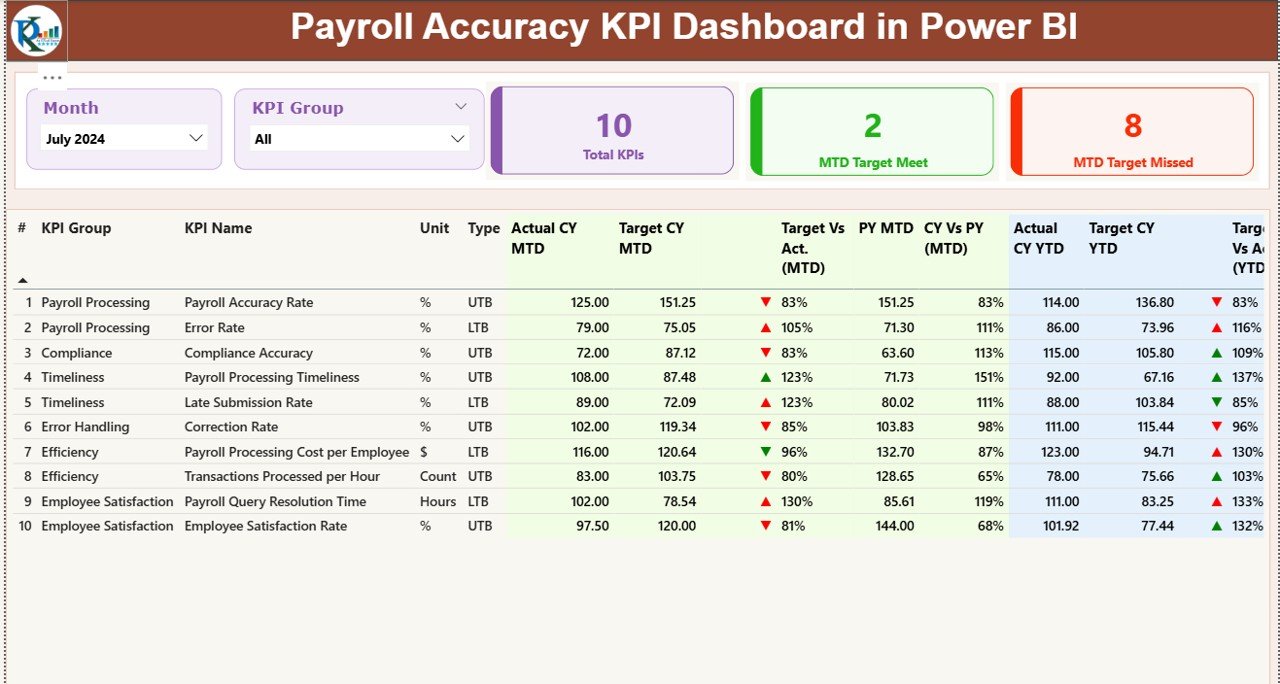
Job: report. A three-page Power BI dashboard (Summary, KPI Trend, KPI Definition) with MTD and YTD comparison against target and previous year. It reads from an Excel file, so you update sheets and refresh.
Who it is for: payroll managers who report to finance and want drill-through to KPI formulas.
- KPI cards showing target met or missed
- Combo charts for MTD and YTD trends
- Month and KPI group slicers
- Detailed KPI table with variance
Use cases: showing the finance director this month against last year; drilling into a KPI definition during an audit question; filtering by KPI group to find the weakest area.
Price: $11.99. View the Payroll Accuracy KPI Dashboard in Power BI.
Best for: Power BI users who need MTD and YTD accuracy views.
6. Payroll Accuracy KPI Dashboard in Google Sheets
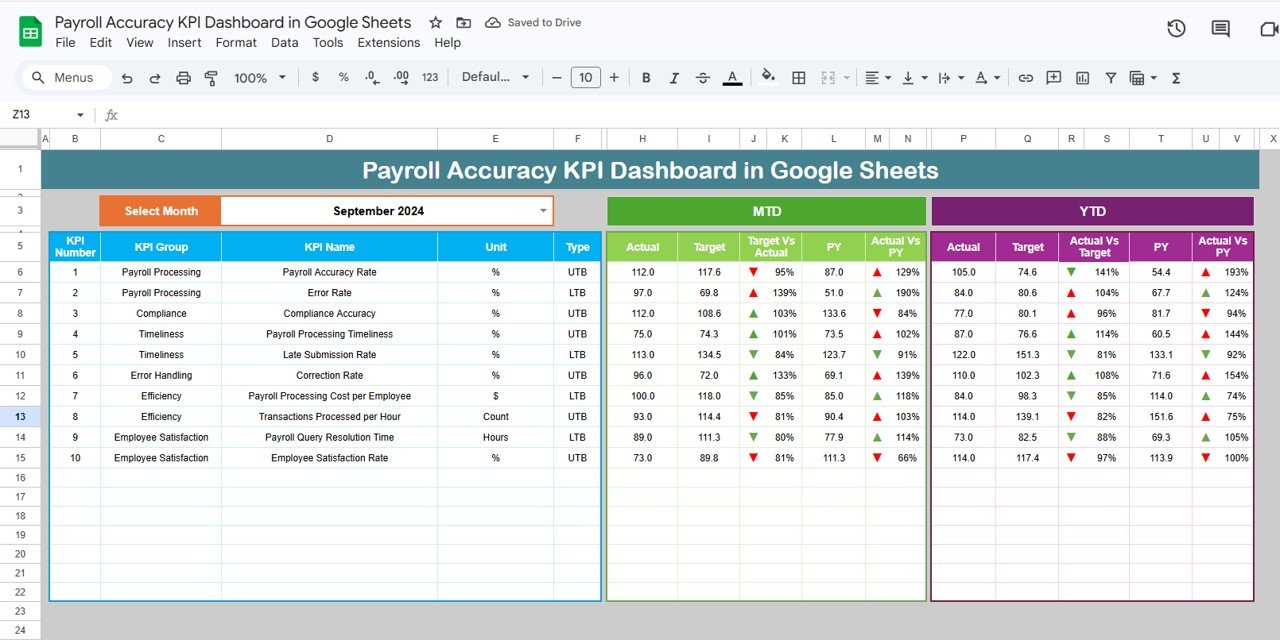
Job: report. The same accuracy idea in Google Sheets: pick a month and all KPI metrics update, with MTD, YTD, target and previous-year comparisons plus arrow indicators from conditional formatting.
Who it is for: payroll managers, HR professionals and analysts who work together in real time.
- Dynamic monthly dashboard
- Target versus actual comparisons
- Visual KPI indicators
Use cases: sharing a link with HR instead of emailing a file; tracking payroll error rates over the year; reviewing target gaps in a weekly check-in.
Price: $9.99. It pairs well with the Google Sheets payroll manager above, since both live in Drive. Get the Payroll Accuracy KPI Dashboard in Google Sheets.
Best for: Sheets teams who want accuracy tracking at the lowest price.
7. Payroll Management KPI Dashboard in Power BI
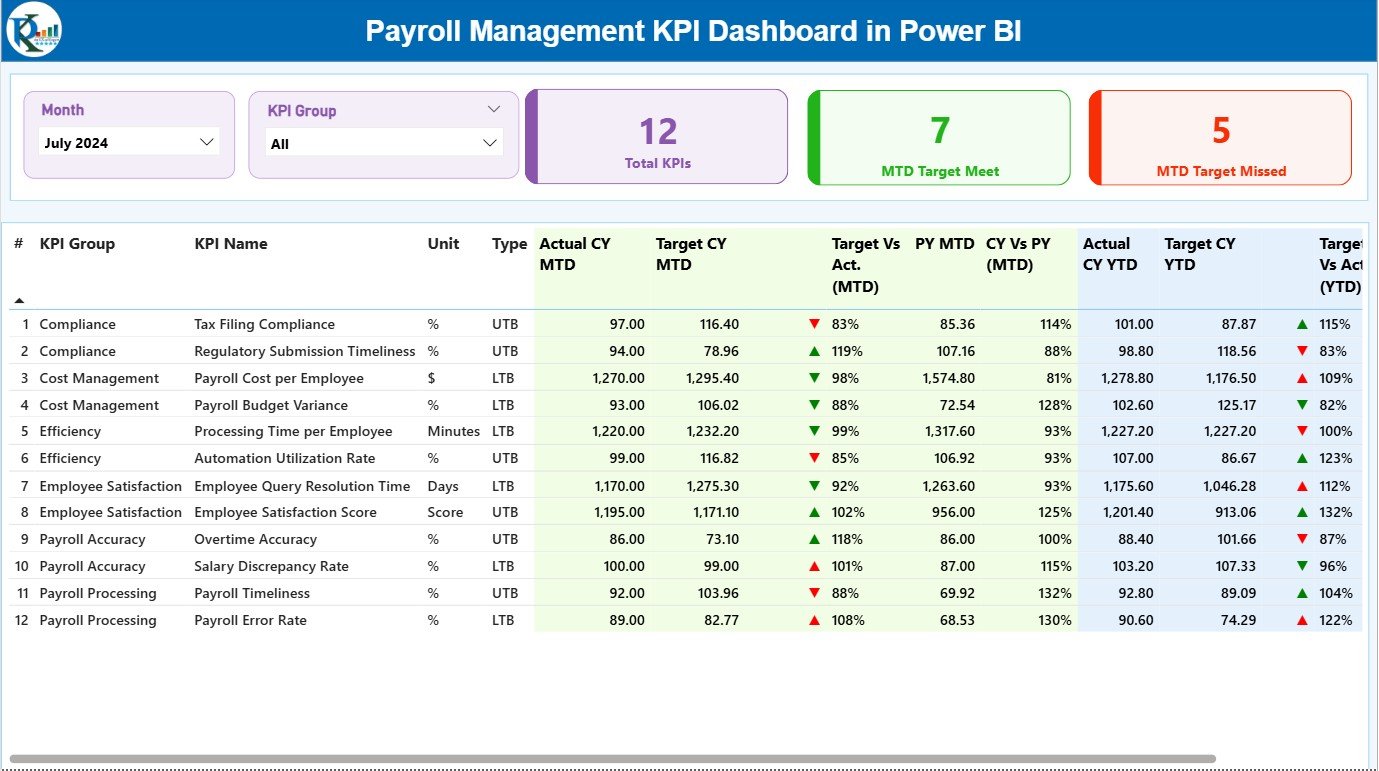
Job: present. A three-page dashboard (Summary, KPI Trend, KPI Definition) with Actual versus Target tracking, traffic-light indicators (green on target, yellow near target, red below target) and the option to publish to Power BI Service.
Who it is for: HR, finance and payroll departments that share results with managers who do not open spreadsheets.
- Excel data source for Actual, Target and Definition sheets
- Trend charts for payroll accuracy, disbursement speed and cost efficiency
- Drill-through to KPI formulas
Use cases: a monthly leadership review; publishing a read-only view for finance; spotting a red KPI before payday.
Price: $11.99. It replaces the monthly slide deck. See the Payroll Management KPI Dashboard in Power BI.
Best for: presenting payroll performance to non-payroll stakeholders.
8. Employee Benefits Utilization KPI Dashboard in Excel
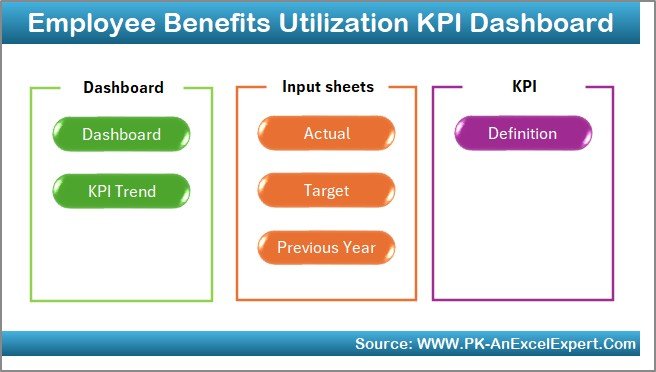
Job: present. This Excel dashboard tracks utilization of benefits such as health insurance, retirement plans, wellness programs and paid time off, with historical comparison and customizable metrics.
Who it is for: payroll managers who also own benefits deductions and need to show which benefits employees actually use.
- Utilization rates by benefit
- Charts for trends over time
- Current versus historical comparison
Use cases: checking whether a deduction-funded benefit is used before renewal; spotting underused wellness programs; supporting a benefits cost discussion. Our employee benefits dashboard in Excel post explains the reasoning in more depth.
Price: $12.99. Get the Employee Benefits Utilization KPI Dashboard in Excel.
Best for: linking benefit deductions to real usage.
How do I roll out a payroll template stack in 30 days?
Do not install all eight at once. Payroll is the one process where a mistake reaches every employee, so build in layers and run each layer in parallel with your current method before you rely on it.
| Days | Task | Template | Check before moving on |
|---|---|---|---|
| 1 to 5 | Load employees, rates, deductions | Monthly Payroll Manager (Sheets) or Payroll Calculator (Excel) | Headcount matches HR records |
| 6 to 12 | Enter hours and run a test month | Same file | Net pay matches last month’s real payroll within your tolerance |
| 13 to 18 | Generate test payslips | Payroll Calculator and Payslip Generator | Three sample payslips checked by hand |
| 19 to 24 | Set accuracy targets | Payroll Accuracy KPI Dashboard (Excel, Power BI or Sheets) | Targets agreed with finance |
| 25 to 30 | Build the monthly report | Payroll Management KPI Dashboard in Power BI | First review meeting held |
If you outgrow the single-file approach, move to the web app and import the same employee data. Our guide to payroll calculation in Excel for US federal, state and FICA helps you validate the formulas first.
How much does payroll cost, and why does it matter?
The U.S. Bureau of Labor Statistics reported that wages and salaries made up 69.9% of private-industry employer compensation costs in March 2026, per its Employer Costs for Employee Compensation release. Compensation averaged $46.60 per hour worked. With that much of total cost running through payroll, a small percentage error is real money.
The Payroll Calculator listing cites manual payroll error rates of roughly 1 to 8% from Ernst & Young and American Payroll Association benchmarks. Those figures come from the product listing, not our own testing, but they explain why accuracy dashboards earn a place in the stack.
How to choose between them
| If you… | Start with | Price |
|---|---|---|
| Run payroll for a growing team and want one system | Payroll and Salary Management System Web App | $39.99 |
| Need PDF payslips from Excel | Payroll Calculator and Payslip Generator in Excel | $14.99 |
| Work in Google Drive with HR and finance | Monthly Payroll Manager and Dashboard in Google Sheets | $9.99 |
| Want error checks in Excel | Payroll Accuracy KPI Dashboard in Excel | $14.99 |
| Report to finance in Power BI | Payroll Management KPI Dashboard in Power BI | $11.99 |
A short rule: pick one processing template first (web app, Excel calculator or Sheets manager), then add one KPI dashboard in the format you already use. Buy the benefits dashboard last.
When a template is NOT the right answer
Buy payroll software if you need automatic tax filing, direct deposit or state registration. Nothing in these listings says they file taxes or move money, so Gusto, ADP or QuickBooks Payroll remain the better fit when those are required. Our Gusto alternatives comparison covers where templates can and cannot substitute.
Software is also the safer choice for very large headcounts, multi-state or multi-country compliance, and teams without anyone comfortable checking formulas. The Payroll Calculator is built around Indian statutory fields (PF, ESI, TDS, Professional Tax), so US-only employers should confirm the fit or use the Sheets manager instead. Templates also do not replace review: always compare a test run to your last real payroll.
Frequently asked questions
What are the best payroll manager Excel templates?
The Payroll and Salary Management System Web App ($39.99) is the most complete, the Payroll Calculator and Payslip Generator in Excel ($14.99) handles calculation and PDF payslips, and the Monthly Payroll Manager in Google Sheets ($9.99) is the best value. Accuracy KPI dashboards add reporting.
Can Excel replace payroll software like Gusto or ADP?
Partly. An Excel or Sheets template can replace calculation, payslip creation and record keeping. It does not file taxes or send direct deposits unless you add those steps yourself. Small teams with simple pay often use templates for processing and keep software only where filing is required.
How much do payroll manager templates cost?
In this stack, prices run from $9.99 to $39.99, all one-time. The Google Sheets payroll manager and accuracy dashboard are $9.99 each, Power BI dashboards are $11.99, Excel tools are $12.99 to $14.99, and the web app is $39.99. Buying all eight individually totals $136.92.
Which payroll template works in Google Sheets?
The Monthly Payroll Manager and Dashboard in Google Sheets ($9.99) calculates gross pay, overtime, tax, deductions and net pay by employee. The Payroll Accuracy KPI Dashboard in Google Sheets ($9.99) tracks accuracy against targets. Both let HR and finance collaborate in Google Drive.
Can I generate payslips in Excel automatically?
Yes. The Payroll Calculator and Payslip Generator in Excel ($14.99) creates PDF payslips in one click, individually or in bulk, after you enter employee details and salary settings once. It uses VBA, so macros must be enabled in your Excel.
What payroll KPIs should a payroll manager track?
Start with payroll accuracy, on-time payment and compliance metrics, then compare actual to target on a month-to-date and year-to-date basis. The Payroll Accuracy KPI dashboards in Excel, Power BI and Google Sheets are built around this view, with definitions included for each KPI.
Is there a payroll dashboard for Power BI?
Yes, two. The Payroll Accuracy KPI Dashboard in Power BI ($11.99) and the Payroll Management KPI Dashboard in Power BI ($11.99) each have Summary, KPI Trend and KPI Definition pages. Both read from Excel and can be published to Power BI Service.
How long does it take to set up a payroll template?
Plan on about 30 days to do it safely: five days to load employee data, a test month in parallel with your current process, payslip checks, then dashboards. Entering the data is quick. The parallel run is what protects you from errors.
Do these templates handle US payroll taxes?
The Google Sheets payroll manager tracks a tax amount and other deductions per employee, and the accuracy dashboards monitor tax calculations. The listings do not describe automatic federal or state tax tables. Use our payroll calculation guide for US formulas and verify rates yourself.
Get more payroll manager templates
Start with the Payroll and Salary Management System Web App for $39.99 for a full workspace, or the Monthly Payroll Manager in Google Sheets for $9.99 as the lowest-cost entry. For hiring-side metrics, see our recruitment KPIs guide. Walkthroughs are on the NextGenTemplates YouTube channel.