

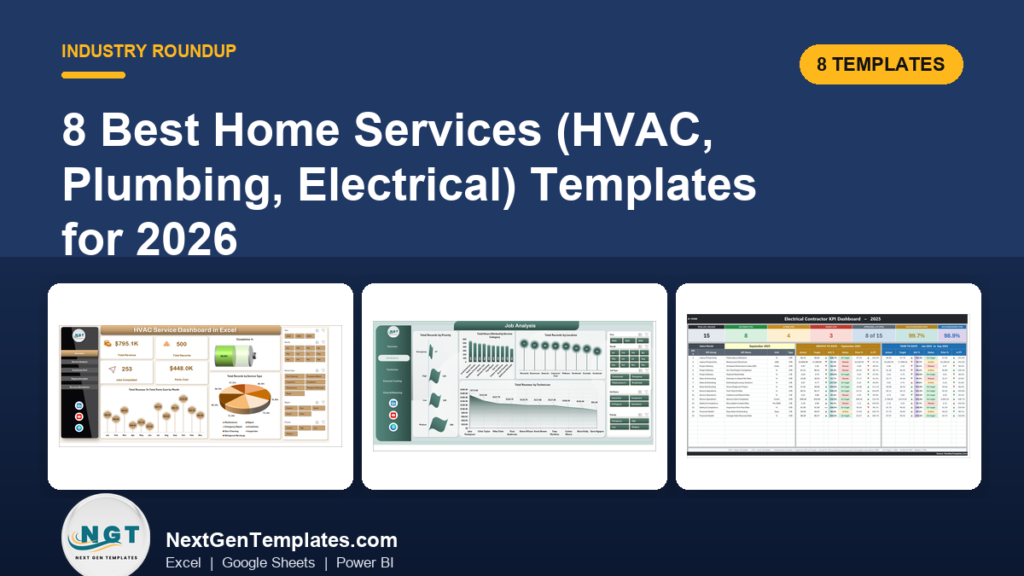
The best home services business template for most trades is the HVAC Service Dashboard in Excel ($17.99). It turns a service call log into revenue, jobs, parts cost, technician and regional profit views. Plumbers and electricians have matching dashboards, and Power BI and Google Sheets versions start at $9.99.
Last updated: October 2026
Key takeaways
- The HVAC Service Dashboard in Excel costs $17.99 once and tracks revenue, jobs completed, parts cost, technician productivity and regional net profit from one data sheet.
- The cheapest option is the HVAC Service Dashboard in Google Sheets at $9.99, with 4 KPI cards and 11 charts.
- The two Electrical Contractor KPI dashboards cost $12.99 each and score 15 KPIs (Excel) or 14 KPIs (Power BI) against targets you set.
- Field service platforms such as ServiceTitan, Housecall Pro and Jobber run $80 to $300 per technician per month, while every template here is a one-time purchase.
- These are reporting dashboards. They do not dispatch, invoice or schedule, so they sit next to your job software and do not replace it.
 Launch offer
SUMIFS, XLOOKUP, FILTER, LAMBDA and checking AI-written formulas, with real business projects. 11h 47m of video by PK, with practice files, quizzes and a capstone.
Home services business templates compared
| Template | Format | Best For | Price |
|---|---|---|---|
| HVAC Service Dashboard in Excel (Best overall) | Excel | HVAC companies and service managers | $17.99 |
| Plumbing Contractor Dashboard in Excel | Excel | Plumbing owners and dispatchers | $17.99 |
| Electrical Contractor KPI Dashboard in Excel | Excel | Electrical contractors who run monthly scorecards | $12.99 |
| HVAC Service Dashboard in Power BI | Power BI | HVAC firms with Power BI skills | $17.99 |
| Plumbing Contractor Dashboard in Power BI | Power BI | Plumbing firms tracking profit by job | $17.99 |
| Electrical Contractor KPI Dashboard in Power BI | Power BI | Electrical firms wanting sparklines and owners per KPI | $12.99 |
| Field Service KPI Dashboard in Excel | Excel | Mixed-trade and general field crews | $14.99 |
| HVAC Service Dashboard in Google Sheets (Best value) | Google Sheets | Small HVAC shops on a tight budget | $9.99 |
How we picked these home services templates
We searched the NextGenTemplates catalog of roughly 6,900 products for dashboards built for HVAC, plumbing, electrical and general field service work. We kept paid, finished dashboards that report on real trade metrics such as service jobs, parts cost, technician performance and KPI targets.
We left out generic business dashboards, calendars and loosely related trackers. Where the same tool exists in more than one format, we included the Excel, Power BI and Google Sheets versions so you can pick the one your team already uses. Prices are the current USD prices on each product page.
What are the 8 best home services business templates for 2026?
1. HVAC Service Dashboard in Excel: best overall
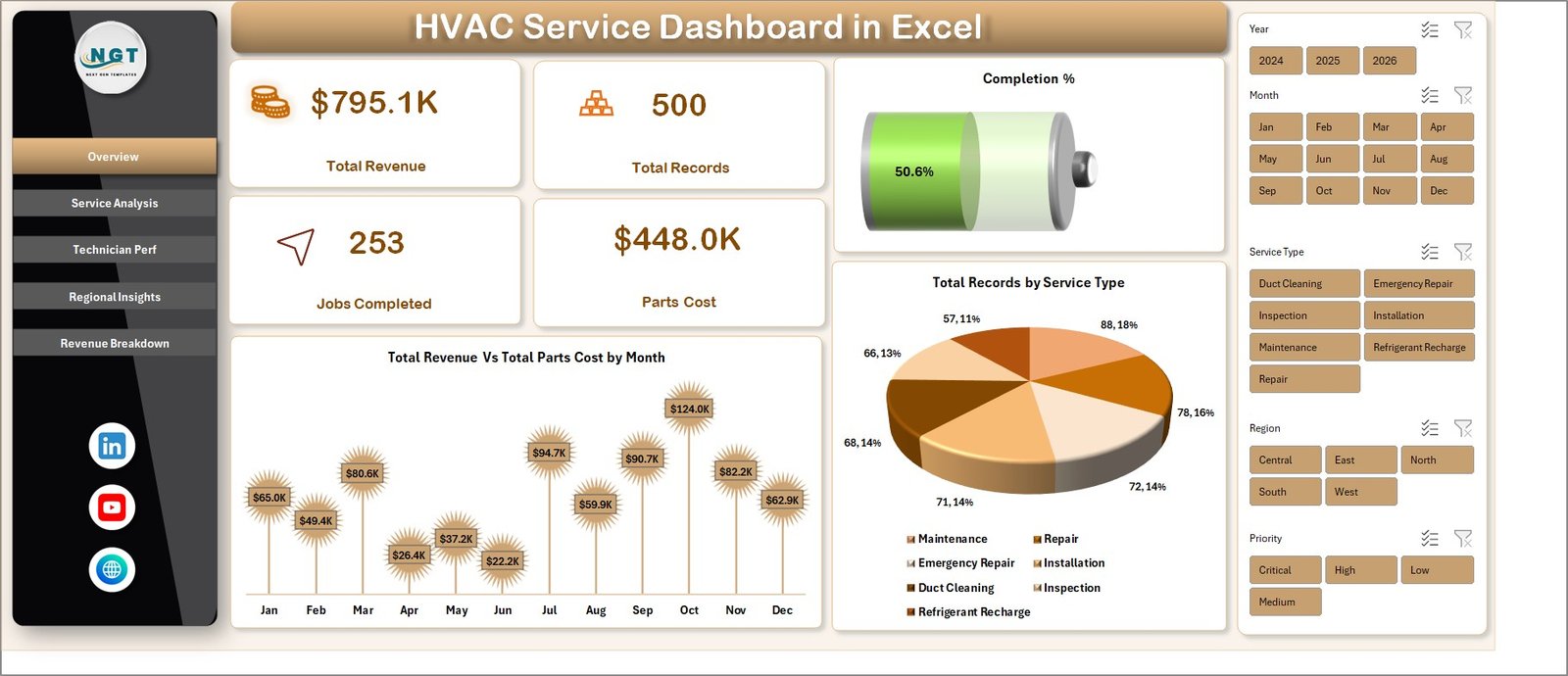
This is a service operations analytics workbook for HVAC companies, facility maintenance teams and field service managers. It converts raw service call logs into KPIs without VBA, add-ins or subscriptions. We rank it first because it covers the widest set of questions an HVAC owner asks (revenue, crews, territories) and the setup is one paste and one click.
Who it is for: HVAC owners, dispatchers and service supervisors who already keep a call log in a spreadsheet.
- Five views: Overview, Service Analysis, Technician Performance, Regional Insights and Revenue Breakdown
- KPI cards for Total Revenue, Total Records, Jobs Completed, Parts Cost and Completion %
- Slicers by service type, region, technician or time period
- Built on pivot tables, so you paste data and click Refresh All
Use cases: compare monthly revenue against parts cost to spot margin pressure; see job volume across installation, repair, maintenance, inspection and emergency calls; rank technicians on productivity; find which regions make or lose money.
Price: $17.99, one-time.
Best for: an HVAC business that wants one workbook covering revenue, crews and territories.
2. Plumbing Contractor Dashboard in Excel
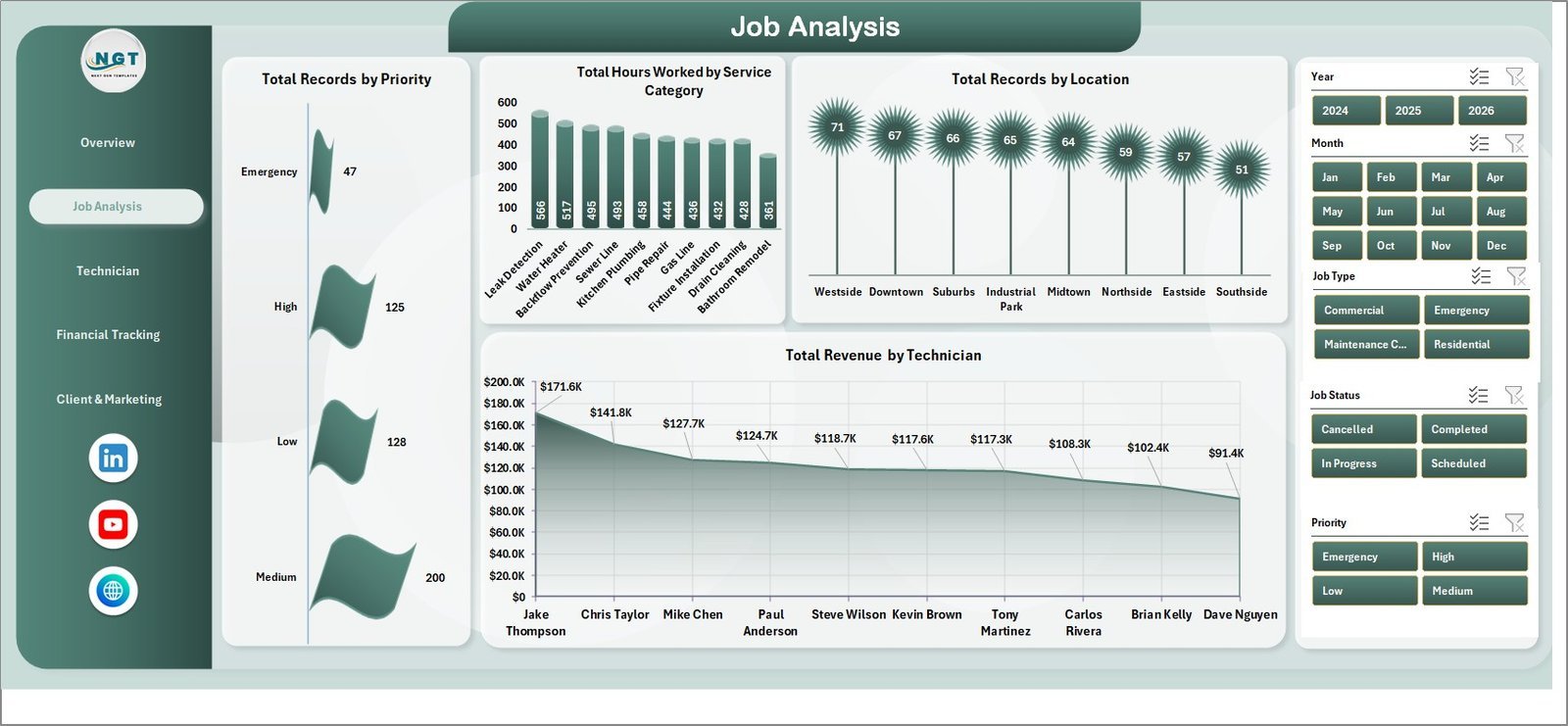
This dashboard tracks 5 headline KPIs across 5 analysis pages, with 17 pivot-driven charts. Setup takes under 10 minutes: paste job records into the Data Sheet, click Refresh All, and every card and chart rebuilds.
Who it is for: plumbing owners, dispatchers and operations managers who need different slices of the same job log.
- KPI cards: Total Revenue, Total Payments, Total Records, Avg. Customer Rating, Total Hours Worked
- Pages: Overview, Job Analysis, Technician Performance, Financial Tracking, Client & Marketing
- Slicers for technician, service category, location, priority or payment status
- Technician view with rating, jobs completed, hours worked and net profit per tech
Use cases: brief office staff weekly on revenue versus payments collected; check hours worked against crew utilization; compare technicians on customer rating; drill from company level to one location in two clicks.
Price: $17.99, one-time.
Best for: plumbing firms that live in Excel and want payment status tracked next to revenue.
3. Electrical Contractor KPI Dashboard in Excel
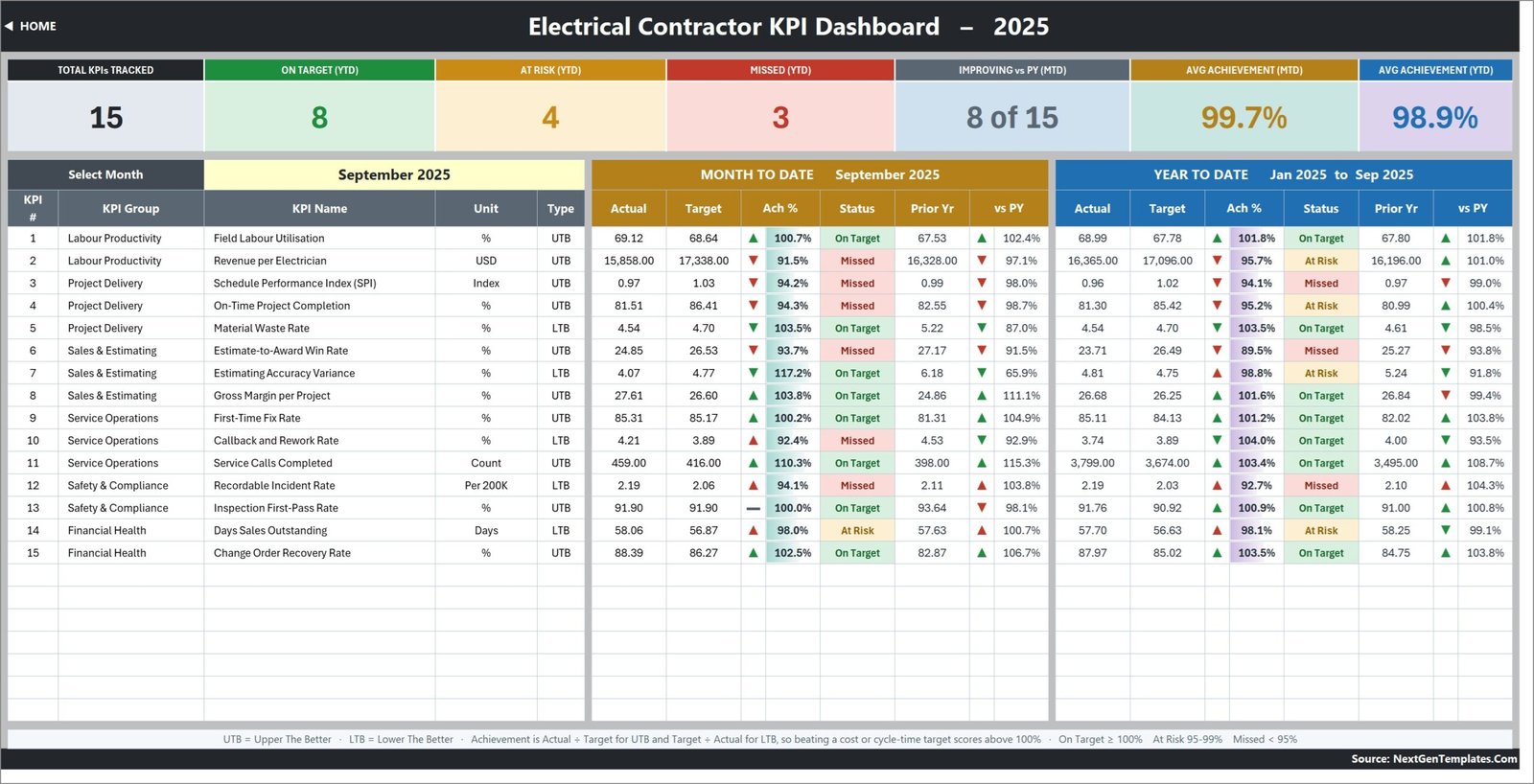
This is a month-picker scorecard with 15 KPIs across six groups: Labour Productivity, Project Delivery, Sales & Estimating, Service Operations, Safety & Compliance and Financial Health. It has ten worksheet pages, sample data for 2024 and 2025, and zero macros. It is a scorecard, so it answers whether you hit the number, not why.
Who it is for: electrical contractors who review targets monthly and want a formula-driven file they can read and edit.
- One month dropdown drives MTD and YTD actuals, targets, achievement and status for all 15 KPIs
- Seven summary cards, including On Target, At Risk, Missed and average achievement
- Direction-aware scoring, so beating a waste or DSO target scores above 100%
- Editable traffic lights: On Target 100%, At Risk 95-99%, Missed below 95%
Use cases: run a month-end review in one sitting; see year-on-year movement per KPI; check how many of 15 KPIs are on target. In the sample month the cards read 15 tracked, 8 on target, 4 at risk and 3 missed (YTD).
Limit: the file does not check electrical codes, licences, permits or inspections. Every number is typed in by you.
Price: $12.99, one-time.
Best for: an electrical contractor who wants a target-versus-actual scorecard in Excel.
4. HVAC Service Dashboard in Power BI
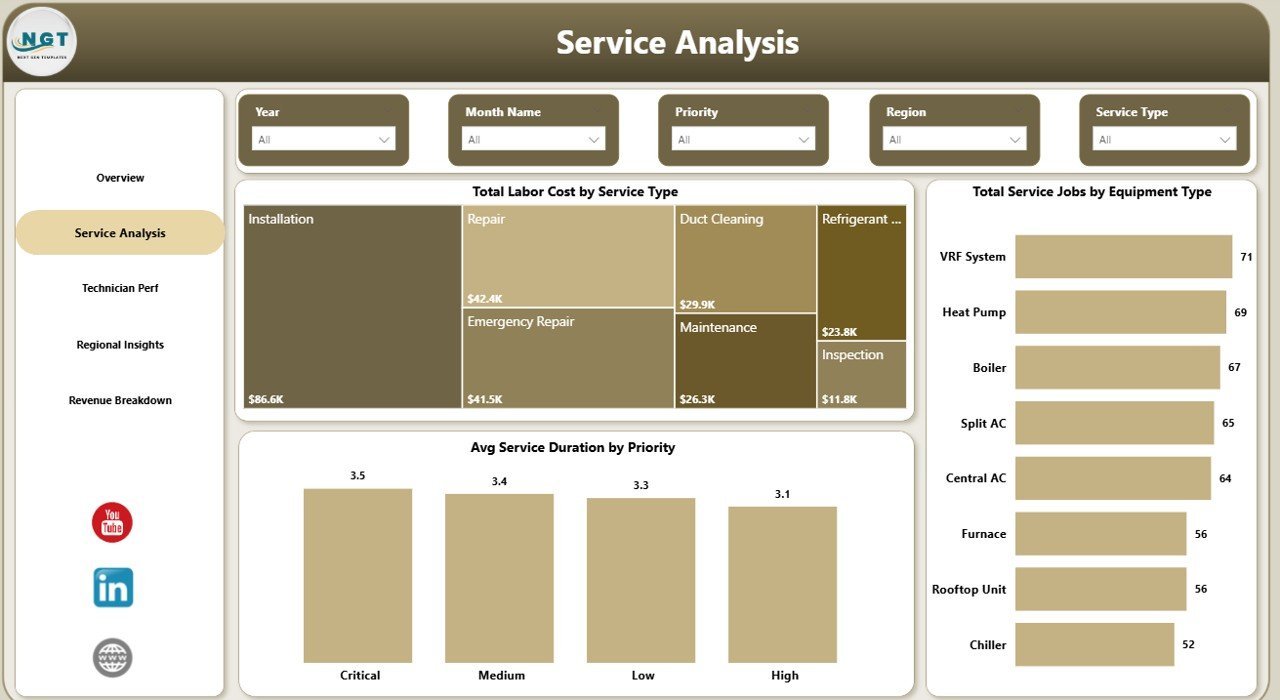
The Power BI version of the HVAC dashboard has 5 report pages, 5 KPI cards and 15+ visuals, all driven by editable DAX measures. The .pbix file runs in free Power BI Desktop, and no Power BI Pro licence is needed for local analysis.
Who it is for: HVAC firms with someone comfortable in Power BI, or multi-branch operators who want cross-page filtering.
- KPI cards: Total Revenue, Total Service Jobs, Total Parts Cost, Total Labor Cost, Completion Rate
- Technician scorecard: customer rating, completion rate, service jobs versus warranty jobs
- Net Profit by Region and Revenue vs Parts Cost by Customer Type
- Cross-page slicers for Region, Technician, Service Type, Equipment Type and Priority
Use cases: run a monthly technician review screen; see which territories and customer segments make money; swap the source data file and refresh every chart in one click. Field service platforms charge $80 to $300 per technician per month, and this costs $17.99 once.
Price: $17.99, one-time.
Best for: HVAC businesses that want warranty and labor cost views plus regional profit in Power BI.
5. Plumbing Contractor Dashboard in Power BI
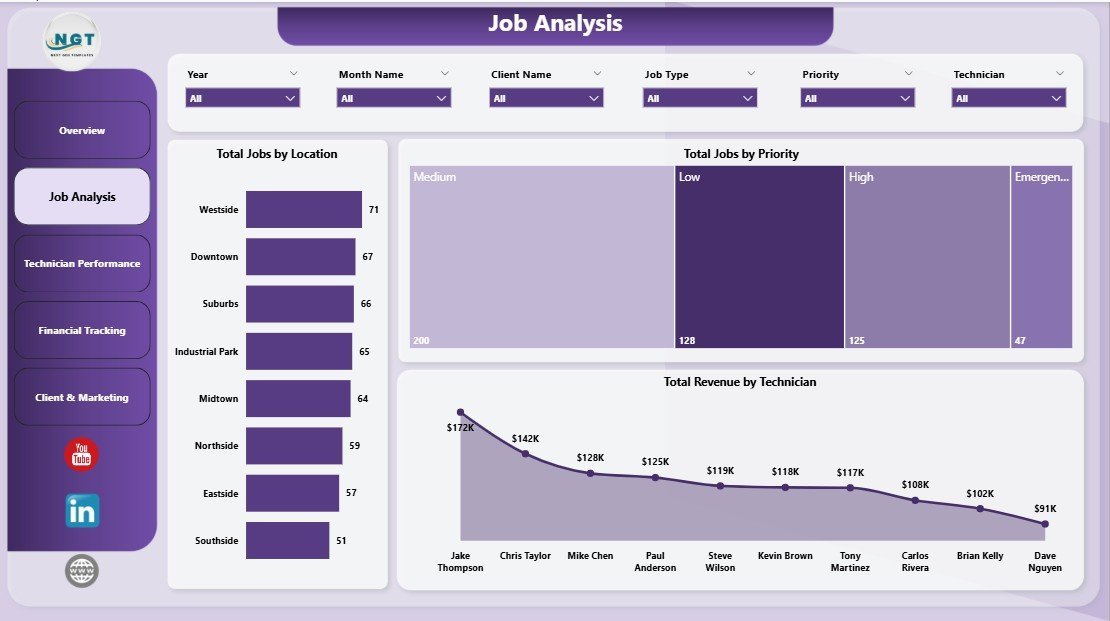
This .pbix tracks 5 headline KPIs across 5 report pages with 12 DAX-driven visuals. Point the data source at your job log, click Refresh, and it rebuilds in free Power BI Desktop. The data model is an editable star schema.
Who it is for: plumbing owners and operations managers who want cost and net profit visible next to job volume.
- KPI cards: Total Revenue, Total Material Cost, Total Labor Cost, Total Jobs, Net Profit
- Pages: Overview, Job Analysis, Technician Performance, Financial Tracking, Client & Marketing
- Cross-page slicers for technician, service category, location, priority and payment status
- Technician view with average rating, completed jobs and monthly net profit
Use cases: compare revenue against material cost; brief staff on cost control and bottom-line profit; filter every page to one technician or location in two clicks.
Price: $17.99, one-time.
Best for: plumbing firms that care most about material and labor cost against net profit.
6. Electrical Contractor KPI Dashboard in Power BI
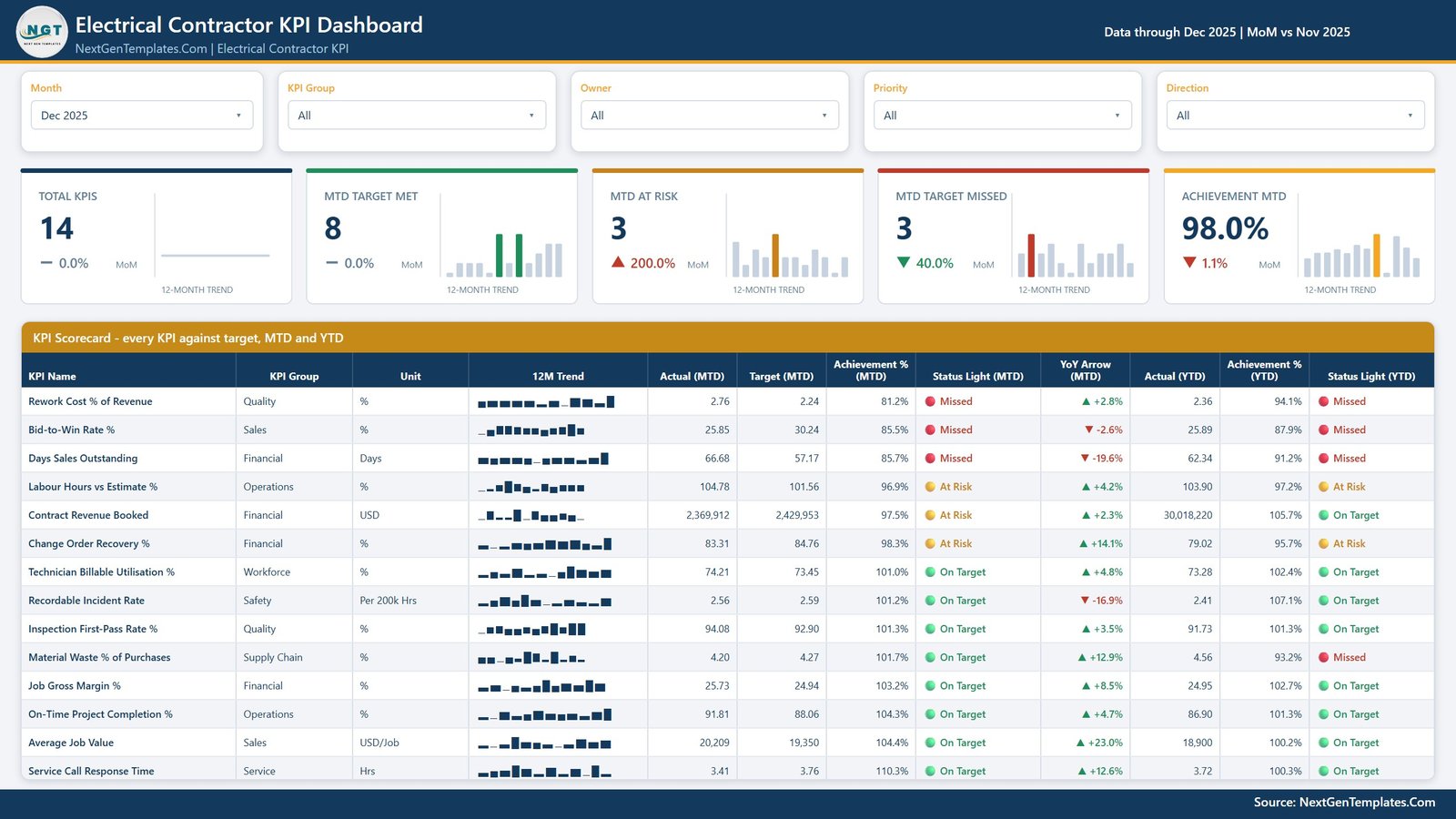
This is a ready-to-open .pbix scorecard with 14 KPIs across 8 groups: financial, sales, operations, workforce, service, quality, supply chain and safety. It has four report pages, five synced slicers and a 12-month sparkline on every row. Sample actuals cover 24 months, and the data sits in a plain Excel workbook you can overwrite.
Who it is for: electrical firms that assign an owner to each KPI and want MTD and YTD traffic lights side by side.
- KPIs include Job Gross Margin %, Days Sales Outstanding, Change Order Recovery %, Bid-to-Win Rate % and Recordable Incident Rate
- Slicers: Month, KPI Group, Owner, Priority and Direction
- KPI Trend page showing current year versus prior year versus target
- KPI Definition page with the formula and written definition
Use cases: track bidding performance and change order recovery; watch DSO and rework cost; review technician billable utilisation. It is a scorecard, so use a separate analytical dashboard to explore why a number moved.
Price: $12.99, one-time.
Best for: electrical contractors who want defined KPIs with owners and priorities in Power BI.
7. Field Service KPI Dashboard in Excel
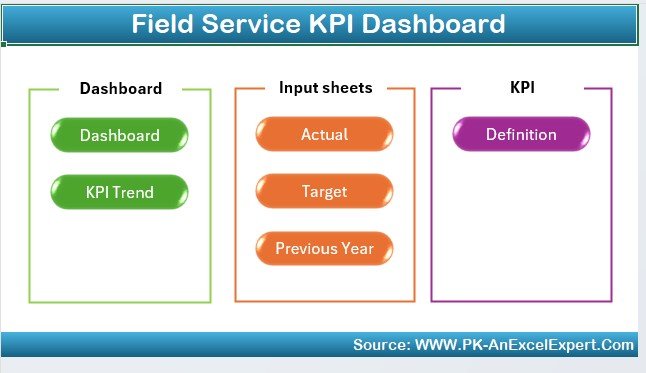
This is the cross-trade pick. It is built for field service managers, operations teams and business owners who run crews across more than one trade, or whose trade does not have its own dashboard here.
Who it is for: managers of mixed crews, such as a company doing HVAC, plumbing and electrical work under one roof.
- Service completion rate, the share of requests completed on time
- Response time monitoring
- Technician productivity, including completed calls, billable hours and job efficiency
- Customer satisfaction through feedback, service ratings and repeat visits
- Field service cost tracking against budget
Use cases: compare response time across crews; check billable hours per technician; hold costs against budget; produce customizable reports for stakeholders.
Price: $14.99, one-time.
Best for: general field crews that need response time and satisfaction KPIs in one Excel file.
8. HVAC Service Dashboard in Google Sheets: best value
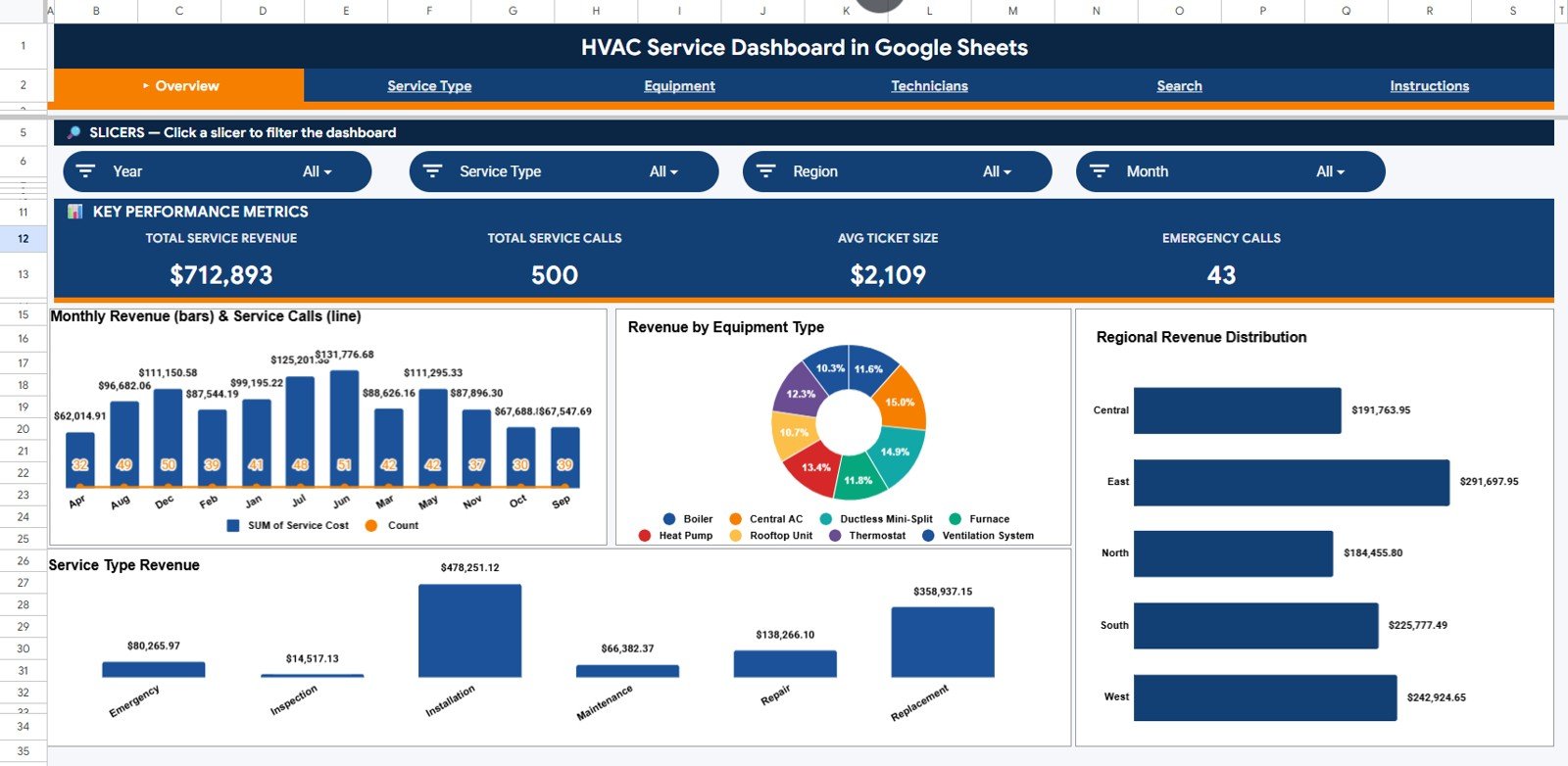
At $9.99 this is the cheapest dashboard in the list. It has 4 KPI cards and 11 charts across 3 analysis pages, plus a Search Sheet and a Data Sheet. Make a copy from the link in your download, paste service call records into the Data Sheet, and the dashboard rebuilds through the native pivot engine.
Who it is for: small HVAC shops, and owners or dispatchers who want to open the numbers on a phone or share them with a team in Google Drive.
- KPI cards: Total Service Revenue, Total Service Calls, Avg Ticket Size, Emergency Calls
- Monthly Revenue and Service Calls by Month, to catch summer AC peaks and winter heating spikes
- Revenue by Equipment Type: air conditioners, furnaces, heat pumps, boilers, ventilation systems
- Revenue by Region and Service Calls by Priority
Use cases: a Monday morning review of four numbers; spotting seasonality before it overloads dispatch; checking emergency versus routine work.
Price: $9.99, one-time.
Best for: budget buyers and Google Workspace teams in HVAC.
How do you choose between these home services templates?
| If you… | Pick | Price |
|---|---|---|
| Run an HVAC business and use Excel | HVAC Service Dashboard in Excel | $17.99 |
| Run an HVAC business on Google Workspace or a tight budget | HVAC Service Dashboard in Google Sheets | $9.99 |
| Run a plumbing business and want payments and hours tracked | Plumbing Contractor Dashboard in Excel | $17.99 |
| Run a plumbing business and want material cost and net profit | Plumbing Contractor Dashboard in Power BI | $17.99 |
| Want a monthly electrical KPI scorecard in a spreadsheet | Electrical Contractor KPI Dashboard in Excel | $12.99 |
| Want electrical KPIs with owners and sparklines | Electrical Contractor KPI Dashboard in Power BI | $12.99 |
| Cover several trades with one dashboard | Field Service KPI Dashboard in Excel | $14.99 |
A quick rule: choose the trade first, then the format. If nobody on your team has opened Power BI, take the Excel version. If your data already lives in Google Drive, take Google Sheets. If you want regional profit and warranty views with cross-page filtering, the Power BI HVAC version is the stronger fit.
What does it cost compared with field service software?
The HVAC Power BI listing cites $80 to $300 per technician per month for platforms like ServiceTitan, Housecall Pro and Jobber. Take the low end of $80 for a five-technician crew: that is $400 a month, or $4,800 a year. One HVAC dashboard at $17.99 is a fraction of one month of that.
The comparison is not like for like, because those platforms also dispatch, schedule and invoice. A dashboard reports on the data you already have. If you only need reporting, the template is the cheaper route.
Should you buy more than one?
Many businesses will want just one. If you run two trades, pair the matching dashboards. HVAC plus plumbing in Excel is $35.98. Buying all eight templates in this list totals $122.92, which only makes sense for an agency, consultant or multi-trade group serving several clients.
What data do you need before you start?
Every dashboard here runs on a log you keep yourself. For the HVAC, plumbing and Field Service dashboards, that is one row per job with fields such as date, technician, service type, region, revenue and cost. For the electrical scorecards, it is a monthly actual per KPI plus a target. Clean, consistent columns matter more than the template you pick.
If your job history lives in another system, export it to CSV and paste it into the Data Sheet. Check that dates are real dates and that technician and region names are spelled the same way every time, because slicers treat two spellings as two values.
Which KPIs matter most for a home services business?
Start with a small set you will really review. Revenue, jobs completed, completion rate and parts or material cost cover the basics. Add technician productivity and customer rating once the basics are stable. Electrical contractors often add days sales outstanding and change order recovery, since cash timing hurts project work.
If you want to build a wider KPI habit, our guides on customer service KPIs, safety KPIs such as TRIR and LTIFR and maintenance KPIs such as MTBF and MTTR explain the formulas and benchmark ranges behind metrics a service business tends to adopt.
For the sales side of the business, see the sales pipeline metrics guide. If you also run delivery or fleet operations, the logistics and OTIF KPI guide is useful. Larger shops that fabricate or assemble should look at the manufacturing KPI guide.
When is a template NOT the right answer?
A dashboard reports on data. It does not create it. If your jobs are not logged anywhere yet, you will need job management software first, and a template cannot replace one.
- You need dispatching, scheduling or invoicing. None of these templates dispatch technicians, send quotes or take payments. Buy field service software for that and use a dashboard for reporting.
- You need compliance tracking. The Electrical Contractor KPI dashboards do not check the NEC, the IEC or NFPA 70E, and they do not track licences, permits, inspections or apprentice hours. A green light only means the number you typed beat the target you typed.
- You need live GPS or real-time crew tracking. These workbooks refresh when you paste data and refresh, not from a live feed.
- You have a large team that needs mobile apps and role-based access. A shared spreadsheet or .pbix file has limits, and a platform may suit you better.
- Nobody will maintain the data. A dashboard with stale rows gives confident, wrong answers. If no one owns the weekly paste, skip it.
For many small and mid-size trades businesses, a one-time template covers the reporting gap at a low cost. Just be clear on what it does not do.
Frequently asked questions
What is the best home services business template?
For most home services businesses, the HVAC Service Dashboard in Excel at $17.99 is the best overall pick. It tracks revenue, jobs completed, completion rate, parts cost, technician productivity and regional profit. Plumbers and electricians should pick the matching trade dashboard instead, and small HVAC shops can start with the $9.99 Google Sheets version.
Is there an HVAC dashboard template for Excel?
Yes. The HVAC Service Dashboard in Excel costs $17.99 and runs on pivot tables and slicers with no VBA or add-ins. You paste your service data into the Data Sheet, click Refresh All, and the Overview, Service Analysis, Technician, Regional and Revenue pages update.
Is there a plumbing business template for Excel or Power BI?
Yes, both. The Plumbing Contractor Dashboard in Excel has 17 pivot-driven charts across 5 pages. The Power BI version has 12 DAX-driven visuals across 5 pages. Each costs $17.99 one-time and covers revenue, jobs, technician performance, financial tracking and client and marketing views.
What KPIs should an electrical contractor track?
The Electrical Contractor KPI Dashboard in Power BI tracks 14, including Job Gross Margin %, Days Sales Outstanding, Change Order Recovery %, Bid-to-Win Rate %, Labour Hours vs Estimate %, Rework Cost % of Revenue and Recordable Incident Rate. The Excel version tracks 15 across six groups. Each costs $12.99.
Do these templates replace ServiceTitan, Housecall Pro or Jobber?
No. Those platforms dispatch, schedule and invoice, and cost $80 to $300 per technician per month according to the HVAC Power BI listing. These templates only report on data you already hold. If you need reporting and not job management, a $17.99 one-time dashboard costs far less.
Do I need Power BI Pro for the Power BI versions?
No. The HVAC Service Dashboard in Power BI runs in free Power BI Desktop and needs no Power BI Pro licence for local analysis. The plumbing and electrical Power BI dashboards are also .pbix files opened in free Power BI Desktop. You swap in your data and click Refresh.
Can I use a home services dashboard in Google Sheets?
Yes. The HVAC Service Dashboard in Google Sheets costs $9.99 and has 4 KPI cards and 11 charts across 3 analysis pages. Make a copy from the link in your download, paste service call records into the Data Sheet, and the dashboard rebuilds automatically using Google Sheets pivot tables.
How long does setup take?
The HVAC, plumbing and Google Sheets dashboards state setup of under 10 minutes: paste your records into the Data Sheet and refresh. The electrical scorecards take longer to fill, since you type in monthly actuals and targets for each KPI. Allow time to clean your data first.
Which template suits a company doing HVAC, plumbing and electrical work?
The Field Service KPI Dashboard in Excel at $14.99 suits mixed crews. It tracks service completion rate, response time, technician productivity, customer satisfaction and cost against budget without being tied to one trade. If one trade dominates revenue, add that trade’s dashboard alongside it.
Get more home services templates
If you run a trades business, start with the dashboard for your trade: the HVAC Service Dashboard in Excel ($17.99), the Plumbing Contractor Dashboard in Excel ($17.99), or the Electrical Contractor KPI Dashboard in Excel ($12.99). On a budget, the HVAC Service Dashboard in Google Sheets is $9.99.
Watch walkthroughs and tutorials on the NextGenTemplates YouTube channel.