

The best auto repair shop Excel template is the Auto Repair Dashboard in Excel ($17.99). It turns job records into 5 KPI cards and 17 charts covering mechanics, branches and vehicle makes. For daily job cards, estimates and billing, the Service Center and Repair Shop Management System Web App ($39.99) is the better fit.
Last updated: October 2026
Key takeaways
- The Auto Repair Dashboard in Excel costs $17.99 and ships with 5 KPI cards and 17 pre-built charts across 5 pages.
- The Service Center and Repair Shop Management System Web App costs $39.99 and runs 25 connected screens, from job card intake to warranty, on Google Sheets.
- The Auto Repair Shop KPI Dashboard in Excel ($12.99) tracks 14 service KPIs, including Comeback Rate and First-Time Fix Rate, with MTD and YTD side by side.
- The two KPI Scorecards cost $9.99 (Excel) and $8.99 (Google Sheets) and fit 10 shop KPIs on one page.
- Buying all six templates costs $107.94 in total, and every one is a one-time payment with no subscription and no per-user fees.
 Launch offer
SUMIFS, XLOOKUP, FILTER, LAMBDA and checking AI-written formulas, with real business projects. 11h 47m of video by PK, with practice files, quizzes and a capstone.
Auto repair shop Excel templates compared
| Template | Format | Best For | Price |
|---|---|---|---|
| Auto Repair Dashboard in Excel (Best overall) | Excel | Owners analysing jobs, mechanics and branches | $17.99 |
| Service Center and Repair Shop Management System Web App | Web app (Google Sheets and Apps Script) | Running job cards, estimates, parts and billing | $39.99 |
| Auto Repair Shop KPI Dashboard in Excel (Best value) | Excel | Monthly KPI reviews with targets and prior year | $12.99 |
| Auto Repair Dashboard in Power BI | Power BI | Shops already reporting in Power BI | $17.99 |
| Auto Repair Shop KPI Scorecard in Excel | Excel | One-page monthly management report | $9.99 |
| Auto Repair Shop KPI Scorecard in Google Sheets | Google Sheets | Cloud-based scorecard shared with the team | $8.99 |
How we picked these
We searched the NextGenTemplates catalog of roughly 6,900 products for anything built for auto repair shops, service centers and vehicle service management. We kept only paid templates that match a repair shop workflow: job tracking, shop performance or KPI reporting.
We dropped off-topic maintenance templates (utility, aviation and office maintenance) because they track assets, not customer vehicles. Where the same tool exists in more than one format, we list the formats separately so you can pick the one you already use.
We also separated three products with near-identical names. The dashboards analyse transaction-level records, the KPI Dashboard is a month-picker scorecard with 14 KPIs, and the KPI Scorecards are one-page reports fed by monthly numbers you type.
What are the 6 best auto repair shop Excel templates for 2026?
1. Auto Repair Dashboard in Excel: best overall
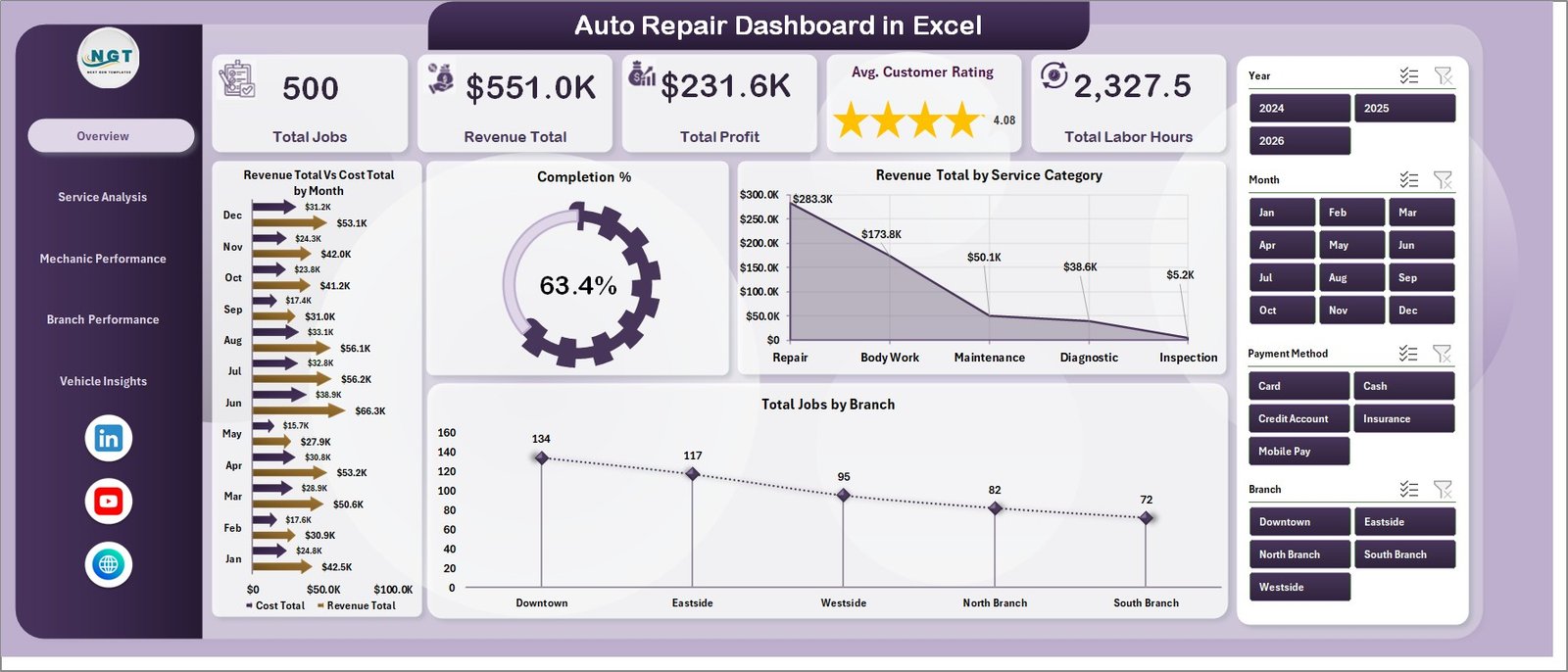
This auto repair dashboard in Excel reads your job records and turns them into live charts. It ranks first because it answers the questions an owner asks most: which mechanics make money, which branch is slipping and which services carry the best margin.
Who it is for: owners and managers of one or more repair shops who already log jobs in a spreadsheet or export them from a shop system.
- 5 KPI cards: Total Jobs, Revenue Total, Total Profit, Avg. Customer Rating and Total Labor Hours
- 17 pre-built charts across 5 pages: Overview, Service Analysis, Mechanic Performance, Branch Performance and Vehicle Insights
- Top-five mechanic leaderboards on Revenue, Cost, Labor Hours, Avg. Customer Rating and Total Profit
- Branch P&L comparison and Profit Margin % by service category
- Slicers for branch, service category and mechanic
Use cases:
- Compare Revenue vs. Cost for each branch to see which location earns its overhead.
- Rank your top five mechanics by Total Profit and by Avg. Customer Rating before a pay review.
- Check Profit Margin % on oil change, brake repair and transmission work to decide which services to push.
- Group revenue by vehicle make to see which makes bring in the most income.
Setup takes under 10 minutes: replace the sample data on the Data sheet, click Refresh All, and every chart, KPI card and pivot updates. Price: $17.99. Get the Auto Repair Dashboard in Excel.
Best for: owners who want a clear picture of profit by mechanic, branch and service.
2. Service Center and Repair Shop Management System Web App: best for daily operations
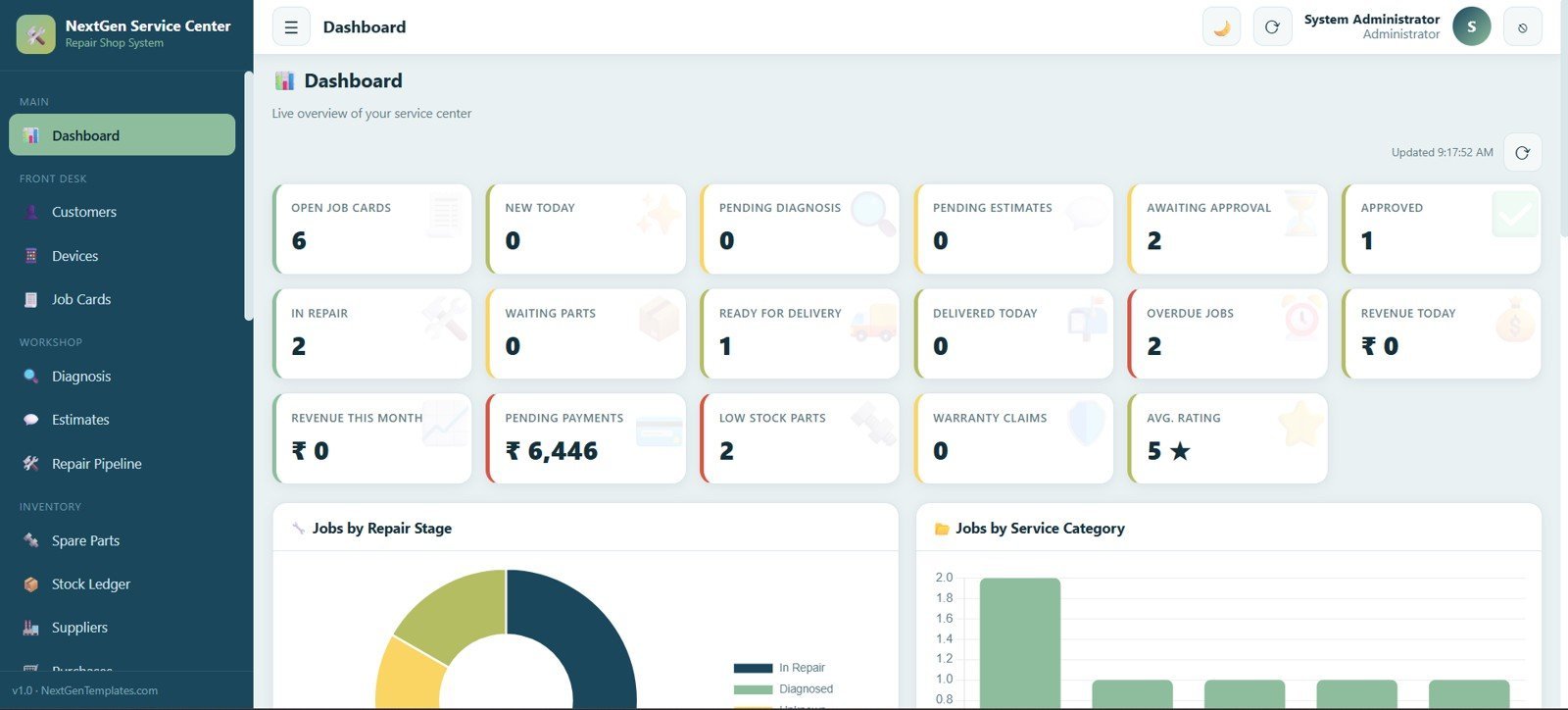
The service center and repair shop management system web app is the only product here that runs the shop rather than reports on it. It is a login-based browser tool built on Google Sheets and Google Apps Script, so there is no server to rent and no per-user subscription.
Who it is for: service centers where reception, technicians and managers all touch the same job and need different views of it.
- 25 connected screens covering job card intake, diagnosis, estimates, spare parts, billing, delivery, warranty and feedback
- Role-based login for Admin, Manager, Reception and Technician
- A 17-KPI live dashboard, including Open Job Cards, Overdue Jobs, Revenue Today, Low Stock Parts and Warranty Claims
- A drag-and-drop repair pipeline from Received to Awaiting Approval
- Two charts: Jobs by Repair Stage and Jobs by Service Category
Use cases:
- Watch Pending Diagnosis and Awaiting Approval cards each morning to see where jobs are stuck.
- Use the Low Stock Parts card to reorder before a job stalls in Waiting Parts.
- Check Pending Payments at close of day against Revenue Today.
- Review Warranty Claims and Average Rating together to spot a repeat fault.
Price: $39.99. See the repair shop management web app.
Best for: shops that lose time and money between intake and billing.
3. Auto Repair Shop KPI Dashboard in Excel: best value
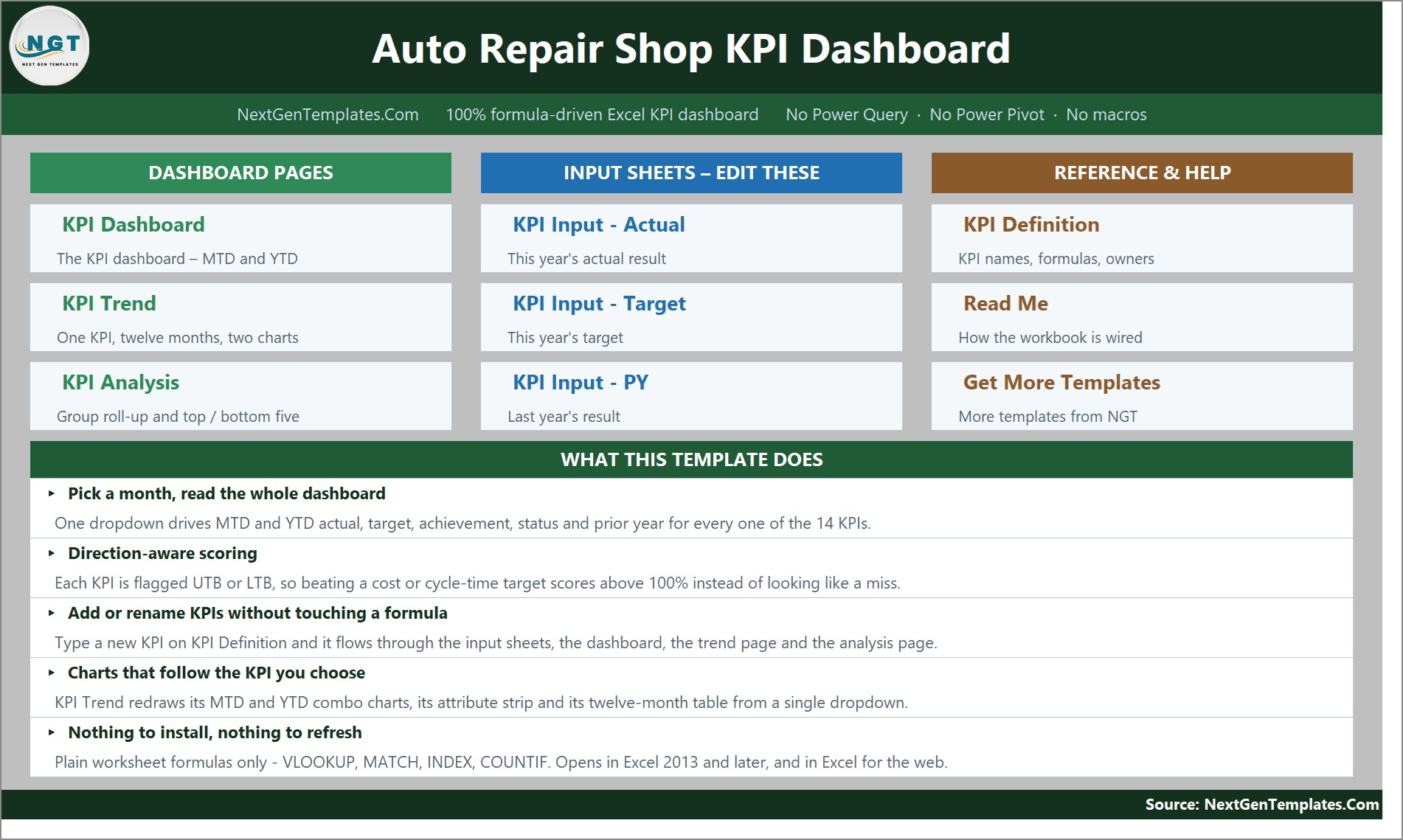
The auto repair shop KPI dashboard in Excel is a month-picker scorecard. Pick a month and the cards, the KPI table and the analysis page all follow it. At $12.99 it gives the most measurement per dollar of any product on this list.
Who it is for: owners who review the shop against targets every month and want last year’s number beside this year’s.
- 14 service KPIs in 5 groups: Financial, Quality, Operations, Customer and Sales
- MTD and YTD in the same row, each with Actual, Target, Achievement %, Status, Prior Yr and vs PY
- Direction-aware scoring, flagged UTB or LTB on the KPI Definition sheet
- Editable traffic lights: On Target 100%+, At Risk 95-99%, Missed below 95%
- A KPI Trend page with MTD and YTD combo charts against a target line
Use cases:
- Check Average Repair Order Value and First-Time Fix Rate side by side before a staff meeting.
- Score Comeback Rate correctly: 2.45% against a 3.30% target reads as 134.7%, not a miss.
- Compare Bay Utilization month to date with year to date to see whether a weak month is a trend.
- Change the thresholds in columns L and U to match your own governance.
It uses plain worksheet formulas only, with no Power Query, macro or add-in, and opens in Excel 2013 or later and Excel for the web. Price: $12.99. Get the Auto Repair Shop KPI Dashboard in Excel.
Best for: monthly performance reviews with targets and prior-year comparison.
4. Auto Repair Dashboard in Power BI: best for Power BI teams
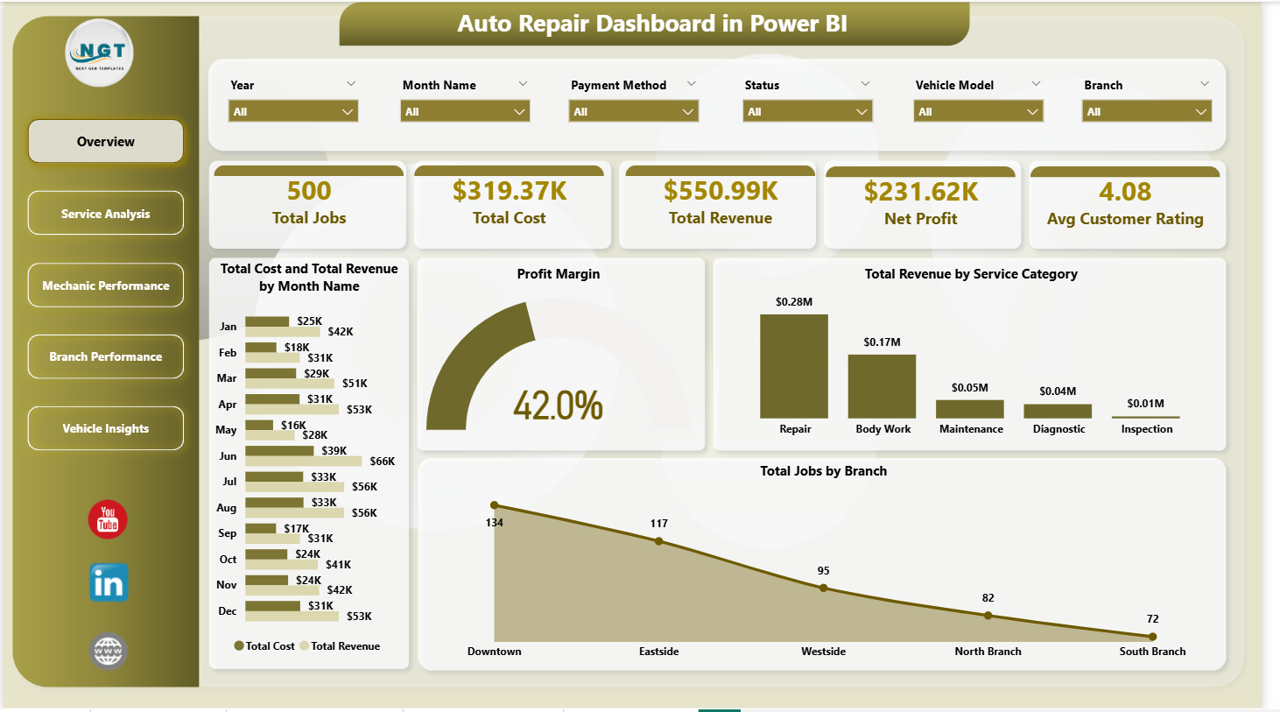
The auto repair dashboard in Power BI covers the same ground as the Excel dashboard in a different tool. It suits shops or groups that already publish reports through Power BI and want one more page in the same place.
Who it is for: multi-branch operators and analysts who prefer Power BI slicers and a data model over pivot tables.
- 5 KPI cards: Total Jobs, Total Cost, Total Revenue, Net Profit and Avg Customer Rating
- 16 pre-built visuals across 5 pages, including trend lines, gauges and bar charts
- Top-ten mechanic leaderboards on Avg Labor Hours, Avg Customer Rating and Net Profit
- Slicers for branch, service category, mechanic, vehicle make and month
Use cases:
- Compare Net Profit, Customer Rating and Completion Rate across branches.
- Rank ten mechanics on Avg Labor Hours per job to find who needs coaching.
- Break down Total Jobs, Total Revenue and Avg Labor Hours by vehicle make.
- Filter the whole report to one month with a single slicer.
Setup takes under 10 minutes: open the file in Power BI Desktop, point the data source to your job records and click Refresh. Price: $17.99. Get the Auto Repair Dashboard in Power BI.
Best for: shops that already live in Power BI.
5. Auto Repair Shop KPI Scorecard in Excel: best one-page report
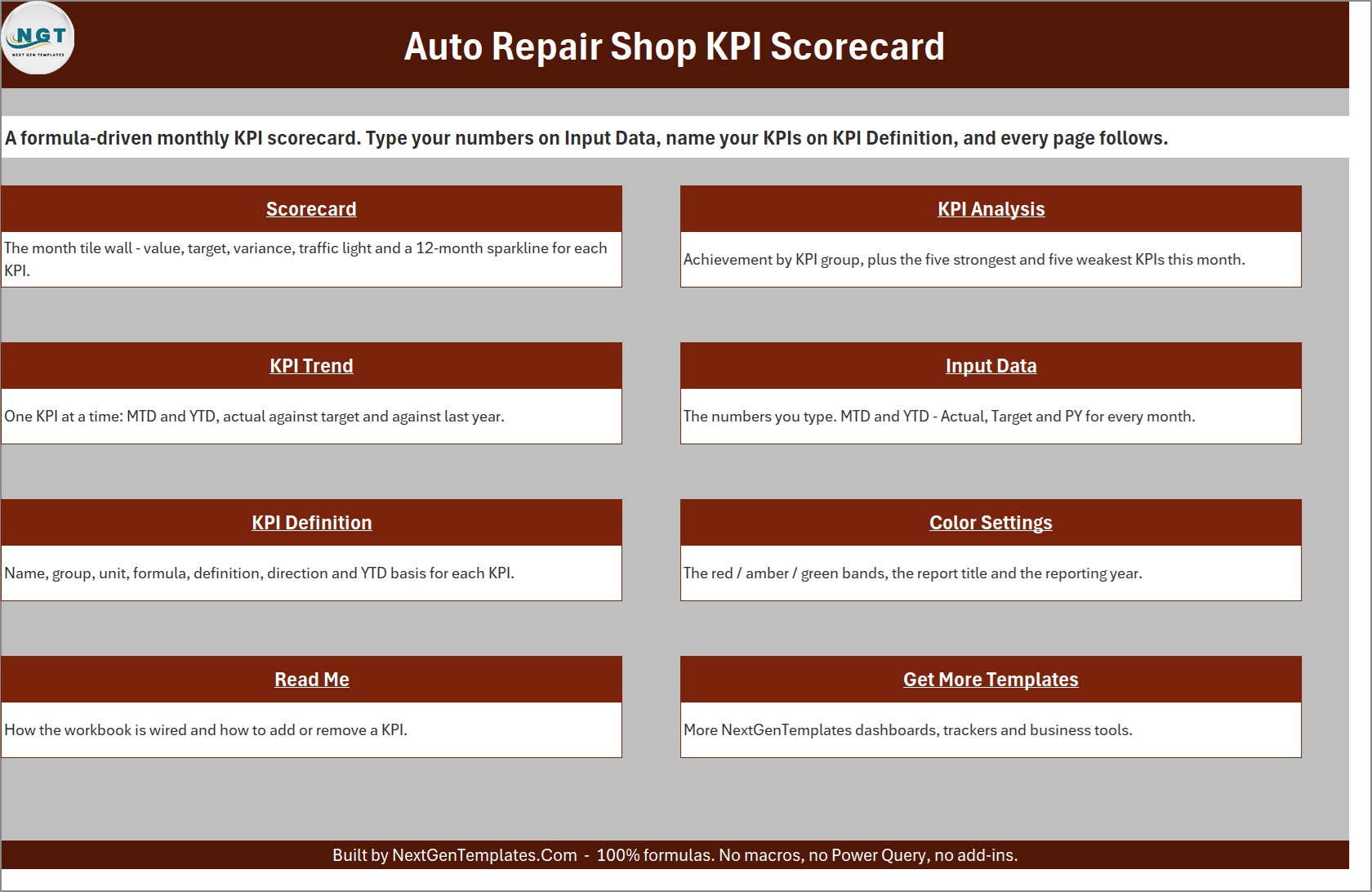
The auto repair shop KPI scorecard in Excel puts 10 KPIs in 4 groups on one page. A shop already produces these numbers in its repair orders, time sheets, service log and customer follow-up. This page lines them up each month in the same shape.
Who it is for: small and mid-size shops that want a monthly management report without a data export routine.
- 10 KPIs across operations, financials, quality and customer
- Month picker with an MTD / YTD switch, compared against Target, PY or Prior Month
- Direction-aware lights: 7 upper-the-better and 3 lower-the-better KPIs
- A 12-month sparkline on every tile, plus KPI Analysis and KPI Trend pages
Use cases:
- Read Comeback Rate and First-Time Fix Rate side by side to see whether work is right first time.
- Use the sample year as a guide: left on Sep-2025 with MTD and Vs. Target, it shows 4 Green, 4 Amber and 2 Red.
- Spot that Repair Orders Completed is 571 against 664 even though Bay Utilization is 78.7% against 77.1%.
- Use the Top 5 and Bottom 5 view to pick the two KPIs for the next meeting.
It is a plain .xlsx built from formulas only. Price: $9.99. Get the Auto Repair Shop KPI Scorecard in Excel.
Best for: a cheap, fast monthly report for a single shop.
6. Auto Repair Shop KPI Scorecard in Google Sheets: best for shared cloud access
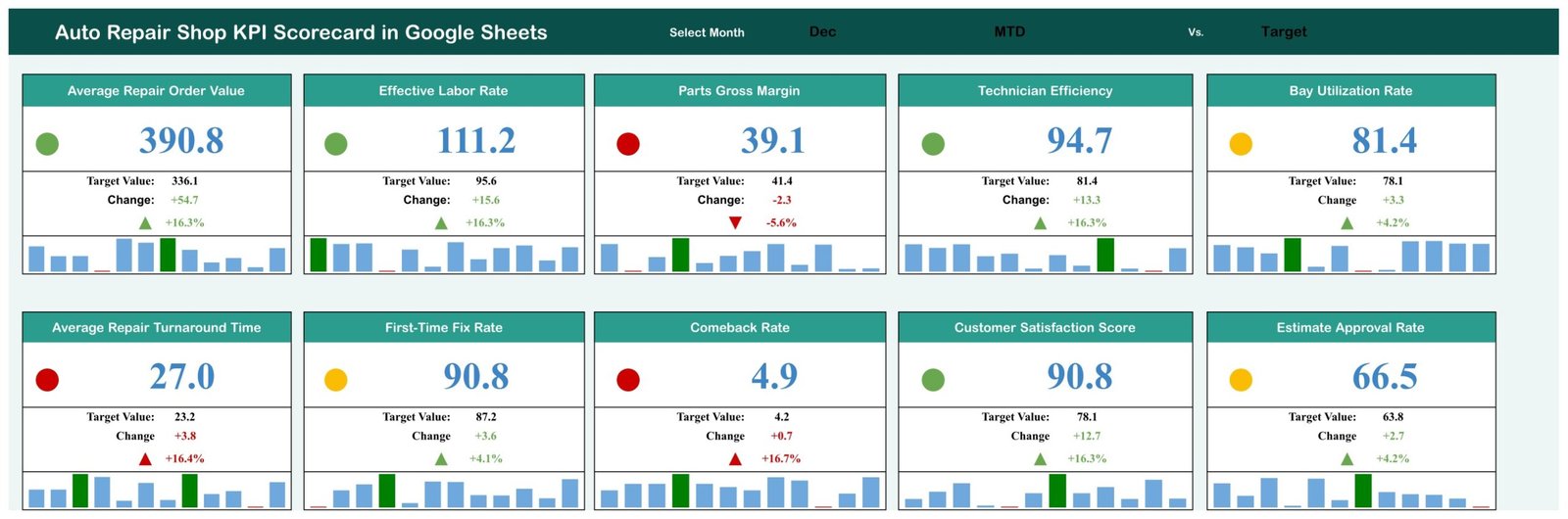
The auto repair shop KPI scorecard in Google Sheets is the cloud version of the scorecard. You make a copy in your own Google Drive, so the service manager, the owner and the accountant can all open the same file.
Who it is for: teams that work in Google Workspace and do not want macros or add-ons to authorise.
- 10 KPIs in four groups: Financial and Revenue, Shop Productivity, Quality and Rework, Customer Experience
- Month, MTD/YTD and Target/PY selectors on one page
- 8 upper-the-better and 2 lower-the-better KPIs: Average Repair Turnaround Time and Comeback Rate
- A KPI Definition sheet with unit, formula, definition and type for each KPI
- An Input Data tab with 12 monthly rows per KPI, and 120 sample records (10 KPIs x 12 months)
Use cases:
- Enter one row of monthly numbers per KPI and let the cards recalculate.
- Switch from Target to PY to see whether the shop beat last year, not only the plan.
- Read the lights: for an upper-the-better KPI, a variance of 0% or below is red, up to 10% is amber and above 10% is green.
- Pick any KPI on the KPI Trend page to chart Actual vs Target vs PY for MTD and YTD.
Price: $8.99. Get the Auto Repair Shop KPI Scorecard in Google Sheets.
Best for: the lowest-cost, shareable scorecard.
Which template should you choose?
| If your main problem is… | Choose | Price |
|---|---|---|
| Jobs get stuck between diagnosis, approval and billing | Service Center and Repair Shop Management System Web App | $39.99 |
| You do not know which mechanic, branch or service makes money | Auto Repair Dashboard in Excel | $17.99 |
| Your reporting already sits in Power BI | Auto Repair Dashboard in Power BI | $17.99 |
| You review 14 KPIs monthly against targets and last year | Auto Repair Shop KPI Dashboard in Excel | $12.99 |
| You want a one-page report in Excel | Auto Repair Shop KPI Scorecard in Excel | $9.99 |
| You want a one-page report the whole team can open in the cloud | Auto Repair Shop KPI Scorecard in Google Sheets | $8.99 |
A quick rule: if your problem is operational, buy the web app. If it is analytical and you have transaction records, buy a dashboard. If you only have monthly totals, buy a scorecard.
Which KPIs should an auto repair shop track, and how are they calculated?
Four metrics show up in almost every shop review. These are common definitions, so check the KPI Definition sheet in whichever template you buy and match your own rules.
| KPI | Common formula | Direction |
|---|---|---|
| Average Repair Order Value | Total repair order revenue / number of repair orders | Higher is better |
| First-Time Fix Rate | Repairs fixed on the first visit / repairs completed x 100 | Higher is better |
| Comeback Rate | Repair orders returning for the same fault / repair orders completed x 100 | Lower is better |
| Bay Utilization | Bay hours in use / bay hours available x 100 | Higher is better |
The direction matters when you score against a target. For an upper-the-better KPI, achievement is Actual divided by Target. For a lower-the-better KPI it is Target divided by Actual. The KPI dashboard for auto repair shops applies this per KPI, which is why 2.45% Comeback Rate against a 3.30% target scores 134.7%.
Worked example from the scorecard sample year: Repair Orders Completed is 571 against a target of 664. Achievement is 571 / 664 = 86.0%, which falls below the 95% line and reads Missed. Bay Utilization at 78.7% against 77.1% is 102.1%, so it is On Target. A shop can be busy in its bays and still complete fewer jobs than planned, and that gap is the thing to investigate.
If you want more on choosing service metrics, our guide to customer service KPIs to track in 2026 covers the customer-facing side, and the post on customer management and service templates covers retention.
Is Excel enough, or do you need shop management software?
Excel is strong at reporting and weak at coordination. A spreadsheet can total revenue by mechanic in seconds. It struggles when four people edit job cards at once, when a customer must approve an estimate, or when stock has to drop as parts are sold.
Dedicated shop management software such as Shop-Ware, Tekmetric and Mitchell 1 Manager SE exists for those jobs, and each publishes its own plans on its own site. Compare their current pricing yourself before deciding. The NextGenTemplates alternative is the $39.99 web app, which keeps the workflow inside Google Sheets with no per-user fees.
A sensible split for many shops: run daily work in a management system or the web app, then export closed repair orders into a dashboard for owner-level analysis. For a similar workflow outside the garage, see our helpdesk and incident management templates and the warehouse management templates, which handle stock-heavy operations.
Is it cheaper to buy one template or all six?
All six together cost $107.94. The three Excel files (dashboard, KPI Dashboard and scorecard) cost $40.97. The two Power BI and Google Sheets tools add $26.98, and the web app adds $39.99.
Most shops do not need all six, because the dashboards, KPI Dashboard and scorecards overlap on purpose. A practical pairing is the web app ($39.99) plus the Excel dashboard ($17.99), which costs $57.98 and covers operations and analysis. Add the KPI Dashboard ($12.99) for $70.97 if the owner wants targets and prior-year comparison. Pick one scorecard, not both, unless you truly need both Excel and Google Sheets.
For reference on who does the work, the US Bureau of Labor Statistics publishes a profile of automotive service technicians and mechanics, which is useful context when you set labor-hour targets.
When are these templates NOT the right answer?
Be honest about the limits before you buy.
- You need integrated parts catalogs and labor guides. The templates here do not include vendor parts lookups or published labor times. Buy shop management software for that.
- You need payment processing or customer text messaging built in. None of the listings describe card processing, so use dedicated software.
- You have no job records at all. The dashboards analyse data you already log. If jobs live on paper, start with the web app or a scorecard that needs only monthly totals.
- You have a large team editing at the same time. Excel files are not multi-user systems. Use the web app, which has role-based login, or software built for concurrent users.
- You want a hands-off integration with your accounting package. These are templates you fill or paste into, so expect manual data entry or your own export.
If two or more of these describe your shop, a subscription tool will probably serve you better. If your problem is simply that nobody can say which jobs and mechanics earn money, a $17.99 dashboard is a low-risk first step.
Frequently asked questions
What is the best auto repair shop Excel template?
The Auto Repair Dashboard in Excel ($17.99) is the best overall pick. It has 5 KPI cards, 17 charts across 5 pages, top-five mechanic leaderboards and branch P&L views, with slicers for branch, service category and mechanic. It analyses job records rather than running daily job cards.
Can Excel run an auto repair shop?
Excel can report on a shop well and track KPIs with formulas, but it is weak at multi-user job cards, parts stock and customer approvals. Use Excel for analysis and monthly scorecards. For daily intake, estimates and billing, the Service Center and Repair Shop Management System Web App ($39.99) is a better fit.
What KPIs should an auto repair shop track?
Start with Average Repair Order Value, First-Time Fix Rate, Comeback Rate and Bay Utilization, then add Repair Orders Completed, customer rating and turnaround time. The Auto Repair Shop KPI Dashboard in Excel ($12.99) tracks 14 service KPIs, and the KPI Scorecard in Excel ($9.99) tracks 10.
How is comeback rate calculated?
Comeback Rate is repair orders that return for the same fault divided by repair orders completed, shown as a percentage. Lower is better. In the KPI Dashboard sample, 2.45% against a 3.30% target scores 134.7%, because the template divides target by actual for lower-the-better KPIs.
Is there an auto repair dashboard for Power BI?
Yes. The Auto Repair Dashboard in Power BI costs $17.99 and has 5 KPI cards and 16 visuals across 5 pages, with slicers for branch, service category, mechanic, vehicle make and month. You open the file in Power BI Desktop, point it at your job records and refresh.
Is there a Google Sheets option for a repair shop?
There are two. The Auto Repair Shop KPI Scorecard in Google Sheets costs $8.99 and shows 10 KPIs as traffic-light cards with 12-month mini charts. The Service Center and Repair Shop Management System Web App costs $39.99 and runs on Google Sheets and Google Apps Script with 25 screens.
Do these templates need a subscription?
No. Each of the six is a one-time payment with no subscription and no per-user fees, and the listings state lifetime access. Shop management SaaS such as Shop-Ware, Tekmetric or Mitchell 1 Manager SE publishes its own plans, so check their current pricing pages to compare.
How long does setup take?
The Auto Repair Dashboard in Excel and the Power BI version each list setup at under 10 minutes: replace the sample data, refresh and the visuals update. The KPI scorecards and dashboard ship with a full sample year, so you can see them working first, then type your own monthly numbers.
Which template suits a single small garage?
A single garage that wants to see monthly health on one page should start with the Auto Repair Shop KPI Scorecard in Excel ($9.99) or Google Sheets ($8.99). If the problem is lost job cards and unbilled work rather than reporting, the $39.99 web app addresses that instead.
Get more auto repair and service templates
If you want one tool to run daily work, start with the repair shop management system web app for $39.99. Add the auto repair dashboard in Excel for $17.99 to analyse the jobs it records.
Watch walkthroughs and template demos on the NextGenTemplates YouTube channel. More service-desk comparisons are in our Freshdesk alternatives and Smartsheet alternatives roundups.