

The best printing business dashboard template for most shops is the Packaging Industry KPI Dashboard in Excel ($14.99). It tracks production, quality, cost and delivery KPIs on one screen with MTD and YTD views. Print and publishing shops can pick the $12.99 Excel, $11.99 Power BI or $9.99 Google Sheets version instead.
Last updated: October 2026
Key takeaways
- The Packaging Industry KPI Dashboard in Excel costs $14.99 and is the broadest packaging KPI option in this list.
- The Printing & Publishing KPI Dashboard comes in three formats: Excel at $12.99, Power BI at $11.99 and Google Sheets at $9.99.
- The Food Packaging KPI Scorecard in Excel ($14.99) suits food manufacturers who need packaging performance tracked against targets.
- The 3D Printing Manufacturing KPI Dashboard in Excel ($14.99) includes machine utilization monitoring for additive manufacturing.
- Buying all six templates costs $79.94, which is less than six months of one Power BI Pro seat at roughly $14 per user per month plus any build time.
 Launch offer
SUMIFS, XLOOKUP, FILTER, LAMBDA and checking AI-written formulas, with real business projects. 11h 47m of video by PK, with practice files, quizzes and a capstone.
Printing and packaging dashboard templates compared
| Template | Format | Best For | Price |
|---|---|---|---|
| Packaging Industry KPI Dashboard (Best overall) | Excel | Packaging plants covering production, quality, cost and delivery | $14.99 |
| Food Packaging KPI Scorecard | Excel | Food and consumer packaging teams | $14.99 |
| 3D Printing Manufacturing KPI Dashboard | Excel | Additive manufacturing and 3D print farms | $14.99 |
| Printing & Publishing KPI Dashboard | Excel | Commercial print and publishing operations | $12.99 |
| Printing & Publishing KPI Dashboard | Power BI | Executive and management reporting | $11.99 |
| Printing & Publishing KPI Dashboard (Best value) | Google Sheets | Small shops and shared cloud teams | $9.99 |
How we picked these printing and packaging dashboards
We searched the NextGenTemplates catalog of roughly 6,900 products for printing, publishing, packaging and additive manufacturing KPI tools. We kept only paid, complete dashboards or scorecards with target-versus-actual tracking, and dropped checklists, generic manufacturing sheets and anything not tied to a print or packaging process.
Ranking follows breadth of KPI coverage first, then fit to a specific buyer, then price. Where the same tool exists in Excel, Power BI and Google Sheets we included all three so you can choose by the software your team already uses.
What are the 6 best printing and packaging dashboard templates for 2026?
1. Packaging Industry KPI Dashboard in Excel: best overall
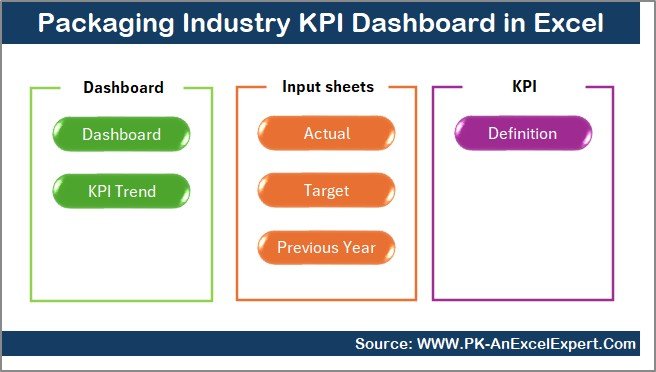
This is the template we rank first because it covers the widest set of packaging KPIs and is the one buyers most often search for by name. It is a 100% Excel solution with no coding and no extra software.
Who it is for: plant managers and operations leads in food, pharma, corrugated, flexible or industrial packaging, and printers who also run converting lines.
- All production, quality, cost and delivery KPIs on one screen
- Dynamic month selection that refreshes the whole dashboard
- MTD and YTD views comparing Actual, Target and Previous Year
- Up and down arrow conditional formatting plus trend analysis by KPI
- Fully documented KPI definitions, so nobody argues about how a number is calculated
Use cases: set a waste target of 3% and see which month drifts above it. Compare this March against last March for on-time delivery. Review MTD output against target in a Monday meeting. Hand a single screen to the owner instead of five separate reports.
Price: $14.99. Get the packaging industry KPI dashboard in Excel.
Best for: any packaging business that wants one Excel file for the whole plant.
2. Food Packaging KPI Scorecard in Excel: best for food packaging compliance
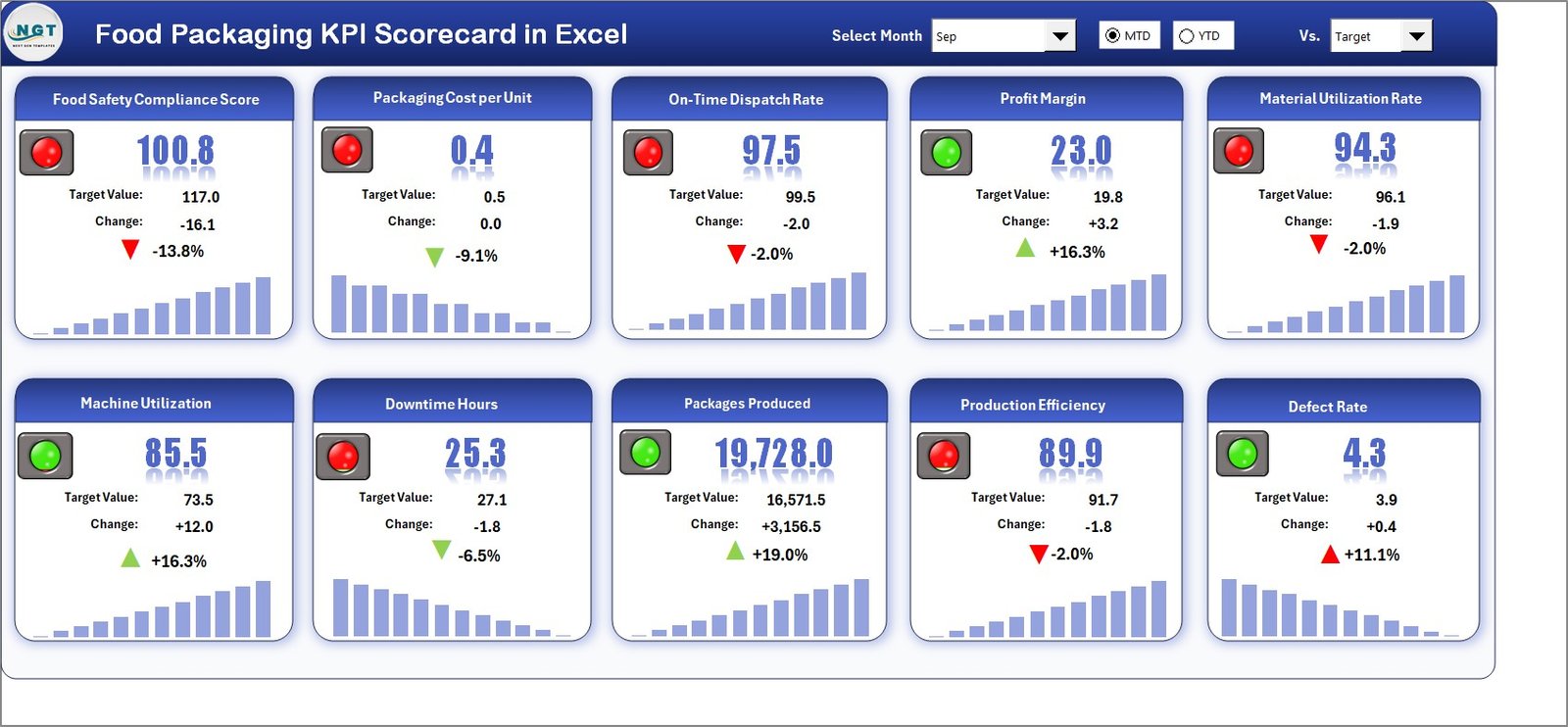
A scorecard built for food manufacturers, where packaging errors turn into material waste, compliance risk and late deliveries.
Who it is for: quality managers, packaging supervisors and food company owners who report packaging performance against targets.
- Interactive KPI scorecard with automated visuals and indicators
- Month selection with MTD and YTD comparison
- Automated Actual vs Target calculations
- Colour-coded indicators and dynamic KPI trend charts
- Centralized input sheet: update data once, refresh everything
Use cases: flag any KPI under target in a monthly quality review. Track packaging waste trend across a year before a customer audit. Give each line supervisor a single page of colour-coded results. Replace scattered spreadsheets with one shared input sheet.
Price: $14.99. See the food packaging KPI scorecard. For wider plant metrics, see our guide to food manufacturing dashboard templates in Excel.
Best for: food and consumer packaging teams that answer to auditors and retail customers.
3. 3D Printing Manufacturing KPI Dashboard in Excel: best for additive manufacturing
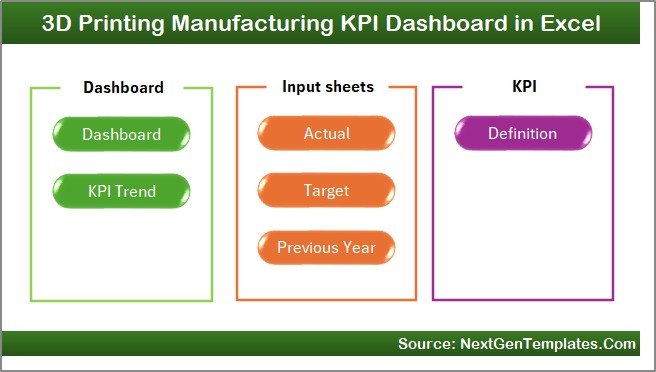
If your "printing business" means printers that build parts, this is the match. It tracks production efficiency, machine performance, material usage and quality in one Excel workbook.
Who it is for: 3D print service bureaus, prototyping shops and manufacturers running additive production.
- Interactive dashboard with all production KPIs in one view
- MTD and YTD analysis with Actual vs Target comparison
- Machine utilization monitoring to reduce downtime
- Dynamic trend charts and up and down visual indicators
Use cases: a farm of 10 printers running 24 hours has 240 machine-hours a day; compare hours actually printing against that figure. Watch material usage month by month. Spot a machine whose utilization keeps falling. Show customers a quality trend.
Price: $14.99. Open the 3D printing manufacturing KPI dashboard.
Best for: additive manufacturers who need machine utilization and output in one place.
4. Printing & Publishing KPI Dashboard in Excel: best for commercial print
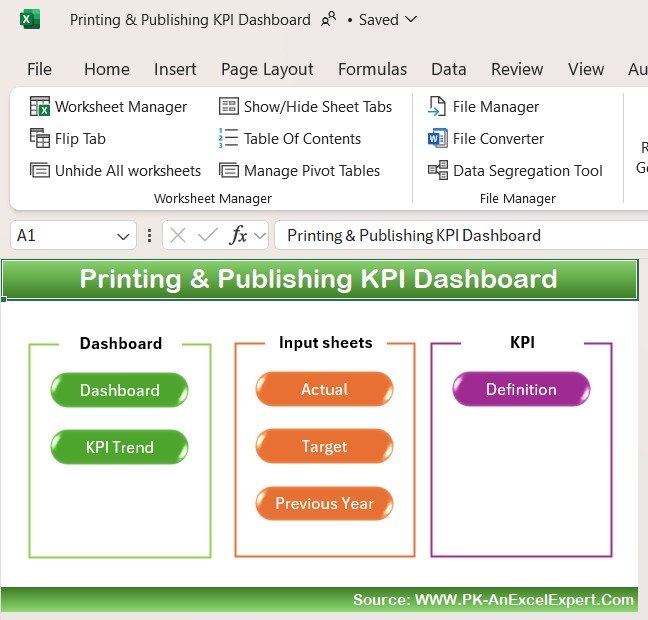
A seven-sheet workbook for printers and publishers. The Home sheet works as an index with six navigation buttons, and the Dashboard sheet shows monthly and yearly performance.
Who it is for: print shop owners, production managers and publishing operations teams replacing ad hoc spreadsheets.
- Seven structured sheets for data input, monitoring and visualization
- Automated calculations from actual, target and previous year data
- MTD and YTD metrics with conditional formatting and trend charts
- Customizable KPI definitions, so you can modify or add KPIs
Use cases: compare monthly actuals against a target for cost per job. Look at this year against last year for output. Add a KPI of your own, such as reprint rate. Keep one file that the owner and the production lead both read.
Price: $12.99. Buy the printing and publishing KPI dashboard in Excel.
Best for: commercial printers who want a lower-cost Excel dashboard with room to customize.
5. Printing & Publishing KPI Dashboard in Power BI: best for executive reporting
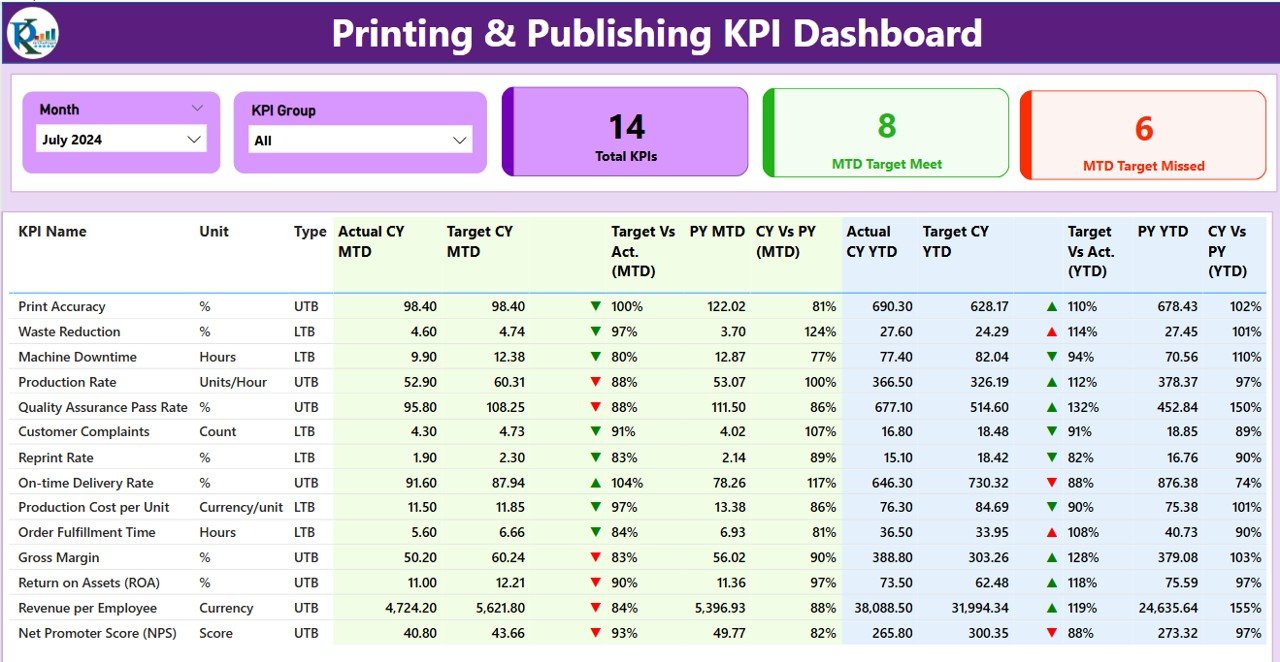
The Power BI version spans production, sales and customer metrics, which makes it a reporting layer for management rather than a data-entry tool.
Who it is for: managing directors, finance leads and analysts who already use Power BI.
- Production tracking: print runs, order fulfillment time, production costs
- Sales and revenue analysis including profitability
- Customer satisfaction metrics such as delivery times and order accuracy
- Time-based monitoring: daily, weekly, monthly and yearly
- Operational efficiency insights for internal processes
Use cases: review revenue and profitability by period in a board pack. Look for seasonality in order volumes. Track order accuracy next to delivery time. Slice trends by week during a busy season.
Price: $11.99. Get the printing and publishing KPI dashboard in Power BI. More options are in our ranking of Power BI dashboard templates by industry.
Best for: leadership teams that want sales, production and customer KPIs in one report.
6. Printing & Publishing KPI Dashboard in Google Sheets: best budget and cloud pick

The cheapest template here, and the easiest to share, since several people can open the same sheet from a browser.
Who it is for: small print shops, publishers and remote teams on Google Workspace.
- Customizable metrics such as production efficiency, cost per unit, print quality and customer satisfaction
- Charts, graphs and trend lines
- Sharing with team members and stakeholders
- A simple layout for users with limited technical skills
Use cases: share one live sheet with the press operator and the owner. Track cost per unit by month. Add a print quality metric your customers care about. Start at $9.99 before deciding whether to move to Excel or Power BI.
Price: $9.99. Choose the printing and publishing KPI dashboard in Google Sheets.
Best for: budget-conscious shops that work in the cloud.
Which printing KPIs should you track, and how are they calculated?
A dashboard is only as good as the definitions behind it. These are the formulas most print and packaging teams use. The benchmark ranges are common rules of thumb, not guarantees, so set your own targets from your history.
| KPI | Formula | Typical reference |
|---|---|---|
| Waste rate | Waste units / total units produced x 100 | Many converters aim for single digits; track your own baseline |
| On-time delivery | Orders delivered on time / total orders x 100 | 90% to 95% is a common target |
| OEE | Availability x Performance x Quality | 85% is the often-quoted world-class figure |
| Machine utilization | Productive hours / available hours x 100 | Set by shift pattern |
| Cost per unit | Total production cost / units produced | Compare month to month and to target |
| Reprint rate | Jobs reprinted / total jobs x 100 | Lower is better; trend matters more than the level |
For the full OEE definition, see the overview of overall equipment effectiveness on Wikipedia. Our guide to 12 manufacturing KPIs to track goes deeper on each one.
A worked example, with illustrative numbers: a packaging line produces 50,000 units in a month and scraps 1,750. Waste rate is 1,750 / 50,000 = 3.5%. If the target is 3%, the packaging KPI dashboard shows the gap and the arrow turns the wrong way. That is the whole job of a KPI scorecard: one number, one target, one direction.
How much does a printing dashboard cost compared with software?
The three-format printing and publishing set costs $34.97 together ($12.99 + $11.99 + $9.99). All three packaging and manufacturing Excel tools cost $44.97. All six templates cost $79.94, one time.
Compare that with subscription tools. Power BI Pro is around $14 per user per month at the time of writing (check Microsoft’s pricing page), so a team of five pays about $840 a year. Print management systems such as Printavo, PrintVis or EFI are sold per seat or by quote and cover estimating and job tracking, which these templates do not. Our guide on how much a business dashboard template should cost explains the price bands.
How do you choose between them?
| If you… | Choose |
|---|---|
| run a packaging plant or converting line | Packaging Industry KPI Dashboard in Excel, $14.99 |
| pack food and face audits | Food Packaging KPI Scorecard in Excel, $14.99 |
| operate 3D printers | 3D Printing Manufacturing KPI Dashboard in Excel, $14.99 |
| run a commercial print shop and live in Excel | Printing & Publishing KPI Dashboard in Excel, $12.99 |
| report to executives in Power BI | Printing & Publishing KPI Dashboard in Power BI, $11.99 |
| need the cheapest shared option | Printing & Publishing KPI Dashboard in Google Sheets, $9.99 |
If you are unsure, start with the Excel version. It works offline, every manager already knows the interface, and you can add a Power BI report later as reporting needs grow. If you source paper or film, a companion procurement dashboard template covers supplier spend, and a logistics dashboard template covers deliveries.
When is a template NOT the right answer?
A KPI template reports what happened. It does not replace every piece of software in a print business, so buy software instead in these cases:
- You need estimating, quoting, web-to-print storefronts or job ticketing. Tools such as Printavo, PrintVis or EFI are built for that.
- Your presses or machines stream live data and you need automatic capture with no manual entry. That needs an MES or IoT platform.
- You have many plants and hundreds of users who need row-level security. A governed Power BI deployment is a better fit.
- Nobody will enter data. Any dashboard fails if the monthly inputs are not filled in.
If your problem is planning rather than reporting, look at the production planning dashboard in Power BI. For plant-wide views, see manufacturing dashboard templates for plant managers. Staffing metrics for your press crew are covered in 15 HR KPIs to track.
Frequently asked questions
What is a printing business dashboard template?
It is a ready-made spreadsheet or Power BI file that tracks print shop KPIs such as production output, cost per unit, delivery performance and customer satisfaction against targets. The Printing & Publishing KPI Dashboard comes in Excel ($12.99), Power BI ($11.99) and Google Sheets ($9.99).
What KPIs should a packaging company track?
Track production output, waste rate, quality, machine efficiency, cost and on-time delivery. The Packaging Industry KPI Dashboard in Excel ($14.99) groups production, quality, cost and delivery KPIs on one screen, with Actual, Target and Previous Year values for each.
Is the Packaging Industry KPI Dashboard built only in Excel?
Yes. It is a 100% Excel solution with no Power BI, no coding and no additional software costs. You choose the month and the whole dashboard refreshes. It costs $14.99 and includes MTD and YTD tracking with documented KPI definitions.
Can I use these dashboards in Google Sheets or Power BI?
The Printing & Publishing KPI Dashboard exists in all three formats: Excel at $12.99, Power BI at $11.99 and Google Sheets at $9.99. The packaging and 3D printing dashboards listed here are Excel templates priced at $14.99 each.
Which template is best for a small print shop?
A small print shop usually does best with the Printing & Publishing KPI Dashboard in Excel at $12.99, or the Google Sheets version at $9.99 if staff need to share one live file. Both track monthly and yearly performance against targets.
Is there a dashboard for food packaging compliance?
The Food Packaging KPI Scorecard in Excel ($14.99) is built for food manufacturers. It compares Actual vs Target, shows MTD and YTD results with colour-coded indicators, and uses standardized KPI documentation so reports stay consistent for audits and customers.
Can I track 3D printer utilization in Excel?
Yes. The 3D Printing Manufacturing KPI Dashboard in Excel ($14.99) includes machine utilization monitoring alongside production efficiency, material usage and quality KPIs. It shows MTD and YTD results with Actual vs Target comparisons and trend charts.
Can I add my own KPIs to these dashboards?
The Printing & Publishing KPI Dashboard in Excel lets you modify or add KPIs to suit your business, and the Google Sheets version offers customizable metrics. The Excel packaging dashboards include documented KPI definitions so changes stay consistent.
How much do these templates cost in total?
The six templates cost $14.99, $14.99, $14.99, $12.99, $11.99 and $9.99, a total of $79.94 as one-time purchases. You can buy any single one on its own, starting from $9.99 for the Google Sheets dashboard.
Do I need a subscription to use them?
No. Each template is a one-time purchase at the price shown. The Excel versions need only Microsoft Excel. Power BI Desktop is needed for the Power BI version, and the Google Sheets version needs a Google account.
Get more printing and packaging dashboard templates
Start with the Packaging Industry KPI Dashboard in Excel for $14.99, or pick the Google Sheets printing dashboard at $9.99 as the lowest-cost entry. Retail print sellers may also like our retail and e-commerce dashboard templates, and SaaS-style subscription tracking is covered in best SaaS dashboard templates. Watch walkthroughs on the NextGenTemplates YouTube channel.