


The best port dashboard template for most terminal and port teams in 2026 is the Shipping Port KPI Dashboard in Excel ($14.99). It tracks cargo volume, container throughput, vessel turnaround, berth and dock use, and port costs against target and last year. Teams that also need profit by port, cargo type and shipping line should add the Port Logistics Dashboard, from $13.99.
Last updated: October 2026
Key takeaways
- Our top pick is the Shipping Port KPI Dashboard ($14.99 in Excel, $9.99 in Google Sheets), because it is the only file here built around the numbers a port manager reports every month: throughput, turnaround and berth use.
- For money questions, the Port Logistics Dashboard compares cost, revenue, profit, delay hours and customer rating by port, cargo type and shipping line across five pages.
- Shippers and forwarders who lose money to demurrage should look at the Container Tracking Dashboard. Its sample file shows $185.9K of demurrage on $1.3M of freight revenue.
- The best value is the Maritime KPI Dashboard, from $9.99 in Google Sheets, for fleet, fuel and port handling KPIs against target.
- All eight picks are one-time purchases from $9.99 to $39.99. Terminal and fleet software is usually sold by quote on yearly contracts, and Power BI Pro alone costs $14 per user per month.
 Launch offer
From your first Pivot Table to the Data Model, DAX, Power Query and a one-page KPI dashboard. 11h 51m of video by PK, with practice files, quizzes and a capstone.
Port and shipping line templates compared
| Template | Format | Best For | Price |
|---|---|---|---|
| Shipping Port KPI Dashboard (Best overall) | Excel, Google Sheets | Port operators reporting throughput, turnaround and berth use | $9.99 to $14.99 |
| Port Logistics Dashboard | Excel, Power BI | Comparing cost, profit and delays by port and shipping line | $13.99 to $17.99 |
| Container Tracking Dashboard | Excel, Power BI | Demurrage, transit days and carrier on-time rates | $17.99 |
| Container Shipping Dashboard | Excel, Power BI | Shipping line P&L: fuel, detention and customer margins | $13.99 to $17.99 |
| Shipping & Cargo Dashboard | Excel, Power BI | Cargo type and origin port profitability | $14.99 to $17.99 |
| Maritime KPI Dashboard (Best value) | Excel, Power BI, Google Sheets | Fleet, fuel and vessel KPIs against target | $9.99 to $12.99 |
| Freight Forwarding Dashboard | Excel, Power BI | Forwarders comparing carriers, modes and routes | $17.99 |
| Import-Export Documentation Management System | Web app (Google Apps Script) | Customs brokers and forwarders managing documents and clearance | $39.99 |
Ports and shipping lines run on data that never sits in one place. Vessel calls live in the port community system. Container moves live in the terminal operating system. Fuel, charter and port fees live in finance, and customer complaints arrive by email. When the general manager asks why berth waiting time went up in March, an analyst spends two days joining exports in a spreadsheet.
The paid fix is a terminal operating system add-on, a fleet performance platform or a BI tool with per-user licences. Those tools pull data automatically, and big terminals need them. They are also priced by quote, often with a long implementation. A port dashboard template costs $9.99 to $17.99 once. It will not connect to your systems by itself, but a weekly or monthly export gives you the same management views, and the file is yours to keep and edit.
How we picked these
We searched the NextGenTemplates catalog for products built for ports, terminals, container shipping, maritime fleets, cargo and freight forwarding, and kept the ones that model port operations, shipping line performance or trade costs. We dropped a tech support efficiency dashboard that the first shortlist carried, because it measures help desk tickets, not ships or cargo.
Every pick has a live product page, a one-time price and a documented list of pages, sheets or KPIs. Where a tool comes in several formats we list it once and give each price. We ranked on three things, in order: how many core port and shipping questions the template answers, how well it fits one clear job, and price.
The 8 best port dashboard and shipping line templates for 2026
1. Shipping Port KPI Dashboard: best overall
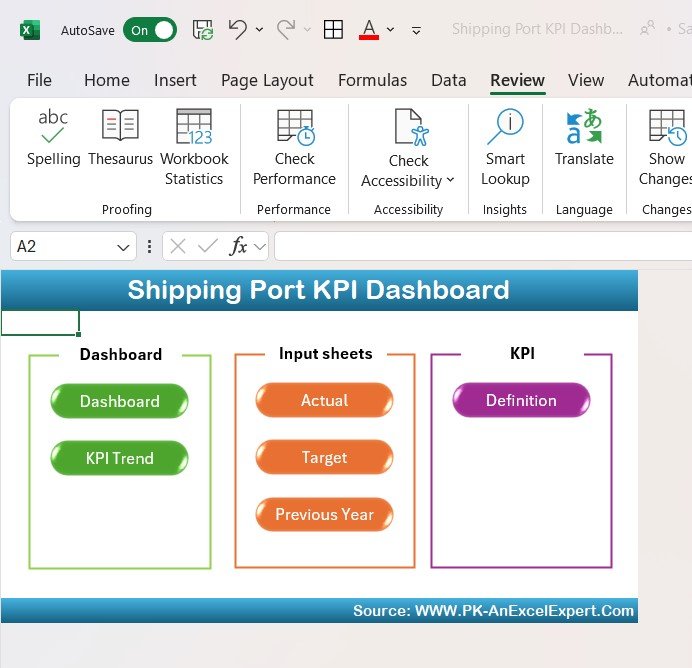
This is the port dashboard we would give a terminal or harbour manager first. Most shipping templates look at money. This one looks at how the port itself performs: how much cargo moved, how fast ships turned around and how hard the berths and cranes worked.
Who it is for: port authorities, terminal operators, harbour masters and the planners who prepare the monthly operations pack.
What is inside:
- Cargo volume and container throughput tracking
- Ship arrivals, departures and vessel turnaround time
- Operational cost, port fees and cargo handling revenue
- Efficiency measures such as crane productivity, dock utilization and workforce performance
- Month-to-date and year-to-date results against target and previous year, with color-coded arrows
The Google Sheets edition ($9.99) adds a KPI Trend tab with a dropdown to chart any KPI over time, separate Actual and Target sheets, and a KPI Definition sheet that records each metric’s group, unit, formula and whether higher or lower is better. That makes it easy to share with a port authority board that wants to see how each number is worked out. The Excel edition costs $14.99.
Best for: monthly KPI reviews where the question is “are we hitting our throughput and turnaround targets?”
2. Port Logistics Dashboard: best for comparing ports and shipping lines
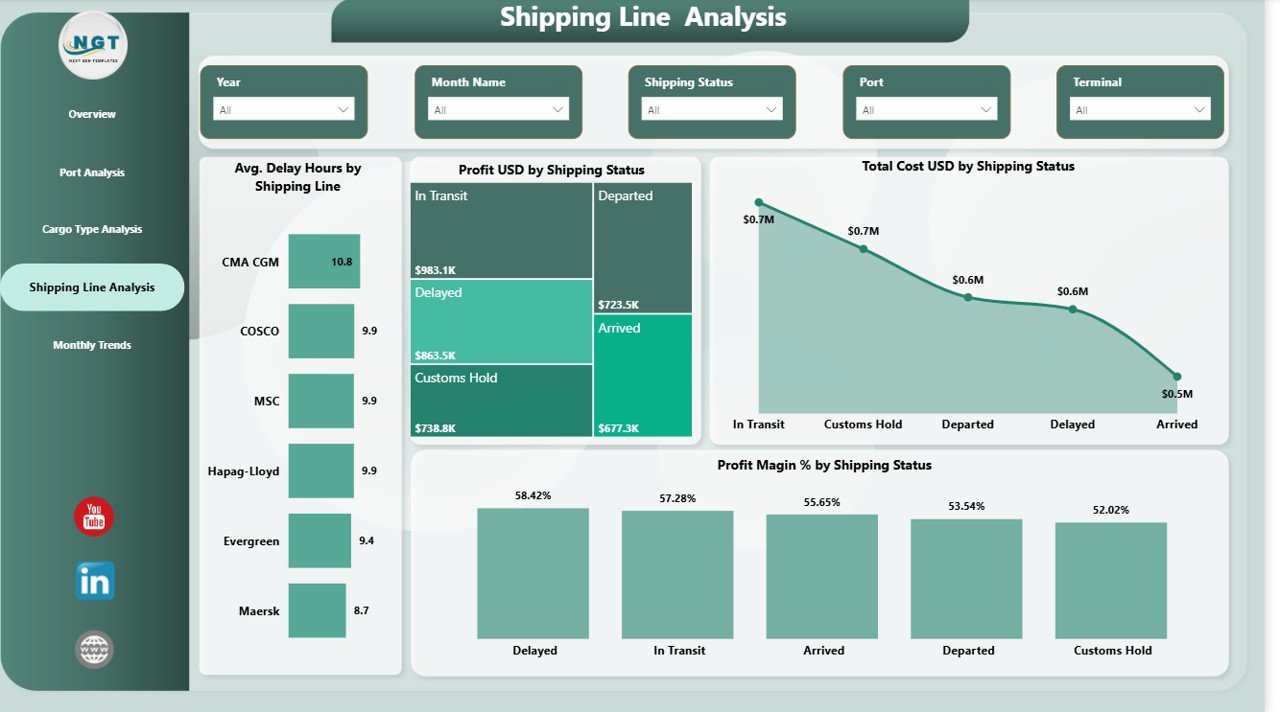
Where the first pick tracks KPIs against target, this template explains where the money and the delays come from. It is built for teams that handle cargo across several ports or work with several shipping lines.
Who it is for: port logistics managers, shipping agents and operations teams that serve more than one port.
What is inside:
- Five pages: Overview, Port Analysis, Cargo Analysis, Shipping Line Analysis and Monthly Trends
- KPI cards for total cost, revenue, profit, profit margin and customer rating
- Container count and cargo type performance
- Delay hours and shipping status by shipping line
- Slicers for port, cargo type, shipping line and time period
The Excel edition costs $13.99 and the Power BI edition costs $17.99. Use it when the board asks which port earns the best margin, or which shipping line causes most of the delay hours.
Best for: profit and delay analysis across ports, cargo types and partners.
3. Container Tracking Dashboard: best for demurrage and carrier on-time rates
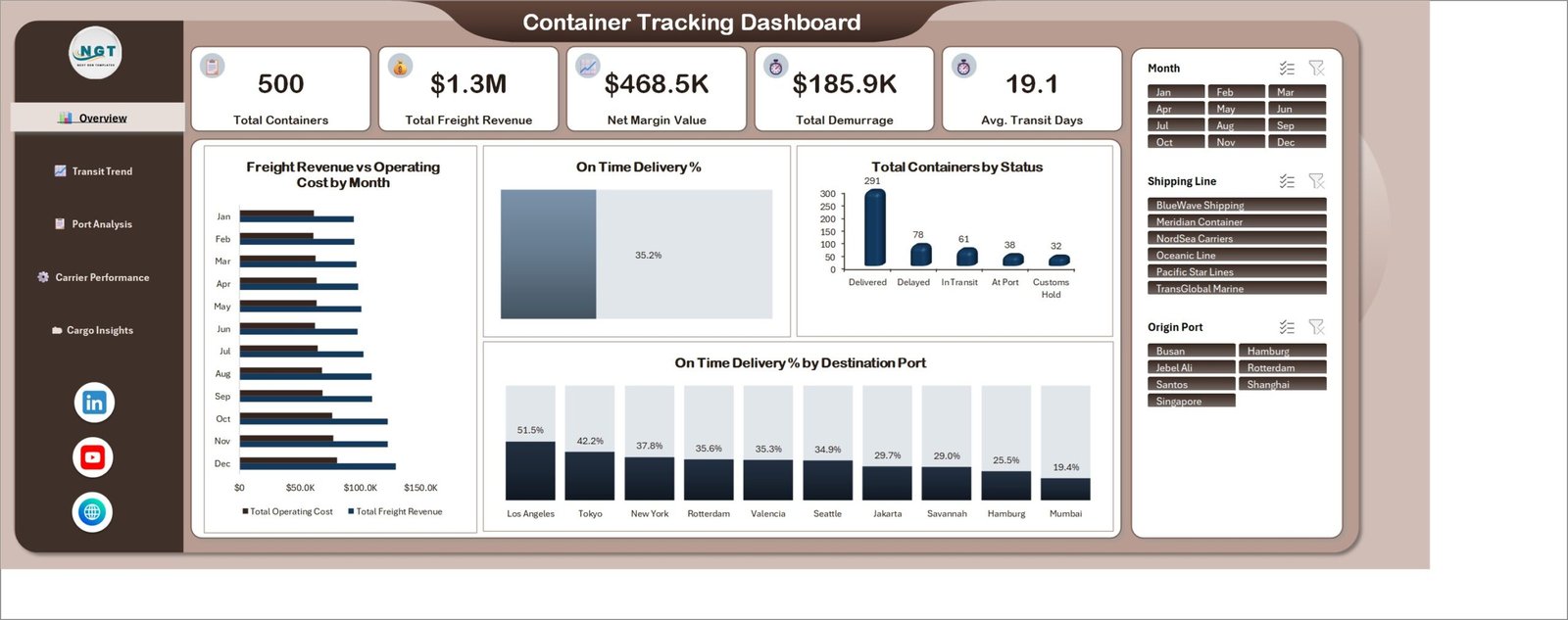
Demurrage is the cost most shippers only notice at month end. This template puts it on the front page. The sample file carries 500 container movements with $1.3M of freight revenue, $468.5K of net margin and $185.9K of demurrage, with on-time delivery at 35.2% and average transit at 19.1 days. Demurrage at that level is about 14 cents of every revenue dollar.
Who it is for: importers, exporters, forwarders and NVOCC teams that book with several carriers.
What is inside:
- Five pages: Overview, Transit Trend, Port Analysis, Carrier Performance and Cargo Insights
- KPI cards for total containers, freight revenue, net margin, total demurrage and average transit days
- Container status split: delivered, delayed, in transit, at port and customs hold
- Demurrage by origin port and a carrier scorecard with on-time delivery and service rating
- Slicers for month, shipping line and origin port that filter every page
The Excel edition and the Power BI edition both cost $17.99. The Power BI file adds 17 DAX measures, a drillthrough to container-level detail and two hover tooltip pages. Be clear about one thing: this is an analysis template, not live track and trace. It does not read AIS, EDI or carrier APIs. It reports on the booking list you keep.
Best for: finding the lane and the carrier that are quietly burning detention and demurrage fees.
4. Container Shipping Dashboard: best for shipping line profitability
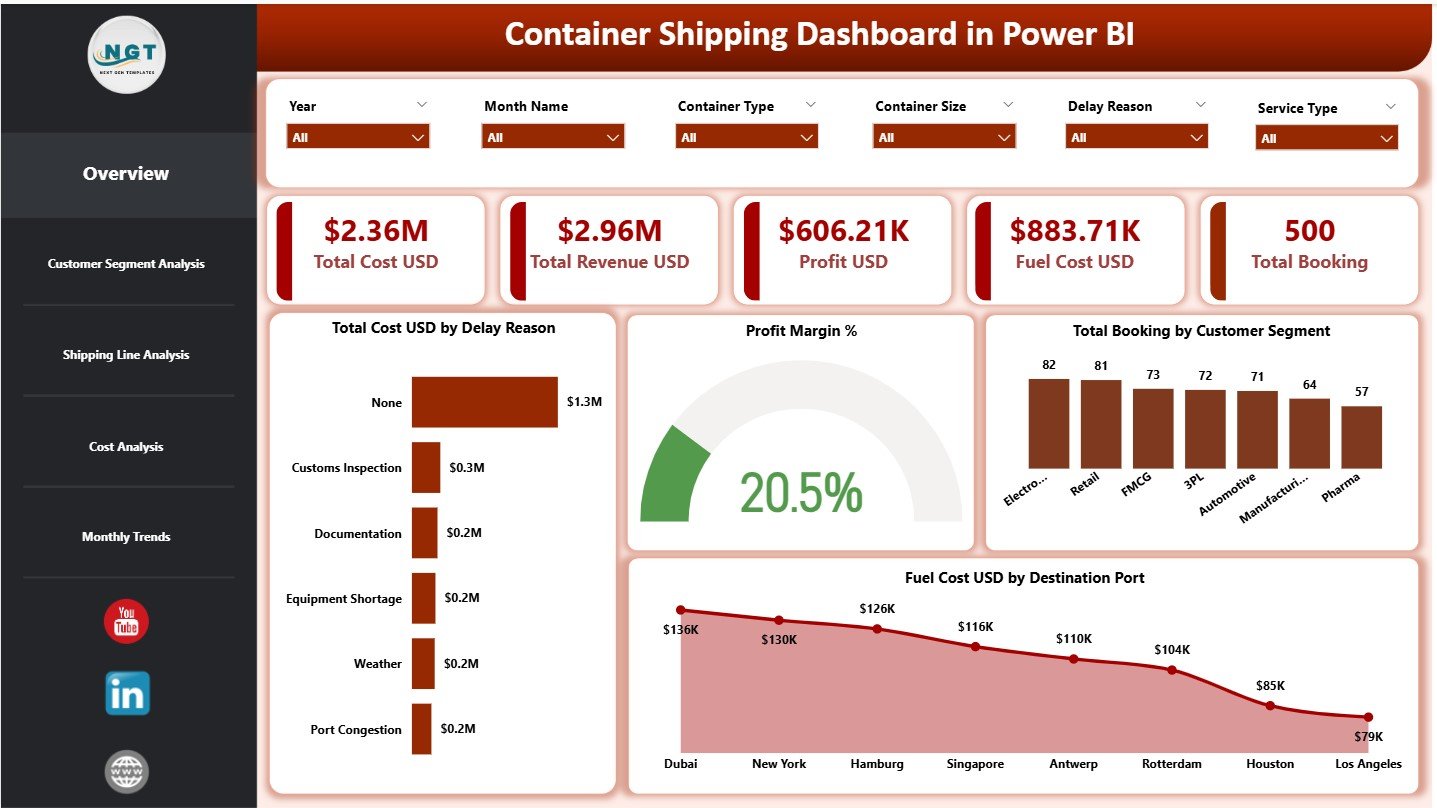
Container lines and their agents live on thin margins. Fuel prices move, delays add penalties, and detention charges eat into profit. This dashboard sets cost, revenue, profit, fuel cost and bookings side by side so you can see which routes, ports and customer segments pay their way.
Who it is for: shipping line finance teams, liner agents and freight forwarders that sell container space.
What is inside:
- Five pages: Overview, Customer, Shipping Line, Cost and Monthly Trends
- KPI cards for total cost, total revenue, profit, fuel cost and total bookings
- Profit margin and fuel cost by route and port
- Customer segment profitability and shipping line comparison, including detention
- Monthly trend charts for revenue, cost and fuel
The Excel edition costs $13.99 and the Power BI edition costs $17.99. Pick Excel if you report monthly from a booking export. Pick Power BI if managers want to slice the numbers themselves.
Best for: the commercial question of which routes and customers make money.
5. Shipping & Cargo Dashboard: best for cargo type and origin port analysis
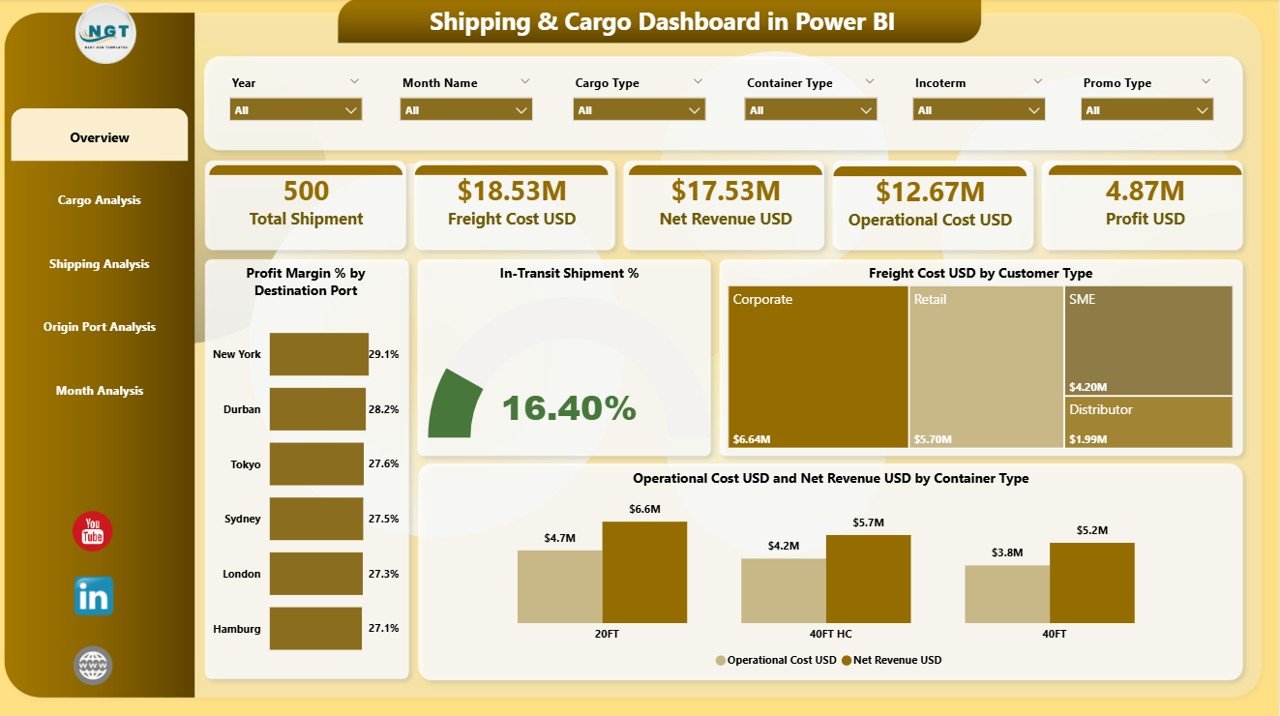
Some cargo is simply more profitable to move than other cargo. This template breaks results down by cargo type, container type, origin port and customer type, so you can see which mix to chase and which to price up.
Who it is for: cargo operators, shipping companies and freight forwarders that handle mixed cargo.
What is inside:
- Five pages: Overview, Cargo Analysis, Shipping Analysis, Origin Port Analysis and Month Analysis
- KPI cards for profit margin %, in-transit shipment %, freight cost and operation cost
- Freight cost versus revenue by cargo type and container type
- Slicers for month, port, cargo type, container type, shipping line and destination
The Excel edition and the Power BI edition cost $17.99 each. If you would rather track a fixed list of KPIs against target each month, the Shipping & Cargo KPI Dashboard in Excel ($14.99) has seven sheets with month-to-date, year-to-date and previous-year comparisons.
Best for: deciding which cargo types and origin ports deserve more capacity.
6. Maritime KPI Dashboard: best value
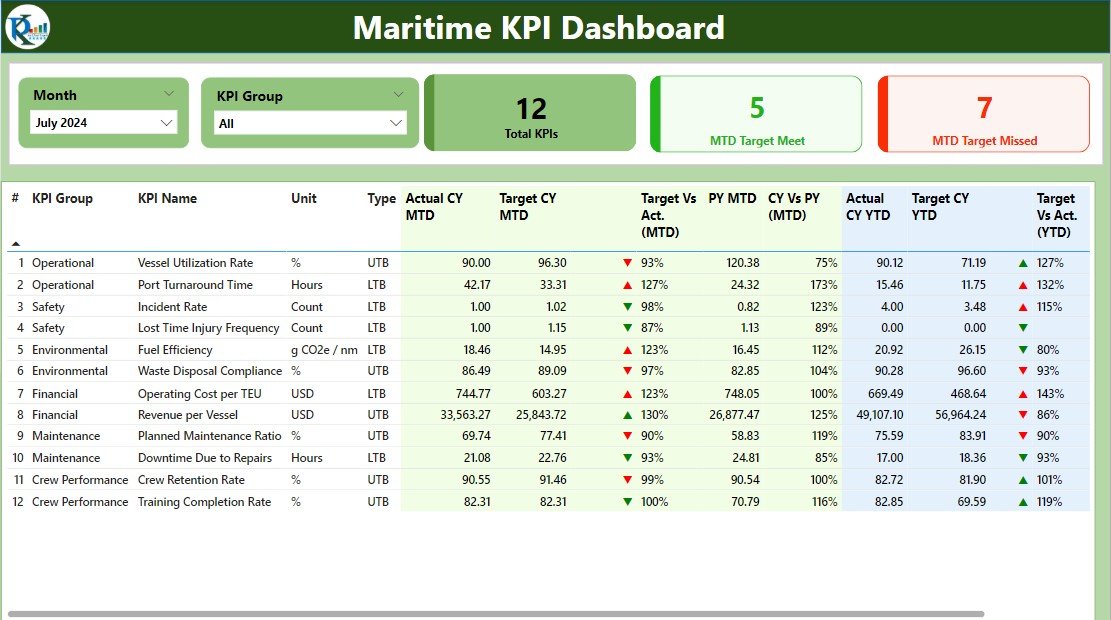
This is the cheapest way to start measuring a fleet. It covers the vessel side of shipping: utilization, fuel consumption, maintenance cost, on-time delivery and port handling times, each compared with a target.
Who it is for: ship operators, small shipping companies and fleet managers.
What is inside:
- Fleet and vessel performance KPIs, including utilization and maintenance costs
- Fuel consumption and fuel efficiency tracking
- Port and terminal KPIs such as throughput, dock utilization and turnaround
- Month-to-date and year-to-date results against target
It costs $9.99 in Google Sheets, $11.99 in Power BI and $12.99 in Excel. For a one-page red, amber and green status view, the Maritime KPI Scorecard in Excel ($14.99) and its Google Sheets version ($9.99) add a scorecard sheet and a KPI definitions sheet.
Best for: small fleets that want KPI tracking for under $13.
7. Freight Forwarding Dashboard: best for forwarders and shipping agents
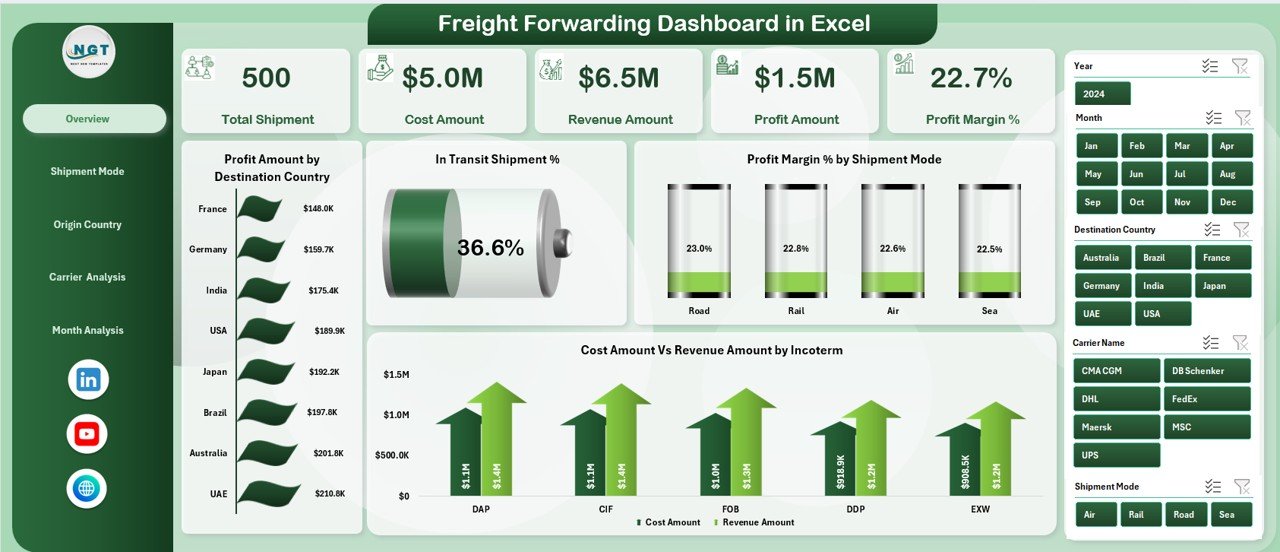
Forwarders sit between shippers and shipping lines, and they rarely move only sea freight. This template compares sea with air and road, so you can see whether the ocean desk is pulling its weight.
Who it is for: freight forwarders, shipping agents and 3PL teams that book space with several carriers.
What is inside:
- Shipments, cost, revenue and profit in one view
- Shipment mode analysis for air, sea and road
- Origin and destination country performance
- Carrier performance by profit, cost and revenue
- Slicers for shipment mode, carrier, country, incoterm and month
Both the Excel edition and the Power BI edition cost $17.99. If your team also runs trucks, the Freight Management KPI Dashboard in Excel ($14.99) tracks freight KPIs against target month by month.
Best for: forwarders deciding which carriers and trade lanes to grow.
8. Import-Export Documentation Management System: best for customs and document control

Ships and containers stop moving when the paperwork is wrong. This pick is not a dashboard. It is a working system for the documents behind every shipment, built on Google Apps Script so it runs in your own Google account.
Who it is for: customs brokers, freight forwarders and trading companies that clear cargo through ports.
What is inside:
- 23 screens for shipments, documents, customs declarations, containers, bookings and invoices
- A completeness check, so no job clears until every mandatory document is verified
- Licence expiry alerts at 90, 60, 30, 15 and 7 days
- 19 reports, including profitability, receivables ageing and pending clearance, exportable to CSV
- 6 user roles and 49 permissions, checked on the server
The Import-Export Documentation Management System Web App costs $39.99, and the product page has a live demo with logins for every role. Note that the duty calculator uses Indian customs terms such as BCD, SWS and IGST, so teams elsewhere should plan to edit the HS Code Master.
Best for: brokers who want fewer held containers caused by missing documents.
Ready to start? The Shipping Port KPI Dashboard in Google Sheets is $9.99 one time, and the Excel edition is $14.99. Load last month’s numbers and you have a port report before the next board meeting.
Which port and shipping KPIs should you track?
Most port and shipping dashboards on this list are built around a short set of measures. If you are setting up your first one, start here:
| KPI | How it is worked out | Why it matters |
|---|---|---|
| Container throughput | Total containers handled in the period, usually in TEU | The headline measure of port capacity use |
| Vessel turnaround time | Departure time minus arrival time, averaged per call | Shorter turnaround means more calls per berth |
| Berth utilization | Hours berths are occupied divided by hours available | Shows whether you need more berth time or better scheduling |
| Crane productivity | Container moves divided by crane working hours | The main driver of turnaround inside the terminal |
| On-time delivery rate | Containers delivered by the promised date divided by all delivered | The carrier and forwarder service measure customers watch |
| Demurrage per container | Total demurrage charges divided by containers | Flags lanes and ports where boxes sit too long |
| Profit margin | (Revenue minus total cost) divided by revenue | Tells you which routes, cargo and customers pay their way |
TEU means twenty-foot equivalent unit, the standard way to count containers, so a 40-foot box counts as two. The TEU entry on Wikipedia explains the conversion, and the demurrage entry covers how those charges arise. For the wider supply chain view, see our guide to supply chain KPIs to track in 2026.
How to choose a port dashboard template
| If your main question is… | Choose |
|---|---|
| Are we hitting our throughput, turnaround and berth targets? | Shipping Port KPI Dashboard |
| Which port and shipping line earn the most, and which cause delays? | Port Logistics Dashboard |
| Where are we losing money to demurrage and late carriers? | Container Tracking Dashboard |
| Which routes and customers are profitable after fuel and detention? | Container Shipping Dashboard |
| Which cargo types and origin ports should we grow? | Shipping & Cargo Dashboard |
| How are our vessels doing on fuel, use and maintenance? | Maritime KPI Dashboard |
| Is sea freight more profitable than air and road for us? | Freight Forwarding Dashboard |
| Why are containers held for missing documents? | Import-Export Documentation Management System |
Format is the second decision. Pick Excel if your planners already work in Microsoft 365, Google Sheets if several terminals or offices update one shared file, and Power BI if your company already holds Power BI licences. Teams that run trucks and warehouses as well as ships should also read our roundup of logistics and transportation dashboard templates. The multimodal Shipping Dashboard in Power BI ($17.99) compares air, sea, road and rail by cost and profit, and the Logistics and Transportation Hub bundles seven Excel and Power BI logistics templates for $69.99.
When a template is NOT the right answer
A template is a reporting layer, not a system of record. Be honest about these cases:
- You need live vessel or container positions. None of these files read AIS, GPS, EDI or carrier APIs. If you need live ETAs, buy a track and trace service and use a template for the monthly review.
- You run a large container terminal. Yard planning, crane scheduling and gate control belong in a terminal operating system. A dashboard can summarise its exports, but it cannot run the yard.
- You have millions of moves a year. Excel and Google Sheets slow down with very large histories. Power BI copes better, but at that size a database with a BI tool is the right setup.
- Many staff edit the same numbers. If dozens of people update one file and you need an audit trail, a governed system beats a shared spreadsheet. The documentation web app on this list is the exception, since it has roles and permissions built in.
Frequently asked questions
What is a port dashboard?
A port dashboard is a report that shows how a port or terminal is performing in one view. It usually tracks container throughput, vessel turnaround time, berth and crane use, costs and revenue. The templates on this list do that in Excel, Google Sheets or Power BI from data you export each month.
Which KPIs should a shipping port dashboard track?
Start with container throughput in TEU, vessel turnaround time, berth utilization, crane productivity and cost per container. Add revenue and profit margin if you report to finance. The Shipping Port KPI Dashboard covers these against target and last year, month to date and year to date.
Can a template track ships and containers in real time?
No. These templates report on the data you load into them, such as a booking list or a terminal export. They do not connect to AIS, GPS or carrier APIs. For live positions use a track and trace service, then use a template for weekly and monthly performance reviews.
Is there a port dashboard template in Google Sheets?
Yes. The Shipping Port KPI Dashboard in Google Sheets costs $9.99 and includes dashboard, trend, actual, target and KPI definition tabs. The Maritime KPI Dashboard and Maritime KPI Scorecard also come in Google Sheets for $9.99, so several offices can update one shared file.
How do I track demurrage and detention in Excel?
Keep one row per container with the free days, the date it left the port and the charge. The Container Tracking Dashboard in Excel already models this and shows demurrage by origin port and carrier. Its sample data carries $185.9K of demurrage across 500 containers.
Are these templates a one-time purchase?
Yes. Every pick is a one-time purchase between $9.99 and $39.99. You download an editable file and keep it, with no per-user or yearly fees. Power BI templates open in the free Power BI Desktop; sharing them online needs a Power BI licence.
Excel, Google Sheets or Power BI: which is best for a shipping dashboard?
Excel suits planners and finance teams on Microsoft 365. Google Sheets suits small teams spread across terminals who share one file. Power BI suits companies that already pay for Power BI and want managers to slice the numbers themselves. Most picks here come in two or three formats.
Can freight forwarders use these templates?
Yes. The Freight Forwarding Dashboard compares air, sea and road by carrier, country and incoterm, and the Container Tracking Dashboard scores carriers on on-time delivery and demurrage. Forwarders that also handle customs paperwork can add the Import-Export Documentation Management System web app.
Can I add my own KPIs?
Yes. The KPI dashboards and scorecards let you add or edit KPIs on their definition sheets, and the analytical dashboards refresh from a data sheet you can extend with new columns. Power BI files are fully editable, including the DAX measures, page text and theme.
Get more port and shipping dashboard templates
If you only buy one file, make it the Shipping Port KPI Dashboard in Excel ($14.99) or its Google Sheets version ($9.99). It covers throughput, turnaround and berth use in one place. Pair it with the Container Tracking Dashboard ($17.99) when demurrage is the cost you most need to bring down. Looking for low-cost options in other areas? See our list of cheap Excel dashboard templates under $15, our premium Power BI templates under $20 and the COO operations dashboard template stack.
Watch how our dashboards work, step by step, on the NextGenTemplates YouTube channel.