

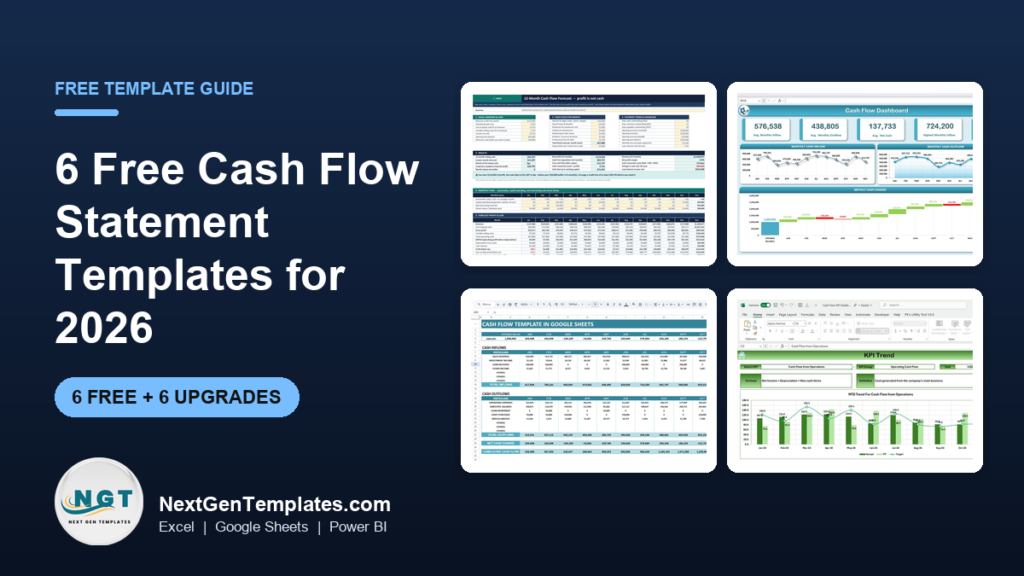
The best free cash flow statement template in 2026 is Vertex42’s Cash Flow Statement. It splits cash into operating, investing and financing activities, has a 12-month sheet and a 3-year sheet, and works in Excel and Google Sheets with no sign-up. For a startup plan, SCORE’s free 12-month statement is the runner-up.
Last updated: October 2026
This guide is for small-business owners, bookkeepers and finance staff who need to see where their cash came from, where it went and whether it will run short. First come the 6 free cash flow statement templates worth downloading. We opened every page in October 2026 and downloaded the Excel files where a direct link was offered, to check that they really are free and what is inside them. Then comes an honest section on when a free statement stops being enough, with 6 paid upgrades from NextGenTemplates. If you mostly want to know which numbers to watch each month, read our guide to the cash flow KPIs worth tracking alongside this one.
Key takeaways
- All 6 free cash flow statement templates in this list cost nothing to download. Five need no email address at all; Numeric asks for a name and work email before it opens the Google Sheet.
- Best overall free cash flow statement template: Vertex42’s Cash Flow Statement for Excel and Google Sheets, with a 12-month sheet and a 3-year sheet.
- Pick the template by the question you are asking. A statement explains last period, a 12-month projection plans the year, and a 13-week forecast tells you whether you can make payroll next month.
- A free template records cash well. It does not build the statement from your balance sheets, find the lowest cash month for you, or chart the trend. Those gaps are why owners upgrade.
- The 6 paid NextGenTemplates upgrades below cost $6.99 to $19.00, paid once with no subscription. The Cash Flow Template in Excel costs $6.99.
 Launch offer
SUMIFS, XLOOKUP, FILTER, LAMBDA and checking AI-written formulas, with real business projects. 11h 47m of video by PK, with practice files, quizzes and a capstone.
Free cash flow statement templates compared
Every free source in this guide, side by side. One row is flagged best overall. All six are free to download.
| # | Template | Source | Format | Best For | Price |
|---|---|---|---|---|---|
| 1 | Cash Flow Statement (Best overall) | Vertex42 | Excel, Google Sheets, OpenOffice | A small business statement by month or by year | Free |
| 2 | 12 Month Cash Flow Statement | SCORE | Excel | Startups writing a business plan | Free |
| 3 | Free Cash Flow Statement Templates (10 cash flow files) | Smartsheet | Excel | Choosing between daily, monthly, quarterly and 3-year layouts | Free |
| 4 | 13-Week Cash Flow Forecast | HighRadius | Excel | A weekly rolling forecast for a tight quarter | Free |
| 5 | 13-Week Cash Flow Template | Numeric | Google Sheets, Excel export | Finance teams that report forecast vs actual each week | Free (email asked) |
| 6 | Monthly Cash Flow Worksheet | Vertex42 | Excel, Google Sheets, PDF | Personal and household cash flow | Free |
Here are the paid upgrades we recommend once a free cash flow statement template runs out of road. One row is best overall and one is best value.
| Upgrade | Format | Best For | Price |
|---|---|---|---|
| Cash Flow Analysis Pack (Best overall) | Excel, Google Sheets, Power BI | Statement, 12-month and 13-week forecasts and scenarios in one model | $19.00 |
| Cash Flow Template in Excel (Best value) | Excel | Monthly inflows, outflows and closing balance with a waterfall chart | $6.99 |
| Cash Flow Template in Google Sheets | Google Sheets | A shared monthly cash flow with cumulative totals | $6.99 |
| Cash Flow KPI Dashboard in Excel | Excel | Tracking cash KPIs against target and last year | $12.99 |
| Cash Flow Dashboard in Google Sheets | Google Sheets | Cash in and out by department and transaction type | $6.99 |
| Personal Cash Flow Tracker in Google Sheets | Google Sheets | Household cash in, cash out and net cash flow by account | $6.99 |
How we picked these free cash flow statement templates
We started where people really look: the big template libraries (Vertex42 and Smartsheet), the US small-business mentoring network SCORE, finance software companies that give a template away, and the Microsoft template gallery. We loaded every page in October 2026. Smartsheet’s 12-Month Cash Flow Forecast came down as a 388 KB Excel file and its Simple Cash Flow Template as a 371 KB file, with no form to fill in. SCORE’s 12-month statement downloaded as a 70 KB workbook with a cash flow sheet and an instructions sheet. HighRadius’s 13-week forecast came down as a 1.1 MB file with a cover page and the forecast sheet.
A source made the list only if the file downloads at no cost and does the job: it lists cash coming in, cash going out and the balance at the end of each period. Microsoft’s template search now sends visitors to a Microsoft 365 sign-in page, so it is out. The Corporate Finance Institute statement template opens a download dialog we could not get past without handing over details, so we left it off rather than guess. Numeric stays in because its form only asks for a name and work email, and we say so plainly.
Search data shaped the list. In the US, “cash flow statement template” is searched about 1,000 times a month and “cash flow forecast template” about 720 times. “Cash flow template excel” gets about 480 searches, “cash flow statement template excel” about 390, and “13 week cash flow template”, “monthly cash flow template” and “personal cash flow template” about 90 each. So the list covers the formal statement, a monthly projection, a 13-week forecast and a personal worksheet. We took the paid upgrades from the NextGenTemplates cash flow range and matched each one to a gap that free files leave open.
The 6 best free cash flow statement templates for 2026
1. Cash Flow Statement (Vertex42): best overall
Jon Wittwer’s template is the cleanest free example of a proper statement of cash flows. It follows the standard layout: cash receipts and cash paid, grouped into operating, investing and financing activities, ending in net cash flow and the closing cash balance. The workbook has two sheets, a 12-Month Cash Flow for month-to-month analysis and a 3-Year Cash Flow for year-to-year comparison, so you can use it to look back or to project forward.
It downloads as an Excel file for Excel 2007 or later, opens as a Google Sheets copy, and also comes in OpenOffice format. There are no macros and nothing to install. The licence is private use, and the page was last updated on 30 September 2021. The categories are meant to be edited: if you do not want separate “cash receipts from” and “cash paid for” blocks, delete those label rows and reorder the lines.
Best for: a small business that wants a real cash flow statement in the textbook format. Free: get the Vertex42 cash flow statement template.
2. 12 Month Cash Flow Statement (SCORE)
SCORE mentors small-business owners for free, and this is the cash flow sheet they hand to people writing a business plan. It runs from cash on hand at the start of the month, through cash receipts (cash sales, collections from credit accounts, loans and other cash injections), to more than 20 lines of cash paid out, from purchases and wages to rent, utilities, insurance and taxes. Loan principal, capital purchases, start-up costs, reserves and owner withdrawals sit below the subtotal, and the sheet ends with your cash position at month end.
The detail that makes it useful for new businesses is the Pre-Startup column, which holds money spent before the 12 months begin. A second sheet carries instructions, and below the cash lines there is space for operating data such as sales volume. It is a plain Excel file with no charts.
Best for: startups that need a cash flow page for a business plan or a loan application. Free: get SCORE’s 12 month cash flow statement.
3. Free Cash Flow Statement Templates (Smartsheet)
Smartsheet’s page by Andy Marker is the widest free collection we found, with ten cash flow files and links straight to each Excel download. The cash flow set covers a Simple Cash Flow Template, a 3-Year Cash Flow Statement split into operating, investing and financing sections, a Monthly Cash Flow with a separate sheet per month, a Daily Cash Flow, a 12-Month Cash Flow Forecast with expected and actual columns, Quarterly Cash Flow Projections, a Cash Flow Analysis sheet for sensitivity checks, a Discounted Cash Flow template, a Nonprofit Cash Flow Projection and a Personal Cash Flow template.
The 12-month forecast is the pick of the bunch for most owners. Each month has an expected column and an actual column, so you can plan the year and then see where reality went off script. The same page also offers free balance sheet, income statement, accounts payable and accounts receivable templates.
Best for: anyone who wants to compare layouts before settling on one. Free: browse Smartsheet’s free cash flow statement templates.
4. 13-Week Cash Flow Forecast (HighRadius)
A monthly statement can hide a bad week. If payroll and rent land in week two and your biggest customer pays in week four, the month looks fine while the bank account goes negative. A 13-week forecast catches that. HighRadius, a treasury software company, gives away a plain Excel version: enter the dates of each week, your opening cash on hand, the receipts you expect (cash sales, customer collections, loans, interest, tax refunds) and the payments you expect (direct costs, payroll, vendors, rent, loan payments, fixed assets), and the sheet rolls the closing balance into the next week.
It is built for treasury staff, so it is plain and number-heavy rather than pretty. That suits the job.
Best for: a business heading into a tight quarter that needs to see cash week by week. Free: get the HighRadius 13-week cash flow forecast.
5. 13-Week Cash Flow Template (Numeric)
Numeric’s version is the more polished 13-week option, and it is the only one in this list that asks for something first: the download form wants your name and a work email before it opens a Google Sheets copy. Inside are three tabs. A cover tab explains the method, the forecast tab uses the direct method with receipts, operating payments and a non-operating block for capital spending, debt service and financing, and a third tab compares forecast with actual for each week.
Two inputs make it stand out: a minimum cash balance, so you can see which weeks fall below your safety line, and the weekly variance tab, which is how a forecast gets better over time. It exports cleanly to Excel.
Best for: finance teams that report cash to a lender or a board every week. Free, email asked: get the Numeric 13-week cash flow template.
6. Monthly Cash Flow Worksheet (Vertex42)
Not every cash flow search comes from a business. Vertex42 built this worksheet for personal finance classes and for “people who don’t like the word budget” but still want to see money coming in and going out of the household. It has a fairly full set of expense categories and is deliberately kept simple.
There is a two-page printable PDF you can fill in by hand, plus an editable Excel version for Excel 2007 or later and a Google Sheets copy. The licence is private use and the page was updated on 25 September 2019.
Best for: personal and household cash flow. Free: get the Vertex42 monthly cash flow worksheet.
Want a free budget calculator by email?
A cash flow plan starts with knowing where the money should go. We will send you our free Budget Calculator in Excel: it splits take-home pay with the 50/30/20 rule, shows target vs actual spending in a bar chart, and logs every expense by date and category across 15+ sub-categories. It is all formulas, with no macros. No payment, no card, and you can unsubscribe at any time.
When does it pay to upgrade from a free cash flow statement template?
A free template is a good place to start. It stops being enough when one of these is true:
- You keep retyping the same numbers. A free statement asks you to type each line every month. A template with a data entry sheet and formulas behind it does the totals, the closing balance and the carry-forward for you.
- You need to see the trend, not just the total. Free files are grids of numbers. When a lender, a partner or you yourself want to see six months of cash at a glance, charts and KPI cards save an hour of explaining.
- Profit and cash disagree and you cannot say why. The usual culprits are customers paying late, stock building up, equipment purchases and loan repayments. A free template rarely ties those back to the balance sheet.
- You need the low point before it arrives. Knowing that cash dips below your safety buffer in April is worth more in January than in May.
- More than one person works on the numbers. A shared Google Sheets version with clear input areas stops formulas being typed over.
6 paid cash flow template upgrades for when free stops working
1. Cash Flow Analysis Pack: best overall ($19.00)
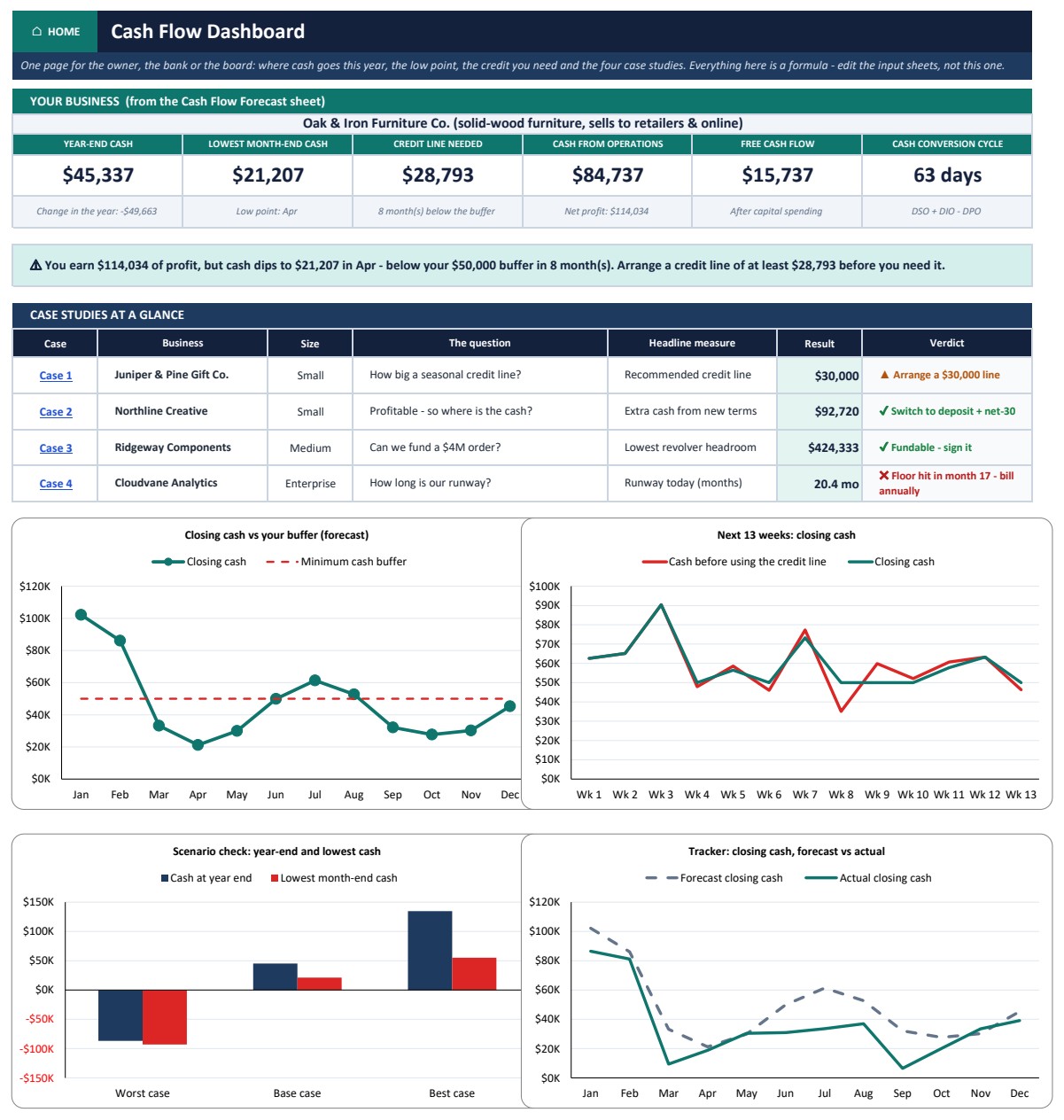
This is the upgrade for owners who need to know why profit and cash disagree. It is a 16-sheet Excel model with a dashboard, a 12-month cash flow forecast, a 13-week cash forecast, a cash flow statement, a working capital sheet, scenarios, sensitivity grids and a tracker. The cash flow statement is built from two balance sheets, proved by the direct method and checked six ways, so it does far more than a free statement you fill in by hand. The 12-month forecast turns profit into cash month by month and shows the low point and the credit line you would need to cover it.
In the sample company, a furniture maker, the business earns $114,034 of net profit while operations generate only $84,737 of cash, and the model shows where the difference went. You get a Sample and a Blank edition, the same model as a Google Sheets copy, an interactive Power BI explorer, a 16-slide PowerPoint deck and a PDF guide. There are no macros and no add-ins, and it runs in Excel 2010 or later on Windows and Mac.
Best for: owners, finance managers and anyone preparing numbers for a lender. See the Cash Flow Analysis Pack ($19.00).
2. Cash Flow Template in Excel: best value ($6.99)
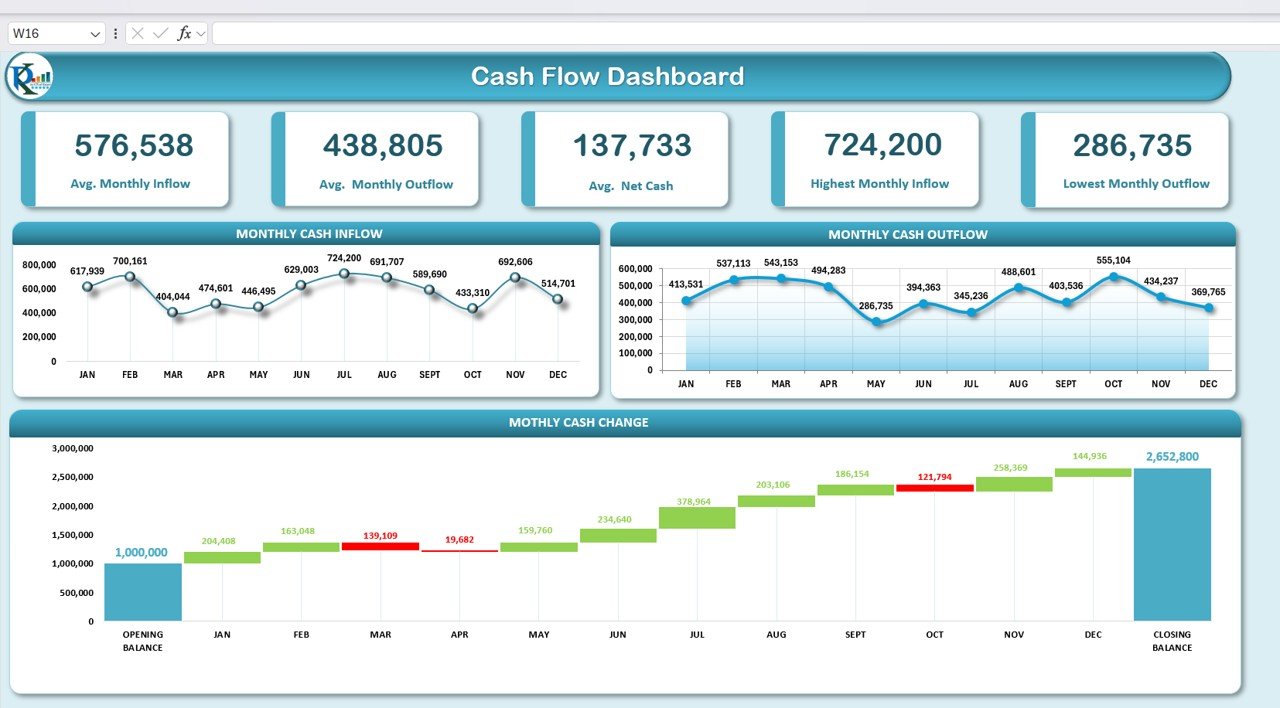
The simplest step up from a free monthly statement. You record an opening balance and monthly cash inflows and outflows on a data entry sheet, using your own categories, and the template works out net cash change and the closing balance for each month. A dashboard shows KPI cards and monthly trends, and a waterfall chart explains how cash moved from the opening balance to the closing one, which makes the low-liquidity months easy to spot.
Best for: small businesses that want a monthly cash flow with charts and no learning curve. See the Cash Flow Template in Excel ($6.99).
3. Cash Flow Template in Google Sheets ($6.99)
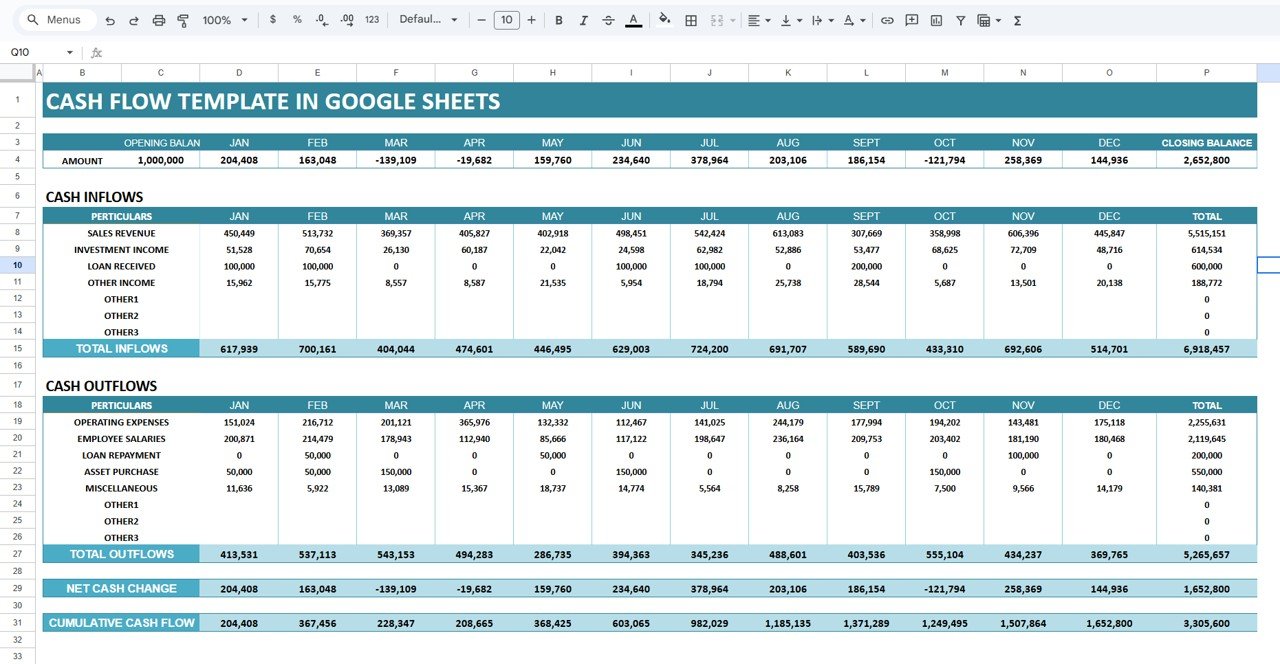
The same idea for teams that live in Google Drive. Monthly inflows such as sales revenue, investment income and loans sit above outflows such as operating expenses, salaries, loan repayments and asset purchases. The sheet calculates net cash change and cumulative cash flow for every month, and a dashboard with summary cards and charts shows the pattern. Because it is a Google Sheet, your accountant can look at the same file you update.
Best for: startups and small finance teams that share one cash flow file. See the Cash Flow Template in Google Sheets ($6.99).
4. Cash Flow KPI Dashboard in Excel ($12.99)
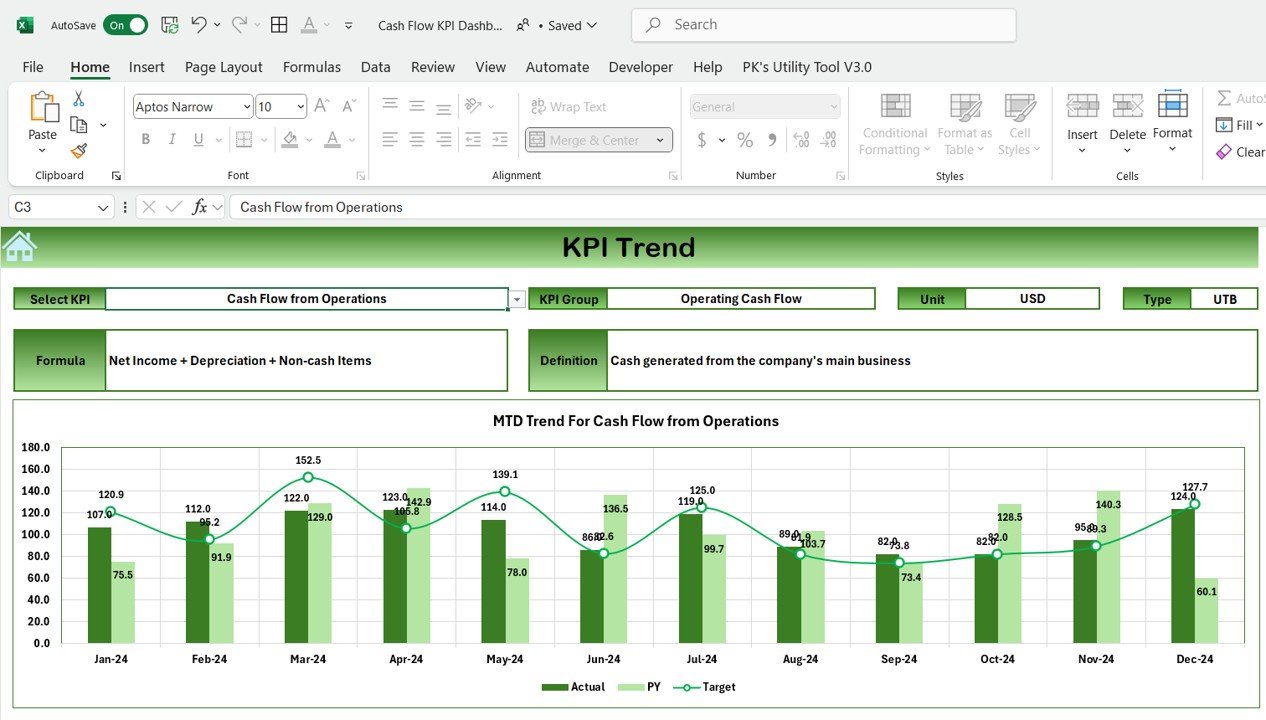
Once the statement is in place, the next question is whether cash is getting better or worse. This dashboard tracks cash flow KPIs such as cash flow from operations, with a formula and a definition for each one, and compares actual figures with target and with last year. Charts update as you enter new data, and you can add the KPIs that matter to your business.
Best for: finance managers and CFOs who report cash performance every month. See the Cash Flow KPI Dashboard in Excel ($12.99). A Google Sheets version costs $9.99.
5. Cash Flow Dashboard in Google Sheets ($6.99)
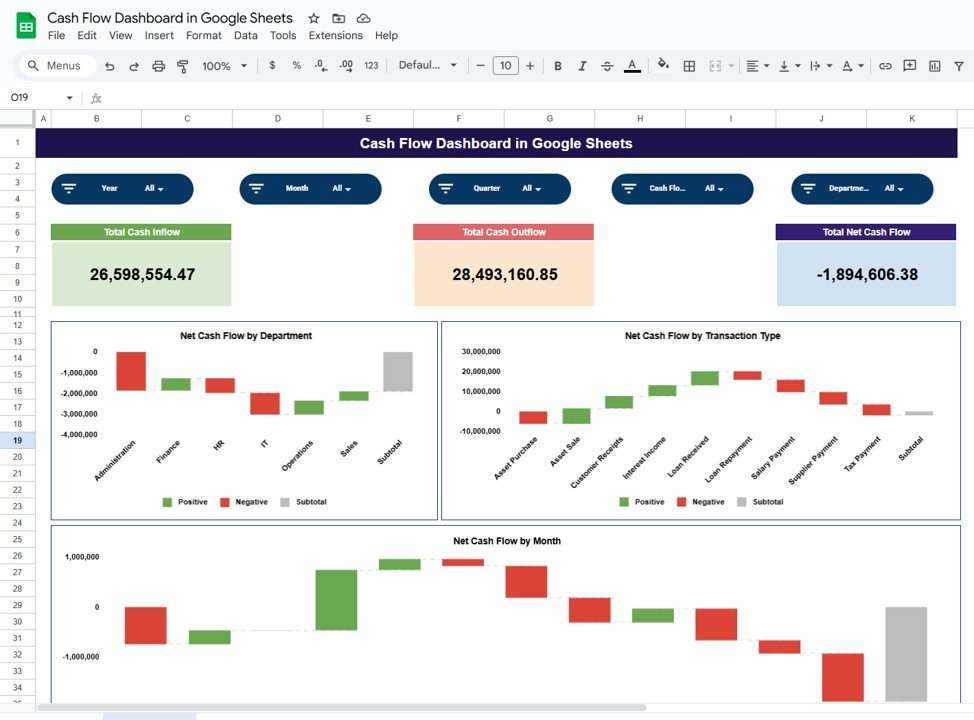
Built from transaction-level data rather than monthly totals. Each line records the date, cash flow category (operating, investing or financing), transaction type, department and payment mode, and the dashboard turns that into KPI cards, department-wise cash analysis, a transaction-type breakdown and monthly trends. That makes it easy to see which teams bring cash in and which drain it.
Best for: SMEs that want to know which departments drive cash in and out. See the Cash Flow Dashboard in Google Sheets ($6.99).
6. Personal Cash Flow Tracker in Google Sheets ($6.99)
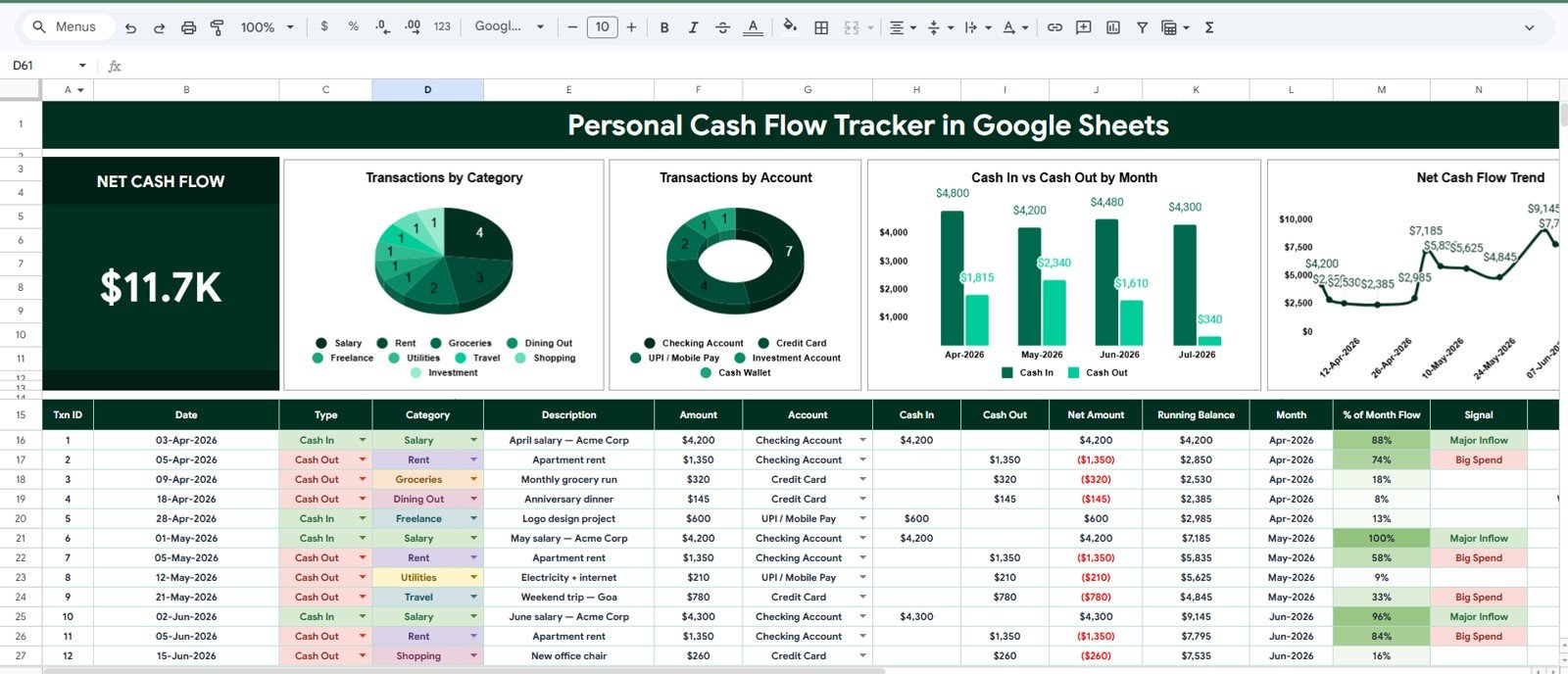
The upgrade for the Vertex42 personal worksheet. A net cash flow card shows cash in minus cash out at the top, and four charts break transactions down by category, by account (checking, savings, card, wallet and your own accounts), by month and by date. Slicers filter by period, category, account or type. It does not ask for a bank login.
Best for: individuals and families who want household cash flow on one page. See the Personal Cash Flow Tracker in Google Sheets ($6.99).
Also worth a look: the Small Business Cash Flow Calendar in Excel ($4.99) puts expected cash in and out on annual, monthly and daily calendar views, which is handy when you think in due dates rather than months.
How to choose between a free and a paid cash flow template
| Your situation | Start with | Upgrade when |
|---|---|---|
| You need a statement for a business plan or loan | SCORE 12 Month Cash Flow Statement | The lender asks how profit turns into cash: Cash Flow Analysis Pack |
| You want a textbook statement of cash flows | Vertex42 Cash Flow Statement | You want charts and automatic balances: Cash Flow Template in Excel |
| Cash is tight over the next quarter | HighRadius or Numeric 13-week forecast | You also need a 12-month view and scenarios: Cash Flow Analysis Pack |
| Several people update the numbers | Smartsheet 12-Month Cash Flow Forecast, opened in Google Sheets | You want one shared file with a dashboard: Cash Flow Template in Google Sheets |
| You report cash KPIs to managers | Any free statement | You need actual vs target vs last year: Cash Flow KPI Dashboard in Excel |
| It is your household cash flow | Vertex42 Monthly Cash Flow Worksheet | You want accounts and charts: Personal Cash Flow Tracker in Google Sheets |
What goes into a cash flow statement template?
Under the international standard IAS 7, Statement of Cash Flows, and under US GAAP, the statement has three sections. Every good template follows them:
- Operating activities: cash from customers minus cash paid to suppliers, staff, landlords and the tax office. This is the line that tells you whether the business funds itself.
- Investing activities: buying or selling equipment, property and investments.
- Financing activities: loans drawn and repaid, owner money put in or taken out, and dividends.
The arithmetic is the same in every file: opening cash + net cash from operating + net cash from investing + net cash from financing = closing cash. Your closing cash should match the bank balance. If it does not, a transaction is missing.
There are two ways to build the operating section. The direct method lists actual cash received and paid, which is what SCORE, HighRadius and Numeric use and what most small businesses find easiest. The indirect method starts from net profit, adds back non-cash costs such as depreciation, and adjusts for changes in receivables, stock and payables. Most published company accounts use the indirect method, and it is the one that explains why profit and cash differ.
Two formulas worth adding to any free template: free cash flow = cash from operations minus capital expenditure, and cash runway in months = cash on hand divided by average monthly net cash burn. Our cash flow KPIs guide covers eight more with benchmark ranges.
When a free cash flow statement template is NOT the right answer
- You already use accounting software. QuickBooks, Xero and similar tools produce a statement of cash flows from your books. Use the spreadsheet for forecasting, not to retype what the software already knows. Our bookkeeper template stack shows where spreadsheets still help.
- You need audited or filed accounts. A template helps you prepare, but statutory accounts should go through your accountant.
- You are tracking spending, not cash position. If what you want to know is where the money goes each month, a budget is the better tool. See our free budget templates guide.
- Your problem is getting paid. Late invoices are one of the most common causes of a cash shortfall. Start with our free invoice templates and chase receivables before you build a forecast.
- You want to know whether you made money, not when cash moves. That question belongs to the profit and loss statement. Start with our free profit and loss statement templates.
For video walkthroughs of Excel and Google Sheets finance templates, see the NextGenTemplates YouTube channel. For a wider finance toolkit, the CFO dashboard template stack and our free Excel dashboard templates are good next reads.
Frequently asked questions
What is the best free cash flow statement template?
Vertex42’s Cash Flow Statement is the best free option for most small businesses. It follows the standard operating, investing and financing layout, has a 12-month sheet and a 3-year sheet, and opens in Excel or Google Sheets with no sign-up. For a startup business plan, SCORE’s 12 Month Cash Flow Statement is a close second.
Is there a free cash flow template in Excel?
Yes. Vertex42, SCORE, Smartsheet and HighRadius all offer free cash flow templates as Excel files, and none of them asks for an email address. Smartsheet alone has ten, from a simple cash flow template to a 3-year statement and a 12-month forecast with expected and actual columns.
What is the difference between a cash flow statement and a cash flow forecast?
A cash flow statement reports what already happened: cash in and out over a past month, quarter or year. A cash flow forecast, or projection, estimates what will happen next, so you can spot a shortfall before it arrives. Many templates do both by using expected and actual columns side by side.
What are the three sections of a cash flow statement?
Operating activities, investing activities and financing activities. Operating covers day-to-day trading, investing covers buying and selling long-term assets, and financing covers loans, owner money and dividends. Opening cash plus the net of all three equals closing cash, which should match your bank balance.
What is a 13-week cash flow forecast?
It is a rolling weekly forecast of cash receipts and payments for the next 13 weeks, about one quarter. Businesses use it when cash is tight, because a monthly view can hide a week where payroll lands before customers pay. HighRadius and Numeric both offer free 13-week templates.
Should I use the direct or indirect method?
Small businesses usually find the direct method easier, because it lists actual cash received and paid. The indirect method starts from net profit and adjusts for non-cash items and working capital, which explains why profit and cash differ. Published accounts mostly use the indirect method.
Can I make a cash flow statement in Google Sheets?
Yes. Vertex42’s cash flow statement and monthly worksheet both open as Google Sheets copies, and Numeric’s 13-week template is a Google Sheet. If you want a shared file with a dashboard, the NextGenTemplates Cash Flow Template in Google Sheets costs $6.99, paid once.
When should I upgrade from a free cash flow template?
Upgrade when you are retyping the same numbers every month, need charts for a lender or partner, cannot explain why profit and cash differ, or need to see the low point months ahead. NextGenTemplates cash flow templates cost $6.99 to $19.00, paid once with no subscription.
Get your free cash flow statement template
Download Vertex42’s Cash Flow Statement if you want one good free file today. Add a 13-week forecast from HighRadius or Numeric if the next quarter looks tight. When you want the statement, the forecasts and the reasons behind them in one model, the Cash Flow Analysis Pack ($19.00) is our top pick, and the Cash Flow Template in Excel ($6.99) is the cheapest way to get charts and automatic balances.