

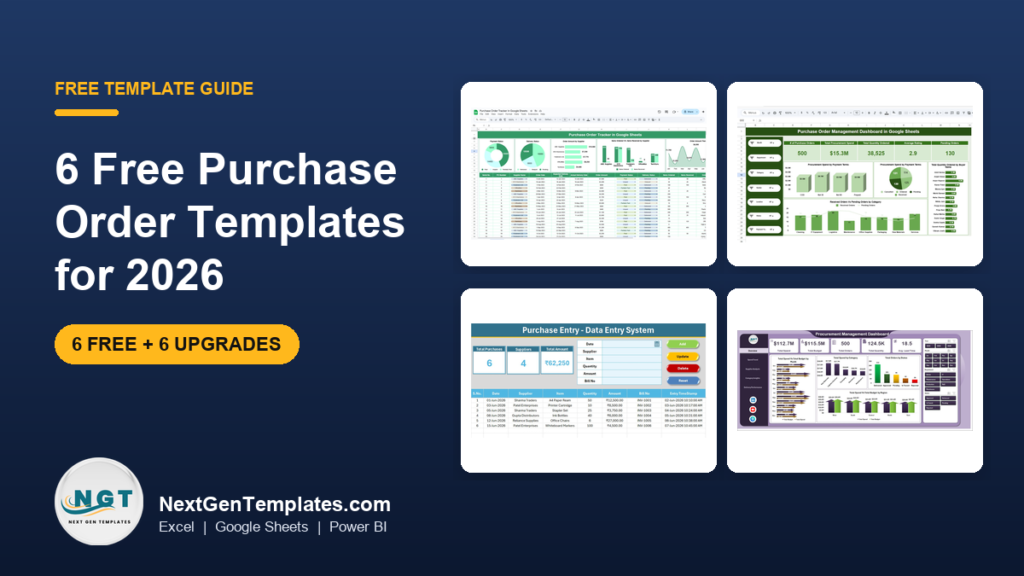
The best free purchase order template in 2026 is Vertex42’s Purchase Order Template. It downloads with no sign-up in Excel, Google Sheets, OpenOffice and Word, and a second version adds drop-downs for vendor and ship-to addresses. If you need blanket, planned or service POs, Smartsheet gives those away free too.
Last updated: October 2026
This guide is for small business owners, office managers and buyers who need to send a proper purchase order to a supplier today without paying for procurement software. First come the 6 free purchase order template sources that are worth your time. All of them are free, and we opened every page and tested the download links in October 2026. Then comes an honest section on when a free PO form stops being enough, with 6 paid upgrades from NextGenTemplates. If you want the bigger picture on buying tools, see our procurement template stack for managers.
Key takeaways
- All 6 free purchase order template sources in this list cost nothing: three from Vertex42, plus Smartsheet, TemplateLab and Zoho Inventory. We loaded every page and checked the download links in October 2026.
- Best overall free purchase order template: Vertex42’s Purchase Order Template. It works in Excel, Google Sheets, OpenOffice and Word, uses no macros, and has a vendor-list version.
- Best free source for special PO types: Smartsheet, with blanket, planned, service and contract purchase order templates in Excel, Word, PDF, Google Docs and Google Sheets.
- A free PO template makes one order form. It does not number POs for you, log what was received, or show how much you still owe each supplier. Those gaps are why buyers upgrade.
- The 6 paid NextGenTemplates upgrades below cost $5.99 to $60.99, paid once with no subscription. The Purchase Entry Data Entry System in Excel costs $5.99.
 Launch offer
SUMIFS, XLOOKUP, FILTER, LAMBDA and checking AI-written formulas, with real business projects. 11h 47m of video by PK, with practice files, quizzes and a capstone.
Free purchase order templates compared
Every free purchase order template source in this guide, side by side. One row is flagged best overall. All six are free.
| # | Template | Source | Format | Best For | Price |
|---|---|---|---|---|---|
| 1 | Purchase Order Template (Best overall) | Vertex42 | Excel, Google Sheets, OpenOffice, Word | A clean PO form you can send as a PDF today | Free |
| 2 | Purchase Order with Price List | Vertex42 | Excel | Repeat orders from the same suppliers | Free |
| 3 | Purchase Order Tracker | Vertex42 | Excel, Google Sheets | Listing every PO with a payment and aging summary | Free |
| 4 | Purchase Order Templates and Forms | Smartsheet | Excel, Word, PDF, Google Docs, Google Sheets | Blanket, planned, service and contract POs | Free |
| 5 | 18 Free Purchase Order Templates | TemplateLab | Excel, Word, PDF | Choosing from many layouts | Free |
| 6 | Purchase Order Templates | Zoho Inventory | Excel | Five clean designs, downloaded in one click | Free |
Here are the paid upgrades we recommend once a free purchase order template runs out of road. One row is best overall and one is best value.
| Upgrade | Format | Best For | Price |
|---|---|---|---|
| Purchase Order Tracker in Google Sheets (Best overall) | Google Sheets | Tracking every PO from order to delivery and payment | $6.99 |
| Purchase Order Management Dashboard in Google Sheets | Google Sheets | Spend, pending orders and vendor ratings by department | $6.99 |
| Purchase Entry Data Entry System in Excel (Best value) | Excel VBA | A one-click purchase register of supplier bills | $5.99 |
| Purchase and GRN Data-Entry System in Excel | Excel VBA | Goods received, amount paid and balance owed | $5.99 |
| Procurement Management Dashboard in Excel | Excel | Spend against budget, lead time and on-time delivery | $17.99 |
| Procurement Manager Toolkit (8 templates) | Excel + Google Sheets | A whole buying team’s toolkit at 40% off | $60.99 |
How we picked these free purchase order templates
We started where people actually look for a free purchase order template: the big template libraries (Vertex42, Smartsheet and TemplateLab), the software companies that give templates away (Zoho, Xero and Someka), Microsoft’s own template site, and our own catalogue. We loaded every page in October 2026, followed the download links, and opened the direct Excel files where a page offered one. Smartsheet’s basic PO form, for example, downloaded straight away as a 375 KB Excel workbook.
A source made the list only if the PO form downloads at no cost and adds real help: it totals line items, pulls prices from a list, or tracks what has been paid. We left out Microsoft Create this year, because its purchase order page now sends you into the Microsoft 365 sign-in flow, so we could not check the files without an account. We also left out several old purchase order pages from software vendors that now return “page not found”. Xero and Someka are fine, but both ask for your email first, so they sit under “also free” below.
Search data shaped the list. In the US, “purchase order template” is searched about 6,600 times a month, “purchase order template excel” about 1,000 times, and “free purchase order template” about 720 times. “PO template” gets about 590 searches and “purchase order form template” about 390. So the list covers Excel, Word and Google Sheets, and at least one PDF option. We took the paid upgrades from the NextGenTemplates purchasing range and matched each one to a gap that free files leave open.
The 6 best free purchase order templates for 2026
1. Purchase Order Template (Vertex42) – best overall free purchase order template
This purchase order template was built from Vertex42’s popular sales invoice template, so the layout will feel familiar if you have used their invoices. You add your company name, contact details and shipping address once, fill in the vendor section, list the items, and the form totals the order. Vertex42 suggests you save a backup copy for each major vendor, keep a copy of every completed PO, and email it to the supplier as a PDF.
It is our pick for best overall because it works almost everywhere: Excel 2007 or later (including Excel for iPad and iPhone), Google Sheets, OpenOffice and Word. A second Excel version adds drop-down lists for the Vendor and the Ship To location, so you pick a supplier instead of retyping its address. There are no macros. The page was last updated on 18 August 2021, and the files are free under Vertex42’s private-use licence.
Best for: small businesses that need a professional PO today. Free – get the Vertex42 purchase order template.
2. Purchase Order with Price List (Vertex42)
If you order the same products from the same suppliers every month, this is the version to use. You type each item’s description, item number and unit price once on a PriceList worksheet. On the purchase order sheet you then choose the item from a drop-down, and the item number and price fill in through lookup formulas. Item descriptions must be unique, because the lookups depend on them. A 2017 update added drop-down lists for Vendor and Ship To addresses, Requisitioner names and Shipping Terms.
Vertex42 recommends one master file per vendor, named something like po_master_vendorname.xlsx, which you copy for each new order. It is “no installation, no macros”, for Excel 2007 or later, and was last updated on 30 August 2021.
Best for: repeat orders where typing prices by hand causes mistakes. Free – get the Vertex42 PO template with price list.
3. Purchase Order Tracker (Vertex42)
Not a PO form but the sheet you need next to one. You list every purchase order you create, set a status such as Draft, Paid or Complete, and the workbook builds a payment and aging summary for all vendors or for one vendor at a time. Rows turn grey when you mark an order Complete, and Draft orders are kept out of the aging summary. You can sort and filter by date, PO number or vendor, and edit the status list to suit your process.
It does not include a purchase order form, so you can use it with any PO template, not only Vertex42’s. It works in Excel 2010 or later and Google Sheets, uses no macros, and was updated on 1 May 2025, the most recent update of the three Vertex42 files.
Best for: knowing which POs are open and what you have paid each supplier. Free – get the Vertex42 purchase order tracker.
4. Purchase Order Templates and Forms (Smartsheet)
Smartsheet’s page is the best free source when a simple PO is not the right document. It offers a basic purchase order form (in a blank version and one with sample data), a blanket purchase order for recurring buys from one supplier over time, a planned purchase order with tentative shipping dates, a service purchase order with scope, duration and acceptance criteria, and a contract purchase order for long-term agreements. Most come in Excel, Word, PDF, Google Docs and Google Sheets, plus a Word “true form” version for PC.
The download buttons link directly to the files, so you do not have to sign up. The page also explains the different types of purchase order, which helps if you are setting up a PO process for the first time. It was published on 20 August 2024 and updated on 31 October 2024.
Best for: blanket, planned, service and contract POs. Free – get Smartsheet’s free purchase order templates.
5. 18 Free Purchase Order Templates (TemplateLab)
TemplateLab collects 18 purchase order templates on one page. Each design has “Download for Excel”, “Download for Word” and “Download in PDF” buttons, so you can pick a layout first and a format second. Below the templates, the page covers what a purchase order form should include, how PO templates work, the different types of purchase order and what a purchase order system is.
The page carries a lot of adverts, and the designs vary in quality. Open two or three files and keep the one that matches your business, then add your logo and terms.
Best for: trying several layouts before you settle on one. Free – browse TemplateLab’s free purchase order templates.
6. Purchase Order Templates (Zoho Inventory)
Zoho Inventory offers five purchase order designs, named Lite, Simple, Minimalist, Basic and Standard. Each one downloads as an Excel file with one click, with no form to fill in. You fill in the details and print the PO offline. The page also explains the key parts of a purchase order: the PO number, the vendor address, the item details (quantity, rate and amount) and a notes section for any special terms you agreed with the vendor.
Zoho would like you to move to its inventory software later, but the templates work on their own.
Best for: a clean, modern-looking PO in seconds. Free – get Zoho Inventory’s free purchase order templates.
Also free: Xero’s free purchase order template is an editable, printable PDF. You fill in a short form (email, location, industry and business type) to get it. Someka’s Purchase Order Generator and Tracker has a free version you get by entering your email; the full version with auto-numbering and a PO database is paid.
Want a free expense tracker by email?
Purchase orders control what you commit to spend. To see what actually goes out each week, we will send you our free Weekly Expense Tracker in Excel. It has a dashboard with 5 KPI cards, budget tracking by category with traffic-light status, a spending pie chart, a 7-day trend line and a top-5 expenses table, all fed from one simple entry sheet. No payment, no card, and you can unsubscribe at any time.
When does it pay to upgrade from a free purchase order template?
A free purchase order template is fine when you raise a few POs a month. Once you raise twenty or more, or more than one person buys for the business, the same five problems push teams towards a paid tool:
- One PO at a time. Each new order means “Save As”, change the PO number, retype the supplier and hope you did not overwrite last month’s file. Duplicate and skipped PO numbers follow.
- No record of what arrived. The PO goes out as a PDF and nothing records whether all the items came, came late or came short. You find out when stock runs out.
- No view of what you owe. Paid, unpaid and part-paid orders live in email threads. Supplier balances and due dates are guesswork. For the numbers worth watching, see our guide to procurement KPIs to track.
- No spend picture. A pile of PO files cannot tell you spend by department, vendor or category, or how often orders are still pending.
- No budget or supplier check. Nobody can see whether spend is within budget, or which suppliers deliver late or below standard.
If two or more of these apply, the time spent fixing free PO files costs more than a one-time template. The 6 upgrades below map onto those gaps.
6 paid purchase order template upgrades for when free stops working
1. Purchase Order Tracker in Google Sheets – best overall upgrade
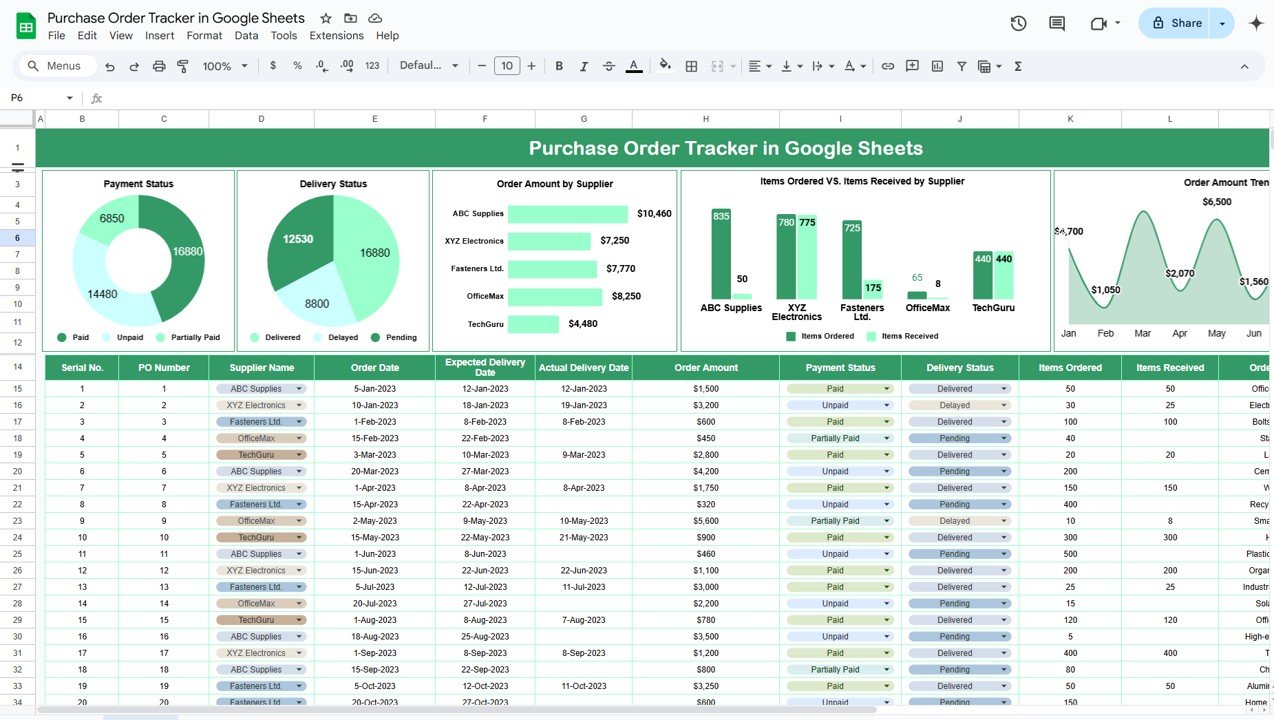
The direct fix for “no record of what arrived” and “no view of what you owe”. Every PO gets one row: serial number, PO number, supplier, order date, expected and actual delivery dates, order amount, items ordered, items received, payment status, delivery status, order details and month. Drop-downs keep statuses consistent. Above the table, the charts update on their own: payment status, delivery status, order amount by supplier, items ordered versus received by supplier, and the trend in order amount over time.
What it adds over free: one live register of every PO, with delivery accuracy and payment status in charts.
Best for: small and mid-sized businesses buying from several suppliers. $6.99 – view the Purchase Order Tracker in Google Sheets.
2. Purchase Order Management Dashboard in Google Sheets
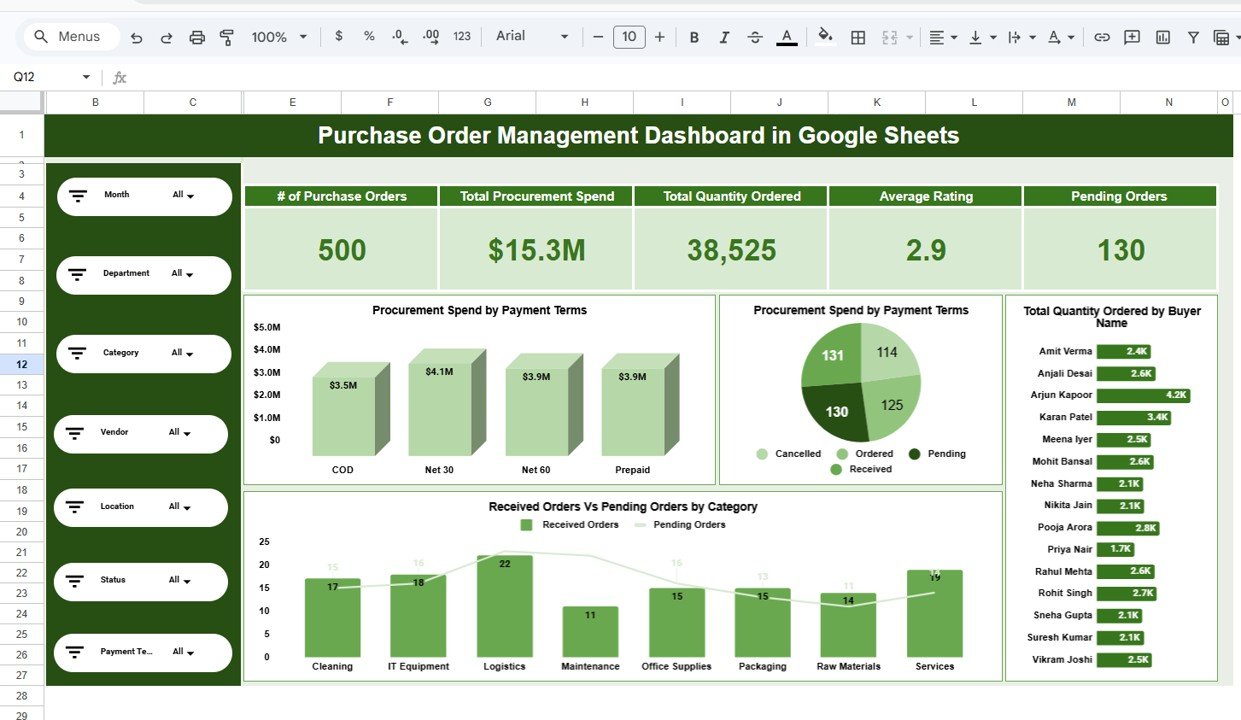
The fix for “no spend picture”. A slicer panel filters everything by month, department, vendor, category, location, status and payment terms. KPI cards show total purchase orders, total procurement spend, total quantity ordered, average vendor rating and pending orders. Separate pages break spend, PO count, quantity and received-versus-pending down by department, by vendor, by category, and by location and payment terms. A search page finds any purchase record in seconds.
What it adds over free: spend and pending orders by department and vendor, for the whole team to share.
Best for: procurement and finance teams working in Google Workspace. $6.99 – view the Purchase Order Management Dashboard.
3. Purchase Entry Data Entry System in Excel – best value
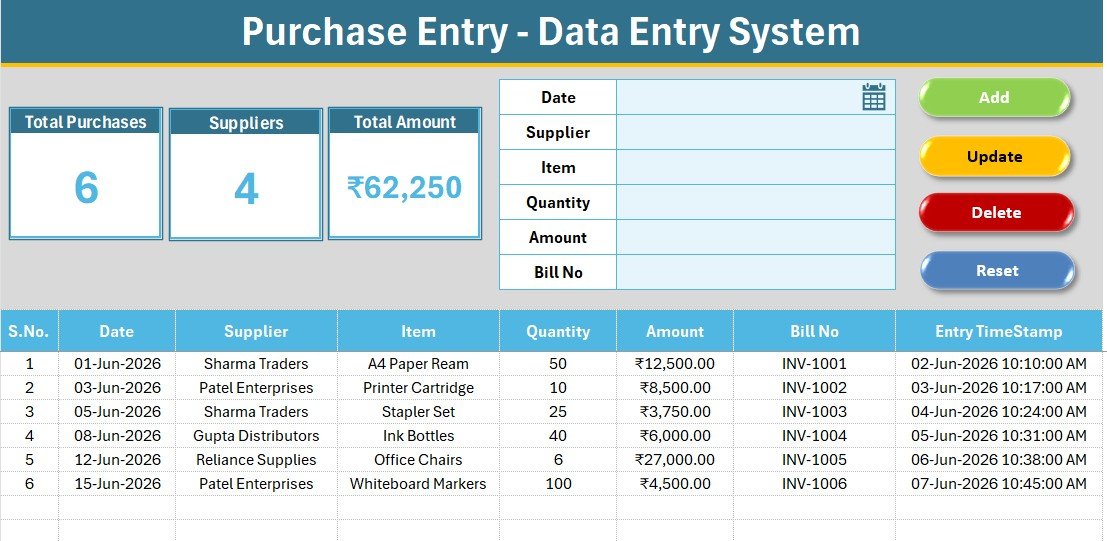
The fix for “one PO at a time” on the records side. A form at the top takes six fields: date, supplier, item, quantity, amount and bill number. Press Add and the row drops into the purchase register with an automatic serial number and entry timestamp. Three KPI cards show total purchases, the number of distinct suppliers and the total amount. Double-click any row to load it back into the form and Update it; Delete and Reset complete the set. Setup takes under five minutes (you import one VBA module), and it runs offline with no login.
What it adds over free: a clean, searchable purchase register for $5.99.
Best for: shops and small offices logging supplier bills. $5.99 – view the Purchase Entry Data Entry System.
4. Purchase and GRN Data-Entry System in Excel
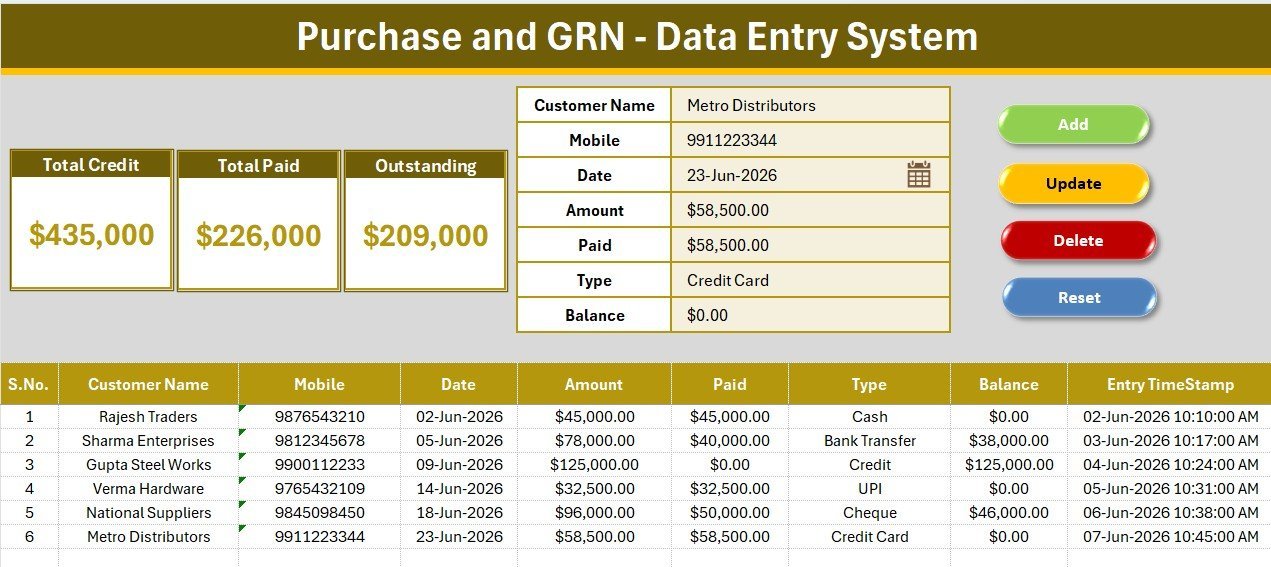
The fix for “no view of what you owe”. Each goods received note (GRN) and its payment sit on one row, entered through a seven-field form: name, mobile, date, amount, paid, payment type and balance. Three KPI cards show Total Credit, Total Paid and Outstanding, and because amount equals paid plus balance, the three always reconcile. The payment type drop-down offers cash, UPI, bank transfer, cheque, credit, debit card and credit card, and you can edit the list on the Setting sheet. Add, Update, Delete and Reset buttons run the workflow, and every row gets a serial number and timestamp.
What it adds over free: a running supplier balance for every delivery you receive.
Best for: traders and distributors who buy on credit. $5.99 – view the Purchase and GRN Data-Entry System.
5. Procurement Management Dashboard in Excel
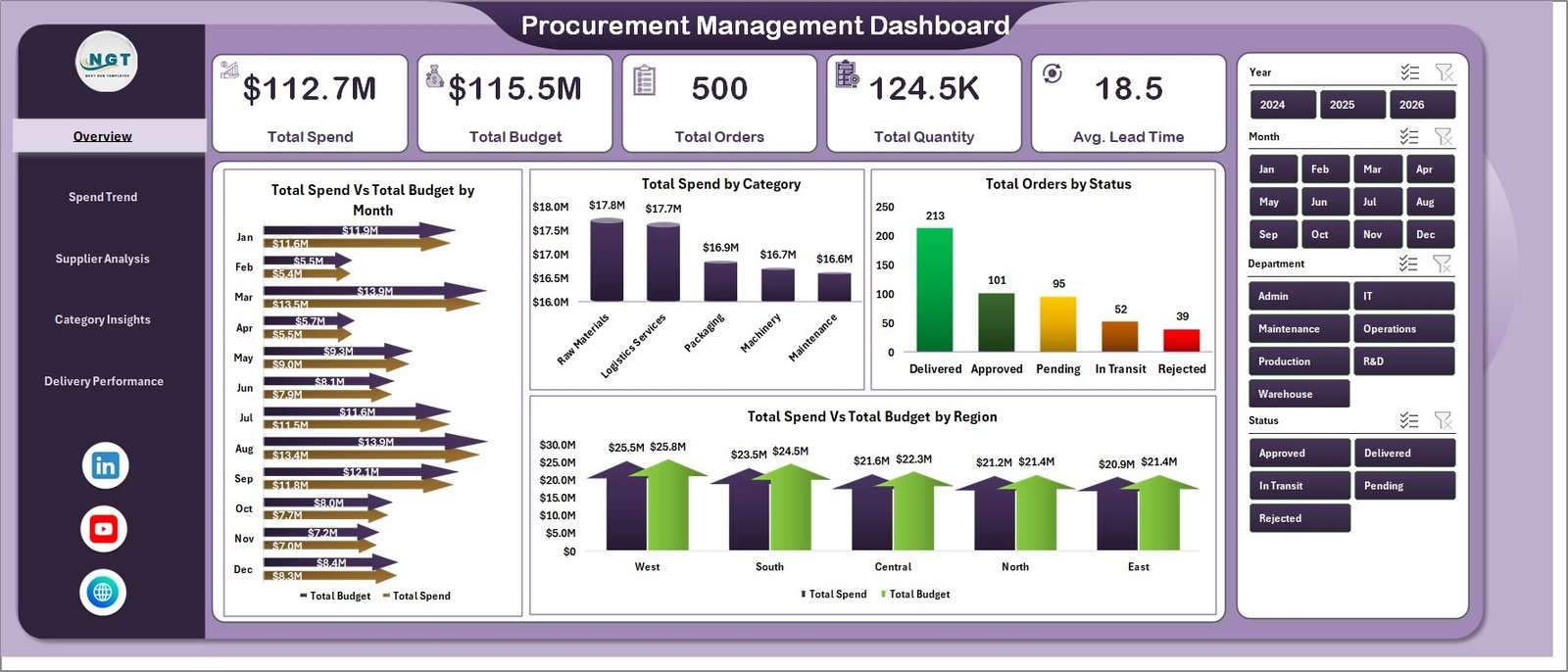
The fix for “no budget or supplier check”. Five pages run on pivot tables and slicers, with no VBA. The overview shows total spend, total budget, total orders, total quantity and average lead time, with spend versus budget by month, spend by category, orders by status and spend versus budget by region. The supplier page compares budget variance, on-time delivery percentage, lead time and quality score by supplier. Further pages cover spend trends, category insights and delivery performance by buyer and payment terms.
What it adds over free: a monthly procurement report that shows budget, lead time and supplier reliability.
Best for: procurement managers reporting to leadership. $17.99 – view the Procurement Management Dashboard in Excel.
6. Procurement Manager Toolkit – 8 templates
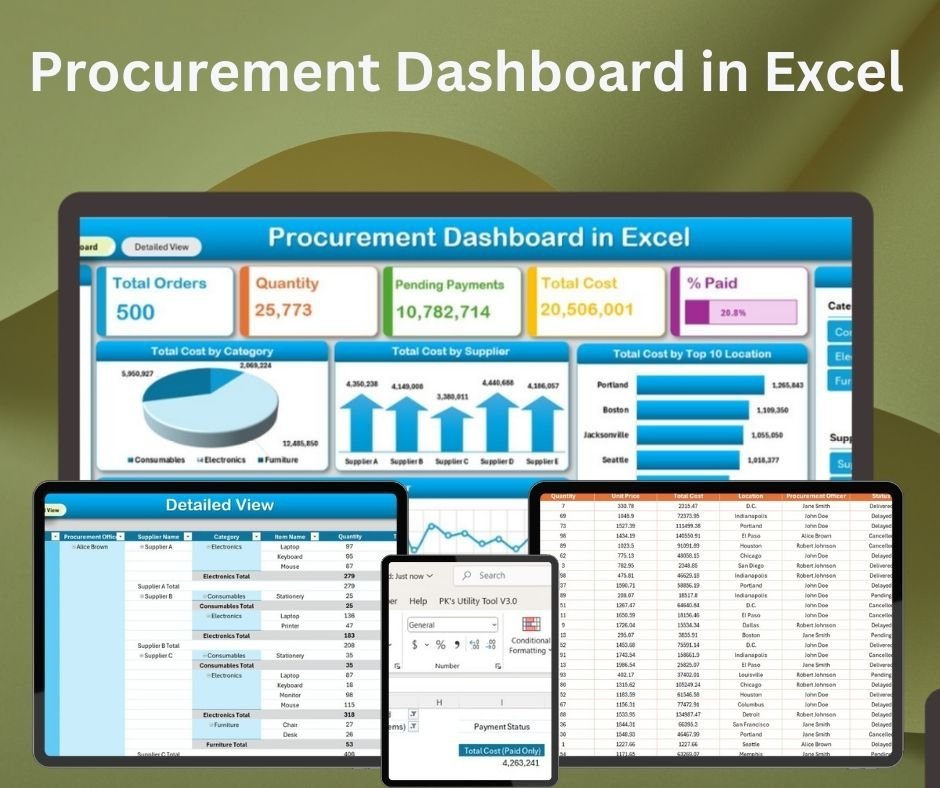
The bundle for a team that wants every gap closed at once. It holds eight templates that cost $100.92 bought one by one: the Purchase Order Tracker in Google Sheets (upgrade #1), the Procurement Dashboard in Excel, the Procurement Tracker and Dashboard in Google Sheets, the Daily Sales Purchase Tracker V1.0 in Excel VBA, the Procurement Cost Analysis Dashboard in Excel, the Supplier Performance KPI Dashboard in Excel, the Vendor Payment Dashboard in Google Sheets and the Supplier Delivery Schedule Calendar in Excel.
What it adds over free: PO tracking, cost analysis, supplier scoring, vendor payments and delivery dates in one pack, a saving of $39.93 (40%).
Best for: buyers and supply-chain teams setting up a full process. $60.99 – view the Procurement Manager Toolkit.
Also worth a look: Sale Purchase Software ($19.99) handles sales orders, purchase orders and stock in one Excel tool. The Procurement and Vendor Management Kit ($49.99) bundles 7 templates across Excel, Power BI and Google Sheets. Once POs turn into bills, the Vendor Payment Dashboard in Excel ($17.99) tracks what you owe, and the Supplier Performance KPI Dashboard in Excel ($12.99) scores your vendors.
How to choose between a free and a paid purchase order template
| Your situation | Pick | Cost |
|---|---|---|
| A few POs a month to a few suppliers | Vertex42 Purchase Order Template (free #1) | Free |
| Same items from the same suppliers every month | Vertex42 PO with Price List (free #2) | Free |
| Recurring or long-term supplier agreements | Smartsheet blanket or contract PO (free #4) | Free |
| A register of every supplier bill | Purchase Entry Data Entry System in Excel | $5.99 |
| Track delivery and payment for every PO | Purchase Order Tracker in Google Sheets | $6.99 |
| Spend by department and vendor for a team | Purchase Order Management Dashboard in Google Sheets | $6.99 |
| Budget, lead time and supplier reliability | Procurement Management Dashboard in Excel | $17.99 |
A simple rule: if one person raises fewer than ten POs a month, stay free and add Vertex42’s tracker. Once you need to know what arrived, what you owe and where the money goes, a template built for that job pays for itself the first time it catches a short delivery or a double payment.
Purchase order template formulas that matter in Excel
Most purchase order errors come from small formula slips. If you build or edit a free purchase order template in Excel or Google Sheets, these six formulas cover almost every case:
- Line total: =ROUND(Qty*UnitPrice,2) rounds each line to cents, so your total matches the supplier’s invoice.
- Price lookup: =XLOOKUP(Item,PriceList[Description],PriceList[Unit Price]) pulls the agreed price, the idea behind Vertex42’s price-list version.
- Tax and total: =ROUND(Subtotal*TaxRate,2), then =Subtotal+Tax+Shipping. Keep the rate in a settings cell, not inside the formula.
- Next PO number: =”PO-“&TEXT(MAX(Log[No])+1,”0000”) gives PO-0042 style numbers from your PO log, so none are skipped or reused.
- Quantity still to arrive: =MAX(0,QtyOrdered-QtyReceived) shows what is open on each line.
- Days late: =IF(ActualDate=””,MAX(0,TODAY()-ExpectedDate),MAX(0,ActualDate-ExpectedDate)) measures supplier lateness for each PO.
Want to see formulas like these in action? Our YouTube channel has Excel and Google Sheets walk-throughs: youtube.com/@NextGenTemplates. For the metrics behind good buying, see the supply chain KPIs to track in 2026.
Purchase order vs invoice: what is the difference?
A purchase order is written by the buyer. It tells the supplier exactly what you want to buy, how many, at what price, and how and where to deliver it. Once the supplier accepts it, it becomes a binding agreement. An invoice is written by the seller after the sale, to ask for payment. The invoice should quote your PO number, and a packing slip with the delivery should reference it too.
Many businesses check three documents before they pay a bill: the purchase order, the goods received note and the supplier’s invoice. If quantities and prices match on all three, the bill is paid. This “three-way match” is the main reason to keep a PO log and a GRN record, and not just a folder of PDFs. If you send invoices yourself, see our list of free invoice templates, and if you sell as well as buy, our free quotation templates cover the price you send before the order. When staff buy small items on their own card instead of through a PO, they claim the money back on an expense report; our free expense report templates list covers that side.
When a free purchase order template is NOT the right answer
- You need approvals that people cannot skip. A spreadsheet cannot stop someone from sending a PO before the manager signs off. If approval limits matter, you need procurement software. Our Coupa alternatives guide compares the spreadsheet route with the software route.
- Your POs must feed accounts and stock automatically. A template records the order. It does not post to your ledger or update stock levels. For inventory-led businesses, see our Cin7 alternatives.
- You must keep records for years. The IRS says most US businesses should keep records for 3 years, and longer in some cases, such as 7 years for a bad debt deduction. A folder of loose PO files is hard to search later; a log or a system is not.
- You raise hundreds of POs a month across many sites. At that volume, an e-procurement system with catalogues and supplier portals is worth the subscription.
Frequently asked questions
Where can I download a free purchase order template?
Vertex42’s Purchase Order Template is the best-built free file, in Excel, Google Sheets, OpenOffice and Word. Vertex42 also offers a price-list version and a PO tracker. Smartsheet, TemplateLab and Zoho Inventory give away free purchase order templates in Excel, Word and PDF. None of them asks for a card.
Is there a free purchase order template for Excel?
Yes. All three Vertex42 files, Zoho Inventory’s five designs, Smartsheet’s PO forms and TemplateLab’s 18 templates are free Excel downloads. Vertex42’s price-list version is the most useful for repeat orders, because it fills in the item number and unit price from a drop-down list.
Is there a purchase order template for Word?
Yes. Vertex42 offers a Word version of its purchase order template, and Smartsheet and TemplateLab offer Word downloads too. Word is fine for a one-off PO, but it cannot total line items reliably, so most buyers switch to Excel or Google Sheets once they raise POs regularly.
Is there a purchase order template for Google Sheets?
Yes. Vertex42’s purchase order template and PO tracker both have Google Sheets versions, and Smartsheet offers Google Sheets downloads. To track every PO’s delivery and payment status with charts, the NextGenTemplates Purchase Order Tracker in Google Sheets costs $6.99.
What should a purchase order include?
A purchase order should show a unique PO number, the order date, your company and shipping details, the vendor’s name and address, each item’s description, quantity, unit price and line total, any tax and shipping, the order total, delivery date, payment terms and an authorised signature or approval.
How do I number purchase orders?
Use a simple sequence such as PO-0001, PO-0002, and keep a log of every number so none are skipped or reused. In Excel, a formula that takes the highest number in the log and adds one gives the next PO number. Tracking tools keep the PO number on every row for you.
What is the difference between a purchase order and a purchase requisition?
A purchase requisition is an internal request: an employee asks for permission to buy something. A purchase order is the external document sent to the supplier once that request is approved. Small businesses often skip the requisition, but it helps when several people spend company money.
Are Vertex42 purchase order templates free for business use?
Vertex42 offers its purchase order templates free under a private-use licence. You can use and edit them in your own business to order from your own suppliers, but you may not distribute or resell the files. Check the licence line on each download page before sharing a template outside your organisation.
When should I upgrade from a free purchase order template?
Upgrade when you raise more than about twenty POs a month, when several people buy for the business, when you cannot tell what has arrived or what you owe, or when you need spend by department or supplier. NextGenTemplates purchasing tools cost $5.99 to $60.99, paid once with no subscription.
Get your free purchase order template
Start free with Vertex42’s Purchase Order Template or Smartsheet’s free purchase order templates. When you need to track every PO’s delivery and payment, the Purchase Order Tracker in Google Sheets is our top upgrade at $6.99. The Purchase Entry Data Entry System in Excel is the best value at $5.99, and the Procurement Manager Toolkit covers a whole buying team for $60.99.
Building out purchasing reports? See our procurement dashboard templates, the small business template bundle guide, and our list of free payslip templates if you pay staff as well.