

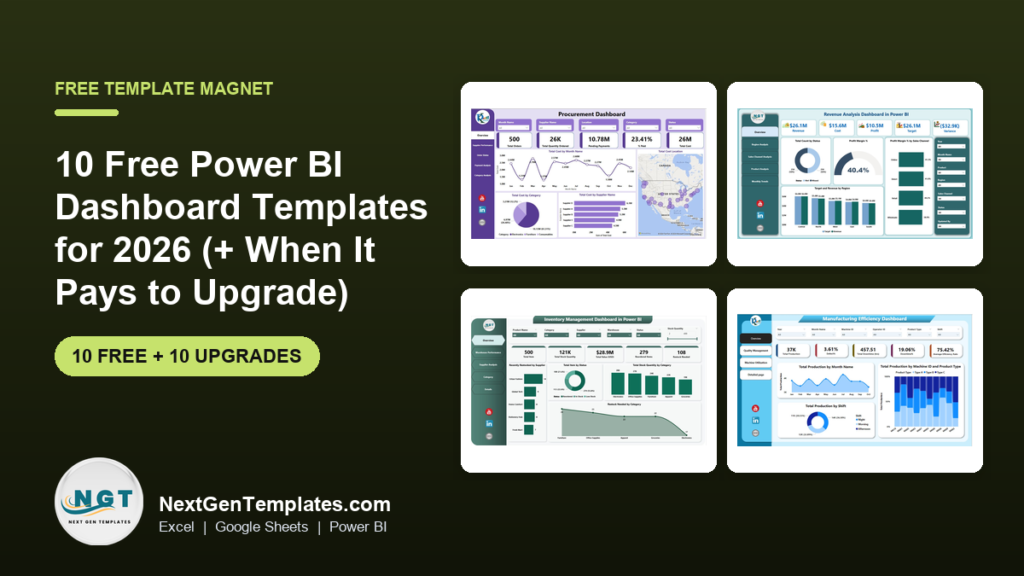
The best free Power BI dashboard templates in 2026 are Microsoft’s own sample reports: real .pbix files with a finished data model, report pages and visuals, free to download and open in the free Power BI Desktop. Our top free pick is the Regional Sales sample from the 2026 refresh, with page navigation, key influencers and a decomposition tree.
Last updated: October 2026
Working in a different tool? See our companion lists of free Excel dashboard templates and free Google Sheets dashboard templates.
Key takeaways
- All 10 files in the free list below cost nothing. They are Microsoft’s official Power BI samples, and we checked every download link in October 2026.
- Best overall free pick: the Regional Sales sample (2026 refresh). It shows page navigation buttons, a Key influencers visual, a decomposition tree and Q&A in one report.
- Power BI Desktop is a free download and you need no Power BI licence to open these samples. Sharing reports with colleagues in the Power BI service needs Power BI Pro, listed at $14 per user per month.
- Microsoft’s samples are learning files: fictitious or anonymised data, an “internal reference” licence and an obviEnce attribution requirement. They are not built to be rebranded for your own business.
- The paid NextGenTemplates Power BI upgrades in this guide cost $11.99 to $17.99 each, paid once, or $79.99 for 15 dashboards in one bundle.
 Launch offer
From your first Pivot Table to the Data Model, DAX, Power Query and a one-page KPI dashboard. 11h 51m of video by PK, with practice files, quizzes and a capstone.
Free Power BI dashboard templates compared
Every free file in this guide, side by side. One row is flagged best overall. Price is “Free” for all ten because all ten are free.
| # | Template | Source | Format | Best For | Price |
|---|---|---|---|---|---|
| 1 | Regional Sales sample (Best overall) | Microsoft | Power BI (.pbix) | Revenue won and lost by region, product and campaign | Free |
| 2 | Store Sales sample | Microsoft | Power BI (.pbix) | Retail sales this year vs last year by store and district | Free |
| 3 | Corporate Spend sample | Microsoft | Power BI (.pbix) | IT spend: actual vs plan by area and region | Free |
| 4 | Revenue Opportunities sample | Microsoft | Power BI (.pbix) | Sales pipeline by stage and region | Free |
| 5 | Employee Hiring and History sample | Microsoft | Power BI (.pbix) | Hiring trends and workforce history | Free |
| 6 | Competitive Marketing Analysis sample | Microsoft | Power BI (.pbix) | Sales vs competitors by channel and product | Free |
| 7 | AdventureWorks Sales sample | Microsoft | Power BI (.pbix) | A modern dark-theme sales report to learn design | Free |
| 8 | Artificial Intelligence sample | Microsoft | Power BI (.pbix) | Learning Key influencers, decomposition tree, anomalies | Free |
| 9 | Procurement Analysis sample | Microsoft | Power BI (.pbix) + Excel | Vendor spend and discounts by category and city | Free |
| 10 | Sales and Returns sample | Microsoft | Power BI (.pbix) | Buttons, drillthrough, what-if and custom tooltips | Free |
And the paid Power BI upgrades we recommend once a free sample runs out of road. One row is best overall, one is best value.
| Upgrade | Format | Best For | Price |
|---|---|---|---|
| Procurement Dashboard in Power BI (Best overall) | Power BI | Orders, supplier performance and unpaid invoices | $17.99 |
| General Management KPI Dashboard in Power BI (Best value) | Power BI | 10 company KPIs with MTD, YTD, target and prior year | $11.99 |
| Revenue Analysis Dashboard in Power BI | Power BI | Revenue, profit margin and target by region and channel | $17.99 |
| Sales Business Intelligence Dashboard in Power BI | Power BI | Target vs sales by region, rep and product | $17.99 |
| Expense Tracking Dashboard in Power BI | Power BI | Spend by department, vendor, project and payment method | $17.99 |
| Marketing Dashboard in Power BI | Power BI | Budget, spend, revenue and ROI by campaign | $17.99 |
| Recruitment Pipeline Dashboard in Power BI | Power BI | Applications, hiring stages and time to hire | $17.99 |
| IT KPI Dashboard in Power BI | Power BI | Uptime, tickets and IT service KPIs vs target | $11.99 |
| Manufacturing Efficiency Dashboard in Power BI | Power BI | OEE, production, defects and downtime | $17.99 |
| Inventory Management Dashboard in Power BI | Power BI | Stock, restocking, warehouses and suppliers | $17.99 |
How we picked these free Power BI dashboard templates
We started where people actually look for free Power BI files: Microsoft’s sample library, the Power BI community galleries, and the “free Power BI templates” roundups that rank in search. Every source page was opened in October 2026 and every download link in this post was checked.
Microsoft’s Power BI samples page won by a wide margin. It lists more than 15 downloadable samples, each with a .pbix file and a written tour, and in 2026 Microsoft refreshed eight of them with the current base theme, the new card visual, mobile layouts and cleaner semantic models. That makes them the most up-to-date free Power BI dashboards anywhere, and they come straight from the people who build the product.
We dropped community gallery posts that only show screenshots, files that need a paid connector before they display anything, and download pages that ask for card details for a “free trial”. A file made the list only if it opens in the free Power BI Desktop with its data already loaded and has at least one complete report page. The paid upgrades come from NextGenTemplates’ Power BI range and were chosen to match the jobs the free samples cover, so each one is a direct next step for a real business rather than a random upsell.
The 10 best free Power BI dashboard templates for 2026
All ten are hosted by Microsoft on its powerbi-desktop-samples GitHub repository or its download centre. File sizes are for the 2026 refresh versions.
1. Regional Sales sample (Microsoft) – best overall free
The Regional Sales sample is a report for a fictitious company, Contoso, built so a sales manager can see which products and regions drive revenue wins and losses. It is the best single file for learning what a modern Power BI dashboard can do, because it packs most of the interactive features into one report:
- Navigation buttons that group pages into Overview, Win/Loss Overview, Industries Overview and Trends, with the other pages hidden for a clean entry point
- A Key influencers page that shows which factors raise the chance of a “Won” deal
- A decomposition tree for drilling revenue down by campaign, territory or product
- A Q&A page where you type questions such as “count of lost by product category”
The 2026 refresh adds the larger canvas, the new card visual and a Shape Map. The file is about 1 MB.
Best for: anyone learning report navigation and AI visuals. Free – download the Regional Sales sample.
2. Store Sales sample (Microsoft)
A retail report on items sold across multiple stores and districts. Its measures compare this year with last year for sales, units, gross margin and variance, and it separates new stores from same stores. The Store Sales Overview page has KPI cards, sales by chain and a map you can drill through to a New Stores page; the District Monthly Sales page combines a line and column chart with a scatter chart by category.
It also shows the “Analyze, Explain the decrease” feature on a sales drop between March and April, which is a good way to see Power BI’s built-in analysis in action. File size about 9.7 MB.
Best for: retailers and anyone who reports year-on-year. Free – get the Store Sales sample.
3. Corporate Spend sample (Microsoft)
Analyses an IT department’s planned versus actual costs over a fiscal year with quarterly latest estimates. The IT Spend Trend page filters by sales region and includes a decomposition tree on plan variance; the Plan Variance Analysis page shows variance by business area. It also demonstrates a hidden report page used as a tooltip.
The 2026 refresh adds conditional formatting, a button slicer and field parameters. At about 0.7 MB it is the lightest file here.
Best for: budget owners who track spend against plan. Free – get the Corporate Spend sample.
4. Revenue Opportunities sample (Microsoft)
Examines a sales pipeline to help prioritise deals and forecast income. The refreshed version combines a Shape Map with a report page tooltip and a combo chart, with an overview of revenue, opportunity count, regional performance, pipeline stage and monthly trends. It is the smallest refreshed file at about 0.25 MB.
Best for: sales leaders who review a pipeline weekly. Free – get the Revenue Opportunities sample.
5. Employee Hiring and History sample (Microsoft)
Presents hiring trends, tenure and historical employee data for workforce planning. The refresh uses colour, line and marker styles, custom tooltip text and conditional formatting to point attention at monthly hiring trends and a workforce matrix. File size about 8.5 MB.
Microsoft also offers a separate, older Human Resources sample with headcount, turnover and diversity measures if you need classic HR KPIs.
Best for: HR analysts learning workforce reporting. Free – get the Employee Hiring and History sample.
6. Competitive Marketing Analysis sample (Microsoft)
Compares a company’s sales performance with competitors and market benchmarks. The refreshed overview page shows sales metrics, channel and product performance and monthly trends, using the new card visual, donut centre values, smooth lines and Azure Maps. File size about 6.6 MB.
Best for: marketers who report market share. Free – get the Competitive Marketing Analysis sample.
7. AdventureWorks Sales sample (Microsoft)
The design showcase of the 2026 refresh. It applies a dark theme, donut centre values, series labels, Azure Maps and the date picker slicer for compact calendar, range and relative-date filtering. Download it to copy layout ideas rather than for its business content. File size about 8.4 MB.
Best for: report designers who want a modern look to copy. Free – get it from the 2026 samples folder.
8. Artificial Intelligence sample (Microsoft)
Brings Power BI’s AI visuals together in one report: Key influencers identifying the factors tied to won opportunities, the Decomposition tree, and anomaly detection on line charts. It is a training file, not a business dashboard, but it is the quickest way to learn when those visuals are worth using. File size about 1.1 MB.
Best for: analysts learning AI visuals. Free – get the Artificial Intelligence sample.
9. Procurement Analysis sample (Microsoft)
Analyses a manufacturing company’s spending on vendors by category and location: who the top vendors are, which categories cost most, and which vendors give the highest discount and when. The Spend Overview page shows invoices by month and category, a country map, sub-category spend and spend by vendor tier; the Discount Analysis page compares discount % by month and city.
It is one of the few samples that also comes as an Excel workbook, so you can inspect the raw data in Power Pivot.
Best for: buyers and procurement analysts. Free – get the Procurement Analysis sample.
10. Sales and Returns sample (Microsoft)
An older sample (2019) that is still worth downloading because it was built to demonstrate report features: buttons, drillthrough, conditional formatting, a what-if parameter and customised tooltips. Open it, click everything, then look at how each interaction is set up in the Format pane.
Best for: learning interactivity techniques. Free – get the Sales and Returns sample.
Also free from Microsoft: the Human Resources, IT Spend Analysis, Retail Analysis, Customer Profitability, Supplier Quality Analysis, Opportunity Analysis and Sales and Marketing samples, all listed on the same samples page with .pbix and .xlsx downloads.
Want a free dashboard by email?
Not ready for Power BI yet, or want a one-page version to share with people who do not have a Power BI licence? Enter your email and we will send you our free One Page Sales Dashboard in Google Sheets: 4 KPI cards, a Revenue vs Profit chart and a Region slicer. No payment and no card. You can unsubscribe at any time.
When does it pay to upgrade from free Power BI dashboard templates?
Microsoft’s samples are excellent teachers. They are not built to run your business, and the same five gaps push people to a ready-made template, usually as soon as they try to load their own data:
- The data model is someone else’s. Each sample is wired to its own fictitious tables. Replacing them with your data means rebuilding relationships and rewriting measures, which is most of the work of a dashboard.
- The licence is narrow. Microsoft’s samples page says you can copy and use the files “for your internal reference purposes”, and many require an obviEnce copyright notice on every visualisation. That is fine for learning, awkward for a board pack or a client report.
- The KPIs are generic. There is no procurement payment tracking, no recruitment funnel, no OEE and no inventory restock view. Industry KPIs mean building your own measures.
- No targets and time logic for your year. Few samples give you a month selector with MTD, YTD, target and prior-year columns ready to fill.
- No plain-Excel data source. Most small teams keep data in Excel. A template built on a simple Excel data sheet is far quicker to refresh than a sample model.
If two or more of these apply, the hours spent adapting a sample cost more than a one-time template. The ten upgrades below map onto those gaps. Every one is a .pbix with the DAX measures, slicers and pages already built, so you replace the data and publish.
10 paid Power BI dashboard upgrades for when free stops working
1. Procurement Dashboard in Power BI – best overall upgrade
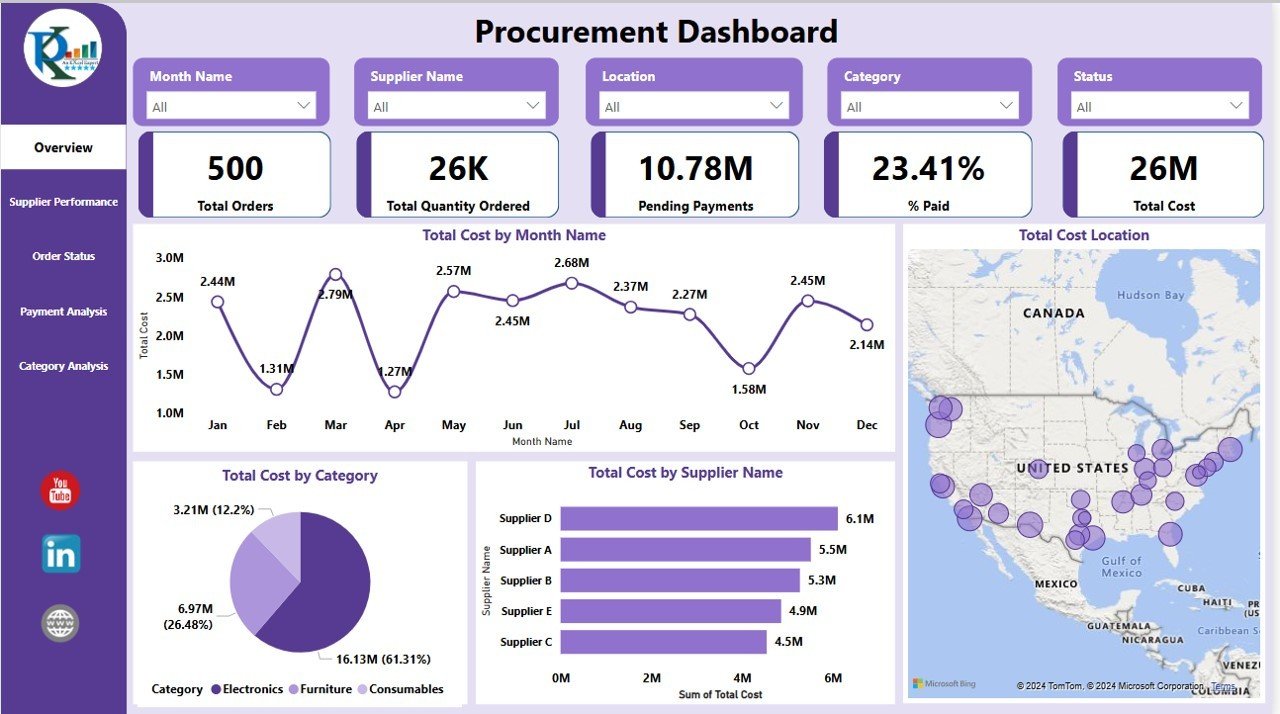
Our best-selling Power BI dashboard and the direct step up from the free Procurement Analysis sample (#9). Five report views (Overview, Supplier Performance, Order Status, Payment Analysis and Category Analysis) cover total orders, quantity, cost, pending payments and % paid, with cost by category, cost by supplier and a location map. Slicers filter by month, supplier, location, category and status.
What it adds over free: order status and unpaid invoice tracking, which the Microsoft sample does not include, on a model built for your own purchase data. Compare it with Excel options in our guide to procurement dashboard templates.
Best for: procurement and finance teams. $17.99 – view the procurement dashboard.
2. General Management KPI Dashboard in Power BI – best value

The fix for the “no targets and time logic” gap, at the lowest price in this guide. Pick a month and KPI group, and the dashboard shows each KPI’s actual against target and prior year, month to date and year to date, with up and down arrows and a count of KPIs that met or missed target. The 10 sample KPIs include revenue growth, profit margin, operational costs, net promoter score, customer retention rate, employee turnover rate and EBITDA, and a KPI Trend page charts each one by month.
What it adds over free: a ready KPI framework with targets, which no Microsoft sample provides.
Best for: owners and general managers running a monthly review. $11.99 – view the general management KPI dashboard.
3. Revenue Analysis Dashboard in Power BI
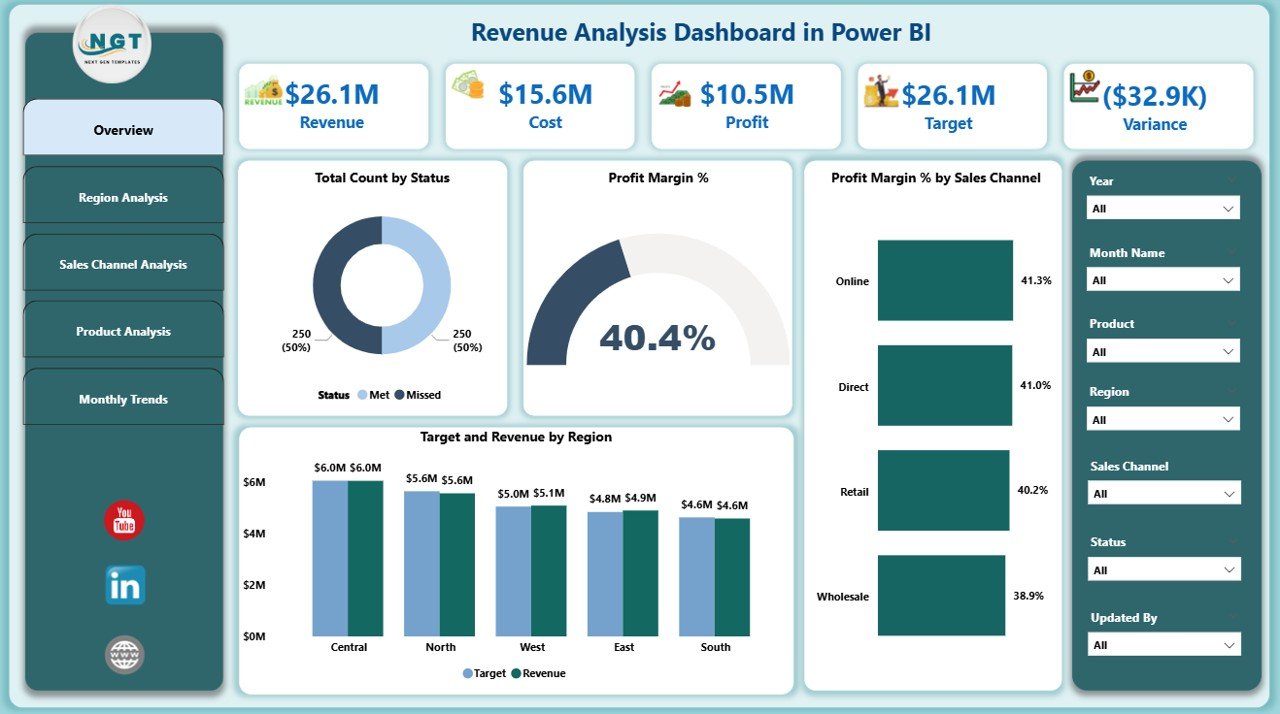
Five pages (Overview, Region, Channel, Product and Monthly Trends). The overview has 7 slicers and KPI cards for total revenue, profit margin %, target achievement %, number of orders and average order value, with charts such as target vs revenue by region and profit margin % by sales channel.
What it adds over free: revenue against target with cost and profit alongside, where the Store Sales and Regional Sales samples (#1, #2) stop at sales and variance.
Best for: finance and sales leads. $17.99 – view the revenue analysis dashboard.
4. Sales Business Intelligence Dashboard in Power BI
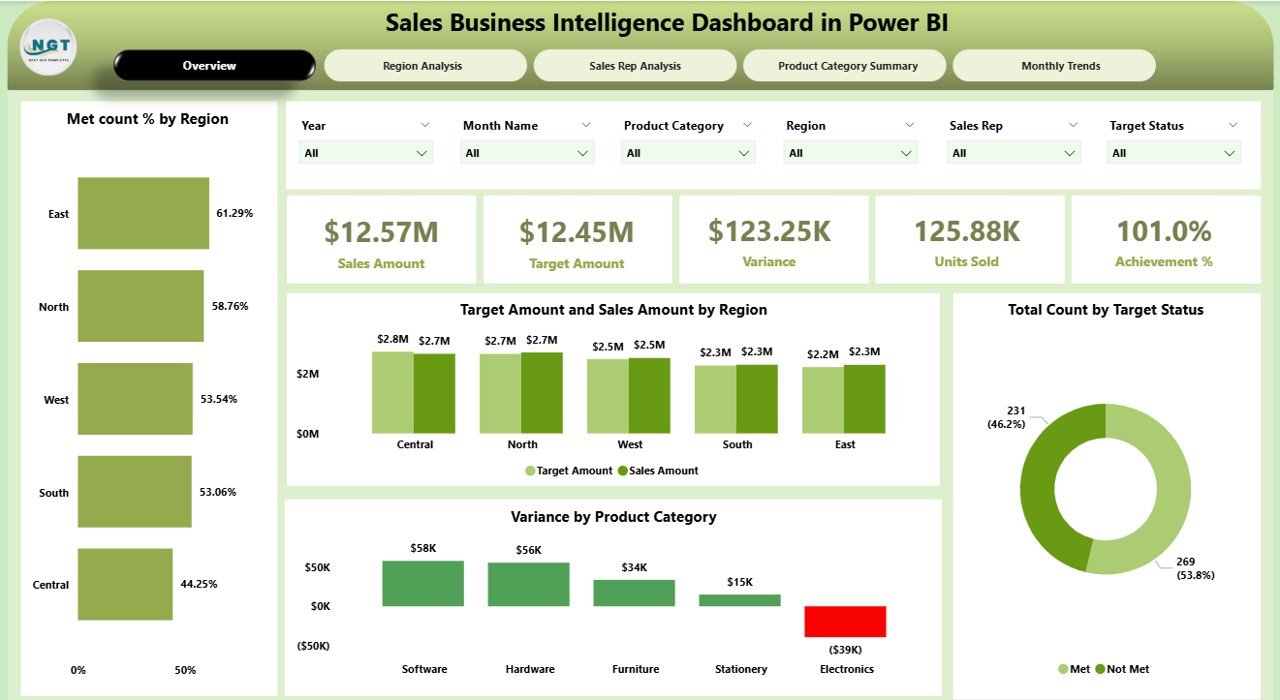
Built around targets per region, rep and product. Five pages (Overview, Region, Sales Rep, Product Category and Monthly Trends) with 6 slicers and KPI cards for total sales, target, variance, achievement % and met count %.
What it adds over free: rep-level target tracking, the view a sales manager actually manages to. For more choices see the best sales dashboard templates for 2026.
Best for: sales managers with named reps and quotas. $17.99 – view the sales BI dashboard.
5. Expense Tracking Dashboard in Power BI
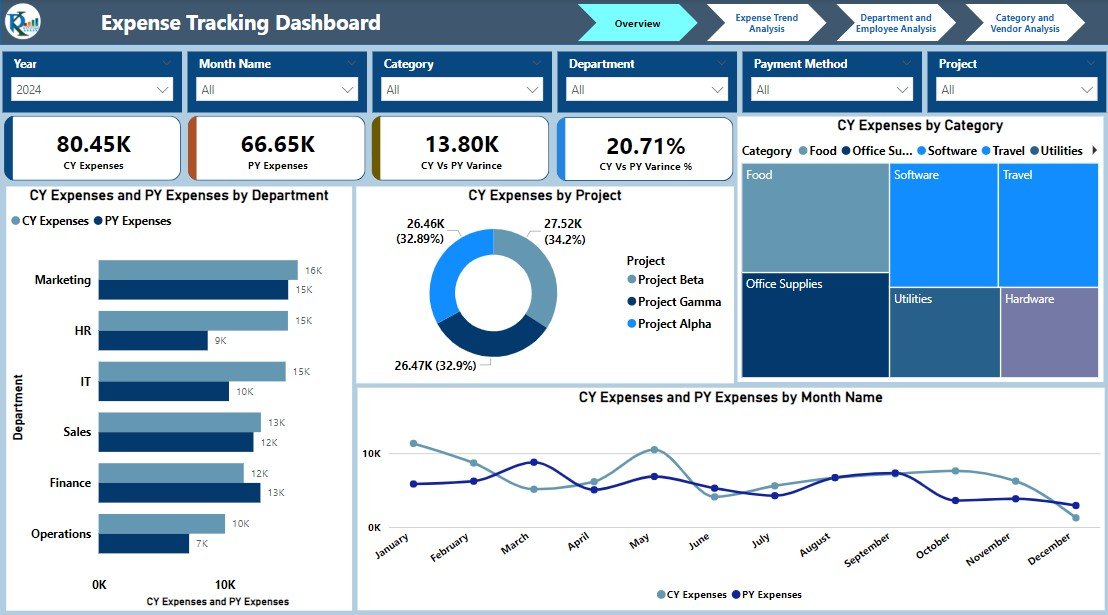
The business-ready version of the Corporate Spend idea (#3). Pages cover an overview, expense trends, department and employee spending, and category and vendor analysis, with current year vs prior year expenses and variance %, spend by project and payment method, and filters for year, month, department, category and payment method.
What it adds over free: employee, vendor and payment method views on a simple expense list rather than an IT budget model.
Best for: finance teams and office managers. $17.99 – view the expense tracking dashboard.
6. Marketing Dashboard in Power BI

Five pages (Overview, Budget vs Spend, Conversion and Revenue, ROI Analysis and a Details page with drillthrough). KPI cards show total budget, spend, revenue, conversion rate and ROI, with MTD, YTD and year-over-year trends and filters by month, channel, campaign type and campaign owner.
What it adds over free: campaign-level budget and ROI, where the Competitive Marketing sample (#6) looks at market share.
Best for: marketing managers reporting spend and return. $17.99 – view the marketing dashboard.
7. Recruitment Pipeline Dashboard in Power BI
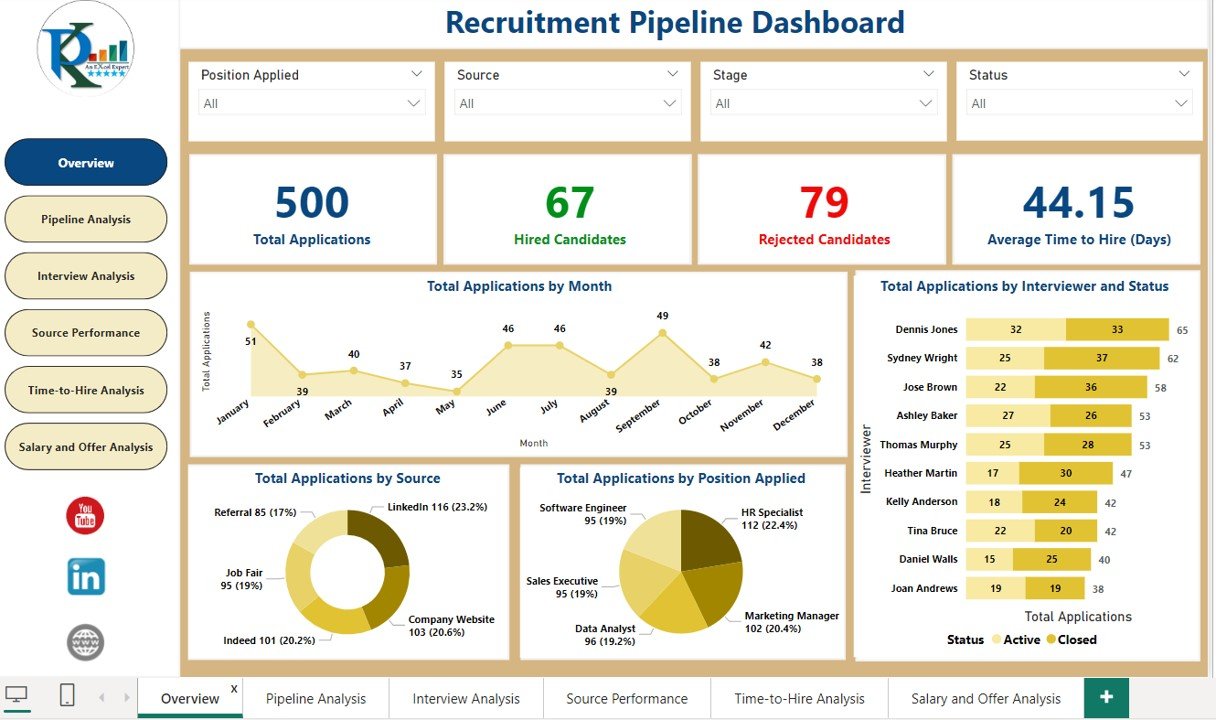
Pages for Overview, Pipeline Analysis, Interview Analysis, Source Performance, Time-to-Hire Analysis and Salary and Offer Analysis. The overview tracks total applications, hired and rejected candidates and average time to hire, with applications by month, source, position and interviewer.
What it adds over free: a hiring funnel by stage and source, where the Employee Hiring and History sample (#5) reports hires after the fact. See more HR options in our HR dashboard templates guide.
Best for: HR teams and recruitment agencies. $17.99 – view the recruitment pipeline dashboard.
8. IT KPI Dashboard in Power BI

The same month-selector layout as the general management file, applied to IT: application downtime, CSAT score, number of security incidents, server uptime, budget variance, mean time to resolve, SLA compliance and first call resolution rate, each against target and prior year with a KPI Trend page.
What it adds over free: service KPIs and targets, where the IT Spend Analysis sample only covers cost.
Best for: IT managers and service desks. $11.99 – view the IT KPI dashboard.
9. Manufacturing Efficiency Dashboard in Power BI

Pages for Overview, Quality Management, Machine Utilization and a detailed page. Cards show total production, defect %, total downtime, downtime % and average efficiency rate, with production by month, by machine and product type, and by shift. Its headline page breaks Overall Equipment Effectiveness into availability, performance and quality.
What it adds over free: a production-line model. The closest Microsoft sample, Supplier Quality Analysis, tracks supplier defects, not your own machines and shifts.
Best for: plant and production managers. $17.99 – view the manufacturing efficiency dashboard.
10. Inventory Management Dashboard in Power BI
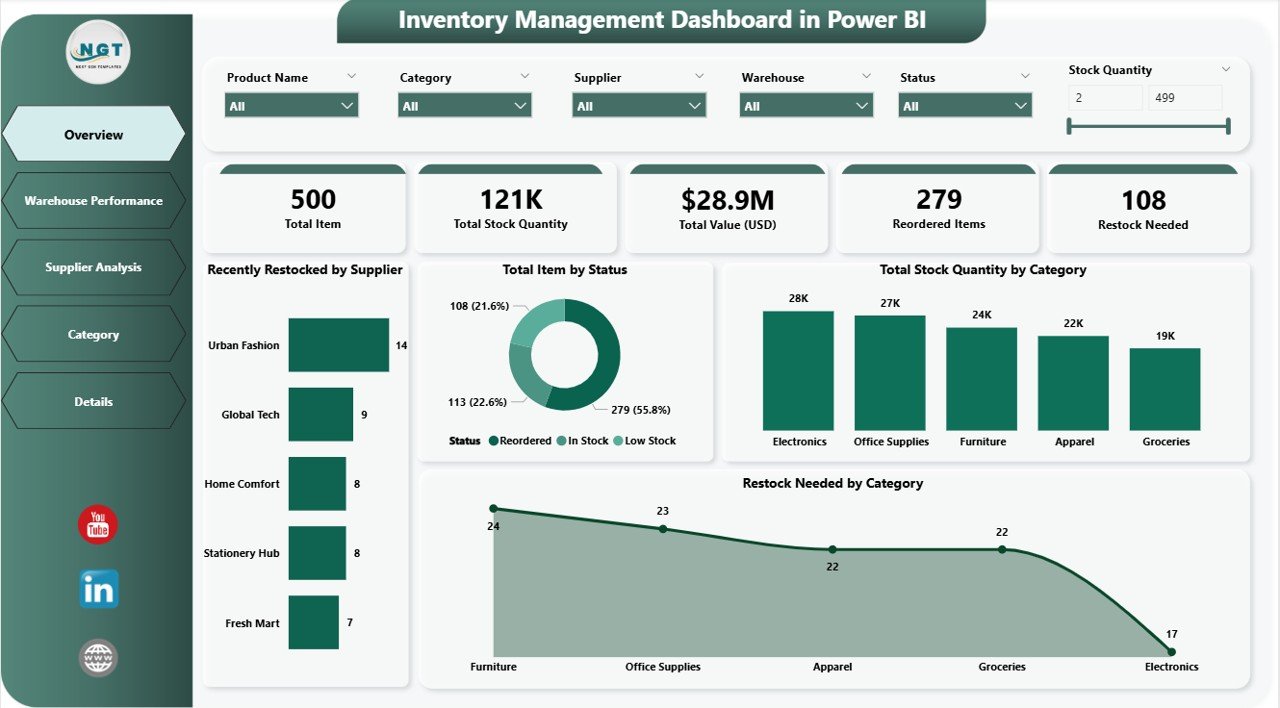
Five pages (Overview, Warehouse Performance, Supplier Analysis, Category and Details). The overview has 6 slicers and KPI cards for total items, stock quantity, stock value, reordered items and items needing restock, with restocking by supplier and stock by category.
What it adds over free: stock and restock tracking by warehouse, which the retail samples (#2) do not model. Running warehouses and fleets too? See our logistics dashboard templates.
Best for: operations managers and inventory planners. $17.99 – view the inventory management dashboard.
Need several of these? The Power BI Dashboard Mega Collection bundles 15 Power BI dashboards (manufacturing, construction, procurement, finance, HR, IT, healthcare, logistics and more) for $79.99 instead of $269.85 bought one by one. Not in your industry? Browse all Power BI dashboard templates or our Power BI dashboard templates ranked by industry.
How to choose between free and paid
| Your situation | Start with |
|---|---|
| Learning Power BI navigation and AI visuals | Free: Regional Sales sample (#1) |
| Learning modern report design | Free: AdventureWorks Sales sample (#7) |
| Practising DAX on a ready model | Free: Store Sales or Corporate Spend (#2, #3) |
| A monthly KPI review with MTD, YTD and targets | Paid: General Management KPI Dashboard, $11.99 |
| Purchase orders, suppliers and unpaid invoices | Paid: Procurement Dashboard, $17.99 |
| Sales targets by rep and region | Paid: Sales Business Intelligence Dashboard, $17.99 |
| Dashboards for several departments at once | Paid: Power BI Dashboard Mega Collection, $79.99 for 15 |
Rule of thumb: if you are learning, stay free and work through Microsoft’s samples. If you need a report about your own business by Monday, buy the template once and spend your time on the data, not the model. Need the same dashboard in Excel or Google Sheets as well? Read when to buy Excel, Google Sheets and Power BI together.
When a Power BI dashboard is NOT the right answer
- Your viewers have no Power BI licence. Sharing through the Power BI service needs Power BI Pro for the publisher and, outside Premium capacity, for viewers too. Microsoft’s Power BI pricing page lists Pro at $14 and Premium Per User at $24 per user per month. For a small team that just needs to view numbers, a shared Google Sheets dashboard can be cheaper.
- You work on a Mac only. Power BI Desktop runs on Windows. Mac users need a Windows machine or virtual machine, or a browser-based tool.
- Small data that changes by hand. If you type 50 rows a month, an Excel dashboard is simpler to update; see our Excel vs Google Sheets vs Power BI comparison.
- Audit-grade controls. Regulated finance or clinical reporting needs governed data and audit trails that no template provides on its own.
For everyone else, Power BI is the strongest free reporting tool you can install. Microsoft’s guide to report themes in Power BI Desktop helps you restyle any sample or template to your brand. If you also work in Excel and want to master dashboards step by step, our Excel Pivot Tables & Dashboards course teaches the method from scratch.
Frequently asked questions
Are there free Power BI dashboard templates from Microsoft?
Yes. Microsoft publishes more than 15 free Power BI samples as .pbix files, with written tours, on its Power BI samples page and its powerbi-desktop-samples GitHub repository. Eight of them were refreshed in 2026 with the current base theme, the new card visual and mobile layouts.
Do I need a Power BI licence to use free Power BI templates?
No. Power BI Desktop is a free download, and Microsoft states you need no Power BI licence to explore the samples in Desktop. A free Fabric account lets you open the built-in samples in the Power BI service. Sharing reports with other people needs Power BI Pro or Premium Per User.
What is the best free Power BI dashboard template for beginners?
The Regional Sales sample from Microsoft’s 2026 refresh. It is small, about 1 MB, and shows navigation buttons, Key influencers, a decomposition tree and Q&A in one report, so a beginner sees most interactive features in a single file. Store Sales is a good second choice for year-on-year retail reporting.
How do I open a .pbix template?
Install Power BI Desktop, then choose File, Open and select the downloaded .pbix file. For files on GitHub, use the Download raw file button first. To share a report online, choose Publish on the Home ribbon and pick a workspace in the Power BI service.
Can I use Microsoft’s Power BI samples for my business?
Treat them as learning files. Microsoft’s samples page says the workbooks can be copied and used for internal reference purposes, and many must carry an obviEnce copyright notice on the visuals. For client work or a branded company report, build your own report or use a template licensed for business use.
What is the difference between a .pbix and a .pbit file?
A .pbix file contains the report pages, data model, queries and the data itself. A .pbit template file contains the report and model but no data, so Power BI asks for your data source when you open it. Microsoft’s COVID-19 US sample, for example, is offered as a .pbit.
How do I replace the sample data with my own?
In Power BI Desktop, open Transform data, select each query and change its source to your file or database, keeping the same column names. Then choose Close and Apply and Refresh. If your columns differ, you must also fix relationships and measures, which is why ready-made templates built on a simple Excel data sheet save time.
When should I pay for a Power BI dashboard template?
Pay when you need industry KPIs such as OEE, time to hire or unpaid invoices, a month selector with MTD and YTD against target, or a report you can rebrand and show to a board or client. Adapting a learning sample to do that usually takes longer than a one-time purchase.
How much do paid Power BI dashboard templates cost?
On NextGenTemplates the Power BI dashboards in this guide cost $11.99 for the KPI dashboards and $17.99 for the multi-page dashboards, paid once with no subscription. The Power BI Dashboard Mega Collection includes 15 dashboards for $79.99, against $269.85 bought separately.
Is Power BI better than Excel for dashboards?
Power BI is better for large data, scheduled refresh from several sources and sharing interactive reports across a company. Excel is simpler for small data typed by hand and for people without Power BI licences. Many teams keep data in Excel and report on it in Power BI.
Get more Power BI dashboard templates
Start free with Microsoft’s Power BI samples to learn the tool. When you need a dashboard for your own business, the Procurement Dashboard in Power BI is our best-seller at $17.99, the General Management KPI Dashboard is the best value at $11.99, and the Power BI Dashboard Mega Collection gives you 15 dashboards for $79.99.
Prefer to see dashboards in action first? Watch walk-throughs and tutorials on our YouTube channel: youtube.com/@NextGenTemplates.