
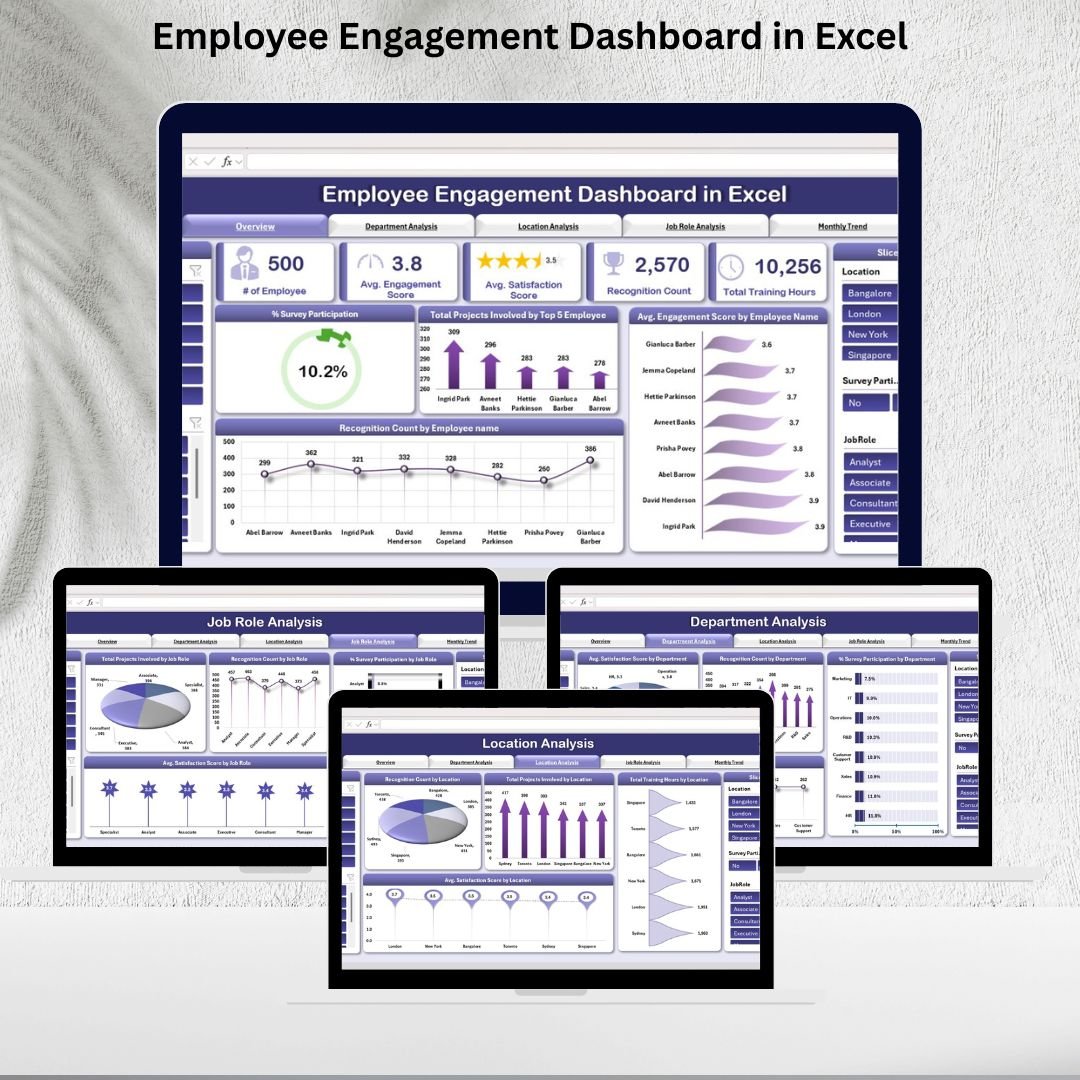


Employee engagement is more than just a buzzword—it’s the foundation of a productive, motivated, and satisfied workforce. With the Employee Engagement Dashboard in Excel, HR teams and managers get a ready-to-use, plug-and-play solution that simplifies engagement tracking, highlights trends, and uncovers areas needing improvement. 📊💡
This interactive Excel-based dashboard consolidates data from surveys, training, recognition programs, and projects into a single, visual platform, enabling organizations to make data-driven decisions that enhance workplace culture. Whether you manage a small team or a large organization, this dashboard is built to provide clarity, transparency, and actionable insights.

🔑 Key Features of the Employee Engagement Dashboard
📋 Overview Sheet Tab
-
Snapshot of employee engagement with metrics like:
-
Total # of Employees
-
Average Engagement Score
-
Average Satisfaction Score
-
Recognition Count
-
Total Training Hours
-
-
Visual charts for Survey Participation %, Engagement by Employee, and Recognition by Employee
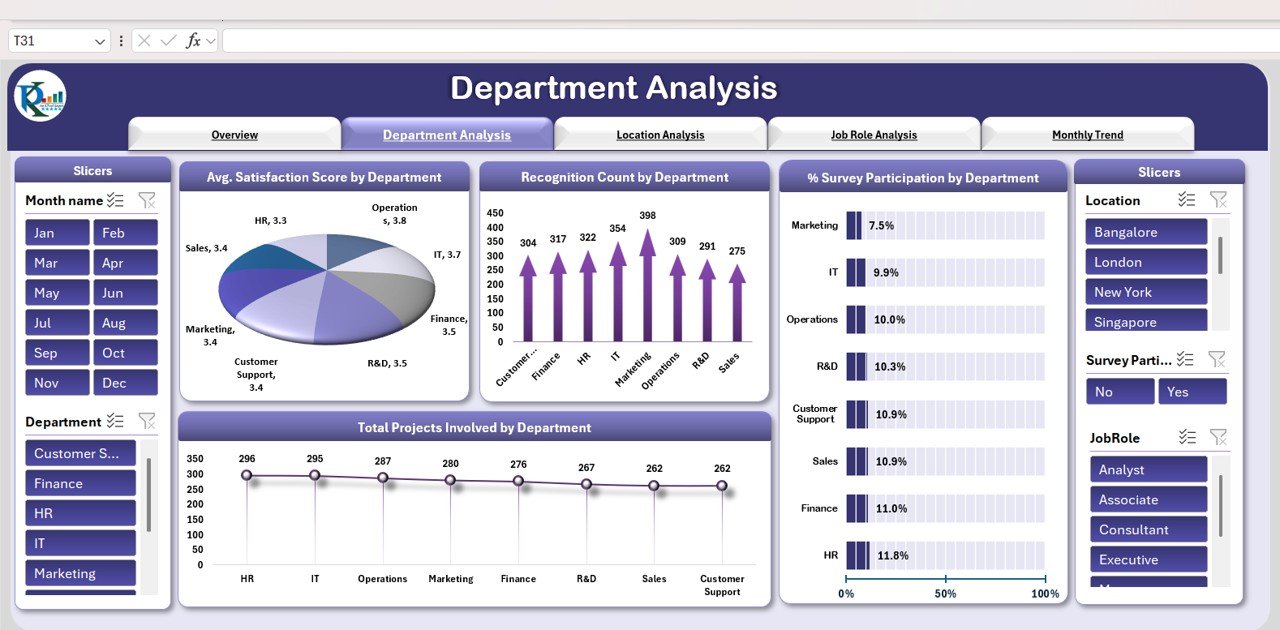
📊 Department Analysis
-
Charts that track satisfaction, recognition, survey participation, and projects by department
-
Identify which teams need more recognition, support, or training
🌍 Location Analysis
-
Compare engagement levels across offices and sites
-
Includes Recognition Count, Training Hours, Projects, and Satisfaction by location
👔 Job Role Analysis
-
Drill down into engagement by job role
-
Track project involvement, recognition, survey participation, and satisfaction scores for each role
📆 Monthly Trend Analysis
-
Monitor engagement over time
-
Charts for Monthly Engagement Score, Satisfaction Score, and Survey Participation %
📑 Data Sheet Tab
-
Input employee-level data on surveys, recognition, training, and projects
-
Auto-updates all dashboards and charts for real-time insights
📦 What’s Inside the Employee Engagement Dashboard?
When you download this template, you’ll get:
✅ Overview Dashboard – A complete snapshot of engagement metrics
✅ Department Analysis Tab – Engagement breakdown at the team level
✅ Location Analysis Tab – Insights for office/site-specific performance
✅ Job Role Analysis Tab – Compare engagement by job responsibilities
✅ Monthly Trend Tab – Track improvement or decline over time
✅ Data Sheet – Pre-formatted for easy entry and real-time reporting
Everything is designed to be easy-to-use, customizable, and scalable for organizations of any size. 🚀
🧑💼 Who Can Benefit from This Dashboard?
🎯 HR Teams – Track engagement initiatives and identify improvement areas
🎯 Business Leaders – Gain visibility into workforce morale and satisfaction
🎯 Department Managers – Monitor engagement at the team level
🎯 Executives – Access high-level performance insights for decision-making
🎯 SMEs & Enterprises – Scalable to fit both small businesses and large organizations
This dashboard makes it simple to measure what matters most—your people.
🧪 How to Use the Employee Engagement Dashboard
-
Enter Data – Input survey, recognition, training, and project data into the Data Sheet
-
Review Metrics – Check the Overview Dashboard for a quick snapshot
-
Analyze Segments – Drill into Department, Location, or Job Role tabs
-
Monitor Trends – Use the Monthly Trend tab to track engagement over time
-
Take Action – Implement HR initiatives where satisfaction or engagement is low
With no coding or technical expertise required, this Excel dashboard is plug-and-play and ready to drive results immediately. ✅
🌟 Why Choose This Dashboard?
-
Centralized employee engagement tracking
-
Real-time updates and visual reporting
-
Department, location, and job role segmentation
-
Trend analysis for proactive HR planning
-
Fully customizable to your KPIs and initiatives
With the Employee Engagement Dashboard in Excel, you’ll gain the insights needed to foster a motivated, engaged, and high-performing workforce. 🌟
🔗 Click here to read the Detailed blog post
Watch the step-by-step video Demo:






























Reviews
There are no reviews yet.