
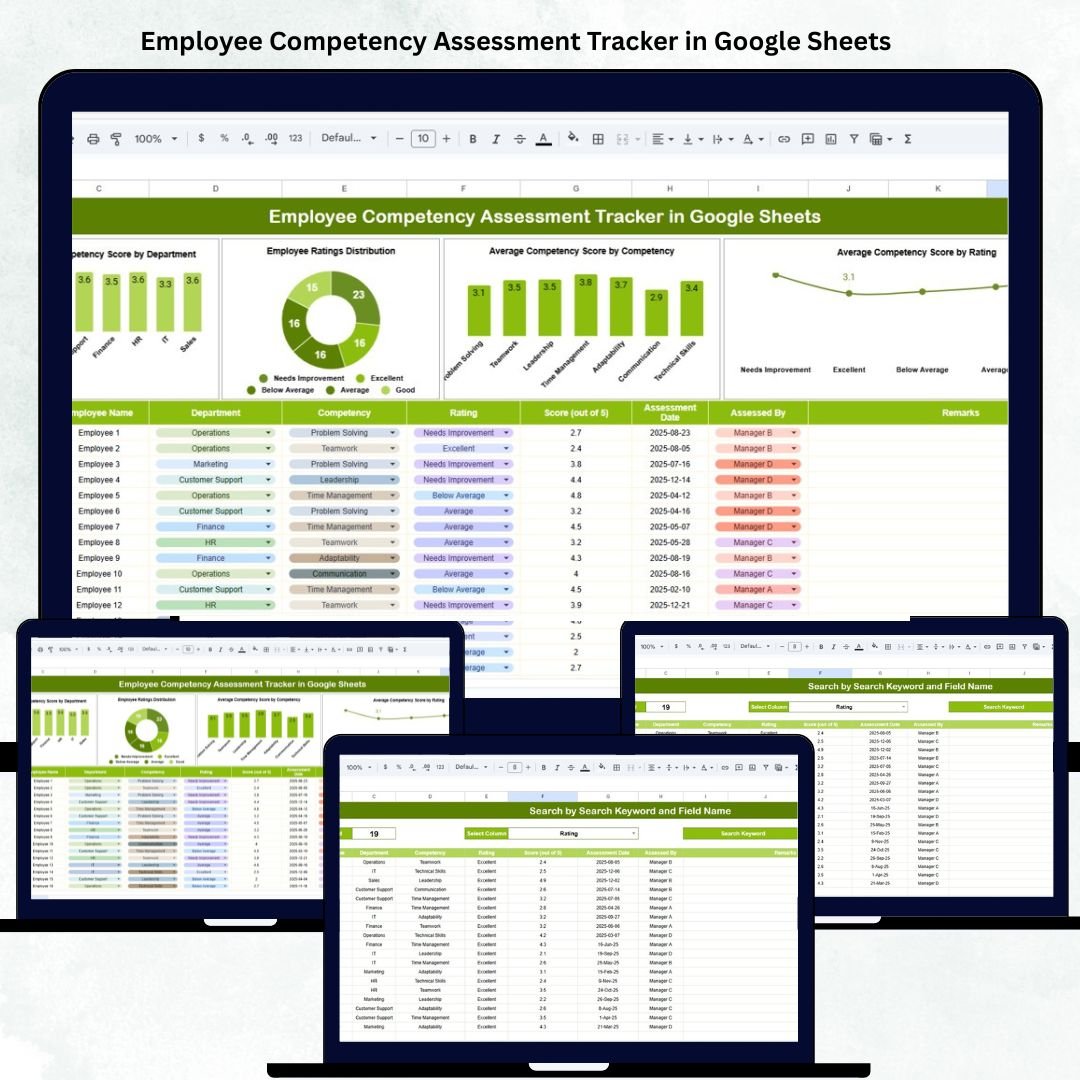
Building a strong workforce begins with understanding employee competencies. The Employee Competency Assessment Tracker in Google Sheets is a ready-to-use HR management solution that helps organizations evaluate, monitor, and analyze employee skills across departments — all in one smart and interactive dashboard. 👩💼📊
Built entirely in Google Sheets, this tracker makes competency management visual, transparent, and data-driven. It automates performance scoring, calculates averages, and provides dynamic charts to highlight strengths, weaknesses, and training needs — without requiring any additional software.
Whether you’re an HR manager, team lead, or learning & development specialist, this tool gives you complete visibility into workforce capabilities, making performance evaluation faster and more effective.
🔑 Key Features of the Employee Competency Assessment Tracker in Google Sheets
📋 Tracker Sheet Tab (Main Dashboard)
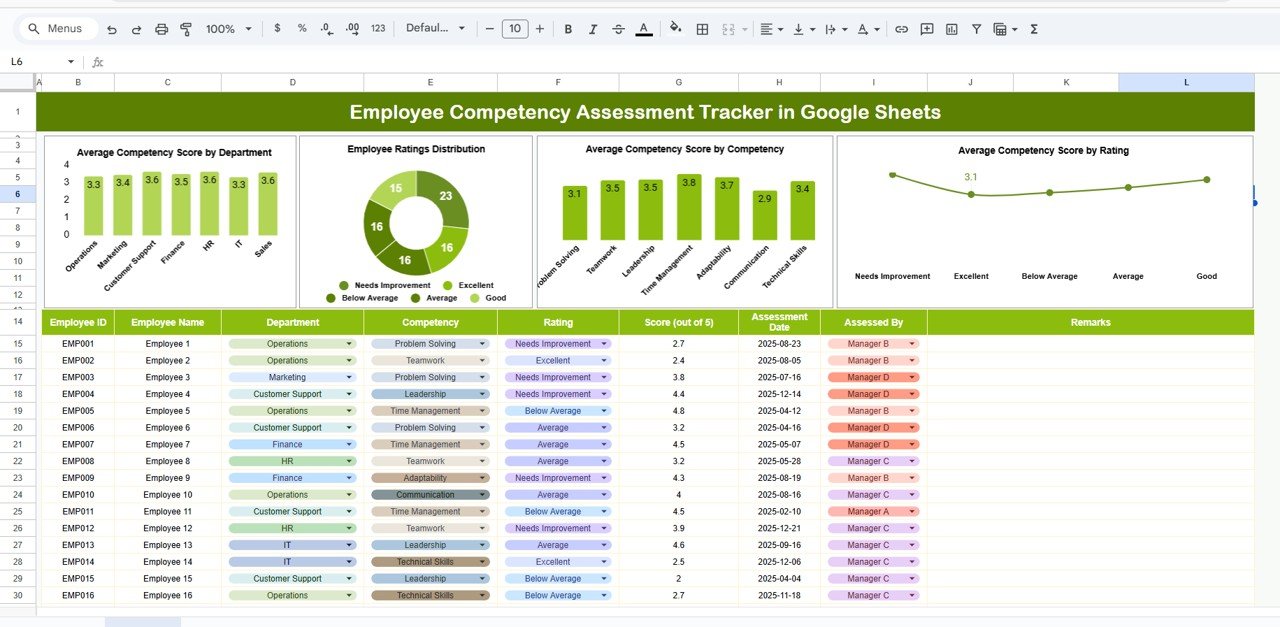
The Tracker Sheet is your central hub for monitoring employee competencies through data visualization.
Charts Included:
-
📈 Average Competency Score by Department – See which departments excel in skills and which require development.
-
🧭 Employee Ratings Distribution – Visualize overall performance across rating categories such as Excellent, Good, Average, and Needs Improvement.
-
💡 Average Competency Score by Competency – Identify which specific skills (e.g., communication, teamwork, leadership) need attention or training.
-
⚙️ Average Competency Score by Rating – Correlate rating levels with competency averages to ensure consistency in evaluation.
These charts update automatically based on the data you input, giving HR professionals and management teams real-time insights into organizational talent distribution.
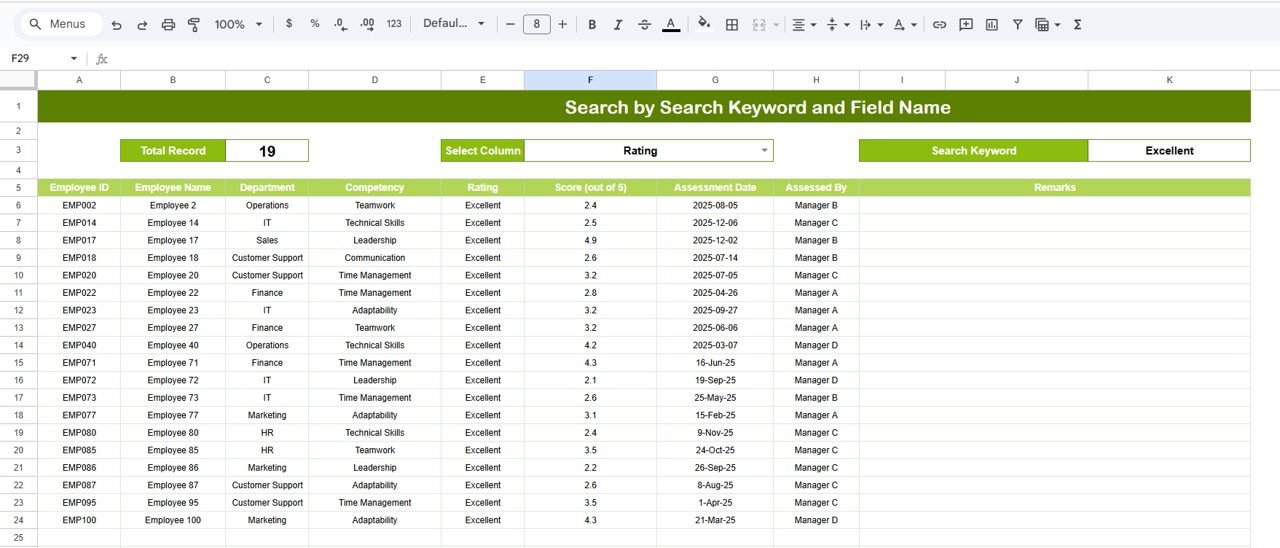
🔍 Search Sheet Tab (Smart Lookup)
Quickly find relevant information about employees or competencies using search filters and keywords.
Example Searches:
-
“Department = HR” → Displays all HR team members and their competency ratings.
-
“Competency = Leadership” → Lists all employees assessed for leadership skills.
-
“Rating ≥ 4” → Filters high performers who scored above average.
This smart search feature saves time, allowing managers to instantly locate and review specific records for performance discussions or appraisals.
🧾 Data Structure Overview
All performance data resides in a clean, structured format for easy maintenance and automation.
Data Fields May Include:
-
Employee Name
-
Department
-
Designation
-
Competency Area
-
Rating Score
-
Comments/Feedback
-
Assessor Name
-
Review Date
The dashboard automatically updates when data changes, ensuring accuracy and consistency.
📦 What’s Inside the Tracker
✅ Pre-built Google Sheets template
✅ Interactive dashboard with dynamic charts
✅ Department-wise competency insights
✅ Search-ready data structure
✅ Customizable rating scales
✅ Real-time collaboration features
✅ No coding required
🧑💼 Who Can Use This Tracker
👩💼 HR Managers – Streamline employee evaluations and monitor department-wise performance.
📋 Team Leaders – Assess team competencies and identify top performers.
🎯 Learning & Development Professionals – Spot skill gaps and create targeted training programs.
🏢 Executives – Gain a high-level view of organizational strengths and areas for growth.
This tracker is ideal for companies aiming to build high-performance teams and improve training investments with measurable data.
⚙️ Opportunities for Improvement
To make the tracker even more powerful, consider adding:
-
Google Forms Integration – Automate data collection from assessors or managers.
-
Weighted Scoring – Assign different weightages to key competencies.
-
Role-Based Filters – Segment performance by job title or level.
-
Historical Trends – Compare competency growth over multiple assessment cycles.
-
Automated Summary Reports – Generate PDF or email reports using Google Apps Script.
🧠 Best Practices
✅ Define clear rating criteria for all competencies.
✅ Update records regularly after every assessment cycle.
✅ Protect cells with formulas and chart links.
✅ Use consistent competency names across departments.
✅ Review and analyze results quarterly to align with performance appraisals.
🌟 Why Choose the Employee Competency Assessment Tracker
-
📊 Instant visual insights into workforce capabilities
-
🧩 Fully customizable for different competency models
-
☁️ Cloud-based and collaboration-ready
-
🔄 Automated KPI calculations
-
💡 Great for appraisals, training design, and career mapping
The Employee Competency Assessment Tracker in Google Sheets transforms how organizations evaluate, track, and develop employee skills — driving continuous improvement, engagement, and long-term success. 🚀
🔗 Click here to read the Detailed blog post
Watch the step-by-step video Demo:

























Reviews
There are no reviews yet.