

🔑 Key Features of the Dental Practice Dashboard in Power BI
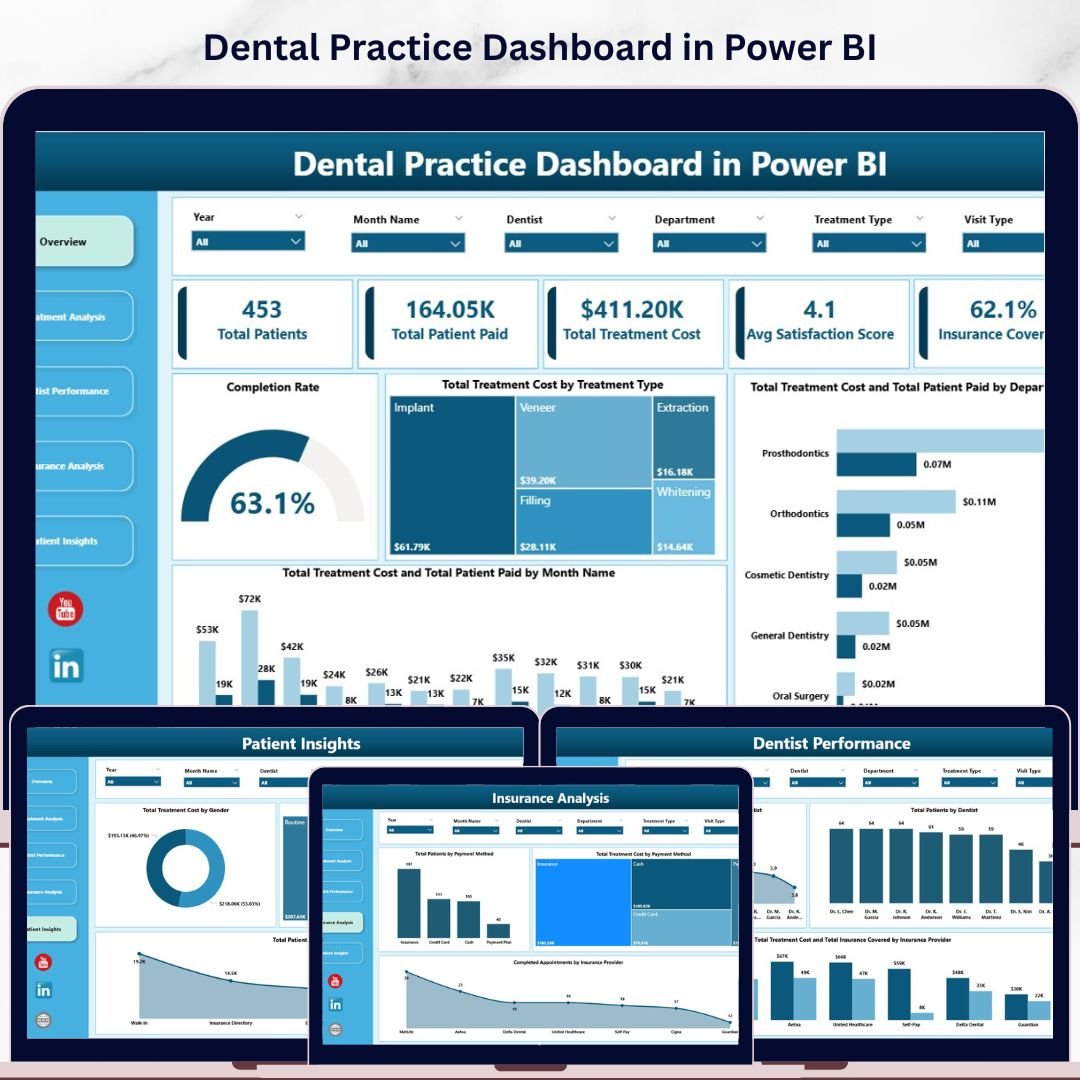
The Dental Practice Dashboard in Power BI is a comprehensive analytics template designed for dental clinics, orthodontic offices, and oral healthcare providers who want to visualize every aspect of their practice performance. This template includes 5 interactive dashboard pages tracking critical dental practice metrics including Total Patients, Total Patient Paid, Total Treatment Cost, Average Satisfaction Score, and Insurance Coverage Rate. Whether you manage a single dental chair or a multi-location dental group, this Power BI Dashboard transforms raw appointment and billing data into clear, actionable visual insights.
Built entirely in Power BI Desktop, this dental analytics template features dynamic slicers for instant filtering, interactive cross-highlighting across all visuals, and a professional dark-themed design that makes data easy to read. Explore more healthcare analytics templates in our Healthcare Templates collection.
📦 What’s Inside the Dental Practice Dashboard in Power BI
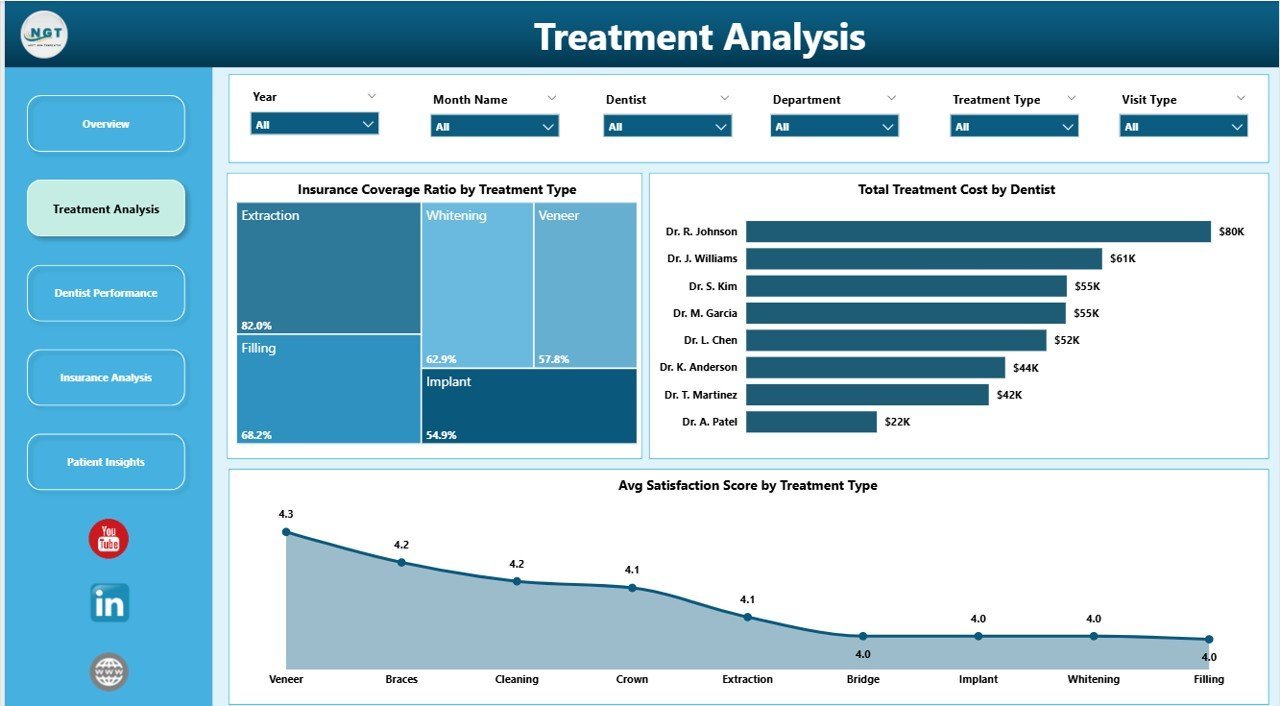
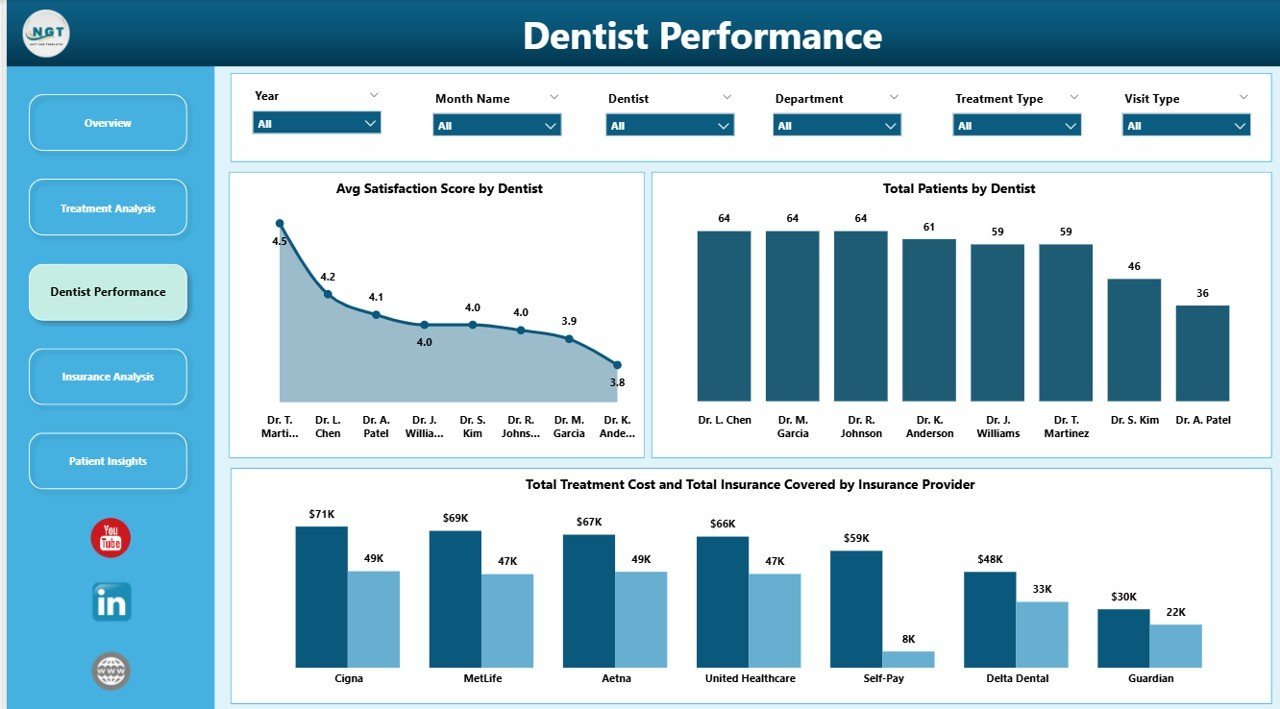
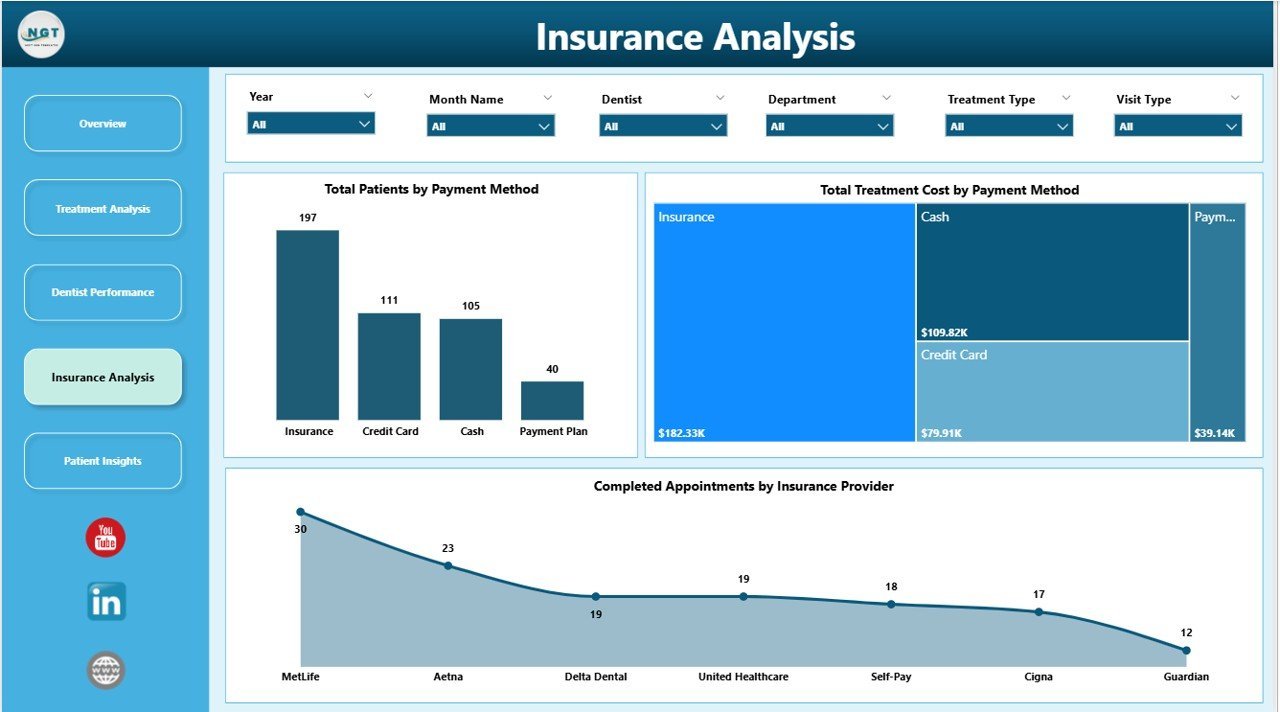
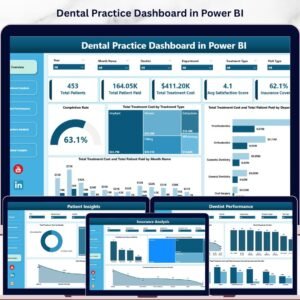
📌 5 Interactive Dashboard Pages – Overview, Treatment Analysis, Dentist Performance, Insurance Analysis, and Patient Insights, each packed with dynamic visuals and KPI cards.
📌 5 KPI Summary Cards – Total Patients, Total Patient Paid, Total Treatment Cost, Avg Satisfaction Score, and Insurance Coverage Rate displayed prominently on the Overview page for instant practice health assessment.
📌 Dynamic Slicers and Filters – Multiple slicers on the Overview page let you filter the entire dashboard by department, treatment type, dentist, month, and more for quick drill-down analysis.
📌 Treatment Cost Analysis – Detailed breakdowns of treatment costs by treatment type, department, and month help you understand revenue patterns and identify your highest-value procedures.
📌 Dentist Performance Tracking – Compare dentist productivity through patient counts, satisfaction scores, and treatment cost contributions to support staffing and performance review decisions.
📌 Insurance Analytics – Track patient counts by payment method, treatment costs by payment method, and completed appointments by insurance provider to optimize your payer mix strategy.
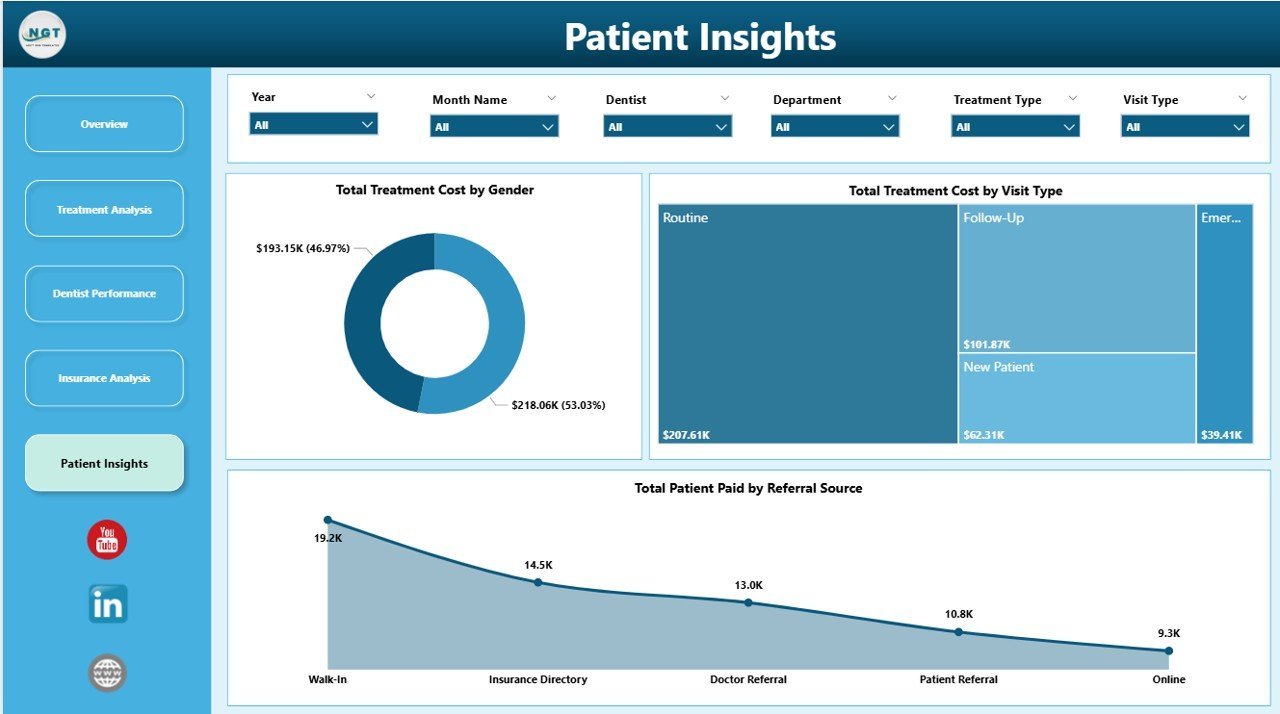
📌 Patient Demographics – Analyze treatment costs by gender, visit type, and referral source to understand your patient base and refine your marketing strategy.
📌 Completion Rate Gauge – A visual gauge on the Overview page shows your appointment completion rate, helping you monitor scheduling efficiency at a glance.
📌 No DAX Expertise Required – All measures and visuals are pre-built. Simply connect your data source and the dashboard updates automatically.
If you also work with Excel, check out the Dental Practice Dashboard in Excel for a pivot-table-powered alternative, or explore the Dental Practice KPI Dashboard in Google Sheets for cloud-based dental analytics.
⚙️ How to Use the Dental Practice Dashboard in Power BI
1️⃣ Download the .pbix file and open it in Power BI Desktop (free from Microsoft).
2️⃣ Review the sample data to understand the data structure and required fields.
3️⃣ Replace the sample data with your own dental practice records — patient details, treatment types, dentist assignments, insurance information, payment amounts, and satisfaction scores.
4️⃣ Click Refresh to update all visuals across all 5 dashboard pages automatically.
5️⃣ Use the slicers on the Overview page to filter by department, treatment type, dentist, or time period.
6️⃣ Navigate between the 5 pages using the tabs to analyze treatments, dentist performance, insurance, and patient demographics.
👥 Who Can Benefit from This Dental Practice Dashboard
🔹 Dental Clinic Owners – Monitor overall practice revenue, patient flow, and satisfaction trends from a single dashboard.
🔹 Practice Managers – Track dentist performance, appointment completion rates, and insurance analytics for operational decision-making.
🔹 Dental Office Administrators – Analyze payment methods, insurance coverage, and patient demographics for billing optimization.
🔹 Orthodontic Offices – Track treatment costs, patient satisfaction, and referral sources across specialized orthodontic procedures.
🔹 Multi-Location Dental Groups – Compare performance across departments and dentists for standardized reporting.
🔹 Healthcare Consultants – Use this template as a ready-made analytics solution for dental practice clients.
❓ Frequently Asked Questions
What KPIs does the Dental Practice Dashboard in Power BI track?
The Dental Practice Dashboard in Power BI tracks 5 primary KPIs on the Overview page: Total Patients, Total Patient Paid, Total Treatment Cost, Average Satisfaction Score, and Insurance Coverage Rate. Additional analysis across 4 more pages covers treatment cost breakdowns, dentist productivity, insurance analytics, payment method analysis, and patient demographics.
Do I need advanced Power BI skills to use this dental dashboard template?
No. All visuals, measures, and data connections are pre-built. Simply open the .pbix file in Power BI Desktop, replace the sample data with your own dental practice records, and click Refresh. The entire dashboard updates automatically without writing any DAX formulas or creating visuals from scratch.
Can I customize the charts or add new treatment types?
Yes. Since this is a standard .pbix file, you can modify any visual, add new pages, create additional measures, or extend the data model to fit your specific dental practice needs. Power BI Desktop provides full editing capabilities.
What is the best Power BI template for tracking dental practice performance?
The Dental Practice Dashboard in Power BI from NextGenTemplates is one of the most comprehensive dental analytics solutions available. It covers treatment analysis, dentist performance, insurance analytics, and patient demographics across 5 interactive pages with dynamic slicers and cross-highlighting.
Is this dashboard compatible with Power BI Service (cloud)?
Yes. You can publish this .pbix file to Power BI Service for cloud-based sharing and collaboration. Once published, you can set up scheduled refresh, share dashboards with team members, and access your dental analytics from any device.
🔗 Explore Related Templates
🔹 Dental Services Dashboard in Power BI – Advanced dental services analytics with Power BI interactivity for larger practice groups.
🔹 Dental Services KPI Dashboard in Power BI – KPI-focused dental analytics with target tracking and trend analysis.
🔹 Dental Practice Dashboard in Excel – Pivot-table-powered dental analytics for teams who prefer Excel.
📖 Click here to read the Detailed Blog Post
🎥 Visit our YouTube channel to learn step-by-step video tutorials
👉 YouTube.com/@NextGenTemplates






















Reviews
There are no reviews yet.