

The best Toast POS alternative in Excel is not another cloud POS — it is a spreadsheet analytics template you own outright. Six restaurant templates from NextGenTemplates ($12.99–$19.99, one-time) replicate Toast’s sales, P&L, and KPI reporting with no per-terminal seat fees, no unused modules, and no monthly lock-in.
Last updated: September 2026
Key takeaways
- Toast POS lists its core Point of Sale plan at $69/month per terminal plus payment processing, and most add-on modules (payroll, marketing, online ordering) bill separately — a mid-size restaurant often pays several hundred dollars a month.
- The strongest one-time replacement for Toast’s reporting is the Restaurant P&L Dashboard in Excel ($17.99) — you own the file forever and never pay per seat.
- Best value is the Restaurants & Food Services KPI Dashboard in Excel at $12.99, covering food cost %, labor %, and average check in one scorecard.
- All six templates are one-time purchases; six of them cost roughly one month of a single Toast terminal.
- Toast still wins when you need live payment capture, kitchen display, and online ordering in one hosted system — templates handle the analytics, not the transactions.
 Launch offer
SUMIFS, XLOOKUP, FILTER, LAMBDA and checking AI-written formulas, with real business projects. 11h 47m of video by PK, with practice files, quizzes and a capstone.
Toast POS alternative templates compared
| Template | Format | Best for | Price |
|---|---|---|---|
| Restaurant P&L Dashboard in Excel (Best overall) | Excel | Monthly profit & loss reporting | $17.99 |
| Restaurants & Food Services Dashboard in Excel | Excel | Sales & operations analytics | $13.99 |
| Restaurants & Food Services KPI Dashboard in Excel (Best value) | Excel | KPI scorecard at a glance | $12.99 |
| Restaurant Management System V2.0 in Excel VBA | Excel VBA | Order, menu & billing management | $19.99 |
| Restaurant P&L Dashboard in Power BI | Power BI | Interactive multi-outlet reporting | $17.99 |
| Restaurant Profit & Loss Dashboard in HTML | HTML | Browser reporting, no install | $12.99 |
Why restaurants churn off Toast POS
Toast is a genuinely capable restaurant platform, and for a busy full-service venue that needs live order capture, it earns its keep. But the same pricing model that makes Toast easy to start makes it expensive to stay on, and three specific costs drive small teams to look for a Toast POS alternative in Excel.
1. Per-terminal seat cost. Toast’s published Point of Sale plan is $69/month per terminal, before payment processing. Add a second or third station and the software line alone clears $150–$200 a month — roughly $2,400 a year that buys you reporting you could own once.
2. Modules you never open. Marketing, loyalty, online ordering, gift cards, and team management are separately priced add-ons. Many operators activate them during onboarding, use two, and keep paying for five. The analytics you actually check every Monday — sales, food cost, labor, profit — is a small slice of what you are billed for.
3. Admin overhead and lock-in. Your historical data lives inside Toast. Cancel and the dashboards go dark; export options are limited and the reports are not yours to reshape. A spreadsheet you own has the opposite property: the data, the formulas, and the layout stay with you forever.
Toast POS pricing at a glance
Here is what Toast publishes on its pricing page, so you can compare like for like. Exact figures change and processing rates vary by plan — treat this as the shape of the bill, and confirm current numbers on the official Toast pricing page.
| Toast plan / module | Typical published cost | What it covers |
|---|---|---|
| Starter Kit | From $0/month software + processing | Entry tier for 1–2 terminals |
| Point of Sale | $69/month per terminal + processing | Core POS and reporting |
| Build Your Own | Custom quote | Multi-location, full stack |
| Payroll & Team Management | Base fee + per-employee | Add-on module |
| Marketing / Loyalty / Online Ordering | Separate monthly fees each | Add-on modules |
The cost math. A two-terminal restaurant on the Point of Sale plan pays about $138/month for software alone — roughly $1,656 a year — before processing fees and before a single add-on module. All six templates on this page together cost $95.94 once, and the seven-template Hospitality & Restaurant Bundle is $49.99 once. Even against Toast’s $69 single-terminal plan, the entire bundle is cheaper than your first month — and it never renews. The trade-off, covered honestly below, is that templates report on your business but do not run the till.
How we picked these
We searched the full NextGenTemplates catalog of 1,000+ paid templates for restaurant and food-service analytics tools priced under $20 that replicate a specific Toast reporting job — sales, profit & loss, or KPI tracking. We kept templates that ship with sample data and working formulas so a non-analyst can drop in their own numbers, and we deliberately included three formats (Excel, Power BI, HTML) so you can match your existing stack. We excluded generic business dashboards that were not built for hospitality, and free templates, which lack the depth to stand in for a paid POS report.
The 6 best Toast POS alternative templates for 2026
1. Restaurant P&L Dashboard in Excel — best overall
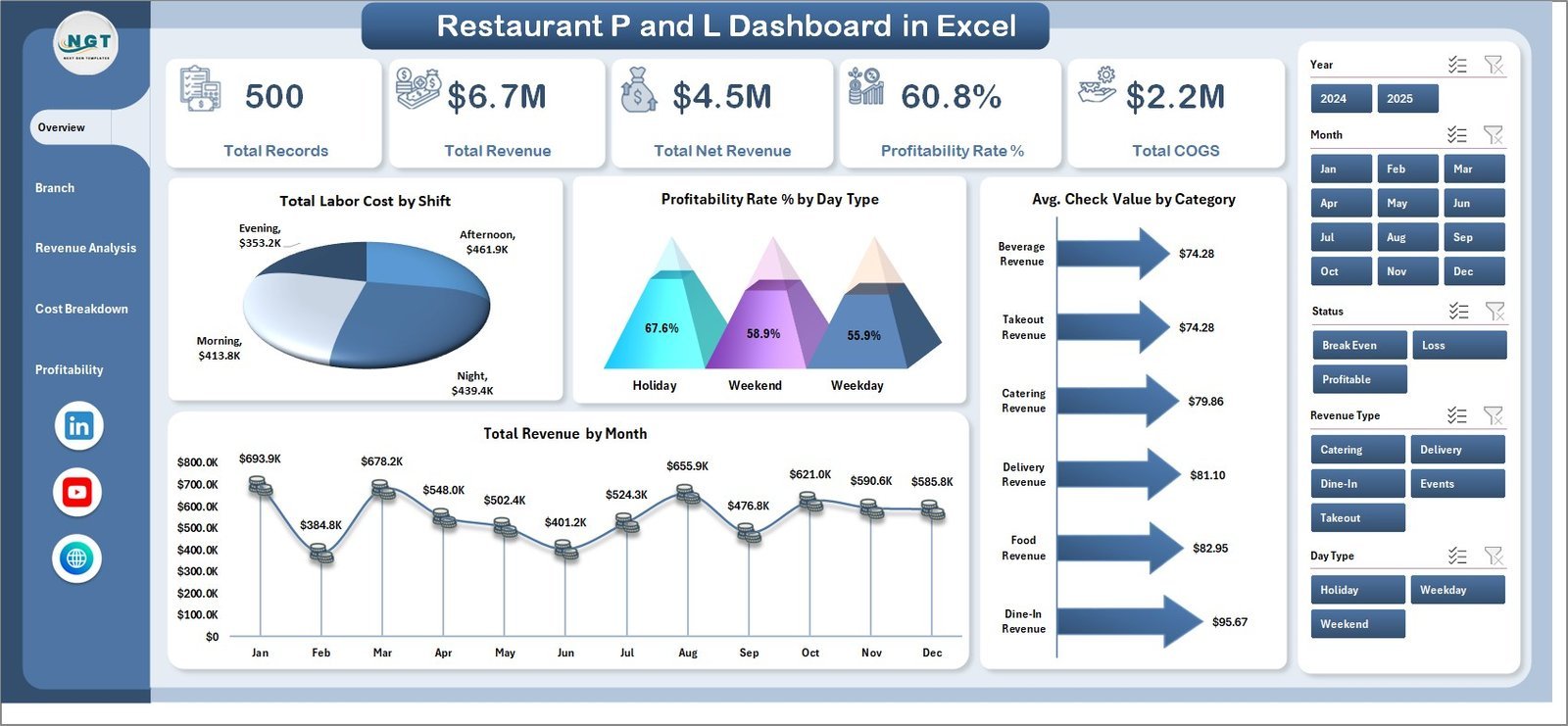
This is the template that most directly replaces Toast’s monthly financial report. It rolls revenue, cost of goods, labor, and operating expenses into a single profit-and-loss view with month-over-month comparison.
Who it is for: owner-operators and bookkeepers who want a clean monthly P&L without paying for a POS module.
- Revenue, COGS, labor and overhead broken out by line item
- Gross-profit and net-profit margins calculated automatically
- Month-over-month and budget-vs-actual comparison
- Editable expense categories for your own chart of accounts
Track a $60,000-a-month venue and you can see food cost creep from 29% to 33% the moment it happens, watch labor as a share of sales week to week, and hand a board-ready P&L to your accountant without a single manual re-key. It is the closest thing on this list to Toast’s reporting tab — for a one-time $17.99.
Get the Restaurant P&L Dashboard in Excel — $17.99
Best for: the single report most restaurants open Toast to see — monthly profit and loss.
2. Restaurants & Food Services Dashboard in Excel
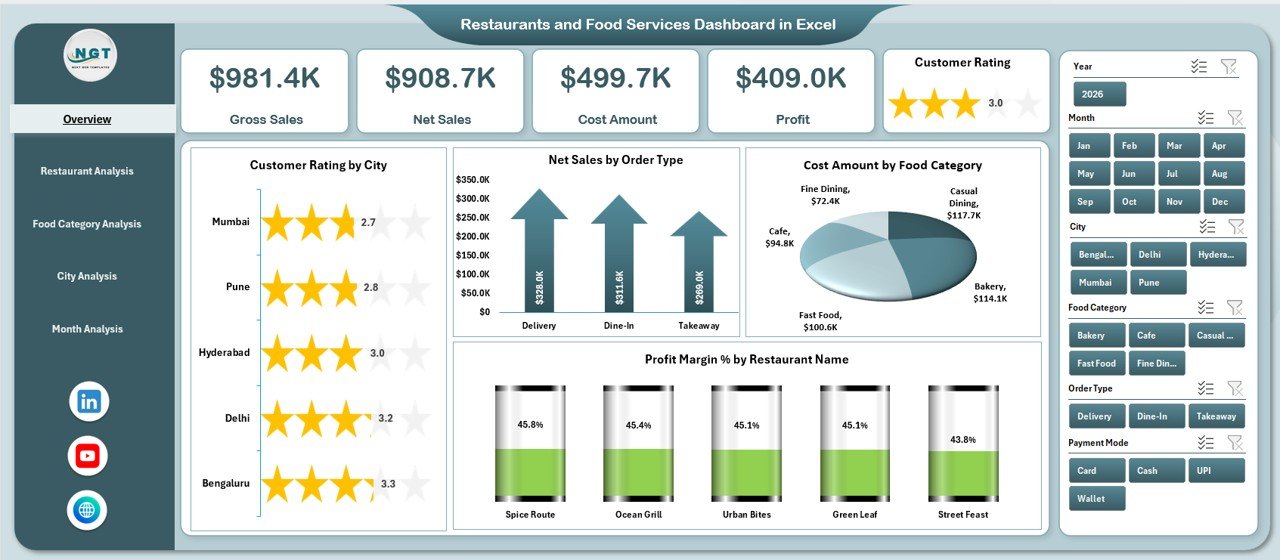
Where the P&L template answers “did we make money,” this one answers “what is selling and where.” It is a sales-and-operations analytics dashboard built for hospitality, with category, outlet, and time-of-day breakdowns.
Who it is for: multi-item menus and small chains that want to see performance sliced by product and location.
- Sales by menu category, item, and outlet
- Order volume, average order value and customer-rating panels
- Profit-margin analysis by food category
- Filterable by period for like-for-like comparison
Use it to find the three menu items driving 40% of profit, spot the Tuesday-night dead zone, and compare two locations on average check. At $13.99 it is a fraction of a single month of Toast’s analytics add-ons, and it never expires.
Get the Restaurants & Food Services Dashboard in Excel — $13.99
Best for: menu-mix and outlet-level sales analysis.
3. Restaurants & Food Services KPI Dashboard in Excel — best value

The cheapest template here and, for a lot of owners, the one they open most. It is a single-screen KPI scorecard: the six or seven numbers that tell you whether the week was good, with targets and traffic-light status.
Who it is for: operators who want a Monday-morning scorecard, not a 12-tab workbook.
- Food cost %, labor cost %, and prime cost tracked against target
- Average check, covers, and table-turn metrics
- Traffic-light conditional formatting for instant read
- Month and YTD views side by side
Food cost above 32%? It turns red. Labor creeping past 30% of sales? Red again. That is the exact glance Toast’s dashboard gives you, minus the $69 terminal fee, for a one-time $12.99 — which is why it is our best-value pick.
Get the Restaurants & Food Services KPI Dashboard in Excel — $12.99
Best for: the fastest at-a-glance health check on the list.
4. Restaurant Management System V2.0 in Excel VBA
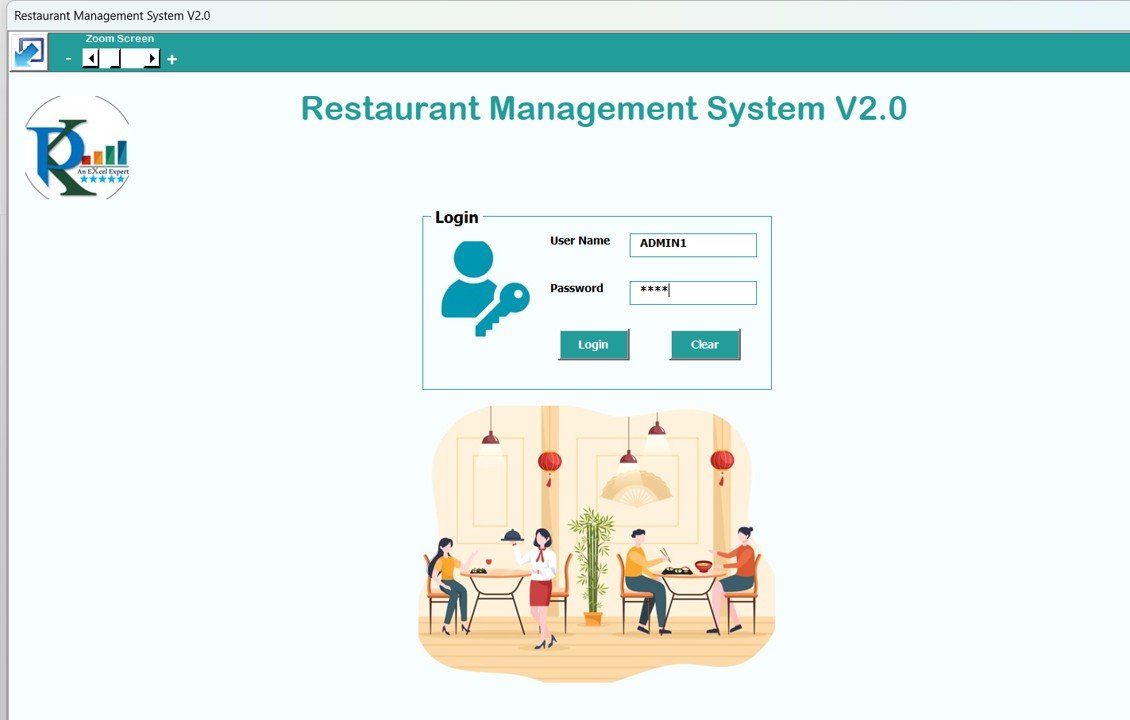
The only template here that steps beyond reporting into operations. Built in Excel VBA, it handles menu setup, order entry, billing, and back-of-house records — the closest thing to a lightweight, offline POS-and-management tool you own outright.
Who it is for: small single-site restaurants and cloud kitchens that want order and billing capture without a monthly subscription.
- Menu and item management with pricing
- Order entry and printable bills/invoices
- Daily sales and item-wise sales summaries
- Built-in macros for add, edit, and delete
It will not replace a full hosted POS with card capture and a kitchen display, and we are honest about that below. But for a takeaway counter or a ghost kitchen running one till, it covers ordering and billing for a one-time $19.99 instead of $69 every month. Pair it with template #1 for full financial visibility.
Get the Restaurant Management System V2.0 in Excel VBA — $19.99
Best for: single-till ordering and billing without a subscription.
5. Restaurant P&L Dashboard in Power BI
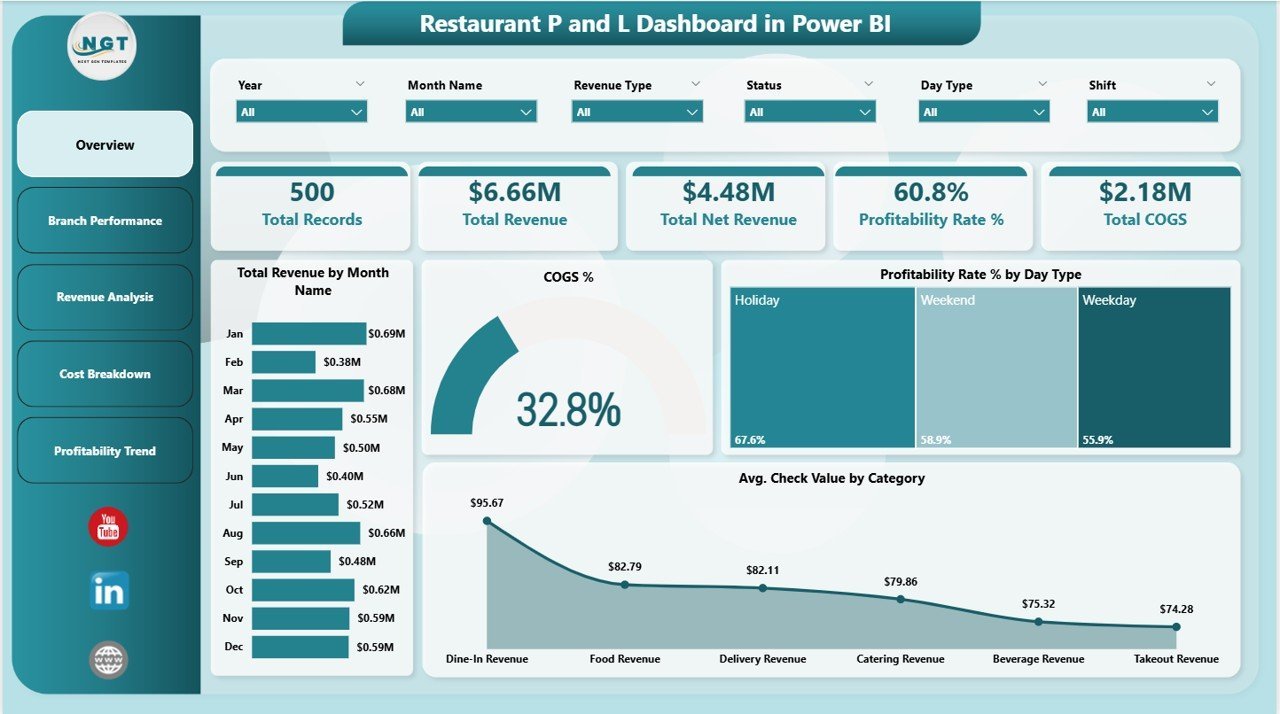
The same profit-and-loss job as template #1, rebuilt for Power BI. If your finance stack already lives in Power BI or you run several outlets, this is the interactive version — slice the P&L by location, period, and category with a click.
Who it is for: multi-outlet groups and analysts who prefer interactive filtering over spreadsheet tabs.
- Interactive P&L with slicers for outlet, month, and category
- Revenue, cost, and margin visuals with drill-down
- Refreshable against your own data source
- Shareable as a read-only report inside your org
Run five locations and you can compare their prime costs on one canvas, then drill into the worst performer to see whether the problem is food or labor. At $17.99, once, it is the interactive Toast-report alternative for teams already on Microsoft’s BI stack.
Get the Restaurant P&L Dashboard in Power BI — $17.99
Best for: interactive, multi-outlet profit reporting.
6. Restaurant Profit & Loss Dashboard in HTML
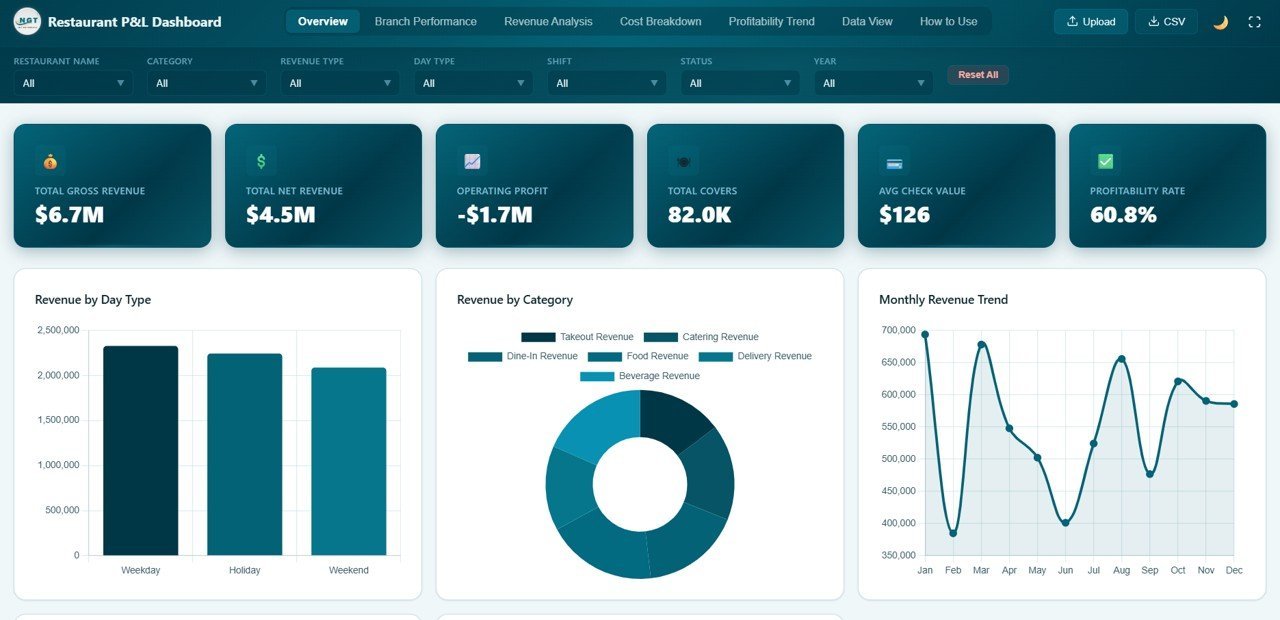
The same P&L reporting delivered as a self-contained HTML dashboard that opens in any browser — no Excel, no Power BI, no install. Useful when you want to view numbers on a phone or a device that has no Office license.
Who it is for: owners who want browser-based reporting and cross-device access with zero software dependency.
- Profit-and-loss visuals that run in any modern browser
- No Microsoft licence or app install required
- Works on tablets and phones at the pass
- Editable source for a developer to customise
For a manager who checks the numbers from the floor on a tablet, this is the lightest-weight option on the list at a one-time $12.99. It is reporting only — there is no data entry engine — but as a read-anywhere Toast-report substitute it does the job.
Get the Restaurant Profit & Loss Dashboard in HTML — $12.99
Best for: browser-based, no-install profit reporting on any device.
How to choose between them
| If you want to… | Choose | Price |
|---|---|---|
| Produce a monthly profit & loss report | Restaurant P&L Dashboard in Excel | $17.99 |
| Analyse menu mix and outlet sales | Restaurants & Food Services Dashboard in Excel | $13.99 |
| Get a one-screen weekly health check | Restaurants & Food Services KPI Dashboard | $12.99 |
| Capture orders and print bills offline | Restaurant Management System V2.0 (Excel VBA) | $19.99 |
| Filter the P&L interactively across outlets | Restaurant P&L Dashboard in Power BI | $17.99 |
| View reports in a browser on any device | Restaurant Profit & Loss Dashboard in HTML | $12.99 |
If you only buy one, buy the Restaurant P&L Dashboard in Excel — it replaces the report you open Toast for most. If you run more than one site or want everything at once, the Hospitality & Restaurant Bundle packs seven premium templates for $49.99, which works out cheaper than one month of a two-terminal Toast setup.
When Toast POS is still the right call
We would be doing you a disservice to pretend a spreadsheet does everything a restaurant platform does. It does not. Buy or keep Toast POS — not a template — when any of these is true:
- You need live payment capture at the table or counter. Templates report on sales; they do not take a card, split a check, or run a tip flow. That is a POS job.
- You run a kitchen display system (KDS) and online ordering. Toast pushes tickets to the line and syncs delivery-app orders in real time. No spreadsheet replicates that hardware-and-integration loop.
- You have many terminals and staff needing role-based access. Concurrent, multi-user, permissioned access across stations is exactly what a hosted POS is built for; a shared workbook is not.
- You want integrated payroll driven by clock-ins. If labor data must flow automatically from shifts to payroll, an integrated platform saves real admin time.
The honest framing: templates replace Toast’s analytics and reporting for a one-time fee, not its transaction engine. Many small operators keep a basic till and move only the reporting into templates they own — that is where the savings are, without giving up card capture.
Frequently asked questions
What is the best Toast POS alternative in Excel?
For reporting, the Restaurant P&L Dashboard in Excel ($17.99) is the best Toast POS alternative — it reproduces Toast’s monthly profit-and-loss report as a spreadsheet you own outright, with no per-terminal fee. Pair it with the KPI Dashboard ($12.99) for a weekly scorecard.
How much does Toast POS actually cost?
Toast lists a core Point of Sale plan at $69/month per terminal plus payment processing, with a lower-cost Starter Kit and custom Build-Your-Own tiers. Add-on modules such as payroll, marketing, and online ordering bill separately, so a real monthly bill is usually higher. Check the official Toast pricing page for current rates.
Can a spreadsheet template really replace a restaurant POS?
It can replace the reporting, not the transactions. Templates handle sales analysis, profit and loss, and KPI tracking for a one-time fee. They do not take card payments, run a kitchen display, or manage many concurrent terminals — keep a POS for those and move the analytics into a template.
Do these templates work in Google Sheets?
The Excel templates open in Google Sheets after upload, though advanced VBA-driven features (like the Restaurant Management System’s macros) are Excel-only. The dashboard and P&L files are formula-based and convert well; test with a copy first if Google Sheets is your primary tool.
Is there a cheaper way to get all of them?
Yes. The Hospitality & Restaurant Bundle packs seven premium Excel and VBA templates for $49.99 — a 44% saving versus buying separately. For an operator who wants P&L, KPIs, and management tools together, the bundle is the lowest cost per template on this page.
What restaurant KPIs do these templates track?
The KPI and dashboard templates track food cost %, labor cost %, prime cost, average check, covers, table turns, and profit margin by category. Those are the same operating metrics a Toast analytics dashboard surfaces — the difference is you own the file and can add your own KPIs.
Do I pay monthly for these templates?
No. Every template on this list is a one-time purchase between $12.99 and $19.99. There is no subscription, no per-terminal seat fee, and no expiry — you download the file and keep it, versus Toast’s recurring per-terminal monthly cost.
Can I customise the templates to my menu and accounts?
Yes. The expense categories, menu items, KPI targets, and layouts are all editable. That is the core advantage over a hosted POS report: the formulas and structure are yours to reshape to your chart of accounts, and NextGenTemplates offers customisation if you need help.
Which format should I pick — Excel, Power BI, or HTML?
Pick Excel if you already work in spreadsheets, Power BI if you run several outlets and want interactive filtering, and HTML if you need to read reports in a browser on a phone or tablet with no Office licence. All three deliver the same restaurant P&L analysis; choose by your existing stack.
Get more restaurant analytics templates
Six templates from $12.99 cover the reporting most small restaurants open Toast POS to see — profit and loss, sales, and KPIs — for a one-time price instead of a per-terminal monthly bill. Start with the Restaurant P&L Dashboard in Excel ($17.99), or take the whole set with the Hospitality & Restaurant Bundle ($49.99, save 44%).
Comparing other tools too? See our guides to QuickBooks alternatives in Excel for restaurant accounting, Power BI Premium alternatives for reporting, Domo dashboard alternatives, Looker Studio alternatives in Google Sheets, and Zoho CRM alternatives in Excel for guest data.
Watch template walkthroughs and dashboard build guides on the NextGenTemplates YouTube channel.
New guide: the 12 restaurant KPIs to track in 2026 — Prime Cost, RevPASH and more — with exact formulas, benchmark ranges and ready-made dashboard templates.