



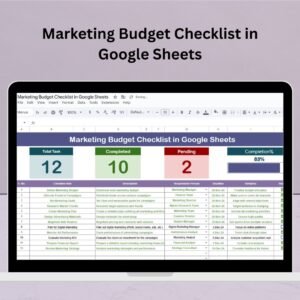
The Customer Feedback Checklist in Google Sheets is a valuable tool for businesses looking to gather and track customer feedback efficiently. Whether you’re running surveys, managing customer service responses, or simply looking to improve your products or services, this checklist helps you streamline the entire feedback collection process.
With real-time tracking, customizable features, and an easy-to-use interface, this checklist allows businesses to monitor customer satisfaction, identify areas for improvement, and take actionable steps to enhance customer experience. Perfect for customer support teams, product managers, and business owners, this tool enables you to keep track of feedback in a structured and organized way.

Key Features of the Customer Feedback Checklist in Google Sheets:
📊 Comprehensive Feedback Tracking
Collect and monitor feedback across multiple customer touchpoints, including surveys, emails, and service interactions. Track positive and negative feedback to understand customer sentiment.
📈 Real-Time Data Updates
Track customer feedback in real time, with automatic updates when new data is entered, helping you identify emerging trends quickly.
🎯 Feedback Categorization
Organize feedback by categories such as product quality, customer service, pricing, and delivery to identify specific areas needing attention or improvement.
🛠 Customizable Inputs
Easily input feedback data, including customer names, feedback scores, comments, and action items. Customize the checklist to align with your business’s specific feedback categories and processes.
🔔 Conditional Formatting Alerts
Get real-time alerts for negative feedback or issues that require immediate attention. Color-coded indicators help highlight urgent feedback to prioritize customer concerns.
📅 Month-to-Date (MTD) and Year-to-Date (YTD) Tracking
Track and compare customer feedback across time periods to measure progress, monitor improvements, and assess customer satisfaction trends.
🚀 Why You’ll Love the Customer Feedback Checklist in Google Sheets:
✅ Track Customer Satisfaction – Monitor feedback from surveys and interactions to gauge customer satisfaction levels and make informed decisions.
✅ Improve Products and Services – Identify recurring issues or trends in feedback that highlight areas for product or service improvements.
✅ Streamline Feedback Collection – Easily input and track feedback data from various sources in one central location.
✅ Prioritize Customer Concerns – Use real-time alerts to prioritize and address urgent customer feedback, ensuring that no concerns go unnoticed.
✅ User-Friendly Interface – Designed to be simple and intuitive, making it easy for your team to manage customer feedback without any technical skills.
What’s Inside the Customer Feedback Checklist in Google Sheets:
- Feedback Categorization: Organize feedback into categories such as product quality, service, delivery, and pricing for easy analysis.
- Customer Sentiment Tracking: Track positive, neutral, and negative feedback to understand overall customer sentiment.
- Feedback Scores: Record feedback scores (e.g., 1-5 scale) and analyze trends to gauge satisfaction levels.
- Action Items: Create follow-up actions for customer feedback, ensuring that every concern is addressed in a timely manner.
- Time-Based Tracking: Monitor feedback over different periods (MTD, YTD) to measure improvements and changes in customer satisfaction.
How to Use the Customer Feedback Checklist in Google Sheets:
1️⃣ Download the Template – Gain instant access to the Google Sheets checklist template upon purchase.
2️⃣ Input Customer Feedback – Enter feedback data including customer names, comments, satisfaction scores, and categories into the provided fields.
3️⃣ Categorize Feedback – Organize feedback by key categories to easily identify trends and focus on areas needing attention.
4️⃣ Set Action Items – Assign follow-up actions to team members and monitor progress on addressing customer concerns.
5️⃣ Generate Reports – Use the checklist to generate reports and track customer satisfaction trends for internal reviews or management meetings.
Who Can Benefit from the Customer Feedback Checklist in Google Sheets:
- Customer Support Teams
- Product Managers
- Business Owners
- Marketing Teams
- Sales Teams
- Service Providers
- Retailers
The Customer Feedback Checklist in Google Sheets is the perfect solution for businesses looking to track and analyze customer feedback efficiently, improving customer satisfaction and driving continuous improvement.
Click here to read the Detailed blog post
https://neotechnavigators.com/customer-feedback-checklist-in-google-sheets/
Visit our YouTube channel to learn step-by-step video tutorials
Youtube.com/@PKAnExcelExpert
Watch the step-by-step video Demo:
Compatibility and Requirements
- Works in Google Sheets with a free Google account and a web browser. Nothing to install.
- New to Google Sheets? Google’s guide How to use Google Sheets covers the basics of entering and editing data.
- Share the file with your support or product team so everyone logs feedback in the same copy.
Frequently Asked Questions
What can I record in the Customer Feedback Checklist?
Customer names, feedback scores, comments, feedback categories and follow-up action items. You can also mark feedback as positive, neutral or negative.
Which feedback categories are included?
The checklist groups feedback by product quality, customer service, pricing and delivery. You can change these to match your own feedback categories.
How does it flag urgent feedback?
Conditional formatting colors negative feedback and issues that need attention, so the urgent items stand out from the rest.
Can I compare feedback across time periods?
Yes. It tracks feedback month to date (MTD) and year to date (YTD), so you can see how satisfaction changes over time.
Is there an Excel version?
Yes, the Customer Feedback Checklist Template in Excel covers the same checklist for teams that work in Excel.
Related Customer Feedback Templates
- Customer Feedback Tracker in Google Sheets: log each piece of feedback with its status in more detail.
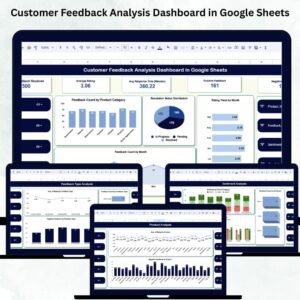
- Customer Feedback Analysis Dashboard in Google Sheets: charts that summarize feedback trends.
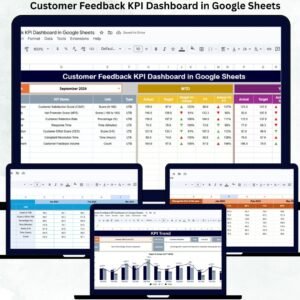
- Customer Feedback KPI Dashboard in Google Sheets: track feedback KPIs against monthly targets.
- Customer Feedback Checklist Template in Excel: the same checklist for Excel users.
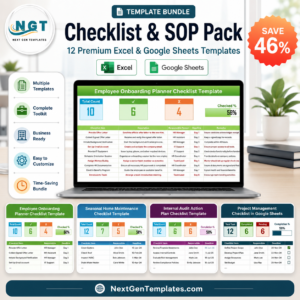
- Checklist & SOP Pack: 12 Excel and Google Sheets checklist templates in one bundle.
Browse all Google Sheets checklist templates or the Google Sheets sales and marketing templates.







Reviews
There are no reviews yet.