


The best Rippling alternative in Excel or Google Sheets is a one-time HR and IT asset template stack that covers onboarding, people reporting and device tracking without a per-employee subscription. Our top pick is the Employee Onboarding Tracker in Excel ($6.99, paid once), which replaces Rippling’s onboarding workflow for less than one seat-month.
Last updated: August 2026
Related guide: If it is project work rather than people admin you are moving off, see Monday.com alternatives — 8 work management templates in Excel & Sheets. If payroll filing is your reason for leaving, start with Gusto alternatives — 6 payroll templates in Excel & Sheets.
Key takeaways
- Rippling publishes almost nothing: the platform “starts at $8 per user per month” plus a flat monthly base fee that its own pages give as $35 in one place and $40 in another. Every module beyond that is quoted by sales, so you cannot price a Rippling stack from the website.
- Third-party 2026 pricing guides put a working HR + payroll configuration at roughly $25 to $50 per employee per month — about $9,000 a year for 25 people at the midpoint.
- All six templates in this guide are one-time purchases from $1.99 to $17.99. Bought together they cost $55.94 once — less than a 25-person company pays for a single month on Rippling’s advertised platform floor of $235.
- Best overall is the Employee Onboarding Tracker in Excel ($6.99); best value is the Employee Onboarding Checklist Template in Excel ($1.99).
- A spreadsheet stack does not run payroll, file taxes or push MDM policies to a laptop. We say exactly where Rippling still wins in the honest-limits section.
 Launch offer
SUMIFS, XLOOKUP, FILTER, LAMBDA and checking AI-written formulas, with real business projects. 11h 47m of video by PK, with practice files, quizzes and a capstone.
What does Rippling actually cost in 2026?
Rippling is a strong product — one system of record for HR, payroll, benefits, devices and app access is genuinely useful. The pricing, though, is the reason most small teams start looking.
1. The published price is one number, and it is the smallest one. On the official Rippling pricing page the company quotes a starting figure of about $8 per user per month for the core platform and then routes you to a sales conversation. That per-user figure is not the whole floor either: Rippling also charges a flat monthly base fee, and its own materials give that number as $35 on one page and $40 on another. Taking the lower one, a 25-person company starts at $8 × 25 + $35 = $235 a month, or $2,820 a year, for the platform alone — no payroll, no IT management. There is no full rate card. Unlike Pipedrive or Monday.com, you cannot open a pricing page, count your seats and know your bill. That opacity is itself a fact worth knowing before you commit: your renewal number is negotiated, not listed.
2. Modules are priced separately and stack on top of the platform. Payroll, benefits administration, time and attendance, device management, app management and recruiting are each their own line item, added to the platform fee rather than included in it. Independent 2026 pricing guides report device management landing near $8 per user per month and app management near $7, with IT management overall quoted anywhere from $5 to $20 per employee per month depending on the bundle. The same guides put a realistic HR-plus-payroll configuration at $25 to $50 per employee per month. At 25 employees and $30 PEPM that is $750 a month, or about $9,000 a year, renewing forever.
3. Minimums, annual terms and unused modules. Reviewers consistently report a five-employee minimum and a one-year commitment, which means a six-person company cannot simply scale down mid-year when a hire does not work out. And most small teams use a fraction of what they buy: an onboarding checklist, a headcount report, a list of who has which laptop. Paying enterprise HCM rates to run three artefacts is the classic churn trigger.
4. Admin overhead does not disappear. Someone still owns the system: seat management, approval chains, workflow rules, re-training every new hire on where things live. For a team of ten, that internal cost frequently exceeds the licence.
A template stack inverts all four. You pay once, you own the file, every formula is visible, and there is no renewal date in your calendar. The trade-off is real and we are blunt about it further down — but for teams under about 30 people who do not need automated provisioning, the maths is lopsided.
Rippling module vs the NGT template that covers it
Here is the head-to-head. On the left, what a Rippling contract charges for; on the right, the template that does the same job and its one-time price.
| What Rippling charges for | NGT template that covers it | One-time price |
|---|---|---|
| Onboarding workflows & new-hire tasks | Employee Onboarding Tracker in Excel | $6.99 |
| Cloud onboarding for distributed teams | Employee Onboarding Tracker in Google Sheets | $6.99 |
| IT device inventory & asset lifecycle | IT Asset Management Dashboard in Excel | $17.99 |
| Shared device register & assignment log | IT Asset Management Dashboard in Google Sheets | $9.99 |
| HR analytics, headcount & turnover reporting | HR KPI Dashboard in Power BI | $11.99 |
| Compliance checklists for new hires | Employee Onboarding Checklist Template in Excel | $1.99 |
| Payroll processing & tax filing | Not covered — keep a payroll provider | — |
| Automated MDM & app provisioning | Not covered — keep an MDM tool | — |
Rippling alternative templates compared
Every template in this guide side by side. Two rows are flagged: one best overall and one best value.
| Template | Format | Best for | Price |
|---|---|---|---|
| Employee Onboarding Tracker (Best overall) | Excel VBA | Running the whole new-hire journey in one file | $6.99 |
| Employee Onboarding Tracker | Google Sheets | Remote and multi-manager onboarding | $6.99 |
| IT Asset Management Dashboard | Excel | Device inventory, depreciation and lifecycle | $17.99 |
| IT Asset Management Dashboard | Google Sheets | A shared, always-current device register | $9.99 |
| HR KPI Dashboard | Power BI | Headcount, turnover and cost-per-hire reporting | $11.99 |
| Employee Onboarding Checklist (Best value) | Excel | Day-one compliance without any setup | $1.99 |
How we picked these
We searched the NextGenTemplates catalogue of roughly 6,900 published products for HR, onboarding, people-analytics and IT asset templates in Excel, Google Sheets and Power BI, then filtered to the ones that reproduce the jobs small teams actually buy Rippling for: structured onboarding, a defensible people report, and a device register that survives an audit. We excluded single-industry HR dashboards that only fit one vertical, files without editable formulas, and anything that implied it could process payroll — because it cannot. Every template below is a paid, one-time product with visible logic you can adapt, covering all three formats so you can match the tool your team already opens every day.
The 6 best Rippling alternative templates for 2026
1. Employee Onboarding Tracker in Excel — best overall
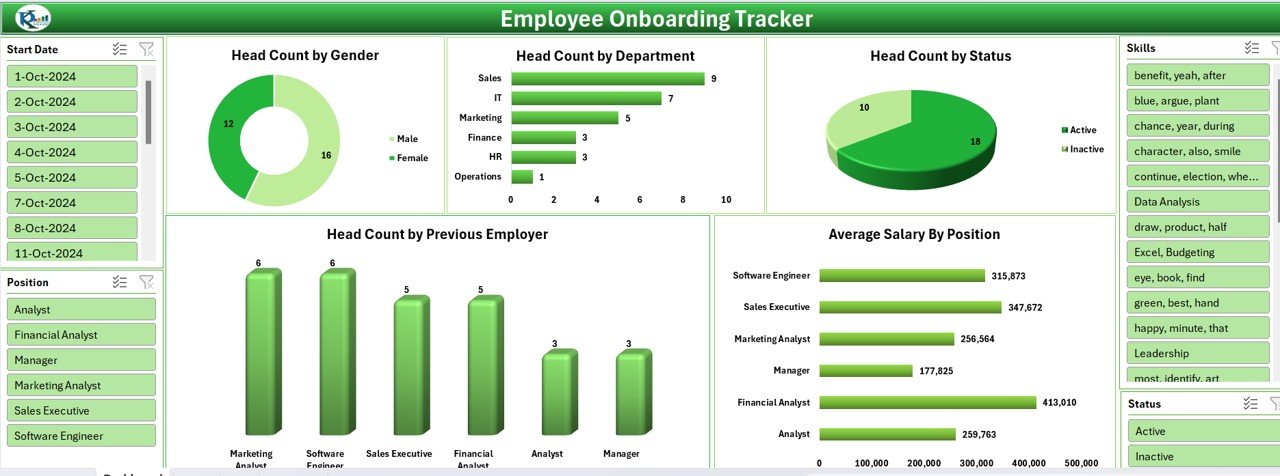
This is the closest single-file substitute for the part of Rippling most small teams genuinely use: getting a new hire from offer letter to productive without anything falling through the cracks. It is a VBA-assisted Excel tracker with a data-entry form, per-hire task status and a progress view.
Who it is for: an HR lead or office manager at a 5-to-50-person company who wants Rippling’s onboarding discipline without an HRIS contract.
What is inside:
- New-hire register with role, start date, manager and department
- Task-level onboarding checklist per employee with owner and due date
- Status roll-up showing completion percentage by hire and by stage
- Entry form and navigation buttons so non-Excel staff can use it safely
Concrete use: a company hiring 24 people a year runs each one through a 22-task sequence and can prove at any moment which three tasks are overdue. Onboarding a single hire typically touches IT setup, payroll forms, policy sign-off and a 30/60/90 review — four owners who otherwise coordinate over chat. If you want the lookup logic behind trackers like this, our guide to INDEX MATCH vs VLOOKUP vs XLOOKUP with HR tracker examples walks through it.
Best for: the single most complete Rippling-to-spreadsheet swap for onboarding. $6.99 — view the template.
2. Employee Onboarding Tracker in Google Sheets
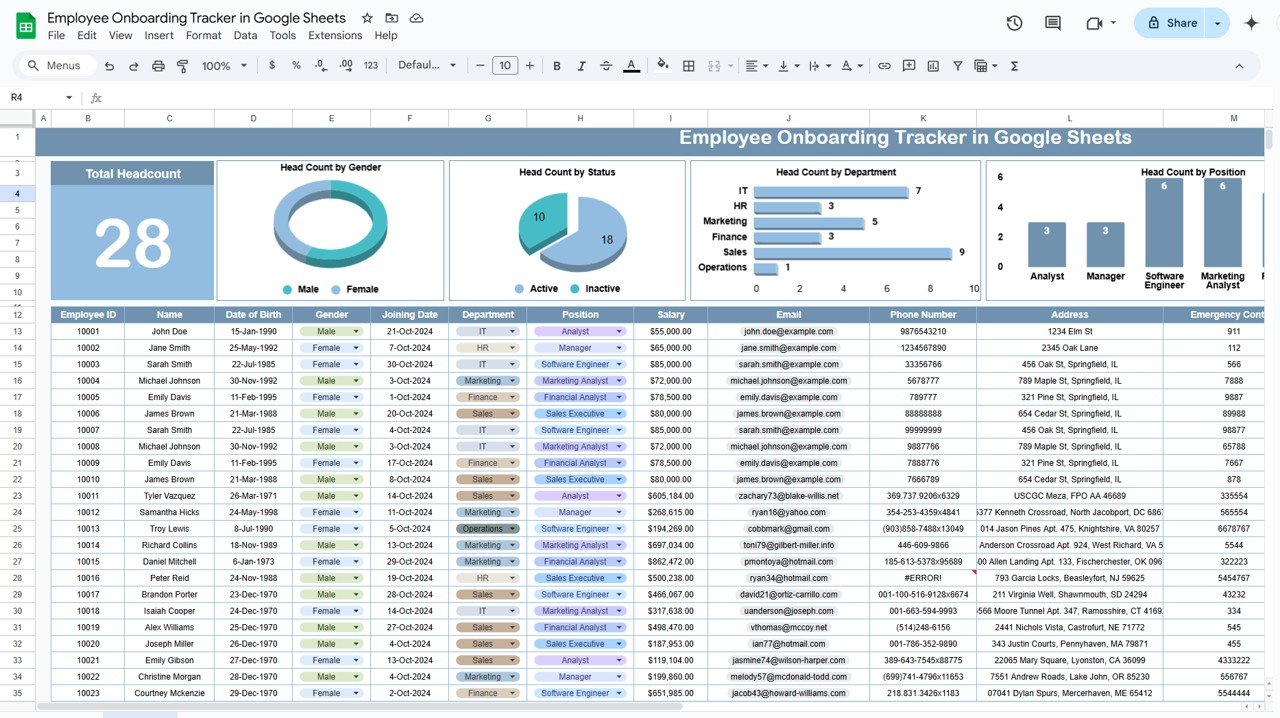
The same onboarding model, cloud-native. This is the version to buy if onboarding is a relay race between a recruiter, a hiring manager and whoever sets up the laptop — three people who are rarely in the same building, let alone the same file.
Who it is for: remote-first and hybrid teams already living in Google Workspace, and anyone who refuses to email spreadsheet versions around.
What is inside:
- Shared onboarding register with per-person task lists
- Dropdown status fields and conditional formatting for overdue items
- Summary tab with completion rates by department and by month
- Link-level permissions — edit for HR, view for managers
Concrete use: a 30-person agency onboarding four hires in one week gives each manager view access and one link. Nobody asks “which version is current” because there is only one. Google Sheets itself costs nothing, so the $6.99 file is the entire spend — against a Rippling platform fee alone of about $240 a month at 30 seats. If you are weighing formats before you buy, read Excel vs Google Sheets vs Power BI for HR dashboards.
Best for: distributed teams where three people share one onboarding process. $6.99 — view the template.
3. IT Asset Management Dashboard in Excel
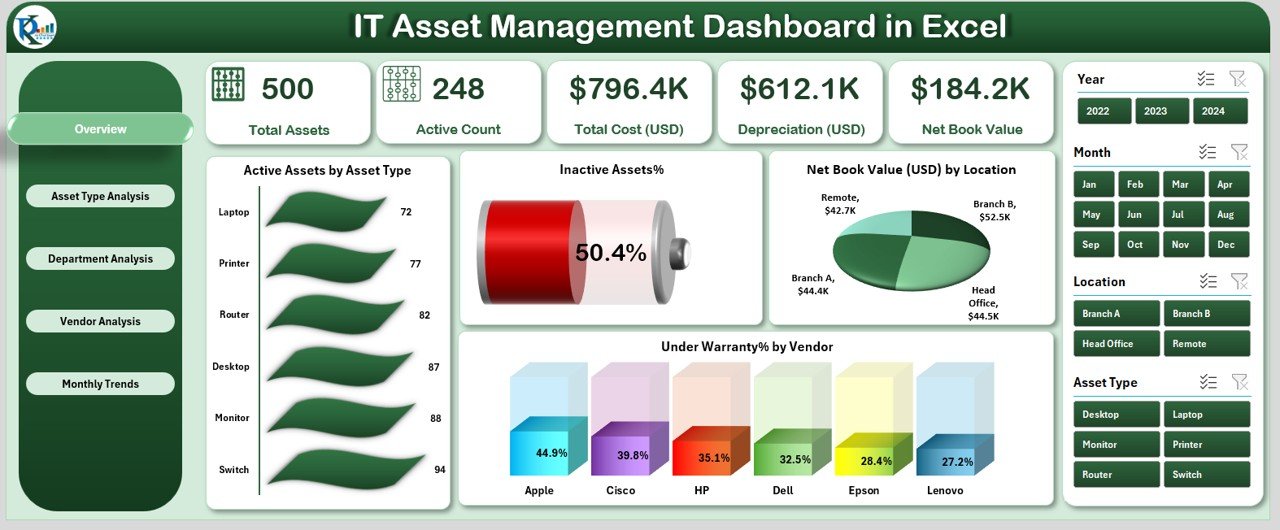
This is the template that covers the half of Rippling people forget to budget for: knowing which laptop, phone, monitor and licence belongs to which employee, what it cost, and what it is worth now. Rippling charges for IT management as a separate module; this is a one-time file.
Who it is for: the office manager or IT generalist who currently keeps the device list in their head or in a tab called “laptops final v3”.
What is inside:
- Asset register with type, serial, purchase cost, assignee and location
- KPI cards for total assets, active assets, total cost, depreciation and net book value
- Charts for assets by type, assets by location and warranty status
- Slicer-driven filtering so you can isolate one department instantly
Concrete use: a firm with 500 tracked assets and 248 currently active can show total cost, accumulated depreciation and net book value on one screen — the exact three figures an auditor or an insurer asks for. Offboarding also stops leaking money: the register tells you what to reclaim on someone’s last day. See also our roundup of IT asset management dashboards.
Best for: replacing Rippling’s IT inventory reporting outright. $17.99 — view the template.
4. IT Asset Management Dashboard in Google Sheets
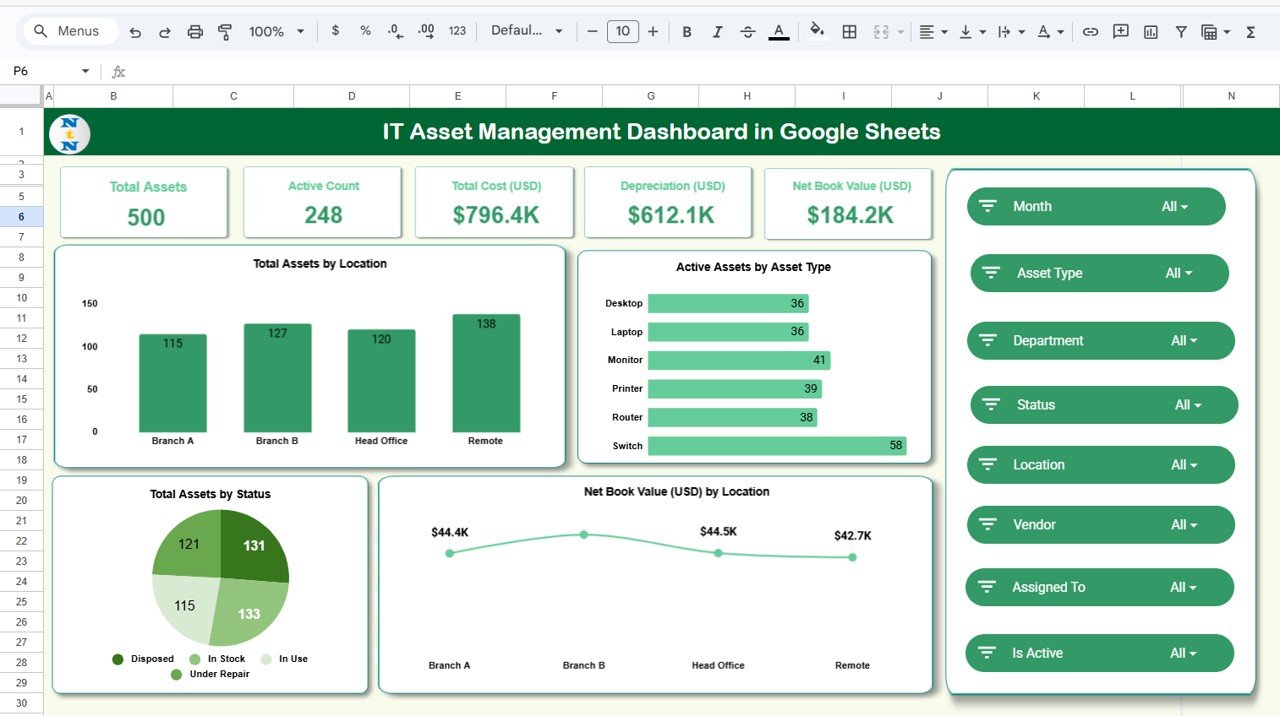
The cloud twin of the Excel asset dashboard, and $8 cheaper. Buy this one when more than one person issues or returns equipment, because the failure mode of asset tracking is never the maths — it is a device handed over while the file was closed on someone else’s laptop.
Who it is for: startups and agencies where ops, IT and the office lead all touch the same equipment pool.
What is inside:
- Live asset register with assignment history and status dropdowns
- Dashboard tab summarising asset count, value and category mix
- Filter views per location or per owner without duplicating the sheet
- Warranty and renewal dates with conditional highlighting
Concrete use: a 40-person company issuing a laptop, monitor, dock and phone to every hire is tracking 160 items before it tracks anything else. One shared link means the register is updated at the moment of handover, not reconstructed a quarter later. For broader fixed-asset coverage beyond IT, see our fixed asset tracking template roundup.
Best for: shared, always-current device registers. $9.99 — view the template.
5. HR KPI Dashboard in Power BI
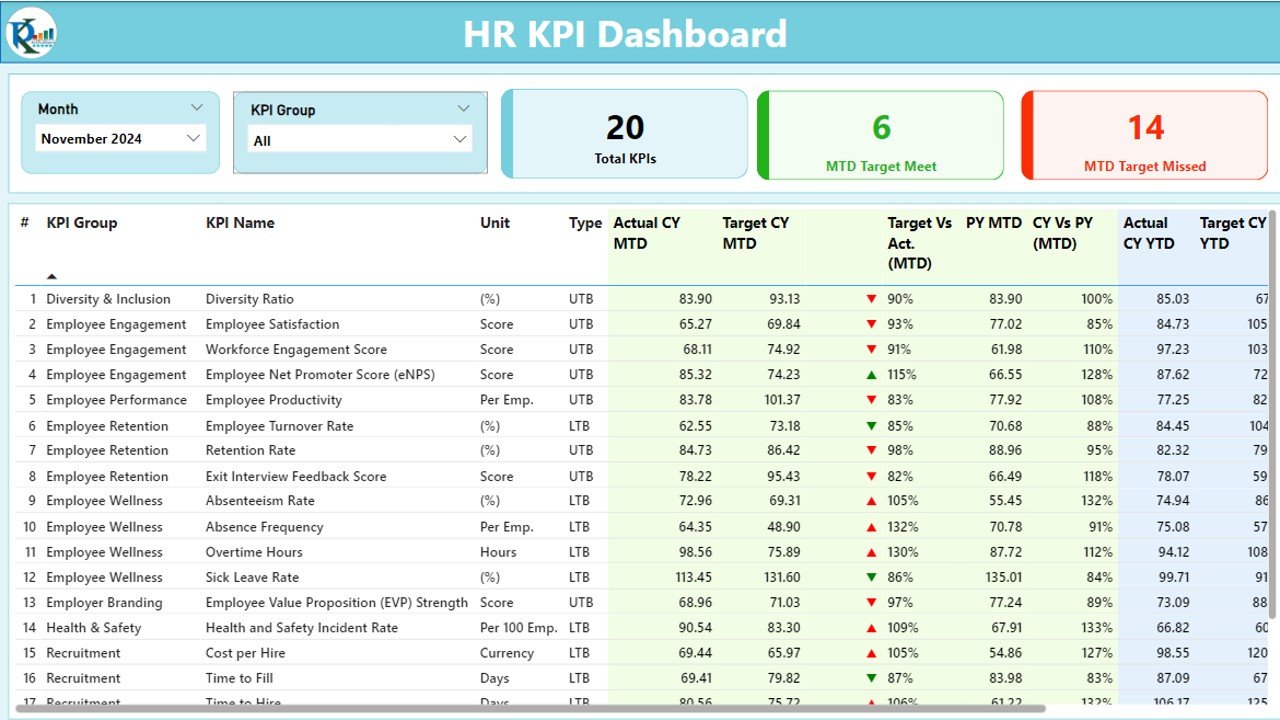
Rippling’s real pull for a founder is not data entry, it is the report at the end — headcount, turnover, time-to-hire, cost-per-hire. This Power BI file gives you that layer over data you already own, with no HRIS underneath it.
Who it is for: a growing company that has outgrown a single sheet and wants a board-ready people report it can refresh monthly.
What is inside:
- KPI tiles with actual-vs-target and month-over-month deltas
- Standard HR measures: headcount, attrition rate, time-to-fill, absence rate
- Trend and drill-down pages by department, location and job level
- Editable DAX so you can define turnover the way your board defines it
Concrete use: a 25-person company losing four people a year is at 16% annual turnover — a number worth watching against a benchmark, not discovering at year end. Because it refreshes from a folder or an Excel source, the monthly reporting cycle drops to minutes. Compare it against the wider field in our 10 best HR dashboard templates in Excel for 2026.
Best for: people analytics without a per-employee subscription. $11.99 — view the template.
6. Employee Onboarding Checklist Template in Excel — best value
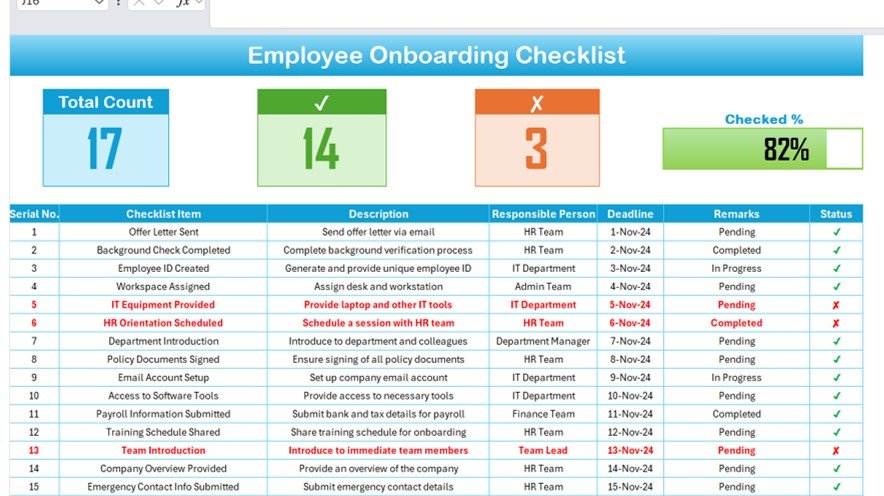
At $1.99 this is the cheapest way to stop onboarding from being improvised. It is a single structured checklist covering pre-boarding, day one, week one and the first 90 days, with owners and sign-off columns.
Who it is for: a company hiring its first few employees, or any team that wants a standard sequence before it invests in a tracker.
What is inside:
- Phased task list from offer acceptance through the 90-day review
- Owner, due-date and completion columns for accountability
- Documentation and compliance items grouped so nothing is missed
- Print-ready layout for managers who want it on paper
Concrete use: two hires a year does not justify an HRIS, but it absolutely justifies a repeatable list — contract signed, ID verified, payroll form submitted, equipment issued, systems access granted, policy acknowledged. At $1.99 it costs less than a coffee and less than six hours of Rippling’s platform fee for a single employee. Pair it with our recruitment and onboarding template set for the hiring stages that come before it.
Best for: day-one compliance with zero setup. $1.99 — view the template.
How to choose between them
Four questions decide it, in this order.
| If this is true | Buy this | Price |
|---|---|---|
| You hire fewer than three people a year | Employee Onboarding Checklist Template in Excel | $1.99 |
| You hire regularly and work in Excel | Employee Onboarding Tracker in Excel | $6.99 |
| Onboarding involves 3+ people in different places | Employee Onboarding Tracker in Google Sheets | $6.99 |
| You issue company laptops and phones | IT Asset Management Dashboard (Excel or Sheets) | $9.99–$17.99 |
| Someone asks you for headcount and turnover numbers | HR KPI Dashboard in Power BI | $11.99 |
The practical stack for most 10-to-40-person companies is three files: the Excel or Sheets onboarding tracker ($6.99), one IT asset dashboard ($9.99 or $17.99), and the HR KPI Dashboard ($11.99) once someone starts asking for numbers. That is $28.97 to $36.97 once. All six together are $55.94 — less than one month of the $235 platform floor for a 25-person company, before a single module is added.
If time and attendance is the gap rather than onboarding, our 8 attendance tracker templates that replace your HRIS covers that module specifically.
When a template is NOT the right answer
This is the section that matters most, so we will be blunt. Rippling is not only an HR system — it is a payroll engine, a device management platform and an identity provider. A spreadsheet stack replaces the record-keeping and the reporting. It does not replace the machinery underneath.
It does not run payroll. No template calculates statutory deductions, files quarterly returns, remits taxes to the correct jurisdictions or produces compliant pay slips at scale. If Rippling is your payroll provider, switching to spreadsheets is not a migration — it is choosing to file payroll taxes yourself or hire a bureau to do it. Keep a payroll provider. Use the templates for everything that sits around it.
It does not provision devices. Rippling’s IT module pushes MDM profiles, enforces disk encryption, installs software on a new Mac before it is unboxed, and remotely wipes a laptop when someone leaves. An asset dashboard records that a laptop exists and who has it. If you need to remotely lock a device tonight, you need MDM software, not a register.
It does not manage app access. Automatically creating a Slack, Google and GitHub account on day one, and revoking all three within a minute of termination, is a security control. Doing it from a checklist depends on a human remembering. For regulated environments or teams above roughly 50 people, that human dependency is the risk, and identity automation is worth paying for.
It has no permissions model or audit trail. Anyone with the file can edit any cell, including salary. Google Sheets gives you sharing controls and version history, which helps; neither gives you field-level permissions or a tamper-evident log. If you handle sensitive compensation or health data under a formal compliance obligation, that gap is real.
The honest cut-off: under about 30 employees, with payroll handled elsewhere and no regulatory audit requirement, a template stack is usually the better buy. Above roughly 50 employees, multi-country, or with a security review to pass, keep Rippling and spend the effort on configuring it properly instead.
Frequently asked questions
What is the best Rippling alternative in Excel?
The Employee Onboarding Tracker in Excel ($6.99) is the best Rippling alternative in Excel for most small teams. It reproduces the onboarding workflow small companies actually use Rippling for — task lists, owners, due dates and completion tracking per hire — in a single file you buy once, with no per-employee fee.
How much does Rippling cost in 2026?
Rippling’s core platform is advertised from about $8 per user per month, plus a flat monthly base fee its own pages give as $35 or $40. Everything else is quoted through sales. Independent 2026 guides report real HR-plus-payroll setups landing between $25 and $50 per employee per month.
Why does Rippling not publish full pricing?
Because it sells modular bundles rather than fixed plans. Your quote depends on which combination of HR, payroll, benefits, IT and recruiting modules you take and how many employees you have. The practical effect is that you cannot compare Rippling against a competitor without booking a demo first.
Can a spreadsheet replace an HRIS?
For record-keeping and reporting, yes. Onboarding, employee registers, device assignment, headcount and turnover all work well in Excel, Google Sheets or Power BI. What a spreadsheet cannot replace is payroll processing, automated device management, app provisioning and field-level permissions. Those need real software.
Does Rippling have a minimum number of employees?
Reviewers consistently report a five-employee minimum and a twelve-month commitment, so very small teams pay for seats they may not fill and cannot easily scale down mid-term. Confirm current terms directly with Rippling before signing, since minimums and contract lengths change between quotes.
What replaces Rippling’s IT device management?
For the inventory half, the IT Asset Management Dashboard in Excel ($17.99) or Google Sheets ($9.99) tracks devices, assignees, cost, depreciation and warranty dates. For the control half — remote lock, wipe and policy enforcement — you still need a dedicated MDM tool. A register is not a control.
How do I move my Rippling data into a template?
Export your employee list, onboarding tasks and asset inventory from Rippling as CSV, then paste the matching columns into each template’s input tab. Names, start dates, departments and serial numbers map directly. Dashboards recalculate automatically; Power BI files refresh from the source folder. Budget about two hours.
Is there a free Rippling alternative?
Google Sheets itself is free, so the only cost of the Sheets templates here is the one-time file — $6.99 for the onboarding tracker or $9.99 for the asset dashboard. Rippling has no permanent free tier. A paid-once template is typically cheaper than the first month of any Rippling contract.
Are one-time templates cheaper than Rippling over a year?
For small teams, overwhelmingly. Twenty-five employees at a mid-range $30 per employee per month is about $9,000 a year, renewed annually. All six templates in this guide cost $55.94 once, with no renewal, no seat count and no minimum. The gap widens every year you keep them.
Which template should I buy first?
Start with the Employee Onboarding Tracker in Excel ($6.99) if hiring is your bottleneck, or the IT Asset Management Dashboard in Google Sheets ($9.99) if untracked laptops are. Add the HR KPI Dashboard in Power BI ($11.99) once someone starts asking for headcount and turnover figures.
Get more HR and IT asset templates
Leaving Rippling is not about losing structure — it is about paying for it once. For less than one month of a small Rippling contract you can own the onboarding tracker, the device register and the people dashboard outright. Start with the Employee Onboarding Tracker in Excel ($6.99) if you live in Excel, the IT Asset Management Dashboard in Google Sheets ($9.99) if equipment is the mess, or take all six for $55.94. Browse the full range of HR dashboard templates in Excel to mix and match formats.
Prefer to see the templates in action first? Watch build walk-throughs and tutorials on our YouTube channel: youtube.com/@NextGenTemplates.
Related: Moving off another platform? See our HubSpot alternatives — 8 CRM & marketing templates in Excel & Sheets and our Asana alternatives — 8 project management templates. For HR platforms specifically, compare BambooHR alternatives — 8 HR templates in Excel & Sheets and Workday alternatives — 8 HR & workforce templates.