

Smartsheet alternatives in Excel and Google Sheets replace per-seat SaaS subscriptions with one-time template purchases. For most small teams, a $1.99–$14.99 spreadsheet template covers the Gantt scheduling, resource allocation and status reporting they actually use in Smartsheet — without the $9–$19 per user, per month billing that scales with headcount.
Last updated: August 2026
Key takeaways
- Smartsheet publishes Pro at about $9 per user/month and Business at about $19 per user/month (billed annually) — a 5-person team on Business runs roughly $1,140 a year.
- The best all-round Smartsheet alternative here is the Project Management Resource Allocation KPI Dashboard in Excel at a one-time $14.99.
- All 8 templates are one-time purchases between $1.99 and $14.99 with no seat limits and no renewal.
- Excel and Google Sheets already do the three things small teams use Smartsheet for: Gantt timelines, task tracking and dashboards.
- Smartsheet still wins for cross-team automation, permissioned workflows and 50+ user rollouts — we say exactly when below.
 Launch offer
SUMIFS, XLOOKUP, FILTER, LAMBDA and checking AI-written formulas, with real business projects. 11h 47m of video by PK, with practice files, quizzes and a capstone.
Smartsheet alternative templates compared
| Template | Format | Best for | Price |
|---|---|---|---|
| Project Management Resource Allocation KPI Dashboard (Best overall) | Excel | Capacity planning & status reporting | $14.99 |
| Project Gantt Chart in Google Sheets | Google Sheets | Cloud-shared project timelines | $12.99 |
| Pro Gantt Chart in Excel with data entry form | Excel (VBA) | Form-driven task entry | $9.99 |
| Weekly Project Plan (Gantt Chart) in Google Sheets | Google Sheets | Short sprints & weekly plans | $6.99 |
| Pro Gantt Chart Project Planner in Google Sheets | Google Sheets | Multi-phase planning | $4.99 |
| Project Plan Gantt Chart in Google Sheet (Best value) | Google Sheets | Simple free-to-share plans | $4.99 |
| Power Gantt Chart in Excel | Excel | Offline Excel-only teams | $4.99 |
| Project Management Schedule Checklist in Excel | Excel | Milestone & deliverable tracking | $1.99 |
Why small teams churn off Smartsheet
Smartsheet is a capable work-management platform, but three costs push small teams to look for an alternative. Its own published pricing page lists the Pro plan at roughly $9 per user/month and the Business plan at about $19 per user/month, both billed annually (verify current rates before you quote them).
1. Seat cost that scales with headcount. A 5-person team on the Business plan pays around $1,140 a year, every year. Add a few contractors and you are near $2,000 annually for what is, for many teams, a shared Gantt chart and a status view.
2. Unused modules. Most small teams touch grid view, a Gantt and a dashboard. Card view, proofing, WorkApps, Bridge automation and Control Center sit unused but are baked into the price you pay per seat.
3. Admin overhead. Sharing rules, permission tiers, licensed vs. unlicensed collaborators and annual renewals all need managing. A spreadsheet you own outright removes the renewal calendar and the seat math entirely.
Smartsheet feature vs. the template that covers it
| Smartsheet feature | NGT template that covers it | One-time price |
|---|---|---|
| Gantt view & project timeline | Project Gantt Chart in Google Sheets | $12.99 |
| Resource management / capacity | Project Management Resource Allocation KPI Dashboard | $14.99 |
| Grid data entry & forms | Pro Gantt Chart in Excel with data entry form | $9.99 |
| Dashboards & status roll-up | Resource Allocation KPI Dashboard | $14.99 |
| Task & deliverable checklists | Project Management Schedule Checklist in Excel | $1.99 |
| Weekly / sprint planning | Weekly Project Plan (Gantt Chart) in Google Sheets | $6.99 |
How we picked these
We searched the full NextGenTemplates catalog of Excel, Google Sheets and Power BI products for tools that map to how small teams actually use Smartsheet: project scheduling, resource planning, task tracking and status reporting. We prioritized templates with real Gantt engines, formula-driven dashboards and editable data tables over static planners.
We excluded single-industry dashboards and anything without a genuine project-management use case, even where it carried a similar name. Every template below is a paid, one-time purchase with no seat limits, priced between $1.99 and $14.99, so the whole shortlist costs less than one month of a single Smartsheet Business seat.
The 8 best Smartsheet alternative templates for 2026
1. Project Management Resource Allocation KPI Dashboard in Excel — best overall

This is the closest single-file answer to Smartsheet’s dashboard and resource-management modules combined. It tracks who is assigned to what, how loaded each person is, and how the project is tracking against plan — the exact reporting layer teams pay Business-tier seats for.
Who it is for: project leads and PMOs who need capacity planning and a status roll-up in one place.
- Resource allocation view showing utilization per team member
- KPI cards for budget, progress and workload
- Formula-driven charts that refresh as you edit the data table
- Works fully offline in desktop Excel — no license server
Reassign a task and the utilization bars recalculate instantly; flag an over-allocated resource before a 3-week slip becomes a 6-week one; export the dashboard as a PDF for a weekly steering call. It is the one template that replaces both Smartsheet’s dashboard and its resource-management add-on.
Price: $14.99 — get the Resource Allocation KPI Dashboard.
Best for: teams that need capacity planning plus reporting in a single owned file.
2. Project Gantt Chart in Google Sheets — best for cloud teams
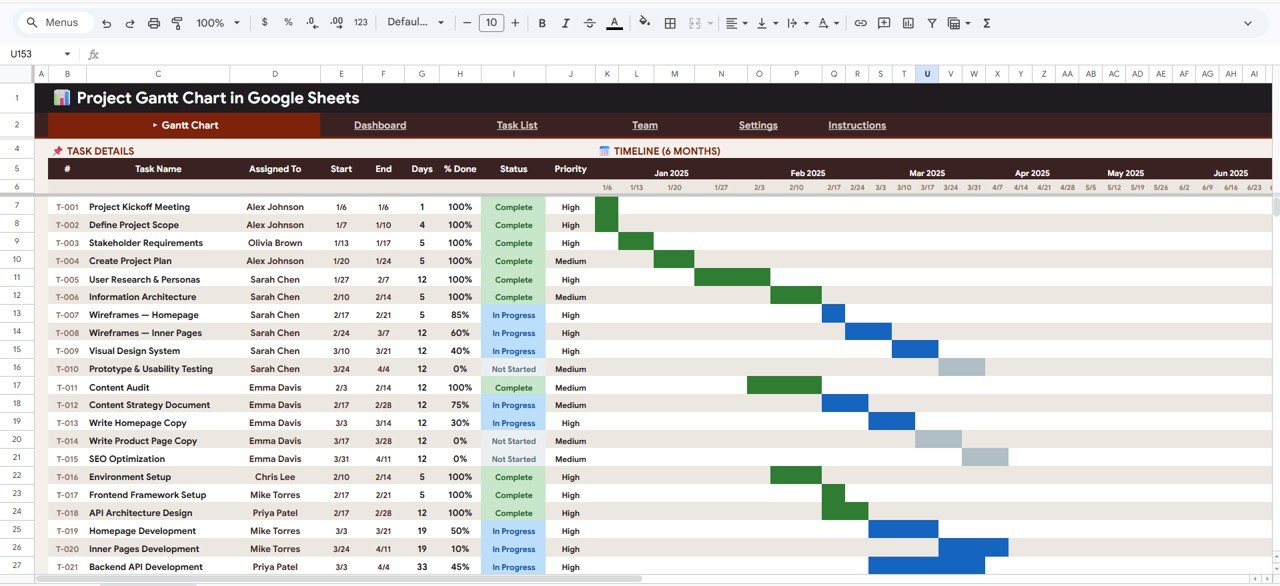
Smartsheet’s headline feature is its Gantt view, and this template delivers the same visual timeline in Google Sheets — shareable by link, editable by anyone you invite, with no per-seat charge for collaborators.
Who it is for: distributed teams that live in Google Workspace and want real-time co-editing.
- Auto-drawing Gantt bars driven by start and end dates
- Task, owner, duration and % complete columns
- Conditional formatting for status and overdue tasks
- Share view-only or edit with unlimited collaborators, free
Drop in 40 tasks and the timeline builds itself; share one link with a client instead of buying them a viewer seat; comment inline the way you would in Smartsheet’s grid. This is the direct swap for teams whose only real Smartsheet use is the schedule.
Price: $12.99 — get the Project Gantt Chart in Google Sheets.
Best for: Google Workspace teams replacing Smartsheet’s Gantt and sharing.
3. Pro Gantt Chart in Excel with data entry form — best for structured input
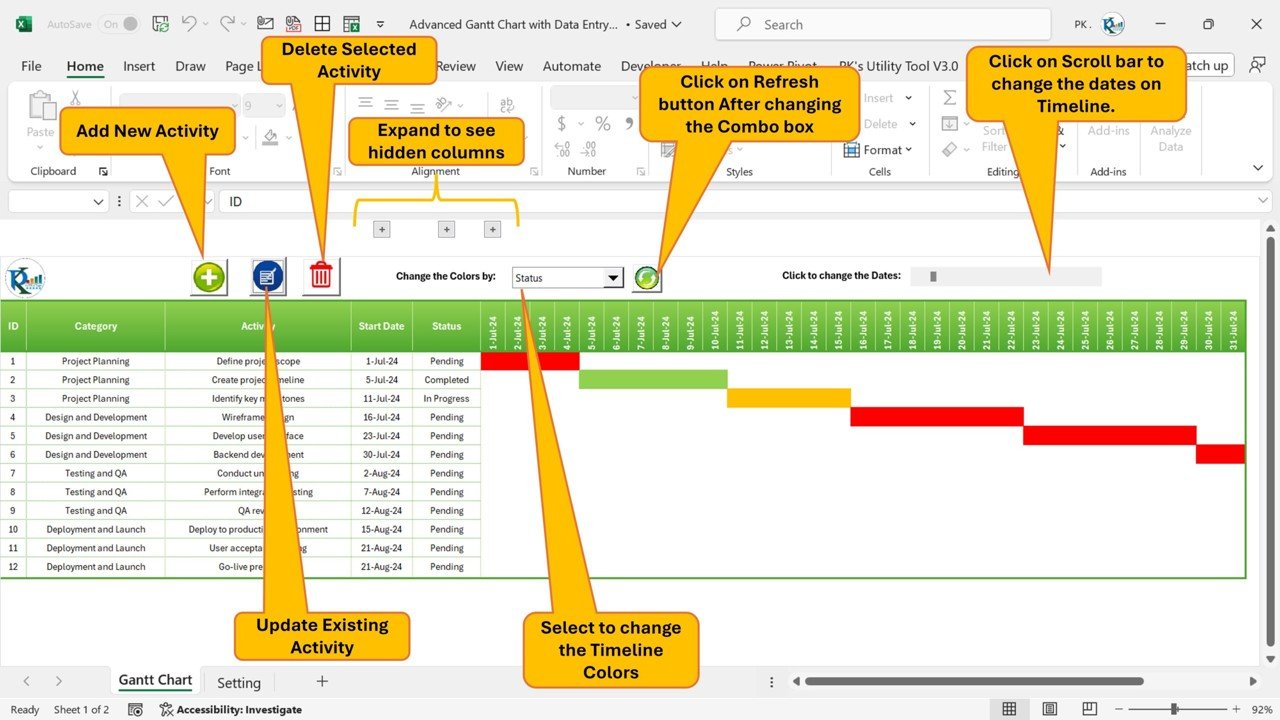
Smartsheet’s grid-plus-forms workflow is what this VBA-powered template reproduces: a guided data entry form feeds a live Gantt, so non-spreadsheet users add tasks without touching the underlying cells.
Who it is for: teams where several people log work but only one owns the file structure.
- Pop-up form for adding, editing and deleting tasks
- Automatic Gantt redraw on every entry
- Data validation to keep dates and statuses clean
- One-time macro-enabled Excel workbook
Hand the form to a coordinator who has never built a Gantt; prevent broken formulas by locking data entry to the form; keep an audit-friendly task list underneath. It closes the biggest gap people fear when leaving Smartsheet — messy manual spreadsheet entry.
Price: $9.99 — get the Pro Gantt Chart with data entry form.
Best for: mixed-skill teams that want Smartsheet-style guided input in Excel.
4. Weekly Project Plan (Gantt Chart) in Google Sheets — best for sprints
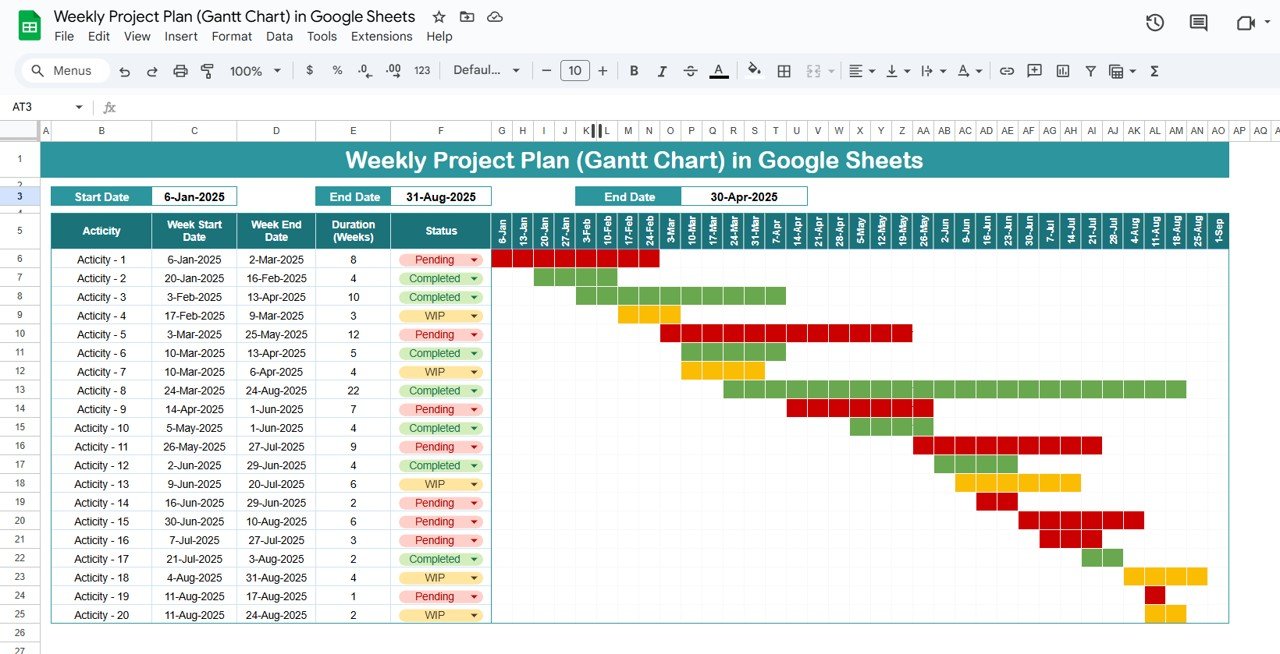
Not every project needs a 9-month timeline. This weekly-grain planner suits sprints, launches and short client engagements, giving you a tight Gantt at a day-by-day resolution inside Google Sheets.
Who it is for: agile teams and agencies running one- to four-week cycles.
- Weekly and daily columns for fine-grained scheduling
- Owner and status tracking per task
- Cloud-shared and mobile-viewable
- Lightweight enough to spin up a new plan in minutes
Plan a two-week sprint on Monday and share it before standup; clone the tab for each new cycle; track blockers with conditional colors. It is the low-friction weekly view Smartsheet users rebuild constantly — here it is ready-made.
Price: $6.99 — get the Weekly Project Plan template.
Best for: sprint and launch planning on a weekly cadence.
5. Pro Gantt Chart Project Planner in Google Sheets — best for multi-phase work

For projects with phases, dependencies and milestones, this planner adds structure on top of a clean Google Sheets Gantt — the kind of multi-phase view teams graduate to inside Smartsheet.
Who it is for: project managers running structured, multi-stage initiatives.
- Phase grouping with roll-up timelines
- Milestone markers and % complete tracking
- Editable in the browser, shareable with the team
- Professional layout ready for client review
Group tasks under Design, Build and Launch phases; mark go-live milestones; present the plan to stakeholders without exporting to another tool. It gives structure without the seat cost of Smartsheet’s higher tiers.
Price: $4.99 — get the Pro Gantt Chart Project Planner.
Best for: multi-phase projects that need milestones and grouping.
6. Project Plan Gantt Chart in Google Sheet — best value

The simplest full Gantt on the list and the best value at $4.99: a clean project plan you can share for free with the whole team, ideal for anyone testing life after Smartsheet before committing to a bigger template.
Who it is for: small teams and freelancers who want a no-frills shared plan.
- Date-driven Gantt bars with minimal setup
- Task, owner and status columns
- Free unlimited sharing in Google Sheets
- Duplicate per project as needed
Stand up a plan in ten minutes; share it with a client at zero cost; keep a copy per engagement. For the price of a coffee it removes the single most common reason people keep paying for Smartsheet — a shared timeline.
Price: $4.99 — get the Project Plan Gantt Chart.
Best for: the cheapest reliable shared Gantt in the cloud.
7. Power Gantt Chart in Excel — best for offline Excel teams
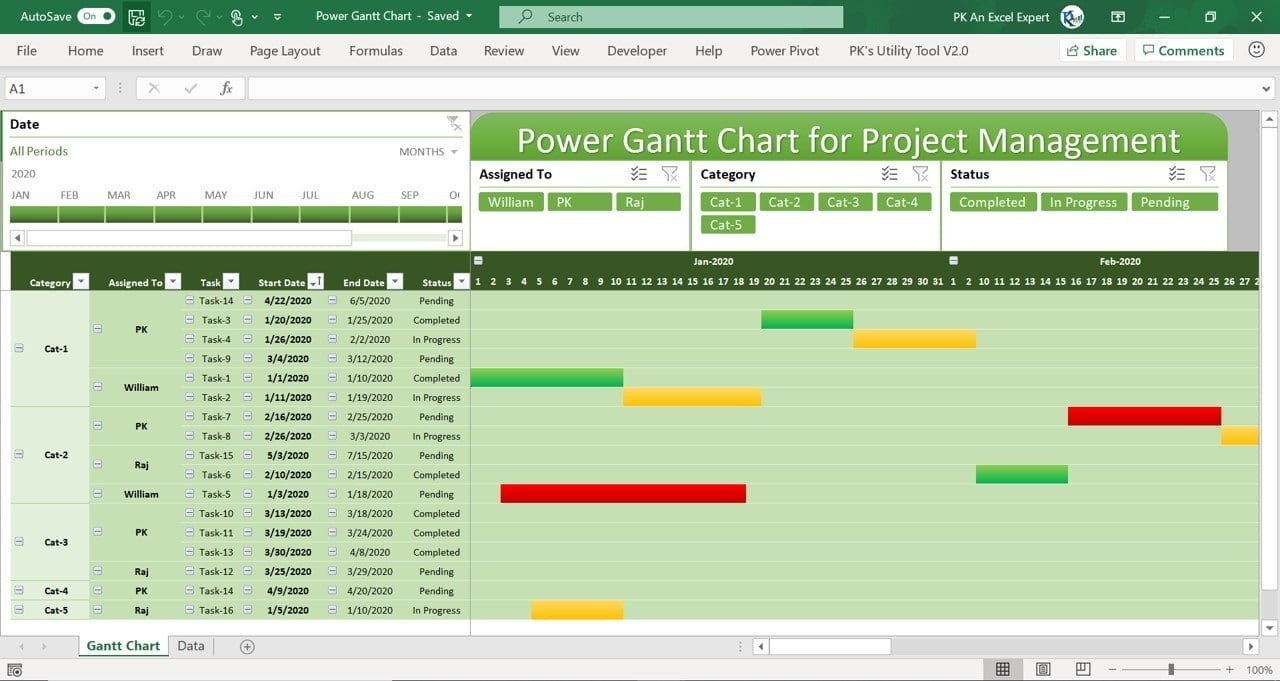
For teams that cannot use cloud tools — regulated industries, air-gapped environments or simple Excel-only preference — this desktop Gantt gives you the full timeline with zero connectivity or subscription.
Who it is for: Excel-first teams and anyone with cloud restrictions.
- Fully offline Excel Gantt engine
- Automatic bars from start and finish dates
- Status and progress tracking columns
- Print- and PDF-ready layout
Run it on a locked-down laptop with no internet; keep sensitive project data on-premises; print a wall chart for the project room. Smartsheet requires the cloud — this does not, and never renews.
Price: $4.99 — get the Power Gantt Chart in Excel.
Best for: offline, on-premises or Excel-only project teams.
8. Project Management Schedule Checklist in Excel — best for milestones

At $1.99 this is the lowest-risk way to leave Smartsheet: a structured schedule and deliverable checklist that tracks milestones, owners and due dates without any Gantt complexity.
Who it is for: teams that mainly need a tracked task and milestone list.
- Milestone and deliverable rows with due dates
- Owner and completion-status columns
- Simple, print-friendly Excel layout
- Ready to use in minutes
Track a launch checklist of 30 deliverables; mark items complete as they close; hand it to a stakeholder as a one-page status. It covers the task-tracking half of Smartsheet for the price of a text message.
Price: $1.99 — get the Schedule Checklist.
Best for: milestone and deliverable tracking without a Gantt.
Skip the seat math. The whole shortlist — every template above — costs less than one month of a single Smartsheet Business seat. Start with the Resource Allocation KPI Dashboard ($14.99) for reporting or the Project Gantt Chart in Google Sheets ($12.99) for scheduling.
How to choose between them
Use this quick decision path:
- You need reporting and capacity planning → Resource Allocation KPI Dashboard ($14.99).
- Your team lives in Google Workspace → Project Gantt Chart in Google Sheets ($12.99).
- Non-technical people log tasks → Pro Gantt Chart in Excel with data entry form ($9.99).
- You run short sprints → Weekly Project Plan in Google Sheets ($6.99).
- You want the cheapest shared Gantt → Project Plan Gantt Chart in Google Sheet ($4.99).
- You cannot use the cloud → Power Gantt Chart in Excel ($4.99).
- You only track milestones → Schedule Checklist in Excel ($1.99).
When Smartsheet is still the right call
A spreadsheet template is not always the honest answer. Keep or choose Smartsheet when:
- You need cross-team automation. Smartsheet’s automated workflows, approvals and alerts across many sheets are genuinely hard to replicate in a single spreadsheet.
- You manage granular permissions. Row-level access, admin controls and licensed-user governance across 50+ people are what enterprise tiers are built for.
- You run connected portfolios. Control Center, WorkApps and Bridge tie dozens of projects into rolled-up portfolios — a template will not do that at scale.
- You need audit trails and compliance. Regulated environments that require activity logs, retention and SSO should stay on a governed platform.
If two or more of these describe you, Smartsheet earns its seat cost. If none do, you are likely paying for infrastructure you never touch — and a one-time template is the cheaper, cleaner fit. The same logic applies to other SaaS tools; see our Monday.com alternatives and Asana alternatives for the project-management side, and the Salesforce alternatives, HubSpot alternatives and Pipedrive alternatives for the sales side.
Frequently asked questions
What is the best free Smartsheet alternative?
The base Google Sheets Gantt templates are the closest to free once you own them: a one-time $4.99 for the Project Plan Gantt Chart, then unlimited free sharing with your whole team. There is no per-seat charge for collaborators, unlike Smartsheet’s licensed-user model.
How much does Smartsheet cost per user?
Smartsheet’s published pricing lists the Pro plan at roughly $9 per user/month and the Business plan at about $19 per user/month, both billed annually. Enterprise pricing is custom. Always confirm the current rates on Smartsheet’s own pricing page before budgeting, as tiers change.
Can Excel or Google Sheets really replace Smartsheet?
For the core work most small teams do — Gantt scheduling, task tracking and status dashboards — yes. Excel and Google Sheets templates cover those directly. What they do not replace is cross-team automation, granular permissions and portfolio management, which are Smartsheet’s enterprise strengths.
Do these templates have per-user fees?
No. Every template here is a one-time purchase between $1.99 and $14.99. You own the file outright, add as many collaborators as you like (free in Google Sheets), and never pay a renewal. That is the core saving versus Smartsheet’s annual per-seat billing.
Which template is closest to Smartsheet’s dashboard?
The Project Management Resource Allocation KPI Dashboard in Excel ($14.99) is the closest match. It combines resource capacity views with KPI cards and status charts that refresh from your data table, reproducing the reporting layer teams pay Smartsheet’s higher tiers to unlock.
Can I share these with clients like Smartsheet?
Yes. The Google Sheets templates share by link with view or edit access to unlimited people at no extra cost. The Excel templates can be shared as files or through OneDrive/SharePoint. Neither requires buying the recipient a paid viewer seat the way Smartsheet does.
Are the templates Excel or Google Sheets?
Both. Five of the eight are Google Sheets templates for cloud-first, co-editing teams, and three are Excel templates (one with a VBA data entry form) for offline or Excel-first teams. You can pick the format that matches how your team already works.
Do I need macros or coding skills?
No. Seven of the eight templates are formula-driven and need no code. Only the Pro Gantt Chart in Excel uses a VBA data entry form, and that is designed to make input easier, not harder — you fill a simple form and the Gantt updates itself.
What happens to my data when I stop paying Smartsheet?
When a Smartsheet subscription lapses, editing access ends and sheets can become read-only or inaccessible. A one-time template lives in your own Excel or Google Drive account permanently, so your project data stays fully editable whether or not you ever buy anything again.
Is a spreadsheet template secure enough for project data?
For most small teams, yes. Excel files stay on your own devices or private cloud storage, and Google Sheets uses your Workspace permissions. For regulated data needing audit logs, SSO and retention policies, a governed platform like Smartsheet remains the safer choice.
Get more Smartsheet alternative templates
Replace your Smartsheet seats for the price of one month. Own your project management outright with a one-time template between $1.99 and $14.99 — no renewals, no seat limits.
Start with the Resource Allocation KPI Dashboard ($14.99) or the Project Gantt Chart in Google Sheets ($12.99). Browse more project and inventory management Excel templates, and watch template walkthroughs on our YouTube channel.