

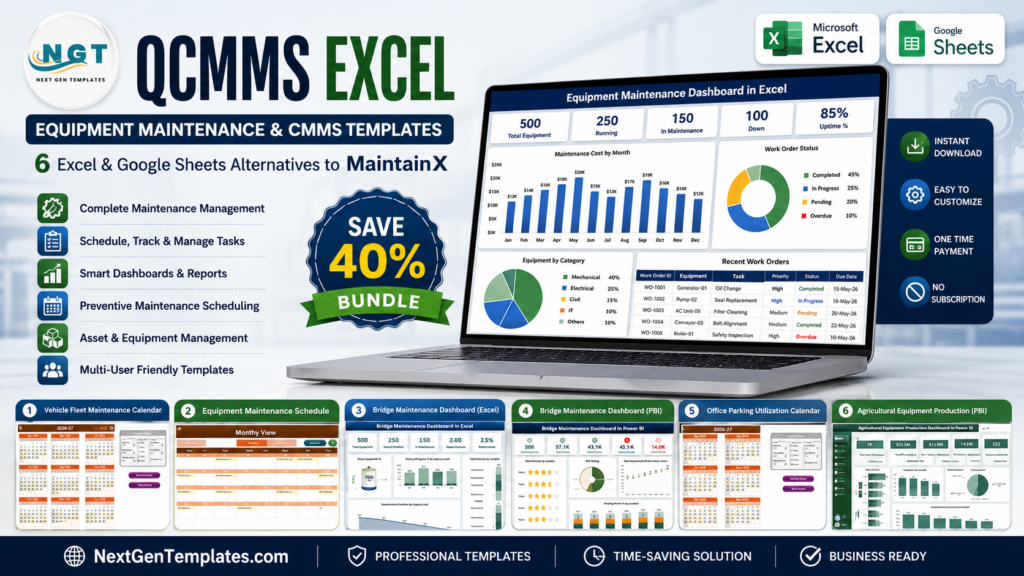
CMMS Excel templates are the practical middle ground for maintenance teams that need preventive maintenance scheduling, a maintenance log, and work order visibility without committing to a full SaaS rollout. In the U.S. market, even simple maintenance software can become expensive once every supervisor, technician, requester, and manager needs access. As of June 29, 2026, MaintainX lists Premium at $65 per user per month when billed annually, while UpKeep lists Premium at $55 per user per month. A five-user maintenance team can therefore reach $3,300 to $3,900 per year before implementation, change management, and add-ons. By comparison, the templates in this guide start at $4.99, and the Power BI dashboards top out at $17.99 as a one-time purchase. This roundup covers eight specific NextGenTemplates products across six maintenance use cases: equipment schedules, fleet service, bridge inspection, facility parking, people-process calendars, and agricultural equipment production analytics.
See also: the 10 maintenance KPIs (MTBF, MTTR) to track in 2026 and the ready-made dashboards that calculate them.
Related reading: for shareable team trackers beyond maintenance, see our guide to Google Sheets business templates for teams — 12 tools under $15.
Cutting SaaS costs across the board? See our Monday.com alternatives in Excel & Google Sheets for affordable work management templates that replace Monday.com.
Why Maintenance Teams Still Need CMMS Excel Templates
Maintenance teams do not always need a heavy system on day one. They often need a clean place to schedule recurring work, log completed tasks, review overdue activity, and summarize downtime. These data points explain why a simple equipment maintenance template can still matter:
- SaaS pricing compounds quickly. The official MaintainX pricing page lists Essential at $20 per user per month annually and Premium at $65 per user per month annually. For a five-user team, that is $1,200 to $3,900 per year.
- UpKeep moves PM scheduling into paid tiers. The official UpKeep pricing page lists Essential at $24 per user per month and Premium at $55 per user per month, with Premium adding PM scheduling, checklists, parts and inventory costing, and time/labor tracking.
- Limble is feature-rich but quote oriented. The official Limble pricing page compares Standard, Premium+, and Enterprise plans, with features such as unlimited work orders, preventive maintenance, asset management, and downtime reporting, but it routes buyers to calculate pricing or schedule a demo.
- Maintenance safety is not abstract. OSHA’s lockout/tagout fact sheet says proper energy-control procedures protect workers who service machinery and equipment, with OSHA estimating that compliance prevents 120 fatalities and 50,000 injuries each year.
- Infrastructure maintenance is data-heavy. The U.S. National Bridge Inventory describes more than 624,000 public-road bridges, which is exactly the type of asset environment where inspection status, condition trends, urgency, and maintenance history need to be visible.
The takeaway is simple: MaintainX, UpKeep, and Limble are strong CMMS platforms when you need mobile apps, approvals, inventory, QR codes, and multi-site governance. But if you are still defining your maintenance process, an Excel maintenance log or Power BI dashboard can give you structure before you buy a subscription for the whole team.
 Launch offer
SUMIFS, XLOOKUP, FILTER, LAMBDA and checking AI-written formulas, with real business projects. 11h 47m of video by PK, with practice files, quizzes and a capstone.
Compare the Equipment Maintenance Templates
| Template | Format | Best For | Price |
|---|---|---|---|
| Vehicle Fleet Maintenance Calendar in Excel | Excel calendar | Fleet service reminders, inspections, vehicle maintenance events | $4.99 |
| Bridge Maintenance Dashboard in Power BI | Power BI dashboard | Bridge condition, inspector, urgency, and monthly trend analytics | $17.99 |
| Bridge Maintenance Dashboard in Excel | Excel dashboard | Infrastructure inspection tracking without Power BI setup | $13.99 |
| Office Parking Utilization Maintenance Calendar In Excel | Excel calendar | Facility parking maintenance, lot usage events, daily schedules | $4.99 |
| Equipment Maintenance Schedule in Excel | Excel calendar | Preventive maintenance scheduling and maintenance log tracking | $4.99 |
| Employee Retention Maintenance Calendar In Excel | Excel calendar | HR maintenance events, retention touchpoints, people-process follow-ups | $4.99 |
| Agricultural Equipment Production Dashboard in Power BI | Power BI dashboard | Production efficiency, delayed orders, cost, quality, and downtime insights | $17.99 |
| Agricultural Equipment Production Dashboard in Excel | Excel dashboard | Equipment production KPIs, defective units, machine hours, downtime trends | $13.99 |
Best Equipment Maintenance and CMMS Excel Templates
1. Vehicle Fleet Maintenance Calendar in Excel
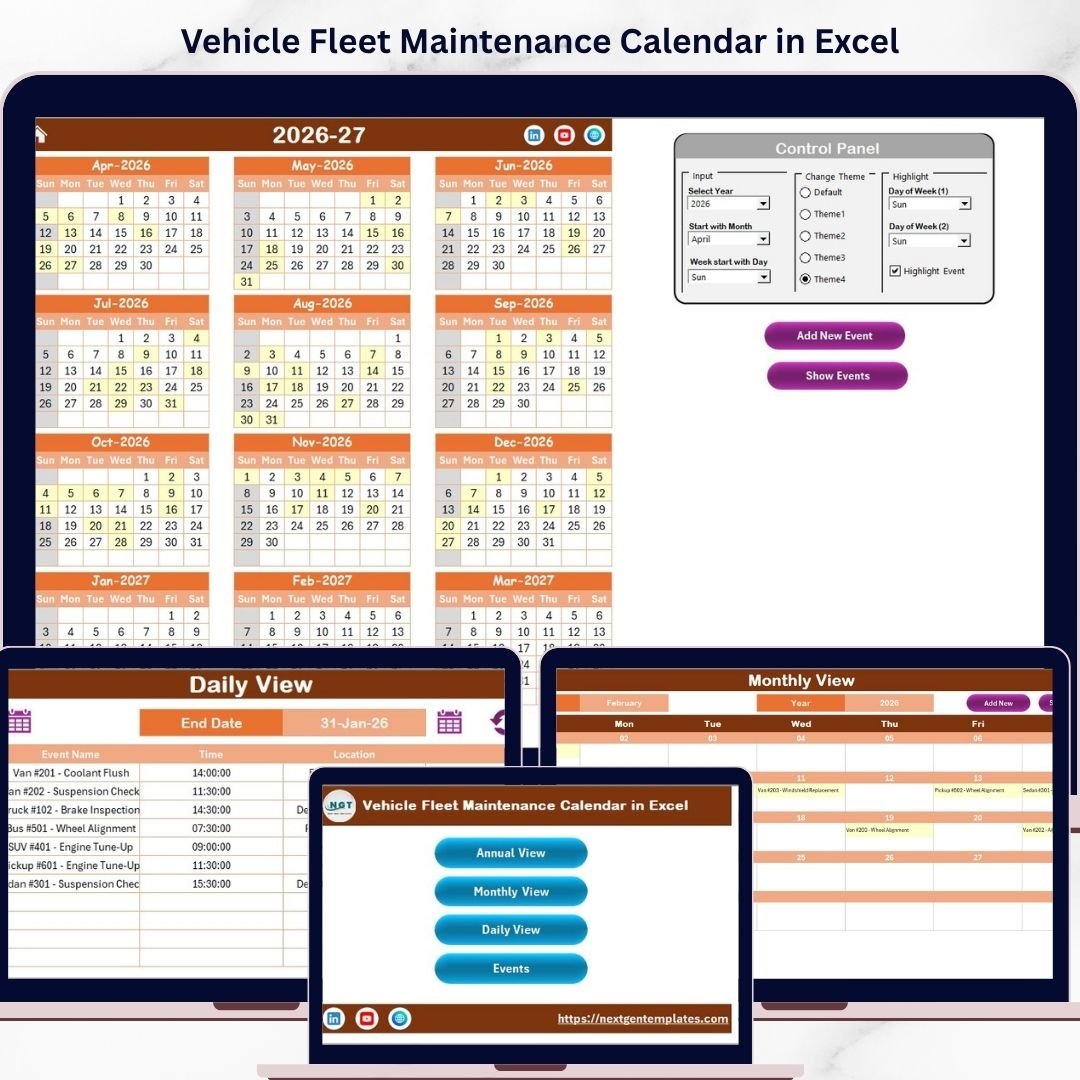
The Vehicle Fleet Maintenance Calendar in Excel is built for fleet managers who need a simple maintenance log for service events, inspections, oil changes, tire rotations, registration renewals, and location-based work. Instead of paying a per-user CMMS subscription just to remember recurring vehicle tasks, this $4.99 Excel template gives you a calendar-first workflow. The workbook includes a Home sheet, Annual View, Monthly View, Daily View, and Events database, so the same maintenance record can be planned at a yearly level and reviewed at a daily level.
Screenshot notes: The product screenshots show an annual fleet calendar, a monthly event view, a daily event list, and an Events sheet where maintenance details are stored with ID, date, day, event name, time, location, and description. That makes it useful as a lightweight work order log for smaller teams.
- Schedule oil changes, tire checks, brake inspections, and insurance renewals.
- Track service events by vehicle, garage location, or driver route.
- Create a basic maintenance history for compliance reviews.
- Plan recurring fleet service without buying a mobile CMMS yet.
Price: $4.99. Get the Vehicle Fleet Maintenance Calendar in Excel.
2. Bridge Maintenance Dashboard in Power BI
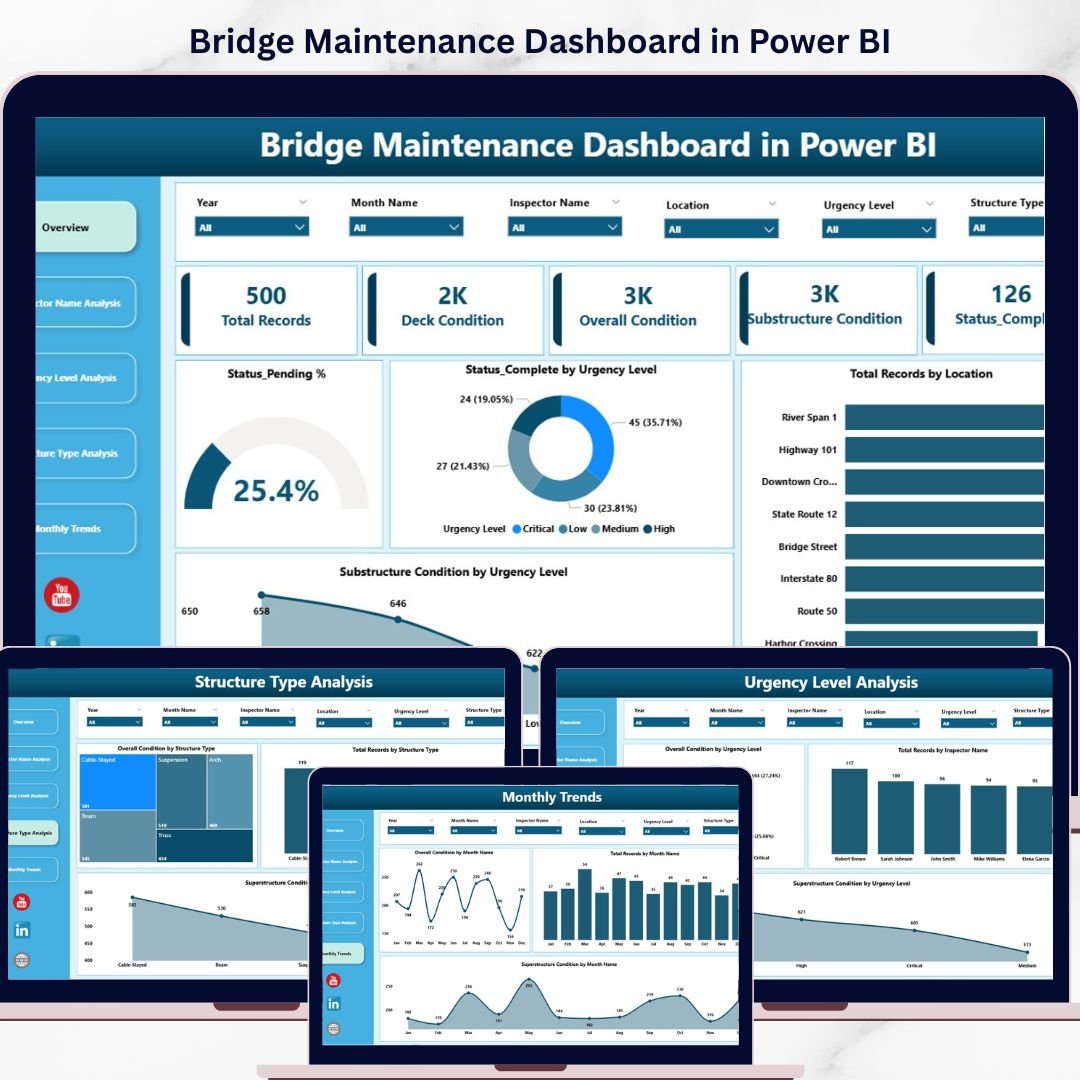
The Bridge Maintenance Dashboard in Power BI is the stronger choice when maintenance reporting needs to move beyond a log and into executive-level infrastructure analytics. At $17.99, it gives civil engineers, inspectors, and infrastructure managers a ready-made Power BI view of bridge condition, inspector performance, urgency levels, structure type, and monthly trends. If your bridge maintenance team is comparing Limble or UpKeep for analytics, this dashboard is a lower-cost way to test the exact KPIs and filters stakeholders want before you standardize a larger software stack.
Screenshot notes: The screenshots show five interactive dashboard pages: Overview, Inspector Name Analysis, Urgency Level Analysis, Structure Type Analysis, and Monthly Trends. KPI cards summarize total records, deck condition, overall condition, and substructure condition, while slicers make it easier to filter by inspector, urgency, and structure type.
- Prioritize high-urgency bridge maintenance work.
- Review inspector workload and task completion patterns.
- Compare condition scores by structure type or location.
- Prepare management reports for city, county, or contractor reviews.
Price: $17.99. Get the Bridge Maintenance Dashboard in Power BI.
3. Bridge Maintenance Dashboard in Excel
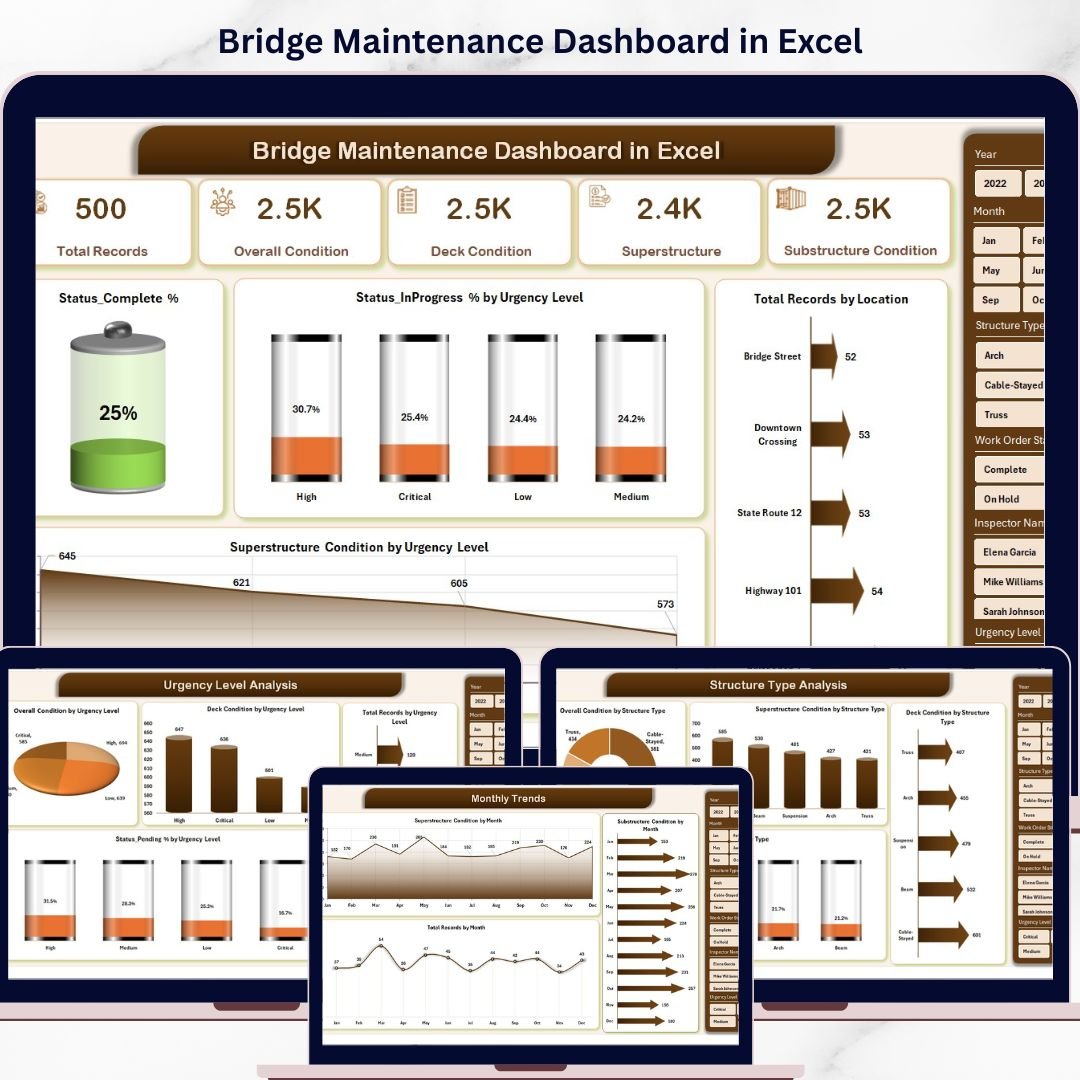
The Bridge Maintenance Dashboard in Excel is ideal for infrastructure teams that want bridge maintenance analytics but do not want to manage Power BI files, datasets, gateways, or report refresh processes. At $13.99, it gives the same buyer persona a spreadsheet-native approach to condition tracking, urgency analysis, inspector accountability, and monthly reporting. This is a better fit for smaller engineering teams, consultants, local authorities, and construction companies that already exchange Excel files with contractors.
Screenshot notes: The screenshots show an Overview page, Inspector Analysis, Urgency Level Analysis, Structure Type Analysis, Monthly Trends, plus Data and Support sheets. That structure gives you a dashboard layer for decision-makers and a data layer for maintenance records.
- Maintain an inspection log by bridge, inspector, location, and urgency.
- Use slicers to review high-risk records and recurring maintenance issues.
- Summarize deck, superstructure, and substructure condition trends.
- Share a familiar Excel dashboard with contractors or municipal leaders.
Price: $13.99. Get the Bridge Maintenance Dashboard in Excel.
4. Office Parking Utilization Maintenance Calendar In Excel

The Office Parking Utilization Maintenance Calendar In Excel is a practical facilities template for office managers, property teams, and site coordinators. Parking maintenance is often handled through email, spreadsheets, and verbal reminders, but it still has recurring work: striping, access gate checks, lighting inspections, snow removal, security patrol coordination, cleaning, and space allocation events. This $4.99 Excel calendar helps centralize those events without forcing the facilities team into a full CMMS.
Screenshot notes: The screenshots show a five-sheet workbook with Home, Annual View, Monthly View, Daily View, and Events database. The control panel lets users select the year, starting month, week start day, color theme, and highlighted days. The Events sheet stores each parking or maintenance activity with ID, date, day, event name, time, location, and description.
- Plan parking lot maintenance, cleaning, repairs, and space allocation changes.
- Coordinate office events that affect parking demand.
- Track recurring security, lighting, and gate inspections.
- Give property teams a shared maintenance calendar before buying SaaS.
Price: $4.99. Get the Office Parking Utilization Maintenance Calendar In Excel.
5. Equipment Maintenance Schedule in Excel
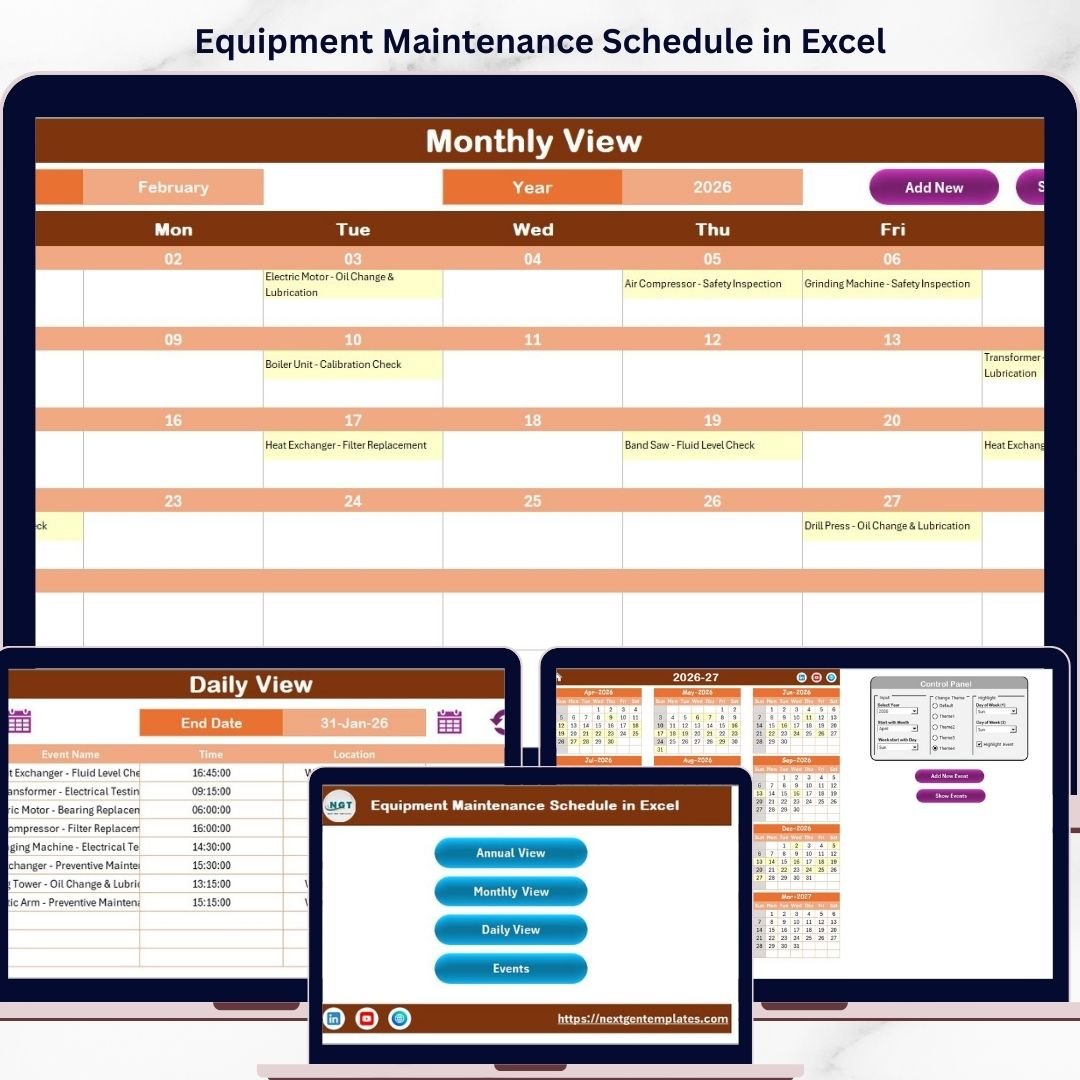
The Equipment Maintenance Schedule in Excel is the best first pick for most readers searching for an equipment maintenance template, CMMS Excel file, or maintenance log. It is broad enough for facility equipment, HVAC units, plant machinery, tools, calibration schedules, safety checks, and recurring preventive maintenance tasks. At $4.99, it is also the simplest way to bring structure to a team that is currently using whiteboards or disconnected spreadsheets.
Screenshot notes: The screenshots show the same maintenance-friendly structure: Home sheet navigation, Annual View for a 12-month plan, Monthly View for current workload, Daily View for date-range task review, and an Events database for the maintenance log. Add, update, delete, and show-event controls help users manage records without rebuilding formulas.
- Create a preventive maintenance calendar for every asset category.
- Log completed work with date, time, location, and task description.
- Track calibration, inspection, cleaning, and service reminders.
- Use the workbook as a starter CMMS process before migrating to software.
Price: $4.99. Get the Equipment Maintenance Schedule in Excel.
6. Employee Retention Maintenance Calendar In Excel
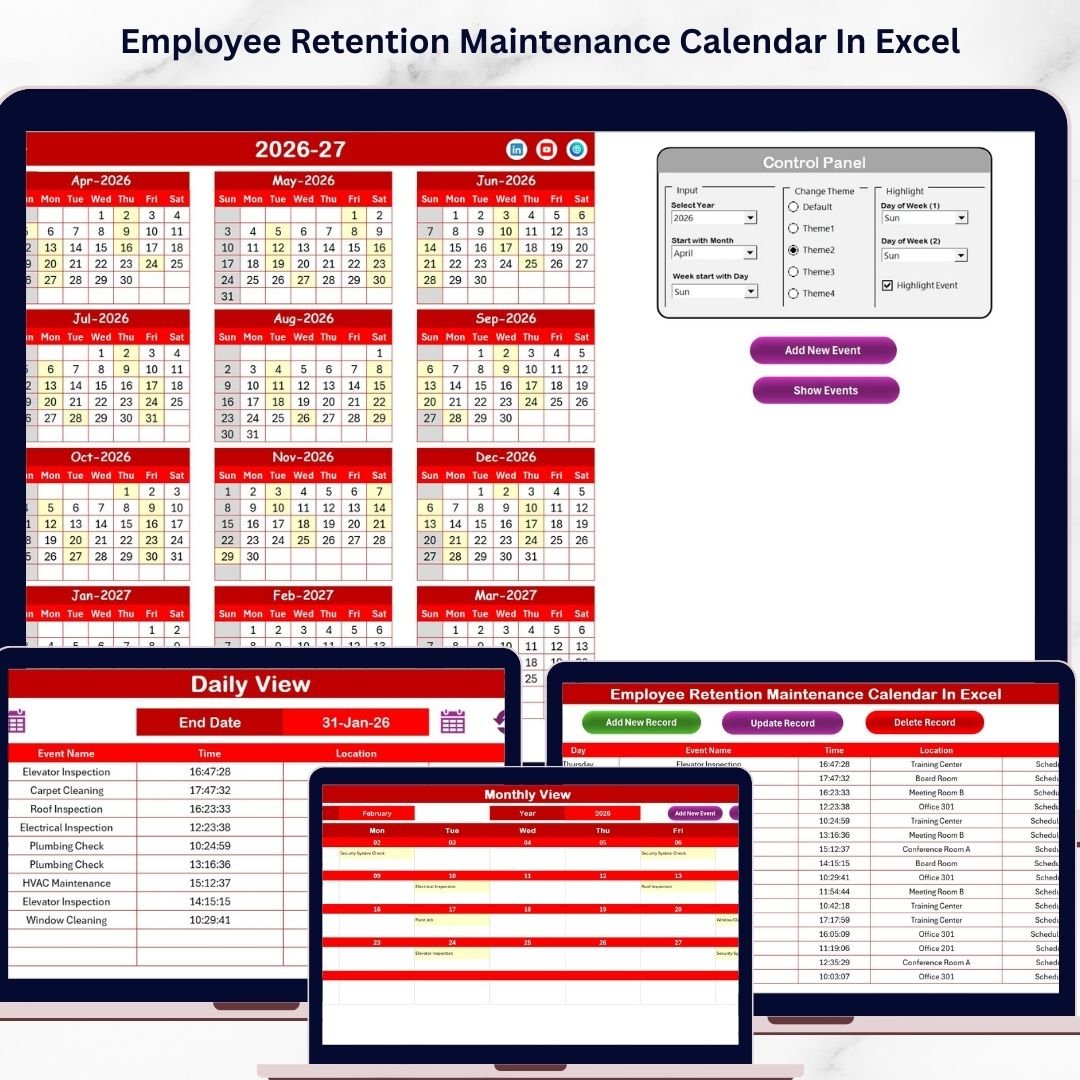
The Employee Retention Maintenance Calendar In Excel is not a machine-maintenance template, and that is worth saying clearly. It belongs in this roundup because maintenance programs fail when training, staffing, handoffs, safety meetings, and retention touchpoints are not scheduled with the same discipline as asset work. For HR managers, team leaders, and operations managers, this $4.99 workbook can coordinate the people-side maintenance that supports reliable facilities and production teams.
Screenshot notes: The screenshots show an annual retention calendar, monthly view, daily event list, and event database. Like the other calendar templates, it stores event records with ID, date, day, event name, time, location, and description. That makes it useful for recurring check-ins, training refreshers, onboarding milestones, supervisor reviews, and employee engagement events.
- Schedule safety training, certification renewals, and supervisor check-ins.
- Plan retention activities for technicians, operators, and field teams.
- Coordinate onboarding follow-ups for new maintenance staff.
- Track recurring HR events alongside operational calendars.
Price: $4.99. Get the Employee Retention Maintenance Calendar In Excel.
7. Agricultural Equipment Production Dashboard in Power BI
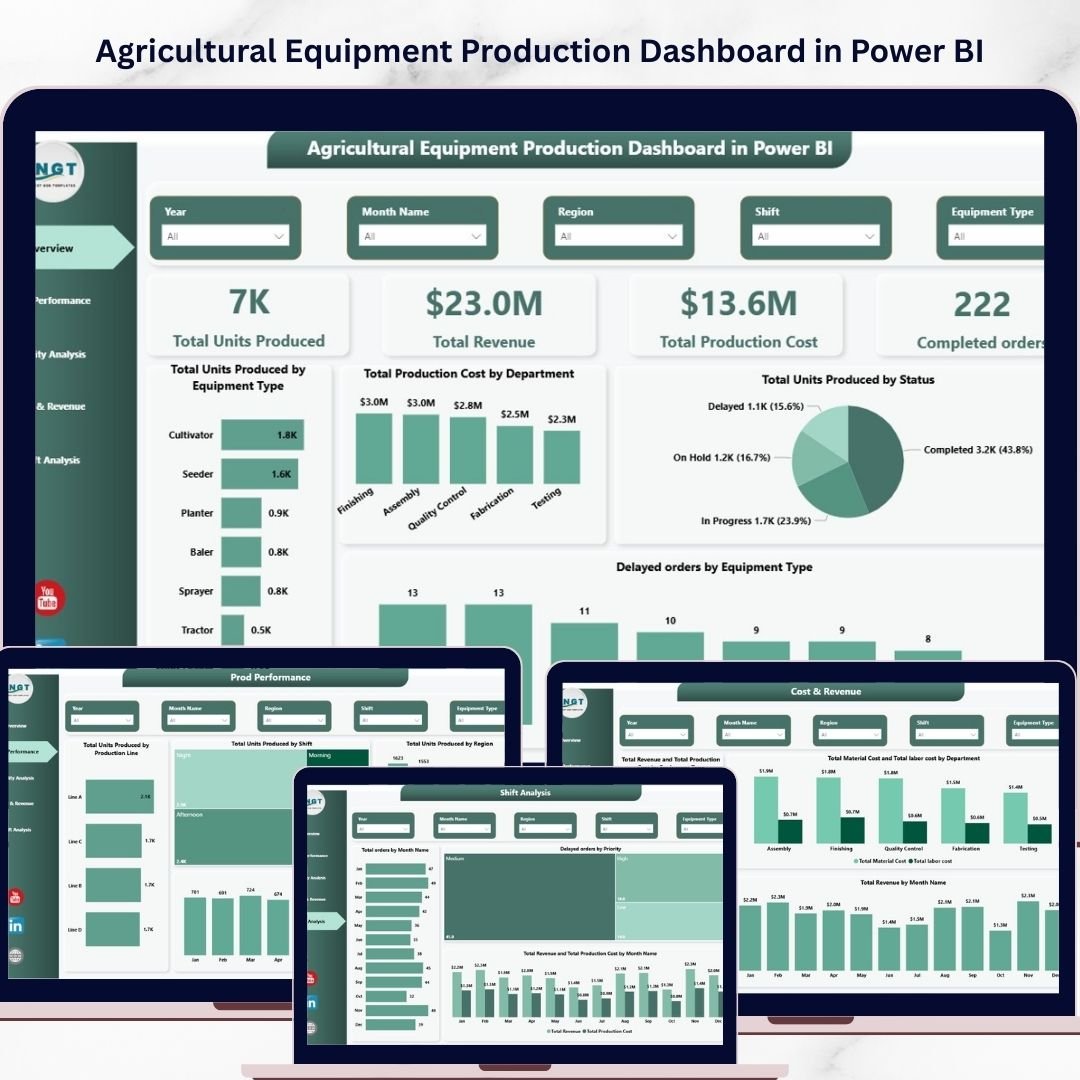
The Agricultural Equipment Production Dashboard in Power BI is a better fit when the maintenance conversation includes manufacturing performance, production delays, defective units, cost, revenue, and efficiency. It is not a classic work order tracker, but it gives equipment manufacturers the analytics layer that often sits beside CMMS reporting. At $17.99, it is especially useful for teams that want Power BI visuals before committing to a custom BI build or a full maintenance platform integration.
Screenshot notes: The screenshots show five analytical pages covering Overview, Production Performance, Quality Analysis, Cost and Revenue, and Month-wise Production Analysis. KPI cards include total units produced, revenue, production cost, completed orders, delayed orders, defective units, and production efficiency. These fields can support MTBF/MTTR-style thinking when paired with failure counts, repair dates, and downtime records.
- Analyze production output by line, region, shift, or month.
- Monitor defective units and quality issues by equipment type.
- Review delayed orders and bottlenecks before they become downtime problems.
- Build Power BI reporting around equipment production and maintenance trends.
Price: $17.99. Get the Agricultural Equipment Production Dashboard in Power BI.
8. Agricultural Equipment Production Dashboard in Excel
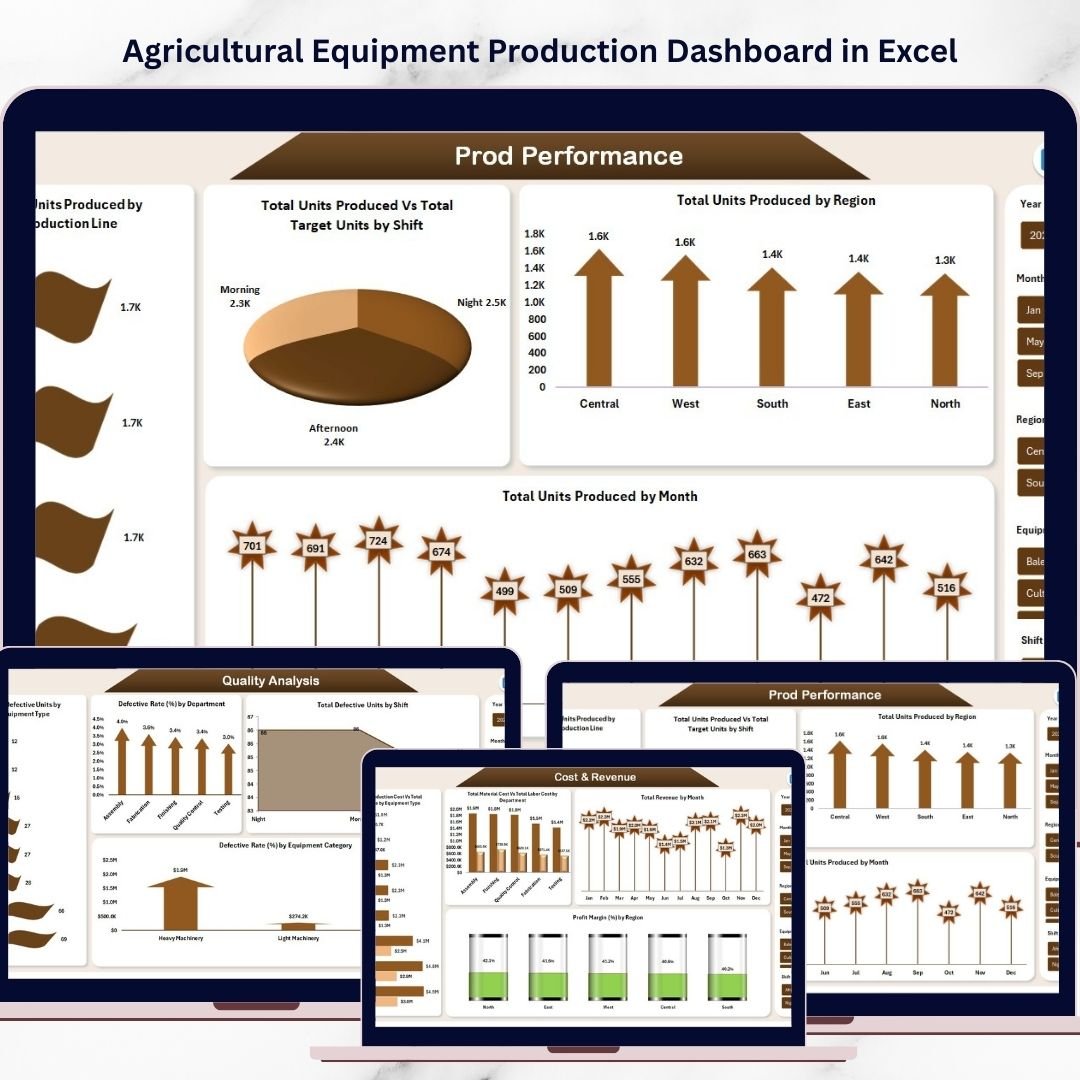
The Agricultural Equipment Production Dashboard in Excel brings the same agricultural manufacturing analytics into a spreadsheet-native format. At $13.99, it is a strong choice for production managers, operations teams, quality control leaders, and finance teams that already manage data in Excel. For maintenance planning, the most relevant pieces are machine hours, downtime hours, delayed orders, defective units, production achievement, and department-level production costs.
Screenshot notes: The screenshots show an Overview dashboard, Production Performance Analysis, Quality Analysis, Cost and Revenue Analysis, and Monthly Production Trends. The product page notes charts for total downtime hours by shift, total machine hours by equipment type, delayed orders by priority, defective rate by department, and production cost by department.
- Track downtime hours and machine-hour trends in Excel.
- Review quality issues that may point to maintenance or process problems.
- Compare production costs, revenue, and equipment performance by region.
- Use Excel slicers and pivot charts for maintenance-adjacent reporting.
Price: $13.99. Get the Agricultural Equipment Production Dashboard in Excel.
How to Choose Between These Maintenance Templates
Choose the template based on the maintenance question you need to answer first. A CMMS Excel file is only useful if it matches the workflow you actually run.
- Start with scheduling if your team misses recurring work. Choose the Equipment Maintenance Schedule in Excel for general PMs, or the Vehicle Fleet Maintenance Calendar in Excel for vehicle service.
- Start with asset condition if your issue is risk prioritization. Choose the Power BI or Excel bridge dashboard if inspections, urgency, structure type, and condition trend reporting matter more than calendar reminders.
- Start with facilities events if the work is location-based. The parking maintenance calendar is better for office lots, access points, lighting, cleaning, and shared-space logistics.
- Start with production analytics if downtime is tied to output. The agricultural equipment dashboards are the better fit when you need machine hours, downtime hours, defective units, production cost, and delayed-order visibility.
- Choose Power BI when leadership wants interactive reporting. Power BI is better for dashboards, slicers, and executive views. Excel is better when the team wants direct editing and easy file sharing.
- Move to MaintainX, UpKeep, or Limble when mobile execution becomes the bottleneck. If technicians need mobile work orders, QR scans, approvals, parts inventory, vendor workflows, or offline mode, a CMMS platform may be worth the recurring cost.
Frequently Asked Questions
What is a CMMS Excel template?
A CMMS Excel template is a spreadsheet used to organize maintenance data such as assets, preventive maintenance schedules, work orders, inspections, downtime, costs, and maintenance history. It is not a full CMMS platform, but it can standardize the workflow before a team buys software.
Can Excel replace MaintainX, UpKeep, or Limble?
Excel can replace a CMMS only for simple workflows. It works well for maintenance logs, preventive schedules, dashboards, and small-team reporting. It does not replace mobile apps, QR codes, automated approvals, parts inventory workflows, offline technician access, or enterprise permission controls.
Which template is best for preventive maintenance scheduling?
The Equipment Maintenance Schedule in Excel is the best general option for preventive maintenance scheduling because it includes annual, monthly, daily, and event database views. Fleet teams should use the vehicle fleet version instead.
How do I use Excel as a maintenance log?
Use one row per maintenance event with fields such as asset, date, technician, work type, location, issue, action taken, downtime, parts used, cost, and status. The calendar templates in this roundup already include event databases that can act as a basic maintenance log.
Can these templates calculate MTBF and MTTR?
The templates can support MTBF and MTTR analysis if your source data includes failure count, operating time, repair start time, repair end time, and downtime. The agricultural equipment dashboards are closest because they already track machine hours and downtime hours. You can extend the data table for explicit MTBF/MTTR formulas.
Should I choose Excel or Power BI for maintenance reporting?
Choose Excel when your team needs editable workbooks and simple sharing. Choose Power BI when managers need interactive dashboards, slicers, trend views, and presentation-ready analytics. For bridge and agricultural equipment use cases, NextGenTemplates offers both Excel and Power BI versions.
Are these templates one-time purchases?
Yes. The templates featured here are paid NextGenTemplates products listed at $4.99, $13.99, or $17.99 depending on format and complexity. That makes them useful for teams that want to control maintenance work without adding another recurring SaaS bill.
Can I use these in Google Sheets?
The featured products in this roundup are Excel and Power BI templates. Some Excel files may open in Google Sheets, but advanced formatting, buttons, slicers, pivot tables, and workbook automation may not behave the same. Use Excel for the cleanest experience unless the product page specifically says Google Sheets.
What is the best template for fleet maintenance?
The Vehicle Fleet Maintenance Calendar in Excel is the best fit for fleet maintenance. It can track inspections, service appointments, registration reminders, tire rotations, oil changes, and other vehicle-specific maintenance events.
When should a team upgrade from templates to CMMS software?
Upgrade when the spreadsheet becomes the bottleneck. Common signs include multiple technicians needing mobile access, frequent missed updates, spare-parts inventory complexity, regulatory proof requirements, multi-site governance, approval workflows, or the need for real-time work order status across a large team.
Final Recommendation
If you are building a maintenance process from scratch, start with the Equipment Maintenance Schedule in Excel. It gives you the core CMMS Excel structure: preventive maintenance scheduling, daily task review, and a maintenance log in one file. If you manage vehicles, choose the Vehicle Fleet Maintenance Calendar in Excel. If you manage infrastructure or production assets, use one of the bridge or agricultural equipment dashboards for analytics.
Related reading: Salesforce alternatives: 8 CRM templates in Excel & Sheets – compare the switch off Salesforce and what each template covers.
Weighing other software switches? Our guide to Airtable alternatives covers 8 tracker and database templates in Excel and Google Sheets that replace a per-seat subscription.
Related: Switching off maintenance software? See our roundup of MaintainX alternatives: 8 CMMS templates in Excel & Sheets with a full head-to-head switch table.