

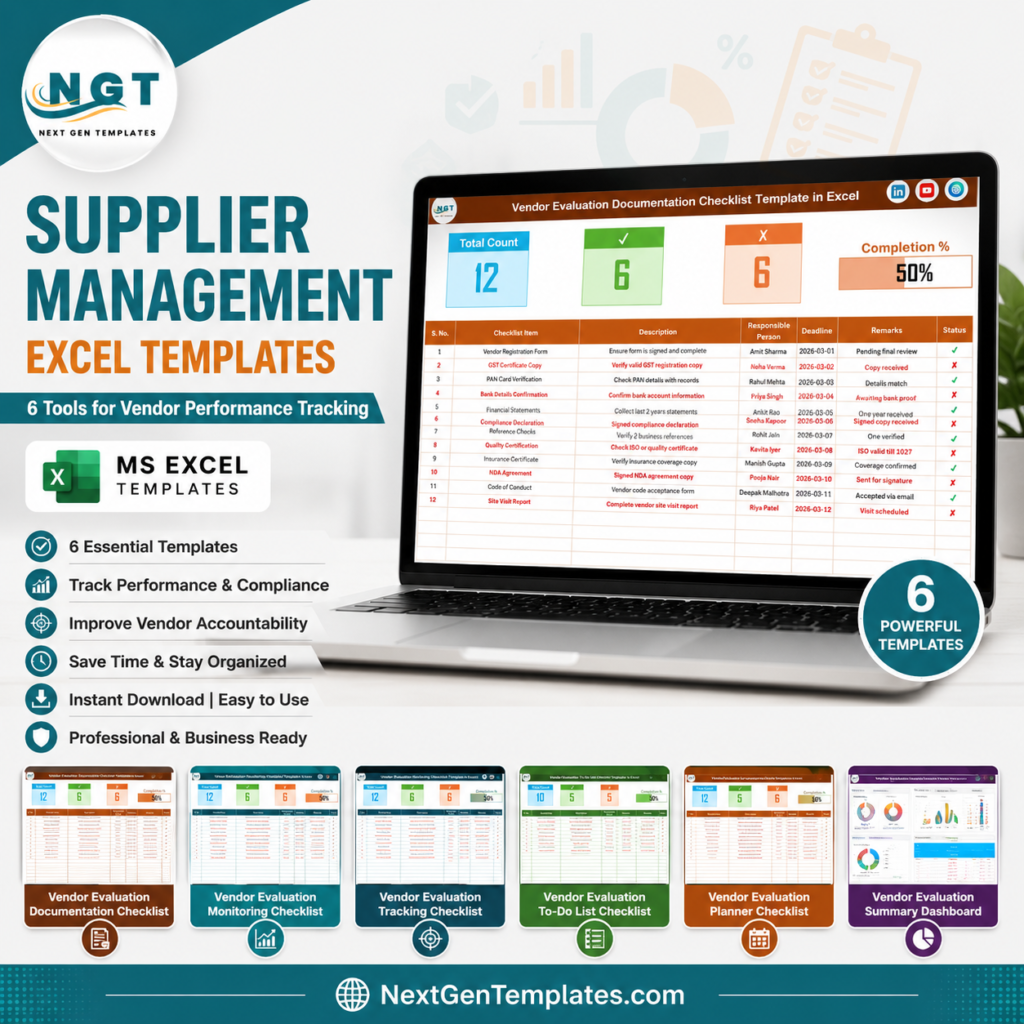
Short answer: supplier management Excel templates give procurement teams a practical way to clean up vendor records, document evaluation steps, and track supplier performance before committing to an enterprise procurement platform. For many U.S. manufacturers, distributors, healthcare teams, contractors, and service businesses, the problem is not a lack of supplier data. The problem is that supplier master data is split across inboxes, shared drives, contract folders, and old spreadsheets. That makes a vendor scorecard unreliable and turns supplier performance reviews into catch-up meetings instead of decision meetings.
Dedicated procurement software can be valuable, but it is not always the first step. The public Precoro pricing page lists procurement plans starting at $499/month, billed annually. By comparison, each template in this roundup is currently $1.99, and even a broader $17.99 template workflow is still a low-cost starting point. This post covers 6 supplier management Excel templates for documentation, review, monitoring, tracking, to-do follow-up, and planning.
Why Supplier Management Excel Matters Now
Supplier management is no longer just a procurement admin task. It affects quality, delivery, compliance, pricing discipline, supplier risk, and executive visibility. These current market signals show why structured vendor tracking matters:
- Tariff exposure is widespread: McKinsey reported in its 2025 supply chain risk pulse that 82% of surveyed companies said new tariffs affected their supply chains, with 20% to 40% of supply chain activity impacted in some way. That makes supplier visibility and alternative sourcing more urgent.
- Procurement value is blocked by internal complexity: Deloitte reported that CPOs named siloed ways of working at 57%, competing priorities at 46%, technology capability gaps at 40%, and talent gaps at 34% as major barriers to value delivery.
- Supplier performance separates leaders from followers: Deloitte’s 2025 Global Chief Procurement Officer Survey found that digital masters were far more likely to meet or exceed supplier performance plans, at 84% versus 59% for followers.
- AI is changing supply chain monitoring: PwC’s 2025 Digital Trends in Operations Survey found that 53% of respondents use AI in at least a few areas to anticipate and mitigate supply chain disruptions, while another 31% are testing or piloting it.
- Supplier records need discipline before automation: A supplier performance dashboard is only as good as the data feeding it. Clean owner names, deadlines, document status, review tasks, and corrective actions are the foundation for useful vendor scorecards.
That is the practical role of these templates. They help a team standardize supplier master data, assign owners, track deadlines, document vendor evaluation steps, and feed better information into a supplier performance dashboard.
 Launch offer
SUMIFS, XLOOKUP, FILTER, LAMBDA and checking AI-written formulas, with real business projects. 11h 47m of video by PK, with practice files, quizzes and a capstone.
Compare the 6 Vendor Performance Templates
| Template | Format | Best For | Price |
|---|---|---|---|
| Vendor Evaluation Documentation Checklist in Excel | Excel | Vendor documents, onboarding records, compliance evidence, audit readiness | $1.99 |
| Vendor Evaluation Review Checklist in Excel | Excel | Structured vendor reviews, scorecard preparation, reviewer accountability | $1.99 |
| Vendor Evaluation Monitoring Checklist in Excel | Excel | Ongoing supplier performance checks, deadlines, monitoring status | $1.99 |
| Vendor Evaluation Tracking Checklist in Excel | Excel | Evaluation tasks, owner follow-up, progress tracking, supplier accountability | $1.99 |
| Vendor Evaluation To-Do List Checklist in Excel | Excel | Action lists, corrective actions, review preparation, procurement follow-up | $1.99 |
| Vendor Evaluation Planner Checklist in Excel | Excel | Supplier review planning, evaluation calendars, responsibility assignment | $1.99 |
6 Supplier Management Excel Templates for Vendor Tracking
Vendor Evaluation Documentation Checklist in Excel
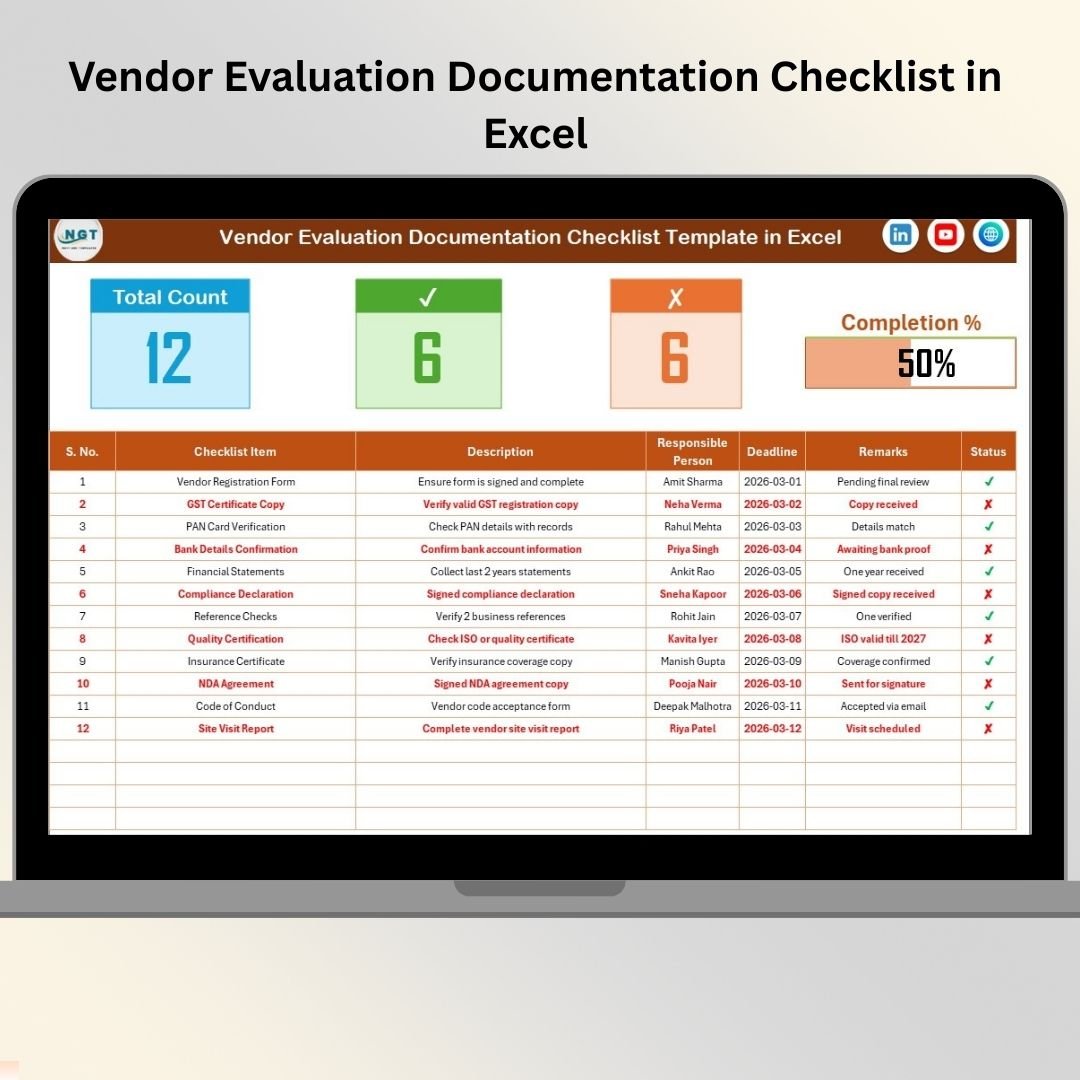
The Vendor Evaluation Documentation Checklist in Excel is the best first tool when supplier management starts with missing files, inconsistent onboarding evidence, and unclear compliance ownership. Procurement teams can use it to track required vendor documents, responsible persons, deadlines, remarks, and status in one workbook. It is especially useful when supplier master data lives in multiple places and nobody can quickly say which vendor record is complete.
Screenshot section – what’s inside: the product screenshot shows a main checklist sheet with a top summary for Total Checklist Count, Checked Count, Crossed Count, and a dynamic completion progress bar. The table includes Serial No., Checklist Item, Description, Responsible Person, Deadline, Remarks, and Status. A second List sheet supports standardized responsible-person dropdowns, which helps keep owner names clean for reporting.
- Track W-9s, insurance certificates, NDAs, contracts, quality documents, and compliance forms.
- Manage supplier onboarding documents when files arrive from multiple departments.
- Prepare for audits by identifying complete, pending, and overdue vendor records.
- Create cleaner supplier master data before building a vendor scorecard.
Price: $1.99. Get the vendor documentation checklist.
Vendor Evaluation Review Checklist in Excel
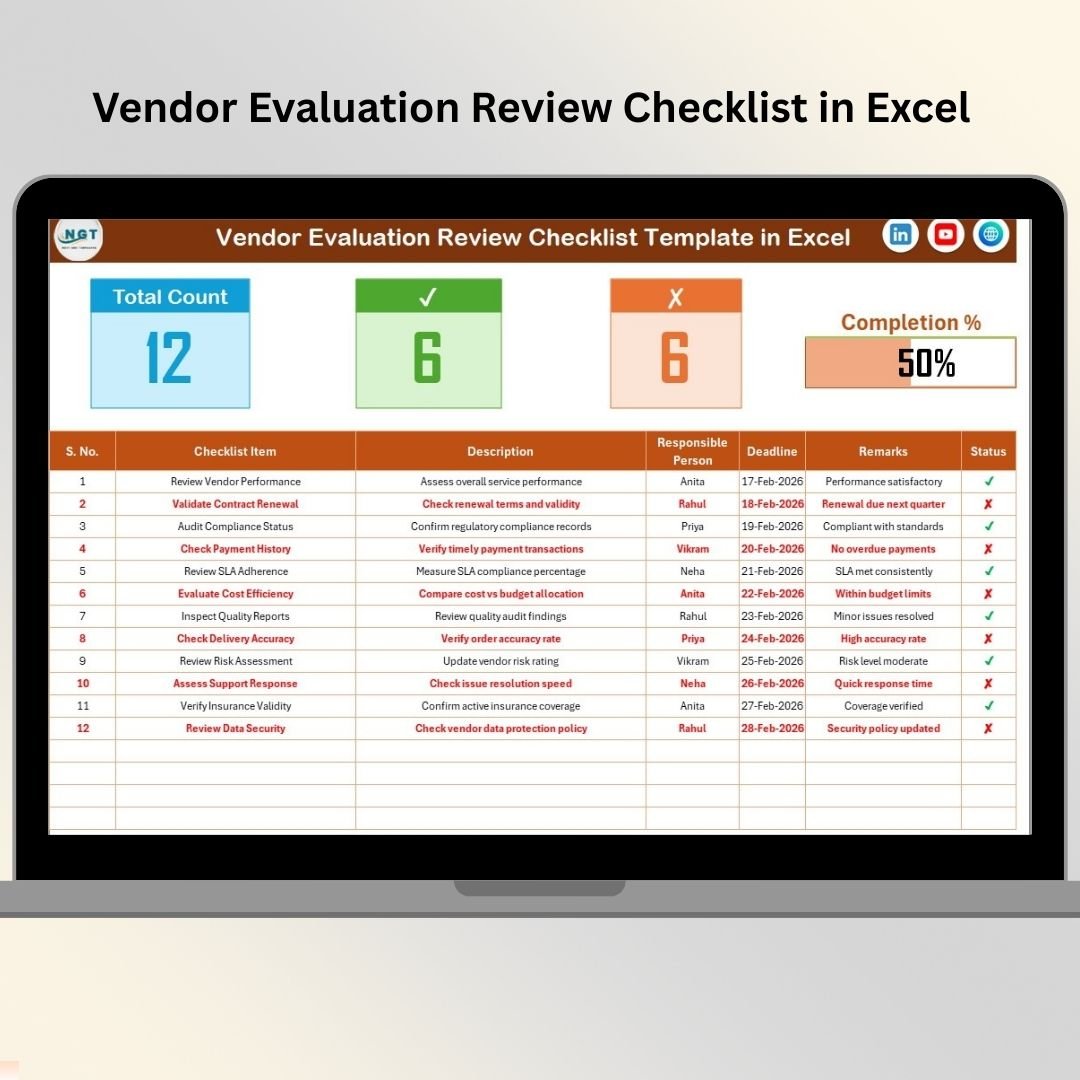
The Vendor Evaluation Review Checklist in Excel is built for formal vendor review cycles. If your team needs a repeatable process for quality, delivery, pricing, contract adherence, service levels, documentation, or compliance review, this template gives the review process a clear operating structure. It is a strong fit for quarterly business reviews, annual supplier evaluations, or pre-renewal checks.
Screenshot section – what’s inside: the screenshot shows a live review summary dashboard at the top with total review items, completed tasks, pending tasks, and progress percentage. The main table captures checklist item, description, responsible person, deadline, remarks, and status. The List sheet keeps reviewer names consistent through dropdowns, which is important if several departments contribute to a vendor scorecard.
- Run quarterly supplier business reviews with procurement, operations, quality, and finance.
- Assign review criteria to different owners without losing accountability.
- Document which vendor review actions are complete before renewal or renegotiation.
- Prepare a lightweight vendor scorecard discussion for leadership meetings.
Price: $1.99. Download the vendor review checklist.
Vendor Evaluation Monitoring Checklist in Excel
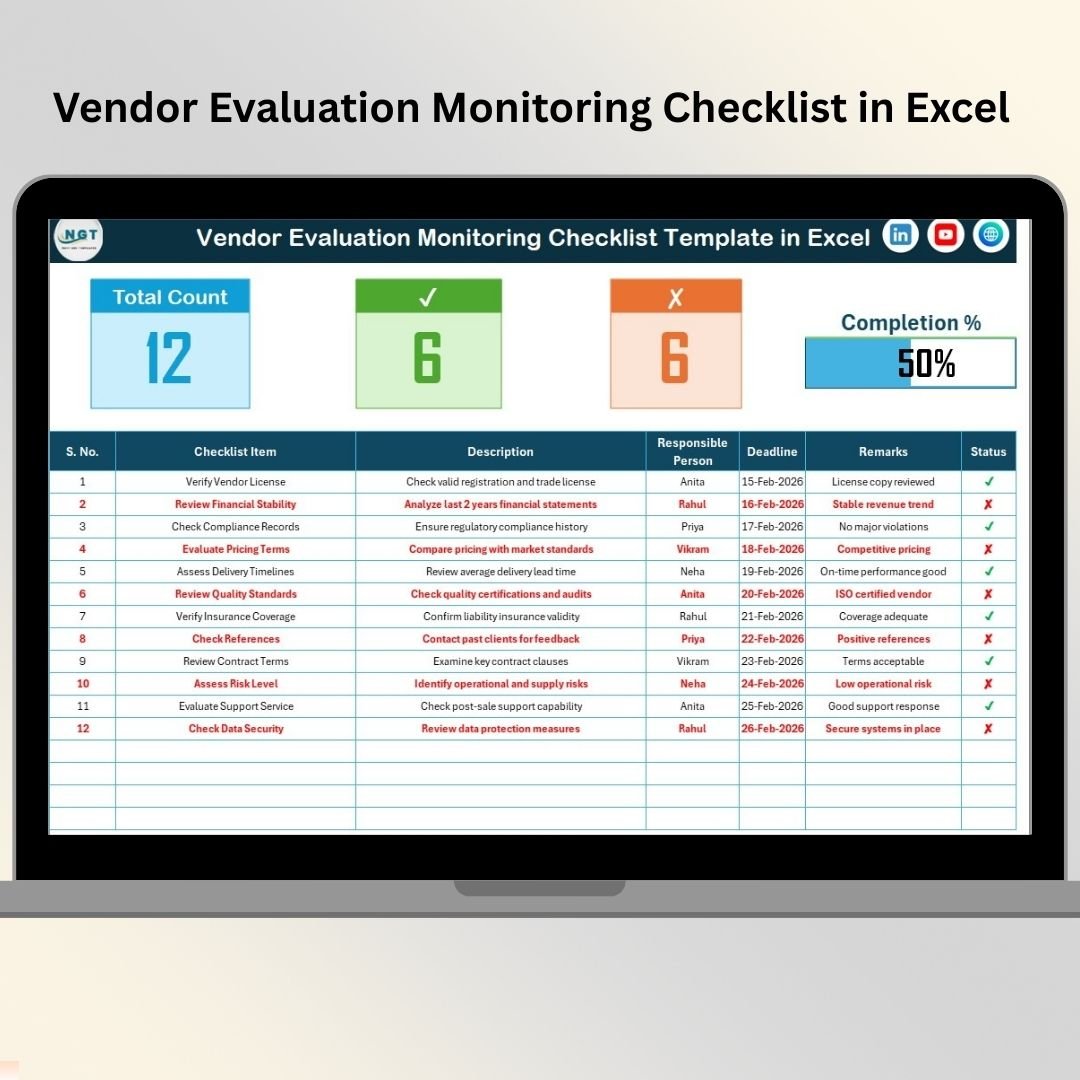
The Vendor Evaluation Monitoring Checklist in Excel is useful after vendor onboarding and initial review are complete. It focuses on ongoing visibility: what needs to be checked, who owns it, when it is due, and whether progress is moving. This is the template to use when supplier performance tracking needs more discipline than email reminders but the team is not ready for full SaaS implementation.
Screenshot section – what’s inside: the screenshot shows a top summary dashboard with Total Tasks, Completed Tasks, Pending Tasks, and a progress bar. The main checklist sheet tracks descriptions, responsible persons, deadlines, and completion status. A separate List sheet supports clean owner dropdowns for consistent reporting. The structure is pivot-friendly, so teams can use it as a source for simple supplier performance dashboard views.
- Monitor SLA reviews, delivery checks, certificate renewals, and recurring follow-up items.
- Keep procurement managers aware of pending vendor monitoring tasks.
- Track compliance checks before they become audit issues.
- Feed weekly supplier performance dashboard updates with cleaner task status.
Price: $1.99. Use the vendor monitoring checklist.
Vendor Evaluation Tracking Checklist in Excel
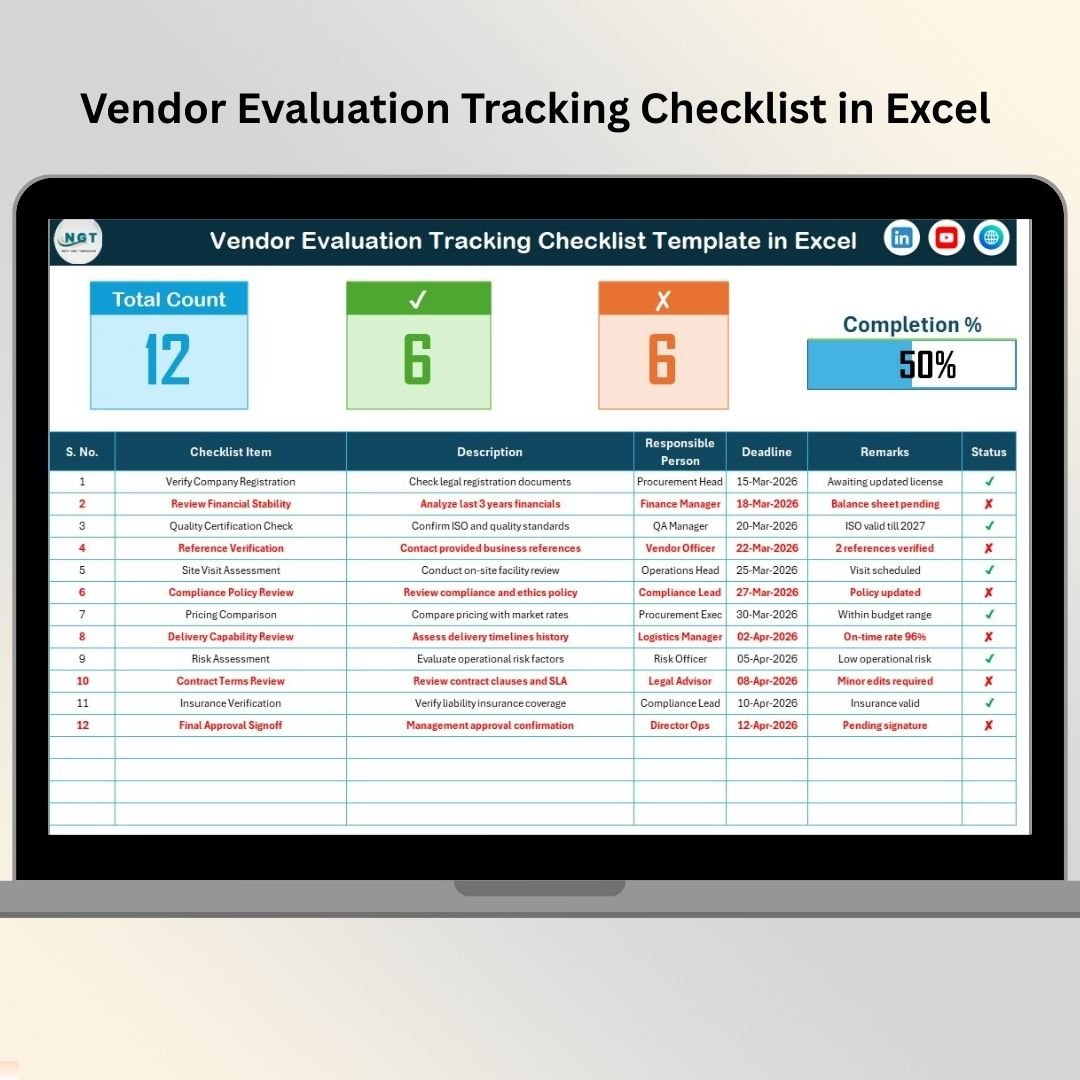
The Vendor Evaluation Tracking Checklist in Excel is the most general-purpose tracker in this set. It works well when the procurement team wants one place to manage evaluation tasks across multiple suppliers or review cycles. The value is straightforward: it makes ownership, deadlines, remarks, and completion status visible, which is exactly what many vendor management processes lack.
Screenshot section – what’s inside: the screenshot shows a main tracking checklist with a summary section, Total Count, Checked Count, Crossed Count, and a visual progress bar. The working table includes checklist item, description, responsible person, deadline, remarks, and status. A List sheet powers standardized responsibility selection, which reduces duplicate owner names and improves supplier performance reporting.
- Track supplier evaluation tasks across quality, cost, delivery, service, and compliance.
- Follow up on corrective actions after a vendor review meeting.
- Give department owners a clear view of overdue supplier tasks.
- Prepare inputs for vendor scorecards and management review packs.
Price: $1.99. Get the vendor tracking checklist.
Vendor Evaluation To-Do List Checklist in Excel
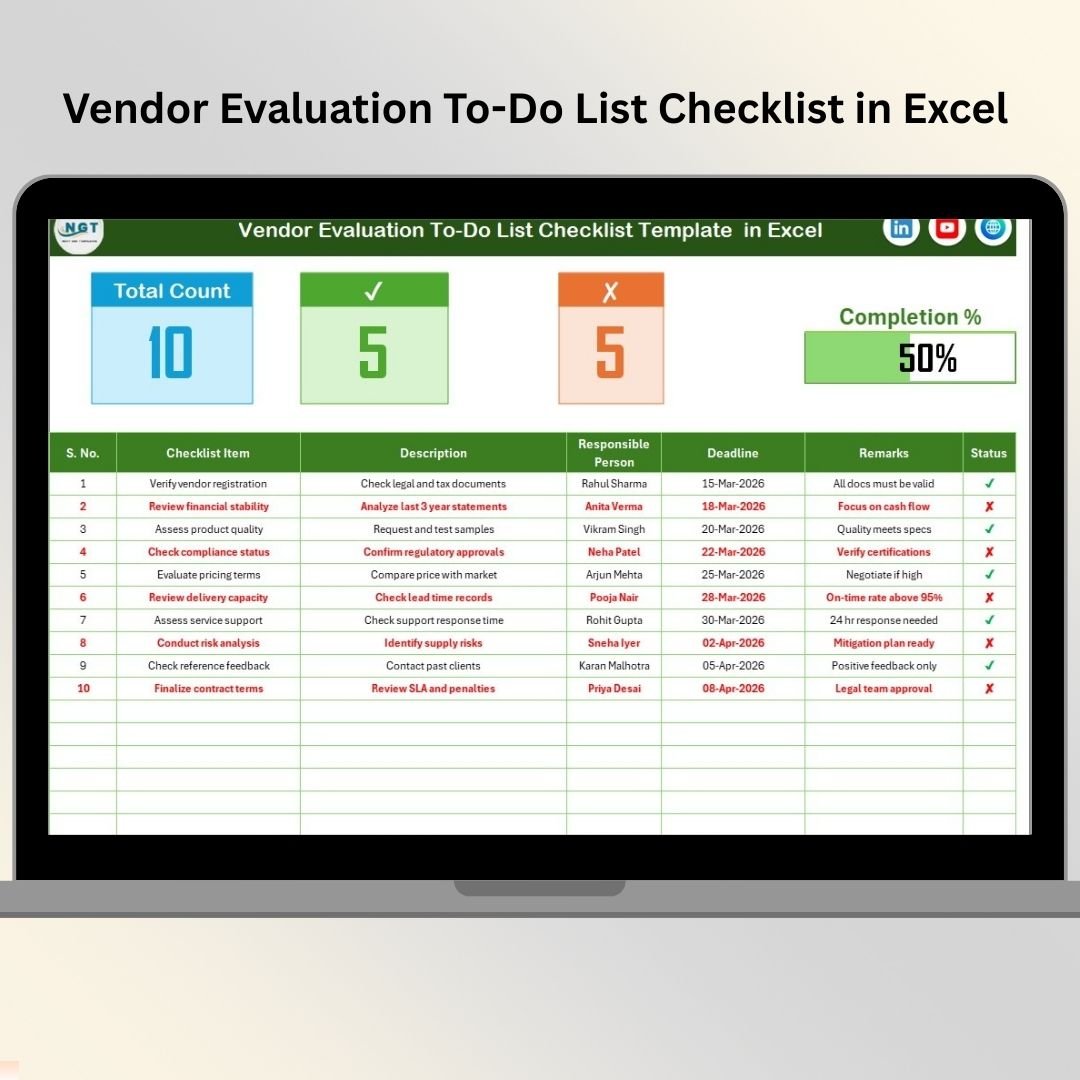
The Vendor Evaluation To-Do List Checklist in Excel is ideal when supplier management breaks down after meetings. Teams often agree on actions, but the follow-up gets lost across emails and chat messages. This template turns evaluation work into a controlled to-do list with status, deadlines, owners, and remarks. It is intentionally simple, which makes it a good entry point for smaller procurement teams.
Screenshot section – what’s inside: the product screenshot shows a main to-do list checklist sheet with a clear top summary: Total Task Count, Checked Count, Crossed Count, and a progress bar with completion percentage. The table includes serial number, checklist item, description, responsible person, deadline, remarks, and status. The List sheet maintains owner names and supports clean dropdown selections.
- Prepare for vendor evaluation meetings and collect pre-review actions.
- Assign post-review corrective actions to buyers, quality teams, finance, or operations.
- Track document requests, contract checks, follow-ups, and escalation reminders.
- Use a simple vendor task list when a full supplier dashboard would be too heavy.
Price: $1.99. Add the vendor evaluation to-do checklist.
Vendor Evaluation Planner Checklist in Excel
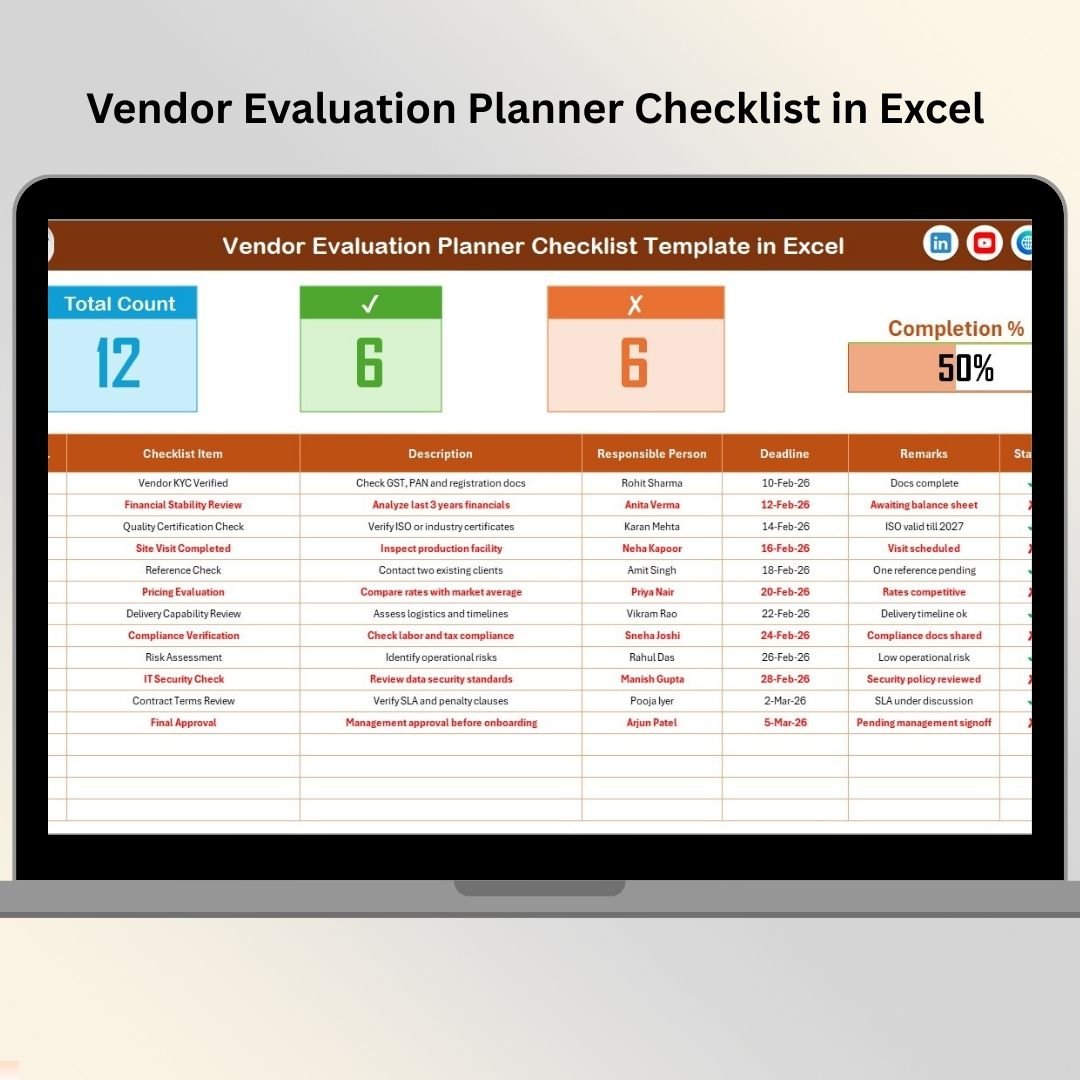
The Vendor Evaluation Planner Checklist in Excel is the best fit when the issue is planning the supplier review process before it starts. It helps procurement managers outline evaluation tasks, assign responsibilities, set deadlines, and monitor completion in a structured way. This makes it useful for new supplier review programs, annual supplier evaluation cycles, or teams that want a clearer review calendar.
Screenshot section – what’s inside: the screenshot shows a planner checklist with a built-in summary dashboard for Total Checklist Items, Checked Count, Crossed Count, Completion Percentage, and Progress Bar. The checklist table captures serial number, checklist item, description, responsible person, deadline, remarks, and status. The List sheet keeps responsible-person entries standardized, which makes the planner easier to reuse each cycle.
- Plan annual supplier evaluations before the review calendar gets crowded.
- Assign evaluation owners across procurement, finance, operations, quality, and compliance.
- Track planned review steps such as financial stability, regulatory compliance, delivery performance, and communication assessment.
- Create a repeatable supplier performance review process for growing teams.
Price: $1.99. Download the vendor evaluation planner.
Supplier tracking is one part of a wider operations role. Our operations manager tools guide shows how a supplier performance dashboard fits alongside production planning, maintenance and quality templates.
How to Choose Between These Vendor Templates
The right supplier management Excel template depends on where your vendor process is weak. Use this decision framework before buying:
- Choose Documentation when the issue is missing evidence. If vendor records, certificates, contracts, and onboarding documents are scattered, start with the Vendor Evaluation Documentation Checklist.
- Choose Review when the issue is inconsistent evaluation criteria. If every reviewer uses a different process, use the Vendor Evaluation Review Checklist to standardize review steps.
- Choose Monitoring when the issue is ongoing follow-up. If recurring checks keep slipping after onboarding, use the Vendor Evaluation Monitoring Checklist.
- Choose Tracking when the issue is day-to-day task visibility. If you need one general supplier performance tracking file, use the Vendor Evaluation Tracking Checklist.
- Choose To-Do List when the issue is action closure. If meetings create tasks but not completion, use the Vendor Evaluation To-Do List Checklist.
- Choose Planner when the issue is review preparation. If you need to schedule and organize upcoming supplier evaluations, use the Vendor Evaluation Planner Checklist.
For a stronger workflow, combine them in sequence: planner, documentation, review, monitoring, tracking, and to-do follow-up. That sequence gives you cleaner supplier master data, a repeatable vendor scorecard process, and a practical supplier performance dashboard foundation without committing to a full software rollout on day one.
Buying seed, feed, fertilizer or chemicals from agricultural suppliers? Pair your vendor scorecard with one of the farm templates for agriculture we ranked, so input costs show up next to yield and profit per acre.
Vendor performance is one input to the month-end close. For the close itself, audit follow-up and KPI reporting, see the financial controller Excel templates stack.
Supplier Management Excel FAQs
What is supplier management Excel?
Supplier management Excel is a spreadsheet-based approach to organizing vendor master data, supplier evaluation tasks, documentation, review criteria, deadlines, owners, and performance follow-up. It is useful for teams that need structure before adopting a larger procurement platform.
What is a vendor scorecard?
A vendor scorecard is a structured view of supplier performance across criteria such as quality, delivery, cost, compliance, communication, and service. These templates help collect the tasks and evidence that support a more accurate scorecard.
Which template is best for supplier master data cleanup?
The Vendor Evaluation Documentation Checklist is the best starting point for supplier master data cleanup because it focuses on required records, responsible owners, deadlines, remarks, and completion status.
Which template is best for supplier performance tracking?
The Vendor Evaluation Monitoring Checklist and Vendor Evaluation Tracking Checklist are the strongest choices for supplier performance tracking because they focus on recurring tasks, deadlines, owners, remarks, and progress visibility.
Can these templates replace supplier management SaaS?
They can replace manual tracking for small teams, early-stage processes, and lightweight vendor evaluation workflows. They are not a full replacement for enterprise procurement SaaS with portals, automated integrations, approval workflows, and real-time supplier risk feeds.
How much do the six templates cost together?
Each featured template is currently listed at $1.99, so the six templates total $11.94 at the current sale price. Prices can change, so review each product page before purchase.
Can I customize the vendor evaluation checklist items?
Yes. These Excel templates are designed to be edited. You can add supplier categories, review periods, risk ratings, scoring fields, quality checks, delivery measures, compliance documents, or department-specific criteria.
What supplier KPIs should I track first?
Start with on-time delivery rate, quality defects, compliance status, contract adherence, cost variance, response time, document completion, and corrective action closure. These measures are practical inputs for supplier scorecards.
Are these templates good for small businesses?
Yes. Small businesses often need vendor accountability but do not yet need a large procurement system. Excel templates are a low-cost way to standardize supplier evaluation, documentation, and follow-up.
How do these templates support AI Overview-style answers?
The page is structured with a direct answer, data-backed rationale, a comparison table, product-specific H3 headings, and FAQ questions. That format makes the content easier for search engines and AI systems to extract and summarize.
Final Recommendation
If supplier data is messy, start with the Vendor Evaluation Documentation Checklist in Excel. If review meetings are inconsistent, choose the Vendor Evaluation Review Checklist in Excel. If follow-up is the pain point, add the Monitoring Checklist, Tracking Checklist, or To-Do List Checklist. If you are planning a formal vendor review cycle, use the Planner Checklist first.
Built by PK – Microsoft Certified Professional with 15+ years of Excel, Google Sheets, and Power BI experience. Founder of NextGenTemplates, reaching 300K+ subscribers across YouTube channels. Every template is hand-built and tested before release.
Also relevant: Tracking vendors and organizers for events rather than suppliers? See our 8 best event management templates for 2026 for budget, venue and organizer dashboards in Excel, Power BI and Google Sheets.