



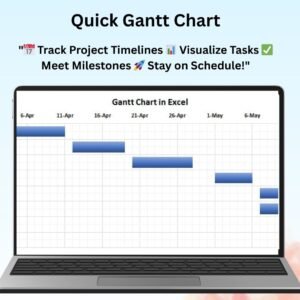
The Quick Gantt Chart is a highly efficient and easy-to-use Excel tool designed to help you create professional project timelines with just a few clicks. This tool allows you to quickly visualize your project schedule, track milestones, and monitor progress in a clear and engaging way. Whether you’re managing a small project, a team task, or a large-scale enterprise initiative, the Quick Gantt Chart simplifies the process of project management and ensures that deadlines are met.
This Gantt chart template provides a comprehensive overview of your project’s phases, tasks, and deadlines. It is fully customizable, allowing you to tailor it to your specific needs. With color-coded task bars, dependencies, and automatic updates, this chart makes it easier than ever to stay on top of your project and communicate progress to stakeholders.

Key Features of the Quick Gantt Chart:
📊 Visual Project Timeline
This Gantt chart creates a visual representation of your project schedule, allowing you to track tasks, milestones, and deadlines in a simple and intuitive layout.
🔄 Automatic Data Updates
As you input new data, the chart automatically updates to reflect the changes, giving you a real-time overview of your project’s progress.
⚙️ Customizable Task Bars
Adjust task bars, colors, and labels to reflect your project’s specific needs. The chart allows you to set start and end dates, durations, and task dependencies to create a comprehensive schedule.
📅 Track Milestones & Deadlines
Easily track critical milestones and deadlines in your project. The Gantt chart highlights these key dates, helping you ensure that your project stays on schedule.
🔧 Easy-to-Use Interface
The Quick Gantt Chart is designed to be user-friendly, making it simple for anyone to create a professional project timeline without any prior Excel experience.
Why You’ll Love the Quick Gantt Chart:
✅ Saves Time & Effort – Quickly create and manage your project timeline without the need for complex tools or software. ✅ Real-Time Updates – The chart automatically recalculates as new data is entered, ensuring that your project timeline is always up-to-date. ✅ Customizable & Flexible – Tailor the chart to fit the unique needs of your project, including adjusting task durations, milestones, and deadlines. ✅ Clear & Professional – Present your project schedule in a clean, visually appealing format that is easy to understand. ✅ Ideal for Any Project – Whether you’re managing a team, tracking a client deliverable, or overseeing a large initiative, the Quick Gantt Chart is perfect for any type of project.
What’s Inside the Quick Gantt Chart:
- Project Schedule – A visual timeline of your project’s tasks and milestones.
- Task Duration & Dependencies – Set task start and end dates, along with task dependencies, to create a realistic schedule.
- Milestone Tracking – Highlight important milestones and deadlines.
- Customizable Design – Adjust colors, task bars, and labels to suit your project needs.
- Automatic Updates – Real-time updates as you input data, ensuring your timeline is always accurate.
How to Use the Quick Gantt Chart:
1️⃣ Download the Template – Instantly access your Excel file upon purchase. 2️⃣ Input Your Project Data – Add tasks, start/end dates, and dependencies. 3️⃣ Track Progress – Watch the Gantt chart update automatically as you enter data. 4️⃣ Customize the Chart – Adjust the design to match your project’s branding or timeline requirements.
Who Can Benefit from the Quick Gantt Chart:
- Project Managers
- Team Leaders
- Small Business Owners
- Consultants
- Event Planners
- Marketing and Sales Teams
- Construction and IT Teams
Stay on top of your project and ensure its timely completion with this easy-to-use, customizable Quick Gantt Chart template.
Click here to read the Detailed blog post
https://www.pk-anexcelexpert.com/quick-gantt-chart/
Visit our YouTube channel to learn step-by-step video tutorials
Watch the step-by-step video tutorial:
Compatibility and Requirements
- Works in Microsoft Excel desktop (Excel 2016 or later, or Microsoft 365).
- Microsoft’s guide Use conditional formatting to highlight information explains the Excel feature this file is built on.
Frequently Asked Questions
What do I enter to build the Gantt chart?
Your tasks with their start and end dates, durations and any dependencies. The chart draws the task bars from those dates.
Does the chart update when dates change?
Yes. It recalculates as you enter or change data, so the timeline stays current.
Can I mark milestones?
Yes. Milestones and deadlines are highlighted on the timeline so key dates stand out.
Can I change the colors and labels?
Yes. You can adjust task bar colors, labels and the layout to match your project or branding.
Related Gantt Chart and Project Templates
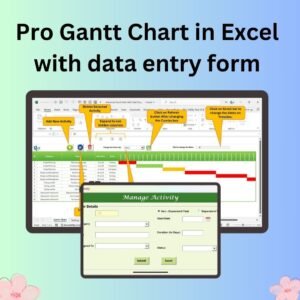
- Pro Gantt Chart in Excel with data entry form: a Gantt chart with a data entry form in Excel
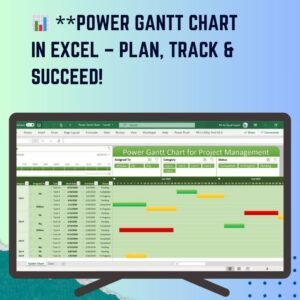
- Power Gantt Chart in Excel: another Gantt chart template in Excel
- Dynamic Hourly Gantt Chart for Projects: an hourly Gantt chart for short projects
- Project Plan Gantt Chart in Google Sheet: a project plan Gantt chart in Google Sheets
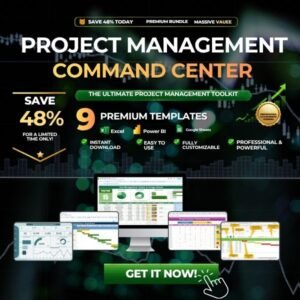
- Project Management Pro Bundle: project management templates in one bundle
Browse all Excel charts and visualization templates or the Excel project management templates.




Reviews
There are no reviews yet.