

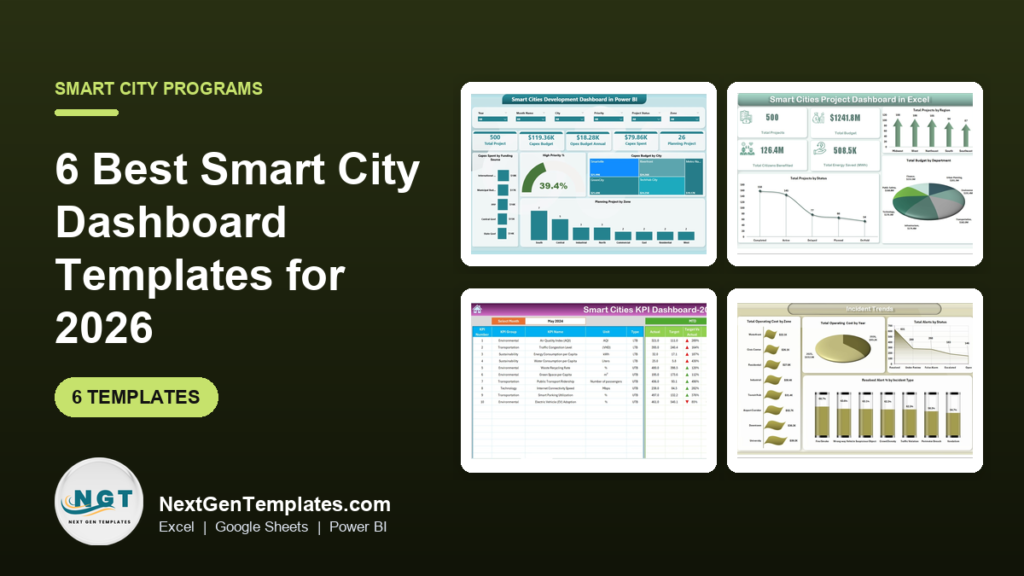
The best smart city dashboard for most programme teams in 2026 is the Smart Cities Development Dashboard in Power BI ($17.99). It tracks Capex, OpEx, funding sources and high-priority projects by city and zone on five pages. Teams that report monthly KPIs against target should add a Smart Cities KPI Dashboard, from $9.99 in Google Sheets.
Last updated: October 2026
Key takeaways
- Our top pick is the Smart Cities Development Dashboard in Power BI: Capex, OpEx and funding source analysis by city, zone and month for $17.99.
- For a portfolio of projects, the Smart Cities Project Dashboard in Excel ($13.99) tracks budgets, citizens benefited, energy saved, risk and delays.
- The Smart Cities KPI Dashboard is the best value: 10 city KPIs against target and last year, from $9.99 in Google Sheets.
- Specialist files cover a 12-KPI development scorecard, CCTV and surveillance alerts, and housing and urban development KPIs.
- None of these files is a live IoT platform. They turn monthly exports into a review-ready report for a one-time price of $8.99 to $17.99.
 Launch offer
From your first Pivot Table to the Data Model, DAX, Power Query and a one-page KPI dashboard. 11h 51m of video by PK, with practice files, quizzes and a capstone.
Smart city dashboard templates compared
| Template | Format | Best For | Price |
|---|---|---|---|
| Smart Cities Development Dashboard (Best overall) | Power BI | Programme budget: Capex, OpEx and funding by city and zone | $17.99 |
| Smart Cities Project Dashboard | Excel, Power BI | Project portfolio: status, spend, impact and delivery risk | $13.99 to $17.99 |
| Smart Cities KPI Dashboard (Best value) | Excel, Google Sheets, Power BI | 10 city KPIs against target and previous year | $9.99 to $14.99 |
| Smart Cities Development KPI Dashboard | Excel | 12-KPI monthly report for a mission or PMU | $14.99 |
| Smart City Surveillance Dashboard | Excel, Power BI | Command centres: alerts, response time and device health | $17.99 |
| Housing & Urban Development KPI Dashboard | Excel | Housing delivery, occupancy and urban service KPIs | $14.99 |
Why do smart city teams use dashboard templates instead of city platforms?
A smart city programme produces data in a dozen places. Capital spending sits with finance, project status with the PMU, traffic and air quality figures with the transport and environment departments, and CCTV alerts with the command centre. Each review meeting starts with someone copying numbers from five files into one deck.
Urban data platforms and open data portals solve that at scale, but they are sold as annual contracts, often priced on request, and need an integration project before the first chart appears. A mission team that has to brief its board next month rarely has that runway. What it needs is a clean data sheet, KPIs with the formulas already built and charts that refresh when a new month goes in.
That is the gap these smart city dashboard templates fill. You stay in Excel, Google Sheets or Power BI, which your analysts already use, and you can change every city, zone, department and KPI name. Public bodies with a wider remit should also see our government dashboard templates, and utility teams our utilities dashboard templates.
How we picked these smart city dashboard templates
We started from every smart city, smart cities, municipal and urban development template in the NextGenTemplates catalogue, about 40 files across Excel, Google Sheets and Power BI. We kept the ones a smart city programme team would run every month and dropped back-office variants, such as the tender, contract and purchasing dashboards, which belong in a procurement stack.
- Programme fit: does it answer a question a smart city mission or municipal team is asked in review meetings, such as where the money went or which KPIs missed target?
- Exact match first: files built specifically for smart cities rank above general public sector files.
- Formats: where a template exists in more than one format, we list each one so you can pick your team’s tool.
- Price: every pick is a one-time purchase. The Google Sheets editions are the cheapest way in.
The 6 best smart city dashboard templates for 2026
1. Smart Cities Development Dashboard in Power BI (Best overall)
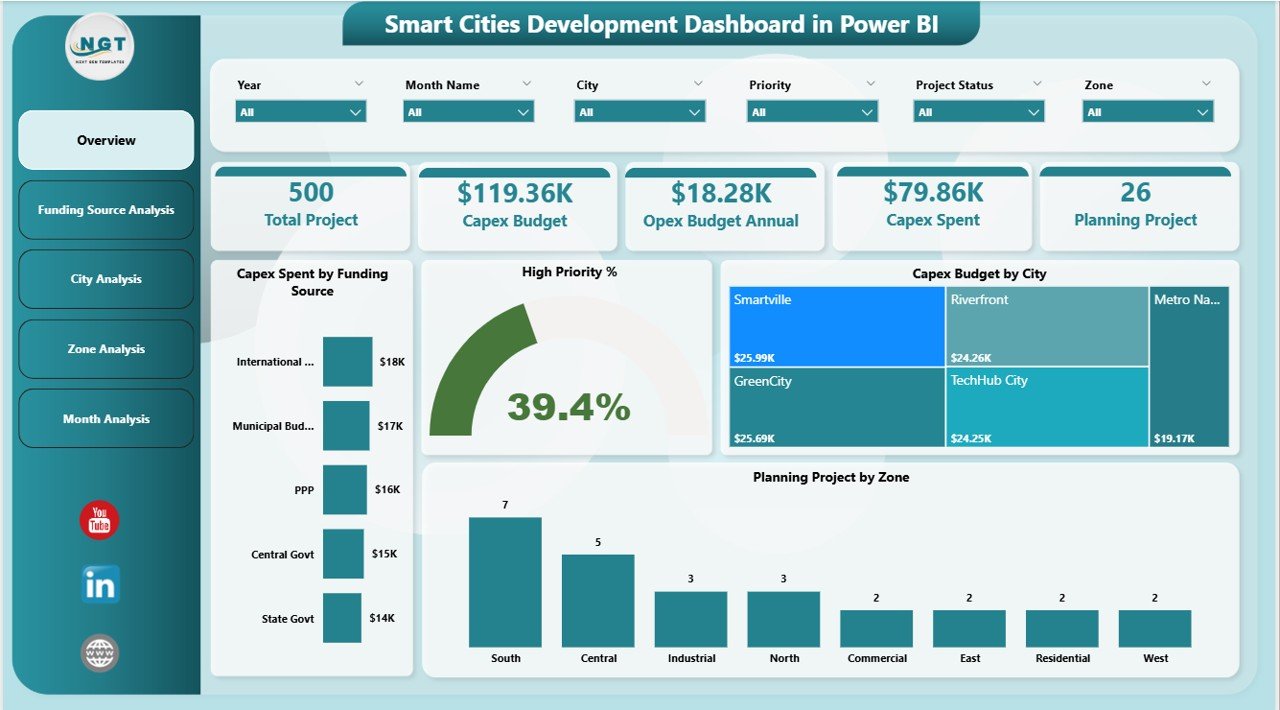
The Smart Cities Development Dashboard in Power BI is built around the money question every programme director gets asked: how much have we committed, how much have we spent, and where. Its Overview page shows total projects, Capex budget, annual OpEx budget, Capex spent and the number of projects still in planning, next to a high-priority project gauge and a Capex budget treemap by city.
Four more pages break the same data down. Funding Source Analysis compares central government, state government, municipal budget, PPP and international funding. City Analysis and Zone Analysis show OpEx and Capex by city and by planning zone, and Monthly Trends shows whether spending is keeping pace with the budget month by month. Slicers for year, month, city, priority, project status and zone filter every page.
- A finance lead sees in seconds that one city has spent its Capex while another has barely started.
- A mission director can show the board the share of PPP funding versus central grants.
- Zone planners can spot residential or industrial zones with many projects still at planning stage.
Prefer Excel? The Smart Cities Development KPI Dashboard in Excel (pick #4) covers the KPI side of the same programme.
Best for: smart city mission teams and finance departments who own the programme budget. Price: $17.99. Get the Smart Cities Development Dashboard
2. Smart Cities Project Dashboard in Excel
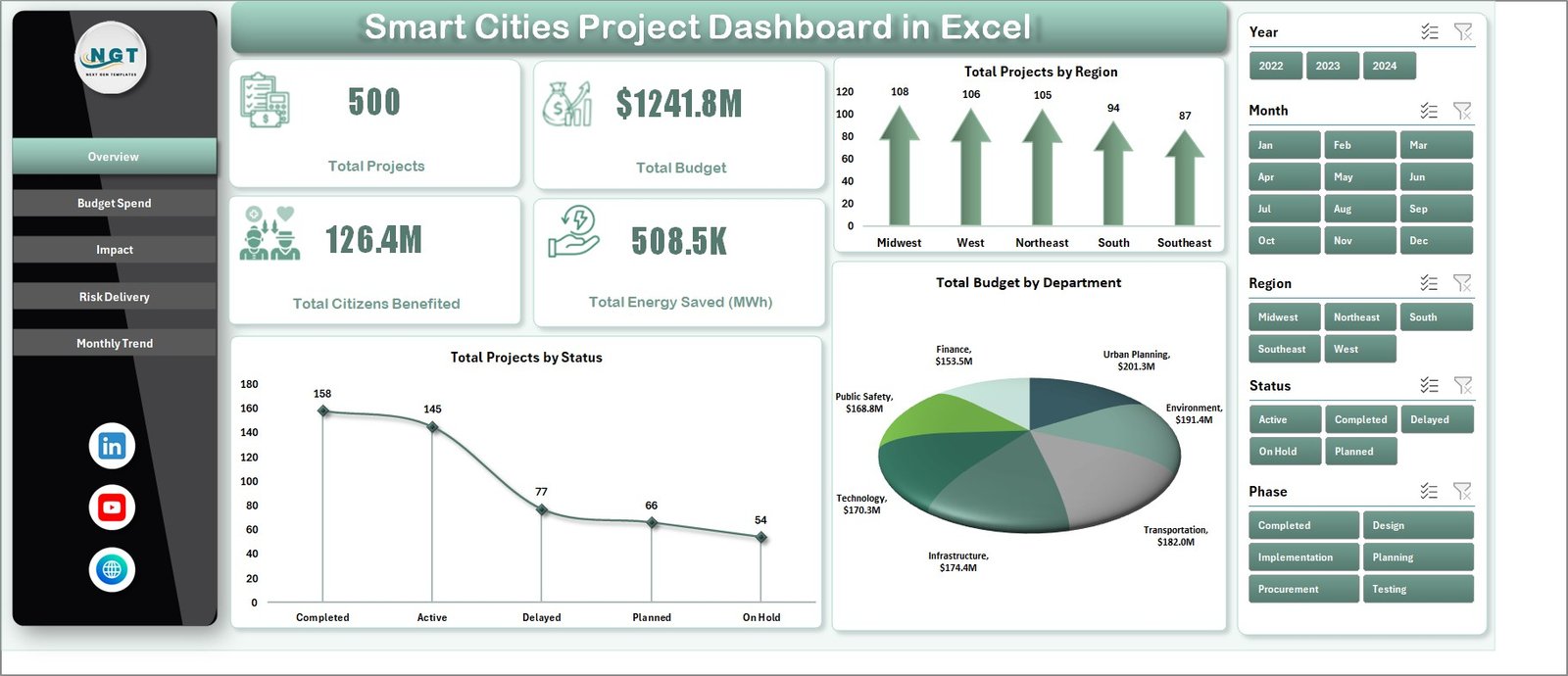
The Smart Cities Project Dashboard in Excel looks at the programme project by project. Four KPI cards show total projects, total budget, total citizens benefited and total energy saved in MWh. Charts break projects down by region, status and department, and the slicer panel filters by year, month, region, status and phase, from planning and design through procurement, implementation and testing.
The workbook has five pages: Overview, Budget Spend, Impact, Risk Delivery and Monthly Trend. Budget Spend compares allocation with actual spending across funding sources and departments. Impact tracks energy savings, CO2 reduction and citizens benefited, and Risk Delivery shows high-risk and delayed projects. You enter one row per project in the data sheet and refresh.
The Smart Cities Project Dashboard in Power BI costs $17.99 and adds Power BI drill-down across the same five views, with a Delayed Projects card on the overview.
Best for: project management units that report on dozens of initiatives at once. Price: $13.99 in Excel, $17.99 in Power BI. See the Smart Cities Project Dashboard
3. Smart Cities KPI Dashboard (Best value)

The Smart Cities KPI Dashboard in Excel is the classic monthly KPI report. Pick a month and the dashboard shows month-to-date and year-to-date actual, target and previous-year figures for each KPI, with up and down arrows for target and prior-year variance. The sample set has 10 KPIs grouped as environmental, transportation, sustainability and technology.
Those KPIs include air quality index, traffic congestion level, energy and water consumption per capita, waste recycling rate, green space per capita, public transport ridership, internet connectivity speed, smart parking utilisation and electric vehicle adoption. Each KPI is marked lower-the-better or upper-the-better, so the arrows read correctly. You can rename or replace any of them.
The Smart Cities KPI Dashboard in Google Sheets costs $9.99 and suits teams that share one file across departments. The Power BI edition costs $11.99. If you prefer a scorecard layout, the Smart Cities KPI Scorecard in Excel costs $12.99.
Best for: a city performance office that reviews the same KPIs every month. Price: $9.99 to $14.99. Get the Smart Cities KPI Dashboard
4. Smart Cities Development KPI Dashboard in Excel
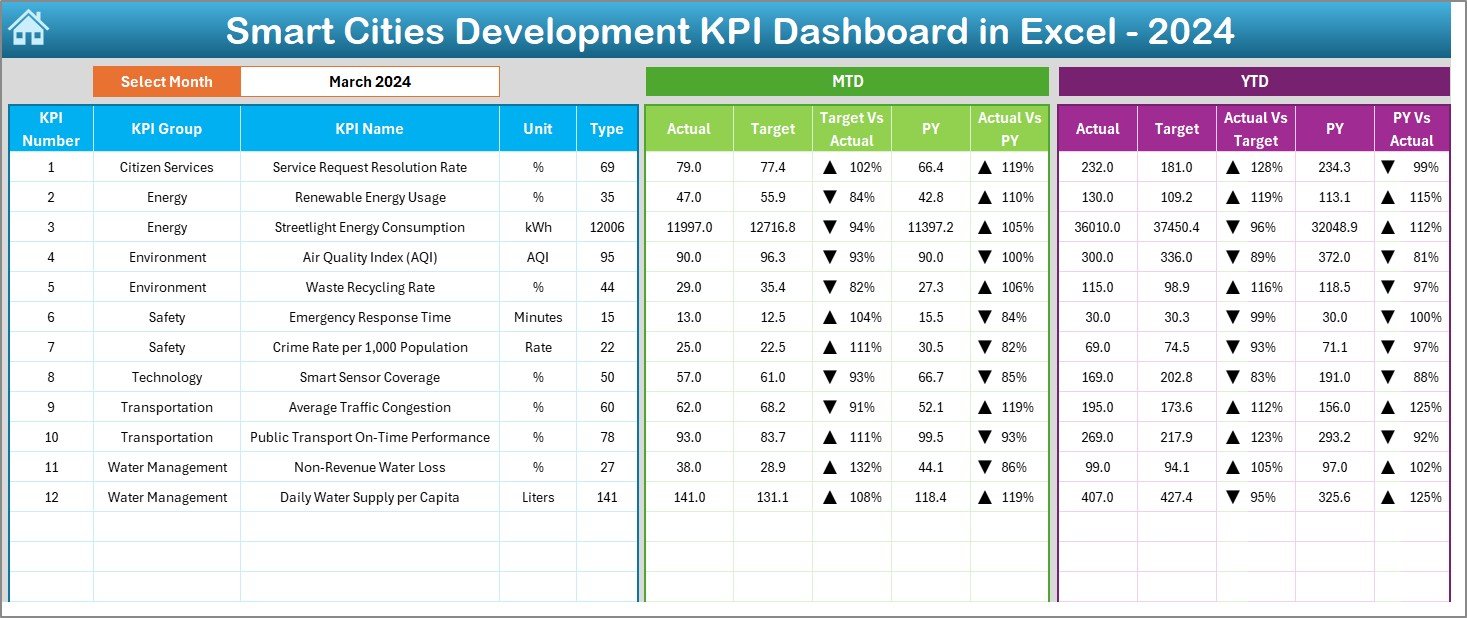
The Smart Cities Development KPI Dashboard in Excel is the broader KPI file. Its sample covers 12 KPIs across seven groups: citizen services, energy, environment, safety, technology, transportation and water management. That means service request resolution rate, renewable energy usage, streetlight energy consumption, emergency response time, crime rate per 1,000 people, smart sensor coverage, public transport on-time performance and non-revenue water loss sit in one view.
The workbook has seven sheets: Summary, Dashboard, Trend, Actual Input, Target Input, Previous Year and KPI Definition. The definition sheet records each KPI’s group, unit, type, formula and definition, which helps when several departments report into one file and argue about what a number means.
- A PMU sends one sheet to each department and pastes the results into Actual Input each month.
- The Trend sheet shows whether non-revenue water loss is falling after a leak detection project.
- Consultants can reuse the file across client cities by renaming the KPIs.
Best for: smart city missions and municipal corporations that report a wide KPI set to a board or ministry. Price: $14.99. See the Smart Cities Development KPI Dashboard
5. Smart City Surveillance Dashboard in Excel
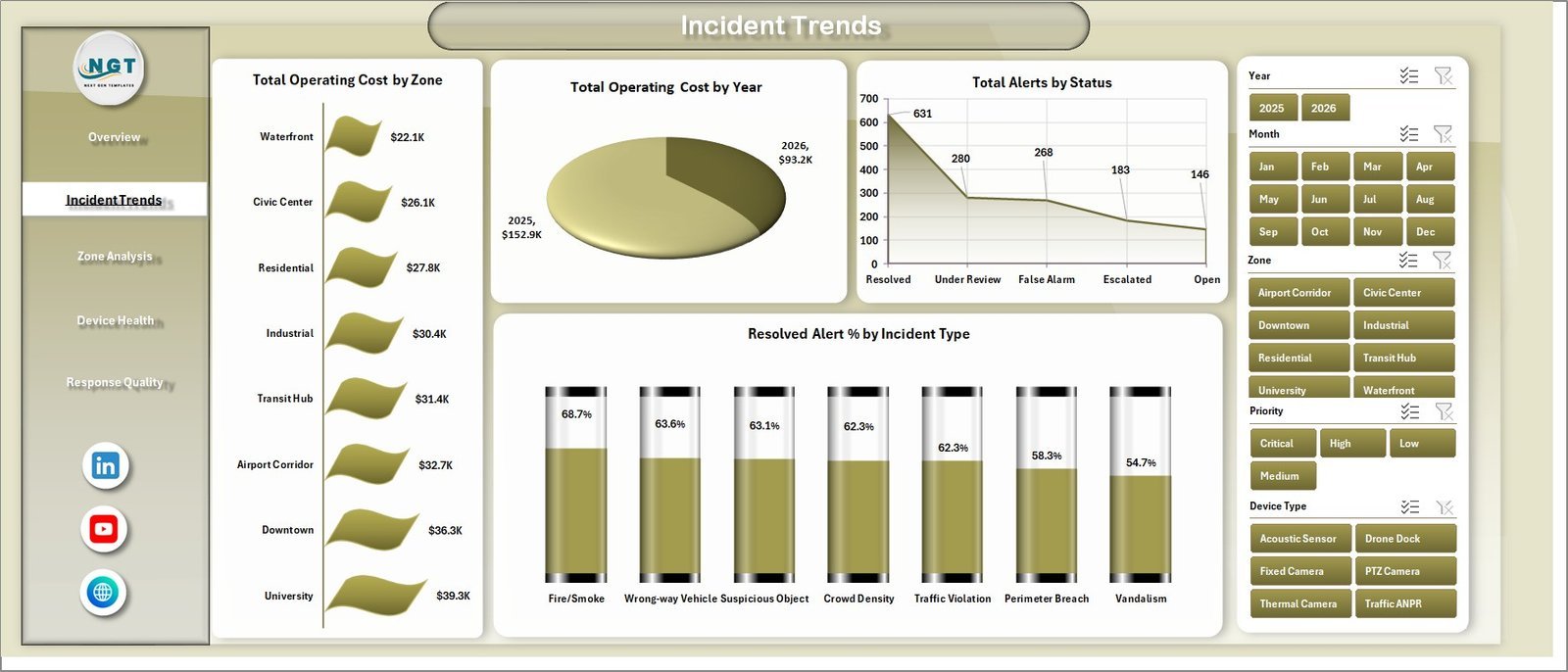
The Smart City Surveillance Dashboard in Excel is for the command and control centre. The Overview cards show total alerts, verified alert volume, resolved alert volume, total operating cost and average response time. Four more pages follow: Incident Trends, Zone Analysis, Device Health and Response Quality.
You can compare response time by district, alerts by vendor, cost by shift and device type, and resolved alert percentage by incident type, from fire and smoke to wrong-way vehicles and perimeter breaches. Device types include fixed, PTZ and thermal cameras, traffic ANPR, acoustic sensors and drone docks. Response Quality tracks verified alert percentage and average operator rating by shift, which is where false alarm problems show up.
The Smart City Surveillance Dashboard in Power BI costs the same $17.99, with five report pages, five KPI cards including open and escalated incidents, and 15 charts. Private operators should also read our security guard templates.
Best for: public safety and CCTV operations managers who report to the city. Price: $17.99 in Excel or Power BI. Get the Smart City Surveillance Dashboard
6. Housing & Urban Development KPI Dashboard in Excel

Many smart city programmes sit inside a housing or urban development authority. The Housing & Urban Development KPI Dashboard in Excel covers that side with 12 sample KPIs: housing project delay days, occupancy rate, road maintenance completion, public transport availability, streetlight functionality, urban crime rate, sewage treatment efficiency, solid waste collection efficiency, affordable housing units built, land development completion rate, water quality compliance and water leakage rate.
It uses the same seven-sheet structure as pick #4, with MTD, YTD, target and previous-year comparisons and a KPI definition library, so the two files sit side by side well. Choose it when your reporting is about housing delivery and basic services rather than technology projects.
The Housing & Urban Development Dashboard in Google Sheets costs $9.99, and the Power BI edition costs $17.99. Developers on the private side should see our real estate dashboard templates.
Best for: housing boards and urban development authorities. Price: $14.99. See the Housing & Urban Development KPI Dashboard
Which smart city KPIs belong on the dashboard?
Start from a recognised indicator set rather than inventing your own. The ITU U4SSC key performance indicators for smart sustainable cities and ISO 37120 for city services and quality of life both group indicators into economy, environment, mobility, safety and society. The templates above already carry many of them. Five formulas cover most monthly reviews:
| KPI | Formula | Good direction |
|---|---|---|
| Capex utilisation % | Capex spent / Capex budget x 100 | Close to the planned spend curve |
| Non-revenue water % | (Water produced – water billed) / water produced x 100 | Lower |
| Waste recycling rate % | Waste recycled / total waste collected x 100 | Higher |
| Public transport on-time % | On-time trips / scheduled trips x 100 | Higher |
| Service request resolution % | Requests closed within SLA / requests received x 100 | Higher |
A worked example from the sample data of pick #1: $79.86K of Capex spent against a $119.36K Capex budget gives a utilisation of about 66.9%. On its own that number means little. Split by city and zone, it shows which places are behind plan and need a delivery review.
How to choose between them
| If your main question is… | Buy this |
|---|---|
| Where is the programme budget going, by city and funding source? | Smart Cities Development Dashboard |
| Which projects are delayed, at risk or over budget? | Smart Cities Project Dashboard |
| Are our city KPIs on target this month? | Smart Cities KPI Dashboard |
| We report 12 or more KPIs from many departments | Smart Cities Development KPI Dashboard |
| How fast does the command centre resolve alerts? | Smart City Surveillance Dashboard |
| How is housing delivery and basic service coverage going? | Housing & Urban Development KPI Dashboard |
| We run municipal services such as water, waste and streets | Municipal Services KPI Dashboard in Google Sheets ($9.99) |
A common setup is one money file and one KPI file: the Development Dashboard for budget reviews and a KPI dashboard for the monthly performance meeting. Procurement teams running smart city tenders can add the Smart Cities Tender KPI Dashboard in Excel ($14.99) and read our procurement tools stack. Environment departments will find more in our waste management dashboard templates and sustainability reporting templates.
When a template is NOT the right answer
- You need live sensor data. Traffic signal control, flood warnings and live parking maps need a real-time platform fed by IoT devices. These files report monthly or weekly totals you load in.
- You need a public open data portal. Publishing datasets to citizens with APIs and licences is a portal job, not a workbook job.
- You need GIS mapping. If decisions depend on parcel-level maps, use your GIS tool and feed summary figures into the dashboard.
- Many agencies edit the same data daily. Once dozens of people submit data with approvals and audit trails, a database-backed system saves time.
For most mission teams, PMUs and municipal departments preparing monthly reviews, a template is the quickest way to get one version of the numbers without another contract. Want to try something free first? See our free Power BI dashboard templates. Every paid file here is fully editable; our guide to editable vs locked templates explains why that matters. Facility and estates teams can also browse our facility management templates.
Frequently asked questions
What is a smart city dashboard?
A smart city dashboard is a report that pulls a city's programme data into one screen: project budgets, capital spending, service KPIs such as traffic congestion or water loss, and sometimes safety alerts. The templates in this guide do that in Excel, Google Sheets or Power BI from data you enter or paste, so the team can review it every month.
Which smart city dashboard template should I buy first?
If you run the programme budget, start with the Smart Cities Development Dashboard in Power BI at $17.99. It tracks Capex, OpEx and funding sources by city and zone. If you manage a portfolio of projects in Excel, start with the Smart Cities Project Dashboard in Excel at $13.99.
Is there a smart city dashboard in Excel?
Yes. The Smart Cities Project Dashboard in Excel costs $13.99. The Smart Cities KPI Dashboard, the Smart Cities Development KPI Dashboard and the Housing and Urban Development KPI Dashboard each cost $14.99 in Excel, and the Smart City Surveillance Dashboard in Excel costs $17.99.
Is there a smart city dashboard in Google Sheets?
Yes. The Smart Cities KPI Dashboard in Google Sheets costs $9.99 and tracks monthly KPIs against target and last year. The Smart Cities KPI Scorecard in Google Sheets costs $8.99, and the Municipal Services KPI Dashboard in Google Sheets costs $9.99 for water, waste and street maintenance KPIs.
What KPIs should a smart city track?
Most programmes track a mix of mobility, environment, utilities, safety and citizen service KPIs. Common ones are average traffic congestion, public transport on-time performance, air quality index, waste recycling rate, non-revenue water loss, emergency response time and service request resolution rate. ITU's U4SSC set and ISO 37120 list standard city indicators you can borrow.
Do these templates connect to IoT sensors or live city data?
No. They read data you enter or paste into a data sheet, then refresh. Many teams export monthly totals from their sensor platform, GIS or ERP and load them into the template. If you need second-by-second sensor feeds or a public open data portal, you need a dedicated platform.
How do you calculate Capex utilisation for a smart city project?
Divide capital spent to date by the approved capital budget and multiply by 100. In the sample data of the Smart Cities Development Dashboard, $79.86K spent against a $119.36K Capex budget gives a utilisation of about 66.9%. Track it by city and zone to see where spending lags the plan.
Can a city surveillance team use an Excel dashboard?
Yes, for monthly and weekly reporting. The Smart City Surveillance Dashboard in Excel reports total alerts, verified and resolved alerts, operating cost and average response time by district, zone, vendor, shift and device type. It is a reporting file for command centre managers, not a video management system.
Are these smart city templates a one-time purchase?
Yes. Prices run from $8.99 to $17.99 per file with no subscription and no per-user fee. You download the file, change the cities, zones, departments and KPIs to match your programme, and keep it.
Who uses smart city dashboard templates?
Smart city mission teams, project management units, municipal corporations, urban development and housing authorities, transport and utility departments, and consultants who report to them. They suit teams that need a clear monthly view for review meetings without waiting for an enterprise analytics project.
Get your smart city dashboard template
Start with the Smart Cities Development Dashboard in Power BI ($17.99) to see your programme budget by city, zone and funding source. Add the Smart Cities KPI Dashboard from $9.99 for the monthly KPI review, or the Smart Cities Project Dashboard in Excel ($13.99) to follow every project. Each one is a one-time purchase you can edit and keep. Step-by-step walkthroughs are on our YouTube channel.