

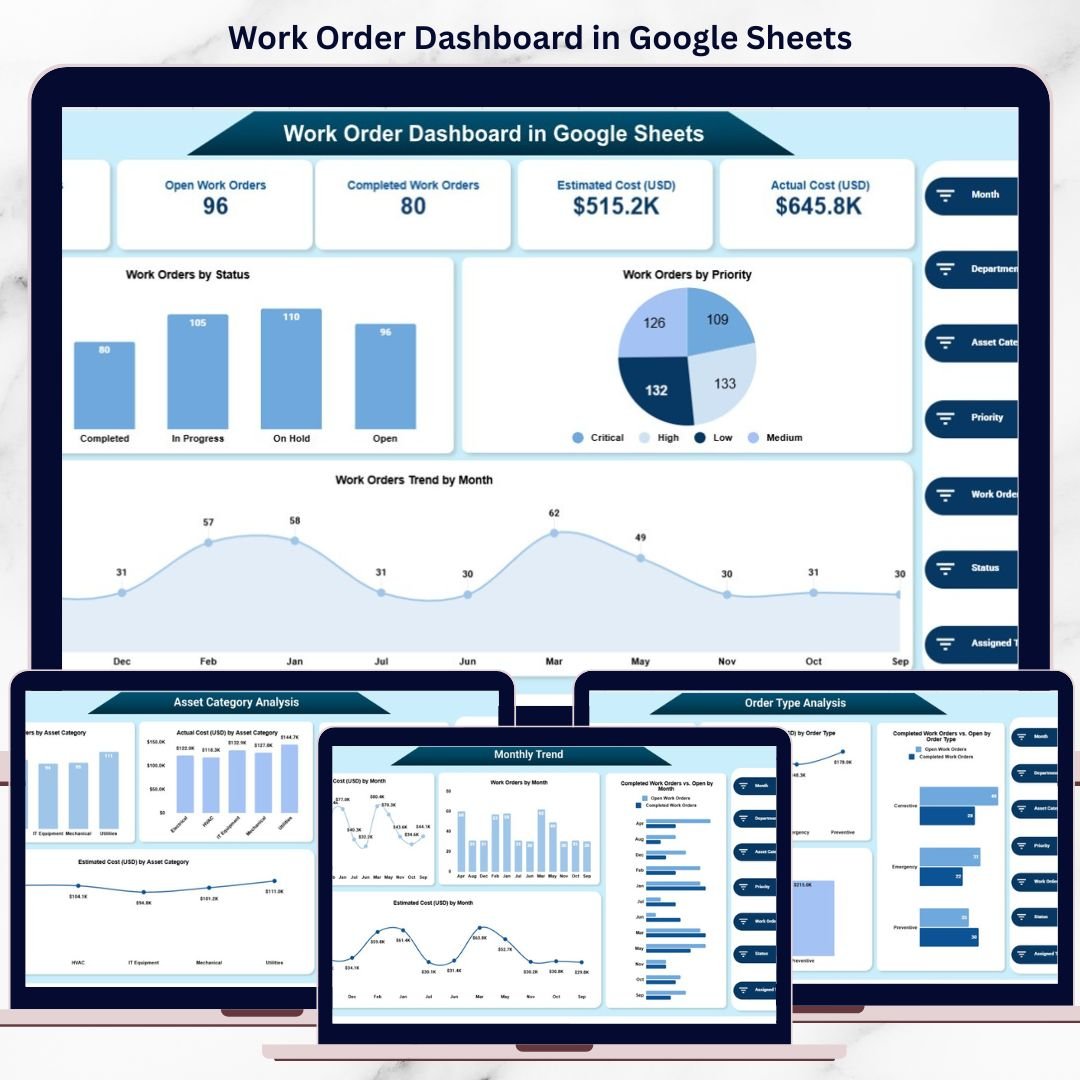
Work orders are the backbone of maintenance, facilities, and operations management. Every organization depends on timely execution of repairs, inspections, service requests, and preventive maintenance activities. However, when work orders are tracked using scattered spreadsheets, emails, or manual logs, teams struggle to monitor progress, control costs, and evaluate performance. As a result, delays increase, expenses go unchecked, and accountability weakens.
That is exactly why the Work Order Dashboard in Google Sheets becomes a powerful and practical solution.
This ready-to-use dashboard transforms raw work order data into a clear, structured, and visual management system. It helps operations, facilities, and maintenance teams track work order status, priorities, costs, departments, order types, and asset categories—all from one centralized Google Sheets dashboard. Instead of manually reviewing rows of data, managers gain instant insights through KPI cards, interactive charts, and trend analysis.
Because the dashboard runs in Google Sheets, it requires no additional software, supports real-time collaboration, and remains easy to customize as business needs evolve.

✨ Key Features of the Work Order Dashboard in Google Sheets
📊 Centralized Work Order Monitoring
Track all work orders—open, in progress, and completed—in one structured dashboard.
💰 Clear Cost Visibility
Compare estimated costs versus actual costs to control maintenance expenses.
⚡ Real-Time Updates
Any data change instantly refreshes all charts and KPIs.
🏢 Department & Asset Insights
Analyze performance by department, order type, and asset category.
🔍 Smart Search Capability
Find specific work orders instantly using keyword-based search.
📂 Dashboard Structure Explained
📌 Overview Sheet Tab – Executive Snapshot
The Overview Sheet provides a high-level view of work order performance.
KPI Cards Display:
-
Total Work Orders
-
Open Work Orders
-
Completed Work Orders
-
Estimated Cost (USD)
-
Actual Cost (USD)
These KPI cards allow managers to instantly assess workload and financial exposure.
Overview Charts Include:
-
Work Orders by Status – Open, In Progress, Completed
-
Work Orders by Priority – High, Medium, Low
-
Work Orders Trend by Month – Identifies workload fluctuations over time
This section acts as the command center for daily operational reviews.
🏢 Department Performance Analysis
This section evaluates how different departments manage work orders.
Charts Included:
-
Work Orders by Department
-
Estimated Cost (USD) by Department
-
Completed vs Open Work Orders by Department
-
Actual Cost (USD) by Department
These visuals help leadership identify departments with high workloads, cost overruns, or delayed closures—supporting better accountability and resource planning.
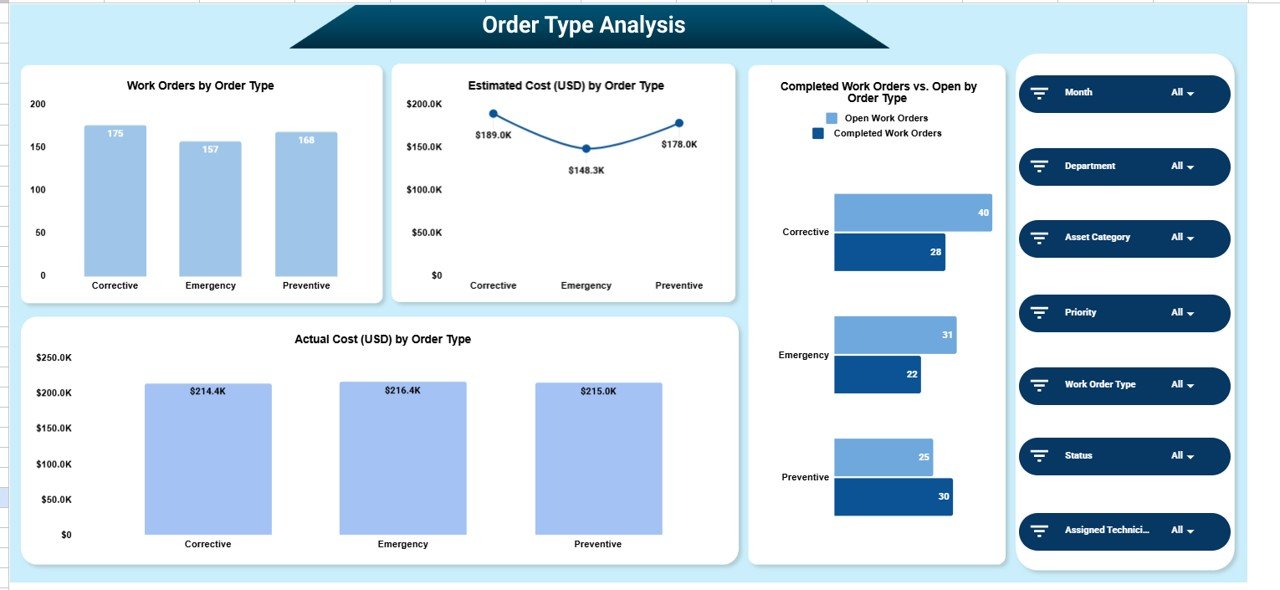
🛠️ Order Type Analysis
Work orders vary in nature, such as maintenance, repair, inspection, or service.
Charts Included:
-
Work Orders by Order Type
-
Estimated Cost (USD) by Order Type
-
Completed vs Open Work Orders by Order Type
-
Actual Cost (USD) by Order Type
This analysis highlights which work types consume the most time and budget, enabling smarter maintenance strategies.
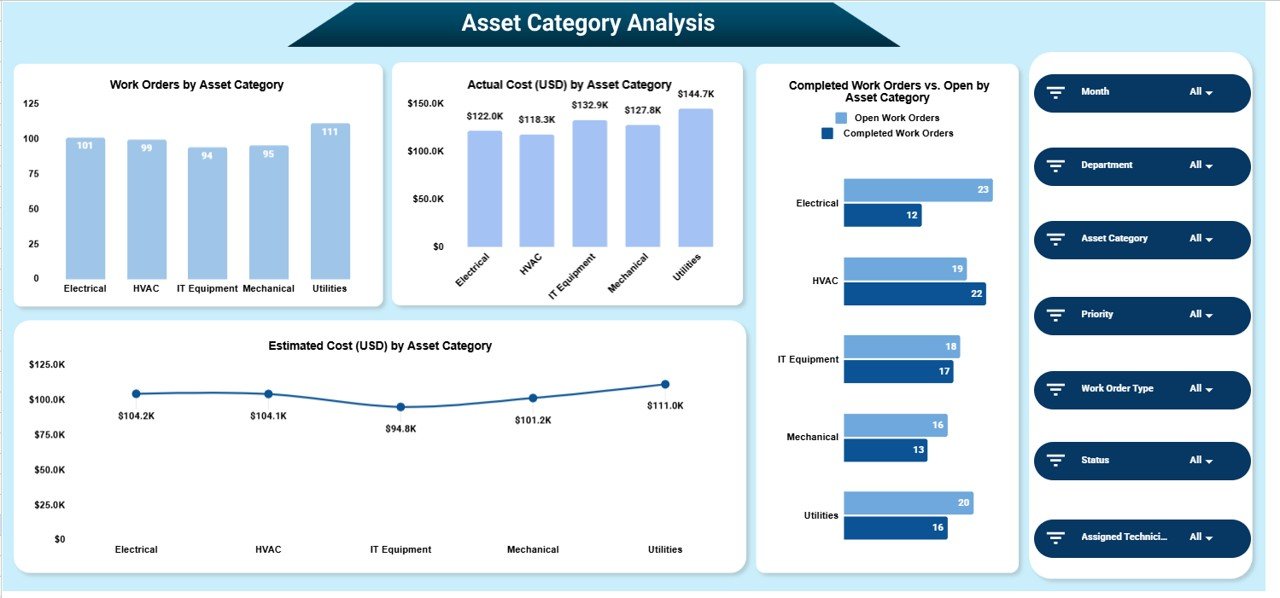
🏗️ Asset Category Analysis
Assets often drive maintenance cost and workload.
Charts Included:
-
Work Orders by Asset Category
-
Estimated Cost (USD) by Asset Category
-
Actual Cost (USD) by Asset Category
-
Completed vs Open Work Orders by Asset Category
This section supports asset-level planning, preventive maintenance, and budget forecasting.
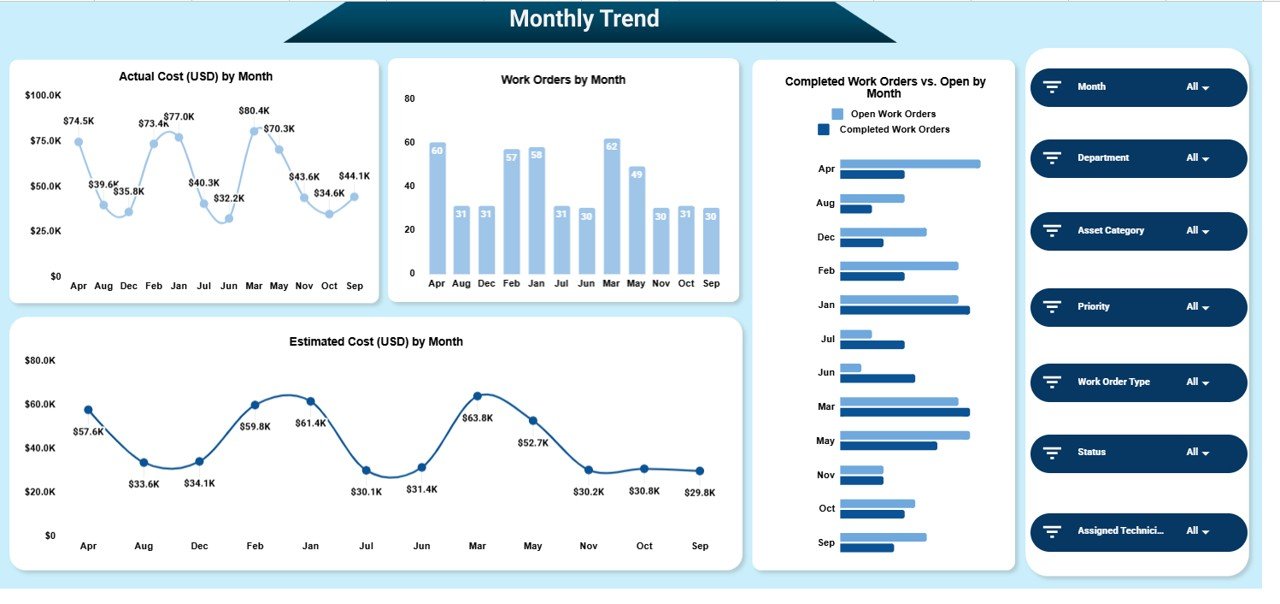
📈 Monthly Trend Analysis
Understanding trends over time is essential for operational planning.
Charts Included:
-
Work Orders by Month
-
Estimated Cost (USD) by Month
-
Actual Cost (USD) by Month
-
Completed vs Open Work Orders by Month
These trends help teams forecast workload, identify seasonal patterns, and control rising costs early.
🔍 Smart Search Feature – Find Any Work Order Instantly
The dashboard includes a powerful search section where users can filter work orders by:
-
Work Order ID
-
Department
-
Priority
-
Order Type
-
Asset Category
-
Status
By entering a Search Keyword and selecting the Field Name, matching records appear instantly—eliminating manual scrolling and filters.
This feature is especially useful during audits, management reviews, and urgent issue tracking.
🎯 Who Should Use the Work Order Dashboard
-
Facilities & Maintenance Teams
-
Operations Managers
-
Asset Management Teams
-
Finance & Cost Control Teams
-
Leadership & Decision-Makers
🛠️ Best Practices for Maximum Value
-
Update work order data daily
-
Standardize priority and status values
-
Review cost variance monthly
-
Share insights with department heads
-
Restrict edit access to authorized users
-
Maintain historical data for trend analysis
Click here to read the Detailed blog post
Watch the step-by-step video tutorial:











Reviews
There are no reviews yet.