


Managing vendor payments efficiently is critical for maintaining healthy cash flow, strong supplier relationships, and financial discipline. However, many finance and procurement teams still rely on emails, manual spreadsheets, and disconnected accounting reports to track invoices and payments. As a result, payment delays increase, overdue amounts rise, reconciliation becomes time-consuming, and vendors lose trust.
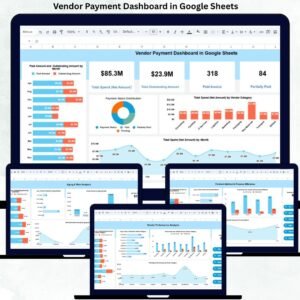
The Vendor Payment Dashboard in Google Sheets is designed to solve these challenges with a centralized, visual, and easy-to-use system. This ready-to-use dashboard gives you complete visibility into vendor invoices, payment status, outstanding balances, overdue risks, and spending trends — all in one place.
Built entirely in Google Sheets, this dashboard updates in real time, supports team collaboration, and requires no expensive software or technical setup. Finance teams can instantly understand payment health, identify risks early, and take corrective action with confidence.
🚀 Key Features of the Vendor Payment Dashboard
📊 Real-Time Payment Visibility
Track paid, partially paid, and outstanding invoices instantly without manual calculations.
⚠️ Overdue & Risk Monitoring
Identify overdue invoices, aging buckets, and 90+ day risk exposure before issues escalate.
🧾 Vendor-Level Performance Insights
Understand vendor payment behavior, overdue trends, and spend concentration.
🏢 Department & Buyer Accountability
Analyze which departments or buyers contribute most to delayed payments.
💳 Payment Method Efficiency Analysis
Compare payment performance across bank transfer, cheque, cash, or digital methods.
🔍 Smart Search Functionality
Find any invoice, vendor, or department in seconds using keyword-based search.
📦 What’s Inside the Vendor Payment Dashboard
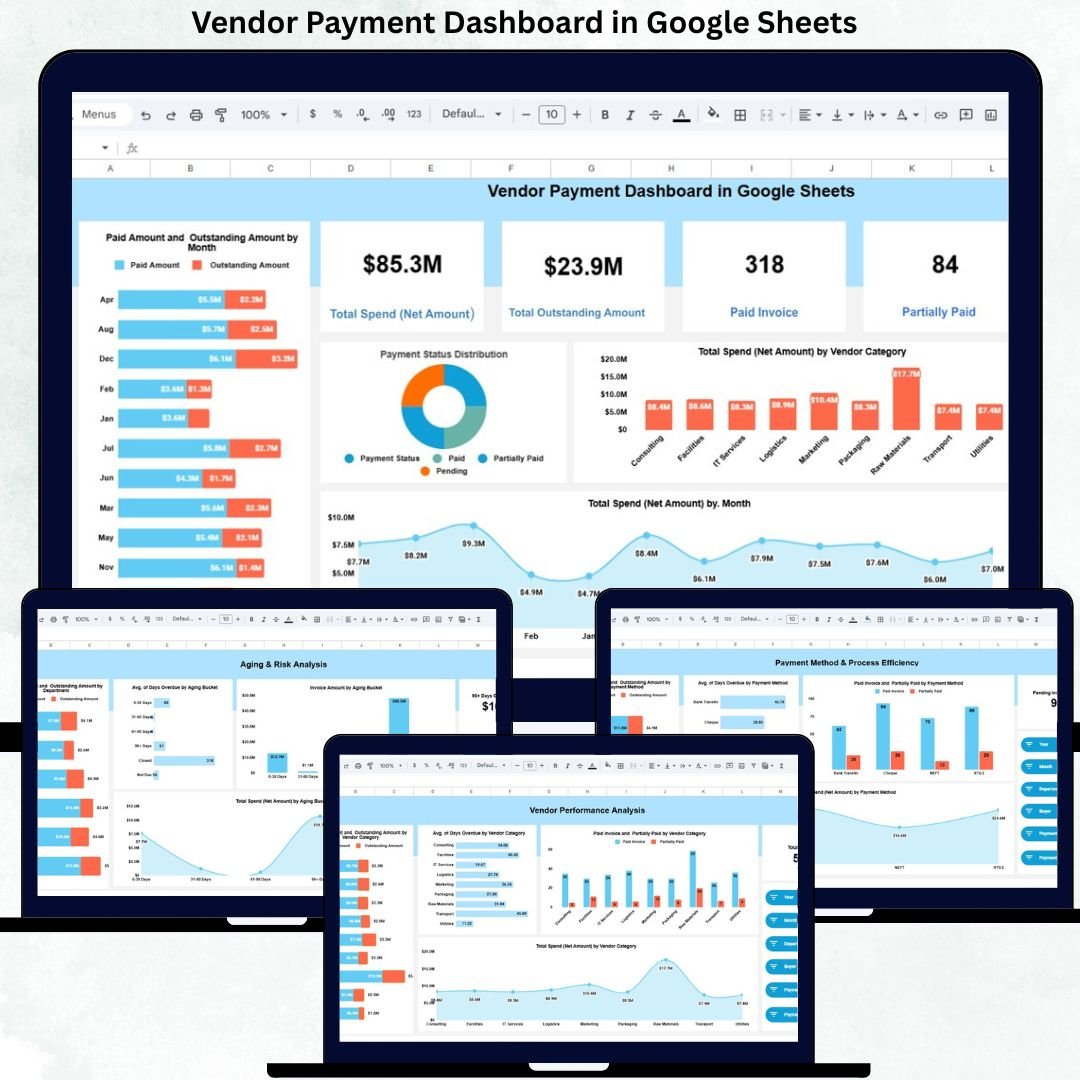
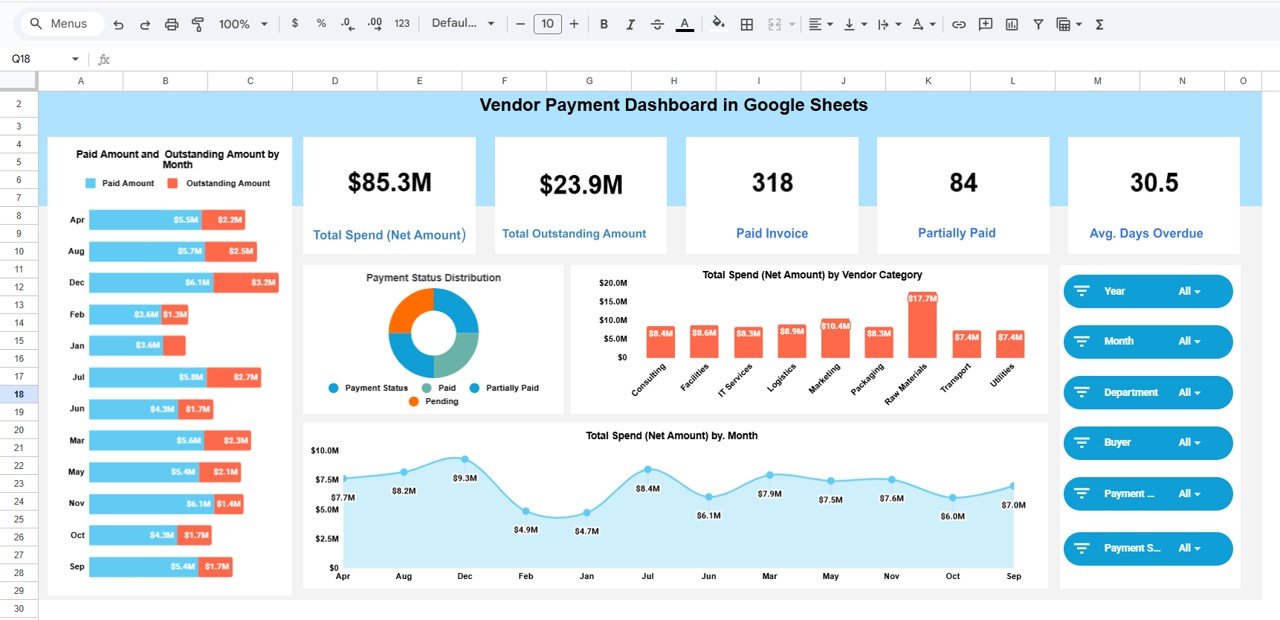
🖥️ Overview Sheet – Executive Snapshot
This sheet provides instant payment health visibility using KPI cards and charts.
KPI Cards Included:
-
Total Outstanding Amount
-
Paid Invoices
-
Partially Paid Invoices
-
Average Days Overdue
Overview Charts:
-
Paid vs Outstanding Amount by Month
-
Payment Status Distribution
-
Total Spend by Vendor Category
-
Total Spend by Month
These visuals help leadership assess payment discipline at a glance.
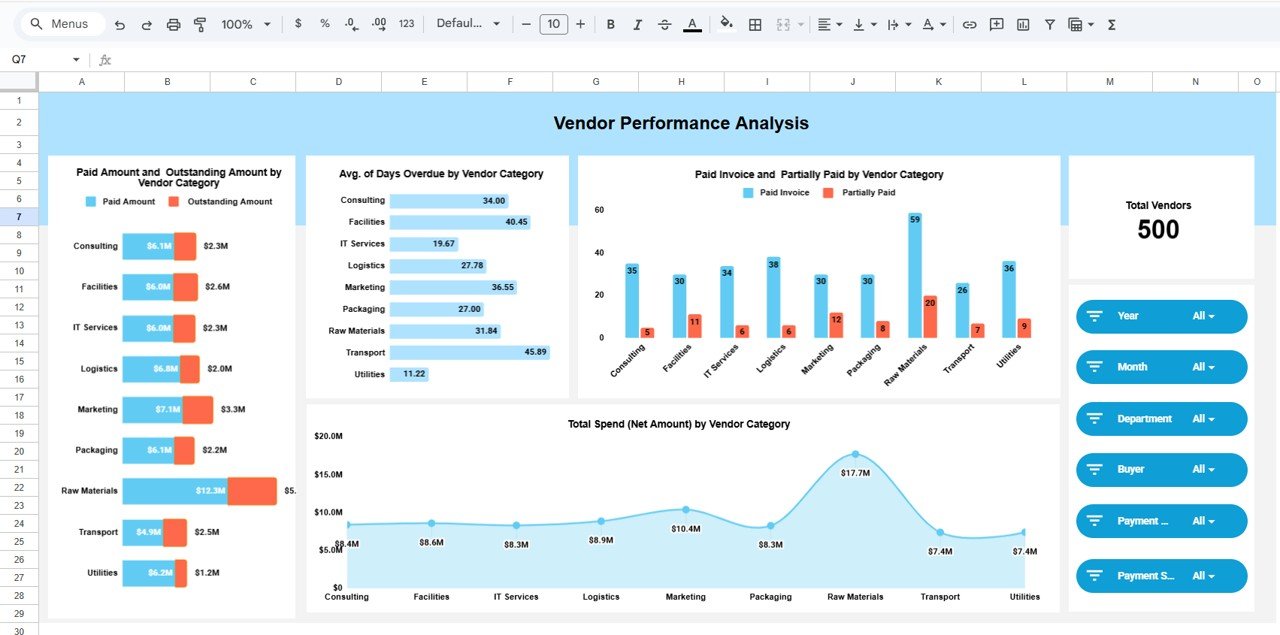
🏷️ Vendor Performance Analysis
This section focuses on vendor-level insights.
Key Highlights:
-
Total Vendors Count
-
Paid vs Outstanding Amount by Vendor Category
-
Average Days Overdue by Vendor Category
-
Paid vs Partially Paid Invoices by Vendor Category
-
Total Spend by Vendor Category
This analysis supports better vendor negotiations and risk prioritization.
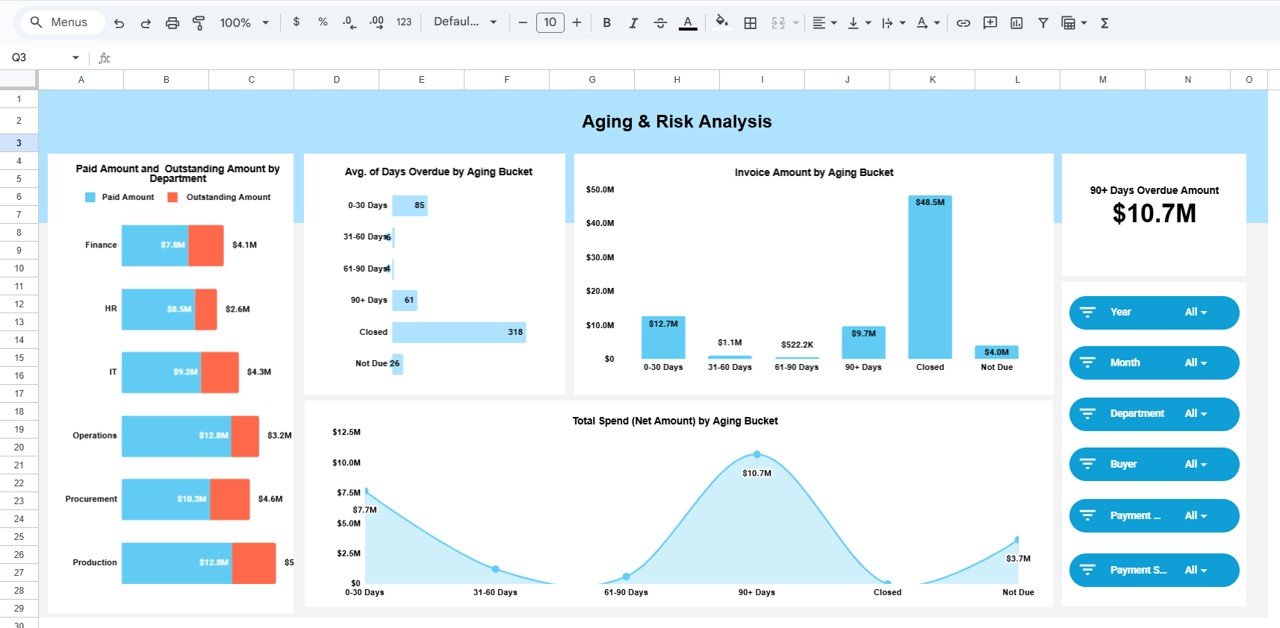
⏳ Aging & Risk Analysis
This section strengthens financial risk control.
KPI Card:
-
90+ Days Overdue Amount
Charts Included:
-
Invoice Amount by Aging Bucket (0–30, 31–60, 61–90, 90+)
-
Average Days Overdue by Aging Bucket
-
Total Spend by Aging Bucket
-
Paid vs Outstanding Amount by Department
It helps finance teams act early on high-risk overdue invoices.
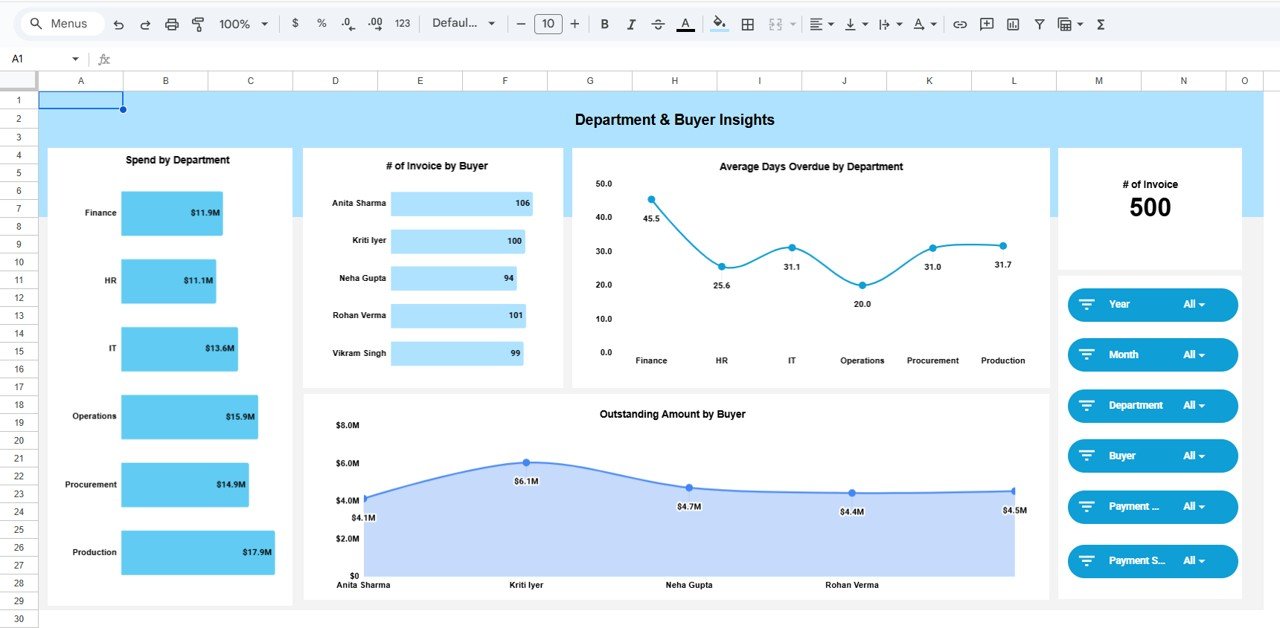
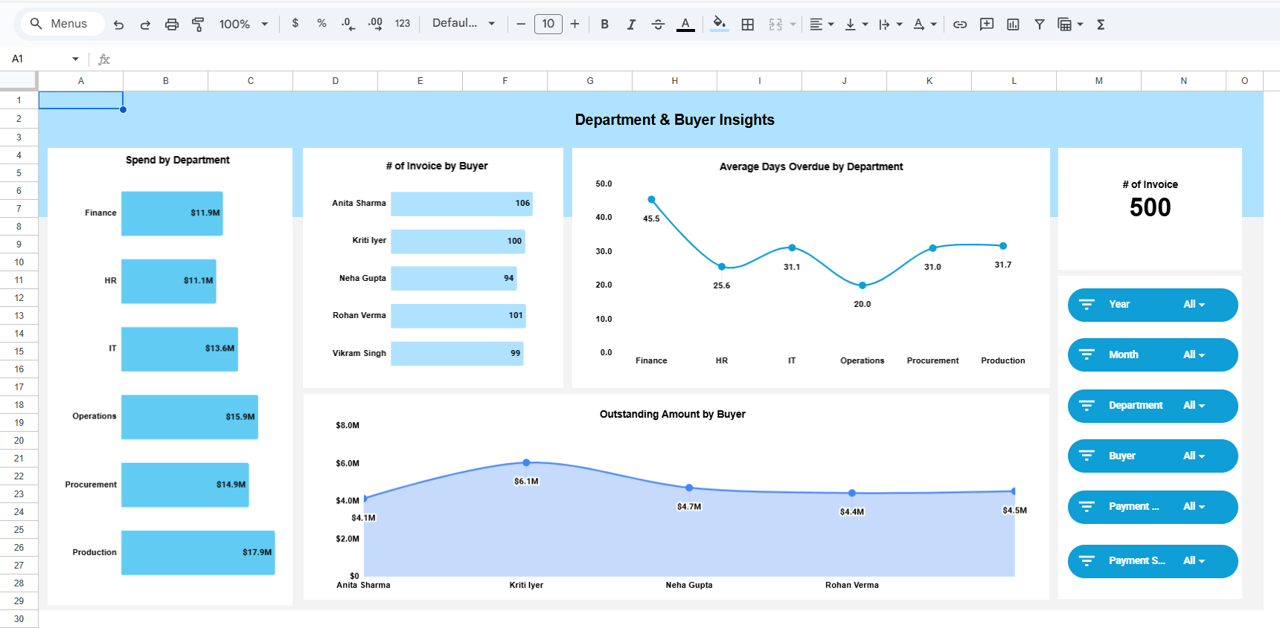
🏢 Department & Buyer Insights
This section links payments to internal accountability.
Charts Included:
-
Spend by Department
-
Number of Invoices by Buyer
-
Average Days Overdue by Department
-
Outstanding Amount by Buyer
Managers can identify process gaps and improve internal discipline.
💳 Payment Method & Process Efficiency
Evaluate how payment channels impact efficiency.
KPI Card:
-
Pending Invoice Count
Charts Included:
-
Paid vs Outstanding Amount by Payment Method
-
Average Days Overdue by Payment Method
-
Paid vs Partially Paid by Payment Method
-
Total Spend by Payment Method
This insight helps optimize payment workflows.
🔍 Smart Search – Find Anything Instantly
Search invoices using:
-
Vendor Name
-
Invoice Number
-
Department
-
Buyer Name
-
Vendor Category
-
Payment Status
-
Payment Method
This saves hours during audits and reviews.
🛠️ How to Use the Vendor Payment Dashboard
1️⃣ Enter invoice and payment data
2️⃣ Update payment status regularly
3️⃣ Review overdue and aging insights weekly
4️⃣ Use department and vendor analysis for accountability
5️⃣ Use search for audits and follow-ups
👥 Who Can Benefit from This Dashboard
-
💼 Accounts Payable Teams
-
📊 Finance & Accounting Teams
-
🛒 Procurement Managers
-
👨💼 Finance Controllers
-
🚀 Business Owners & CFOs
### Click here to read the Detailed blog post
Visit our YouTube channel to learn step-by-step video tutorials
👉 https://youtube.com/@NeotechNavigators




























Reviews
There are no reviews yet.