Managing your monthly finances can feel overwhelming when expenses are scattered across bank statements, payment apps, receipts, and notes. Many people know their monthly income but struggle to track exactly where their money goes. As a result, unnecessary spending increases and savings slowly disappear.
That’s exactly where the Monthly Budget Planner Template in Excel becomes your personal financial control center 💰📊.
This ready-to-use Excel template helps you organize income, plan expenses, track actual spending, and instantly compare budget vs actual values. Instead of guessing your financial situation, you gain a clear picture of how money flows in and out every month.
Whether you want to reduce expenses, improve savings, or simply gain control over your finances, this Excel budget planner provides a simple and powerful solution.
🚀 Key Feature of Monthly Budget Planner Template in Excel
💰 Income Tracking System – Record multiple income sources such as salary, freelance work, or additional earnings.
📊 Budget vs Actual Comparison – Instantly compare planned spending with actual expenses.
📉 Variance Calculation – Identify overspending automatically using built-in Excel formulas.
📅 Monthly Expense Monitoring – Track spending categories throughout the month.
📈 Visual Budget Analysis Chart – Easily analyze financial behavior using charts.
🏠 Organized Expense Categories – Track fixed, variable, lifestyle, and miscellaneous expenses.
⚙️ Automatic Calculations – Excel formulas calculate totals and variances instantly.
🎯 Financial Awareness & Control – Understand where your money goes and adjust spending habits.
With these features, managing personal finances becomes structured, transparent, and stress-free.
📦 What’s Inside the Monthly Budget Planner Template in Excel?
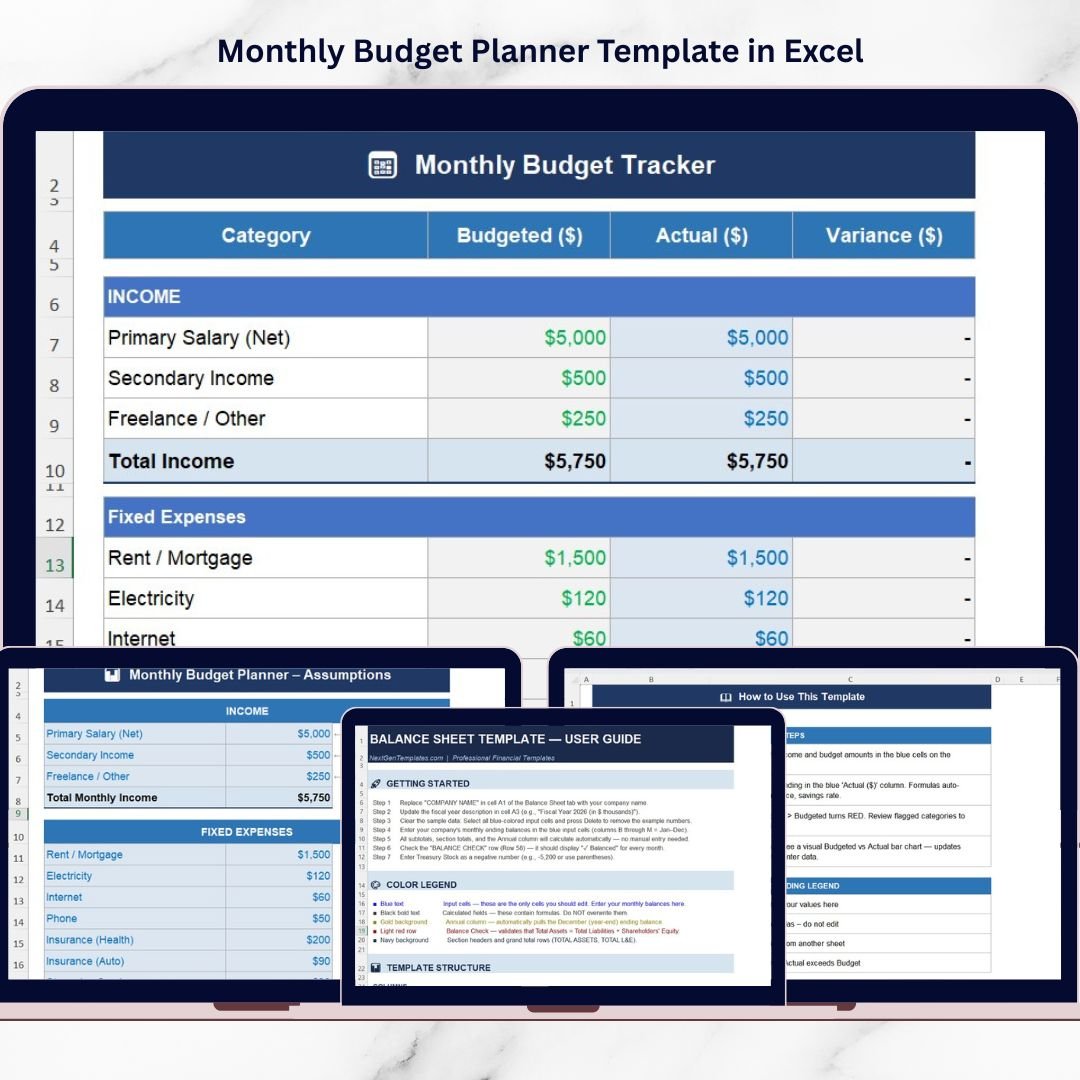
This template includes four structured worksheets designed to guide users through the budgeting process.
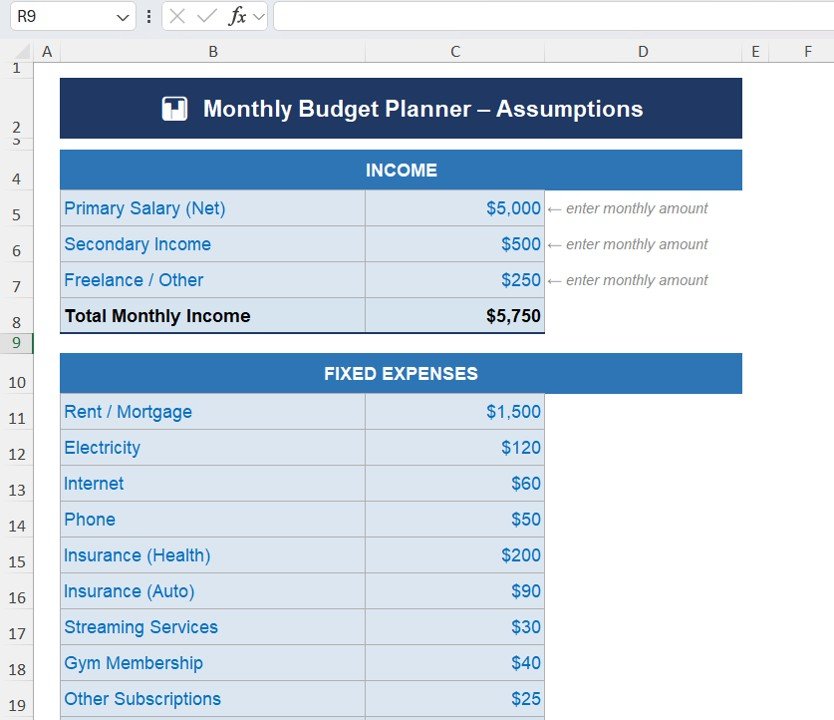
1️⃣ Assumptions Sheet – Define Income and Base Budget
The Assumptions Sheet is the starting point of the template. Here, users enter their expected income and define the foundation for monthly budgeting.
The income section allows users to record:
• Primary Salary (Net Income)
• Secondary Income
• Freelance / Other Income
The template automatically calculates Total Monthly Income, which becomes the base for financial planning.
This sheet also includes fixed expense planning, such as:
• Rent or Mortgage
• Electricity Bills
• Internet
• Phone Bills
• Health Insurance
• Auto Insurance
• Streaming Services
• Gym Memberships
• Other Subscriptions
Planning these recurring costs first ensures that essential expenses are always covered.
2️⃣ Monthly Budget Tracker – Compare Budget vs Actual Spending
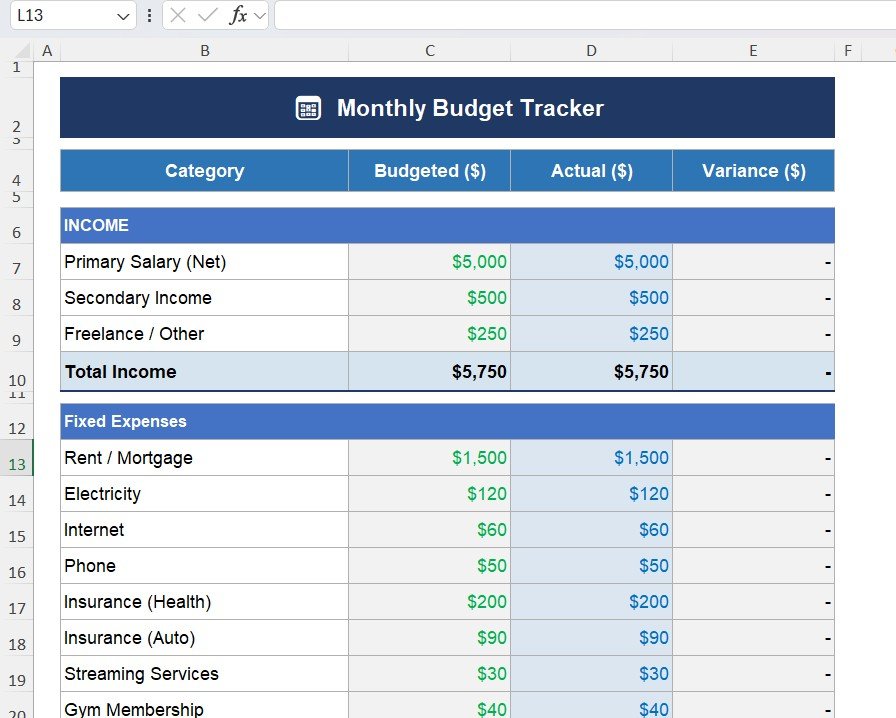
This sheet helps track planned expenses and real spending behavior.
The tracker includes three key columns:
Budgeted Amount
This column represents planned spending based on the assumptions sheet.
Actual Amount
Users enter real spending values in this column.
Variance
The template automatically calculates:
Variance = Budget – Actual
This helps users instantly detect overspending.
For example, if the actual grocery expense exceeds the planned amount, the variance highlights the difference immediately.
3️⃣ Expense Categories – Organized Spending Structure
The template organizes expenses into clear categories to ensure accurate tracking.
Fixed Expenses
• Rent / Mortgage
• Electricity
• Internet
• Phone
• Insurance
Variable Expenses
• Groceries
• Dining Out
• Coffee / Snacks
• Transportation / Fuel
• Public Transit
Lifestyle Expenses
• Entertainment
• Shopping / Clothing
• Personal Care
• Health / Pharmacy
Miscellaneous Expenses
• Unexpected costs
• Additional personal spending
This structure ensures that every type of expense gets recorded properly.
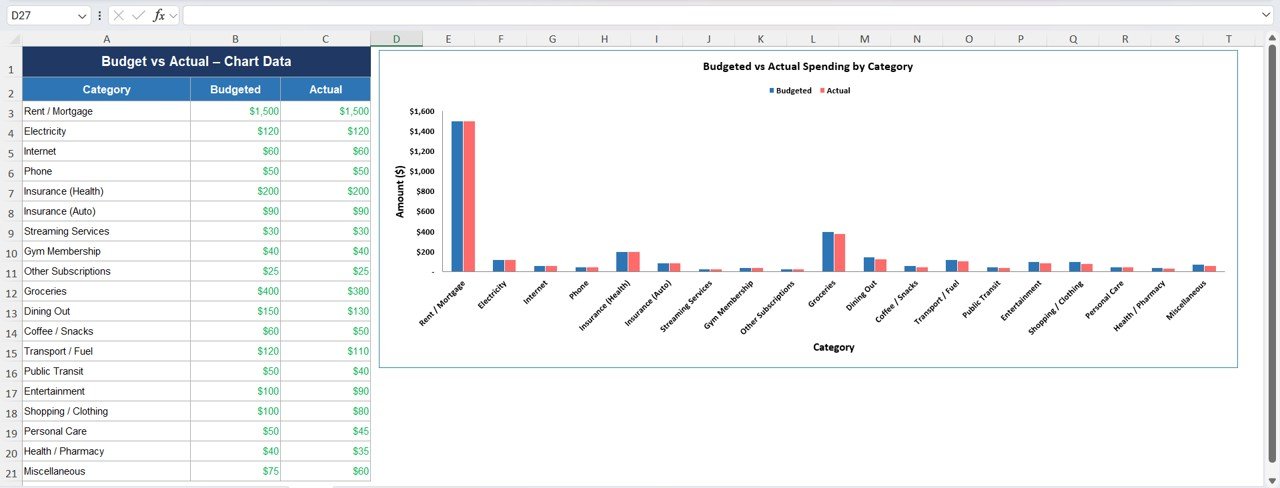
4️⃣ Budget vs Actual Chart – Visual Spending Analysis
Numbers alone sometimes make it difficult to understand financial patterns.
Therefore, the template includes a visual chart sheet that compares:
• Budgeted Spending
• Actual Spending
for each expense category.
This visual representation helps users quickly identify:
• Overspending areas
• Expense patterns
• Opportunities to reduce spending
As a result, users can make better financial decisions.
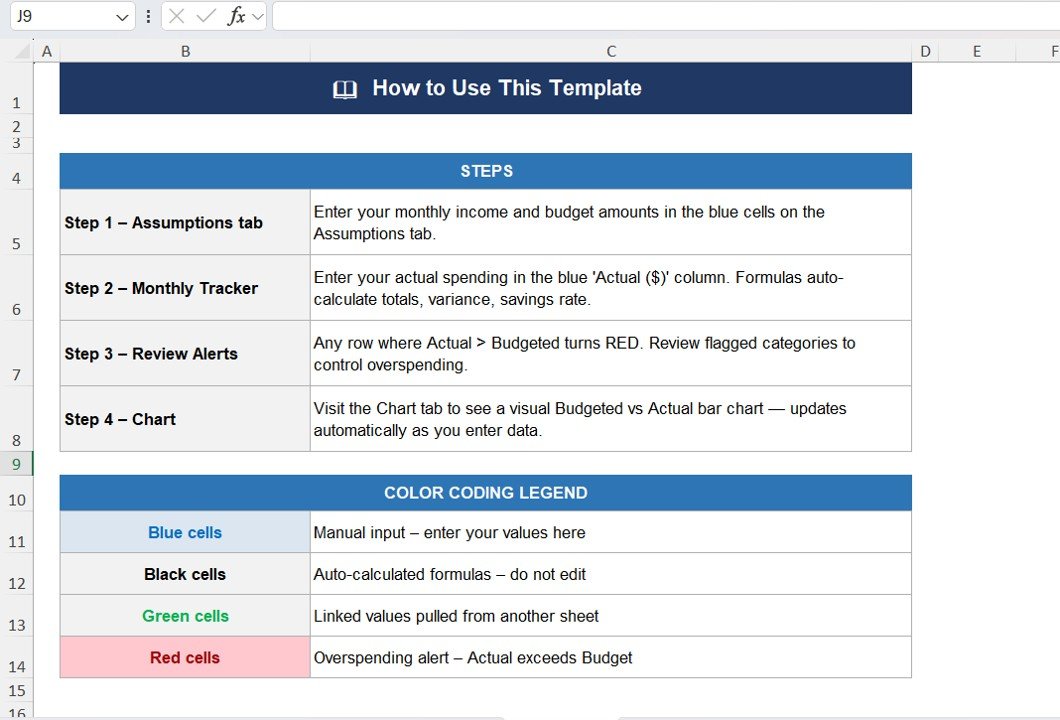
⚙️ How to Use the Monthly Budget Planner Template in Excel
Using this template is simple and beginner-friendly.
1️⃣ Enter your monthly income sources in the Assumptions sheet
2️⃣ Define your expected fixed expenses
3️⃣ Record planned spending in the budget column
4️⃣ Update actual spending regularly
5️⃣ Review variance and charts to analyze financial behavior
Because Excel handles calculations automatically, users spend less time calculating and more time improving financial habits.
👥 Who Can Benefit from This Monthly Budget Planner?
This Excel template is perfect for anyone who wants better control over their personal finances.
✔ Individuals managing monthly income and expenses
✔ Families planning household budgets
✔ Students learning financial discipline
✔ Freelancers managing variable income
✔ Young professionals building savings habits
✔ Anyone aiming to improve financial awareness
By using this planner regularly, users gain clarity about their financial behavior and identify opportunities to increase savings.
This template answers critical financial questions such as:
• How much money do I earn monthly?
• How much do I spend each month?
• Which category consumes the most money?
• Am I overspending in certain areas?
• How much can I save?
Instead of guessing, users gain clear financial insights.
Moreover, the template is fully customizable. Users can add new expense categories, modify income sources, and adapt the structure according to their lifestyle.
In today’s world, financial discipline is the foundation of long-term stability. With the Monthly Budget Planner Template in Excel, you can take control of your money, reduce unnecessary spending, and build stronger financial habits.
Click hare to read the Detailed blog post
Watch the step-by-step video tutorial: