



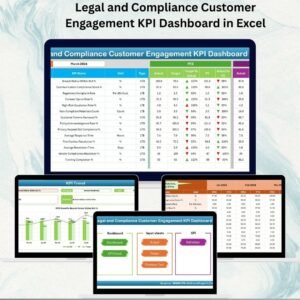
Legal and Compliance Customer Engagement KPI Dashboard in Excel ⚖️📊
In today’s competitive business world, success is not just about delivering great products and services—it’s about staying compliant with regulations while ensuring an exceptional customer experience. Any gaps in compliance or engagement can lead to fines, customer churn, and reputational risk. To overcome these challenges, we’ve created the Legal and Compliance Customer Engagement KPI Dashboard in Excel—a ready-to-use, interactive, and cost-effective solution.
This dashboard is designed to give businesses a 360-degree view of compliance performance and customer engagement metrics in one place. With multiple worksheet tabs, automated visuals, and easy navigation, it empowers compliance teams, customer service managers, and executives to monitor KPIs with clarity and confidence.
✨ Key Features of the Dashboard
🏠 Home Sheet – Easy Navigation

Acts as the index page of the dashboard.
Includes 6 navigation buttons to jump across sections instantly.
Saves time and improves user experience, even for beginners.
📊 Dashboard Sheet – Real-Time Insights
The core visualization page of the tool.
Month selector (cell D3) filters all visuals for instant updates.
Displays MTD (Month-to-Date) and YTD (Year-to-Date) Actuals, Targets, and Previous Year comparisons.
Conditional formatting with green/red arrows shows performance at a glance.
📈 KPI Trend Sheet – Track Progress Over Time
Select KPI name from a drop-down menu (cell C3).
Shows KPI Group, Unit, Type (UTB or LTB), Formula, and Definition.
Visualizes MTD & YTD trends with Actual vs Target vs Previous Year charts.
📝 Actual Numbers Input Sheet – Data Accuracy
Manual entry of monthly actual performance values.
YTD and MTD data fields for consistent reporting.
Month selection available at cell E1 for streamlined updates.
🎯 Target Sheet – Define Benchmarks
Stores MTD and YTD target values for each KPI.
Serves as the baseline for performance comparisons.
📅 Previous Year Numbers Sheet – Historical Comparison
Maintains last year’s KPI data for benchmarking.
Helps in identifying growth, stagnation, or decline.
📖 KPI Definition Sheet – Standardized Metrics
Contains key details for every KPI:
KPI Name
KPI Group
Unit of Measurement
Formula
Definition
Ensures consistency and avoids misinterpretation across teams.
✅ Advantages of the Dashboard
Enhanced Compliance Monitoring – Track legal KPIs like audits, deadlines, and contract approval times.
Improved Customer Trust – Monitor response times, SLA adherence, and complaint resolution rates.
Better Decision-Making – Managers act faster with real-time, visual insights.
Time-Saving – Prebuilt template eliminates setup headaches.
Cost-Effective – Excel-based, no need for expensive compliance software.
Customizable – Add/remove KPIs based on industry needs.
Audit-Ready – Historical data and clear KPI definitions make it audit-friendly.
🔧 Opportunities for Improvement
Automate data entry via Power Query or CRM/ERP integration.
Connect with Power BI/Tableau for advanced analytics.
Add real-time notifications (e.g., overdue tasks).
Introduce role-based access for sensitive compliance metrics.
Expand with AI-driven insights for predictive analysis.
📌 Best Practices
Keep KPIs clear, measurable, and relevant.
Update actual/target data at least monthly.
Use conditional formatting to flag risks early.
Benchmark against industry standards or historical results.
Train users for proper adoption across teams.
Protect sensitive compliance data with Excel password security.
👥 Who Can Benefit?
Legal Teams – Monitor audits, contract approvals, and compliance KPIs.
Customer Service Teams – Track response time, SLA adherence, complaint resolution.
Executives – Get a high-level overview of compliance & engagement.
Auditors – Validate compliance processes quickly.
🌍 Real-World Applications
Financial Institutions – Monitor regulatory compliance deadlines & customer complaints.
Healthcare Industry – Track patient privacy compliance and satisfaction scores.
Retail Sector – Measure consumer protection compliance and customer loyalty KPIs.
SMEs & Startups – Low-cost compliance & customer tracking tool.
🚀 Conclusion
The Legal and Compliance Customer Engagement KPI Dashboard in Excel is more than just a spreadsheet—it’s a comprehensive tool for monitoring compliance and customer satisfaction. With its interactive features, variance analysis, and historical comparisons, it provides organizations with the visibility needed to stay compliant while building customer trust.
Whether you are a small business or a large enterprise, this dashboard will help you manage risks, streamline compliance, and improve customer relationships—all in a familiar Excel environment.
📖 Click here to read the Detailed Blog Post
🎥 Visit our YouTube Channel for step-by-step tutorials
Watch the step-by-step video tutorial:
Compatibility and Requirements
- Works in Microsoft Excel desktop (Excel 2016 or later, or Microsoft 365).
- You pick the month from a selector on the Dashboard sheet and the KPI name from a drop-down on the KPI Trend sheet. Microsoft explains drop-downs in Create a drop-down list.
Frequently Asked Questions
Which sheets are included?
Seven sheets: Home, Dashboard, KPI Trend, Actual Numbers Input, Target, Previous Year Numbers and KPI Definition.
How do I update the dashboard?
Enter your monthly MTD and YTD actual values in the Actual Numbers Input sheet and your benchmarks in the Target sheet. Then choose a month in cell D3 on the Dashboard sheet and the visuals update.
Can I compare this year with last year?
Yes. Add last year’s figures to the Previous Year Numbers sheet. The Dashboard shows MTD and YTD actuals next to targets and previous year values, with green and red arrows for performance.
How do I see the trend for one KPI?
Open the KPI Trend sheet and select the KPI in cell C3. It shows the KPI group, unit, type (UTB or LTB), formula and definition, plus MTD and YTD charts of actual, target and previous year.
Is there another version of this compliance dashboard?
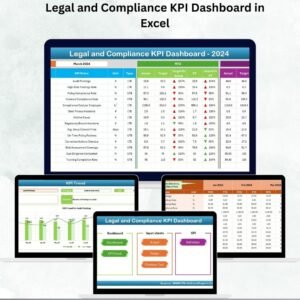
See the Legal and Compliance KPI Dashboard in Excel for the general set of compliance KPIs.
Related Legal and Compliance Templates
- Legal and Compliance KPI Dashboard in Excel: the general compliance KPI set in Excel
- Legal and Compliance Operations KPI Dashboard in Excel: operations KPIs for legal teams
- Legal and Compliance Resource Allocation KPI Dashboard in Excel: resource allocation KPIs
- Customer Engagement KPI Dashboard in Power BI: customer engagement KPIs in Power BI
- KPI Dashboard Library (Excel): 15 KPI dashboard templates in one download
Browse all Excel KPI dashboards.






Reviews
There are no reviews yet.