


In today’s competitive business environment, organizations generate massive amounts of knowledge every day—documents, SOPs, training materials, guidelines, best practices, and insights. Knowledge Management Dashboard in Excel However, when this knowledge remains scattered across folders, emails, and systems, its true value gets lost. Teams waste time searching, duplicate work increases, and critical insights go unused.
Knowledge Management Dashboard in Excel That is exactly why the Knowledge Management Dashboard in Excel becomes a powerful, business-changing solution 📊🚀.
This ready-to-use Excel dashboard transforms raw knowledge data into clear, visual, and actionable insights. Instead of guessing whether knowledge initiatives actually deliver value, leaders can now measure cost savings, time efficiency, reuse, compliance, and overall impact from one centralized dashboard. Because the solution is built entirely in Microsoft Excel, it remains flexible, affordable, and extremely easy to adopt—without complex tools or technical dependencies.
Designed for modern organizations, this dashboard helps teams move from information overload to strategic knowledge utilization.
⭐ Key Features of Knowledge Management Dashboard in Excel
📊 Centralized Knowledge Performance Tracking
Monitor how knowledge is created, accessed, reused, and validated across the organization.
💰 Cost Savings Measurement
Track real cost savings generated through knowledge reuse and standardization.
⏱️ Time Efficiency Analysis
Measure average time saved (in hours) using validated and reusable knowledge.
📋 Compliance & Governance Visibility
Monitor compliance validation status to reduce risk and support audits.
📈 Department, Owner & Knowledge-Type Insights
Analyze which teams, contributors, and knowledge formats deliver the highest value.
🧭 User-Friendly Navigation
Quick page navigation makes leadership reviews and presentations effortless.
📦 What’s Inside the Knowledge Management Dashboard in Excel
This professionally designed Excel dashboard includes five powerful analytical pages plus a structured data sheet:
📊 Overview Page
The command center showing:

-
KPI cards for Cost Saved, Reuse Count, Average Time Saved, Compliance Validation, and Average Rating
-
Charts for Cost Saved by Access Level, Reuse by Department, Time Saved by Status, and Compliance by Category
📂 Knowledge Type Analysis Page
Analyze value by knowledge format with charts for:
-
Average Time Saved by Knowledge Type
-
Compliance Validation by Knowledge Type
-
Cost Saved by Knowledge Type
-
Total Downloads by Knowledge Type
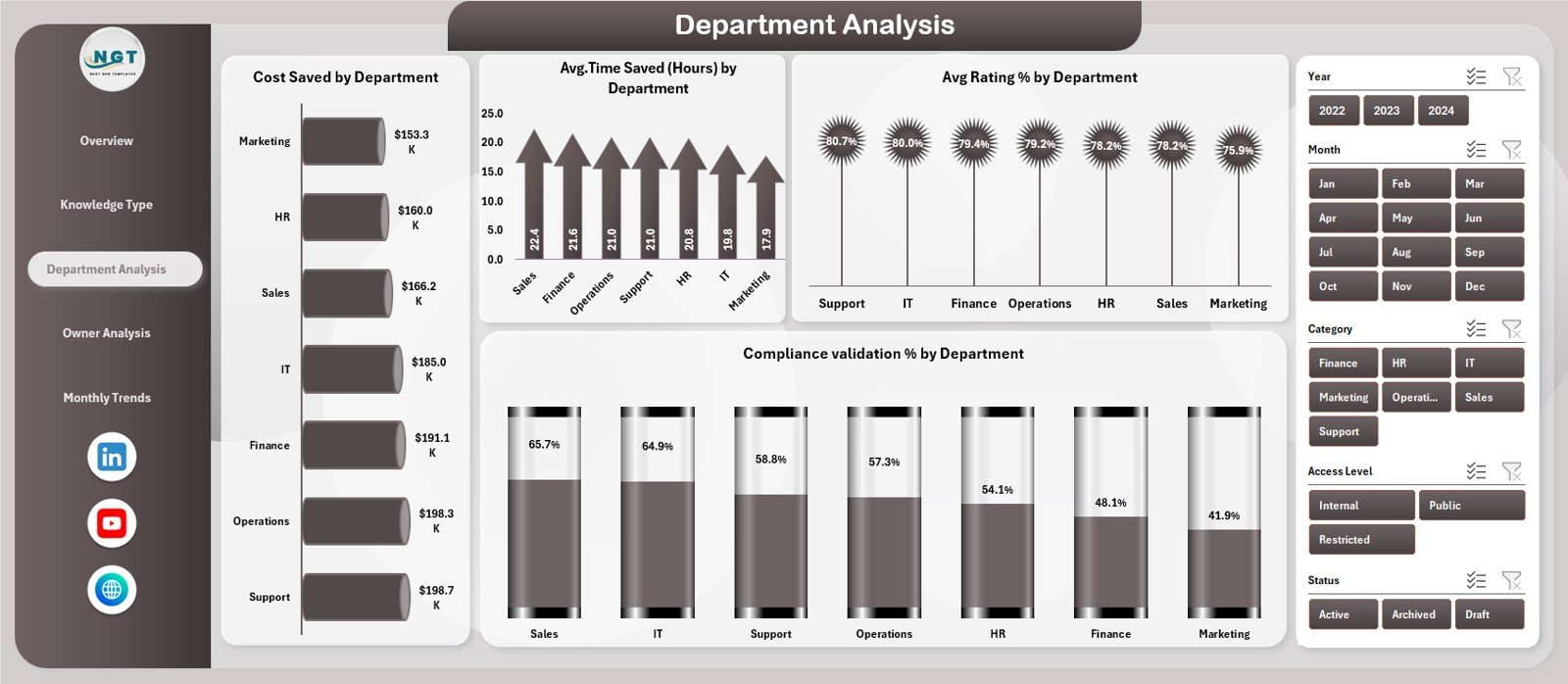
🏢 Department Analysis Page
Understand team-wise adoption using:
-
Cost Saved by Department
-
Time Saved by Department
-
Average Rating by Department
-
Compliance Validation by Department
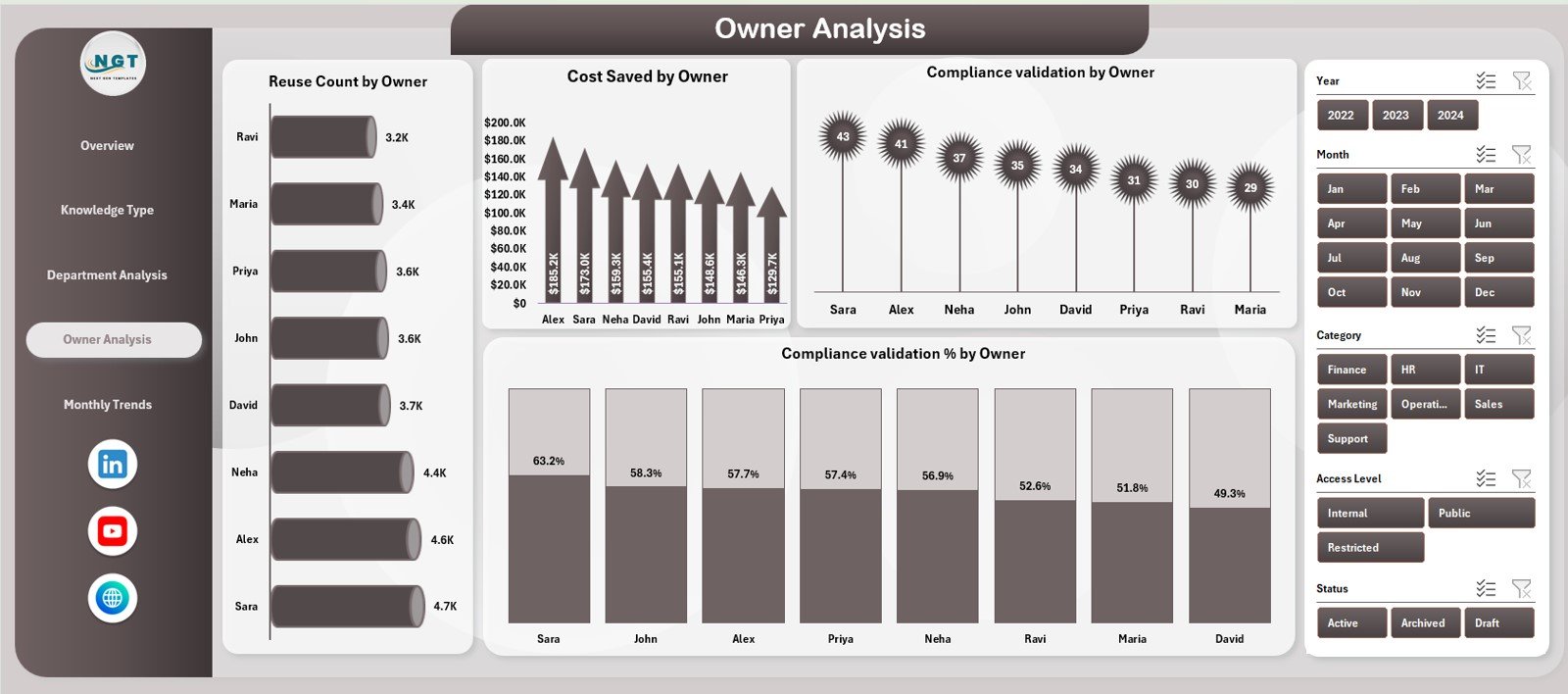
👤 Owner Analysis Page
Track contributor impact with:
-
Reuse Count by Owner
-
Cost Saved by Owner
-
Compliance Validation by Owner
-
Compliance Validation % by Owner
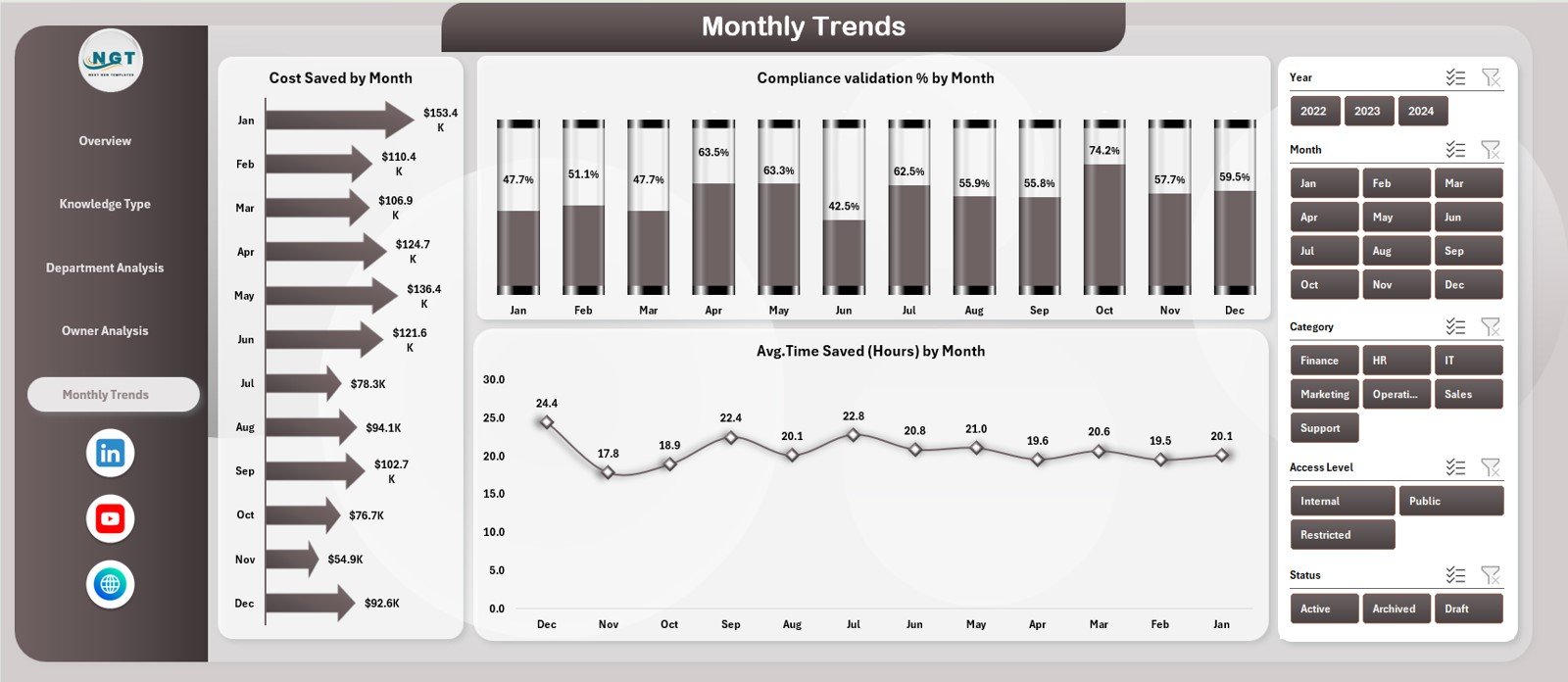
📈 Monthly Trends Page
Measure consistency and improvement using:
-
Cost Saved by Month
-
Compliance Validation % by Month
-
Average Time Saved by Month
🗂️ Data Sheet
The centralized data entry sheet capturing:
-
Knowledge type, department, owner
-
Access level, cost saved, time saved
-
Compliance status, ratings, downloads
Once data is updated, all visuals refresh automatically.
🛠️ How to Use the Knowledge Management Dashboard in Excel
Using the dashboard is simple and efficient:
1️⃣ Enter or update knowledge records in the Data Sheet
2️⃣ Review high-level KPIs on the Overview Page
3️⃣ Drill down by Knowledge Type, Department, or Owner
4️⃣ Analyze Monthly Trends for improvement tracking
5️⃣ Use insights to optimize knowledge strategy
Because everything updates automatically, teams save time and eliminate manual reporting.
👥 Who Can Benefit from This Knowledge Management Dashboard in Excel
This dashboard is ideal for:
🧠 Knowledge Managers
📚 HR & Learning Teams
⚙️ Process Excellence Teams
💻 IT Documentation Teams
📋 Compliance & Audit Teams
🏢 Department Heads
📊 Senior Leadership
Any organization that values structured, reusable knowledge will benefit instantly.





























Reviews
There are no reviews yet.