

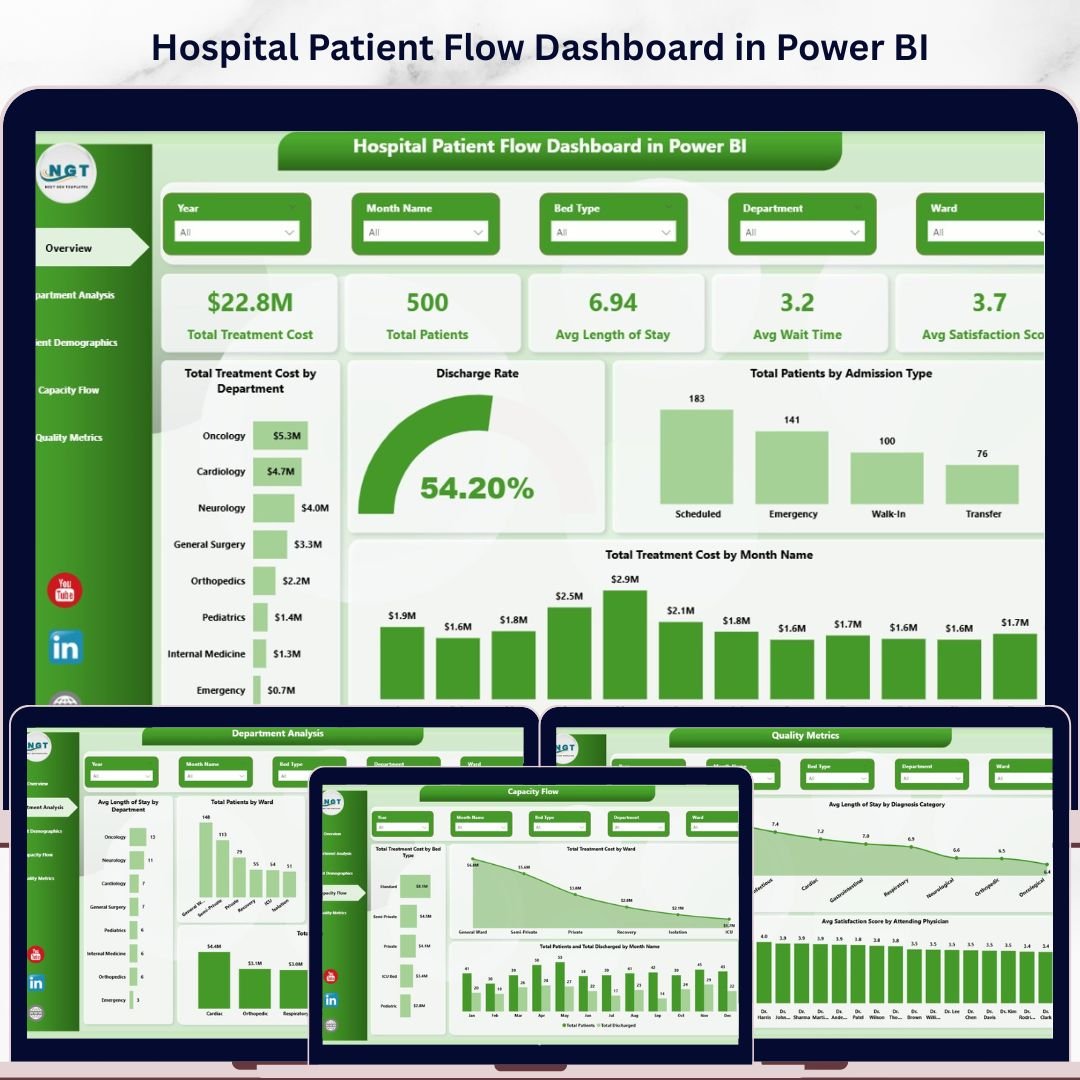
🔑 Key Features of Hospital Patient Flow Dashboard in Power BI
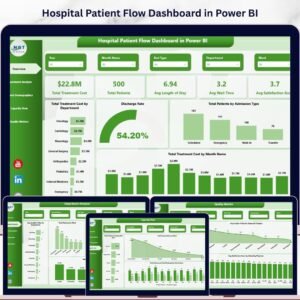
Hospital Patient Flow Dashboard in Power BI is a comprehensive, interactive analytics template designed for hospital administrators, healthcare analysts, and clinical operations teams who need to monitor patient movement, treatment costs, satisfaction scores, and quality metrics across departments — all from one powerful Power BI report. This professionally built Power BI dashboard template includes 5 interactive pages covering Overview, Department Analysis, Patient Demographics, Capacity Flow, and Quality Metrics with dynamic slicers for instant filtering.
Whether you manage a single hospital unit or oversee multi-department operations, this dashboard gives you instant visibility into admission types, discharge rates, ward utilization, readmission patterns, and physician-level satisfaction analysis. The dashboard tracks 5 key performance indicators including Total Treatment Cost, Total Patients, Average Length of Stay, Average Wait Time, and Average Satisfaction Score — all updated dynamically. Explore more Power BI Dashboard Templates from our collection.
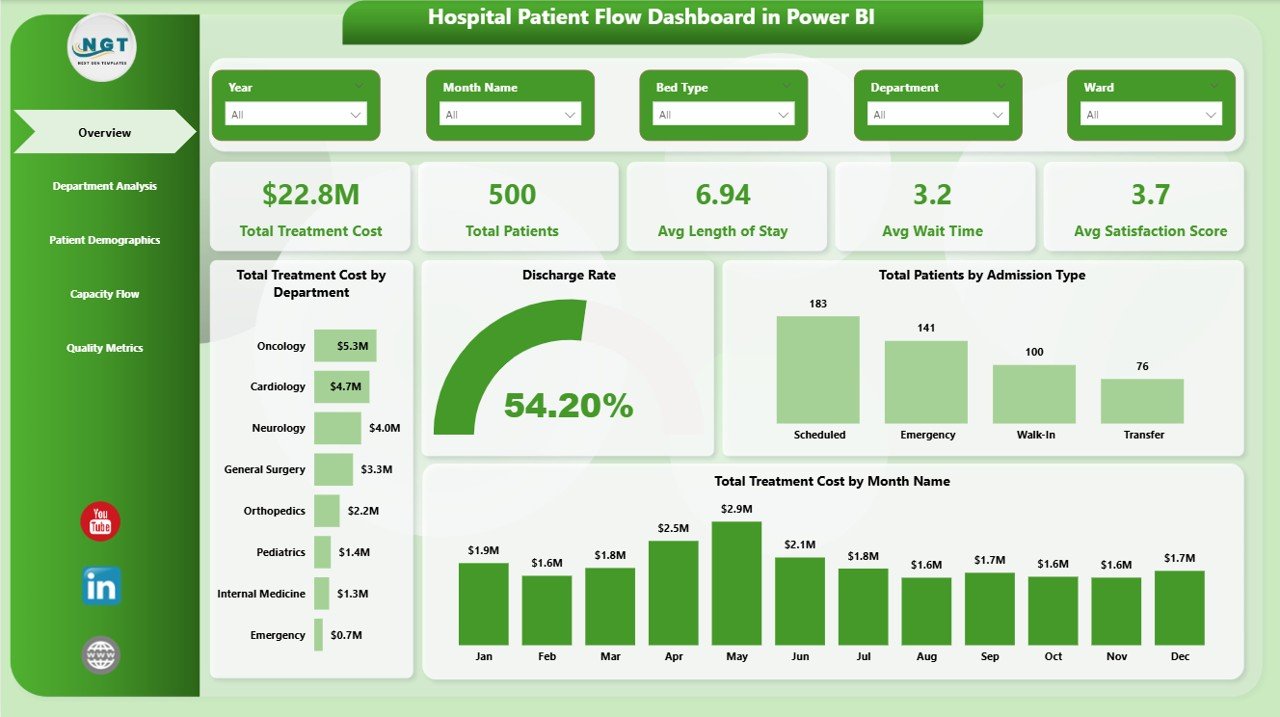
Hospital Patient Flow Dashboard in Power BI
📦 What’s Inside the Hospital Patient Flow Dashboard in Power BI
This dashboard contains 5 dedicated analytical pages, each designed to answer specific operational and clinical questions about your hospital:
📊 Overview Page — The command center of your hospital analytics. Five high-level KPI cards display Total Treatment Cost, Total Patients, Avg Length of Stay, Avg Wait Time, and Avg Satisfaction Score. Below the cards, interactive charts show Total Treatment Cost by Department, Discharge Rate, Total Patients by Admission Type, and Total Treatment Cost by Month Name. Multiple slicers let you filter the entire dashboard instantly by department, admission type, date range, and more.
📊 Department Analysis — Deep dive into departmental performance with Avg Length of Stay by Department, Total Patients by Ward, Avg Satisfaction Score by Department, and Total Treatment Cost by Diagnosis Category. This page helps hospital leaders identify which departments need attention and optimize resource allocation across clinical units.
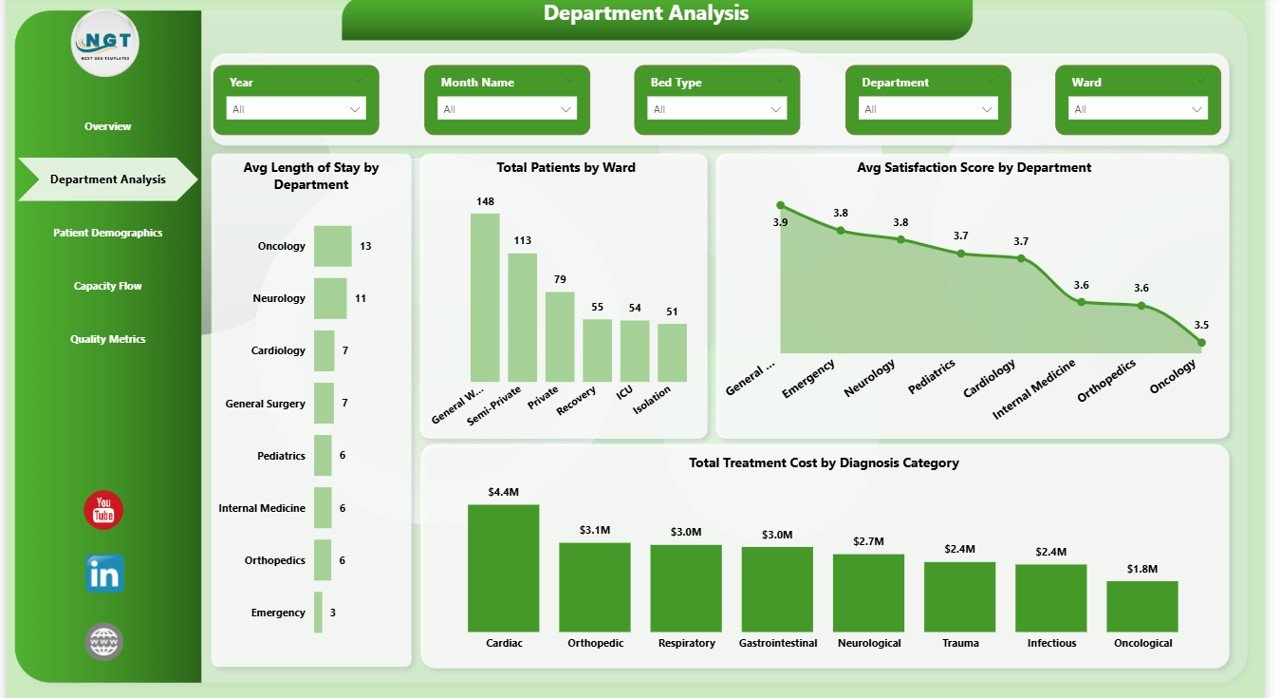
Department Analysis
📊 Patient Demographics — Understand your patient population through analysis of Total Treatment Cost by Insurance Type, Total Treatment Cost by Discharge Status, and Total Treatment Cost by Admission Type. These insights help hospitals tailor services and plan for specific patient needs across insurance categories and admission patterns.
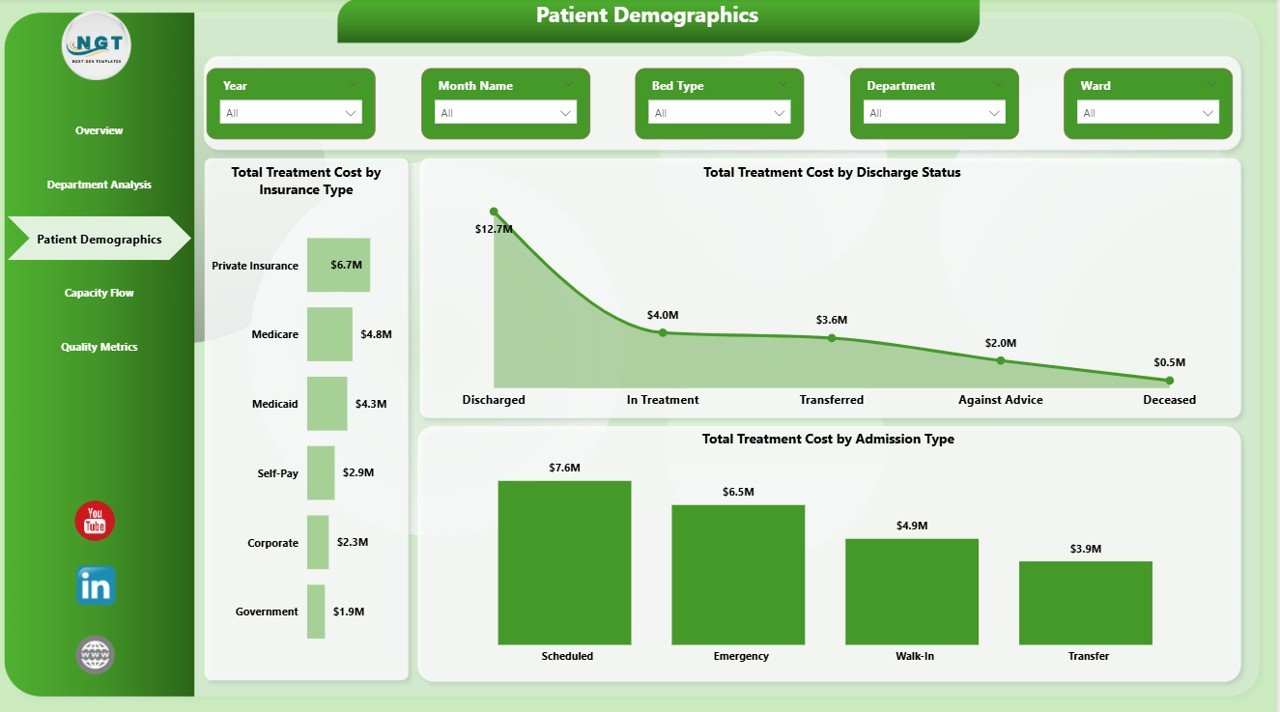
Patient Demographics
📊 Capacity Flow — Monitor hospital capacity with Total Treatment Cost by Bed Type, Total Treatment Cost by Ward, and Total Patients and Total Discharged by Month Name. This page is critical for bed management, resource planning, and ensuring optimal patient throughput across wards. If you also work with Excel, check out the Hospital Patient Flow Dashboard in Excel.
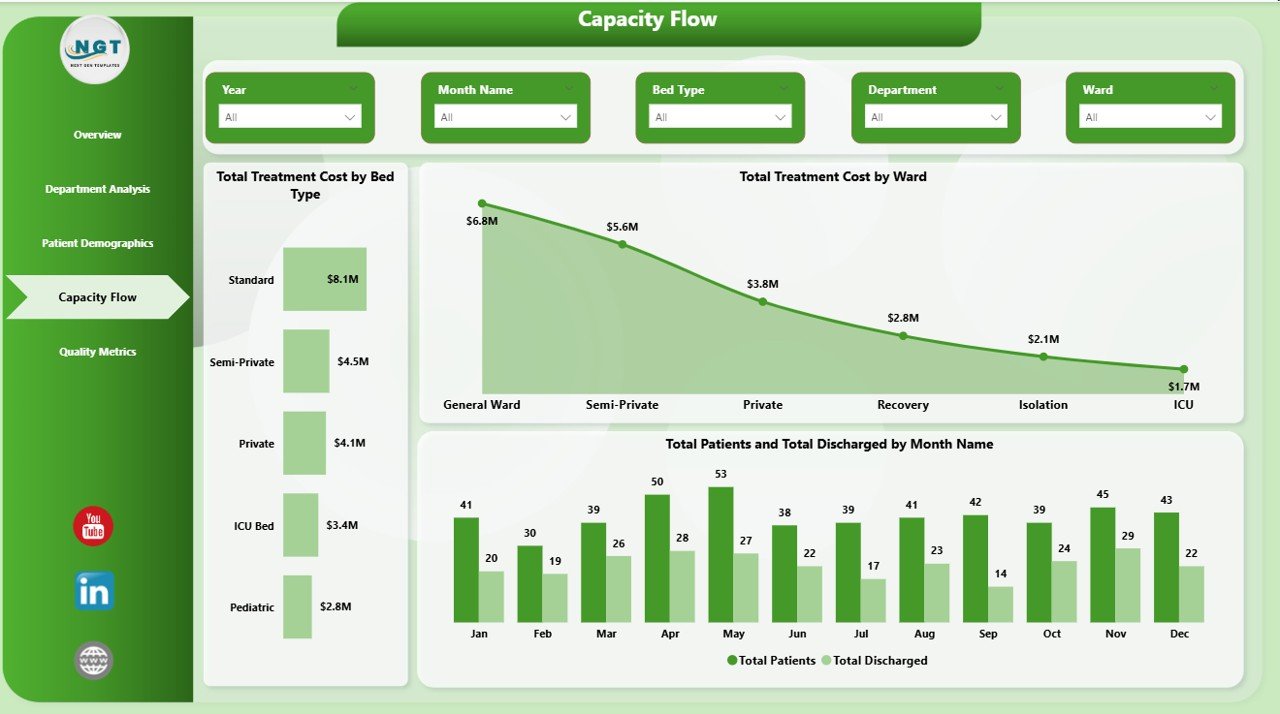
Capacity Flow
📊 Quality Metrics — Track clinical quality through Total Readmissions by Department, Avg Length of Stay by Diagnosis Category, and Avg Satisfaction Score by Attending Physician. This page empowers quality improvement teams to identify readmission patterns and physician-level satisfaction trends. Browse all our Healthcare Templates for more options.
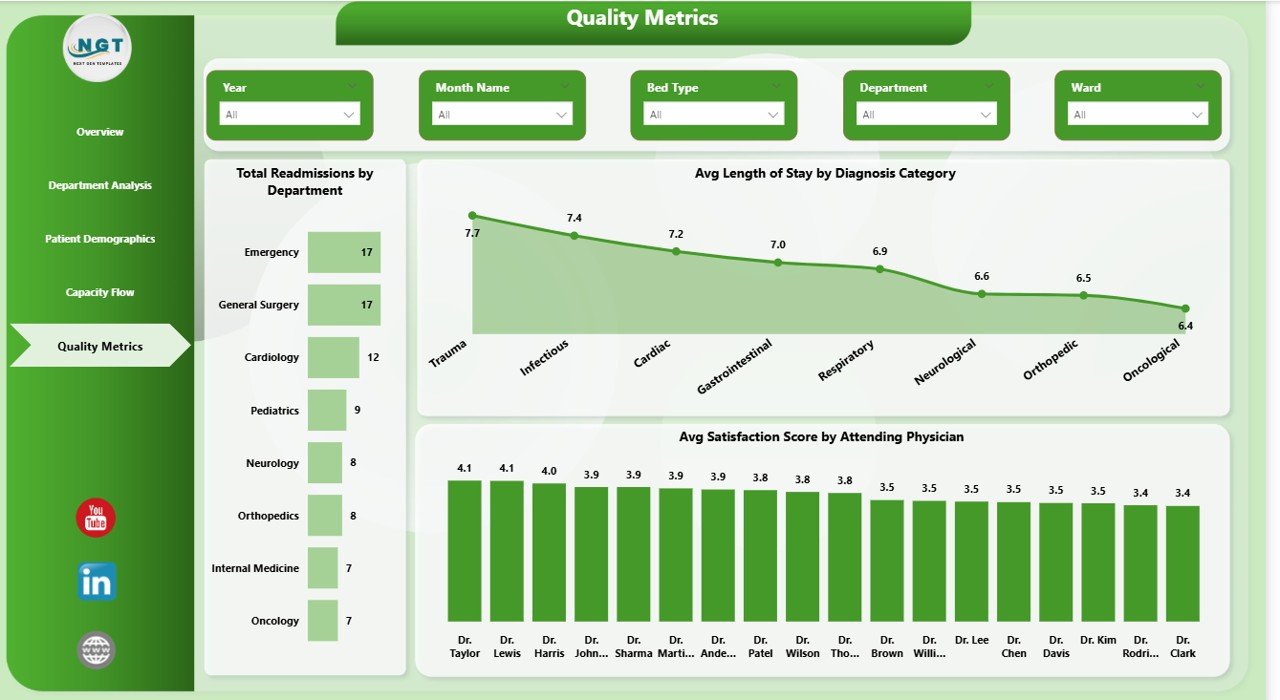
Quality Metrics
⚙️ How to Use the Hospital Patient Flow Dashboard in Power BI
📌 Step 1: Download and open the .pbix file in Microsoft Power BI Desktop (free from Microsoft).
📌 Step 2: Explore the sample data across all 5 dashboard pages to understand the layout and visualizations.
📌 Step 3: Connect your own data source (Excel, CSV, or database) using Power BI’s data import wizard.
📌 Step 4: Map your data columns to the existing data model structure and hit Refresh to update all visuals instantly.
📌 Step 5: Use the slicers on each page to filter by department, admission type, ward, date range, and more for focused analysis.
👥 Who Can Benefit from This Hospital Patient Flow Dashboard in Power BI
📌 Hospital Administrators monitoring patient volumes, treatment costs, and operational efficiency across departments
📌 Clinical Operations Managers tracking length of stay, wait times, and discharge patterns
📌 Quality Improvement Teams analyzing readmission rates and patient satisfaction by physician
📌 Healthcare Data Analysts creating interactive reports for board meetings and performance reviews
📌 Nursing Directors overseeing ward utilization, bed type allocation, and monthly patient throughput
📌 Healthcare Consultants presenting hospital performance data in a professional, interactive Power BI format
❓ Frequently Asked Questions
What KPIs does the Hospital Patient Flow Dashboard in Power BI track?
The Hospital Patient Flow Dashboard in Power BI tracks 5 key performance indicators: Total Treatment Cost, Total Patients, Average Length of Stay, Average Wait Time, and Average Satisfaction Score. It also provides detailed analysis across 5 interactive pages covering department performance, patient demographics, capacity flow, and quality metrics including readmission tracking.
Do I need advanced Power BI skills to use this dashboard?
No. Simply open the .pbix file in Power BI Desktop, connect your data source, and hit Refresh. All charts, KPI cards, and slicers update automatically. No DAX formulas or custom measures need to be written.
Can I filter the dashboard by specific department or admission type?
Yes. The dashboard includes multiple slicers on each page that let you filter all charts and KPIs by department, admission type, ward, bed type, date range, and other dimensions instantly.
How many dashboard pages are included in this template?
This template includes 5 interactive dashboard pages: Overview, Department Analysis, Patient Demographics, Capacity Flow, and Quality Metrics — each packed with focused charts and visual analysis for hospital operations.
What is the best Power BI template for hospital patient flow analysis?
The Hospital Patient Flow Dashboard in Power BI from NextGenTemplates is purpose-built for tracking patient movement, treatment costs, wait times, readmissions, and satisfaction scores. It includes 5 interactive pages with slicers and dynamic visuals that update automatically with your data.
Is this template available in other formats?
Yes. We also offer the Hospital Patient Flow Dashboard in Excel and Hospital Patient Flow Dashboard in HTML for users who prefer other platforms.
🔗 Explore Related Templates
📌 Hospital Patient Flow Dashboard in Excel — The Excel version with pivot tables and automated formulas for hospital analytics.
📌 Hospital Patient Flow Dashboard in HTML — Browser-based interactive dashboard for patient flow monitoring.
📌 Blood Banks Dashboard in Power BI — Monitor blood bank operations, inventory, and analytics with Power BI.
📖 Click here to read the Detailed Blog Post
Watch the step-by-step video tutorial:


















Reviews
There are no reviews yet.