



In the fast-evolving world of digital finance, monitoring blockchain activity and cryptocurrency performance can be overwhelming without the right tools. The Blockchain & Cryptocurrency Dashboard in Excel offers a simple, yet powerful way to track your crypto data — all within a single, dynamic Excel file.
Whether you’re a trader, investor, analyst, or blockchain enthusiast, this ready-to-use dashboard helps you visualize transactions, analyze performance, and monitor wallet balances effortlessly. No coding, no complex tools — just clean visuals, smart automation, and Excel-powered insights.
With its five analytical pages and two support sheets, this dashboard transforms raw crypto data into actionable intelligence, helping you make smarter, faster, and more confident financial decisions.
⚙️ Key Features of the Blockchain & Cryptocurrency Dashboard in Excel
🔹 Page Navigator – One-Click Access
A sleek navigation panel on the left lets you switch between pages like Overview, Department Analysis, Blockchain Network, Transaction Type, and Monthly Trends — ensuring a seamless user experience.
🪙 1️⃣ Overview Page – The Command Center
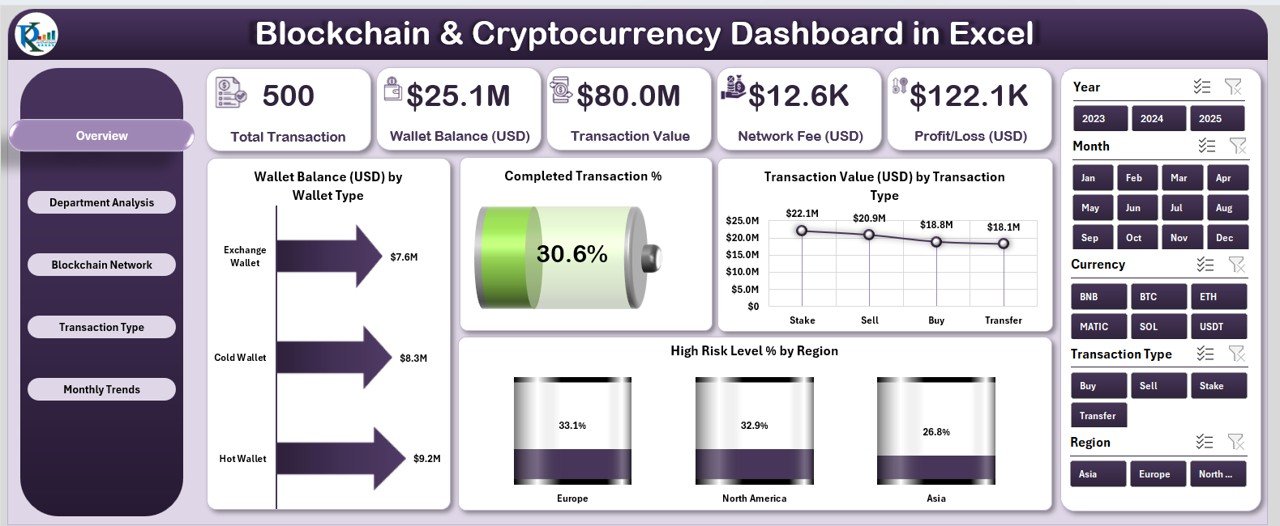
This page delivers a complete picture of your blockchain and crypto ecosystem.
Highlights:
5 Analytical Cards: Total Wallet Balance, Completed Transaction %, Average Transaction Value, Network Fees, Profit/Loss.
Slicers: Filter data by wallet type, time period, or region.
Dynamic Charts:
💰 Wallet Balance (USD) by Wallet Type
✅ Completed Transaction %
📊 Transaction Value (USD) by Transaction Type
🌍 High-Risk Level % by Region
It’s your go-to space for instant insights on overall blockchain performance.
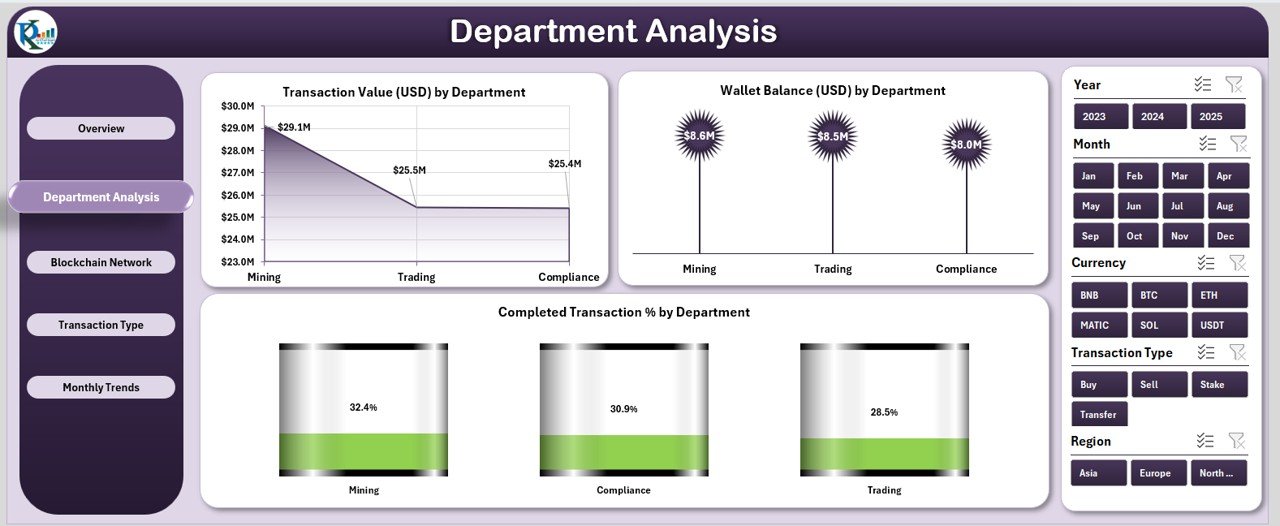
🏢 2️⃣ Department Analysis – Performance by Team
Perfect for organizations managing crypto operations across departments.
Charts Included:
Transaction Value (USD) by Department
Wallet Balance (USD) by Department
Completed Transaction % by Department
Filter insights with a department-level slicer to assess which teams are performing efficiently and which need improvement.
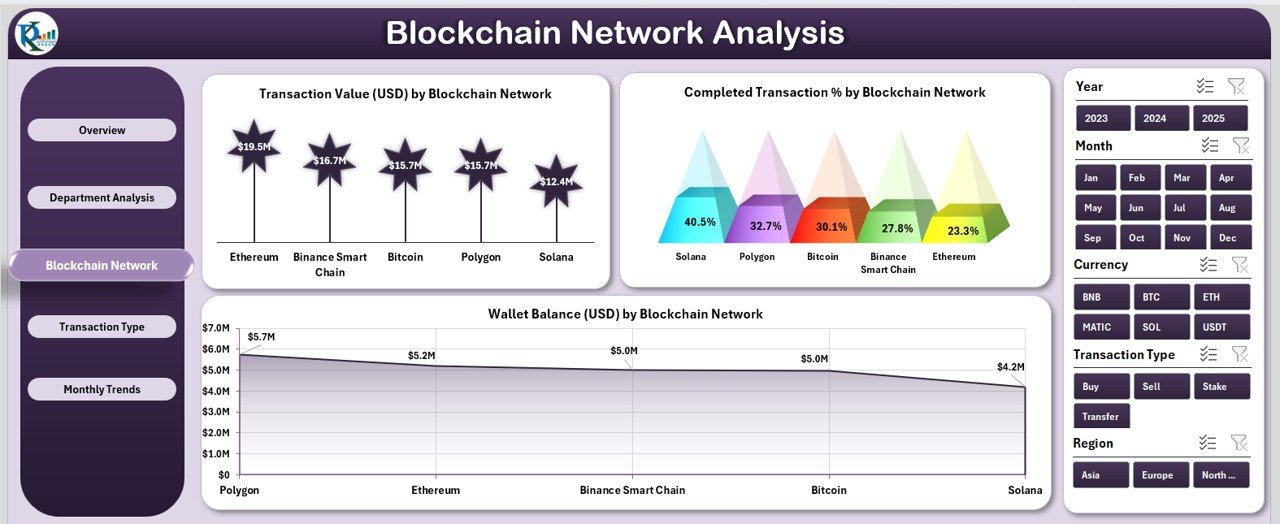
🔗 3️⃣ Blockchain Network Analysis – Comparing Network Efficiency
Analyze how different blockchain networks perform over time.
Key Visuals:
Days to Transaction Value (USD) by Blockchain Network
Wallet Balance (USD) by Blockchain Network
Completed Transaction % by Network
Compare performance across Bitcoin, Ethereum, Solana, Binance Smart Chain, and more — identifying the most reliable and cost-effective options.
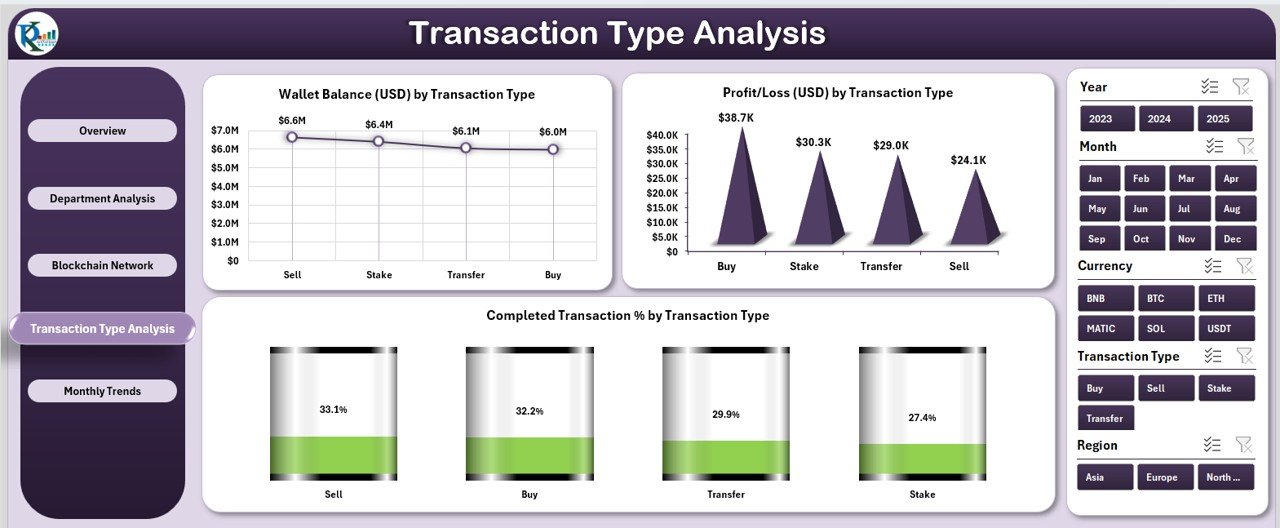
💹 4️⃣ Transaction Type Analysis – Understanding Profitability
Break down profitability and performance by transaction type.
Charts Displayed:
Wallet Balance (USD) by Transaction Type
Completed Transaction % by Type
Profit/Loss (USD) by Type
Find out which activities — buying, selling, staking, or transferring — deliver the best financial outcomes.
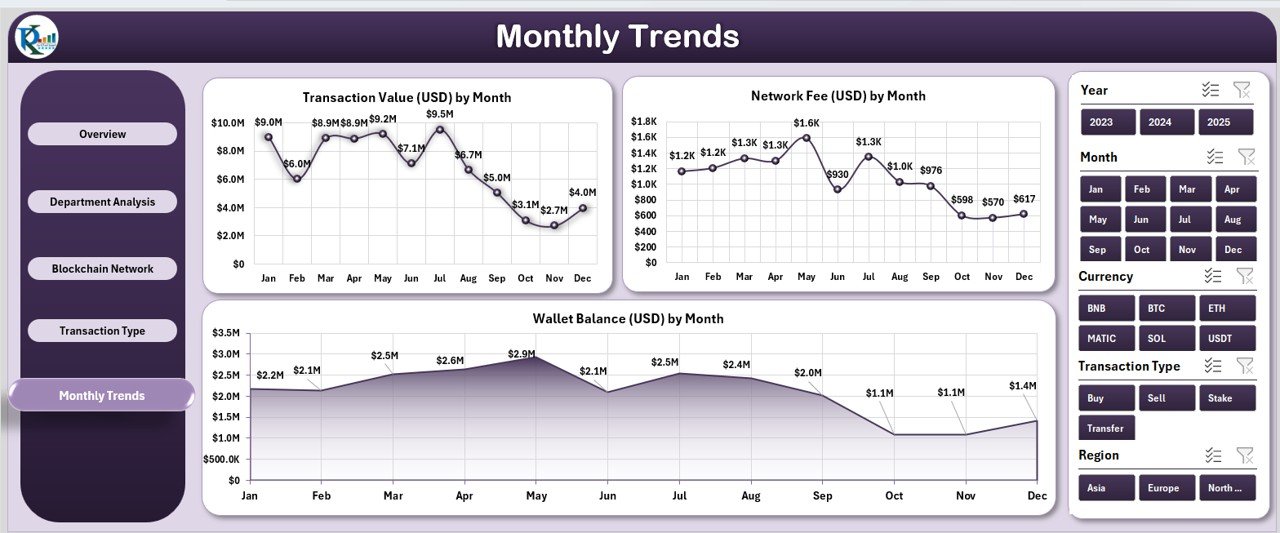
📆 5️⃣ Monthly Trends – Tracking Over Time
Visualize blockchain growth and trends throughout the year.
Charts Included:
Transaction Value (USD) by Month
Network Fee (USD) by Month
Wallet Balance (USD) by Month
Easily identify seasonal fluctuations and long-term performance patterns.
🧾 Supporting Sheets – The Data Engine
1️⃣ Data Sheet: Holds all transaction, wallet, and performance records.
2️⃣ Support Sheet: Contains lists and formulas for dropdowns and slicers.
Update your data once — and the entire dashboard refreshes automatically.
🧭 How to Use the Dashboard
✅ Open the Excel file.
✅ Input or import crypto data into the Data Sheet.
✅ Use the Page Navigator to switch between views.
✅ Apply slicers to filter by wallet type, network, or time.
✅ Instantly review visuals and KPIs.
In just minutes, you’ll have a powerful crypto analytics dashboard that updates as your data evolves.
🌟 Advantages of the Blockchain & Cryptocurrency Dashboard in Excel
🔹 Real-Time Decision Support: Monitor wallet balances, transaction trends, and risk metrics instantly.
🔹 Centralized Data Management: Consolidate blockchain data from multiple sources in one dashboard.
🔹 Simple Yet Smart: Pivot charts and slicers make complex analysis accessible to everyone.
🔹 Offline & Secure: Work privately without relying on third-party apps or the internet.
🔹 Fully Customizable: Adjust charts, KPIs, and visuals to fit your portfolio.
🔹 Strategic Insights: Compare blockchain networks and transaction types for smarter investment decisions.
💡 Best Practices for Maximum Insights
🔸 Update your Data Sheet regularly for accuracy.
🔸 Maintain consistent wallet and network names.
🔸 Protect sensitive data with Excel password features.
🔸 Use conditional formatting to highlight key metrics.
🔸 Integrate with APIs or Power Query for automated data updates.
🔸 Backup your file frequently for added security.
With these practices, your Excel dashboard becomes a professional-grade crypto intelligence system.
👥 Who Can Benefit from This Dashboard
💼 Investors & Traders: Track profits, network fees, and portfolio balance.
🏢 Businesses: Manage blockchain transactions across departments.
💻 Developers: Monitor network reliability and processing efficiency.
📊 Auditors & Analysts: Ensure data integrity and compliance monitoring.
This dashboard adapts to all user levels — from individual crypto investors to enterprise blockchain teams.
🔗 Click here to read the Detailed Blog Post
🎥 Visit our YouTube channel for step-by-step tutorials
🔗 YouTube.com/@PKAnExcelExpert
Watch the step-by-step video tutorial:
Compatibility and Requirements
- Works in Microsoft Excel desktop (Excel 2016 or later, or Microsoft 365).
- The dashboard uses slicers to filter by wallet type, region, department and time period. Microsoft explains them in Use slicers to filter data.
Frequently Asked Questions
How many pages does the dashboard have?
It has five analytical pages: Overview, Department Analysis, Blockchain Network Analysis, Transaction Type Analysis and Monthly Trends. Two support sheets, a Data Sheet and a Support Sheet, sit behind them.
Which numbers appear on the Overview page?
Five cards show Total Wallet Balance, Completed Transaction %, Average Transaction Value, Network Fees and Profit/Loss. Charts below them cover wallet balance by wallet type, transaction value by transaction type and high-risk level % by region.
How do I add my own crypto data?
Enter or import your records into the Data Sheet. The Support Sheet holds the lists and formulas used by the dropdowns and slicers, and the dashboard refreshes from the Data Sheet.
Can I compare blockchain networks?
Yes. The Blockchain Network Analysis page shows days to transaction value, wallet balance and completed transaction % for each network, such as Bitcoin, Ethereum, Solana and Binance Smart Chain.
Is there a Power BI or Google Sheets version?
Yes. See the Blockchain & Cryptocurrency Dashboard in Power BI and the Blockchain and Cryptocurrency Dashboard in Google Sheets.
Related Blockchain and Crypto Templates
- Blockchain & Cryptocurrency KPI Dashboard in Excel: a KPI-focused view of the same topic
- Blockchain & Cryptocurrency KPI Scorecard In Excel: a scorecard layout for your crypto metrics
- Blockchain & Cryptocurrency Report in Excel: a report format for sharing results
- Blockchain Finance Dashboard in Excel: a finance view for blockchain activity
- Blockchain & Cryptocurrency Dashboard in Power BI: the Power BI edition
Browse all Excel KPI dashboards.














Reviews
There are no reviews yet.