



The Quick Male-Female and Waffle Chart in Excel is a powerful yet easy-to-use tool designed to help you visually represent gender-based data and other comparative metrics in an engaging way. Using the waffle chart design, this template makes it easy to illustrate male/female comparisons or track any part-to-whole data. Whether you’re analyzing survey results, tracking team diversity, or presenting any other gender-based data, the Quick Male/Female and Waffle Chart in Excel offers a simple and visually compelling solution.
This Excel template allows you to create gender-based visualizations or any data that requires a segmented view of parts and whole. By displaying data as a set of colorful squares, the waffle chart makes it easy to compare proportions at a glance. It is fully customizable, allowing you to tailor it for various applications such as gender comparison, resource allocation, or even project milestones.

Key Features of the Quick Male/Female and Waffle Chart in Excel
📌 Gender-Based Data Representation
The template is optimized for displaying gender-based comparisons. Track the proportion of males vs. females, or any other categorical comparison you need. The waffle chart format gives a visually clear and easy-to-understand breakdown of the data.
🛠 Customizable Waffle Chart
Create your own visual representation by adjusting the number of squares, colors, and labels. This template is versatile enough to represent various data categories, such as age groups, teams, project progress, and more.
💡 Simple Setup
The waffle chart template is easy to set up, with clear instructions on how to enter and modify your data. No advanced Excel skills are required to get started – just enter your data and watch the chart generate automatically.
🔢 Real-Time Updates
As you input or update your data, the waffle chart automatically adjusts to reflect the new values. This feature ensures that your data visualization stays up-to-date and accurate at all times.
🚀 Multiple Use Cases
While the template is ideal for gender-based comparisons, you can also use it to represent any type of part-to-whole relationship. Track anything from gender distribution in a survey to progress toward a goal, sales targets, or resource allocation.
📊 Interactive and Clear Visualization
The waffle chart provides an interactive and visually clear way to represent data. Each square represents a set value, and the filling of the squares makes it easy to see how parts relate to the whole.
⚙ Easy Customization
Modify the chart’s design to fit your specific needs. Whether you want to change colors, labels, or the number of squares, this template is highly customizable to suit any data set.
🚀 Why You’ll Love the Quick Male/Female and Waffle Chart in Excel
✅ Visually Engaging – Track and compare data using colorful, easy-to-understand squares. ✅ Customizable Design – Adjust the chart to fit your specific data and categories. ✅ Real-Time Data Updates – Automatically update the chart as you modify data. ✅ Simple and Easy Setup – No advanced Excel skills required to use the template. ✅ Multiple Data Use Cases – Perfect for gender analysis, project milestones, sales tracking, and more.
📂 What’s Inside the Quick Male/Female and Waffle Chart in Excel?
- Customizable Waffle Chart: Visualize gender-based data or part-to-whole comparisons.
- Adjustable Data and Labels: Modify the number of squares, categories, and colors.
- Real-Time Data Updates: Watch the chart update as you enter or modify data.
- Easy-to-Use Setup: Clear instructions for a simple setup and customization.
🔍 How to Use the Quick Male/Female and Waffle Chart in Excel
1️⃣ Download the Template – Instant access to the Excel file upon purchase. 2️⃣ Enter Your Data – Input your data for male/female distribution or any other metric. 3️⃣ Customize Your Chart – Adjust the number of squares, colors, and labels to suit your data. 4️⃣ Track Progress – Use the waffle chart to visualize your data in a clear and dynamic format. 5️⃣ Present and Share – Use the chart in presentations, reports, or meetings to communicate insights.
🎯 Who Can Benefit from the Quick Male/Female and Waffle Chart in Excel? 🔹 HR Managers 🔹 Marketing Teams 🔹 Project Managers 🔹 Business Analysts 🔹 Sales Teams 🔹 Anyone needing to track and compare data visually
Create visually stunning comparisons and track data progress with the Quick Male/Female and Waffle Chart in Excel. Whether you are working on gender distribution, sales tracking, or other data-driven projects, this chart makes data visualization easy, clear, and engaging.
Click here to read the Detailed blog post
https://www.pk-anexcelexpert.com/quick-male-female-and-waffle-chart-in-excel/
Visit our YouTube channel to learn step-by-step video tutorials
Watch the step-by-step video tutorial:
Compatibility and Requirements
- Works in Microsoft Excel desktop (Excel 2016 or later, or Microsoft 365).
- Built with standard Excel charts. Microsoft’s guide Create a chart from start to finish explains how charts work.
Frequently Asked Questions
What data can it show?
Male and female splits, or any part-to-whole data such as survey results, team makeup or resource allocation.
Can I change the squares and colors?
Yes. You can adjust the number of squares, the categories, the colors and the labels.
Can I use other categories?
Yes. It also works for age groups, teams, project progress and similar splits.
Does the chart update by itself?
Yes. The waffle chart adjusts as you enter or change data.
Related Waffle and Infographic Templates
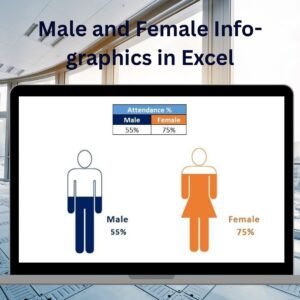
- Male and Female Info-graphics in Excel: another male and female visual
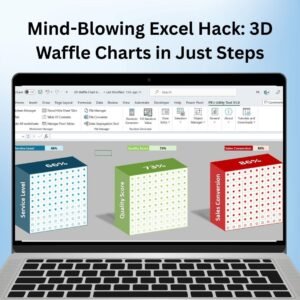
- Mind-Blowing Excel Hack: 3D Waffle Charts in Just Steps: a 3D waffle design
- Waffle chart with Football Icon in Excel: a waffle chart with an icon
- Dynamic Chart with Slicer for Employees Count by Age group: headcount by age group
- Data Analyst’s Chart & Visualization Pack: 10 chart and visualization templates for Excel and Google Sheets
Browse all Excel charts and visualization templates.




























Reviews
There are no reviews yet.