

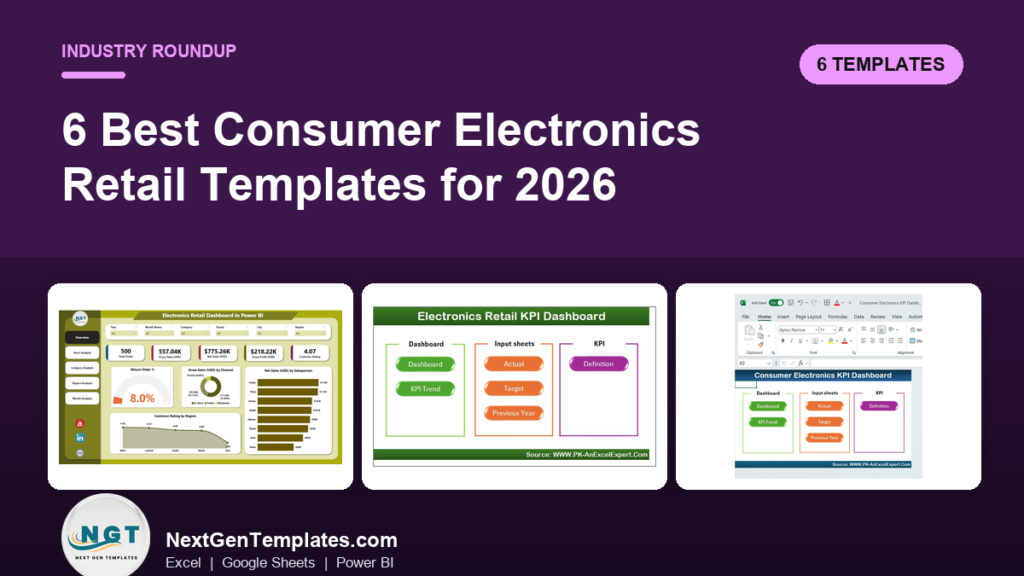
The best electronics retail dashboard template is the Electronics Retail Dashboard in Power BI ($17.99), which tracks sales, returns, ratings, stores, categories and regions across five pages. If you work in spreadsheets, the Excel version costs $13.99 and the Google Sheets version costs $9.99.
Last updated: October 2026
Key takeaways
- The Electronics Retail Dashboard in Power BI ($17.99) is the best overall pick: five pages covering overview, stores, categories, regions and monthly trends.
- The Electronics Retail Dashboard in Google Sheets ($9.99) is the best value: 16 KPI cards, 15 slicers and 18 charts built on native pivot tables.
- The Electronics Retail Dashboard in Excel ($13.99) tracks gross sales, net sales, profit, customer ratings and return order % with slicers for month, region, store, category and channel.
- The two KPI dashboards ($14.99 Excel, $11.99 Power BI) add MTD and YTD views against target and prior year, which the plain dashboards do not.
- The Consumer Electronics KPI Dashboard in Excel ($14.99) suits brand and product teams more than store operators, so it ranks last for retailers.
 Launch offer
SUMIFS, XLOOKUP, FILTER, LAMBDA and checking AI-written formulas, with real business projects. 11h 47m of video by PK, with practice files, quizzes and a capstone.
Electronics retail dashboard templates compared
| Template | Format | Best For | Price |
|---|---|---|---|
| Electronics Retail Dashboard in Power BI (Best overall) | Power BI | Multi-store chains that want drill-down by store, category and region | $17.99 |
| Electronics Retail Dashboard in Excel | Excel | Owners who want slicers and KPI cards without leaving Excel | $13.99 |
| Electronics Retail Dashboard in Google Sheets (Best value) | Google Sheets | Small shops and teams that share one live file | $9.99 |
| Electronics Retail KPI Dashboard in Excel | Excel | Managers who report actual vs target vs prior year | $14.99 |
| Electronics Retail KPI Dashboard in Power BI | Power BI | Teams already on Power BI that need a KPI scorecard | $11.99 |
| Consumer Electronics KPI Dashboard in Excel | Excel | Product managers and marketers on the brand side | $14.99 |
How we picked these electronics retail templates
We searched the NextGenTemplates catalog of roughly 6,900 products for anything built around electronics retail or consumer electronics. Six paid templates matched. We ranked them on fit for a store operator, depth of analysis, format coverage and price.
The three exact-match Electronics Retail dashboards (Power BI, Excel, Google Sheets) lead the list because they are built around retail questions: which store, which category, which region. The KPI versions come next, and the generic Consumer Electronics KPI Dashboard comes last because it leans toward product and marketing analytics. Free templates and loosely related retail dashboards were excluded.
What are the 6 best electronics retail dashboard templates for 2026?
1. Electronics Retail Dashboard in Power BI: best overall
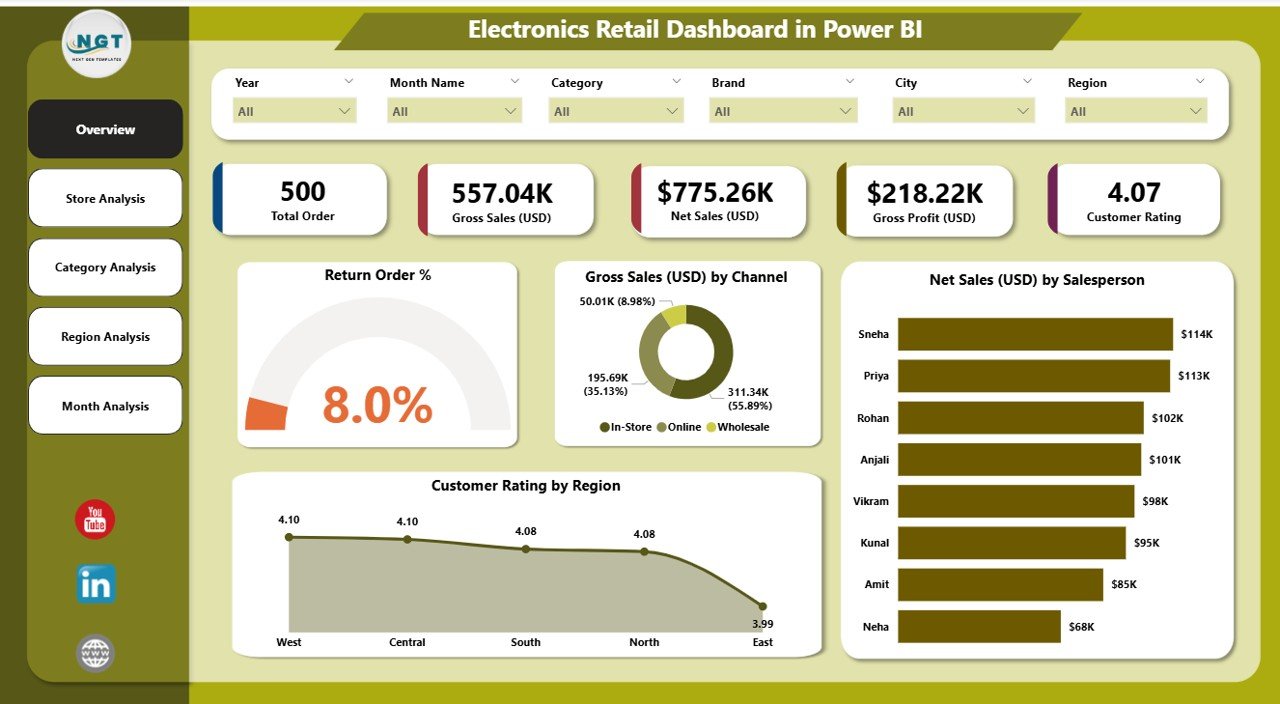
This is the strongest electronics retail dashboard template in the catalog. It reads your data from Excel or another database, so you refresh once and every visual updates. It ranks first because it covers the widest set of retail questions in one file, and Power BI handles larger data volumes better than a workbook.
Who it is for: owners, managers and analysts running several stores who want to compare locations and categories quickly.
What is inside:
- Overview page: return order %, gross sales, net sales by salesperson, customer ratings and channel insights.
- Store Analysis page: store-wise sales, ratings and net sales to find top and low performers.
- Category Analysis page: demand, satisfaction and sales across mobiles, laptops, TVs, accessories and more.
- Region Analysis page: buying trends, profit and ratings by location.
- Monthly Trends page: seasonal patterns, festival demand, cost trends and monthly gross sales.
Use cases: rank every store by net sales and rating each month; spot a category where the return order % is climbing; compare festival-month gross sales with a normal month; check whether a high-sales region is also a high-profit region.
Price: $17.99. Get the electronics retail dashboard in Power BI.
Best for: multi-store electronics retailers who want the deepest drill-down.
2. Electronics Retail Dashboard in Excel
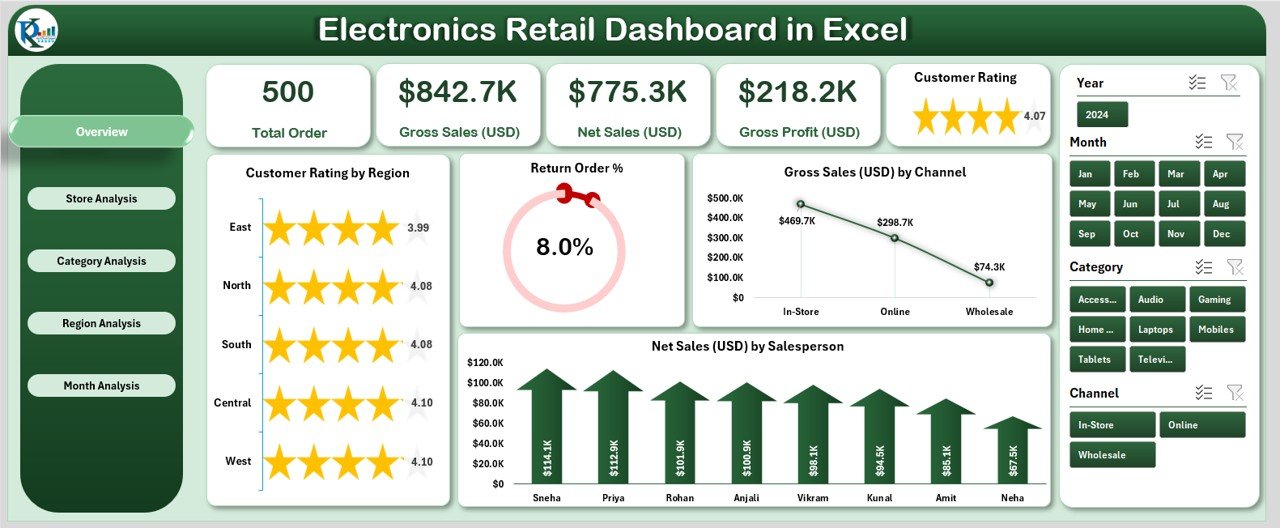
The Excel edition covers the same retail story as the Power BI version, built with structured tables, slicers, formulas and interactive visuals. You paste data into the Data Sheet, refresh once, and the dashboard updates. It costs $4 less than the Power BI version and needs no extra software.
Who it is for: single-store owners and small chains that already live in Excel.
What is inside:
- KPI cards for Gross Sales, Net Sales, Profit, Customer Ratings and Return Order %.
- A left-side Page Navigator to switch between five analytical pages.
- Slicers for month, region, store, category and sales channel.
- Store-level profit reports and category performance breakdowns.
- Region-wise insights and monthly trend views.
Use cases: filter to one store and one month to see profit before a staff review; watch return order % to catch a delivery or product fault; find the best-selling category per region; hand a clean report to a business partner without a login.
Price: $13.99. Get the electronics retail dashboard in Excel.
Best for: owners who want a full retail dashboard inside a workbook they already know.
3. Electronics Retail Dashboard in Google Sheets: best value
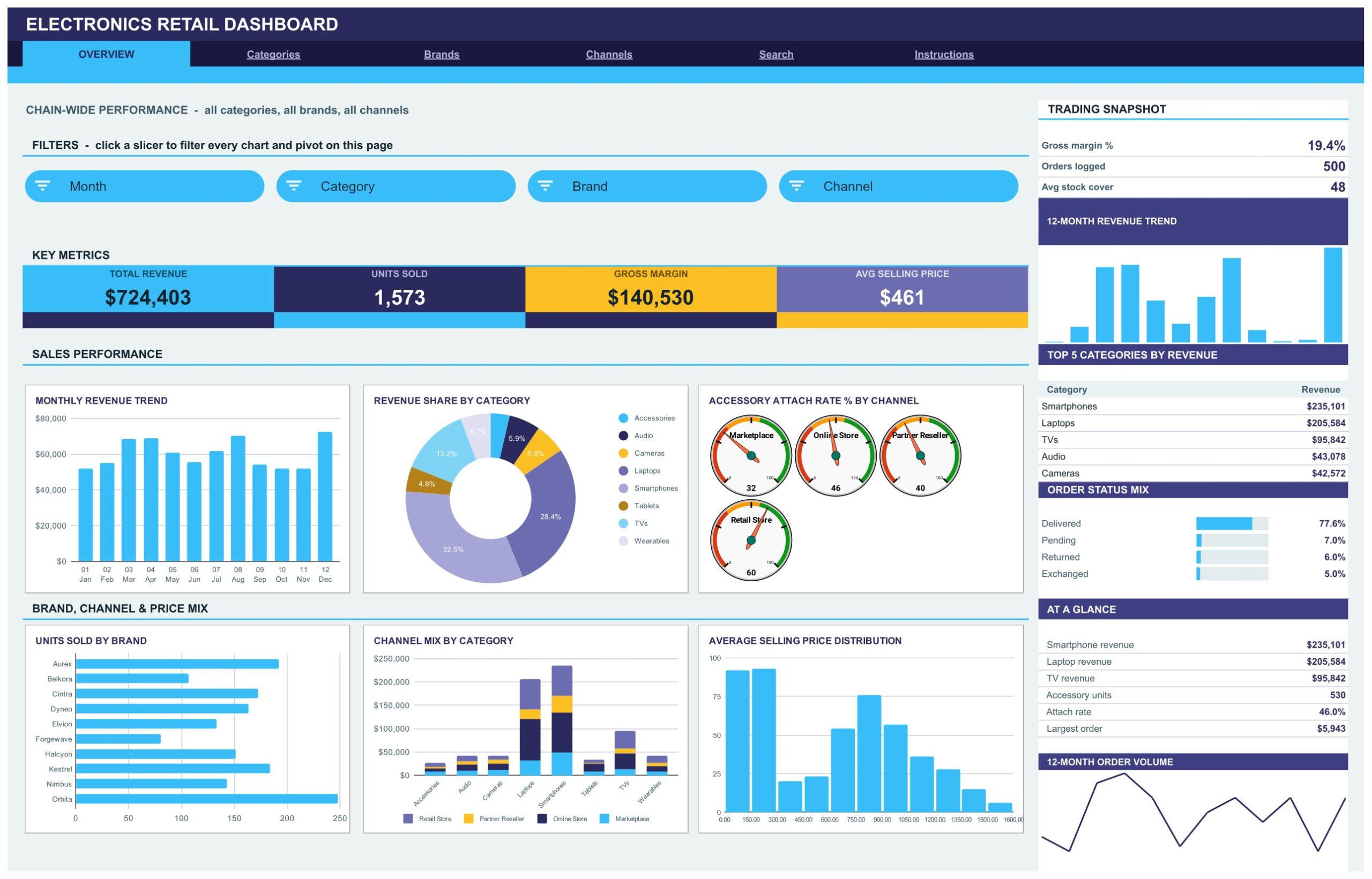
At $9.99 this is the cheapest template here and the most detailed on paper. It ships with 500 sample orders across 8 product categories, 10 brands, 4 sales channels and 6 regions, laid out over six linked tabs. Every chart reads a native pivot table, so there are no helper formulas to break.
Who it is for: small shops, online sellers and teams that want several people looking at the same live sheet.
What is inside:
- Six tabs: Overview, Categories, Brands, Channels, Search and Instructions.
- Sixteen KPI cards, including revenue, units, gross margin, average selling price and margin per unit.
- Fifteen slicers for month, category, brand, channel, region, customer segment, warranty and payment method.
- Eighteen charts such as Revenue Share by Category and Units Sold by Brand.
- An Order Lookup tab that shows all sixteen fields of any Order ID.
Use cases: on the bundled sample data the Overview shows Total Revenue of $724,403, 1,573 units, Gross Margin of $140,530 and an Average Selling Price of $461. Setup takes under 10 minutes: paste your own order rows over the sample data and every pivot, slicer and chart follows.
Price: $9.99. Get the electronics retail dashboard in Google Sheets.
Best for: budget-conscious retailers who want brand, channel and warranty views.
4. Electronics Retail KPI Dashboard in Excel

This one is a scorecard rather than an exploration tool. It compares actual results with targets and previous year, and switches between Month-to-Date and Year-to-Date. A month dropdown in cell D3 drives every number, and no VBA is needed.
Who it is for: store managers and executives who report against targets every month.
What is inside:
- Seven sheets: Home, Dashboard, Trend, Input, Target, PY and KPI Definition.
- Actual vs Target and previous-year comparison for every KPI.
- Up and down arrows from conditional formatting.
- KPI trend charts for month-over-month and yearly performance.
- Sales, inventory and customer KPIs in one compact sheet.
Use cases: set a monthly sales target on the Target sheet and see at once which KPIs missed; compare this March with last March; add a new KPI to the Input sheet; show a board what each KPI means using the KPI Definition tab.
Price: $14.99. Get the electronics retail KPI dashboard in Excel.
Best for: target-driven managers who care about plan versus actual.
5. Electronics Retail KPI Dashboard in Power BI
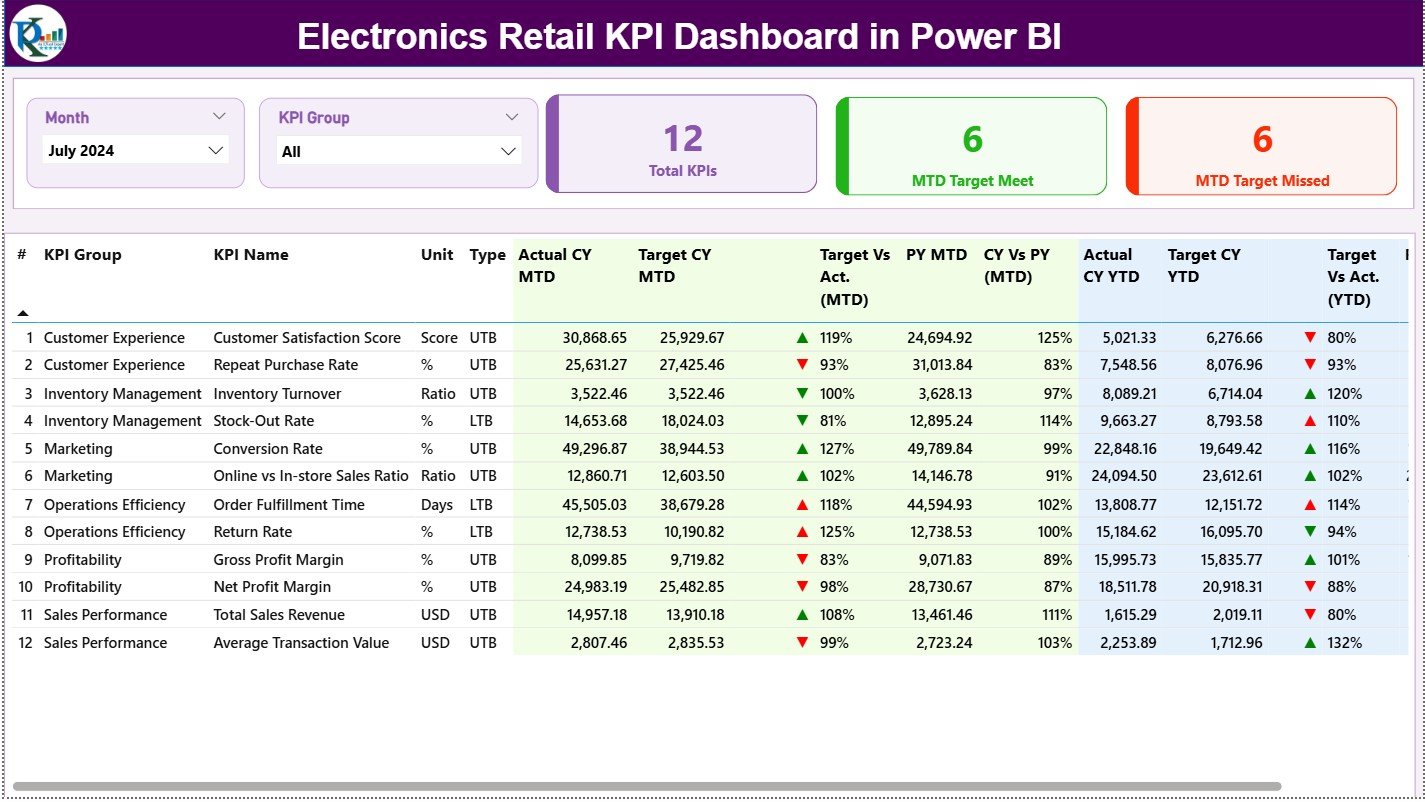
The Power BI KPI version costs $11.99 and uses three analytical pages: a Summary page, trend views and a drill-through page with KPI definitions. Data entry stays in Excel. You update the file, refresh Power BI, and the dashboard is current.
Who it is for: teams that have chosen Power BI and want a target-focused scorecard rather than a full exploration dashboard.
What is inside:
- Summary page with sales, customer, store and service KPIs together.
- MTD and YTD analysis with CY vs PY vs Target trend charts.
- Target vs Actual view showing which KPIs were met and missed.
- Category, store and customer insights, including return and rating KPIs.
- A drill-through page explaining each KPI formula and logic.
Use cases: open the Summary page in a Monday meeting and read off missed KPIs; drill into a KPI to confirm how it is calculated; compare current year with prior year for the same month; track return KPIs next to customer ratings.
Price: $11.99. Get the electronics retail KPI dashboard in Power BI.
Best for: Power BI users who want a cheap, target-based scorecard.
6. Consumer Electronics KPI Dashboard in Excel

This template looks at the industry from the product side. It is written for product managers, marketers and business analysts, and it tracks sales, customer engagement, product performance, market trends and customer feedback. It is less about running stores and more about how products perform.
Who it is for: brand owners, product teams and marketers in consumer electronics.
What is inside:
- Sales performance and revenue growth across regions.
- Customer engagement metrics such as active users, session length and in-app purchases.
- Product performance, including returns, warranty claims and satisfaction.
- Market trends, new launches and competitor activity.
- Customer feedback, ratings and reviews from different platforms.
Use cases: follow warranty claims for a product line; compare review scores across platforms; watch revenue growth by region after a launch; line up engagement against returns.
Price: $14.99. Get the consumer electronics KPI dashboard in Excel.
Best for: product and marketing teams, not store-level reporting.
Not sure which one to buy? Try the free Power BI route first
The Power BI templates open in Power BI Desktop, which Microsoft offers as a free download for Windows (Microsoft Power BI Desktop). Sharing reports with colleagues online needs a paid Power BI licence, so check Microsoft’s current pricing before you plan for a team.
For wider context on what to measure, read our guide to retail KPIs to track in 2026.
Best-value pick: the Electronics Retail Dashboard in Google Sheets is $9.99 with 16 KPI cards, 15 slicers and 18 charts. Want the deepest analysis? The Power BI version is $17.99.
How do you choose the right electronics retail dashboard?
| If you… | Choose | Price |
|---|---|---|
| Run several stores and want drill-down | Electronics Retail Dashboard in Power BI | $17.99 |
| Work in Excel and want slicers | Electronics Retail Dashboard in Excel | $13.99 |
| Share a live file across a small team | Electronics Retail Dashboard in Google Sheets | $9.99 |
| Report against targets in Excel | Electronics Retail KPI Dashboard in Excel | $14.99 |
| Report against targets in Power BI | Electronics Retail KPI Dashboard in Power BI | $11.99 |
| Manage products, not stores | Consumer Electronics KPI Dashboard in Excel | $14.99 |
A quick rule: pick the format your team already opens daily. Then decide between exploration (the three Electronics Retail Dashboards) and scorecard (the two KPI dashboards). Buying both a dashboard and a KPI version in the same format is reasonable if you want exploration and target tracking, and it still costs less than a month of many retail analytics subscriptions.
Which metrics should the dashboard show, and how are they calculated?
Whatever you buy, check that you can reproduce these on your own data:
- Gross margin % = (revenue minus cost of goods sold) / revenue. On the Google Sheets sample, $140,530 / $724,403 is about 19.4%.
- Average selling price = revenue / units sold. The sample gives $724,403 / 1,573 units, about $461.
- Return order % = returned orders / total orders. Watch it by category, because laptops and accessories rarely behave alike.
- Net sales = gross sales minus returns and discounts.
- Average order value = revenue / orders. The sample works out to roughly $1,449 across 500 orders.
These numbers come from sample data and are not industry benchmarks. Set your own baseline from the first three months of real data, then use the dashboard to see movement. For the sales side of the picture, see sales KPIs to track, and for stock movement see warehouse KPIs.
When is a template NOT the right answer?
A dashboard template reports on data you give it. It does not replace systems that create that data. If you need a point-of-sale system, live stock sync across tills, or a storefront such as Shopify, Lightspeed or Square, buy that software. These templates sit on top of those exports.
Skip a template if your sales data refreshes every few seconds and must trigger alerts, or if you have hundreds of stores and need role-based security across a central data warehouse. Power BI with a managed database is the better path there, and these Power BI files would be a starting layout at most.
The Google Sheets version suits modest order logs. Very large histories will be slower in any spreadsheet, so move to the Power BI edition once the file starts to drag. Also note the Consumer Electronics KPI Dashboard is not an inventory or POS tool. If you sell high-value items such as watches, our jewelry and luxury retail templates may fit better, and online sellers should look at retail and e-commerce dashboard templates.
Frequently asked questions
What is an electronics retail dashboard template?
An electronics retail dashboard template is a ready-made file in Power BI, Excel or Google Sheets that turns your sales data into charts and KPIs. It shows sales, returns, ratings, stores, categories and regions so owners can compare performance without building reports from scratch.
Which electronics retail dashboard is best overall?
The Electronics Retail Dashboard in Power BI at $17.99 is the best overall. It has five pages covering overview, store analysis, category analysis, region analysis and monthly trends, and it refreshes from Excel or a database. Choose the Excel ($13.99) or Google Sheets ($9.99) version if you prefer spreadsheets.
What is the cheapest electronics retail dashboard?
The Electronics Retail Dashboard in Google Sheets is the cheapest at $9.99. It includes six tabs, sixteen KPI cards, fifteen slicers, eighteen charts and an Order Lookup tab, plus 500 sample orders so you can see how it works before pasting in your own data.
Can I use an electronics retail dashboard in Excel?
Yes. The Electronics Retail Dashboard in Excel costs $13.99 and has KPI cards for gross sales, net sales, profit, customer ratings and return order %. You paste your data into the Data Sheet, refresh, and the slicers and five analysis pages update.
What is the difference between a retail dashboard and a retail KPI dashboard?
The retail dashboards focus on exploring sales by store, category and region. The KPI dashboards focus on targets: they compare actual results with goals and prior year, in Month-to-Date and Year-to-Date views. The Excel KPI version costs $14.99 and the Power BI KPI version costs $11.99.
Do I need Power BI Pro to use the Power BI templates?
Power BI Desktop is free to download and lets you open and use the files on your own computer. Sharing reports online with colleagues requires a paid Power BI licence, so check Microsoft’s current pricing page before planning for a team.
How do I load my own data into the dashboard?
In the Excel and Google Sheets dashboards you paste your order rows over the sample data on the data sheet, then refresh. The Power BI versions read from Excel or a database: update the source, click refresh, and the visuals follow. No coding is required.
Which template tracks return rates?
The Electronics Retail Dashboard in Power BI and Excel both show Return Order %, and the Electronics Retail KPI Dashboard in Power BI adds return and customer KPIs. The Consumer Electronics KPI Dashboard in Excel tracks returns and warranty claims at product level.
Is the Consumer Electronics KPI Dashboard good for a store?
It can help, but it is written mainly for product managers, marketers and analysts. It covers sales, engagement, returns, warranty claims, market trends and reviews. For store-by-store and category-by-category comparison, the Electronics Retail dashboards are a closer fit.
Can one dashboard cover several stores?
Yes. The Electronics Retail Dashboard in Power BI and Excel both compare stores on sales, ratings and profit, with filters for region, store, category and month. The Google Sheets version filters by region, channel and brand across its four analysis pages.
Get more electronics retail templates
Start with the Electronics Retail Dashboard in Power BI for $17.99, or the Google Sheets version for $9.99. Add a target view with the Power BI KPI dashboard at $11.99.
Watch walkthroughs and template demos on the NextGenTemplates YouTube channel.